ghostpilot
Health Uyari
- License — License: MIT
- Description — Repository has a description
- Active repo — Last push 0 days ago
- Low visibility — Only 5 GitHub stars
Code Uyari
- process.env — Environment variable access in src/main/headless.ts
Permissions Gecti
- Permissions — No dangerous permissions requested
Bu listing icin henuz AI raporu yok.
A real Chromium browser for macOS with an MCP server inside, so Claude (or any MCP client) can drive it with 84 tools.
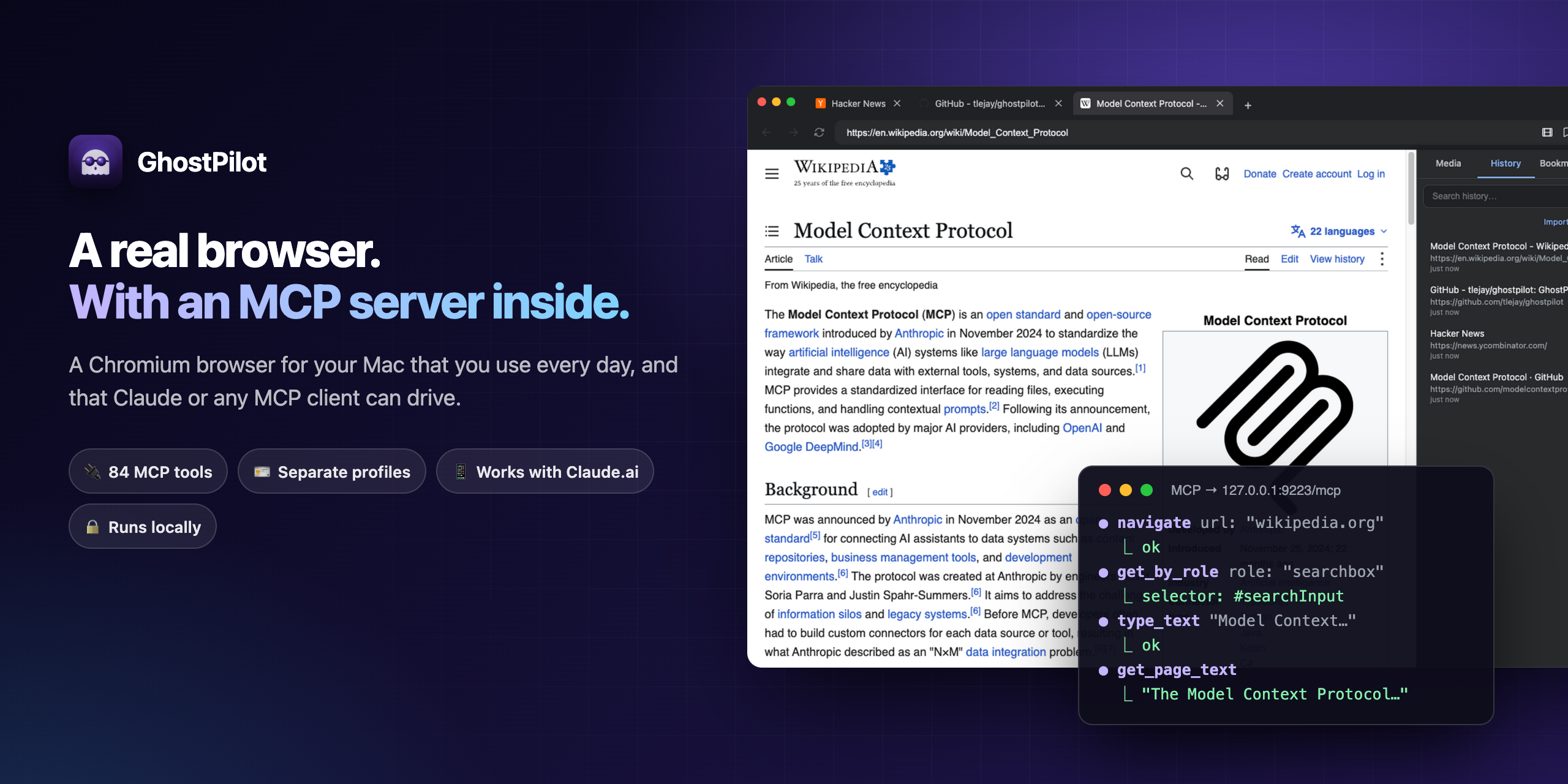
👻 GhostPilot
A Chromium browser for your Mac that you use every day, and that Claude can drive.
GhostPilot runs an MCP server inside the browser. Claude Code, Claude.ai or any other
Model Context Protocol client can then open tabs, click, type, read pages, capture network traffic and more, all in the same window you browse in.






Quick start · See it in action · Tools · Connect from Claude.ai · Configuration
✨ What you get
| Feature | What it does |
|---|---|
| 🧭 A real browser | Chromium via Electron 33, with tabs, bookmarks, history, downloads, find-in-page and a side panel. You can use it as your everyday browser. |
| 🔌 84 MCP tools | Navigate, click, fill, type, hover, screenshot, evaluate JS, read the accessibility tree, emulate devices, run Lighthouse, or send raw CDP. |
| 🎯 Playwright-style locators | get_by_role, get_by_text, get_by_label and get_by_test_id return a stable CSS selector. click and fill wait for the element and retry when the DOM changes. |
| 🌐 Network capture + HAR | Filter requests by method, status, URL pattern, MIME type or time, then export them as HAR 1.2. |
| 🪪 Separate profiles | Each profile has its own cookies, storage, history and bookmarks. Switch from the toolbar or over MCP. |
| 📱 Drive it from Claude.ai | Optional OAuth 2.1 + PKCE with dynamic client registration. Put a tunnel in front and Claude on iPhone or the web can control the browser on your Mac. |
| 👻 Headless mode | --headless hides the window and Dock icon. The MCP server works the same, so you can run it on CI. |
| 🧰 External Chrome too | The ext_* tools drive any Chrome started with --remote-debugging-port, so you can reuse a session you're already signed in to. |
| 🧠 Skills registry | Claude can save the steps of a task it has worked out (save_skill) and reuse them next time (get_skill). |
| 🔒 Local by default | The MCP server binds to 127.0.0.1. There's no telemetry. The only network calls GhostPilot makes on its own are update checks against GitHub Releases. |
🎬 See it in action
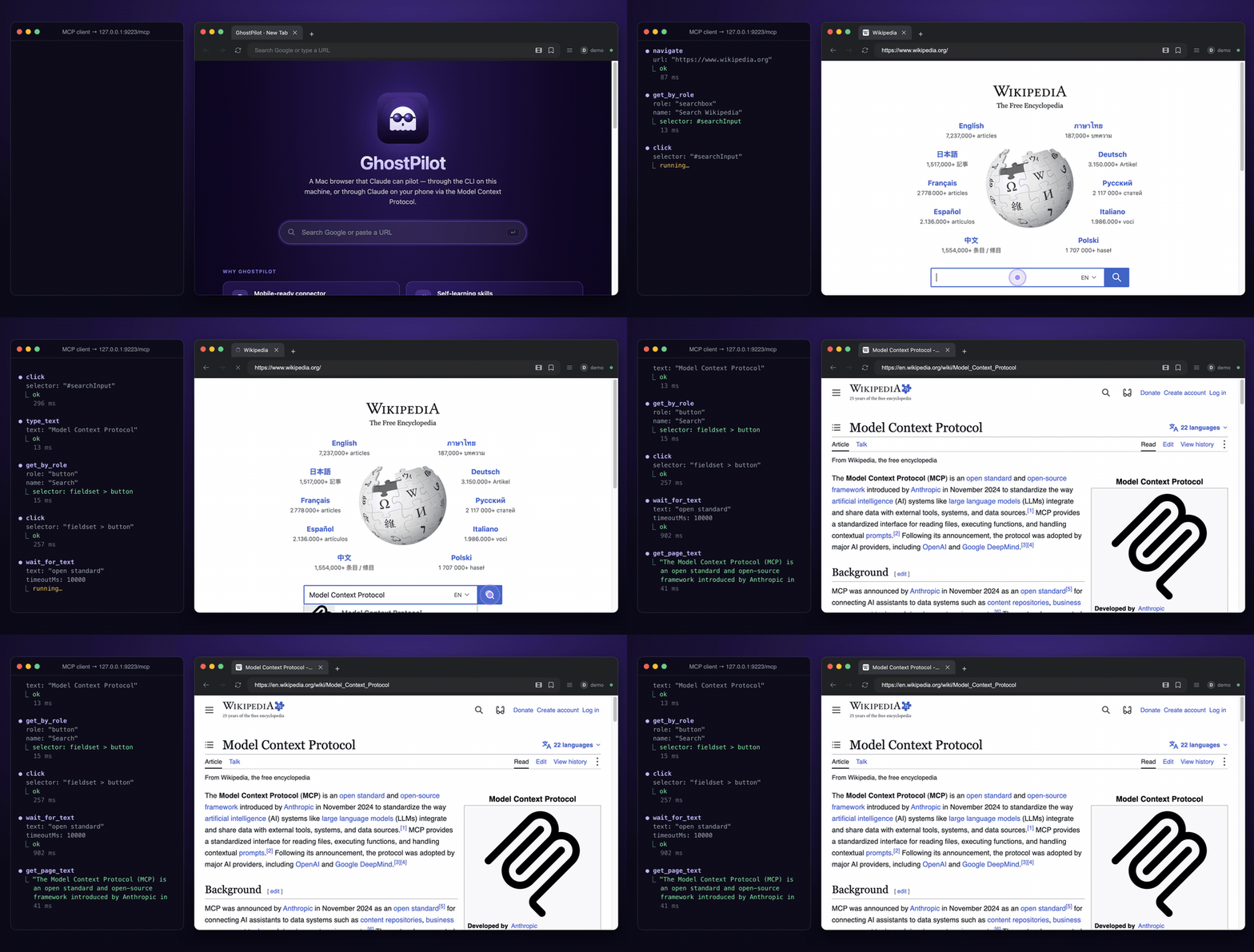
On the left, an MCP client calls tools over http://127.0.0.1:9223/mcp. On the right, GhostPilot does the work. Every step in the recording is a real tool call against the running app: navigate → get_by_role → click → type_text → click → wait_for_text → get_page_text.
🖥️ A browser first
 |
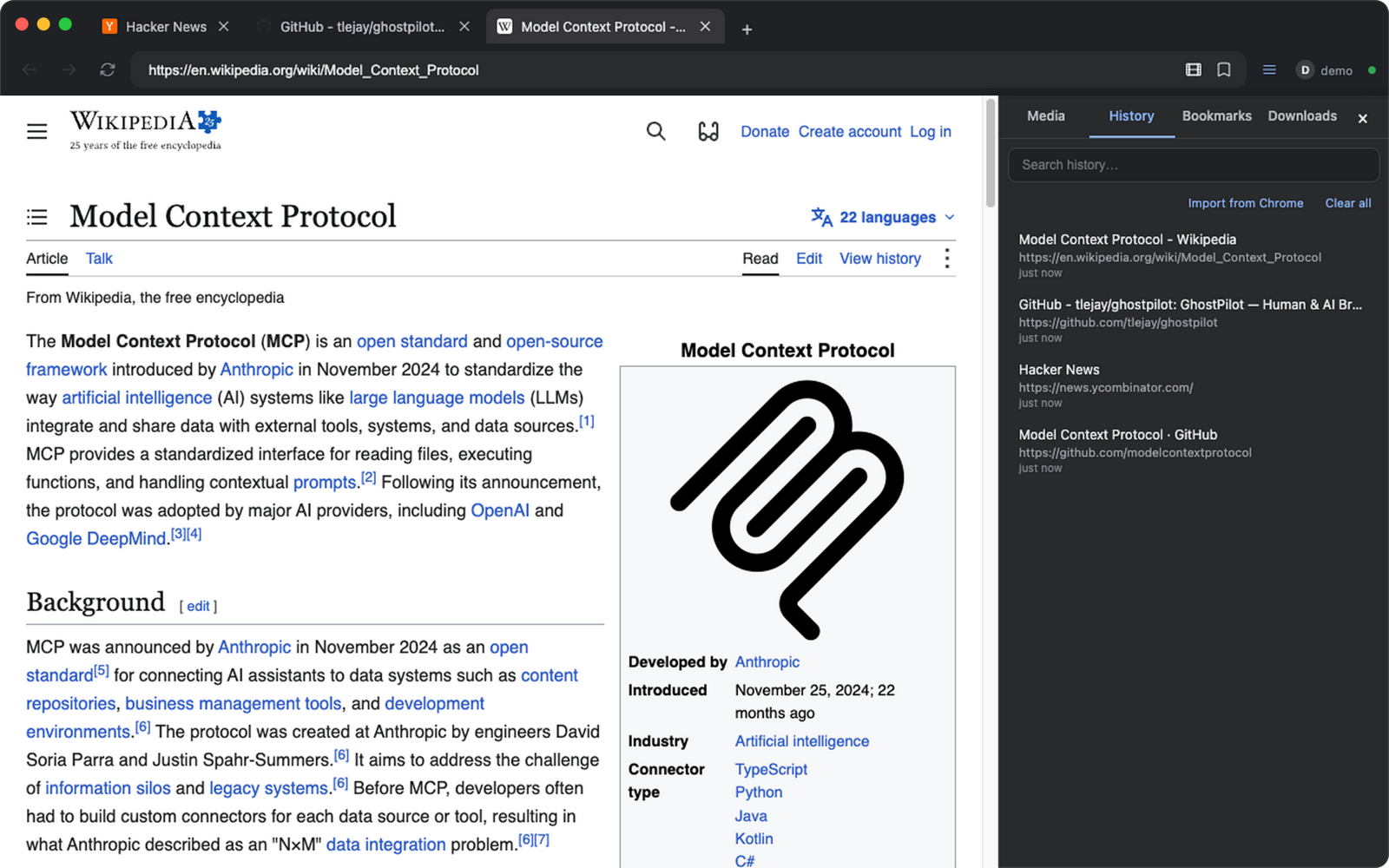 |
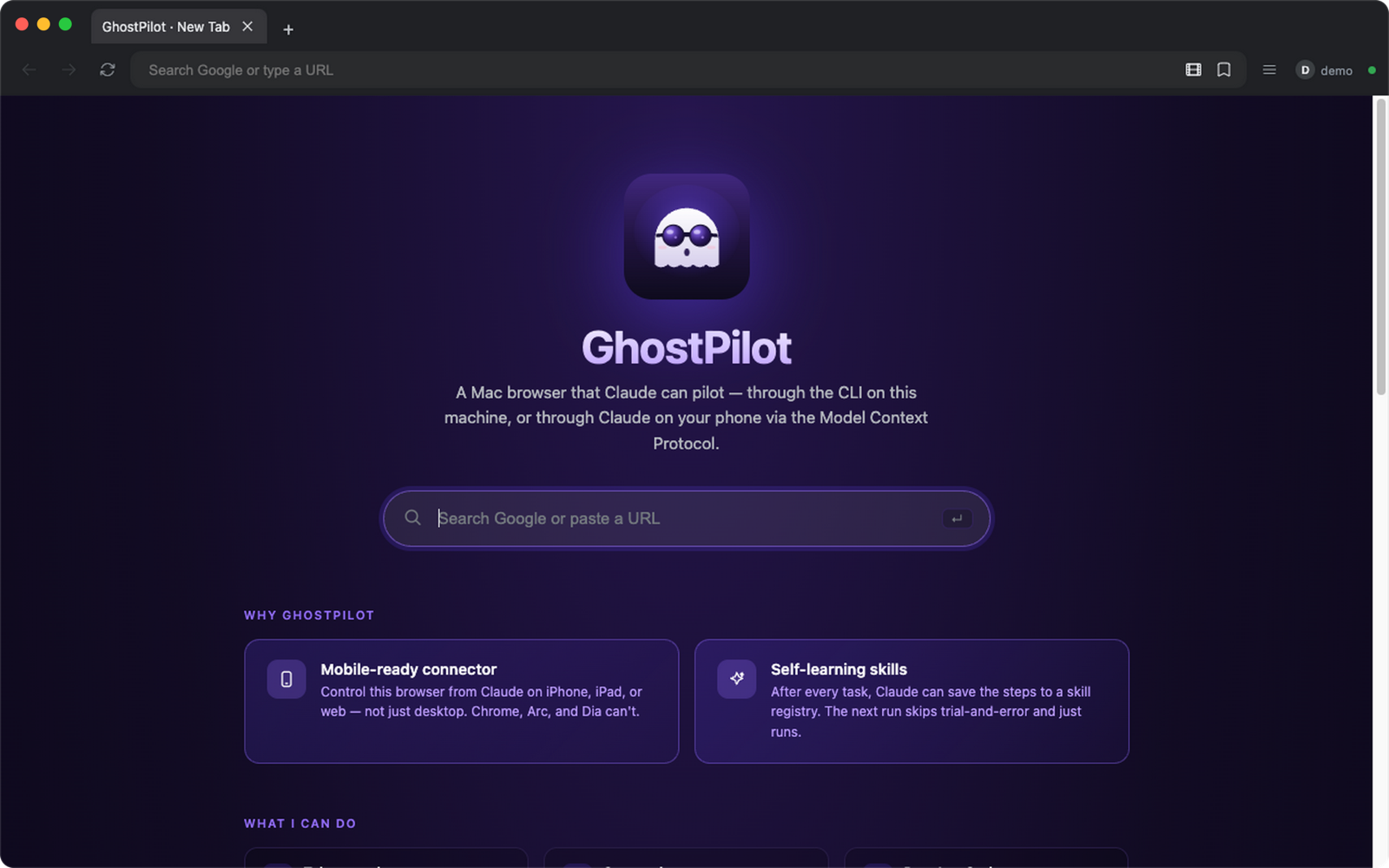
| New tab page. Search Google or paste a URL. | Side panel (⌘B) with history, bookmarks, downloads and media. |
The green dot next to the profile badge shows the MCP server is up. Screenshots are taken from a fresh demo profile. More: tabs.
🤔 GhostPilot or another browser MCP?
There are good options already. This is how they differ, as fairly as we can put it:
| What matters | GhostPilot | Playwright MCP / chrome-devtools-mcp | Claude in Chrome (extension) |
|---|---|---|---|
| Browser | Its own Chromium app (Electron) | Launches or attaches to Chrome | Your existing Chrome |
| You browse in it too | Yes, it's designed as a daily browser | Usually a separate automation window | Yes |
| Reach it from Claude.ai on a phone | Yes, via OAuth + your own tunnel | Not built in | Runs inside desktop Chrome |
| Setup | Build or install an app, add one MCP URL | npx one package |
Install an extension |
| Platform | macOS only | Cross-platform | Wherever Chrome runs |
| Maturity | One maintainer, young project | Backed by large teams | Official Anthropic product |
Pick another tool if you need Windows or Linux, or cross-browser testing (Firefox, WebKit), or if you'd rather not install a separate browser. Pick GhostPilot if you want the AI to drive the same browser you use every day, or want to reach it from Claude on your phone.
🚀 Quick start
Version note.
mainis v0.8.1 (see CHANGELOG). The newest prebuilt DMG on Releases is still v0.4.0, so build from source to get the tools added since then (profiles, media, yt-dlp, mouse/keyboard input,hide_facebook_chat).
# 1. install
pnpm install

# 2. dev (or `pnpm dist` to build a DMG, then install GhostPilot.app)
pnpm dev
# → window opens, MCP server boots on http://127.0.0.1:9223/mcp

# 3. wire it into Claude Code
claude mcp add --transport http ghostpilot http://127.0.0.1:9223/mcp

# 4. trivial MCP call: list the open tabs
curl -s -X POST http://127.0.0.1:9223/mcp \
  -H 'Content-Type: application/json' \
  -H 'Accept: application/json, text/event-stream' \
  -d '{"jsonrpc":"2.0","id":1,"method":"tools/call","params":{"name":"list_tabs","arguments":{}}}'
The tool result is a JSON array of tabs (inside the usual MCP content[0].text):
[{"id":"88eb…","url":"https://en.wikipedia.org/wiki/Model_Context_Protocol","title":"Model Context Protocol - Wikipedia","loading":false,
  "canGoBack":false,"canGoForward":false,"active":true,"pinned":false}]
- Walk through a real end-to-end task in TUTORIAL.md (capture a HAR of a Google search, extract the failed requests).
🧰 Tool surface (84)
Need fewer tools for a small client context window? Filter at startup with
GHOSTPILOT_TOOLS=core(or any comma-separated list of categories). See Configuration.tool_categoriesreturns the live taxonomy.
| Group | Count | Tools |
|---|---|---|
| Tabs | 9 | list_tabs, new_tab, close_tab, activate_tab, navigate, go_back, go_forward, reload, toggle_devtools |
| Page | 7 | get_page_text, get_page_html, screenshot, evaluate, click, fill, wait_for_selector |
| Input | 10 | press_key, type_text, hover, mouse_click, mouse_move, mouse_drag, keyboard_key, keyboard_type, scroll, get_viewport_info (the mouse, keyboard and scroll tools send real CDP Input.* events) |
| Locators | 4 | get_by_role, get_by_text, get_by_label, get_by_test_id: Playwright-style stable selectors |
| Console | 2 | list_console_messages, clear_console_messages |
| Network | 3 | list_network_requests (rich filters), clear_network_requests, export_har (HAR 1.2) |
| Emulation | 3 | emulate, clear_emulation, wait_for_text |
| Accessibility | 1 | a11y_snapshot |
| Files / dialogs | 2 | upload_file, handle_next_dialog |
| Performance | 3 | performance_start_trace, performance_stop_trace, lighthouse_audit |
| CDP | 1 | cdp_send: raw Chrome DevTools Protocol passthrough |
| History | 2 | history_list, history_clear |
| Bookmarks | 3 | bookmarks_list, bookmarks_add, bookmarks_remove |
| Downloads | 4 | downloads_list, downloads_cancel, downloads_reveal, downloads_clear |
| Media | 3 | list_media, download_media, clear_media |
| Video downloader | 3 | ytdlp_status, download_with_ytdlp, list_ytdlp_jobs |
| Chrome import | 3 | list_chrome_profiles, import_chrome_bookmarks, import_chrome_history |
| GhostPilot profiles | 5 | list_ghostpilot_profiles, current_ghostpilot_profile, create_ghostpilot_profile, delete_ghostpilot_profile, switch_ghostpilot_profile |
| Skills | 4 | list_skills, get_skill, save_skill, delete_skill |
| Desktop | 2 | desktop_screenshot, set_window_bounds |
External Chrome (ext_*) |
6 | ext_list_tabs, ext_navigate, ext_evaluate, ext_click, ext_a11y_snapshot, ext_screenshot |
| 1 | hide_facebook_chat: hides Messenger overlays (see below) |
|
| Lifecycle | 3 | stop (stop loading), check_for_updates, tool_categories (always on) |
| Total 84 | Counted from tools/list on a running build of main. |
Every tool that takes a tabId falls back to the active tab when omitted. The MCP server binds to 127.0.0.1 only.
TypeScript users: each tool's input shape is declared in types/ghostpilot-tools.d.ts, generated from the MCP registry with pnpm gen:types. It hasn't been regenerated since the Input tools were added, so run pnpm gen:types yourself if you need them.
Featured tools
Sample requests are written as raw curl for portability. In practice you'll usually call them through Claude CLI or any MCP SDK.
hide_facebook_chat — adblock for Messenger overlays (v0.8.0)
Facebook's Messenger chat bubbles render as fixed-position overlays in the bottom-right of the viewport. When you automate a click on the Post button by coordinates, Chromium's hit-test silently routes it to the chat avatar on top instead. Every project that automates FB used to need its own _close_chat_popouts() workaround. Not anymore.
One MCP call, and every automation script stops wasting clicks on chat popouts:
# Hide popouts before your automation
... '{"jsonrpc":"2.0","id":1,"method":"tools/call","params":{"name":"hide_facebook_chat","arguments":{"mode":"block"}}}'

# Restore when done
... '{"jsonrpc":"2.0","id":2,"method":"tools/call","params":{"name":"hide_facebook_chat","arguments":{"mode":"off"}}}'
CSS injection only — no network requests are blocked, no login state is touched. Messenger.com works normally on any other tab. The injection persists across full-page navigations and SPA route changes (e.g. facebook.com → facebook.com/marketplace → facebook.com/groups) via an Electron-native webContents.on('did-finish-load') listener.
Signature: hide_facebook_chat({ tab_id?, mode: "block"|"off", scope?: "popouts"|"full_sidebar" })
scope:"popouts"(default) — hides chat bubble avatars + dialog popupsscope:"full_sidebar"— also hides the right-rail Contacts sidebar
Returns { ok: true, mode, scope, applied_selectors } on block, { ok: true, mode: "off", removed } on off.
list_tabs — what's open
curl -s -X POST http://127.0.0.1:9223/mcp -H 'Content-Type: application/json' -H 'Accept: application/json, text/event-stream' \
  -d '{"jsonrpc":"2.0","id":1,"method":"tools/call","params":{"name":"list_tabs","arguments":{}}}'
Response: an array of tabs, [{ id, url, title, loading, canGoBack, canGoForward, active, pinned }].
navigate — drive the active tab
... '{"jsonrpc":"2.0","id":2,"method":"tools/call","params":{"name":"navigate","arguments":{"url":"https://madebytle.com"}}}'
Response: { ok: true, tabId }. Implicit auto-wait for DOM-ready.
get_by_role — Playwright-style locator (v0.4.0)
Resolve an element by semantic role + accessible name, get back a CSS selector you can hand to click/fill:
... '{"jsonrpc":"2.0","id":3,"method":"tools/call","params":{"name":"get_by_role","arguments":{"role":"button","name":"Search","timeoutMs":3000}}}'
Response: { ok: true, count: 1, selector: "button[aria-label='Search']", role, name, matches: [...], waitedMs: 42 }. Survives DOM refactors (selector synthesis prefers data-testid → #id → ARIA → tag attributes).
click — auto-retry + auto-wait (v0.4.0)
... '{"jsonrpc":"2.0","id":4,"method":"tools/call","params":{"name":"click","arguments":{"selector":"button[aria-label=\"Search\"]"}}}'
Response: { ok: true }. Behind the scenes: waits for the box to be visible + stable, retries on transient DOM errors (node detached, frame detached, navigation interrupted) up to retries:3 with backoff [100, 300, 800]ms. Opt-out with { retries: 1, wait_stable_ms: 0 }.
evaluate — run JS in the page
... '{"jsonrpc":"2.0","id":5,"method":"tools/call","params":{"name":"evaluate","arguments":{"script":"document.title"}}}'
Response: { ok: true, result: "Google" }. World is isolated from page scripts.
list_network_requests — capture filter (rich, v0.4.0)
... '{"jsonrpc":"2.0","id":6,"method":"tools/call","params":{"name":"list_network_requests","arguments":{"failedOnly":true,"urlPattern":"/api/","since":"2026-05-18T00:00:00Z"}}}'
Filter axes (AND): method, status (scalar or array), urlPattern (substring or /regex/flags), mimeType, since (ISO or epoch ms), failedOnly. Per-entry shape includes requestHeaders/responseHeaders/statusLine/mimeType.
export_har — portable network capture (v0.4.0)
... '{"jsonrpc":"2.0","id":7,"method":"tools/call","params":{"name":"export_har","arguments":{"failedOnly":true,"path":"/tmp/failures.har","pretty":true}}}'
Response: { ok: true, path: "/tmp/failures.har", entryCount: 12 }. Open in Chrome DevTools → Network → "Import HAR…", or feed to Charles / Postman / k6.
desktop_screenshot — full Mac desktop (v0.4.0)
... '{"jsonrpc":"2.0","id":8,"method":"tools/call","params":{"name":"desktop_screenshot","arguments":{"path":"/tmp/desktop.png"}}}'
Captures everything (any monitor, any window — not just GhostPilot's tab). Requires Screen Recording TCC for /Applications/GhostPilot.app.
set_window_bounds — programmatic move/resize (v0.4.0)
... '{"jsonrpc":"2.0","id":9,"method":"tools/call","params":{"name":"set_window_bounds","arguments":{"x":40,"y":40,"width":1280,"height":900}}}'
Bounds persist across launches per profile (<userData>/window-bounds.json).
ext_list_tabs — drive a second, external Chrome (v0.4.0)
Point GhostPilot at any Chrome started with --remote-debugging-port=9222 (a separate profile, your real Chrome account, an authenticated LINE Web / Facebook session — anything the embedded session can't host):
... '{"jsonrpc":"2.0","id":10,"method":"tools/call","params":{"name":"ext_list_tabs","arguments":{"cdp_url":"http://127.0.0.1:9222"}}}'
ext_click dispatches a real CDP Input.dispatchMouseEvent so event.isTrusted === true — useful when a site gates handlers on trust.
Patterns
Click a button by visible name (Plan #2 + #3)
// 1. resolve "โพสต์" button to a stable selector
const { selector } = await mcp.call("get_by_role", { role: "button", name: "โพสต์" });

// 2. click it — auto-waits + retries through DOM churn
await mcp.call("click", { selector });
Why two steps: the locator returns a uniqueness-verified CSS selector, so a later click/fill/wait_for_selector keeps working even if the DOM re-renders.
Capture failing API calls on a page
await mcp.call("clear_network_requests", {});
await mcp.call("navigate", { url: "https://app.example.com/dashboard" });
await mcp.call("wait_for_text", { text: "Loaded", timeoutMs: 10000 });

const { entries } = await mcp.call("list_network_requests",
  { failedOnly: true, urlPattern: "/api/" });

await mcp.call("export_har",
  { failedOnly: true, urlPattern: "/api/", path: "/tmp/failed-api.har" });
Full walkthrough in TUTORIAL.md.
Drive an external Chrome profile (LINE Web)
// Chrome was launched with: --user-data-dir=~/.chrome-agent --remote-debugging-port=9222
const { tabs } = await mcp.call("ext_list_tabs", { cdp_url: "http://127.0.0.1:9222" });
const lineTab  = tabs.find(t => t.url.startsWith("chrome-extension://"));
await mcp.call("ext_a11y_snapshot", { cdp_url: "http://127.0.0.1:9222", target_id: lineTab.id });
The ext_* group is purpose-built for workflows that need an authenticated profile or extension the embedded GhostPilot session can't carry.
Modes
GhostPilot runs in two modes, both serving the same MCP surface.
| Mode | Window | Dock icon | Tools blocked |
|---|---|---|---|
| Default | visible | yes | none |
| Headless | hidden (show:false) |
hidden (app.dock.hide()) |
desktop_screenshot, set_window_bounds return {ok:false, error:"… headless mode …"} |
Enable headless via CLI flag (--headless) or env (GHOSTPILOT_HEADLESS=1). CLI wins if both are set. A line [headless] enabled — main window hidden, dock icon hidden (darwin) is printed at boot. See plans/ghostpilot-headless.md for the full design + CI workflow example.
Architecture
┌─────────────────────────────────────────────────────────────┐
│  Electron main process                                      │
│  ┌──────────────┐  ┌────────────┐  ┌──────────────────┐     │
│  │ TabManager   │  │ Storage    │  │ MCP server       │     │
│  │ · WebContents│  │ · history  │  │ · Express        │     │
│  │   View       │  │ · bookmarks│  │ · StreamableHTTP │     │
│  │ · partition  │  │ · downloads│  │ · OAuth 2.1+PKCE │     │
│  │ · capture    │  │ · skills   │  │ · 84 tools       │     │
│  └─────┬────────┘  └─────┬──────┘  └────────┬─────────┘     │
│        │                 │                  │               │
│        └─────────────────┼──────────────────┘               │
│                          │ IPC                              │
└──────────────────────────┼─────────────────────────────────┘
                           │
              ┌────────────▼────────────┐         ┌──────────────────────┐
              │  Renderer (Vite)        │         │ External Chrome      │
              │  index · about ·        │         │ (separate process)   │
              │  licenses · newtab      │         │ CDP :9222            │
              └─────────────────────────┘         │ ↑ ext_* tools        │
                                                  └──────────────────────┘
- Main process (
src/main/) — TabManager (WebContentsView), storage (per-profile atomic JSON), download tracking, the MCP server (@modelcontextprotocol/sdk,StreamableHTTPtransport), About/Licenses windows. - Preload (
src/preload/) — typedwindow.apiviacontextBridge. NonodeIntegration. - Renderer (
src/renderer/) — three Vite entries: main UI, About, Licenses. - MCP server — singleton stores, stateless per-request
McpServer, optional bearer-token or OAuth 2.1 + PKCE for remote Claude.ai connectors. - External CDP (
ext_*) — talks raw CDP over WebSocket to any Chromium with--remote-debugging-portset. No second Electron process; it's justws+ the Chrome DevTools Protocol.
Configuration
| Env | Default | Purpose |
|---|---|---|
AI_BROWSER_MCP_PORT |
9223 |
Port for the embedded MCP server. |
AI_BROWSER_MCP_TOKEN |
unset | If set, /mcp requires Authorization: Bearer <token>. |
GHOSTPILOT_OAUTH_PASSWORD |
unset | Enables OAuth 2.1 + PKCE for Claude.ai web/mobile connectors. |
AI_BROWSER_PROFILE |
default |
Profile (≤32 chars, [A-Za-z0-9_-]). Separate cookies/storage/history/bookmarks/downloads. |
AI_BROWSER_UPDATE_URL |
GitHub releases | Manifest URL for update checks. |
AI_BROWSER_UPDATE_NAG |
on |
Set to off to silence the update banner in MCP responses. |
AI_BROWSER_DEBUG_PORT |
9224 |
Remote debugging port exposed to Lighthouse + external CDP clients. |
GHOSTPILOT_TOOLS |
unset (= all) |
Comma-separated tool-category allowlist (e.g. core or nav,interact,network or all,-ytdlp). |
GHOSTPILOT_HEADLESS |
unset | 1 → hide window + dock icon. CLI flag --headless overrides. |
GHOSTPILOT_EXT_CDP_PORT |
9222 |
Default external-Chrome CDP port for ext_* tools. |
Flag: --headless on the GhostPilot CLI (wins over the env var if both set).
Tokens in GHOSTPILOT_TOOLS: bare category enables it; -name subtracts; all is the default; core = nav,tabs,interact,inspect; unknown names log a WARN and are ignored. lifecycle (stop, check_for_updates, tool_categories) is always on. Call tool_categories to introspect what's enabled in the current process.
Connect from Claude.ai (web / iPhone / iPad)
# password MUST be on the same line as pnpm dev (electron-vite does not source .env)
GHOSTPILOT_OAUTH_PASSWORD=$(openssl rand -base64 18 | tr -d '/+=' | cut -c1-20) pnpm dev

# in another terminal — prefer a named tunnel; quick tunnel shown here for first run
brew install cloudflared
cloudflared tunnel --url http://127.0.0.1:9223
# → https://<random>.trycloudflare.com
In Claude.ai → Settings → Connectors → Add custom connector: paste https://<your-tunnel>.trycloudflare.com/mcp, leave Client ID/Secret blank (GhostPilot supports RFC 7591 dynamic client registration). On the next call, Claude opens a login page from the tunnel — enter the password. Tokens persist per-profile across restarts.
Read HOWTOMCP.md before you do this. It covers three things that bite first-time setups: named vs quick tunnels (named is strongly preferred — quick tunnels silently die), why
.envisn't auto-loaded, and the dynamic-OAuth recovery story.
Threat model. Anyone with both the tunnel URL and the password gets full control of every tab + any logged-in session. Use a strong password, keep the tunnel down when idle, prefer named Cloudflare tunnels with Cloudflare Access for production.
Stable tunnel (so the connector URL doesn't break on every restart)
The cloudflared tunnel --url ... quick-start above generates a fresh *.trycloudflare.com hostname every run, so the Claude.ai connector goes ✗ Failed to connect the moment you restart it. For a permanent setup, point Claude.ai at a hostname you own.
Option A — Cloudflare named tunnel (free, recommended)
Requires a domain on Cloudflare DNS.
cloudflared tunnel login                              # one-time browser auth
cloudflared tunnel create ghostpilot                  # creates ~/.cloudflared/<uuid>.json
cloudflared tunnel route dns ghostpilot ghostpilot.example.com
Create ~/.cloudflared/config.yml:
tunnel: ghostpilot
credentials-file: /Users/<you>/.cloudflared/<uuid>.json
ingress:
  - hostname: ghostpilot.example.com
    service: http://127.0.0.1:9223
  - service: http_status:404
Run it (and add a LaunchAgent if you want it to come up on login):
cloudflared tunnel run ghostpilot
The connector URL becomes https://ghostpilot.example.com/mcp — stable across every reboot. Add Cloudflare Access in front of the hostname for an extra IdP-gated layer beyond the OAuth password.
Option B — ngrok with a reserved domain (paid)
ngrok config add-authtoken <token>
ngrok http --domain=ghostpilot.<your-subdomain>.ngrok-free.app 9223
Connector URL: https://ghostpilot.<your-subdomain>.ngrok-free.app/mcp.
If you stick with the throwaway trycloudflare.com URL, you'll need to update the connector every time it rotates: Claude.ai → Settings → Connectors → GhostPilot → Edit → paste the new https://<random>.trycloudflare.com/mcp URL. Existing OAuth tokens stay valid as long as GHOSTPILOT_OAUTH_PASSWORD is unchanged.
Releases + semver
Tagged releases live on GitHub: https://github.com/tlejay/ghostpilot/releases. Pin to a specific version with:
git checkout v0.4.0
pnpm install
pnpm dev
main may carry post-release work; tags are the supported surface. See RELEASING.md for the cut-a-release runbook and semver guidance (the public contract is the MCP tool surface — new tool / new optional field = minor, removed/renamed/required-field-changed = major).
Build a DMG
pnpm dist
Regenerates icon + license notices, builds the renderer, runs electron-builder. Outputs release/GhostPilot-<version>-arm64.dmg and -x64.dmg.
Contributing
PRs welcome. Three rules:
- No
nodeIntegration: trueanywhere — all renderer ↔ main traffic goes throughcontextBridge. - New MCP tools live in
src/main/mcp/tools.ts(or a sibling likelocator-tools.ts/har-export.ts/ext-cdp.tsfor groups) with a ZodinputSchema. Update README.md, CLAUDE.md, and the relevant test insrc/main/mcp/tool-groups.integration.test.ts(which asserts total count + per-category histogram). - New runtime dependencies must show up in the Licenses window — automatic if
pnpm assets:licensesruns before shipping.
Dev loop:
pnpm install
pnpm typecheck
pnpm test:unit
pnpm test:integration
pnpm dev
Design docs live in plans/:
- plans/ghostpilot-stable-selectors.md — Plan #2 (locators)
- plans/ghostpilot-har-network.md — Plan #6 (HAR + filters)
- plans/ghostpilot-headless.md — Plan #4 (headless mode)
See CHANGELOG.md for what shipped where, and CLAUDE.md for the full per-file map + agent contribution conventions.
About + Open Source Licenses
GhostPilot ships two legal-compliance windows reachable from the GhostPilot menu:
- About GhostPilot — version, runtime info, link to madebytle.com.
- Open Source Licenses… — searchable list of every production dep with license + author + homepage + full text. Generated at build time from
pnpm licenses list --prod --json→assets/notices.json. Regenerate withpnpm assets:licenses.
License
MIT — see LICENSE.
Built by Tle — from madebytle.com 👻
If GhostPilot saves you some clicking, a ⭐ helps other people find it.
Yorumlar (0)
Yorum birakmak icin giris yap.
Yorum birakSonuc bulunamadi