kio-agent-system
Health Uyari
- License — License: MIT
- Description — Repository has a description
- Active repo — Last push 0 days ago
- Low visibility — Only 5 GitHub stars
Code Basarisiz
- rm -rf — Recursive force deletion command in setup.sh
Permissions Gecti
- Permissions — No dangerous permissions requested
Bu listing icin henuz AI raporu yok.
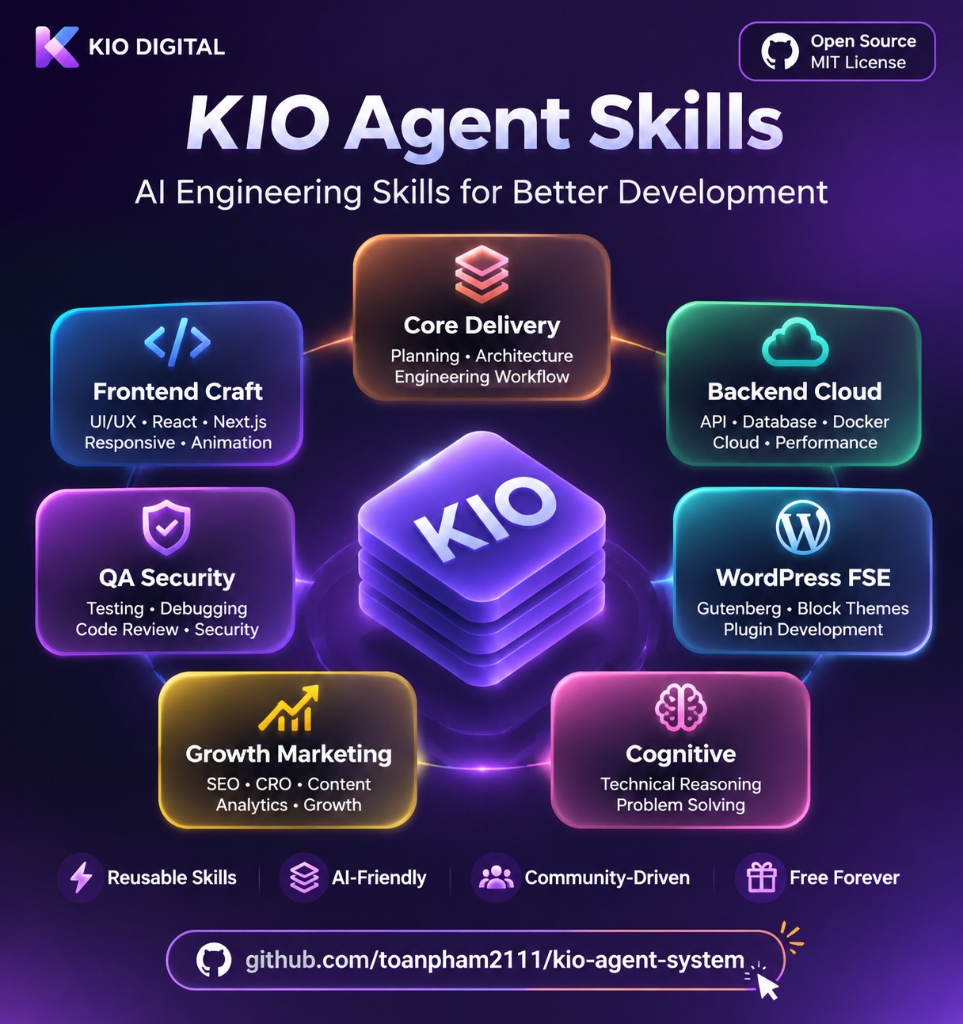
Open-source AI coding skills collection for Claude Code, Cursor, Codex, and Antigravity. 7 modular master skills for Frontend Craft, Backend & Cloud, Automated QA, CRO Growth, and WordPress FSE.
🧰 Kio — Open Source AI Skills Collection for Modern Software Engineering







A modular, open-source collection of engineering skills designed for AI coding tools.
Plug-and-play skills for Frontend UI/UX, Backend APIs, Automated QA Testing, Marketing CRO, and WordPress FSE.
🚀 Installation Guide • ⚡ 2-Minute Quickstart • 🧰 The 7 Core Skills • 📖 Per-Skill Usage Guide • 🧪 Skill Evaluation Framework • 🧩 Compatibility Matrix • ❓ Troubleshooting & FAQ
💡 What is Kio?
Kio is an open-source collection of specialized AI coding skills. It is not a heavy framework that requires deploying servers, running background daemons, or setting up complex infrastructure.
Instead, Kio provides ready-to-use skill packages following the standard SKILL.md format. When you link or copy these skills into your preferred AI coding tool (Claude Code, Cursor, Codex, or Google Antigravity), your AI assistant instantly gains focused domain knowledge, structured engineering workflows, and concrete checklists:
- Frontend Craft: 79 design styles, 192 contrast-tested color palettes, 60fps Lenis smooth scroll conventions, defensive spacing, and rules to eliminate generic AI layouts.
- Backend & Cloud: Practical REST/GraphQL patterns, PostgreSQL indexing strategies, Supabase Row-Level Security (RLS), idempotent webhook processing, and Docker multi-stage builds.
- QA & Testing: Automated 4-quadrant test case matrices, multi-language unit test boilerplates (Vitest, Pytest, Go), and headless browser visual checks via Playwright.
- Structured Delivery: Atomic task planning (2-5 minute steps) and specification-driven development (SDD) before writing code.
- Growth & Marketing: 53 conversion rate optimization (CRO) frameworks and technical SEO/GEO guidelines optimized for modern AI search engines.
- WordPress FSE: Full Site Editing workflows for clean, 100% native Gutenberg block theme creation without third-party page builder bloat.
🧪 Real-World Test: Without Skill vs With Kio
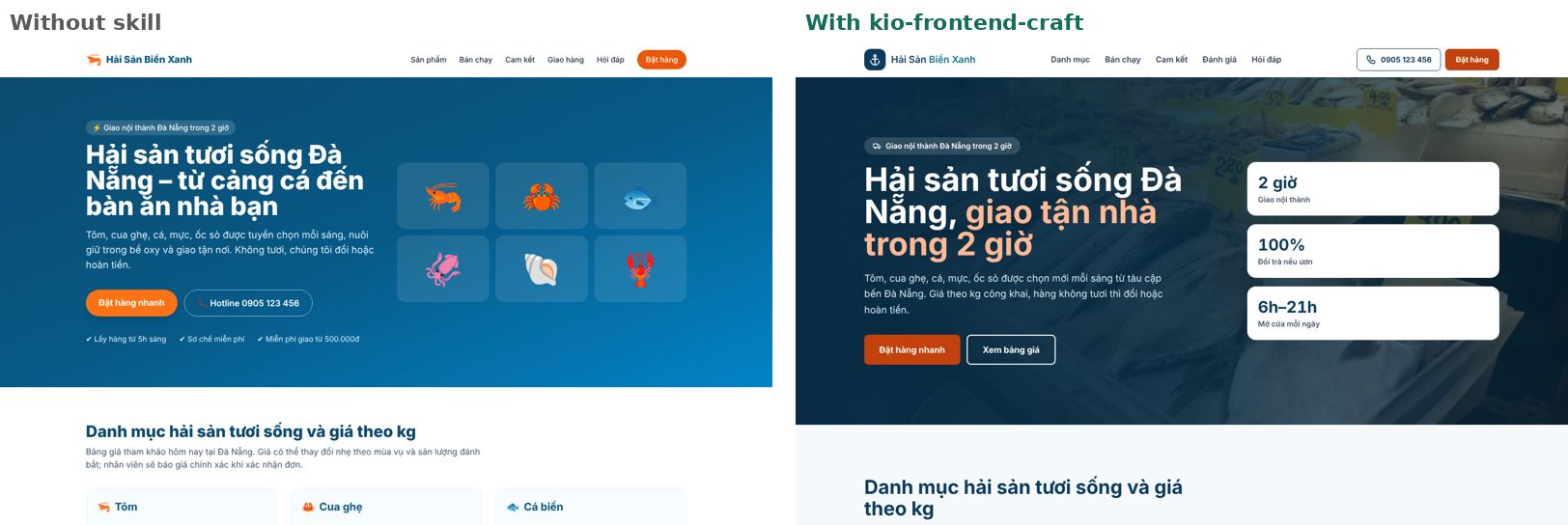
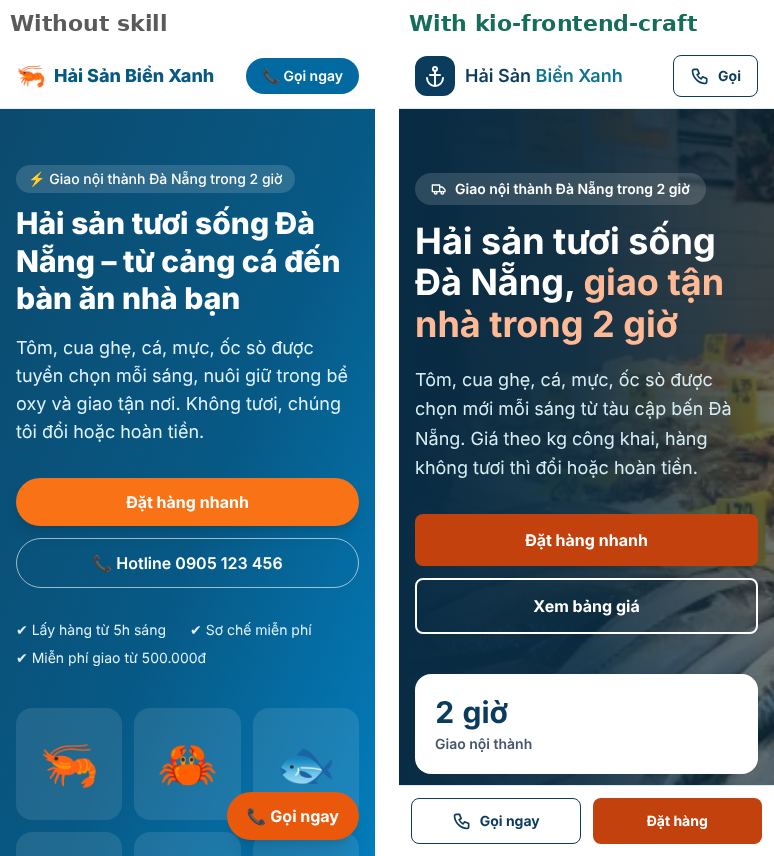
Same request "a fresh-seafood shop website in Da Nang with proper SEO", same model Claude Sonnet 5.5, one run without a skill and one with kio-frontend-craft (2026-11-22, Kio v1.3.0).
| Desktop 1440 px | Mobile 375 px |
|---|---|
 |
 |
| Without skill | With Kio | |
|---|---|---|
| Blind judge score (Opus 5.5, out of 100) | 75 | 86 |
| Lighthouse mobile — Perf / A11y / Best Practices / SEO | 100 / 96 / 100 / 100 | 98 / 100 / 96 / 100 → 100 / 100 / 100 / 100 after the skill fix ¹ |
| Contrast failures | main order button 2.8:1 | 0 |
| Order form | shows success but sends nothing | validates and sends the order |
Mobile edge overflow / & entities |
1 / 1 | 0 / 0 |
| Time | 1 min 55 s | 8 min 2 s |
| Output / input tokens | 20,387 / 97,344 | 42,951 / 1,663,477 (96% cache reads) |
| Cost | US$0.33 | US$0.86 |
¹ The Kio page scored slightly lower because of a real hero photo, a render-blocking Google Fonts stylesheet and a missing favicon (the baseline was HTML + CSS with emoji only). Non-blocking fonts plus a favicon give 100/100/100/100; both are now mandatory skill rules.
Kio produced a clearly better page on design, accessibility and form reliability, at roughly 2.6–4× the time and tokens. One run per condition. Details, full-page screenshots, source code and data: evaluations/showcase/seafood-v1.3.
⚡ 2-Minute Quickstart
You do not need to read through thousands of documentation files to start using Kio. Get up and running in 3 simple steps:
Step 1: Install Kio on your machine (takes under 10 seconds)
Open your terminal and run the one-line command:
# Linux / macOS / WSL:
curl -fsSL https://raw.githubusercontent.com/toanpham2111/kio-agent-system/main/setup.sh | bash

# Windows PowerShell:
irm https://raw.githubusercontent.com/toanpham2111/kio-agent-system/main/setup.ps1 | iex
Step 2: Open your AI coding assistant
Launch your favorite AI tool: claude, cursor, codex, or agy. The tool will automatically detect the linked SKILL.md files in its configuration directory.
Step 3: Copy and test an immediate prompt
Try pasting one of these tested prompts into your AI:
Frontend Test Prompt:
"Design a 3-tier SaaS pricing table in React with Tailwind CSS. Apply a tech-focused color palette with high contrast meeting WCAG AA standards, add micro-interactions on hover, and ensure defensive spacing that never bleeds on mobile."
QA & Testing Test Prompt:
"Generate a 4-quadrant test case matrix (Happy Path, Boundary, Edge Case, Failure Mode) and write complete Vitest unit tests for a shopping cart checkout function with coupon discounts and tax calculations."
Immediate Result: Your AI tool automatically detects and activates the matching Kio skill, producing clean, production-grade output without messy templates or generic AI styling.
🚀 Installation Guide
Kio installs as a set of safe, non-destructive symbolic links directly into your local AI tool configuration directories (~/.claude/skills, ~/.cursor/skills, ~/.gemini/config/skills).
🛡️ 5 Safety & Clean Design Guarantees:
- ⬇️ Install Skills: Install all 7 skills or choose specific individual skills.
- ✅ Preserve Existing Skills: Never deletes, renames, or overwrites any of your personal skills (folders or custom symlinks).
- 🔍 Realpath Target Inspection: Verifies symlink destinations, updating only symlinks that point to the Kio repository.
- 📋 Ownership Manifest: Centrally tracks Kio-managed symlinks in
~/.kio/manifest.json.- 🗑️ Clean Uninstall: Safely removes only Kio-installed symlinks, leaving all other user skills untouched.
Method 1: One-Line Installer (Recommended)
Linux / macOS / WSL:
curl -fsSL https://raw.githubusercontent.com/toanpham2111/kio-agent-system/main/setup.sh | bash
Windows (PowerShell):
irm https://raw.githubusercontent.com/toanpham2111/kio-agent-system/main/setup.ps1 | iex
Which version gets installed: the one-line installer installs the latest release (newest
v*tag), never unreleased work onmain. Re-run it to update. To choose another version:curl -fsSL .../setup.sh | KIO_REF=v1.1.0 bash(orKIO_REF=main); on Windows:$env:KIO_REF="v1.1.0"; irm .../setup.ps1 | iex. If an update fails, the installer prints the error and exits with code2; your skills keep using the copy already on disk.
Method 2: Granular Installation & CLI Options
You can install single skills, inspect available packages, or safely uninstall at any time:
# List all 7 skills and their command shortcuts
./setup.sh --list

# Install all 7 skills (default)
./setup.sh

# Install specific skill(s) only (e.g. Frontend & QA)
./setup.sh --skill frontend,qa

# Safely uninstall Kio skills (preserves all your personal skills)
./setup.sh --uninstall
(On Windows PowerShell, use .\setup.ps1 -Skill frontend,qa and .\setup.ps1 -Uninstall)
Method 3: Copy Single Skills to Your Project
If you prefer not to create global symlinks, simply clone the repository and copy any skill folder into your project's .claude/skills/ or .cursor/skills/ directory:
git clone https://github.com/toanpham2111/kio-agent-system.git
cp -r kio-agent-system/skills/kio-frontend-craft path/to/your-project/.claude/skills/
🧰 The 7 Core Engineering Skills
All capabilities are organized into 7 self-contained master skills located in the skills/ directory:
| Skill Directory | Focus Area | What It Gives Your AI Assistant |
|---|---|---|
skills/kio-frontend-craft |
Frontend UI/UX & Motion | 79 searchable styles, 192 contrast-checked palettes, 74 font pairings and 22 framework rule sets (search CLI), 64 React/Next.js performance rules, Core Web Vitals (PageSpeed 95–100) audits, the 9-pass /unslop redesign SOP, Lenis smooth scroll, PDF → responsive HTML, React Native / Expo / SwiftUI guides, free stock photos with credits (Unsplash, Pexels, Openverse) and a layout check (layout-check.js: no edge spill, aligned rows, no wrapped buttons, no HTML entities like &). |
skills/kio-backend-cloud |
Backend, DB & Cloud | REST/GraphQL API and auth (anti-IDOR) design, payments with idempotent webhooks (Stripe, PayPal, VNPay, MoMo, PayOS, SePay — tested reference code), PostgreSQL / Supabase RLS, EXPLAIN-driven indexing, zero-downtime migrations, Docker, GitHub Actions, Terraform, RAG with pgvector, QLoRA fine-tuning, and MCP servers in Python or TypeScript. |
skills/kio-qa-security |
Automated QA & Security | 4-quadrant test matrices and unit-test templates (Vitest, Pytest, Go), TDD and systematic debugging (root-cause tracing, flaky-test and test-pollution tools), deep review of risky diffs (blast radius, interrogation, arena), security review with Semgrep and CodeQL SAST (scripts + tests), and Playwright E2E visual QA at 375/768/1440 px. |
skills/kio-core-delivery |
Planning & Delivery | Socratic brainstorming with browser Visual Companion mockups, Spec-Kit SDD templates (constitution.md, spec.md, plan.md, tasks.md), 2–5 minute atomic task plans, persistent file-based working memory (task_plan.md, findings.md, progress.md), parallel subagent dispatch, Git worktrees, multi-engine AI CLI routing (kio_router.py), and 5-pillar executive audit sign-off. |
skills/kio-growth-marketing |
Growth, CRO & SEO | One router over 79 sub-skills: 53 growth modules (CRO, copywriting, pricing, email, ads, launches, analytics, RevOps…) and 26 SEO Engine sub-skills (technical SEO, schema, AI search / GEO, local SEO) with 19 agents and 60+ Python checks. |
skills/kio-wordpress-fse |
WordPress FSE | Step-by-step S0-S8 industrial pipeline for turning designs or HTML mockups into clean, 100% native Gutenberg block themes without plugin bloat. |
skills/kio-cognitive |
Deep Thinking & Rationale | First-principles analysis methods, architectural decision walkthroughs ("Why & How"), and post-mortem failure analysis for continuous learning. |
📖 Per-Skill Usage Guide (Prompts & Expected Outputs)
Each skill is designed to activate on demand when given a relevant prompt. Use the real-world prompt examples below:
1. kio-frontend-craft
- When to Use: Building web interfaces, mobile layouts, fixing alignment bugs, removing generic AI styling, or auditing color contrast.
- Stock photos: when you have no real photos, the skill fetches free stock images with credits. Set
UNSPLASH_ACCESS_KEY(unsplash.com/developers) orPEXELS_API_KEY(pexels.com/api) for the best results; without a key it uses Openverse (openly licensed, smaller images). - Prompt Example:
"Build a responsive SaaS analytics dashboard in React + Tailwind CSS with MRR metric cards, a recent transactions table, dark mode support, and an empty state." - Expected Output:
- Asymmetric Bento Grid layout with defensive padding that never clips screen borders at
375pxor1440px. - Palette selected from curated system with 80/15/5 distribution (80% neutral background, 15% structure, 5% accent).
- Clean interactive buttons with defined hover, focus-visible, and active states. No cliche purple gradients.
- Asymmetric Bento Grid layout with defensive padding that never clips screen borders at
2. kio-backend-cloud
- When to Use: Designing REST or GraphQL endpoints, drafting database migrations, securing PostgreSQL tables with RLS, and writing Dockerfiles.
- Prompt Example:
"Create a PostgreSQL schema for a multi-tenant project management app in Supabase with strict Row-Level Security policies." - Expected Output:
- Production-ready SQL with explicit
ENABLE ROW LEVEL SECURITY;. - Distinct policies for
SELECT,INSERT,UPDATE, andDELETEscoped toauth.uid()andtenant_id. - B-Tree indexes on foreign keys to prevent sequential table scans.
- Production-ready SQL with explicit
3. kio-qa-security
- When to Use: Designing test plans, generating test case matrices, writing unit tests (Vitest/Pytest), and setting up Playwright visual tests.
- Prompt Example:
"Create a 4-quadrant test case matrix and write comprehensive Vitest unit tests for user authentication (JWT login) including brute-force rate limit edge cases." - Expected Output:
- Structured matrix covering Happy Path, Boundary, Edge Case, and Failure Mode.
- Complete Vitest test suite with safe external mocks, clear assertions, and >90% branch coverage.
4. kio-core-delivery
- When to Use: Breaking down large epics into small steps, writing technical specification documents, or coordinating multi-engine task delivery.
- Long tasks: for work with 5+ steps the skill keeps a plan on disk (
.planning/<date>-<task>/task_plan.md,findings.md,progress.md) viascripts/planning/init-session.sh, andcheck-complete.shreports unfinished phases before you stop. - Prompt Example:
"I want to build an automated PDF invoice export service. Create an SDD specification document and break it down into 2-5 minute atomic tasks." - Expected Output:
- Structured spec defining Inputs, Outputs, Failure Cases, and Dependencies.
- Ordered checklist of atomic tasks (e.g., Task 1: HTML template, Task 2: PDF renderer, Task 3: API route, Task 4: Unit tests).
5. kio-growth-marketing
- When to Use: Landing page conversion optimization, pricing psychology, technical SEO audits, and Schema.org structured data.
- Prompt Example:
"Restructure this coding bootcamp landing page to maximize signups, and generate valid Schema.org Course JSON-LD markup." - Expected Output:
- High-converting 6-tier page hierarchy (Hero $\rightarrow$ Social Proof $\rightarrow$ Core Benefits $\rightarrow$ Curriculum $\rightarrow$ Pricing $\rightarrow$ FAQ).
- Syntactically valid JSON-LD
@type: "Course"snippet ready for Google Rich Snippets.
6. kio-wordpress-fse
- When to Use: Converting HTML/Figma mockups into Gutenberg Full Site Editing (FSE) block patterns, themes, or templates.
- Prompt Example:
"Convert this Hero section design into a native WordPress Gutenberg Block Pattern for Full Site Editing." - Expected Output:
- Clean pattern file placed in
patterns/using native comments (<!-- wp:group -->,<!-- wp:heading -->,<!-- wp:buttons -->). - Seamless styling connected with
theme.jsonwithout hardcoded CSS overrides.
- Clean pattern file placed in
7. kio-cognitive
- When to Use: Architecture trade-off evaluations, first-principles reasoning, and post-mortem root cause analysis.
- Prompt Example:
"Evaluate the trade-offs between storing file uploads directly as database BLOBs versus S3 Object Storage Presigned URLs from first principles." - Expected Output:
- Multi-dimensional breakdown: database I/O overhead, network latency, backup complexity, server bandwidth, and operational cost.
- Concrete technical recommendation mapped to specific throughput thresholds.
🧪 Skill Evaluation Framework
Kio validates capability through transparent, reproducible benchmarks and live execution evidence. All 7 Master Skills are defined and benchmarked against the Kio Skill Evaluation Framework across 21 test scenarios:
| Skill Group | Scenarios | Evaluation Focus | Benchmark Status | Raw Evidence Logs |
|---|---|---|---|---|
kio-frontend-craft |
5 | Bento Grid, Mobile 375px, 9-Pass /unslop, Negative Tests (No forced Lenis, WCAG audit) | 🟢 5/5 Scenarios Defined | results/frontend/ |
kio-backend-cloud |
4 | Supabase RLS, Docker multi-stage, SQL injection prevention, Webhook idempotency | 🟢 4/4 Scenarios Defined | results/backend/ |
kio-qa-security |
4 | 4-quadrant test matrices, Vitest unit tests, Reject mock-only solutions | 🟢 4/4 Scenarios Defined | results/qa/ |
kio-core-delivery |
2 | 2-5 minute atomic task breakdowns, Elimination of ambiguous steps | 🟢 2/2 Scenarios Defined | results/core/ |
kio-growth-marketing |
2 | CRO funnel hierarchy, Valid Schema.org JSON-LD | 🟢 2/2 Scenarios Defined | results/marketing/ |
kio-wordpress-fse |
2 | Native Gutenberg block patterns, Zero external builder dependency | 🟢 2/2 Scenarios Defined | results/wordpress/ |
kio-cognitive |
2 | First-principles trade-off analysis, Root cause post-mortems | 🟢 2/2 Scenarios Defined | results/cognitive/ |
Latest A/B re-run (v1.2.0, Claude Code, blind judge, n = 1): average 7.61 → 8.01 (+0.40) across 10 scenarios; largest gain FE-01 (+3.8), 4 scenarios scored lower. Details and caveats in
benchmark-summary.md; per-scenario evidence inresults-v1.2.0/.
📖 Review full evaluation framework and live logs:
👉 Read the Skill Evaluation Framework (SKILL_EVALUATION_FRAMEWORK.md)
👉 Read Live Benchmark Summary & Evidence Logs (benchmark-summary.md)
🧩 Compatibility Matrix
Kio adopts the standard SKILL.md format. Verification statuses across major AI coding assistants and operating systems are categorized into four transparent tiers:
| AI Coding Tool | Auto-Discovery Path | Linux | macOS | Windows / WSL | Compatibility & Verification Tier |
|---|---|---|---|---|---|
| Claude Code | ~/.claude/skills/ or <project>/.claude/skills/ |
✅ | ✅ | 🟡 | 🟢 Tested & Verified (Full test evidence available) |
| Google Antigravity | ~/.gemini/config/skills/ |
✅ | ✅ | 🟡 | 🟢 Tested & Verified (Full test evidence available) |
| Cursor IDE | ~/.cursor/skills/ or <project>/.cursor/skills/ |
✅ | ✅ | 🟡 | 🟡 Tested (Installation and basic discovery verified) |
| Codex CLI | ~/.codex/skills/ or <project>/.codex/skills/ |
✅ | ✅ | 🟡 | 🟡 Tested (Installation and basic discovery verified) |
| Windsurf / Cascade | <project>/.windsurf/skills/ |
🔄 | 🔄 | 🔄 | 🔵 Supported (Requires manual copy into project directory) |
Windows note: 🟡 until
setup.ps1(changed in v1.1.0 and v1.2.0) has been run on a real Windows machine again.setup.shwas re-tested on Linux for v1.2.0.
Verification Tier Definitions:
- 🟢 Tested & Verified: Fully tested in production environments with benchmark logs available in
evaluations/results/.- 🟡 Tested: Verified to install cleanly and parse
SKILL.mdspecifications.- 🔵 Supported (Manual): Specification-compatible; requires manual folder copy into the local workspace.
❓ Troubleshooting & FAQ
Troubleshooting Common Issues
1. Symbolic link privilege errors on Windows:
- Symptom: PowerShell outputs
New-Item: A required privilege is not held by the clientor fails to link skills. - Resolution: Enable Developer Mode in Windows Settings (
Settings > Update & Security > For developers > Developer Mode: ON), or run PowerShell with Run as Administrator.
2. AI tool does not recognize skills after running the installer:
- Symptom: Launching
claudeor Cursor shows no change in assistant behavior. - Resolution: Restart the AI CLI session (exit and restart
claude) or reload the Cursor window to refresh the tool skill cache.
3. Legacy skill name conflicts:
- Symptom: Existing symlinks or older versions cause the installer to skip updates.
- Resolution: Run
./setup.sh --uninstallto cleanly remove previous Kio links, then rerun./setup.shto recreate clean symlinks.
Frequently Asked Questions (FAQ)
Q1: Does Kio slow down AI response times or consume excessive tokens?
No. Kio operates on Lazy Context Loading. Your AI assistant only reads the title and brief description from the YAML frontmatter. Detailed skill instructions are only pulled into the active context when your prompt specifically demands them.
Q2: Do I need to buy additional API keys or pay extra fees?
No. Kio consists of open-source Markdown skill files (SKILL.md). It runs directly inside your existing AI tool subscription without requiring any external Kio API key.
Q3: Can I install only the Frontend skill without installing the others?
Yes. Simply run./setup.sh --skill frontend(or.\setup.ps1 -Skill frontendon Windows). The installer will link onlykio-frontend-craft.
Q4: Does Kio run background daemons or consume system RAM?
No background processes are created. Kio consists strictly of static markdown files and symbolic links. When your AI tool is closed, Kio consumes zero CPU cycles and zero RAM.
📂 Repository Structure
The repository maintains a clean, transparent layout centered on the skills/ directory:
kio-agent-system/
├── skills/                           # Core: 7 Self-contained engineering skills
│   ├── kio-frontend-craft/           # UI/UX, styles, palettes, Lenis smooth scroll
│   ├── kio-backend-cloud/            # API design, database RLS, Docker, cloud setups
│   ├── kio-qa-security/              # Test case matrix, unit tests, Playwright checks
│   ├── kio-core-delivery/            # Atomic task planning, spec-kit templates
│   ├── kio-growth-marketing/         # Conversion frameworks, technical SEO modules
│   ├── kio-wordpress-fse/            # WordPress block theme creation pipeline
│   └── kio-cognitive/                # Architecture rationale walkthroughs
├── evaluations/                      # Skill Evaluation Framework & Live Benchmarks
│   ├── SKILL_EVALUATION_FRAMEWORK.md # 21 verified test scenarios
│   ├── benchmark-summary.md          # Live benchmark summary report
│   └── results/                      # Raw evidence logs per scenario (FE, BE, QA...)
├── agents/                           # Optional: 6 Role-specialized agent personas
│   ├── kio.md                        # Coordinator persona for task triage & review
│   ├── agent-pd.md                   # Product & specification planner persona
│   ├── agent-fe.md                   # Frontend engineering specialist persona
│   ├── agent-be.md                   # Backend & database specialist persona
│   ├── agent-qa.md                   # QA & test verification specialist persona
│   └── wp-leader.md                  # WordPress FSE technical lead persona
├── memory/                           # Optional: Cross-session notes & project registry
│   ├── global_learnings.md           # Tracked lessons learned across projects
│   ├── user_profile.md               # User preferences & tech stack notes
│   └── projects_registry.md          # Active local dev ports registry
├── docs/                             # Engineering guides & operational SOPs
│   ├── releases/                     # Release notes per version
│   └── RELEASE_WORKFLOW.md           # Dual-repository release & synchronization SOP
├── rules/                            # Optional: Global coding guidelines
│   ├── GLOBAL_RULE.md                # General code quality & safety rules
│   └── wp-build-pipeline.md          # WordPress FSE technical checklist
├── scripts/                          # Utility & synchronization scripts
├── setup.sh                          # Safe 1-command installer for Linux/macOS/WSL
├── setup.ps1                         # Safe 1-command installer for Windows
├── CONTRIBUTING.md                   # Contribution guidelines
├── CHANGELOG.md                      # Release changelog (Semantic Versioning)
├── SECURITY.md                       # Security policy and disclosure
├── CODE_OF_CONDUCT.md                # Contributor Covenant Code of Conduct
├── README.md                         # Primary documentation
└── LICENSE                           # MIT License
🛠️ How Skills Work in Your IDE
When an AI coding assistant (like Claude Code, Cursor, or Antigravity) reads a skill:
- Context-Triggered Loading: The assistant inspects the
nameanddescriptionfrontmatter inside eachSKILL.md. - On-Demand Activation: When your prompt involves frontend styling, database design, or unit testing, the tool loads only the matching skill into memory—keeping token usage low.
- Actionable Instructions: Rather than hallucinating rules, the AI follows the verified code snippets, directory conventions, and checklists documented in the skill.
🤖 Optional: Multi-Agent Workflows & Orchestration
For developers who want an orchestrated team experience beyond standalone skills, Kio includes optional multi-agent assets:
1. The 6 Sub-Agent Personas (agents/)
If your environment supports custom agents or sub-agent delegation, you can invoke specialized roles:
kio: Coordinates high-level planning and reviews final diffs.agent-pd: Gathers requirements and writes task specs before coding begins.agent-fe: Implements client-side views and animations.agent-be: Handles database models, server endpoints, and cloud infra.agent-qa: Writes unit tests, checks for regressions, and runs Playwright.wp-leader: Orchestrates WordPress theme development.
2. Multi-Engine Task Routing (kio_router.py)
Located in skills/kio-core-delivery/scripts/kio_router.py, this optional utility helps recommend which CLI tool fits a specific subtask best:
- Claude Code (
claude -p): Recommended for frontend craft, CSS micro-interactions, and nuanced copywriting. - OpenAI Codex (
codex exec): Recommended for heavy algorithm tasks, complex SQL queries, and unit test generation. - Google Antigravity (
agy -p): Recommended for large monorepo context scanning (1M-2M tokens) and document extraction.
3. Persistent Memory Notes (memory/)
A simple file-based memory system allowing your local tools to remember:
- Recurring bugs and lessons learned (
memory/global_learnings.md) - Preferred tech stacks (
memory/user_profile.md) - Local development ports to avoid port collisions (
memory/projects_registry.md)
📄 License, Credits & Contributing
Kio is open source and licensed under the MIT License.
🙏 Credits & Third-Party Open Source Acknowledgments
Kio unifies, adapts, and extends open-source agent skill specifications, datasets, and tooling under the MIT License. We gratefully acknowledge the original authors and contributors of the following upstream open-source projects (full copyright notices are preserved in THIRD_PARTY_NOTICES.md):
- Marketing & CRO Frameworks: Adapted and modularized from
marketingskillsby Corey Haines (coreyhaines31/marketingskills, MIT License). - Technical SEO & GEO Sub-skills: Adapted and integrated from
claude-seo&claude-adsby Daniel Agrici (AgriciDaniel/claude-seo, MIT License), Ivan Kuznetsov (ivankuznetsov/claude-seo, MIT License), andflowframework prompts (CC BY 4.0). - Frontend UI/UX Datasets: Style, typography, and palette datasets in
skills/kio-frontend-craft/data/adapted fromui-ux-pro-max-skill(nextlevelbuilder/ui-ux-pro-max-skill, MIT License), Google Fonts metadata, and Phosphor Icons. - SDD & Agent Workflows: Adapted and extended from
superpowersby Jesse Vincent (obra/superpowers, MIT License), GitHub Spec-Kit (github/spec-kit, MIT License), andplanning-with-filesby Ahmad Adi (OthmanAdi/planning-with-files, MIT License). - React & Next.js Performance Rules: The 64 rules in
skills/kio-frontend-craft/references/react/are adapted from Vercel's React Best Practices (vercel-labs/agent-skills, MIT License). - MCP Server Builder:
skills/kio-backend-cloud/references/mcp-server-builder.mdis adapted from Anthropic'smcp-builderskill (anthropics/skills, Apache License 2.0). - Copywriting, AI-visibility, conversion-tracking and RevOps references: Profound (
retieedra-profound/skills-marketing-library), Knowatoa (Knowatoa/ai-visibility-skills), ConversionKit (ConversionKit/conversion-tracking), Elias Stravik (eliasstravik/rowbound) and Ploy AI (Ploy-AI/ploy-tools), all MIT License. - Practitioner inspirations (re-expressed, no text copied): Ivan Falco (
ivangfalco/ads-skills) and Shiv Sakhuja / Gooseworks (gooseworks-ai/gooseworks-ads-skills). - Every sub-skill keeps its original
authorin its frontmatter, withmaintainer: Kio System. File-level detail lives in each skill'sTHIRD_PARTY_NOTICES.md.
Contributions, new skill modules, and bug fixes are welcome via GitHub pull requests:
- Repository: https://github.com/toanpham2111/kio-agent-system
- Author: Toan Pham (@toanpham2111)
Yorumlar (0)
Yorum birakmak icin giris yap.
Yorum birakSonuc bulunamadi