ToastMonitor
Health Uyari
- License — License: MIT
- Description — Repository has a description
- Active repo — Last push 0 days ago
- Low visibility — Only 5 GitHub stars
Code Basarisiz
- rm -rf — Recursive force deletion command in scripts/build-app.sh
Permissions Gecti
- Permissions — No dangerous permissions requested
Bu listing icin henuz AI raporu yok.
Native macOS menu-bar AI usage monitor. Aggregates token usage from Claude Code, Codex, OpenCode, Hermes, Oh My Pi, DeepSeek Harness and OpenRouter — zero third-party dependencies.
ToastMonitor


A native macOS menu-bar monitor for AI coding usage. It reads the local logs of Claude Code, Codex, OpenCode, Hermes, Oh My Pi and DeepSeek Harness, checks your subscription quotas and prepaid balances, and keeps today's token total in the menu bar. SwiftUI and the system SQLite, no third-party dependencies.
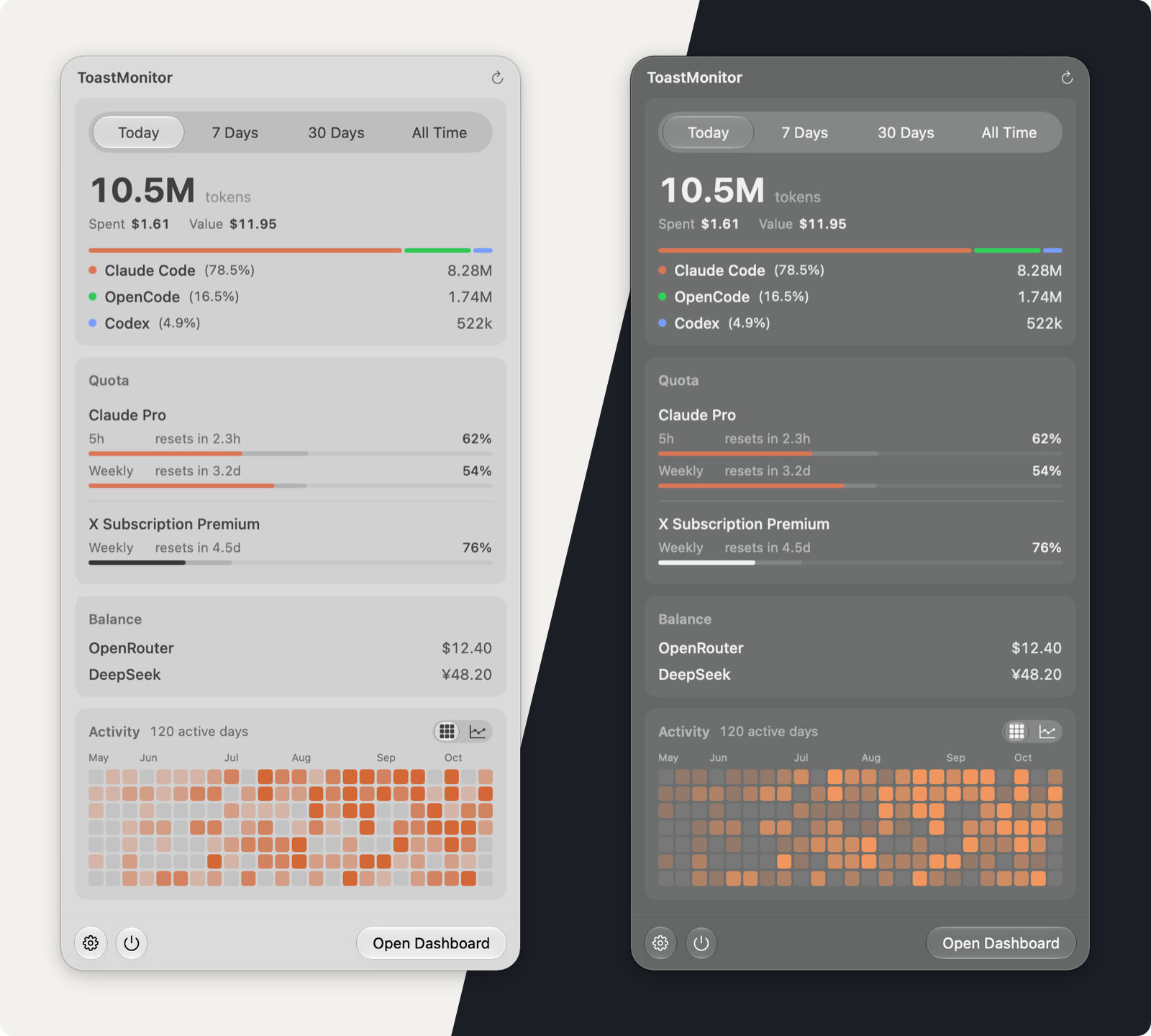
Screenshots use made-up demo data.
What you get
The menu bar shows today's tokens. Click it for the panel.
The panel separates what you used from what you have left:
- Usage — pick Today, 7 Days, 30 Days or All Time. You get the token total, what you actually spent, what the same calls would cost at API list prices, and the share of each tool. The period switch sits inside this card because it changes only these numbers.
- Quota — one bar per subscription window (Claude 5h and weekly, OpenCode Go, Codex, Command Code, Grok) with its reset countdown. The darker part of each track shows how much of the window's time has passed, so a bar that runs past it means you are using the quota faster than time.
- Balance — OpenRouter and DeepSeek prepaid credit, one short line each. An account gets its own highlighted line only when it will run out within about a week at your recent pace, is empty, or cannot be read.
- Activity — the last 24 weeks as a heatmap, or the last 60 days as a trend line.
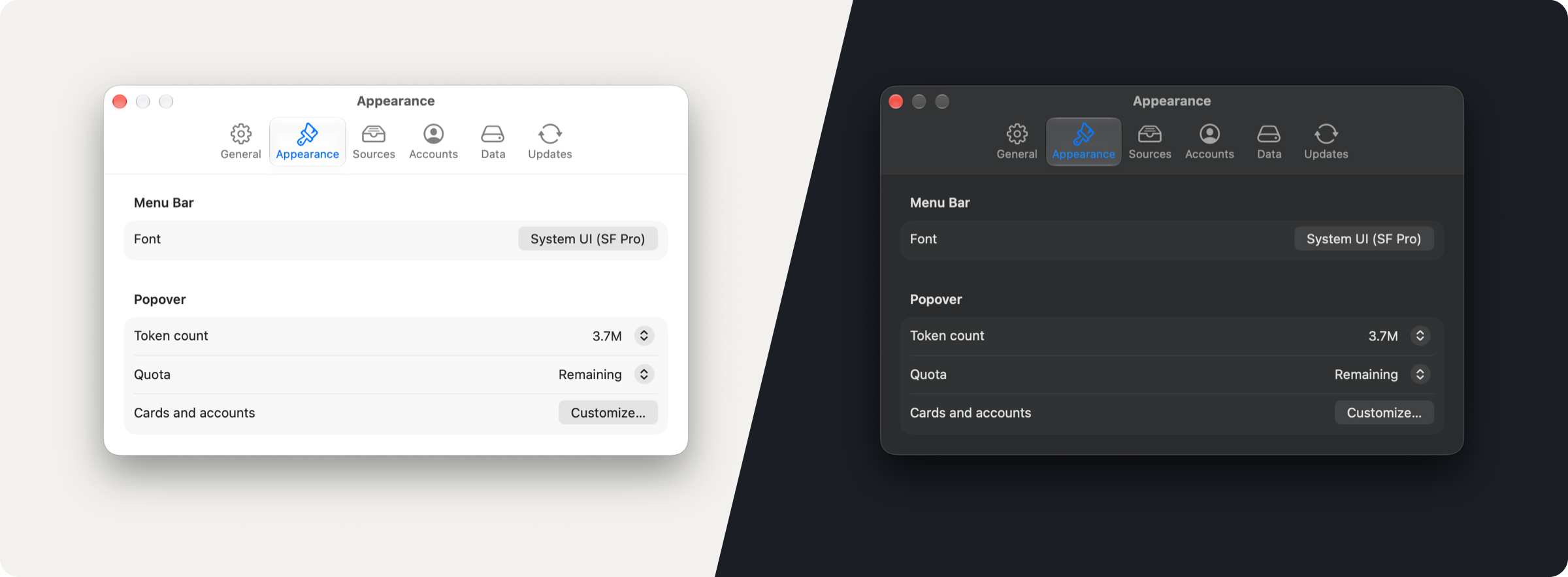
When an account cannot refresh, a small question mark appears next to it; click it for what went wrong and how to fix it. Settings → Appearance → Customize… chooses which cards and accounts appear.
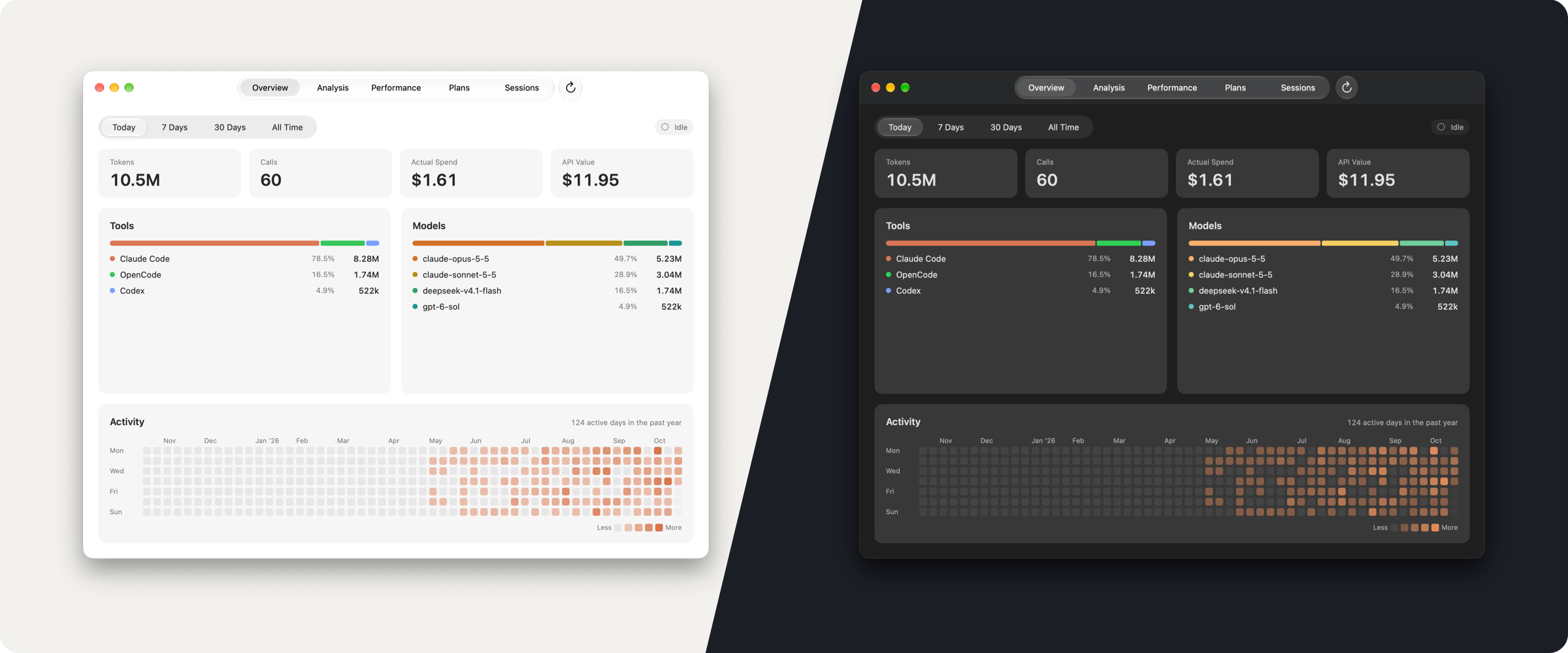
The dashboard has five pages that each fit the window without scrolling:
- Overview — period figures, tool and model breakdowns, a year of activity
- Analysis — tokens or estimated cost per day by tool or model over 7, 30 or 90 days, with CSV export
- Performance — output speed and time to first token per model, by day
- Plans — one card per connected account with its quota windows, balance and history
- Sessions — every session, newest first, grouped by day
Settings (⌘, or the panel's gear) is a standard macOS settings window: General, Appearance, Sources, Accounts, Data and Updates. Updates are signed and installed in place after you confirm.
Data sources
| Tool | Read from this Mac | Remote |
|---|---|---|
| Claude Code | ~/.claude/projects/*/*.jsonl, plus Claude Desktop Cowork sessions run in local agent mode |
VPS feed |
| Codex | ~/.codex/sessions/.../rollout-*.jsonl + state_5.sqlite |
VPS feed |
| OpenCode | ~/.local/share/opencode/opencode.db |
VPS feed |
| Hermes | ~/.hermes/state.db |
VPS feed |
| Oh My Pi | ~/.omp/agent/sessions/**/*.jsonl |
— |
| DeepSeek Harness | $DSH_HOME (default ~/.dsh) session logs and projection cache |
— |
| OpenRouter | Cloud API (key and credit snapshots) | — |
| DeepSeek account | Platform balance and account-wide billing, or balance only with an API key | — |
Remote feeds are contacted only at addresses you add yourself in Settings → Sources; nothing is preconfigured. Local and remote sources can be turned off independently.
Claude usage outside this Mac. Cowork, claude.ai chat and Claude Code on other machines leave no local transcript. ToastMonitor estimates their tokens from how far the shared Claude quota rises beyond what this Mac's own usage explains, and shows the result as the "Cowork & web" row. It is included in the headline token count, the menu bar and the Overview. Calls, cost, Analysis and Sessions count recorded usage only. It is an estimate and likely a lower bound: the quota is only sampled while the panel or dashboard is open.
Accounts and quotas
All quotas are built in; no opencode-quota install is needed.
- Claude (opt-in, off by default) — 5h, weekly and weekly-Opus windows from
api.anthropic.com/api/oauth/usage, using the login Claude Code already saved on this Mac. Nothing to paste. The login is read from~/.claude/.credentials.jsonand theClaude Code-credentialsKeychain item without ever prompting, and ToastMonitor never changes that item. When the login has expired, ToastMonitor startsclaudeonce in the background to refresh it, unless macOS has quarantined thatclaudebinary (for example right after a Homebrew update); then it asks you to runclaudein Terminal instead of triggering a Gatekeeper dialog. - Grok (opt-in) — off on a fresh install; an existing database keeps it on. The weekly pool your Grok plan shares across Grok Chat, Imagine, Build / CLI and Grok Bot, read with the token
grok loginstores in~/.grok/auth.json(never copied). Turn it on underSettings → Accounts. When the saved token has expired, ToastMonitor may rungrok modelsonce to renew it. The API still reports some X Subscription plans as "SuperGrok"; add the plan inSettings → Sources → Subscriptionsto show its real name. - OpenCode Go — rolling, weekly and monthly usage from your OpenCode workspace. Paste the workspace and cookie in
Settings → Accounts, or use--provision-go. - Codex (opt-in) — off on a fresh install; an existing database keeps it on. The ChatGPT plan's usage, read with the login Codex keeps in
~/.codex/auth.json(never copied). Turn it on underSettings → Accounts. - Command Code (experimental) — paste your Studio session cookie in
Settings → Accounts; it is kept only in the Keychain. The billing endpoint is not a public API and may change. - OpenRouter — key and credit snapshots every 60 seconds while the panel is open, every 5 minutes otherwise. The key lives only in the Keychain.
- DeepSeek — balance, plus account-wide spend for Platform logins, including other devices (connect guide).
Install and build
Download the latest release from Releases (arm64 for Apple Silicon, universal for Intel).
macOS blocks the first launch. Try opening the app once, then go to System Settings → Privacy & Security and click Open Anyway.
The app is not notarized. To verify your download, run shasum -a 256 <downloaded-file> and compare the result with the checksum on the release page.
Or build it:
./scripts/build-app.sh # release build → code sign → install to /Applications
- After switching to Apple Development signing for the first time, run
./scripts/authorize-local-keychain.shonce. It only touches ToastMonitor's own Keychain items. - Versions come from
vMAJOR.MINOR.PATCHgit tags. Untagged local builds are1.0;TM_VERSIONoverrides it for release builds. build-app.shrefuses ad-hoc signing; pass an identity withTM_SIGNING_IDENTITY.
Releasing
Each release ships an arm64 and a universal zip plus a signed, architecture-aware update manifest (appcast.json) that drives Settings → Updates. The manifest is Ed25519-signed with a key that never leaves the maintainer's machine (~/.config/toastmonitor/update-key.pem, 0600); the app carries the public half.
git tag vX.Y.Z
./scripts/package-release.sh
gh release create vX.Y.Z dist/release/*.zip --title "ToastMonitor vX.Y.Z" --notes-file docs/release-vX.Y.Z.md
./scripts/sign-update-manifest.sh X.Y.Z \
  dist/release/ToastMonitor-X.Y.Z-arm64.zip \
  dist/release/ToastMonitor-X.Y.Z-universal.zip
cp appcast.json docs/appcast.json
git commit -am "Publish update manifest for vX.Y.Z" && git push
- The feed is served from GitHub Pages (
https://toast1zz.github.io/ToastMonitor/appcast.json, deployed fromdocs/); check it withcurl -safter publishing. - Download URLs are tag-pinned (
/releases/download/vX.Y.Z/…), never/releases/latest/. - The updater verifies the download before installing, keeps the old app as
ToastMonitor.app.tm-backupuntil the new one starts, and reports a failed install inSettings → Updates.
Command line
# Credentials always come from stdin, never argv
printf '%s\n' 'sk-or-...' | ToastMonitor.app/Contents/MacOS/ToastMonitor --provision-or-key
printf '%s\n' 'auth_cookie' | ToastMonitor.app/Contents/MacOS/ToastMonitor --provision-go <workspaceId>
ToastMonitor.app/Contents/MacOS/ToastMonitor --provision-hermes <feedURL>
ToastMonitor.app/Contents/MacOS/ToastMonitor --clear-or-key
Development and screenshots:
TM_DEBUG=1logs each file-scan decision.--show-panel,--show-dashboardand--show-settings [pane]open the real windows without starting collectors or reading the Keychain;--appearance light|darkpicks the look.--demofills them with made-up usage, quotas and balances. It requiresTM_DATABASE_PATHpointing at a throwaway database, so it can never touch your real data. The README screenshots are made this way.--render-popover,--render-dashboardand--render-settingswrite offscreen PNGs; native controls are not drawn there.--verify-status-toggleand--verify-quota-badgeare CI self-checks.
How it works
- One collection loop — scans every second while the panel is open, every 5 seconds in the background, every 30 seconds when nothing changed, and every 60 seconds on low power. Sleep pauses the loop. Files are read incrementally, keyed on size, nanosecond mtime and inode, so an idle scan is only
statcalls. Large JSONL and DeepSeek Harness logs are streamed in bounded chunks rather than loaded whole. - One SQLite store —
~/Library/Application Support/ToastMonitor/toastmonitor.db(WAL). - Cost estimates — a built-in price table for common models; unknown models count tokens without a price, and OpenCode's own cost is used when present. A cost is priced once: a later price change applies to new usage, not to history. Value is the exception, and always shows today's list price. Above 272K input tokens, GPT models with a long-context rate charge it on the whole request. That is an estimate, because OpenAI doesn't specify.
- DeepSeek Harness — parses the zstd-compressed session logs when the
zstdCLI is installed, otherwise falls back to the projection cache (no model or per-call timing). The mode never switches once chosen, so the two can't double-count.
Privacy and security
- Logs, usage, project paths and session metadata stay in the local database. Quota services and remote feeds are contacted only after you turn them on. Codex and Grok quota reads are off on a fresh install; an existing database keeps them on.
- Credentials live in the macOS Keychain, never in URLs, plists or logs. No analytics or ad SDKs.
- Update checks run once at launch (
Settings → Updatescan turn that off). An update is downloaded only after you confirm, and the signature, version and SHA-256 are checked before anything is installed. Settings → Dataexports, backs up, restores and rebuilds the database. A rebuild makes a protected backup first, re-reads the logs still on this Mac, and keeps history whose log is gone.
Known limitations
- The menu bar shows today's tokens only; cost and subscriptions live in the panel.
- Claude usage outside this Mac is estimated from the shared quota. It counts toward the headline tokens, so the Overview total can be higher than the Analysis total, which is recorded usage only.
- Prices are approximate official list prices.
- Without the
zstdCLI, DeepSeek Harness usage has no model, so its cost is 0.
Contributing
See CONTRIBUTING.md for the build, test and pull-request workflow, and SECURITY.md for reporting vulnerabilities.
Acknowledgements
Thanks to @yeyebbc for #4, which releases transient read buffers during collector scans and cut scan peak memory by more than 80% in the bundled benchmark.
The menu bar icon was contributed by @yeyebbc in #6.
License
MIT — see LICENSE. Third-party system components remain under their own licenses.
Yorumlar (0)
Yorum birakmak icin giris yap.
Yorum birakSonuc bulunamadi