Tokfuel
Health Uyari
- License — License: MIT
- Description — Repository has a description
- Active repo — Last push 0 days ago
- Low visibility — Only 5 GitHub stars
Code Basarisiz
- rm -rf — Recursive force deletion command in .github/workflows/site-preview.yml
- rm -rf — Recursive force deletion command in .github/workflows/ui-preview.yml
Permissions Gecti
- Permissions — No dangerous permissions requested
Bu listing icin henuz AI raporu yok.
See how you actually use Claude Code from the menu bar — local-only skill, MCP, sub-agent & prompt usage stats (macOS, SwiftUI)
Tokfuel
See what AI coding costs you — from the menu bar.
A tiny SwiftUI menu-bar app (⛽️) for macOS.
It reads the transcripts Claude Code (and, if present, Codex CLI and Cursor) already write
under ~/.claude/projects/, ~/.codex/sessions/, and Cursor's local database,
and shows today's and period cost. Zero setup — everything stays on your Mac.



Download for macOS · English · 日本語
Features
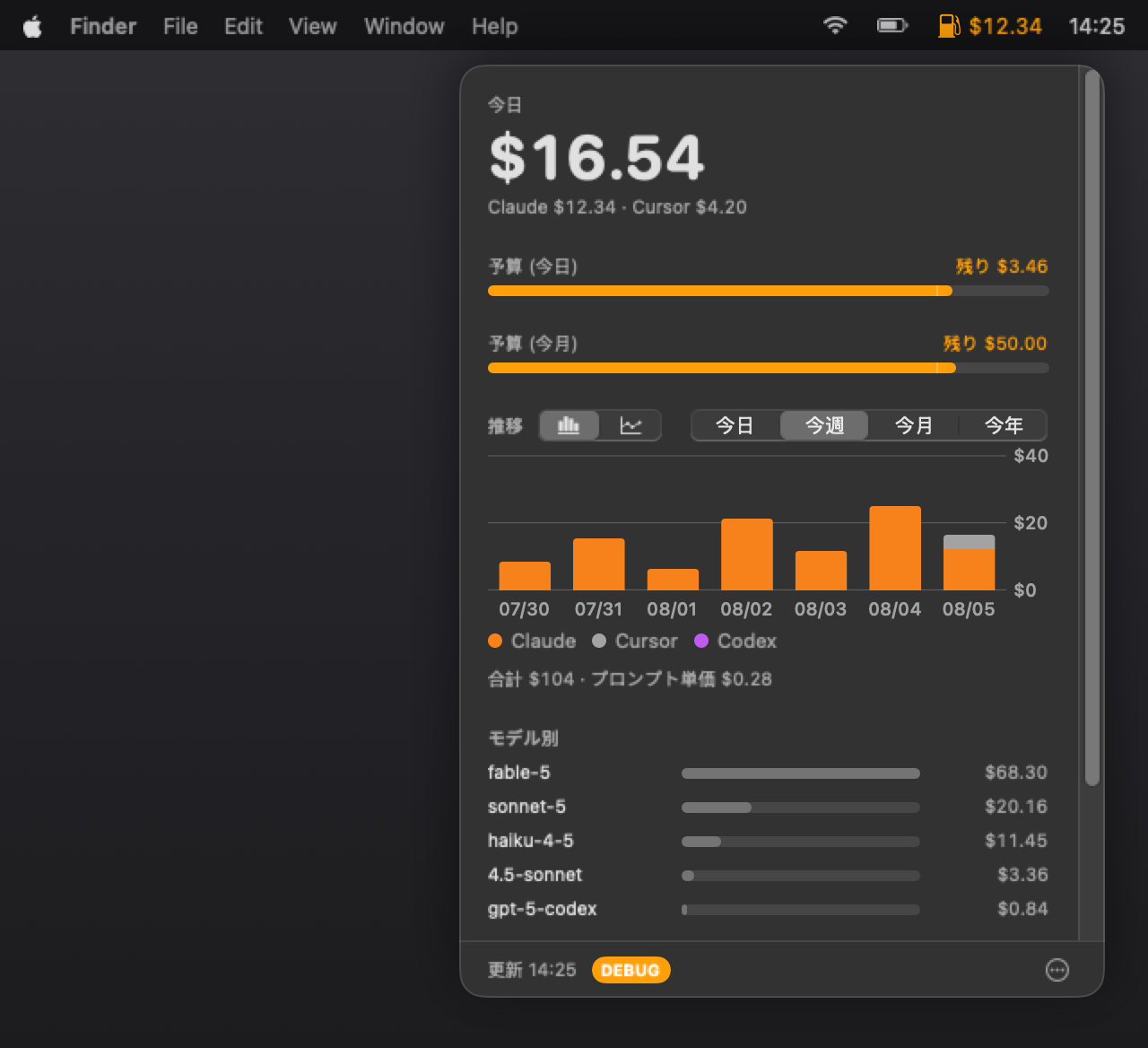
💵 Cost at a glance
Today's / period cost, daily and cumulative charts for today / this week / this month /
this year (calendar windows; week start is Sat/Sun/Mon in Settings), with a budget
reference line when the chart matches a calendar-month budget and a month-end pace
estimate otherwise, per-model breakdown, top sessions, and saving tips — retok's
Claude analysis plus Cursor-derived ones (model skew, models missing from the price
table, Cursor's share of the period), each badged with the source it came from.
Expand a tip to copy a ready-to-paste prompt that asks Claude how to act on it.🖱️ Cursor, too
If Cursor is installed and you're signed in, today's Cursor usage is folded into the
same total and chart via Cursor's own dashboard API (using the session Cursor already
keeps on disk — nothing to paste). Offline or signed-out, it falls back to local
token snapshots (often a lower bound on Cursor 3.x) and the popover says so, so a $0
Cursor figure is never mistaken for "I didn't use it". Usage that your plan covers —
the rows whose Cost column reads "-" on Cursor's own dashboard — is billed at nothing,
so it is not added to the total. Events that carry no readable cost field are priced
from Cursor's published price table instead, the same way the local path is; a model
the table doesn't list stays at $0 rather than getting a made-up rate. If the reason
is an expired
sign-in, the popover offers a button that brings Cursor to the front — you sign in there,
in Cursor's own UI, and Tokfuel picks the new session up. Pricing for the fallback path is
refreshed once a day from Cursor's published price table.
Top sessions lists Cursor conversations next to Claude's, estimated from the local
database (the dashboard API has no per-conversation breakdown).
In Settings, choose combined / Claude only / Cursor only / Codex only / side-by-side —
the popover and menu bar both follow that choice (budget gauges still use the included
sum). "Codex only" appears once Codex CLI is present on the Mac.🤖 Codex, too
If Codex CLI has local session logs (
~/.codex/sessions/), its cost is estimated
separately (via the bundled retok script's own Codex pricing) and shown as its own
color in the daily chart, alongside session and token counts — never merged into
your Claude total.🚨 Budgets
Independent monthly and daily limits.
Near a limit the ⛽️ icon turns orange; over it, red — with a heads-up.
Choose how you get it: a notification, a floating alert window that follows you into
full-screen Spaces, or both. Either way it fires once, when the level rises.📊 Menu-bar readout
Pick a metric (today, this month, both, prompts) and how to show it
(amount, percent, ring gauge, ring + percent, icon only) — or the remaining budget.
Percent and gauges measure against your budget limit or your 30-day daily average.
The gauge is either a ring (beside the ⛽️ icon or replacing it) or the ⛽️ icon itself
filling bottom-up like a fuel tank — blue inside budget, orange at the threshold, red over.
Today and this month are coloured independently. Live previews in Settings.⚡ Keeps up while you work
The readout refreshes every 10 minutes when nothing is happening. As soon as today's
cost moves, it switches to once a minute for the next 5 minutes (extended on every
further move) and the ⛽️ icon pulses so you can tell it is tracking live. No extra
network requests. Both the faster refresh and the pulse can be turned off in Settings,
and the pulse also stops in Low Power Mode or with Reduce Motion enabled.🎨 Appearance
In Settings, choose System / Light / Dark for the popover, Settings, and About.
System follows macOS Appearance.💱 USD or JPY
Budgets and all amounts switch currency.
Daily rate via Frankfurter.🔄 In-app updates
At launch and then every hour, the app checks
GitHub Releases for a newer version
and shows an Update button next to the popover's ⋯ menu. One click downloads the
release, verifies its code signature, swaps the app in place, and relaunches.📤 CSV export
The popover's ⋯ menu has two export entries — daily and monthly — for the currently
shown period. Daily writes one row per day (date, cost, output tokens); monthly
rolls the same numbers up to one row per calendar month. Both add period totals
(prompts, API requests, cache hit rate) and a per-model cost breakdown — everything
already in the retok report, no extra scanning. Useful for an admin collecting a
team's spend by hand (each member exports and shares the file); nothing is sent
anywhere on its own.🔒 Local-first
Prompts and transcripts never leave your Mac. Network calls are: the opt-in
exchange-rate fetch; the update check against GitHub Releases at launch and every
hour (the release file downloads only when you click update); if Cursor is
installed, the daily price-table refresh; when signed into Cursor, a usage query to
Cursor's dashboard API (auth + date range only — no prompts); on distribution
builds, Crashlytics crash reports (no consent prompt); and, only if you opt in,
anonymous Firebase Analytics for app-UI events. Development builds never configure
Firebase. Details: Privacy Policy · Terms of Use.
Install
- Download
Tokfuel-x.y.z.dmgfrom the download page or
Releases. - Open it and drag
Tokfuel.appontoApplications. - Launch it — releases are signed with a Developer ID and notarized by Apple, so it opens
with no Gatekeeper warning.
Requirements
- macOS 14 or later
python3for the cost analysis (ships with the Xcode Command Line Tools)
Build from source
git clone https://github.com/akidon0000/Tokfuel.git
cd Tokfuel
bash Scripts/build.sh
Architecture
App code lives under App/. SPM targets follow UI → Store → sources; the executable wires them (ADR-0002). Arrows are import direction.
flowchart TB
  App["Tokfuel<br/>executable + DI"]
  UI["TokfuelUI"]
  Store["TokfuelStore"]
  Settings["TokfuelSettings"]
  Claude["TokfuelClaude"]
  Cursor["TokfuelCursor"]
  Codex["TokfuelCodex"]
  Budget["TokfuelBudget"]
  Analytics["TokfuelAnalytics"]
  Core["TokfuelCore"]

  App --> UI
  App --> Store
  App --> Settings
  App --> Claude
  App --> Cursor
  App --> Codex
  App --> Budget
  App --> Analytics
  App --> Core

  UI --> Store
  UI --> Settings
  UI --> Core

  Store --> Settings
  Store --> Claude
  Store --> Cursor
  Store --> Codex
  Store --> Budget
  Store --> Core

  Claude --> Core
  Cursor --> Core
  Codex --> Core
  Budget --> Core
  Settings --> Core
  Analytics --> Core
Data flows fetch (sources) → shape / aggregate (Store) → present (UI). Verification lives under App/Tests/ (UnitTests is what swift test runs; TestDocs / E2E are docs or a separate runner). Decisions are recorded in Docs/adr/.
Contributing
PRs welcome — see CONTRIBUTING.md.
- Tests:
swift test - Roadmap: GitHub Issues
- Architecture decisions: Docs/adr/README.md (日本語)
- Found a vulnerability? Report it privately — see SECURITY.md.
Contributors


Acknowledgements
- Cost analysis — retok, bundled unmodified.
© Daiki Matsudate (@d-date), MIT License. - App icon — designed with Icon Composer;
the source document lives in Tokfuel/icon. - Exchange rates — Frankfurter.
- Roadmap conventions — adapted from bajutsu's issue-driven development workflow.
License
Yorumlar (0)
Yorum birakmak icin giris yap.
Yorum birakSonuc bulunamadi