Nullable.Extended
Health Gecti
- License — License: MIT
- Description — Repository has a description
- Active repo — Last push 0 days ago
- Community trust — 60 GitHub stars
Code Gecti
- Code scan — Scanned 4 files during light audit, no dangerous patterns found
Permissions Gecti
- Permissions — No dangerous permissions requested
Bu listing icin henuz AI raporu yok.
A Roslyn analyzer to improve the experience when working with nullable reference types.
Nullable Extended


Roslyn tools and analyzers for better coding with nullable reference types
Nullable reference types
are a great feature introduced with C# 8.0 that helps in writing better code.
This project helps to improve the experience when coding with them.
Two tools are available:
- The Roslyn Analyzer (NuGet package) warns about every unjustified usage of the null-forgiving operator, in the IDE and in your builds. Works with any IDE and on CI.
- The Visual Studio Extension lists all usages of the null-forgiving operator in your solution and detects those that are no longer needed.
For AI assistants, there is an MCP server that finds the unjustified usages in large solutions, so they can be fixed.
Managing null-forgiving operators
Sometimes it is necessary to use the
null-forgiving operator "!"
to suppress a false warning.
However, using too many of them will render the value of nullable checks almost useless.
There are two obstacles:
- The
!symbol is so unobtrusive, and has multiple meanings in code, that null-forgiving operators are hard to find. - After some time no one will remember why a null-forgiving operator has been added, or if its usage has been validated,
so you have to look at the code again and again.
This toolset detects occurrences of the null-forgiving operator and encourages you to annotate them with a justification comment,
so everyone will instantly know why the usage is required.
Justification comments
A justification comment is one or more single line comments directly above the statement or declaration.
The first comment line must start with // ! , followed by the justification text:
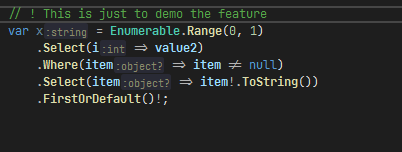
// ! This is only needed to demo the feature
var text = value1!.ToString();
AI assistants
The MCP server Nullable.Extended.Mcp lets AI assistants (GitHub Copilot, Claude and other MCP clients) find the unjustified null-forgiving operators
in large solutions, project by project, without a build. The accompanying skill teaches the assistant to fix the code first,
and to use a justification comment only as the last resort.
- Install the MCP server (.NET 10 or later) and register it in your MCP client, e.g. in
.vscode/mcp.json:dotnet tool install -g Nullable.Extended.Mcp{ "servers": { "nullable-extended": { "type": "stdio", "command": "nullable-extended-mcp", "args": ["--root", "${workspaceFolder}"] } } } - Install the skill into your project or user profile, with the GitHub CLI or the
skillsCLI:
Without the skill, the server sends a short version of the workflow to the client when it connects.gh skill install tom-englert/Nullable.Extended nullable-extended npx skills add tom-englert/Nullable.Extended
See the documentation for the tools and their parameters.
Roslyn Analyzer
The analyzer generates a warning for every occurrence of the null-forgiving operator that is not annotated with a justification comment,
and provides a code fix that adds the scaffold for the justification comment.
Installation
Install the NuGet package in your projects:
dotnet add package Nullable.Extended.Analyzer
Usage
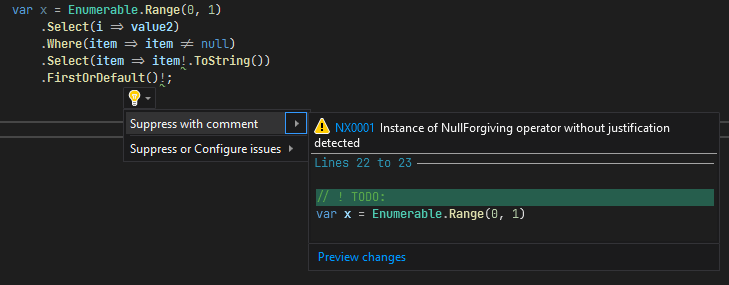
A warning is shown for every unjustified occurrence, and a code fix is offered to add the justification comment:
The warning disappears after a justification comment has been added:
Diagnostics
Occurrences are grouped into four categories, to reflect their different contexts:
| Id | Context |
|---|---|
| NX0001 | Any other usage of the null-forgiving operator. |
| NX0002 | Null-forgiving operator on the null or default literals at any other statement. |
| NX0003 | Null-forgiving operator inside lambda expressions. |
| NX0004 | Null-forgiving operator on the null or default literals at init only property assignment. |
General usages (NX0001) can mostly be avoided by cleaning up the code, while inside lambda expressions (NX0003) they are often unavoidable,
so you might want to configure different severity levels for different categories in your .editorconfig file:
[*.cs]
dotnet_diagnostic.NX0001.severity = error
dotnet_diagnostic.NX0003.severity = suggestion
Visual Studio Extension
The Visual Studio Extension lists all occurrences of the null-forgiving operator in your solution,
categorizes them like the analyzer does, and even detects those that are still present in code but no longer needed.
Installation
Install the extension from the Visual Studio Marketplace,
the Open VSIX Gallery
or from the Releases page.
Usage
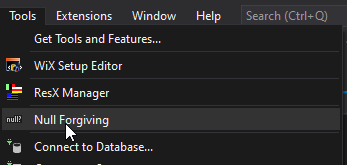
Start the tool window from the tools menu:
The tool window shows all occurrences of the null-forgiving operator in your solution and their justification comments.
It also shows if the null-forgiving operator is required to suppress nullable warnings.
If the "Required" column is not checked, the null-forgiving operator might be obsolete and can probably be removed.
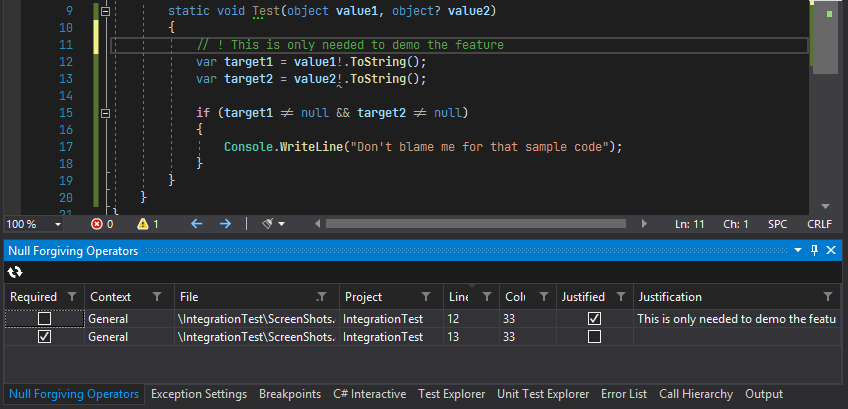
- Click the refresh button to scan your solution.
- Double click any entry to navigate to the corresponding source code.
Yorumlar (0)
Yorum birakmak icin giris yap.
Yorum birakSonuc bulunamadi