better-agent-terminal
Health Gecti
- License — License: MIT
- Description — Repository has a description
- Active repo — Last push 0 days ago
- Community trust — 222 GitHub stars
Code Basarisiz
- os.homedir — User home directory access in electron/claude-agent-manager.ts
- process.env — Environment variable access in electron/claude-agent-manager.ts
- fs.rmSync — Destructive file system operation in electron/logger.ts
- process.env — Environment variable access in electron/logger.ts
- execSync — Synchronous shell command execution in electron/main.ts
- process.env — Environment variable access in electron/main.ts
- network request — Outbound network request in electron/main.ts
- process.env — Environment variable access in electron/node-resolver.ts
- child_process — Shell command execution capability in electron/pty-manager.ts
- process.env — Environment variable access in electron/pty-manager.ts
- fs module — File system access in electron/pty-manager.ts
Permissions Gecti
- Permissions — No dangerous permissions requested
Bu listing icin henuz AI raporu yok.
Multi-workspace terminal aggregator with Claude Code AI integration
Better Agent Terminal





A cross-platform terminal aggregator with multi-workspace support and built-in AI agent integration
Manage multiple project terminals in one window, with a built-in Claude Code agent panel, file browser, git viewer, snippet manager, and remote access — all in a single Electron app.
Screenshots
Claude Code Agent Panel — Built-in AI agent with permission controls, status line, and streaming output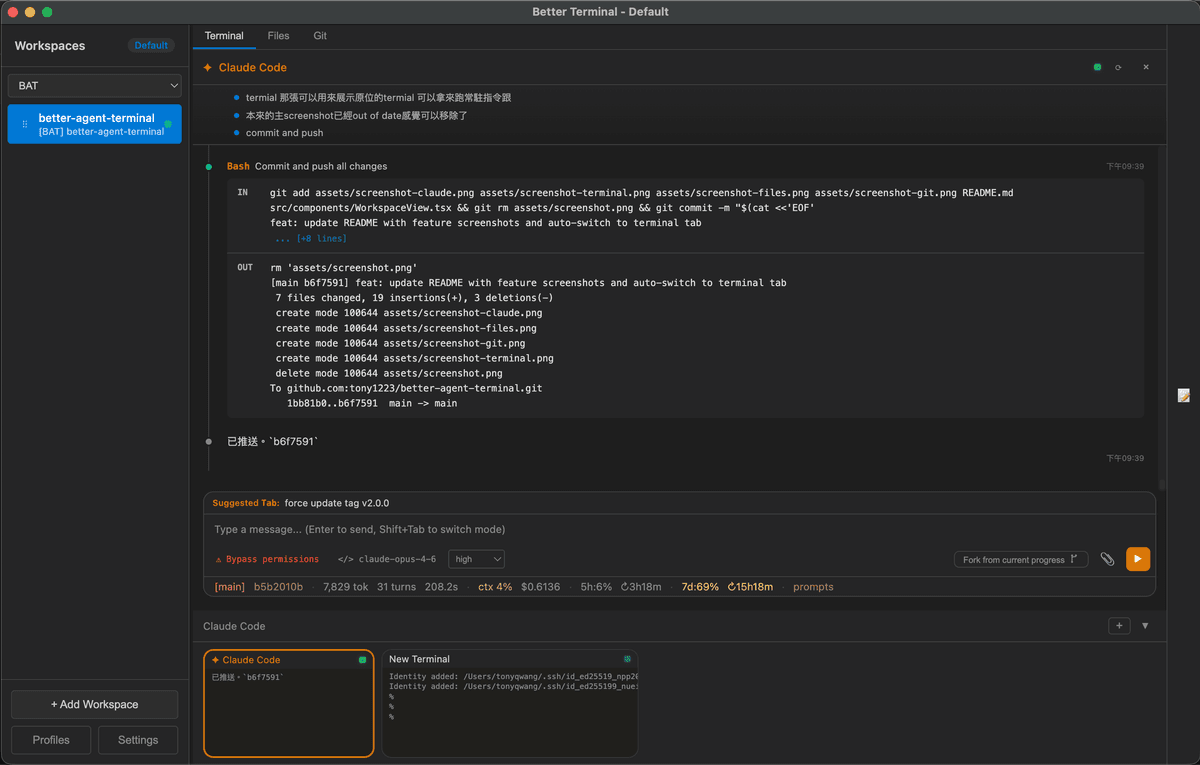
Terminal — Run persistent terminals alongside your agent for long-running commands and monitoring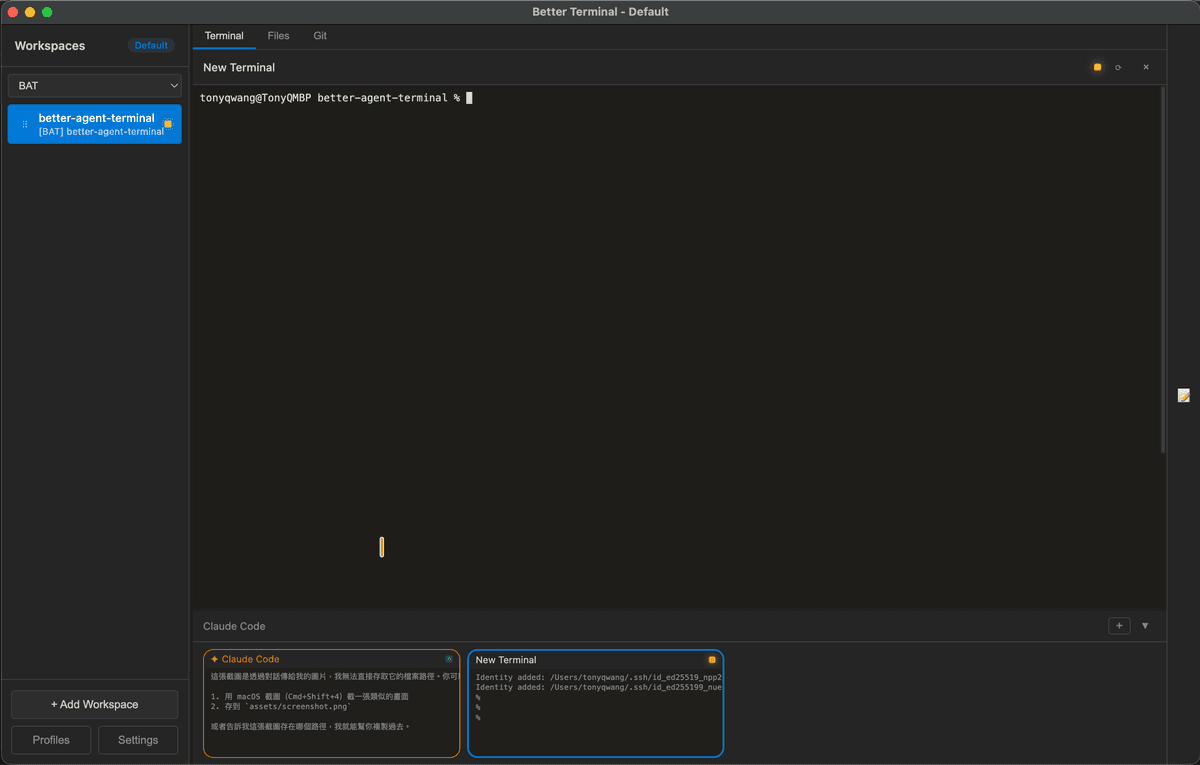
File Browser — Browse and preview project files without leaving the app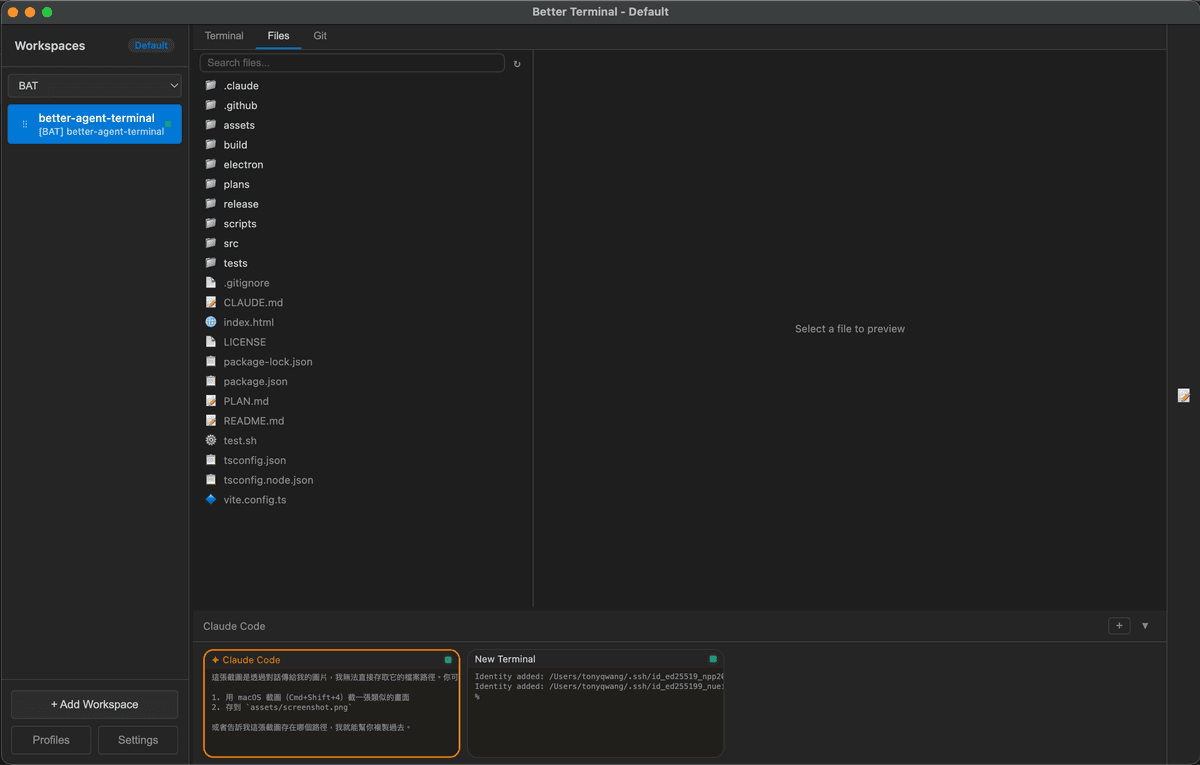
Git Viewer — View commit history and diffs at a glance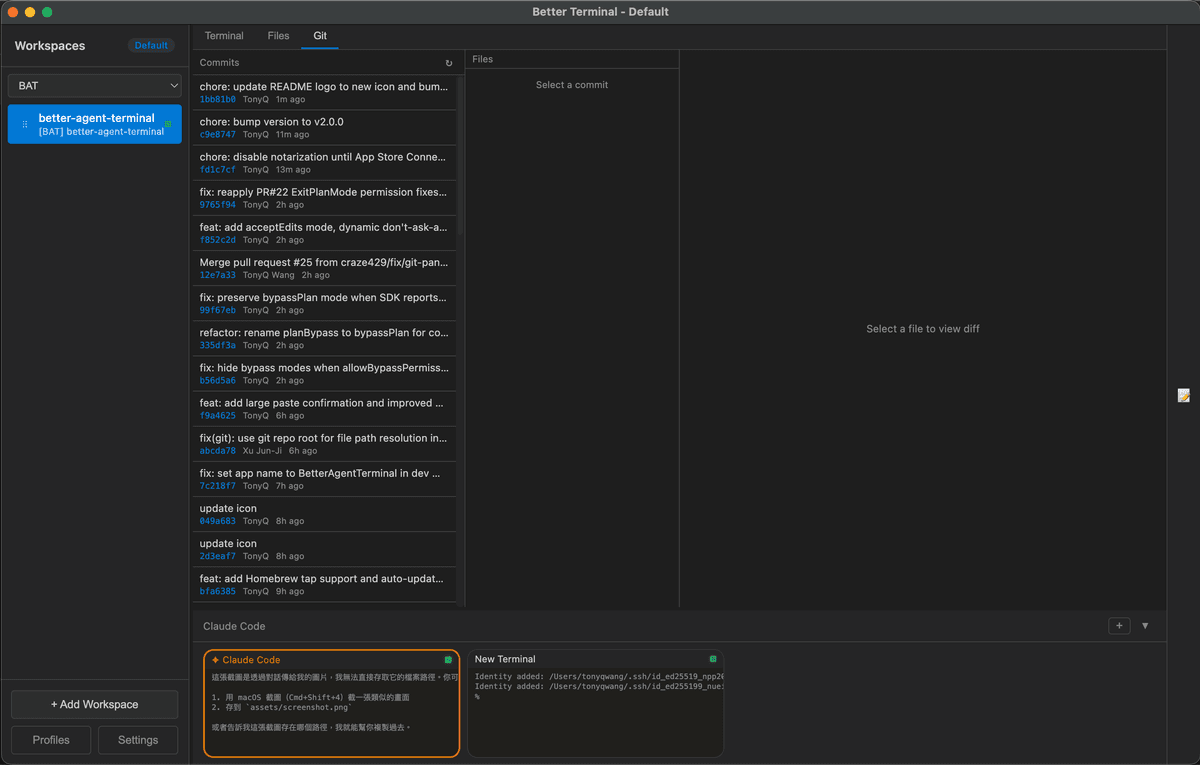
Features
Workspace Management
- Multi-Workspace — Organize terminals by project folders; each workspace binds to a directory
- Drag & Drop — Reorder workspaces freely in the sidebar
- Groups — Categorize workspaces into named groups with a filter dropdown
- Profiles — Save and switch between multiple workspace configurations (local or remote)
- Detachable Windows — Pop out individual workspaces to separate windows; auto-reattach on restart
- Per-Workspace Env Vars — Configure custom environment variables per workspace
- Activity Indicators — Visual dots showing which workspaces have active terminal processes
- Double-click to rename, right-click context menu for all workspace actions
Terminal
- Google Meet-style layout — 70% main panel + 30% scrollable thumbnail bar showing all terminals
- Multiple terminals per workspace — Powered by xterm.js with full Unicode/CJK support
- Agent presets — Pre-configured terminal roles: Claude Code, Gemini CLI, Codex, GitHub Copilot, or plain terminal
- Tab navigation — Switch between Terminal, Files, and Git views per workspace
- File browser — Search, navigate, and preview files with syntax highlighting (highlight.js)
- Git integration — Commit log, diff viewer, branch display, untracked file list, GitHub link detection
- Snippet manager — Save, organize, search, and paste code snippets (SQLite-backed with categories and favorites)
Claude Code Agent
- Built-in Claude Code via SDK — Runs the agent directly inside the app; no separate terminal needed
- Message streaming with extended thinking blocks (collapsible)
- Permission-based tool execution — Every tool call is intercepted; approve individually, or enable bypass/plan mode for auto-approval
- Subagent tracking — See spawned subagent tasks with progress indicators and stall detection
- Session resume — Persist conversations and resume them across app restarts
- Session fork — Branch off from any point in a conversation
- Rest/Wake sessions — Pause and resume agent sessions from the context menu to save resources
- Statusline — Live display of token usage, cost, context window %, model name, git branch, turn count, and session duration
- Usage monitoring — Track API rate limits (5-hour and 7-day windows) via Anthropic OAuth
- Prompt history — View and copy all previous user prompts from the statusline
- Image attachment — Drag-drop or use the attach button (up to 5 images per message)
- Clickable URLs — Markdown links and bare URLs open in the default browser
- Clickable file paths — Click any file path in agent output to preview it with syntax highlighting and search (Ctrl+F)
- Ctrl+P file picker — Fuzzy-search project files and attach them to the conversation context
- Update notifications — Automatic check for new releases on GitHub
Keyboard Shortcuts
| Shortcut | Action |
|---|---|
Ctrl+P / Cmd+P |
File picker (search & attach files to agent context) |
Shift+Tab |
Switch between Terminal and Agent mode |
Enter |
Send message |
Shift+Enter |
Insert newline (multiline input) |
Escape |
Stop streaming / close modal |
Ctrl+Shift+C |
Copy selected text |
Ctrl+Shift+V |
Paste from clipboard |
Right-click |
Copy (if text selected) or Paste |
Slash Commands
| Command | Description |
|---|---|
/resume |
Resume a previous Claude session from history |
/model |
Switch between available Claude models |
Quick Start
Option 1: Homebrew (macOS)
brew tap tonyq-org/tap
brew install --cask better-agent-terminal
Option 2: Download Release
Download from Releases for your platform:
| Platform | Format |
|---|---|
| Windows | NSIS installer, .zip |
| macOS | .dmg (universal binary) |
| Linux | .AppImage |
macOS DMG installation:
- Download the
.dmgfile from Releases - Double-click the
.dmgto mount it - Drag Better Agent Terminal into the Applications folder
- On first launch, macOS may block the app — go to System Settings > Privacy & Security, scroll down and click Open Anyway
- Make sure Claude Code CLI is installed (
npm install -g @anthropic-ai/claude-code)
Option 3: Build from Source
Prerequisites:
- Node.js 18+
- Claude Code CLI installed and authenticated
git clone https://github.com/tony1223/better-agent-terminal.git
cd better-agent-terminal
npm install
Development mode:
npm run dev
Build for production:
npm run build
Option 4: Quick Install (Script)
Run the following command in your terminal (macOS, Linux, or Windows with Git Bash/MSYS2):
curl -fsSL https://raw.githubusercontent.com/tony1223/better-agent-terminal/main/install.sh | bash
This script will detect your OS and install the application to the standard location.
macOS Build Notes
Native dependencies (node-pty, better-sqlite3) require Xcode Command Line Tools:
xcode-select --install
Then:
npm install
npm run dev      # Development
npm run build    # Build .dmg
Architecture
better-agent-terminal/
├── electron/                          # Main process (Node.js)
│   ├── main.ts                        # App entry, IPC handlers, window management
│   ├── preload.ts                     # Context bridge (window.electronAPI)
│   ├── pty-manager.ts                 # PTY process lifecycle, multi-window broadcast
│   ├── claude-agent-manager.ts        # Claude SDK session management
│   ├── logger.ts                      # Disk-based logger (enable with BAT_DEBUG=1)
│   ├── snippet-db.ts                  # SQLite snippet storage
│   ├── profile-manager.ts            # Profile CRUD and persistence
│   ├── update-checker.ts             # GitHub release update check
│   └── remote/
│       ├── protocol.ts                # Proxied channel/event definitions
│       ├── handler-registry.ts        # Unified IPC + remote handler registry
│       ├── broadcast-hub.ts           # Event broadcasting to remote clients
│       ├── remote-server.ts           # WebSocket server (host mode)
│       ├── remote-client.ts           # WebSocket client (connect mode)
│       └── tunnel-manager.ts          # IP detection, Tailscale, QR code info
├── src/                               # Renderer process (React)
│   ├── App.tsx                        # Root component, layout, profile orchestration
│   ├── components/
│   │   ├── Sidebar.tsx                # Workspace list, groups, drag-drop, context menu
│   │   ├── WorkspaceView.tsx          # Per-workspace container
│   │   ├── ClaudeAgentPanel.tsx       # Claude agent chat UI and streaming
│   │   ├── TerminalPanel.tsx          # xterm.js terminal wrapper
│   │   ├── ThumbnailBar.tsx           # Scrollable terminal thumbnail strip
│   │   ├── MainPanel.tsx              # Tab container (Terminal / Files / Git)
│   │   ├── GitPanel.tsx               # Git log, diff, status viewer
│   │   ├── FileTree.tsx               # In-app file browser
│   │   ├── PathLinker.tsx             # Clickable file paths & URLs, preview modal
│   │   ├── SnippetPanel.tsx           # Snippet manager sidebar
│   │   ├── PromptBox.tsx              # Agent message input with image attach
│   │   ├── SettingsPanel.tsx          # App settings UI
│   │   ├── ProfilePanel.tsx           # Profile switcher
│   │   ├── EnvVarEditor.tsx           # Per-workspace env var editor
│   │   └── UpdateNotification.tsx     # Update banner
│   ├── stores/
│   │   ├── workspace-store.ts         # Workspace + terminal state (pub/sub)
│   │   └── settings-store.ts          # App settings persistence
│   ├── types/
│   │   ├── index.ts                   # Core types (Workspace, AppSettings, etc.)
│   │   ├── claude-agent.ts            # Claude message and tool call types
│   │   ├── agent-presets.ts           # Agent preset definitions
│   │   └── electron.d.ts             # window.electronAPI type declarations
│   └── styles/
│       ├── main.css
│       ├── claude-agent.css
│       └── path-linker.css
├── assets/                            # App icons and screenshots
├── scripts/
│   └── build-version.js               # Version string generator
└── package.json
Tech Stack
- Frontend: React 18 + TypeScript
- Terminal: xterm.js + node-pty
- Framework: Electron 28
- AI: @anthropic-ai/claude-agent-sdk
- Build: Vite 5 + electron-builder
- Storage: better-sqlite3 (snippets, session data)
- Remote: ws (WebSocket) + qrcode
- Syntax Highlighting: highlight.js
Remote Access & Mobile Connect
BAT includes a built-in WebSocket server that allows other BAT instances or mobile devices to connect and control it remotely. This feature is currently experimental.
How It Works
- The Host enables the WebSocket server in Settings → Remote Access (default port: 9876)
- On startup, the server generates a Connection Token (32-character hex string) used to authenticate connections
- The Client connects by entering the host IP, port, and token via a Remote Profile
- Once connected, the client can operate all terminals, Claude Agent sessions, workspaces, and other features on the host
Connection Methods
Method 1: Remote Profile (BAT-to-BAT)
On the client BAT instance:
- Open Settings → Profiles
- Create a new profile and set the type to Remote
- Enter the host IP, port (9876), and token
- Load the profile to connect to the remote host
Method 2: QR Code (Mobile Devices)
On the host BAT instance:
- Open Settings → Remote Access → Generate QR Code
- If the server is not yet running, it will start automatically
- Scan the QR code with a mobile device to retrieve the connection info
- The QR code contains the WebSocket URL and token (in JSON format)
Recommended: Use Tailscale for Cross-Network Connections
If the host and client are not on the same local network (e.g., connecting from home to an office machine), we recommend using Tailscale to establish a secure peer-to-peer VPN:
- Free plan supports up to 100 devices
- No port forwarding or additional server setup required
- Each device gets a stable
100.x.x.xIP address - BAT automatically detects Tailscale IPs and uses them preferentially
Installation:
| Platform | Install |
|---|---|
| macOS | Download or brew install tailscale |
| Windows | Download |
| iOS | App Store |
| Android | Google Play |
| Linux | Install Guide |
After installation, sign in with the same account on all devices and they will be able to communicate. BAT's QR code will automatically use the Tailscale IP.
Security Notice
Warning: Enabling the Remote Server opens a WebSocket connection. Any device with the token can fully control BAT on the host machine, including executing terminal commands, accessing the file system, and controlling Claude Agent sessions.
- Do not start the server on untrusted networks
- Do not share the token with untrusted parties
- Shut down the server when not in use
- Strongly recommended to use Tailscale to avoid direct exposure to the public internet
Configuration
Workspaces, settings, and session data are saved to:
| Platform | Path |
|---|---|
| Windows | %APPDATA%/better-agent-terminal/ |
| macOS | ~/Library/Application Support/better-agent-terminal/ |
| Linux | ~/.config/better-agent-terminal/ |
Debug Logging
Set the BAT_DEBUG=1 environment variable to enable disk-based debug logging. Logs are written to debug.log in the configuration directory.
Release
Version Format
Version follows: 1.YY.MMDDHHmmss
Example: v1.25.1219091538 = 2025-12-19 09:15:38
Automated Release (GitHub Actions)
Push a tag to trigger builds for all platforms:
git tag v1.52.0
git push origin v1.52.0
License
MIT License - see LICENSE for details.
Author
TonyQ - @tony1223
Contributors
- lmanchu - @lmanchu - macOS/Linux support, workspace roles
- bluewings1211 - @bluewings1211 - Shift+Enter newline, preserve workspace state, resizable panels
- Henry Hu - @ninedter - Key API discovery and valuable architectural feedback
- craze429 - @craze429 - Windows/Linux credential reading, permission fix, git parsing fix, async dialog
- Owen - @Owen0857 - Windows zombie process fix, terminal resize black screen fix, debug log cleanup
- MikeThai - @mikethai - macOS .dmg spawn ENOENT fix
- Luke Chang - @lukeme117 - Snippet sidebar and UI improvements
Built with Claude Code
Yorumlar (0)
Yorum birakmak icin giris yap.
Yorum birakSonuc bulunamadi