yapcap
Health Uyari
- License — License: NOASSERTION
- Description — Repository has a description
- Active repo — Last push 0 days ago
- Low visibility — Only 7 GitHub stars
Code Gecti
- Code scan — Scanned 12 files during light audit, no dangerous patterns found
Permissions Gecti
- Permissions — No dangerous permissions requested
This is a native COSMIC desktop panel applet (for Pop!_OS/Linux) that displays your local usage limits and quotas for AI coding tools like Codex, Claude Code, and Cursor. It reads credentials already present on your machine to fetch usage statistics directly from provider APIs.
Security Assessment
Overall Risk: Medium.
The tool necessarily handles highly sensitive data, including local OAuth tokens and browser cookies, to authenticate with provider APIs. It makes external network requests to provider endpoints (e.g., `chatgpt.com`, `api.anthropic.com`, `cursor.com`). Notably, it also executes the shell command `claude auth status --json` to handle token refresh flows.
However, there are no immediately dangerous code patterns, no hardcoded secrets, and no dangerous permission requests. The README explicitly states that no data is sent to third parties, no telemetry is collected, and the light code scan (12 files) found no malicious patterns. Still, because it directly accesses browser cookies and authentication tokens, users should be aware of the inherent risks and ensure they trust the maintainer.
Quality Assessment
The project is actively maintained, with the most recent code push occurring today. It features a clear, highly detailed README with automated CI/CD workflows. While the license is marked as unasserted by Git, the repository explicitly lists the OSI-approved MPL-2.0 license. Community trust is currently minimal given its very low visibility (only 7 GitHub stars), meaning the codebase lacks broad peer review.
Verdict
Use with caution: The code appears safe and is actively maintained, but its low community visibility combined with the necessary handling of highly sensitive local credentials warrants manual review before installing.
Native COSMIC panel applet for Linux that shows local usage limits for Codex, Claude Code, and Cursor.
YapCap
A native COSMIC panel applet that shows local usage state for Codex, Claude Code, and Cursor.



What it does
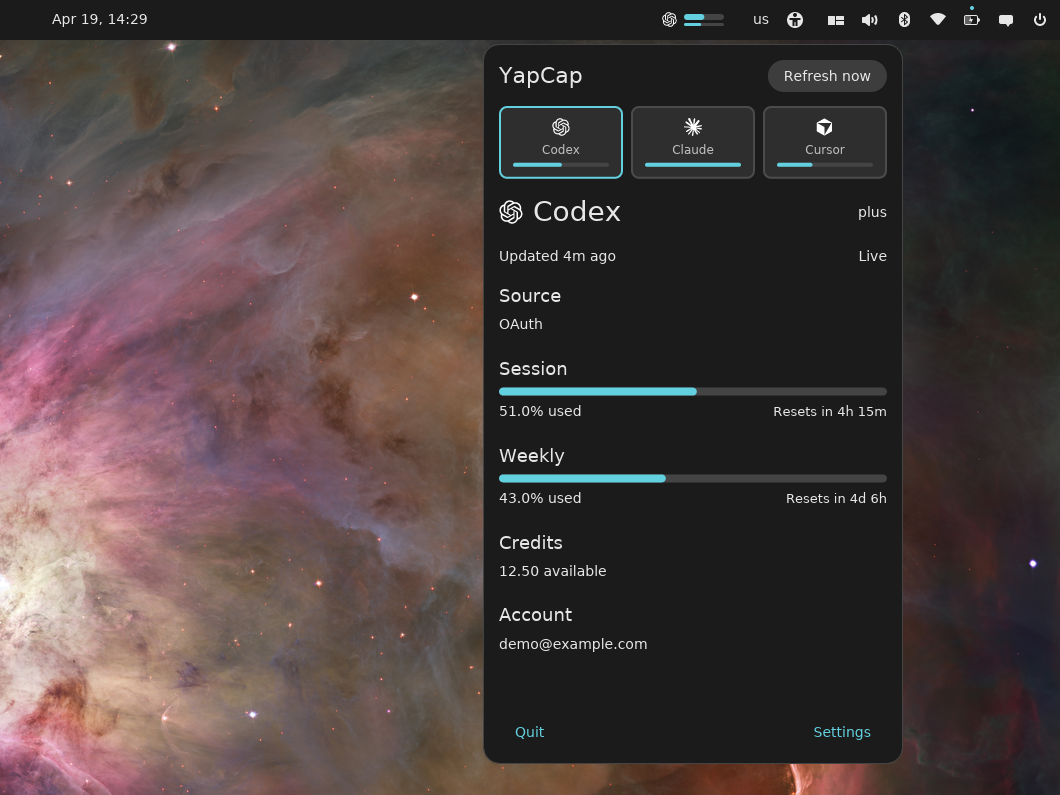
YapCap lives in your COSMIC panel and reads local credentials to show how much of your AI coding quota you've used this session, week, or billing cycle — without sending anything to a third party.
- Codex — 5-hour and weekly windows, credit balance
- Claude Code — session utilization and reset time
- Cursor — plan usage and billing cycle end
All data is fetched directly from the provider APIs using credentials already on your machine. No telemetry, no cloud sync, no account needed beyond the ones you already have.
On startup, YapCap shows any cached snapshot immediately, then refreshes enabled providers in the background. Provider API calls have short network timeouts so a stalled request does not leave the applet stuck refreshing forever.
Requirements
- Pop!_OS (or another distro running COSMIC)
- At least one of: Codex, Claude Code, or Cursor logged in locally
- COSMIC dependencies installed
- Rust toolchain (stable) only if you build from source
Install
Install with apt (recommended)
Download the .deb package from the latest release, then install it:
sudo apt install ./yapcap_*.deb
Restart your COSMIC session (or log out and back in) so the panel picks up the new applet, then add YapCap from the panel applet picker.
From source
This path requires COSMIC development dependencies and a local Rust toolchain.
git clone https://github.com/TopiCsarno/yapcap
cd yapcap
just install
Providers
Codex
Reads OAuth token from ~/.codex/auth.json and calls chatgpt.com/backend-api/wham/usage.
Claude Code
Reads OAuth token from ~/.claude/.credentials.json or $CLAUDE_CONFIG_DIR/.credentials.json (scope user:profile) and calls api.anthropic.com/api/oauth/usage.
If the Claude Code access token is expired or close to expiring, YapCap runs claude auth status --json and then rereads the credentials file. Claude Code owns the OAuth refresh flow and may update .credentials.json; YapCap does not call Claude's private token endpoint directly.
Cursor
Imports the WorkosCursorSessionToken cookie from a supported local browser and calls cursor.com/api/usage-summary. Supported browsers: Brave, Chrome, Edge, Firefox.
Configuration
| Path | Purpose |
|---|---|
~/.config/yapcap/config.toml |
Per-provider enable flags, browser selection |
~/.cache/yapcap/snapshots.json |
Last successful response per provider |
~/.local/state/yapcap/logs/yapcap.log |
Log output |
Cursor browser selection can be overridden per-run with YAPCAP_CURSOR_BROWSER (brave, chrome, edge, firefox).
To hide a provider you don't use, open the popup → Settings and toggle it off. The change is written straight to config.toml:
codex_enabled = true
claude_enabled = true
cursor_enabled = false
Disabled providers are hidden from the popup entirely.
Updates
YapCap checks GitHub for a newer release on startup and surfaces the result in Settings → About. If a new version is available, the About section shows a link to the release page. No automatic download or install — just a nudge so you know to pull.
Privacy
YapCap reads local files and talks directly to provider APIs over HTTPS. For Claude Code, it may also run claude auth status --json to let Claude Code refresh its own local credentials. Logs avoid credentials, cookies, and bearer tokens — if you find one leaking, that's a bug, please file it.
Troubleshooting
- Applet doesn't appear after install — restart the COSMIC session (log out and back in).
- "Auth required" on Codex or Claude — log in with the respective CLI. For Claude,
claude auth status --jsonis used automatically when possible, but/loginmay still be needed if Claude Code reports the refresh token is revoked or expired. - Cursor shows no data — make sure you're logged in to
cursor.comin a supported browser, then quit that browser so YapCap can read its cookie DB. - Stale data — a transient refresh failure keeps the last good snapshot visible and marks it stale. Click refresh once the network or provider is back.
Logs at ~/.local/state/yapcap/logs/yapcap.log are usually the fastest way to see what's going on.
Limitations
- COSMIC only. No GNOME, KDE, or tray fallback.
- Three providers only. Not designed to be extensible.
- No historical charts, notifications, or cost analytics.
- Cursor cookie import requires the browser to be closed (its cookie DB is locked while running).
License
MPL-2.0 — see LICENSE.
Yorumlar (0)
Yorum birakmak icin giris yap.
Yorum birakSonuc bulunamadi