Camouflow
Health Gecti
- License — License: MIT
- Description — Repository has a description
- Active repo — Last push 0 days ago
- Community trust — 52 GitHub stars
Code Gecti
- Code scan — Scanned 12 files during light audit, no dangerous patterns found
Permissions Gecti
- Permissions — No dangerous permissions requested
Bu listing icin henuz AI raporu yok.
Local-first browser automation with Camoufox and CloakBrowser: reviewed AI workflows, structured extraction, deterministic replay and local MCP/n8n integrations.

CamouFlow
English · Русский
A local-first desktop workspace for browser profiles, proxies and visual automation.
Different profiles. One workflow. On your computer — under your control.





📚 Documentation (RU/EN): camouflow.site/docs · API reference: camouflow.site/api
Describe once. Review. Replay without a model.
Try the isolated catalog demo, inspect a structured table, export JSON/CSV, then turn recorded actions into a parameterized scenario. Read-only replay checks outputs using the existing automation engine, without another model request.
AI workflow quickstart · CLI / optional MCP / n8n example
Available in v0.4.0. Model-reported success is not a verified workflow. Page content goes to your chosen provider; editable field contents are excluded from snapshots, not every possible secret.
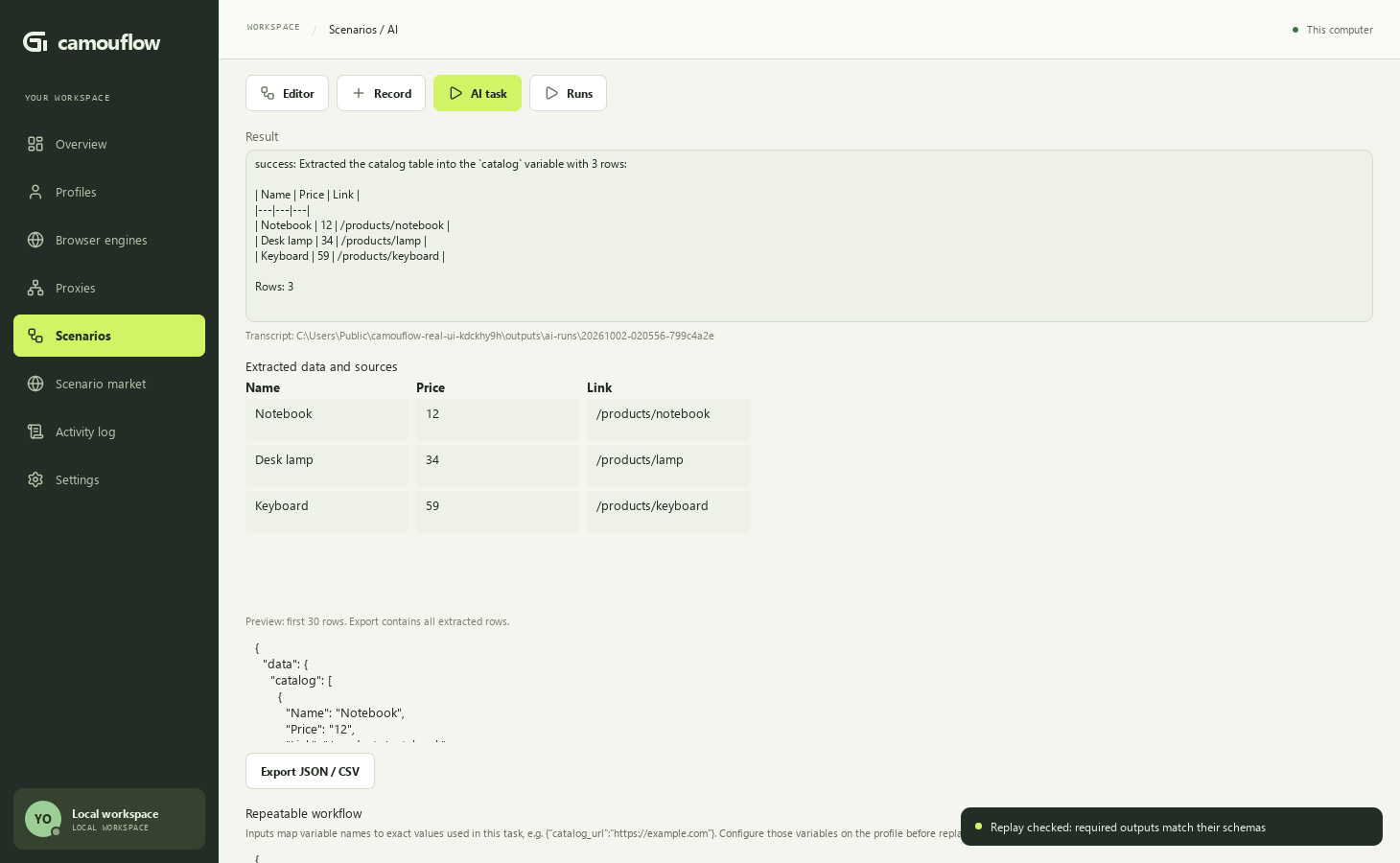
Watch the recorded UI demo — synthetic catalog, real configured DeepSeek model, export and replay check. No personal browser profile was used.
What is CamouFlow
CamouFlow is a desktop app for working with isolated browser profiles. Every profile has its own context: cookies, fingerprint, proxy and engine settings. Profiles come together in one workflow: visual automation scenarios, proxy pools with health checks, logging and team collaboration through an optional server.
- 🔒 Local-first — profiles, scenarios and data stay on your machine; local mode needs no server login
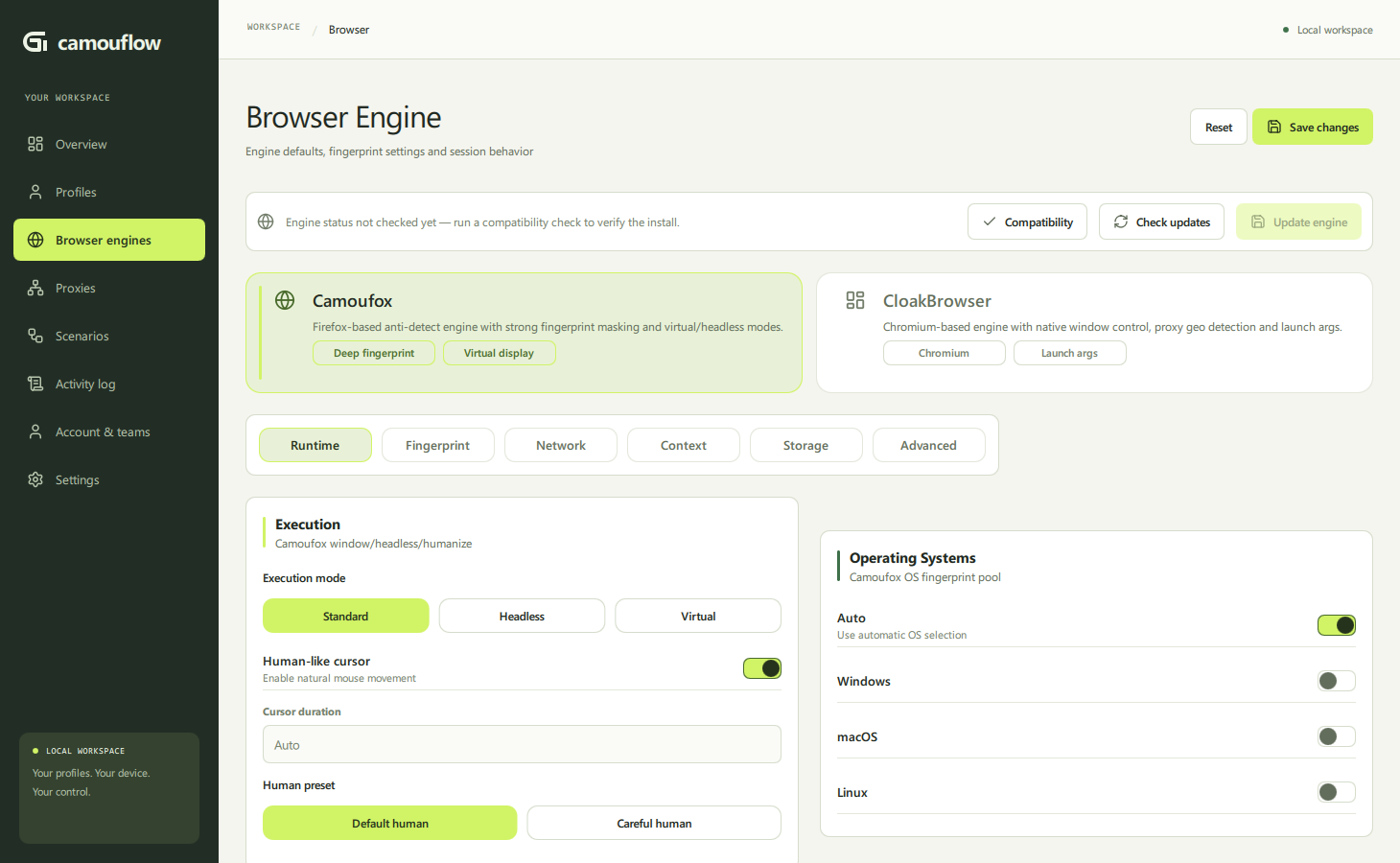
- 🧬 Anti-detect engines — Camoufox (Firefox-based) and CloakBrowser (Chromium-based) with configurable fingerprints
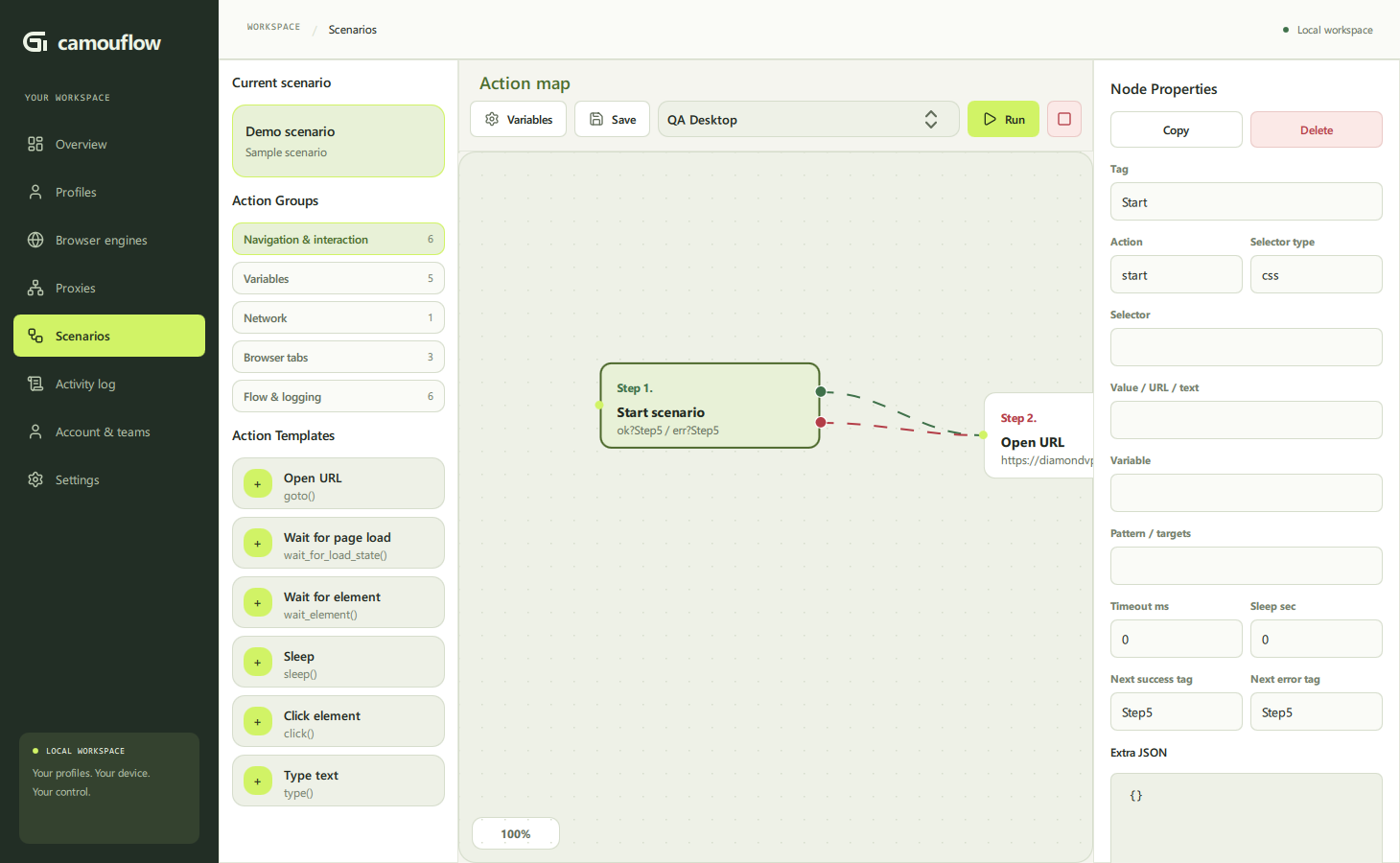
- 🕸 Visual automation — scenarios are assembled on a canvas from steps linked by success/error transitions
- 🤖 AI assistant — describe a task in plain language and a built-in agent (a Chat Completions-compatible provider, including local Ollama) drives the profile's browser on both engines; save its actions as a replayable scenario
- 🌐 Teams and control center — optional server: roles, shared pools, audit, marketplace
Screenshots
| Overview | Profiles |
|---|---|
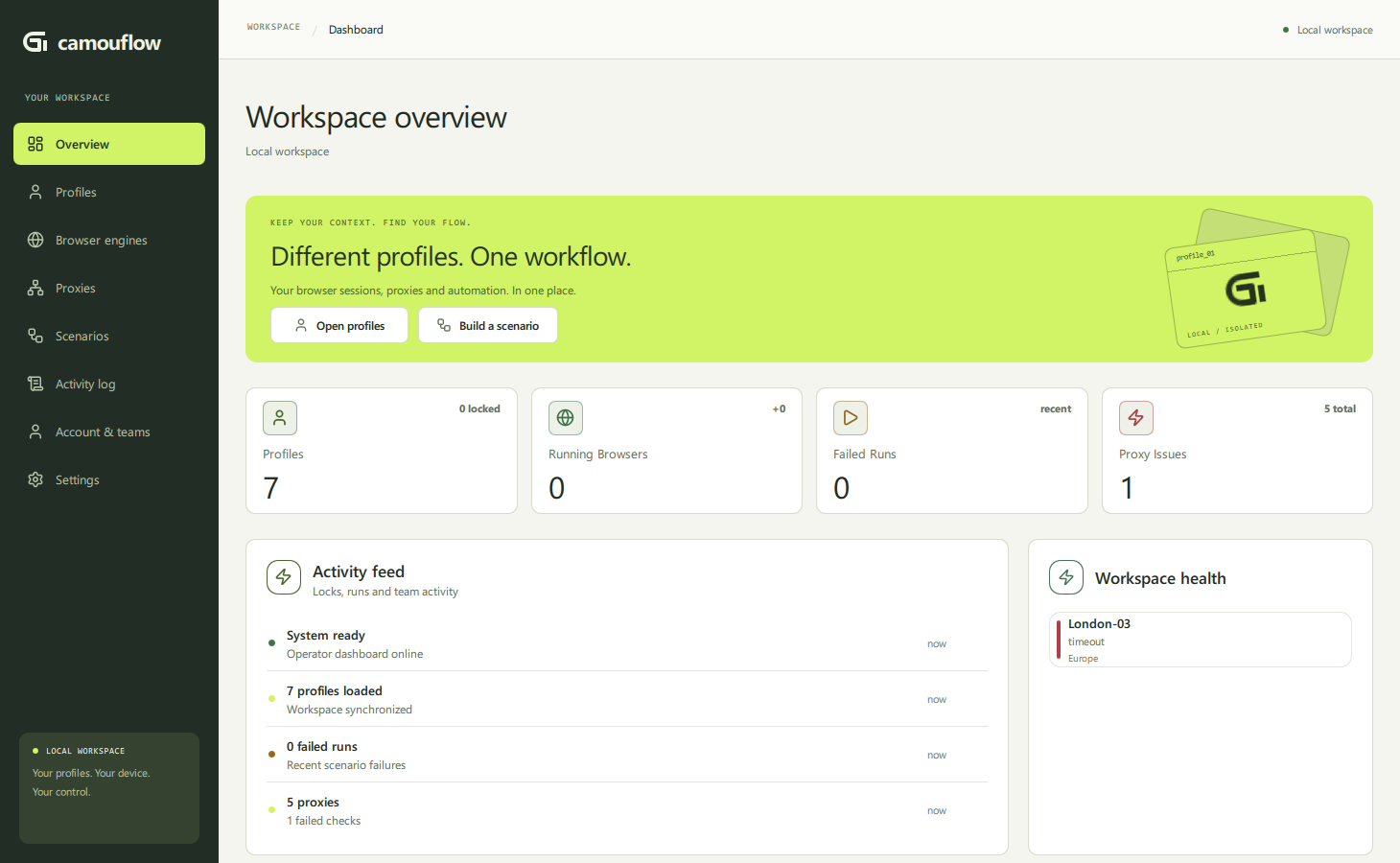 |
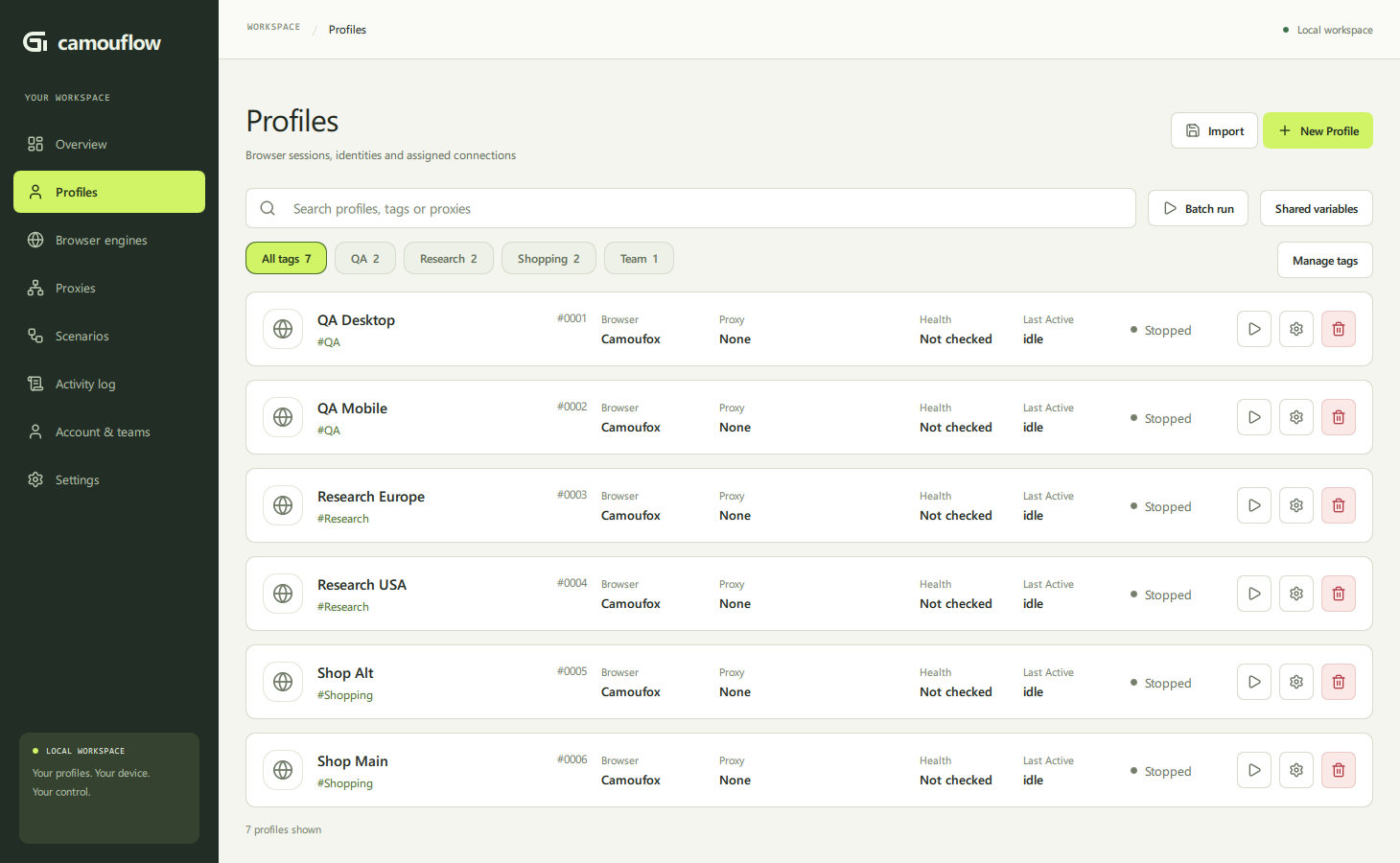 |
| Proxies | Scenarios |
|---|---|
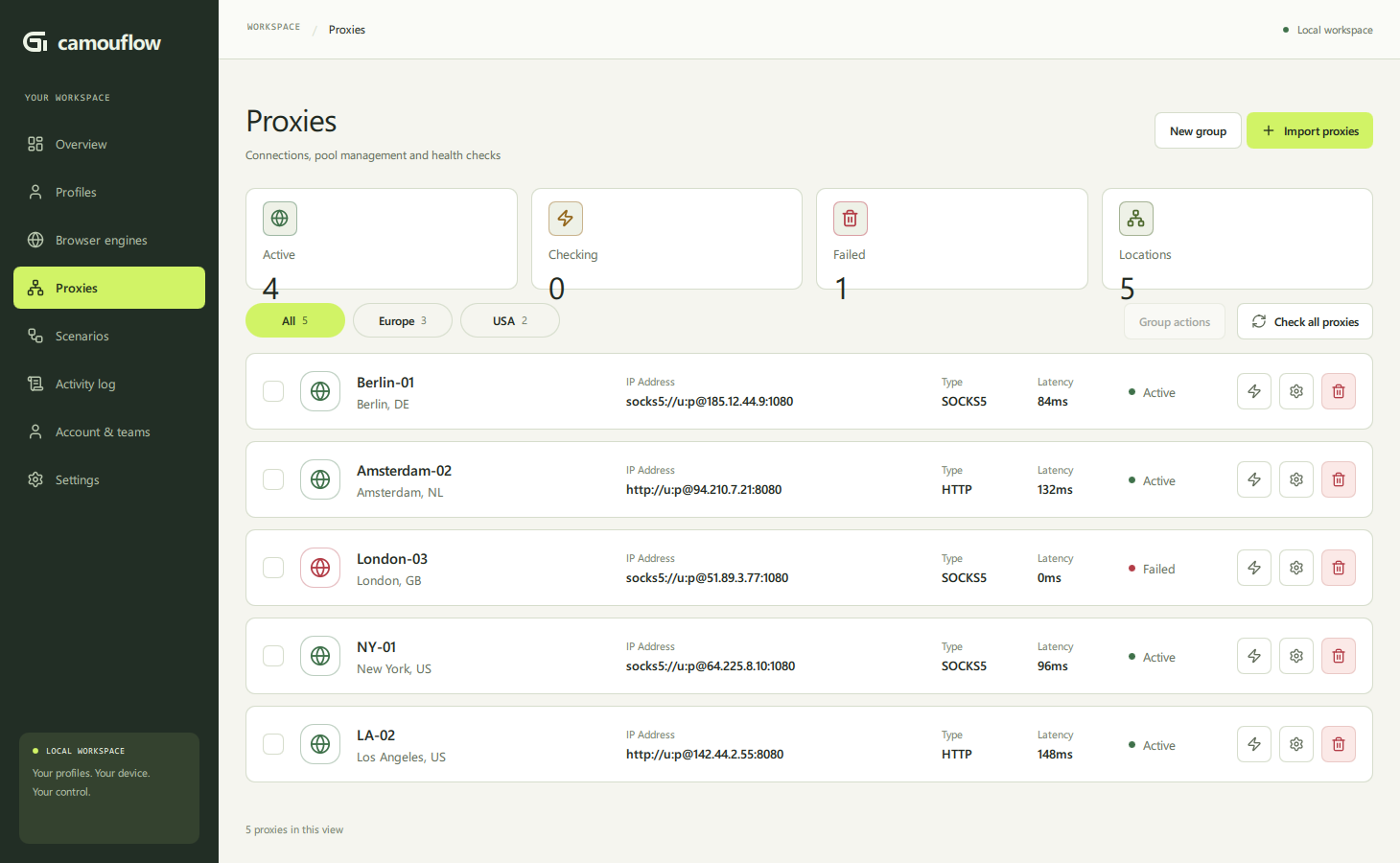 |
 |
| Browser engine | Logs |
|---|---|
 |
 |
Features
🗂 Profiles
- create, edit, duplicate and delete browser profiles
- start and stop profile browser sessions
- bulk import with an account parse template
- tag groups and search by name, tag or proxy
- assign a proxy, edit profile variables and cookies
- per-profile browser overrides: locale, timezone, User-Agent, WebGL/GPU, CPU cores
- batch-run a scenario on profiles with a selected tag
🕸 Proxies
- proxy pools/groups: create, rename, delete
- bulk list import:
socks5://host:port:user:pass,http://user:pass@host:port - health checks: single, per pool or all at once — status, latency, geo
- quarantine and release, unassigning from profiles
- pool statistics: active, checking, failed, locations
⚙️ Scenarios
- visual editor: draggable steps on a canvas, pan/zoom
success/errorlinks between steps, context menus for nodes and links- scenario library: create, duplicate, delete
- run a scenario on a selected profile, recent runs panel
- shared variables inside the editor, step editor with raw JSON
- scenario marketplace (with a connected server)
Supported steps: start/end · open URL · HTTP request · wait for element/load · sleep · click · type text · set/parse variables · shared variables · extract text · write file · if condition · tab management · tag · run another scenario · log/message
🧬 Browser engine
- switch Camoufox ↔ CloakBrowser with separate per-engine settings
- launch modes: windowed / headless / virtual display
- behavior humanization: cursor, mouse speed, typing delays, presets
- Camoufox OS fingerprint pool and seed, Chromium launch args
- navigator/UA/WebGL/CPU overrides, window/screen sizes
- JSON overrides (navigator, window), addons/fonts, permissions and headers
- engine status strip: compatibility check and updates
📋 Logs
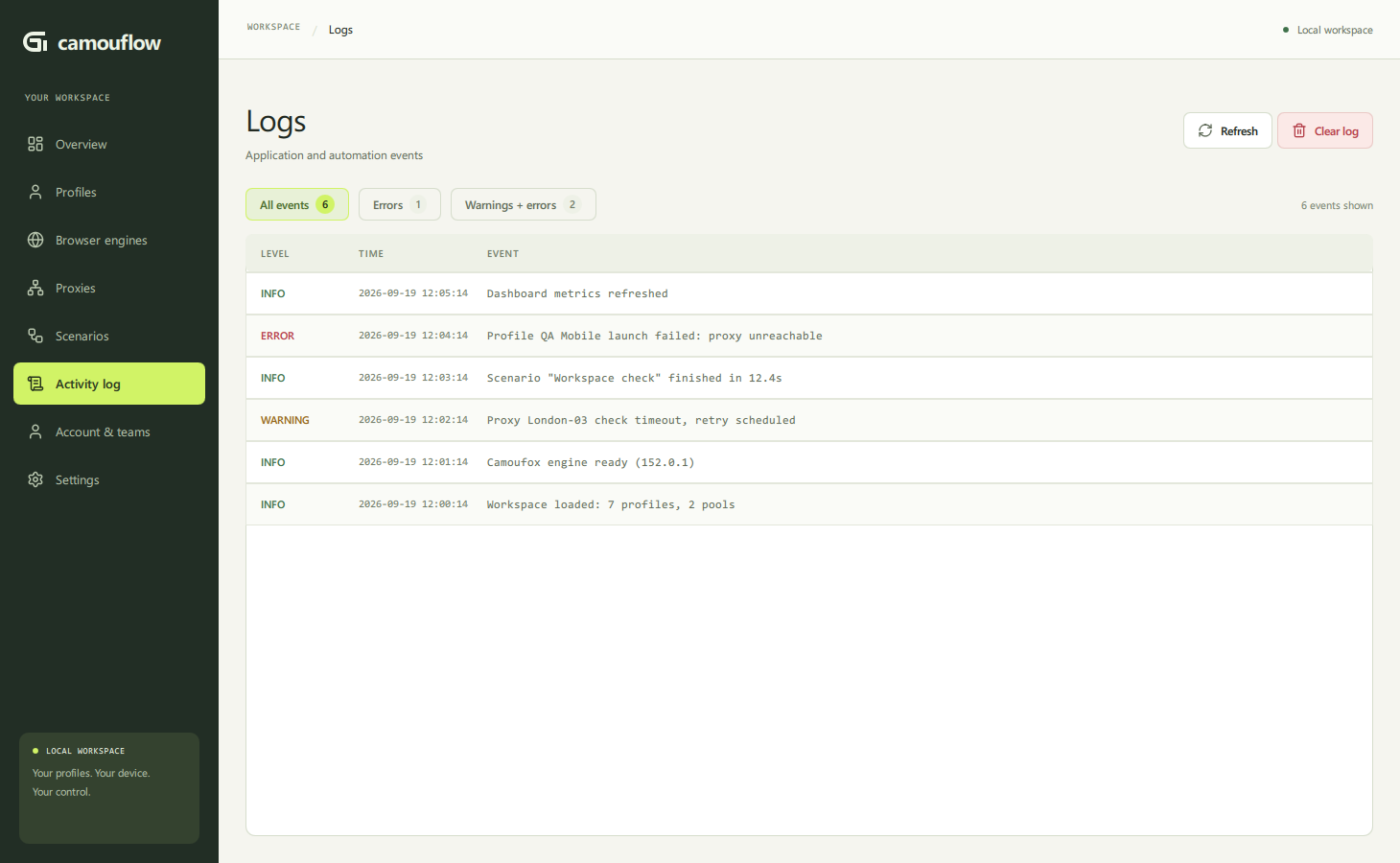
- application and automation events in a
level · time · eventtable - filters: all / errors / warnings with live counters
- refresh and clear the log (with confirmation)
Architecture
┌─────────────────────────────┐        ┌─────────────────────────────┐
│   Desktop app (this repo)   │        │   Server (optional)         │
│   PyQt6/QML + Python core   │◄──────►│   teams · roles · pools     │
│   Camoufox · CloakBrowser   │  API   │   audit · market            │
│   local profiles and data   │        │   owner web console         │
└─────────────────────────────┘        └─────────────────────────────┘
Local mode is fully self-sufficient. The server is connected optionally — for team access, shared pools and the scenario marketplace. Project site: camouflow.site (RU/EN).
app/
  core/         browser engine integration, fingerprints, proxies
  qml/          UI (QML): pages and components
  services/     scenario engine and executable steps
  storage/      local database and storage helpers
  ui/bridge/    Python ↔ QML bridges
images/         screenshots used by the README
Quick start
Download the ready-to-run Windows build: latest release (zip) — unpack and run CamouFlow.exe (browser engines download on first launch). All releases and per-version changes: Releases · CHANGELOG.md.
Or run from source. Requirements: Windows, Python 3.12, Git.
py -3.12 -m venv .venv
.venv\Scripts\activate
python -m pip install --upgrade pip
pip install -r requirements.txt
The first launch may take a while — browser engine dependencies are downloaded.
python main.py
Build the Windows app
build.bat
Output: dist\CamouFlow\CamouFlow.exe.
Data and privacy
All working data — profiles, scenarios, proxies, settings, logs and browser profile data — is stored locally. The active data root is shown in Settings → App Settings.
License
MIT — see LICENSE.
Repository and safe releases
The desktop lives in app/ and its CI runs from this repository. The optional backend, web console, migrations and server tests are maintained privately in the sibling ../server/ directory, outside this Git repository. The old local server path and .github/workflows/server.yml remain ignored. Back up the backend separately; cloning this repository does not restore it.
build.bat writes a separate timestamped release under dist/ and never deletes previous builds or stops running browsers. Portable data lives beside the executable; upgrading the executable does not migrate it automatically. Stop the application and back up settings/, profiles/, scenaries/ and outputs/ before transferring a portable workspace.
Local synchronization binds that data directory to one server/team. Switching the active team still permits direct cloud work, but does not authorize transferring local resources to a different team. Manual synchronization confirms the destination; cookie upload requires separate confirmation. Deletions require an explicit conflict resolution and browser directories are retained.
Desktop operations
Python blocks are available under Scenarios > Scripting > Python script.
Use Edit Python script for code, inputs and the result variable; test through
the existing run debugger. Native Python requires local approval and executes in
a supervised process, not a security sandbox. See the Python scripting guide.
Select profiles with their checkboxes, then use Selected actions to schedule a scenario, bulk edit/export, or create a full archive. Restore archives through Profiles > Import > Restore archive. The queue and results live under Scenarios > Runs, beside the editor. Run/Batch run actions use this same queue; switching pages does not stop jobs.
- Queue & results: one job per profile, optional local date/time (
YYYY-MM-DD HH:MM), 1–8 simultaneous browsers, pause new starts, cancel running/queued jobs. The application must remain open. After restart the queue is paused, unfinished executions are marked interrupted, and pending jobs are retained. Resume explicitly; no automatic retries of interrupted work. Scenario definitions (including nested scenarios) are saved locally with the job. Keep the data directory private. - Results: inspect status, failure reason, step metadata, screenshots and Playwright traces. Retry starts the entire scenario and requires confirmation because previous submissions may repeat. Artifacts can contain sensitive account data. Trace viewer uses the local Playwright runtime and requires its Chromium browser; failures are reported with a local diagnostic log.
- Bulk changes: preview and apply tag/proxy/engine-setting changes to stopped local profiles. If profiles changed since preview, the operation is rejected. Local metadata export omits credentials and browser sessions. Cloud bulk editing is not enabled by this screen.
- Backup & restore: export a local profile to a checksummed ZIP; choose browser session files and sensitive metadata separately. Archives are unencrypted. Session directories can contain secrets even when the metadata-secrets option is off. Restore only trusted archives, always under a new name. Optional scenarios are imported as new copies, engine defaults are applied only to the restored profile, and existing global settings remain unchanged. Browser-encrypted credentials may not transfer between OS users or machines.
- Proxy policy: keep the current assignment, check it and stop on failure, or explicitly allow replacement from one named pool before launch. Occupied/quarantined proxies are excluded from replacement; healthy replacements remain assigned. No automatic IP changes are made after launch. Cloud replacement requires manager privileges; queued cloud execution acquires and renews the profile lock.
Queue capacity is limited to 500 unfinished jobs and 32 MiB of metadata. Archive verification is limited to 2 GiB and 50,000 files. These are protective limits, not commercial quotas. Clearing finished jobs preserves artifact files; manage those separately in the data directory.
Record a scenario (desktop)
Open Scenarios > Record, select a stopped local or cloud Camoufox profile and enter an HTTP(S) start URL. Click Start recording, perform actions in the browser, then Stop and Save & edit. Stop closes the recording browser. Saving requires a new scenario name and never replaces existing scenarios. Recording reserves the profile against simultaneous launches and workspace operations. Cloud recording also acquires and renews the server profile lock, then releases it after the browser closes. Cloud recording requires operator access; saving a new scenario requires manager access. Save in the same workspace where recording started; switching teams does not transfer the draft.
The first version records the initial tab and main frame: navigation, clicks, text input, single-value HTML selects, checkboxes/radio buttons and Enter. Selectors prefer unique test IDs, IDs, names and accessible attributes; ambiguous targets are reported rather than guessed. Sequential typing is combined into one step. The select_option, set_checked and press actions are available in the editor and executor.
Password inputs use the profile variable {{password}}; other recognized sensitive inputs use {{recorded_secret_N}}. Their literal values are removed before crossing from the page into Python. Missing required variables stop replay. Other text and URLs are recorded as entered and must be reviewed before sharing.
Limitations: Camoufox only, no iframe/popup recording, file uploads, rich-text editors or multiple selects. The installed CloakBrowser runtime does not support the required exposed binding. Unsupported actions generate review warnings. Browser-initiated navigation immediately after an action is represented by a load wait; unusual delayed or multi-stage navigation may need manual editing. Recording is capped at 1,000 steps. Unsaved drafts exist only in memory until the application exits. Automation executes real actions: inspect the draft before replaying submissions.
Profile editing and step debugging
- Profile settings accept one proxy connection string, an existing pool proxy, or any available proxy from a selected pool. Empty manual input removes the proxy. An exhausted pool is an error, not a direct-connection fallback.
- Workspace list refreshes run in background workers. Profile tabs retain their drafts while switching; cookies load asynchronously.
- In Scenarios > Runs, enable Debug in separate window before adding a job, then resume the queue. The debugger pauses before the first step. Next step executes one step; Resume continues; Run selected jumps to a step. Closing the debugger stops its run.
- Queue debugging uses the saved run snapshot, not hot reload. After completion, enqueue another run to execute edited steps.
Yorumlar (0)
Yorum birakmak icin giris yap.
Yorum birakSonuc bulunamadi