openspec-ui
Health Gecti
- License — License: MIT
- Description — Repository has a description
- Active repo — Last push 0 days ago
- Community trust — 23 GitHub stars
Code Gecti
- Code scan — Scanned 12 files during light audit, no dangerous patterns found
Permissions Gecti
- Permissions — No dangerous permissions requested
Bu listing icin henuz AI raporu yok.
Web dashboard for OpenSpec — one kanban board across every repo, showing which artifact is next and what is blocked. OpenSpec 1.6 compatible.
OpenSpec UI — a web dashboard for OpenSpec



A single kanban board over every OpenSpec repo you work in — which change is where in the workflow, what is ready to write next, and what is still blocked. openspec view shows you one repo in the terminal; this shows all of them, in a browser, on your phone too.
Read-only, runs locally, one binary. It never writes to your specs.
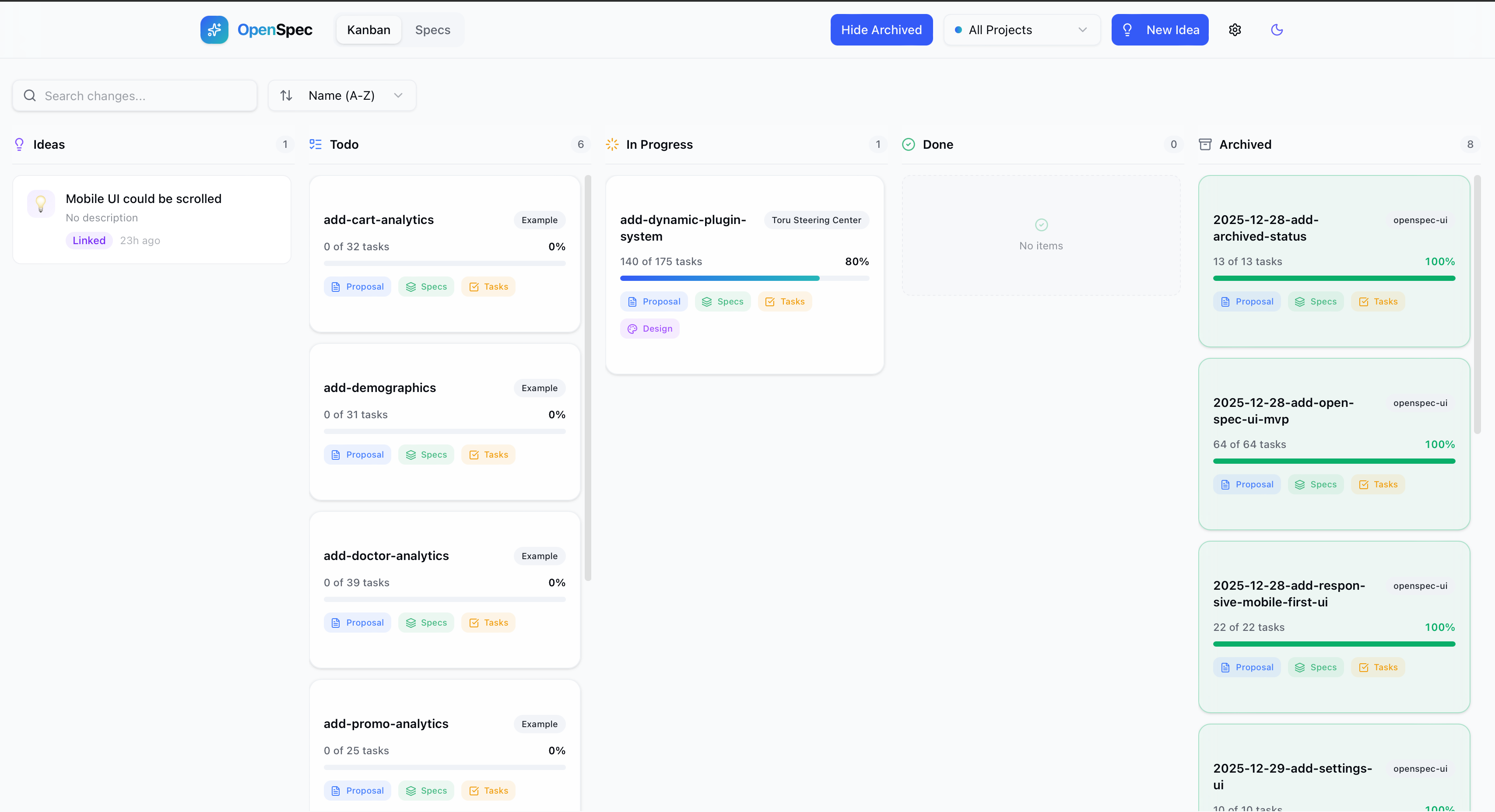
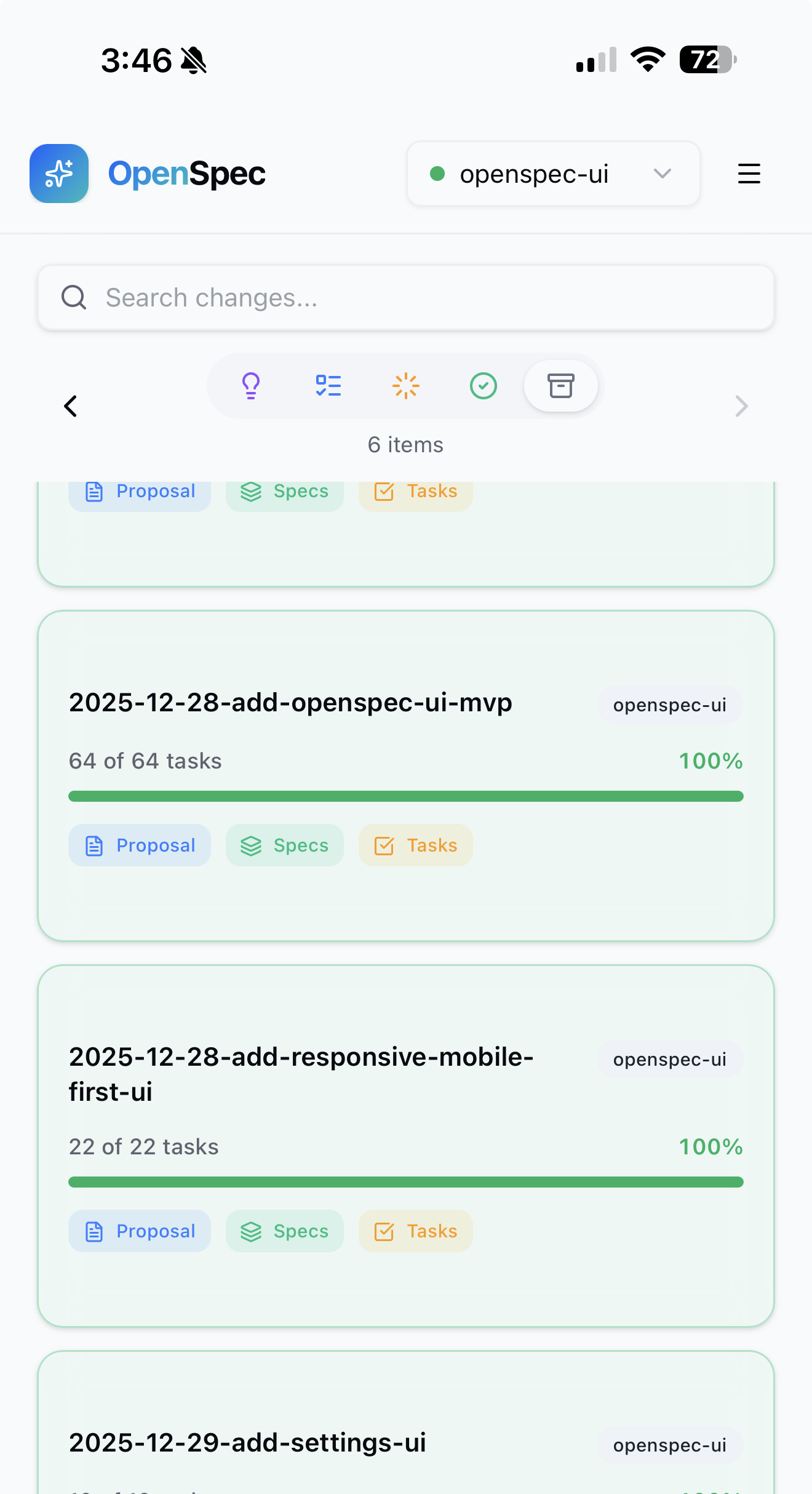
Desktop and mobile views — mobile-first design should work on any device
Why
AI coding assistants are powerful, but when you're working across multiple projects, it's hard to keep track of what's happening where. Which features are in progress? What did the agent finish yesterday? What ideas are waiting to be developed?
OpenSpec UI solves this by giving you a single dashboard to monitor all your AI-assisted projects — capture ideas on the go, watch progress in real-time, and stay in sync with your agents.
What is OpenSpec?
OpenSpec is a spec-driven development (SDD) framework for AI coding assistants. Instead of jumping straight into code, you first define what should be built through structured proposals and specifications. Your AI agent then implements the spec, task by task.
openspec/
├── specs/          # What IS built (source of truth)
├── changes/        # What SHOULD change (proposals + tasks)
└── ideas/          # Quick thoughts to develop later
OpenSpec UI reads this structure and displays it as a kanban board.
What It Does
OpenSpec UI gives you a bird's-eye view of all your AI-assisted projects:
- Artifact chain per change — see
proposal → design → specs → taskswith each one marked written, ready to write next, or blocked and waiting on another artifact. Same vocabulary asopenspec status, read straight from disk. - Multi-repo visibility — monitor every OpenSpec repository from one board
- Capture ideas — quick-capture thoughts that AI agents can later expand into proposals
- Track progress — watch changes move from Ideas → Todo → In Progress → Done
- Real-time updates — auto-refreshes as your agents work through tasks
Because the artifact states are derived from the files themselves, the dashboard needs no OpenSpec install in the repos it watches, and it works the same whether a change was created by you or by an agent.
The Workflow
💡 Idea  →  📋 Proposal  →  ⚡ Implementation  →  ✅ Done
   ↑            ↑                  ↑
  You      AI Agent           AI Agent
- Capture an idea in the UI
- Work with your AI agent to expand it into a full OpenSpec proposal
- Watch progress as the agent implements tasks
- Archive completed changes
OpenSpec UI is the mission control — the actual spec-driven development happens through OpenSpec and your AI coding assistant (Cursor, Claude Code, etc.).
Installation
Option 1: Download Binary (Recommended)
Download the latest release from GitHub Releases:
| Platform | File |
|---|---|
| macOS (Apple Silicon) | openspec-ui-<version>-darwin-aarch64.zip |
| macOS (Intel) | openspec-ui-<version>-darwin-x86_64.zip |
| Linux (x86_64) | openspec-ui-<version>-linux-x86_64.zip |
| Windows (x86_64) | openspec-ui-<version>-windows-x86_64.zip |
# Extract and run (Linux/macOS)
unzip openspec-ui-*.zip
./openspec-ui --config openspec-ui.json
Option 2: Docker
docker build -t openspec-ui .

docker run -p 3000:3000 \
  -v /path/to/your/repos:/repos \
  -v /path/to/openspec-ui.json:/app/openspec-ui.json \
  openspec-ui
Option 3: Build from Source
Prerequisites: Rust (stable), Node.js 18+
# Quick build & run (creates default config if missing)
./build_n_run.sh

# Or step by step:
cd frontend && npm ci && npm run build && cd ..
cd backend && cargo build --release && cd ..
./backend/target/release/openspec-ui --config openspec-ui.json
Configuration
Create openspec-ui.json:
{
  "sources": [
    { "name": "my-project", "path": "/path/to/my-project/openspec" },
    { "name": "another-repo", "path": "/path/to/another-repo/openspec" }
  ],
  "port": 3000
}
| Field | Description |
|---|---|
sources |
Array of OpenSpec directories to monitor |
sources[].name |
Display name for the project |
sources[].path |
Path to the openspec/ directory |
port |
Server port (default: 3000) |
Features
- Kanban Board — Ideas, Todo, In Progress, Done, Archived columns
- Artifact chain — per change: written / ready to write / blocked, with what it is waiting for
- Specs Browser — Browse specifications across all repositories
- Detail View — View proposals, specs, tasks, and design documents
- Real-time Updates — Auto-refreshes when files change (SSE)
- Mobile-first — Works great on phone and tablet
- Light/Dark Theme — Toggle between themes
OpenSpec compatibility
Tested against OpenSpec 1.6, and still reads the pre-1.0 layout.
A change is recognised either by its .openspec.yaml marker (written by openspec new change from 1.0 onward) or by a proposal.md (older layout). This matters: OpenSpec creates the marker first and the proposal only once your agent drafts it, so a change that exists but has no proposal yet is still a change — and shows on the board as proposal: ready instead of being invisible.
Artifact states follow the spec-driven schema — proposal gates design and specs, which together gate tasks — and are computed from the files on disk, so the values match openspec status --change <name> without shelling out to the CLI.
Tech Stack
- Frontend: React + TypeScript + Tailwind CSS + shadcn/ui
- Backend: Rust (Axum)
- Real-time: Server-Sent Events (SSE)
Related
- OpenSpec — The spec-driven development framework this UI is built for
License
MIT
Yorumlar (0)
Yorum birakmak icin giris yap.
Yorum birakSonuc bulunamadi