chat-on-steroids
Health Pass
- License — License: MIT
- Description — Repository has a description
- Active repo — Last push 0 days ago
- Community trust — 438 GitHub stars
Code Fail
- fs module — File system access in .github/workflows/publish.yml
- rm -rf — Recursive force deletion command in .github/workflows/release.yml
- process.env — Environment variable access in .github/workflows/release.yml
- exec() — Shell command execution in extension/chatgpt-dom.js
- exec() — Shell command execution in extension/fiber.js
Permissions Pass
- Permissions — No dangerous permissions requested
No AI report is available for this listing yet.
Cross-platform local MCP capabilities for ChatGPT with Chrome integration, Goal, Compact & Resume, and durable multi-agent workflows.

Chat On Steroids
Give ChatGPT a controlled bridge to your computer.
Local files, commands, durable session history, Compact & Resume, experimental worker chats, and optional Windows desktop control over MCP.
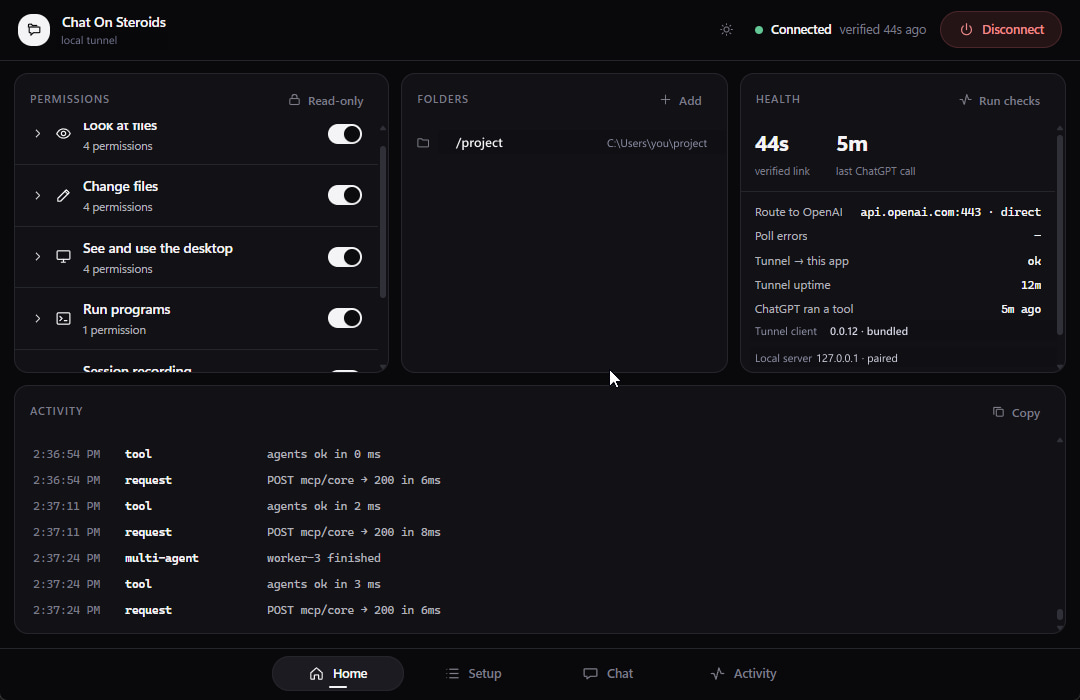
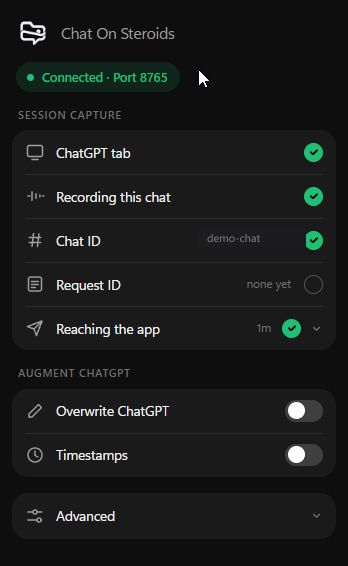
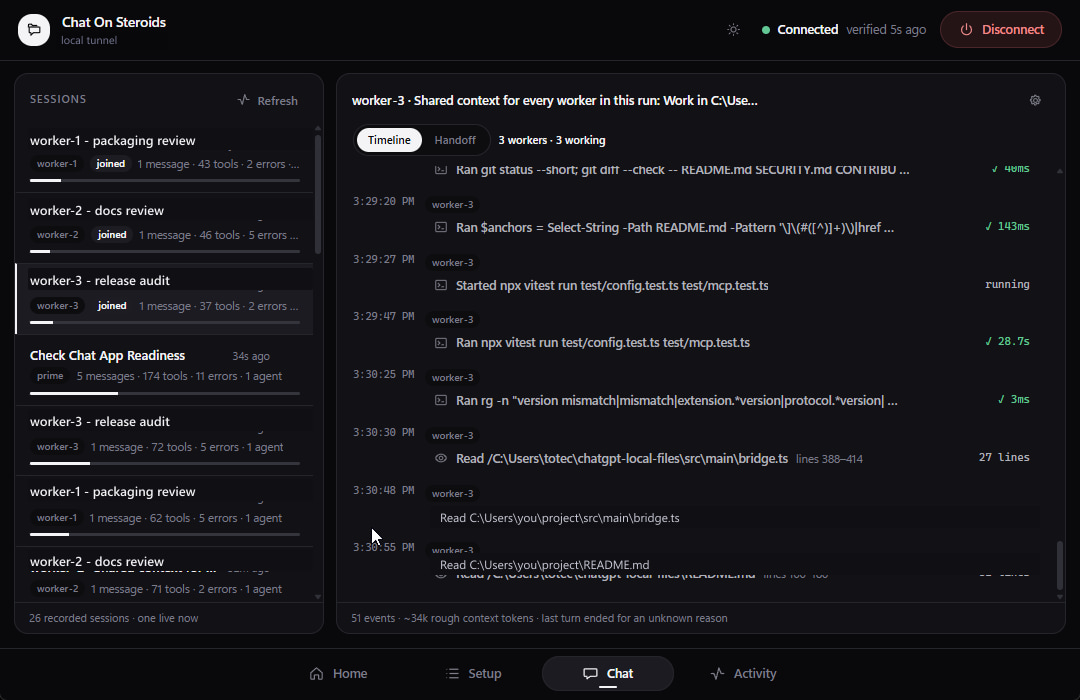
Chat On Steroids is a Windows, macOS and Linux desktop app that exposes only the folders and capabilities you configure through a local MCP server. You keep using ChatGPT in the browser. The app is the permission boundary and local executor; the companion Chrome extension adds browser-side chat attribution, session capture, richer tool rows, Compact & Resume, and experimental multi-agent coordination. Screen/mouse/keyboard/clipboard automation remains Windows-only and is omitted from the macOS/Linux product surface.
Download
| Platform | x64 | ARM64 |
|---|---|---|
| Windows | EXE | EXE |
| macOS | DMG · ZIP | DMG · ZIP |
| Linux | AppImage · DEB | AppImage · DEB |
Every package is architecture-specific and carries matching Electron/native dependencies, tunnel-client, ripgrep and the Chrome extension. Windows uses a per-user-capable assisted installer; macOS ships DMG/ZIP; Linux ships AppImage and Debian packages. On Debian/Ubuntu, prefer the DEB. The portable AppImage uses electron-builder's static launcher; if the host disables unprivileged user namespaces, that launcher can fall back to starting Chromium with --no-sandbox so the app can still run. On such restrictive hosts, use the DEB when you do not want that AppImage fallback. In packaged builds Open extension folder points at a stable per-user copy of the bundled extension, so Chrome's Load unpacked path survives AppImage remounts and app upgrades. A standalone extension zip is attached too for manual installs.
Every release includes SHA256SUMS.txt. Verify an installer before running it, then compare the printed hash with the matching line in that file:
Windows PowerShell:
Get-FileHash .\Chat-On-Steroids-Setup-x64.exe -Algorithm SHA256
macOS / Linux:
shasum -a 256 Chat-On-Steroids-macOS-arm64.dmg   # macOS
sha256sum Chat-On-Steroids-Linux-x64.AppImage   # Linux
Beta, with real permissions
Fresh installs start with the full Core capability set enabled and read-only mode off. Review the Home permission panel before connecting ChatGPT. Run commands can execute arbitrary programs as your logged-in OS user. Windows also starts the optional Desktop permissions enabled; macOS/Linux do not expose Desktop automation at all.
Use a project folder, not your whole profile, drive or filesystem root. Work on code that is committed or backed up. Path containment is defence in depth, not a kernel sandbox. Release binaries are currently publisher-unsigned; OS/browser trust prompts are expected. See Permissions and security boundaries and
SECURITY.md.
What it adds
| Area | What ChatGPT gets |
|---|---|
| Files | Bounded read/search plus preflighted multi-file text patches inside approved roots |
| Commands | Native shell processes and interactive terminal sessions, when enabled |
| Desktop | Windows only: screenshots, window/control inspection, mouse, keyboard and clipboard permissions |
| Sessions | Local durable history, real tool-call evidence and Compact & Resume |
| Workers | Experimental prime/worker chats with deterministic local routing |
| Goal loop | Optional: a second model writes your next message until the goal is met (needs an OpenRouter key) |
The app has no replacement chat UI and does not host a model. It runs quietly in the system tray/menu bar and bridges ChatGPT to capabilities on the computer you already use.
Requirements
- Windows 10/11, macOS 12 Monterey or newer, or a modern desktop Linux distribution, on x64 or ARM64 matching the downloaded build.
- Chrome 116+ if you want session attribution, Compact & Resume, Overwrite, or worker chats.
- Linux: a working Secret Service/keyring backend such as GNOME Keyring or KWallet when you use stored API keys or the companion extension. Electron's unencrypted
basic_textfallback is deliberately refused. - A ChatGPT workspace where Developer mode and custom MCP apps are available on the web. OpenAI currently documents full MCP support, including write/modify actions, as a beta rollout for Business, Enterprise and Edu; Pro can connect custom MCPs for read/fetch only. Business developer mode is admin/owner controlled, while Enterprise/Edu can additionally use workspace permissions/RBAC. Availability, policy and UI can change, so check OpenAI's current Developer mode and MCP apps documentation if your workspace differs.
Use a normal ChatGPT conversation with the custom app enabled. OpenAI's built-in Agent mode currently does not use custom apps; Chat On Steroids' experimental worker chats are a separate browser-augmentation feature.
The recommended connection uses OpenAI's Secure MCP Tunnel. Release builds bundle a pinned, checksum-verified tunnel-client for the installer's CPU architecture. An explicit binary path you configure wins; otherwise the bundled tested copy wins, with PATH / normal install locations used only as fallback. Cloudflare and self-hosted HTTPS tunnels remain available as alternatives.
Three-minute setup
- Install the build for your CPU and open Chat On Steroids.
- Review permissions, then approve one or more project folders.
- Create an OpenAI Secure MCP Tunnel and a restricted API key with Tunnels: Read and Use.
- In ChatGPT on the web, enable Developer mode and create the Core app. On Windows, create the Desktop app too if you enabled screen/control/clipboard permissions. Your workspace admin may need to grant or enable Developer mode first.
- In Chat On Steroids, press Open extension folder. In
chrome://extensions, enable Developer mode, choose Load unpacked, and select that folder. Pairing is automatic.
The Setup tab tracks each hop and only marks it complete once that side of the chain has actually been observed.
OpenAI Secure MCP Tunnel
- In Platform → Tunnels, create a tunnel in the same workspace you use in ChatGPT and copy its ID (
tunnel_…). - In Platform → API keys, create a Restricted key with only Tunnels: Read and Tunnels: Use.
- Paste both into the Setup tab and press Connect.
- In ChatGPT on the web, enable Developer mode from Settings → Apps → Advanced settings, or from the workspace Apps area. Business workspaces require an admin/owner; Enterprise/Edu may also require RBAC access from an admin.
- Create a custom app, choose Tunnel, select the tunnel, review the discovered actions, and publish/enable it as your workspace requires.
For OpenAI tunnels, Core and the optional Windows-only Desktop surface use separate tunnel IDs because ChatGPT addresses each custom app as one endpoint.
Cloudflare quick tunnel
Press Connect, copy the URL the app shows, and use it as the MCP server URL when creating the custom app in ChatGPT. The URL is public and its random path is the capability secret, so treat the complete URL like a password. It changes when the app restarts.
Run your own tunnel
Point your own HTTPS tunnel at the loopback URL shown by the app and give ChatGPT the public equivalent, including the secret path.
After changing permissions or tool shape, refresh/review the custom app in ChatGPT, or recreate it if your workspace does not expose a refresh action, then start a new conversation. ChatGPT can retain the previously reviewed action set, so the desktop app does not pretend it can hot-rewrite an already cached schema.
Experimental browser augmentation and OpenAI terms
The MCP connector uses ChatGPT's documented Developer mode and Secure MCP Tunnel path. The companion extension is different: it observes ChatGPT's web UI, records browser-rendered conversation state locally, and the experimental worker feature opens and seeds additional ChatGPT tabs. Those browser-augmentation paths are experimental and are not a documented public ChatGPT automation API. Depending on the account and workflow, OpenAI terms and policies around automated extraction, rate limits, access controls, safeguards and permitted use may apply. Review the agreement that governs your account before using the extension or multi-agent mode. Do not use these features to scrape or bulk-extract ChatGPT data, evade limits or confirmations, or bypass access and safety controls. See OpenAI's Terms and policies, Services Agreement and current Developer mode documentation.
Unsigned release builds
Release binaries are not yet publisher-signed, and macOS builds are unnotarized, so Windows SmartScreen, macOS Gatekeeper or your browser may warn about an unverified download. Apple-silicon Mach-O files can contain ad-hoc signatures required by the platform; those do not identify a publisher. Verify the SHA-256 first. On Windows, More info → Run anyway is the SmartScreen path; on macOS use the normal system-approved open flow only after verifying the file. If you do not want to run an unverified binary, build from source instead.
Permissions and security boundaries
Fresh installs intentionally start the Core surface fully enabled: file/search/write permissions, command execution, session recording and experimental multi-agent mode are on; read-only mode is off. Windows additionally enables the optional Desktop permissions. macOS/Linux force those Desktop capabilities off at runtime while preserving any stored Windows choices in a config moved between machines. Existing installs otherwise keep their stored choices.
The important boundaries are simple:
- File tools are limited to approved folders. Paths are validated and canonicalised before access. This is application-level containment, not an OS or VM sandbox; same-user filesystem races remain possible.
- Commands are not folder-sandboxed.
exec_commandstarts in an approved folder but then runs with your normal logged-in user privileges and can reach anything that account can reach. - Desktop control is Windows-only and not folder-scoped. Screen capture, mouse/keyboard input and clipboard access apply to the Windows desktop when their permissions are enabled.
- The MCP server is loopback-only. A random secret path protects each local connector. ChatGPT reaches it through the tunnel you configure; treat any complete public tunnel URL as a secret.
- Secrets use Electron
safeStorage: DPAPI on Windows, Keychain on macOS, and a desktop secret store such as libsecret/KWallet on Linux. The app refuses Linux's unencryptedbasic_textfallback and explains how to enable a keyring. - The browser bridge is separate and loopback-only. It exists for the companion extension and does not expose file, command or settings routes.
Read-only mode is the fast kill switch for local mutation: it disables file writes, command execution, desktop control and clipboard writes while leaving read-only capabilities available. See SECURITY.md for reporting and scope.
Connectors and tools
Chat On Steroids publishes Core everywhere and an additional Desktop app on Windows:
| Connector | Purpose | Current tool names |
|---|---|---|
| Core | Approved files, search, patches, terminal, session lookup, workers | read, view_image, find, apply_patch, exec_command, write_stdin, session, agents |
| Desktop | Windows only: screen, windows, mouse/keyboard and clipboard | observe, computer |
Core declares eight possible names but exposes at most seven at once because find is the no-shell search fallback and is mutually exclusive with the command pair. Desktop is optional and Windows-only. Revoking a permission takes effect immediately even if ChatGPT still shows a schema cached earlier; refresh the app in ChatGPT and start a new chat when you change the exposed tool shape.
The public tool contract and permission mapping live in docs/tool-surface.md.
Session recording and the extension
Session recording is on by default for new installs and can be disabled. It stores the local history needed for the Chat timeline and session lookup under the app's per-user data directory: %APPDATA%\chat-on-steroids\sessions\ on Windows, ~/Library/Application Support/chat-on-steroids/sessions/ on macOS, and ${XDG_CONFIG_HOME:-~/.config}/chat-on-steroids/sessions/ on Linux. The small Activity log is separate, capped, redacted and memory-only. Session retention defaults to 30 days.
The bundled Chrome extension adds browser-side conversation identity, page-visible transcript capture, richer tool rows, Compact & Resume, and worker-tab coordination. It runs only on chatgpt.com / chat.openai.com plus the app's loopback bridge ports. App and extension versions move together, so after updating the app, use Reload for the unpacked extension in chrome://extensions.
Compact & Resume
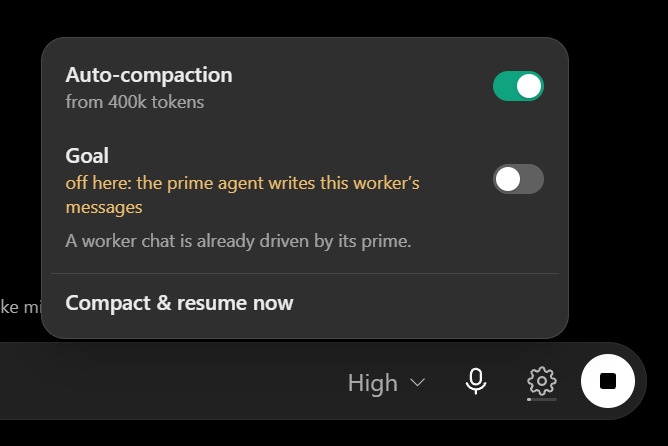
For long recorded sessions, the app estimates context pressure locally. Fresh installs warn around 400k estimated tokens, use 533k as the limit marker, and enable automatic compaction at 400k. These are local estimates, not ChatGPT's private context counter.
Compact & Resume asks the current chat to write a handoff, stores it locally, opens a fresh ChatGPT conversation and rebinds the same local session to it. The original session remains intact if the handoff cannot be completed.
The goal loop (optional, off by default)
Long tasks are mostly you typing "carry on" for an hour. With the goal loop on, a second model
reads each answer ChatGPT finishes. The shipped prompt is deliberately eager: it keeps going while
any concrete task or question you actually asked for is not yet clearly completed or answered,
including requested checklist items the latest answer simply omitted. It stops only when ChatGPT
clearly presents the whole request as done and all requested questions as answered. That explicit
all-done claim is still authoritative, so the second model does not invent extra testing, polish
or follow-up after a genuinely finished task.
It runs only when a turn has genuinely finished. The strongest signal is ChatGPT's exact Fiberend_turn evidence for the current response. When that bit is missing, the extension stays
conservative: Stop must remain gone through the four-second settle window, the answer and tool
rail must be quiet, no connector call may still be unanswered, and a fresh completed-message
action must belong to the exact terminal assistant section. Hidden tabs do not depend on a
throttled debounce timer to notice the final Stop removal. A message sent into a turn that is
still working would read as a correction to it, so ambiguous/interim states stay open.
Give one chat a specific goal. The gear beside the composer has an add specific goal
line under the Goal switch. Write what the chat has to reach, press Save, and the same loop
prompts towards that goal until it is reached, then stops without forgetting the goal text. A
goal is enough on its own: you do not have to turn the standing switch on as well. In a New
Chat it also writes the first message, so a goal is all you have to type. Goals are durable and
per-chat: reopening an old finished chat restores its goal in the UI without automatically
starting stale work, and Compact & Resume transfers the same goal to the replacement chat so
an unattended chain can keep pursuing it across multiple resumptions. The goal stays until you
clear or replace it. A worker chat spawned by an agent run cannot be given one — its prime already
writes its messages, and the sheet says so.
The loop also answers a turn ChatGPT cut short by itself, not only one it finished cleanly. A
turn you stopped by hand is still left alone: you are about to type something yourself.
What is sent is only your messages and ChatGPT's final answers. Tool calls, their results and
the commentary a turn produces while it works never leave the machine; a recorded session holds
file contents and command output, and none of that belongs in a chat message.
It needs an OpenRouter API key, which is stored encrypted alongside the app's other secrets
and never reaches the browser: the request is made by the app. Set the key, model, reasoning level
and editable system prompt under Chat → Settings; the prompt editor includes a one-click
restore to the eager-but-bounded shipped default. The model picker lists OpenRouter's catalogue newest first,
twenty at a time. The switch is also on the gear beside the ChatGPT composer, together with
automatic compaction. A finished or failed Goal status stays visible above the composer for the
finished turn, can be dismissed immediately with its top-right ×, and clears automatically when
you send the next prompt, open New Chat or switch conversations.
Goal decisions use OpenRouter strict JSON Schema with parameter-aware provider routing,
reasoning excluded from the returned response, and Response Healing for malformed JSON. The app
validates the result again locally: wrapped NO_REPLY, tokenizer markers such as<|begin_of_sentence|>, reasoning tags, malformed schemas and empty normalized replies stop or
fail closed and are never typed into ChatGPT.
This spends your OpenRouter credit on every finished turn, and it sends messages to ChatGPT
without asking each time. Turn it off when you are not watching. The terms note in
Experimental browser augmentation and OpenAI terms
applies here too.
Multi-agent mode (experimental)
Fresh installs currently enable multi-agent mode with two workers by default; the hard maximum is eight. One prime chat can open worker chats and exchange brokered messages with them. Workers cannot message each other directly.
Workers are reusable conversations, not disposable one-shot tabs. When a worker reports its
result, or the app durably observes that its turn has naturally settled, it normally goes to
sleep and frees its worker slot while keeping the full ChatGPT conversation. Messaging that
sleeping worker wakes the same conversation again. If its tab is still open the extension reuses
and focuses that exact tab; if it was closed, the app reopens the stored /c/<conversation> and
types the prime's new instruction there as an ordinary user message. Waking consumes a free slot
and is refused before anything is queued or typed when no slot is available. At roughly 400k
recorded context tokens a worker becomes non-revivable after its next stop instead of being
reused indefinitely.
Worker chats never Compact & Resume themselves: automatic compaction is disabled for them and
the manual Compact & Resume action is unavailable. Reaching 400k does not interrupt or replace the
worker conversation; it may finish the live task and receive messages normally, then its next stop
becomes permanent and the same chat remains only as non-revivable history.
Sleeping workers belong to the prime conversation's durable worker history, not to a global
swarm lock. If the last working worker goes to sleep, that active run is parked immediately and
another ChatGPT conversation may start its own workers. The original prime still sees its own full
history in agents action=status, including sleeping and permanently non-revivable rows, can spawn
a fresh worker-N without reviving an older sleeper, and can later wake any reusable old worker in
its exact original chat once the global execution slot is free. Friendly ids such as worker-1
are scoped to that prime history, so two primes may each retain their own worker-1 without
sharing identity or workspace. Compact & Resume moves that complete worker history and revival
authority from the parent chat to its resumed child. Explicitly clearing the swarm is the action
that discards that retained ownership. Turning Multi-agent off is only an execution pause:
queued browser work is withdrawn and active workers are parked, but every prime-owned worker
history stays durable across disabled app restarts and is available again after re-enable.
Agent identity is deliberately fail-closed. spawn, worker messaging and other identity-sensitive
operations require the companion extension to prove which ChatGPT conversation made the MCP call.
If the same chat is being used from a client the extension cannot observe, such as a phone app,
ordinary Core tools can still work but multi-agent control is refused rather than guessed.
This is experimental browser automation, and parallel chats can edit the same files or spend account limits quickly. Use it only on work you can recover, keep worker ownership explicit, and turn the feature off when you do not want ChatGPT tabs opened or coordinated automatically. The terms note in Experimental browser augmentation and OpenAI terms applies here.
Troubleshooting
- Tools missing or still visible after a permission change: refresh/review the custom app in ChatGPT, or recreate it if needed, then start a new conversation so it discovers the current schema.
- Extension says app not found: session recording or multi-agent mode must be on for the browser bridge to run; then reopen the extension popup.
- Extension version mismatch: reload the unpacked extension after every app update.
agentssaysUNIDENTIFIED_CALLER: open/use that same ChatGPT conversation in the paired desktop browser so the extension can observe its connector request id. The app intentionally will not infer agent identity from the active tab or timing.- OS/browser warning about an unverified app: expected for the unsigned beta. Verify
SHA256SUMS.txtbefore overriding an OS trust prompt. - Linux says secure credential storage is unavailable: start/unlock GNOME Keyring, KWallet or another Secret Service provider, then restart the app. The insecure Electron
basic_textfallback is intentionally rejected. - Tunnel unavailable: use Advanced settings to point at an explicit
tunnel-client/cloudflaredexecutable, or use the bundled copy from the release build.
Contributing
Bug reports, feature requests and PRs are welcome. Please read CONTRIBUTING.md first. Security issues go through SECURITY.md, privately rather than in an issue or PR. Release history is in CHANGELOG.md.
Development
npm ci
npm run dev        # run the app with hot reload
npm run verify     # the same gate CI runs
Building
npm run dist:x64          # Windows x64 EXE
npm run dist:arm64        # Windows ARM64 EXE
npm run dist:mac:x64      # macOS Intel DMG + ZIP
npm run dist:mac:arm64    # macOS Apple Silicon DMG + ZIP
npm run dist:linux:x64    # Linux x64 AppImage + DEB
npm run dist:linux:arm64  # Linux ARM64 AppImage + DEB
Run platform packaging on that operating system; the reusable release workflow does exactly that on native Windows/macOS/Linux x64/ARM64 runners. Packaging pins and verifies the target-specific tunnel/ripgrep assets, stages matching native dependencies, builds the platform artifacts, and runs the packaged-runtime smoke test. A final assemble job downloads all six package jobs, builds the standalone extension ZIP, generates SHA256SUMS.txt, and uploads one release-candidate artifact ready for publication.
Licence
MIT — see LICENSE.
Not affiliated with, endorsed by, or connected to OpenAI. "ChatGPT" is a trademark of
OpenAI; it is used here only to describe what this tool interoperates with.
Reviews (0)
Sign in to leave a review.
Leave a reviewNo results found