kybern
Health Gecti
- License — License: MIT
- Description — Repository has a description
- Active repo — Last push 0 days ago
- Community trust — 79 GitHub stars
Code Gecti
- Code scan — Scanned 12 files during light audit, no dangerous patterns found
Permissions Gecti
- Permissions — No dangerous permissions requested
Bu listing icin henuz AI raporu yok.
Kybern is a desktop and mobile control plane for your coding agent harnesses

Kybern
The multi-threaded desktop studio for autonomous coding agents.
Orchestrate Claude Code, Codex, OpenCode, Cursor, and Pi in isolated git worktrees with native protocols, unified diffs, and zero context leakage.
English • Bahasa Indonesia






Quick Install • Supported Agents • Features • Command Line • Development • Guide
Why Kybern?
- ⚡ True Parallelism & Worktree Isolation: Run multiple coding agents concurrently on the same codebase without merge conflicts or dirty working copies. Each thread can spin up its own git worktree.
- 🔌 Native Protocol Drivers: Kybern speaks directly to each agent's native JSON-RPC, stdio, or app-server protocols rather than fragile terminal screen scraping.
- 🛡️ Local-First & Isolated Secrets: Transcripts, logs, and checkpoints remain on your machine. API keys and secrets requested during execution go straight to git-ignored
.envfiles. - 📱 Headless & Mobile Mobility: Run daemon workloads on remote servers over SSH or Tailscale, and monitor streaming turns, approvals, and diffs from the iOS/Android companion app.
Supported Agents
Kybern connects to every major agent harness natively. You need at least one agent installed and authenticated on your machine—Kybern automatically discovers and connects to them:
| Harness | Integration Layer | Delegation & Lead | Full Access Launch Mode |
|---|---|---|---|
| Claude Code | Native CLI protocol | Supported | --permission-mode bypassPermissions --allow-dangerously-skip-permissions |
| OpenAI Codex | App-Server protocol | Supported | Approval policy never, sandbox danger-full-access |
| OpenCode | Server API (v1.10+ / v2.2+) | Supported | *: allow rule set |
| Cursor | Official Local SDK | Supported | Sandbox & automatic review disabled |
| Pi / Oh My Pi | RPC / stdio session | Supported | yolo approvals |
Quick Install
Download installers and assets directly from GitHub Releases.
| Platform | Supported Architecture | Recommended Method |
|---|---|---|
| macOS | Apple Silicon (aarch64) & Intel (x86_64) |
curl -fsSL https://github.com/Tresnanda/kybern/releases/latest/download/kybern-gpuix-mac-install.sh | sh |
| Windows | Windows 10 (1809+) & Windows 11 (x64) | Download Setup .exe |
| Linux | Ubuntu, Debian, Fedora, openSUSE, Arch (x64) | curl -fsSL https://github.com/Tresnanda/kybern/releases/latest/download/kybern-gpuix-linux-install.sh | sh |
| Remote Server | Headless Linux & macOS (over SSH / Tailscale) | curl -LsSf https://github.com/Tresnanda/kybern/releases/latest/download/kybern-remote-install.sh | sh -s -- --service |
| Mobile Companion | Android & iOS | Download Preview APK |
Platform Details
macOS
Apple Silicon (aarch64) and Intel (x86_64).
curl -fsSL https://github.com/Tresnanda/kybern/releases/latest/download/kybern-gpuix-mac-install.sh | sh
You can also download kybern-gpuix_<version>_aarch64.app.tar.gz or _x86_64.app.tar.gz from the latest release.
[!NOTE]
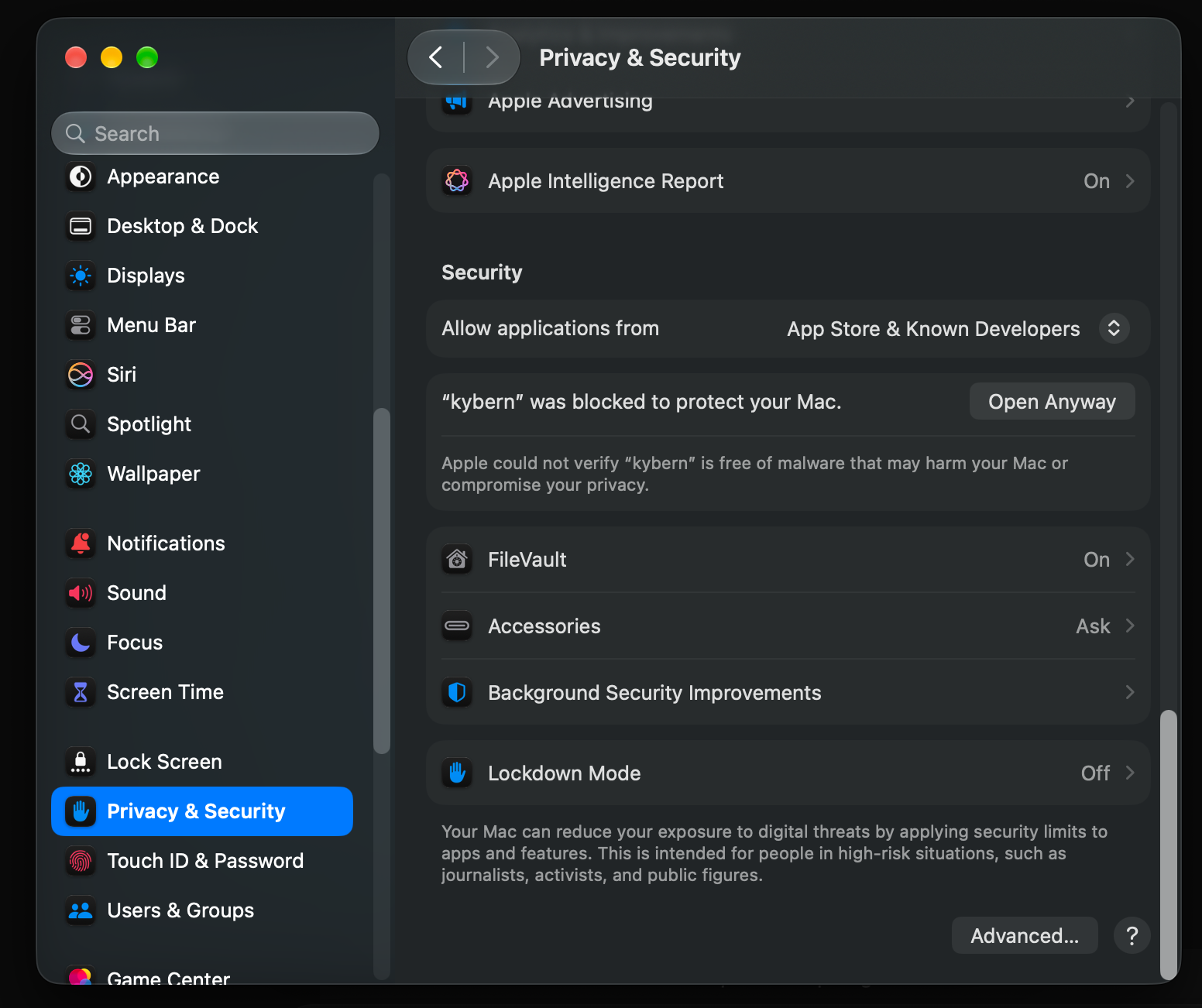
First-time Gatekeeper Notice (macOS):
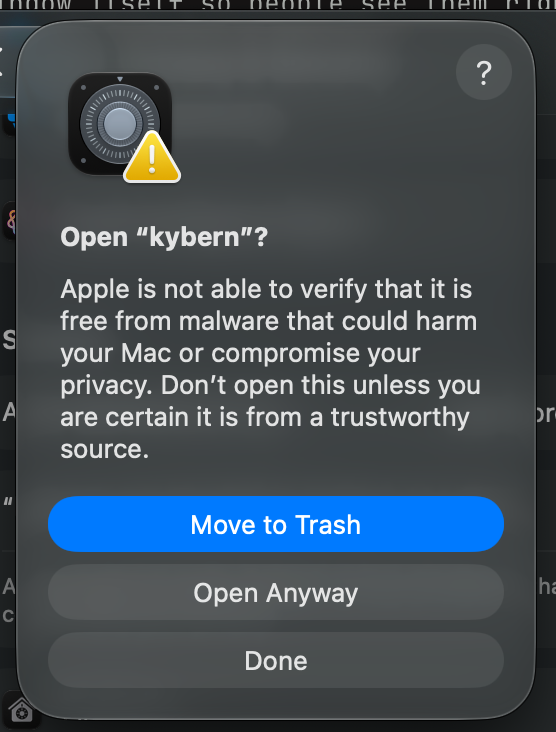
If downloaded via a browser, Gatekeeper will show "Apple could not verify Kybern is free of malware".
- Click Done on the dialog.
- Open System Settings → Privacy & Security, scroll to Security, and click Open Anyway next to Kybern:
- Confirm with Open Anyway using Touch ID or your password:
(Note: The curl install script automatically handles this step).
Windows
Windows 10 (version 1809 or later) and Windows 11, x64.
- Download
kybern-gpuix_<version>_x64-setup.exefrom Releases. - Run the installer. It installs for your user account without requiring administrator privileges.
- If Microsoft Defender SmartScreen displays a warning, click More info → Run anyway.
Linux
x86_64 distributions with glibc 2.35 or newer (Ubuntu 22.04+, Debian 12+, Fedora 36+, openSUSE Leap 16 / Tumbleweed, Arch Linux):
curl -fsSL https://github.com/Tresnanda/kybern/releases/latest/download/kybern-gpuix-linux-install.sh | sh
- The installer detects your package manager and installs
.deb(viaapt) or.rpm(viadnforzypper), falling back to AppImage. - To force the AppImage: append
sh -s -- --appimage. - To uninstall: append
sh -s -- --uninstall(your data in~/.kybernis preserved).
Mobile Companion (Android & iOS)
Track agent progress when away from your desk. The companion app streams turns, requests approvals, browses files and diffs, and manages project tasks.
- Android: Download the preview APK from the GitHub release.
- iOS: Available via development build (see the Mobile Companion README).
- Pairing: In the desktop app, click Pair a device and scan the QR code with your phone. To connect across external networks, enable Reachable over Tailscale.
Headless Server / Remote Agents
Run daemon workloads on a dedicated server or VPS while controlling them from your desktop or phone:
- Via Desktop App: Go to Switch environment → Add environment → Over SSH and enter
user@host. Kybern installs the daemon and tunnels traffic over SSH automatically. - Manual Server Setup: Install the daemon and CLI as a persistent systemd user service:
curl --proto '=https' --tlsv1.2 -LsSf \
  https://github.com/Tresnanda/kybern/releases/latest/download/kybern-remote-install.sh | sh -s -- --service
Features
- Multi-Agent Threads: Launch multiple agent sessions concurrently. Each thread maintains its own agent, model, and permission tier. Switch any conversation to a different harness or account at any time.
- Granular Turn Inspection: Every turn folds into an audited summary (e.g., "Worked for 3m") containing exact terminal commands, file edits, and git diffs. Undo changes or rewind conversations to any prior checkpoint.
- Autonomous Delegation & Coordinator: Instruct an agent to "have Codex implement this and Claude review it". Helper agents automatically appear as linked sub-threads. Projects can also designate a Coordinator—a long-running lead thread that schedules tasks and reviews results.
- Interactive Approvals & Secret Isolation: Permissions, questions, and API key prompts appear as interactive cards on your desktop and phone. Submitted secrets are written directly to your project's git-ignored
.envfile, never leaked into chat contexts. - Integrated Workspace: Built-in terminals, file tree, code editor, pull request reviews, notes, and tasks stay right alongside your conversations.
- Live In-App Previews: Agents can spin up interactive web pages or dev server previews right in the thread with zero port conflicts.
- Resume Native Sessions: Pick up previous conversations started in an agent's native CLI (Claude Code, Codex, OpenCode, Cursor, Pi) with complete message and tool history.
Explore advanced workflows, permissions, and settings in the Kybern Guide.
Command Line
Kybern includes a command-line client (kybern) that connects to the same daemon as the desktop app:
# Discover available and authenticated agent harnesses
kybern providers

# Start a new task in the current project
kybern new -p . "explain this repo in three lines"

# Inspect active threads and stream live events
kybern threads
kybern watch

# Send a message to an active thread
kybern send <thread-id> "implement the feedback and run tests"

# Resume an existing session from Claude Code or Codex
kybern sessions --provider claude-code
kybern resume --provider claude-code <native-session-id>
Enable automatic PATH integration in Settings → About → Terminal command → Install.
Updates
Kybern automatically checks for updates on startup and every few hours (or manually via Settings → About). When an update is ready, a notification card appears: click Update and restart to apply it.
On Linux distributions using .deb or .rpm, Kybern provides the exact apt or dnf command to run. Conversations in progress are preserved across daemon restarts and resume on your next message.
(Note: The older Tauri-based desktop app was retired after 0.18.0; Kybern GPUIX uses the same data in ~/.kybern, ensuring your projects and history carry over seamlessly).
Development
Build the Rust daemon, CLI, and GPUIX desktop app from source:
# Build Rust daemon and CLI (seconds)
cargo build -p kybern

# Launch a local scratch daemon
./target/debug/kybernd --data-dir /tmp/kyb --port 4199

# Build and run Kybern GPUIX desktop app
cd apps/gpuix
pnpm install --frozen-lockfile
native/update.sh                      # build the patched GPUIX addon
KYBERN_DATA_DIR=/tmp/kyb pnpm dev
For more details on testing and contributing, see CONTRIBUTING.md and RELEASING.md.
Architecture & Privacy
Kybern follows a strict local-first architecture:
- No Cloud Relay: All traffic stays on your own machines and private network. The app talks directly to your local daemon or connects across your machines over Tailscale (or your own peer relay), with zero third-party cloud servers in between.
- Data Privacy: Your transcripts, git checkpoints, and configurations remain on your machine in
~/.kybern. No tracking, telemetry, or third-party analytics are bundled. - Secret Safety: API keys requested through
kybern_request_secretare written directly to your project's git-ignored.envfile, bypassing chat context entirely.
Acknowledgements
Kybern is inspired by pioneering work from the agentic coding community, especially T3 Code and Synara.
License
Released under the MIT License.
Yorumlar (0)
Yorum birakmak icin giris yap.
Yorum birakSonuc bulunamadi