agentrules-architect
Health Gecti
- License — License: MIT
- Description — Repository has a description
- Active repo — Last push 0 days ago
- Community trust — 112 GitHub stars
Code Gecti
- Code scan — Scanned 12 files during light audit, no dangerous patterns found
Permissions Gecti
- Permissions — No dangerous permissions requested
AgentRules Architect is a CLI tool and harness that generates AGENTS.md / CLAUDE.md files and execution plans for various AI coding agents (like Codex, Cursor, and Claude Code). It automates project analysis to help configure and standardize how these AI assistants interact with your codebase.
Security Assessment
Overall Risk: Medium. This tool inherently requires handling sensitive data to function. It manages and stores API keys for multiple LLM providers (Anthropic, OpenAI, DeepSeek, etc.) locally in a configuration file (`~/.config/agentrules/config.toml`). It makes network requests to external AI provider APIs and features an optional integration for Tavily web search. Furthermore, since it acts as a harness for coding agents, it facilitates the execution of generated commands and code.
However, the automated audit passed with flying colors: it scanned 12 files and found no hardcoded secrets or dangerous code patterns. It does not request inherently dangerous OS permissions, and API keys are kept locally rather than transmitted to a third-party server.
Quality Assessment
The project appears to be highly maintained and trustworthy. It was recently updated (pushed within the last day) and utilizes the permissive and standard MIT license. It has garnered 112 GitHub stars, indicating solid community adoption and interest. The repository is well-documented, packaged for PyPI, and features a clear, professional structure.
Verdict
Safe to use, provided you follow standard security practices for API key management and carefully review any generated execution plans or automated changes before applying them to your codebase.
AGENTS.md/CLAUDE.md generator and ExecPlan harness for Codex, Claude Code, Cursor, Antigravity, OpenCode and other coding agents. Use api keys or authenticate with Codex
🤖 AgentRules Architect v3






Your multi-provider AI code analysis and AGENTS.md generator 🚀
Demo • Highlights • Features • Requirements • Installation • Codex Runtime • CLI • Configuration • Architecture • Outputs • Development
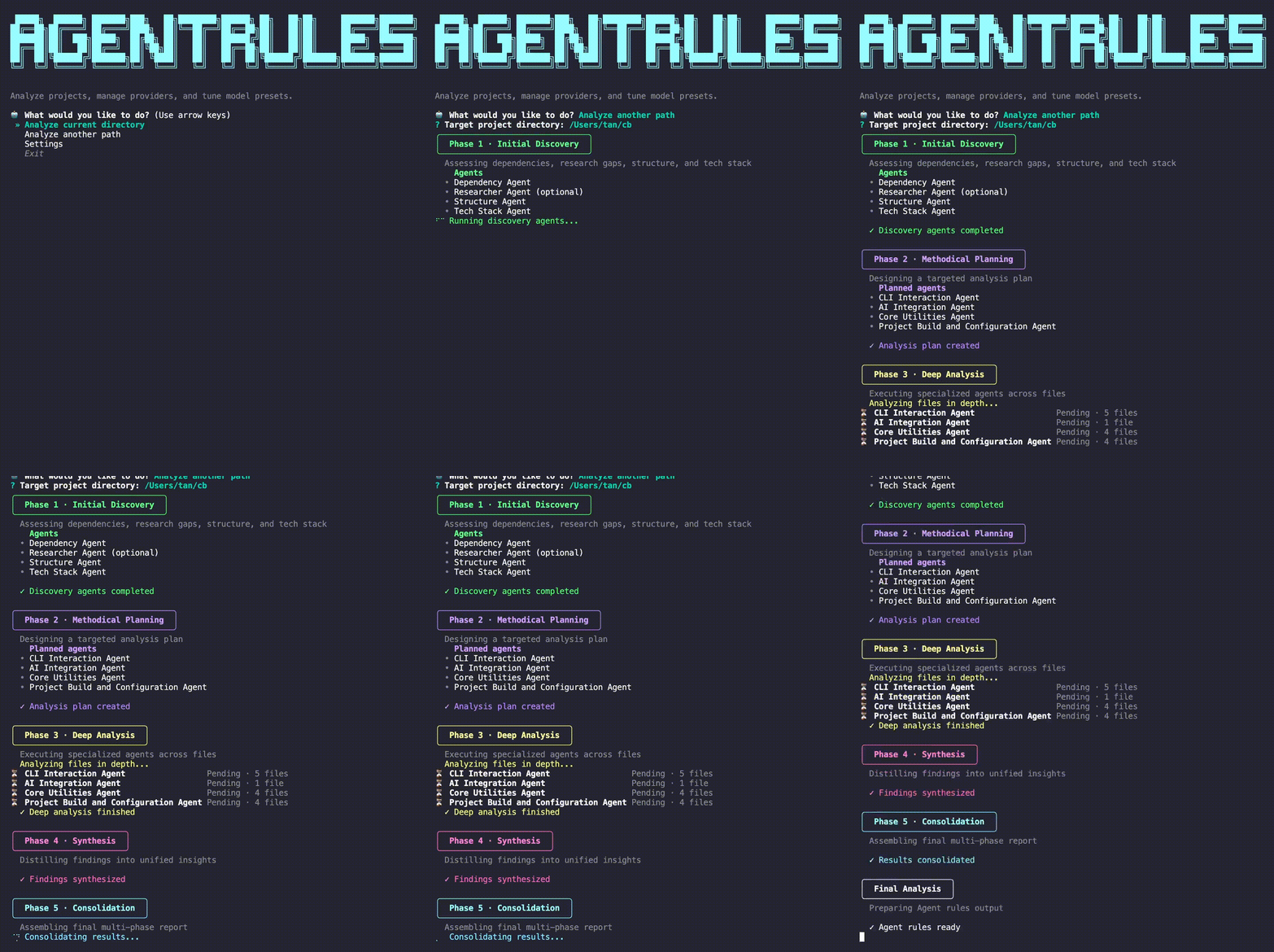
🎥 CLI Demo
Why AgentRules Architect?
Version 3 rebrands the project from CursorRules Architect to AgentRules Architect to match the standardized AGENTS.md contract used across modern AI coding agents. The rename comes with a fresh Typer-powered CLI, a persistent configuration service, broader provider support across Anthropic, OpenAI, Google, DeepSeek, xAI, and the local Codex app-server runtime, and a tooling layer that keeps the six-phase analysis reliably consistent yet flexibly extensible to your project's unique needs.
🔥 v3 Highlights
- ✨ Rebrand & packaging – ships on PyPI with console-script and
python -m agentrulesentry points. - 🧭 Typer CLI overhaul –
agentruleslaunches an interactive main menu with subcommands foranalyze,configure, andkeys. - 🗂️ Persistent settings – API keys, model presets, logging, and output preferences live in
~/.config/agentrules/config.toml(override withAGENTRULES_CONFIG_DIR). - 🧠 Expanded provider matrix – the preset catalog spans Anthropic, OpenAI, Google, DeepSeek, xAI, and Codex runtime presets, with phase-by-phase model selection from the CLI or config file.
- 🧰 Codex runtime support – route phases through local
codex app-serverwith ChatGPT auth viaCODEX_HOME(no AgentRules-stored OpenAI API key required). - 🔌 Unified tool management – the new
ToolManageradapts JSON tool schemas for each provider; Tavily web search is available to researcher agents with one toggle. - ✅ Test & quality backbone – 200+ unit/integration tests, Pyright, Ruff, and offline stubs provide confidence without hitting live APIs.
✨ Feature Overview
- 🌐 Multi-provider orchestration with consistent streaming telemetry.
- 🔍 Six-phase pipeline: discovery → planning → deep dives → synthesis → consolidation → final AGENTS.md generation.
- 🧩 Researcher tooling via Tavily search with provider-aware tool translation.
- 📊 Rich terminal UI (Rich) showing per-agent progress, duration, and failures in real time.
- 🪵 Configurable outputs:
AGENTS.md,SNAPSHOT.md(enabled by default),.cursorignore, optional.agent/scaffold templates, and per-phase markdown/json snapshots. - 🔧 Declarative model presets plus runtime overrides via CLI or TOML.
🧮 Analysis Pipeline
All CLI entry points ultimately execute the AnalysisPipeline orchestrator (src/agentrules/core/pipeline) that wires the six analysis phases together and streams progress events to the Rich console.
- Phase 1 – Initial Discovery (
core/analysis/phase_1.py) inventories the repo tree, surfaces tech stack signals, and collects dependency metadata that later phases reuse. - Phase 2 – Methodical Planning (
core/analysis/phase_2.py) asks the configured model to draft an XML-ish agent plan, then parses it into structured agent definitions (with a safe fallback extractor). - Phase 3 – Deep Analysis (
core/analysis/phase_3.py) spins up specialized architects per agent definition, hydrates them with file excerpts, and runs them in parallel; if no plan exists it falls back to three default agents. - Phase 4 – Synthesis (
core/analysis/phase_4.py) stitches together Phase 3 findings, elevates cross-cutting insights, and flags follow-up prompts for the final steps. - Phase 5 – Consolidation (
core/analysis/phase_5.py) produces a canonical report object that downstream tooling (rules generator, metrics, exporters) consumes. - Final Analysis (
core/analysis/final_analysis.py) produces the narrative summary that drivesAGENTS.md, output toggles, and console highlights.
The pipeline captures metrics (elapsed time, agent counts) and hands them to the output writer so offline runs and full analyses share the same persistence path.
🛠 Requirements
- Python 3.11.9+ (matches Pyright target and packaged metadata).
- API key(s) for at least one provider:
- Anthropic
- OpenAI
- DeepSeek
- xAI
- Tavily (optional, enables live web search tooling)
- Optional local runtime provider:
- Codex CLI (
codex) forcodex app-serverintegration
- Codex CLI (
- Current preset IDs live in
src/agentrules/config/agents.py. - Core dependencies:
anthropic,openai,google-genai>=1.51.0,tavily-python,tiktoken,rich,typer,questionary,platformdirs,pathspec,python-dotenv,protobuf. - Dev tooling:
pytest,pytest-asyncio,pytest-mock,flask,ruff,pyright.
📦 Installation
Install from PyPI
pip install -U agentrules
- Package page: https://pypi.org/project/agentrules/
- Test index page: https://test.pypi.org/project/agentrules/
Install from source
git clone https://github.com/trevor-nichols/agentrules-architect.git
cd agentrules-architect
python -m venv .venv
source .venv/bin/activate
pip install -e ".[dev]"
Need a one-liner? Use the helper script:
./scripts/bootstrap_env.sh # set PYTHON_BIN=/abs/path/to/python to override interpreter
Quick smoke test
agentrules --version
agentrules analyze /path/to/project
Prefer module execution during development? Invoke the CLI with Python’s module flag—the package ships a __main__ entry point:
python -m agentrules analyze /path/to/project
Need to install directly from GitHub instead of PyPI?
pip install "git+https://github.com/trevor-nichols/agentrules-architect.git#egg=agentrules"
Need to validate against TestPyPI specifically?
pip install -i https://test.pypi.org/simple/ --extra-index-url https://pypi.org/simple agentrules==3.4.1
🔐 Configure API Keys
Run the interactive configurator to store credentials securely:
agentrules configure
- Keys are saved to
~/.config/agentrules/config.toml(override withAGENTRULES_CONFIG_DIR). - Values are mirrored into environment variables on the next launch.
- Use
agentrules configure --provider openaifor quick single-key updates. - Show current status with:
agentrules keys
🧰 Configure Codex Runtime (Optional)
AgentRules supports Codex as a local runtime provider via codex app-server, separate from API-key providers.
- Open
agentrules->Settings->Codex runtime - Configure:
- executable path (
codexby default) CODEX_HOMEstrategy (managedorinherit)- optional managed home override
- executable path (
- Use
Sign in with ChatGPTto authenticate runtime-backed model access.
After runtime setup, choose Codex presets under Settings -> Model presets per phase.
See docs/codex-runtime.md for complete setup, auth flow, model catalog behavior, and live smoke instructions.
🧭 CLI At A Glance
agentrules– interactive main menu (analyze, configure models/outputs, check keys).agentrules analyze /path/to/project– full six-phase analysis.agentrules analyze /path/to/project --rules-filename CLAUDE.md– one-run override for output rules filename.agentrules snapshot generate [path]– create (or refresh)SNAPSHOT.mdin the current directory by default.agentrules snapshot sync [path]– sync an existing snapshot as project files evolve (also creates if missing).agentrules execplan new \"Title\"– create a new ExecPlan markdown file under.agent/exec_plans/active/<slug>/.agentrules execplan complete EP-YYYYMMDD-NNN [--date YYYYMMDD]– move a full ExecPlan directory under.agent/exec_plans/complete/YYYY/MM/DD/EP-YYYYMMDD-NNN_<slug>/.agentrules execplan list [--path]– list active ExecPlans with compact milestone progress (completed/total).agentrules execplan milestone new EP-YYYYMMDD-NNN \"Title\" [--ms N]– create a milestone under a specific ExecPlan (auto sequence by default, or explicitMS###when provided).agentrules execplan milestone list EP-YYYYMMDD-NNN [--active-only]– list milestones for one ExecPlan.agentrules execplan milestone complete EP-YYYYMMDD-NNN --ms <N>– move an active milestone sequence into themilestones/complete/directory.agentrules execplan milestone remaining EP-YYYYMMDD-NNN [--path]– show active milestones left for one ExecPlan.agentrules execplan-registry [build|check|update]– manage.agent/exec_plans/registry.jsonfrom ExecPlan front matter.agentrules scaffold sync [--check|--force]– sync.agent/PLANS.mdand.agent/templates/MILESTONE_TEMPLATE.mdwith packaged defaults.agentrules configure --models– assign presets per phase with guided prompts; the Phase 1 → Researcher entry lets you toggle the agent On/Off once a Tavily key is configured.agentrules configure --outputs– toggle.cursorignore,.agent/scaffold generation,phases_output/, and custom rules filename.agentrules configure --logging– set verbosity (quiet,standard,verbose) or export viaAGENTRULES_LOG_LEVEL.
🧭 ExecPlan & Milestones
ExecPlans are long-horizon execution artifacts for work that is too large for a single prompt/session and too risky to run as ad hoc edits.
They give humans and agents a durable plan, explicit scope, and audit trail that can survive context switching across days or weeks.
This follows the same general planning pattern OpenAI now recommends for larger Codex work: start with an implementation plan, then execute it iteratively in smaller scoped chunks (see OpenAI Codex docs and How OpenAI uses Codex).
Think of the model in three layers:
- ExecPlan (strategic layer) – one high-level objective, constraints, success criteria, and overall rollout strategy.
- Milestones (delivery layer) – concrete sub-deliverables within that plan, sequenced (
MS001,MS002, ...) and independently completable. - Task checklists (execution layer) – fine-grained implementation/validation steps inside each plan or milestone document.
Why this exists:
- Keep long-running work coherent across multiple agent runs.
- Make progress and remaining scope visible at a glance.
- Reduce regressions by forcing explicit sequencing, verification, and rollback thinking.
- Preserve design decisions and rationale in one canonical place.
ExecPlans and milestones use canonical IDs and deterministic file locations:
- ExecPlan ID:
EP-YYYYMMDD-NNN - Milestone ID:
EP-YYYYMMDD-NNN/MS### - Active ExecPlan path:
.agent/exec_plans/active/<plan-slug>/EP-YYYYMMDD-NNN_<plan-slug>.md - Complete ExecPlan path:
.agent/exec_plans/complete/YYYY/MM/DD/EP-YYYYMMDD-NNN_<plan-slug>/EP-YYYYMMDD-NNN_<plan-slug>.md - Active milestone path:
.agent/exec_plans/active/<plan-slug>/milestones/active/MS###_<milestone-slug>.md - Complete milestone path:
.agent/exec_plans/active/<plan-slug>/milestones/complete/MS###_<milestone-slug>.md
Milestone creation is parent-first and sequence-safe:
- Users provide parent ExecPlan ID + milestone title.
- CLI/API assign
MS###automatically, or accept--ms Nto request a specific sequence. - Sequence is monotonic per plan across active and completed milestones (
MS001,MS002, ...). .agent/templates/MILESTONE_TEMPLATE.mdis a guidance scaffold for authors.
Generated milestone files come from an internal file template used byexecplan milestone new.
Examples:
# 1) Create an ExecPlan
agentrules execplan new "Auth Refresh" --date 20260207

# 2) Create milestones for that plan (auto-assigns MS001, then MS002, ...)
agentrules execplan milestone new EP-20260207-001 "Design callback flow"
agentrules execplan milestone new EP-20260207-001 "Implement callback flow"

# Optional: request an explicit sequence (must be unused)
agentrules execplan milestone new EP-20260207-001 "Backfill docs" --ms 5

# 3) List milestones (all or active-only)
agentrules execplan milestone list EP-20260207-001
agentrules execplan milestone list EP-20260207-001 --active-only

# Optional: compact "what's left" view for active milestones only
agentrules execplan milestone remaining EP-20260207-001

# 4) Archive a completed milestone
agentrules execplan milestone complete EP-20260207-001 --ms 1

# 5) Complete the ExecPlan directory
agentrules execplan complete EP-20260207-001 --date 20260212

# Optional: list all active plans with compact milestone progress
agentrules execplan list
⚙️ Configuration & Preferences
- Config file:
~/.config/agentrules/config.tomlproviders– API keys per provider.codex– local runtime settings (cli_path,home_strategy,managed_home).models– preset IDs applied to each phase (phase1,phase2,final,researcher, …).outputs–generate_cursorignore,generate_agent_scaffold,generate_phase_outputs,generate_snapshot,rules_filename,snapshot_filename.generate_snapshotdefaults totrueand writesSNAPSHOT.mdat project root after each analysis run (toggle anytime inagentrules configure --outputs).
features–researcher_mode(on/off) to control Phase 1 web research (managed from the Researcher row in the models wizard).exclusions– add/remove directories, files, or extensions; choose to respect.gitignore.
- Runtime helpers (via
agentrules/core/configuration/manager.py):ConfigManager.get_effective_exclusions()resolves overrides with defaults fromconfig/exclusions.py.ConfigManager.should_generate_phase_outputs()and related methods toggle output writers incore/utils/file_creation.
- Environment variables:
AGENTRULES_CONFIG_DIR– alternate config root.AGENTRULES_LOG_LEVEL– overrides persisted verbosity.AGENTRULES_RULES_FILENAME– runtime override for generated rules filename (for exampleCLAUDE.md).CODEX_HOME– used when Codexhome_strategy = "inherit".
- Rules filename precedence:
agentrules analyze --rules-filename <name>AGENTRULES_RULES_FILENAMEoutputs.rules_filenameinconfig.toml(set viaagentrules configure --outputs)AGENTS.mddefault
🧠 Model Presets & Providers
Presets live in config/agents.py via the MODEL_PRESETS dictionary. Each preset bundles:
- Provider (
ModelProvider) - Model name plus reasoning/temperature configuration
- Human-readable label and description for the CLI wizard
The app currently exposes presets across these providers:
- Anthropic
- OpenAI
- Codex App Server (local runtime)
- DeepSeek
- xAI
Choose any available preset per phase through the CLI (agentrules configure --models) or by editing config.toml / config/agents.py. At runtime the values populate MODEL_CONFIG, which the pipeline consumes while resolving phase architects (src/agentrules/core/agents/factory/factory.py).
Preset tip: Legacy-friendly presets stay under the
gpt5-*keys (backed by thegpt-5model name) so existingconfig.tomlfiles continue to work, while the newer GPT‑5.1 presets live under thegpt51-*keys, GPT‑5.2 presets undergpt52-*, and GPT‑5.4 Mini/Nano variants under thegpt54-mini-*andgpt54-nano-*keys. Mixing them per phase or per-agent is fully supported.
🧠 Reasoning & Advanced Configuration
- Reasoning modes: Anthropic presets use fixed-budget or adaptive thinking depending on the Claude family, Gemini presets use provider-native thinking controls, OpenAI presets map to reasoning effort or temperature based on model family, and DeepSeek/xAI presets keep their provider-native reasoning behavior (
src/agentrules/core/types/models.py). - Codex runtime modes: Codex presets route the same model families through
codex app-server, with runtime-discovered model/effort variants available from the live model catalog. - Agent planning: Phase 2 generates agent manifests that Phase 3 converts into live architects; when parsing fails the fallback extractor and default agents keep the pipeline running (
core/analysis/phase_2.py,core/analysis/phase_3.py). - Provider-specific tools:
create_researcher_configenables Tavily-backed tool use for whichever preset you promote to the Researcher role, and the CLI’s Researcher row simply flips that on/off (core/types/models.py,config/tools.py). - Prompt customization: Fine-tune behaviour by editing the phase prompts under
src/agentrules/config/prompts/—heavy modifications should stay aligned with the YAML/XML formats expected by the parser utilities. - Token-aware runs: Architects now emit token preflight logs using configured context limits/estimators, and Phase 3 uses limit-aware batching plus summarization when a model’s max input tokens are provided.
- Direct overrides: Advanced users can swap presets or tweak reasoning levels by modifying
MODEL_PRESETS/MODEL_PRESET_DEFAULTSinconfig/agents.py; the configuration manager merges those with TOML overrides at runtime.
🔍 Tooling & Research Agents
core/agent_tools/tool_manager.pynormalizes JSON tool schemas for each provider.config/tools.pyexposesTOOL_SETSand awith_tools_enabledhelper for models that accept function/tool calls.- Tavily search (
tavily_web_search) ships as the default researcher tool. AddTAVILY_API_KEYin the provider settings to automatically enable the Researcher agent, then pick the model (or flip it backOff) from the models wizard’s Researcher entry. When disabled—or when no key is present—documentation research is skipped; our contributor smoke tests use deterministic stubs to keep CI free of external calls. The dependency agent automatically downgrades from “knowledge gaps” mode to its legacy full catalog so downstream agents still receive usable dependency data when research is unavailable.
🧱 Project Architecture
agentrules/– Typer CLI, interactive Questionary flows, Rich UI, configuration services, and pipeline runner (agentrules/SNAPSHOT.md).core/– provider-specific architects (core/agents), analysis phases (core/analysis), tool adapters (core/agent_tools), streaming primitives, and filesystem utilities (core/SNAPSHOT.md).config/– preset definitions, exclusions, prompts, and tool bindings (config/SNAPSHOT.md).tests/– live smoke tests, deterministic offline stubs for CI, provider fixtures, and unit coverage for helpers and phases.pyproject.toml– package metadata, scripts, Ruff/Pyright config, and dependency declarations.
🧾 Output Artifacts
By default the pipeline produces:
AGENTS.md(or your custom rules filename) – cleaned, standardized agent instructions.SNAPSHOT.md– full project tree snapshot (no depth limit by default) generated at the project root after the pipeline finishes..cursorignore– generated when enabled to keep editor agents focused on relevant files..agent/scaffold – generated when enabled (.agent/PLANS.mdand.agent/templates/MILESTONE_TEMPLATE.md).phases_output/– per-phase markdown/JSON snapshots for auditing and downstream automation.- Want a concrete sample? See
docs/examples/phases_output/for a full run’s phase artifacts. - Rich console logs summarizing model usage, timing, and file counts.
Toggle outputs with agentrules configure --outputs or via the config TOML.
🛠 Development Workflow
- Install dev extras:
pip install -e .[dev] - Format & lint:
ruff format . && ruff check . - Static typing:
pyright - Run targeted tests:
python tests/phase_3_test/run_test.py - Deterministic smoke runs (CI/local without API calls):
agentrules analyze --offline tests/tests_input - Full suite:
python -m unittest discover tests -v - Releases are Release Please-driven: merges to
mainupdate/open a release PR, and merging that PR creates thevX.Y.Ztag + GitHub release automatically. - GitHub Actions now publishes package artifacts with Trusted Publishing (OIDC) via
.github/workflows/publish-pypi.yml(no long-lived PyPI API token). - Run a safe preflight publish first from Actions with
workflow_dispatchandrepository = testpypi; publish to production PyPI on release-tag push or manualrepository = pypi. - Keep docs and presets in sync when adding providers (
config/agents.py,config/tools.py,core/agents/*).
Release Process (PyPI)
- Merge feature PRs into
mainusing Conventional Commit-style titles/messages (for examplefeat: ...,fix: ...). .github/workflows/release-please.ymlupdates or opens a release PR with the version bump and changelog.- (Optional, recommended) run
.github/workflows/publish-pypi.ymlmanually withrepository = testpypifrom the release PR head commit. - Merge the release PR. Release Please creates/pushes the matching
vX.Y.Ztag and publishes a GitHub release. - The tag push triggers
.github/workflows/publish-pypi.ymlto publish to production PyPI. - One-time setup for new projects:
- Configure a repo secret
RELEASE_PLEASE_TOKEN(PAT or GitHub App token) with permission to create/update PRs, tags, and releases. This ensures tag pushes from Release Please trigger downstream workflows. - Configure Trusted Publishers on TestPyPI and PyPI for repository
trevor-nichols/agentrules-architect, workflow.github/workflows/publish-pypi.yml, and environmentstestpypi/pypi.
- Configure a repo secret
🤝 Contributing
See CONTRIBUTING.md for detailed guidelines on workflows, testing, and pull request expectations. Issues and PRs are welcome—just ensure Ruff/Pyright/tests pass before submitting.
📄 License
Released under the MIT License. See LICENSE for details.
Yorumlar (0)
Yorum birakmak icin giris yap.
Yorum birakSonuc bulunamadi