x-ray
Health Uyari
- License — License: Apache-2.0
- Description — Repository has a description
- Active repo — Last push 0 days ago
- Low visibility — Only 9 GitHub stars
Code Gecti
- Code scan — Scanned 12 files during light audit, no dangerous patterns found
Permissions Gecti
- Permissions — No dangerous permissions requested
Bu listing icin henuz AI raporu yok.
Kubernetes-native typed memory with recall: MemoryCell CRDs, hybrid search, MCP, voice
X-Ray
Agentic memory substrate for local and Kubernetes-native use.
X-Ray gives an agent two kinds of memory:
- Authored memory. Typed items that agents and people write: facts, patterns, events, notes. In a cluster each item is a
MemoryCellcustom resource (xray.triageagent.dev/v1); in a program they live in the process. - Derived memory. A graph of source code, documentation and Kubernetes manifests, built from files that already exist and searched by meaning: who calls this, what breaks if it changes, where was it decided.
Both are searched by keyword and by meaning, and a web UI that is part of the binary draws the memory and lights it up as agents recall. You can run X-Ray as a service on Kubernetes, embed it in your own agent as a Go library, or connect an agent to a running one over MCP.
Specification · Adding X-Ray to an agent · Architecture decisions · Changelog
| You want | Use | Section |
|---|---|---|
| A shared memory service for your agents and your team | the Helm chart | Run it on Kubernetes |
| Memory and a code graph inside one agent, no server | pkg/memory, pkg/codegraph |
Build an agent with X-Ray embedded |
| The memory engine inside your own service (store, search, cell sync, live events) | pkg/memstore and its subpackages |
Go reference |
| An agent that uses an X-Ray that is already running | pkg/xray, or any MCP client |
Connect an agent to X-Ray |
What it does
- Typed memory. Every item has a
kind(stable_fact,event,note,system_identity,operational_pattern,active_concern,watch_item,hypothesis,recent_change,unknown), ascope(publicorprivate), a subject, tags, a confidence, typed links and an optional expiry. - Recall. Search fuses keyword and semantic ranking, collapses near-duplicate facts and weighs query words by how distinctive they are. With an embedding endpoint it builds an HNSW index; without one it falls back to keyword search.
- Provenance. Every item records who wrote it. A write that names a person is
human, anything elsederived, and a model's write never replaces a person's. A wrong item is refuted, and the items drawn from it are retired with it. - Code graph. Go and ten other languages, Markdown and YAML become one graph per repository, with resolved call and import edges. It serves
search_graph,get_graph_node,get_graph_impactandget_graph_risk, and snapshots can be age-encrypted. See docs/graph.md. - Web UI. Embedded in the binary and served at
/: the memory graph, search, per-kind lists, voice, and a live view of recalls. It runs the same locally and in a cluster. - Interfaces. MCP, a REST API, a server-sent event stream, a Gemini Live voice WebSocket, and the Go packages below.
- Access control. GitHub or Microsoft Entra sign-in, an optional GitHub org and team restriction, and OAuth 2.1 for MCP clients with read and write scopes.
How a recall shows up
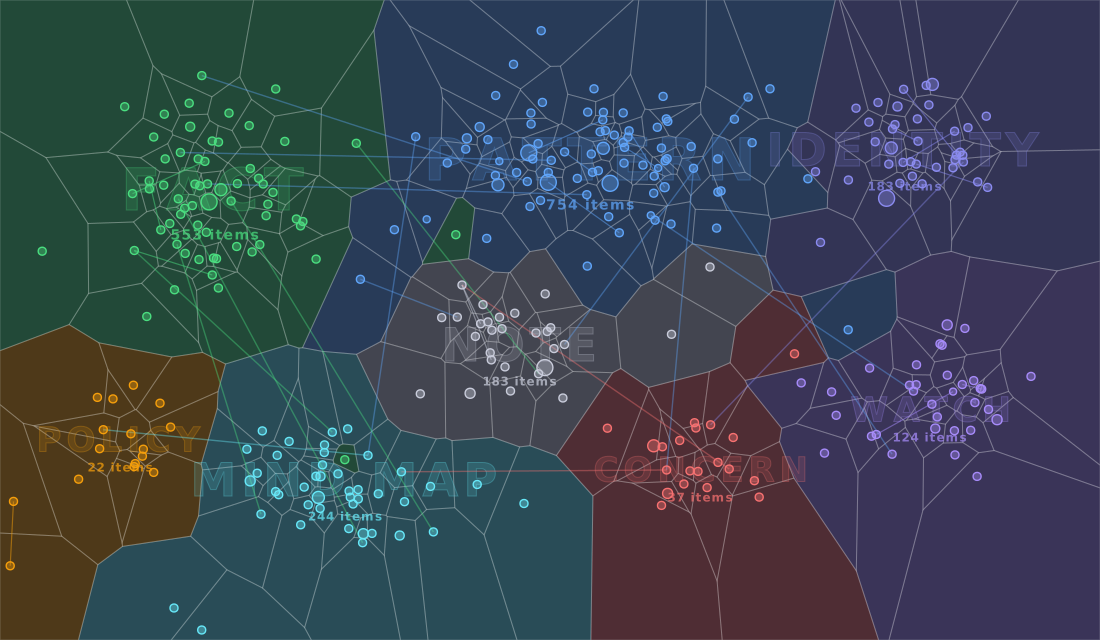
Every recall is an event. When an agent recalls memory, through search_memory or get_memory_context over MCP, or by voice, the store publishes a hit event: the ids of the items it returned, the query, and the kind of each item. A write publishes a change event. Both reach every connected client over a live stream. This server streams them as server-sent events at /v1/memory/events, and the web UI in the binary listens to that stream. A deployment that carries the same events over a WebSocket, as a Triage controller does, drives the same UI. Private items are never named on the stream.
The web UI turns a hit into light, the way optogenetics does: a neuron made to carry a light-gated channel fires when blue light reaches it. In the graph:
- The region. The kinds in the event name the region, so a blue fibre lights it even when the recalled cell is not one of the nodes drawn.
- The cells in it wash blue in the order the light reaches them, nearest the fibre first.
- The recalled cells fire hardest: a white-blue double flare, three spike rings, and an afterglow that lasts a few seconds.
- The synapses. A pulse of light runs from each recalled cell along its links to the memories it connects to.
This sits on top of the category-coloured flash the graph already draws, and a repeat hit fires again. The region treatment is one fast attack and a smooth decay, about two pulses a second at most, because flicker over a large area is a photosensitivity risk; the fast effects stay on the small dots, and prefers-reduced-motion gets one slow wash.
Base components
| Component | Does what here |
|---|---|
| HNSW | Approximate nearest-neighbour search over embeddings. Memory builds one index per subject over its cells, so a restart rebuilds from the cells without re-embedding. Each code-graph map carries its own index inside the snapshot, so loading a map is not an embed pass. |
| Tree-sitter | The parser behind the code graph. Go gets resolved call, import and inherit edges; TypeScript, JavaScript, Python, Java, Rust, Ruby, C, C++, PHP, C# and Kotlin go through a generic extractor. The grammars are C and link into the CGO build, which is why only that build parses. |
| Kubernetes | MemoryCell custom resources are the store; etcd persists, replicates and audits them. |
| MCP | The agent interface to both kinds of memory, over streamable HTTP, with OAuth 2.1 or a shared secret. |
Run it on Kubernetes
The chart runs the xray server: REST, MCP and voice, with memory stored as MemoryCell objects and a local embedding sidecar for semantic search. It needs Kubernetes 1.29 or later (the sidecar is a native sidecar), Helm 3, and a namespace of its own: the server reads Secrets in its namespace.
The images and charts are published to GitHub Packages:
| Image | ghcr.io/triageagent-dev/xray:<version> |
| Chart | oci://ghcr.io/triageagent-dev/charts/xray |
A first look
Sign-in off, reached through kubectl port-forward. Use it for a trial only.
kubectl create namespace xray
kubectl -n xray create secret generic xray-mcp-token --from-literal=token="$(openssl rand -hex 24)"

helm upgrade --install xray oci://ghcr.io/triageagent-dev/charts/xray \
  --version <version> -n xray --set dev=true

kubectl -n xray rollout status deploy/xray
kubectl -n xray port-forward svc/xray 8080:80 8083:8083 &
curl localhost:8080/v1/version
Open http://localhost:8080 for the web UI.
dev=true adds --dev, which turns sign-in off and accepts any origin. MCP is on port 8083 and takes the secret as Authorization: Bearer <token>. If the images are in a private registry, create a pull secret in the namespace and add --set 'imagePullSecrets[0].name=<secret>'.
The chart installs the MemoryCell CRD from its crds directory, skipped if the cluster already has it. Helm never upgrades a CRD, so apply a changed one by hand. The embedding sidecar runs in the pod on localhost:8090, with the model baked into its image.
For real use
Without --dev the server refuses to start unless it has a sign-in method and the address users reach, and it says which is missing. After creating the namespace and the MCP token as above, set both up:
kubectl -n xray create secret generic github-oauth \
  --from-literal=GITHUB_CLIENT_ID=<id> --from-literal=GITHUB_CLIENT_SECRET=<secret>
helm show values oci://ghcr.io/triageagent-dev/charts/xray --version <version> > values.yaml
Edit values.yaml:
- set
github.secretName: github-oauth(orazure.secretNamefor Microsoft Entra); - in
args, uncomment--public-url=https://xray.example.comand--github-org=<your org>, with your own address and organisation (--github-teamnarrows it to a team); - set
ingress.enabled: truewith ahostname, or usehttpRoutefor a Gateway API route.
helm upgrade --install xray oci://ghcr.io/triageagent-dev/charts/xray \
  --version <version> -n xray -f values.yaml
To give each MCP client a token of its own, which also makes its writes count as human, set mcp.oauth.enabled: true, uncomment the --mcp-oauth lines in args and remove --mcp-address=:8083. The shared secret still works as a fallback.
Replicas. The chart runs one. Items and their change events follow the cluster across replicas, but voice quota counters and search-hit pulses are per pod, so keep replicaCount: 1.
Voice. Voice runs on Gemini Live. Set --gcp-project (Vertex AI, with Workload Identity on a service account that has Vertex AI User) or --gemini-api-key. The default model, gemini-3.8-live, is served on Vertex only in the multi-regions eu and us, so add --voice-location=eu; --gcp-location keeps the embeddings location. A browser needs HTTPS (or localhost) for the microphone.
A code map from a registry. Build a map with xray graph snapshot, pack it with make maps-image MAPS="<label>", push the image, and give the memory server a cell that points at it by digest. The server pulls the image, registers the map, and answers code questions over MCP and by voice:
apiVersion: xray.triageagent.dev/v1
kind: MemoryCell
metadata: {name: map-myrepo}
spec:
  id: map-myrepo
  kind: mental_map
  scope: public
  subject: myrepo            # the map's label
  status: active
  title: myrepo code map
  content: The code graph of myrepo, for questions about how it is built.
  confidence: high
  createdAt: "2026-01-01T00:00:00Z"
  updatedAt: "2026-01-01T00:00:00Z"
  data:
    graphRef: {mime: text/plain, bytes: "ghcr.io/you/maps@sha256:..."}
Run the server with --mental-maps-dir=/tmp/maps (it may be empty: it turns the map registry on) and, for a private registry, --registry-pull-secret=<dockerconfigjson secret>. An age-encrypted snapshot opens with --mental-maps-snapshot-key. See docs/graph.md.
Traces. --otel-endpoint=http://collector:4317 sends voice traces over OTLP/gRPC, and --otel-token-secret=<secret> sends a bearer token from a Secret with them, for a collector that asks for one.
Voice, tracing and the rest. Every flag is listed by xray -help, and every chart value, with the optional args as comments, is in charts/xray/values.yaml. There is one chart; code maps load into it from a registry, as described above.
Build an agent with X-Ray embedded
X-Ray is also a Go library. The same memory store and code-graph engine the server runs can live inside your agent's process, with no server, no cluster and no MCP in between. The only network call is to the embedding endpoint you choose.
go get github.com/triageagent-dev/x-ray/v2
Memory
import (
	"github.com/triageagent-dev/x-ray/v2/pkg/memory"
	"github.com/triageagent-dev/x-ray/v2/pkg/xray"
)

store, err := memory.New(ctx,
	memory.WithEmbeddings("http://localhost:8090", "nomic", 256), // optional: semantic search
	memory.WithFile("agent-memory.json"),                         // optional: survive a restart
)
if err != nil { /* ... */ }
defer store.Close()

store.Upsert(ctx, xray.Write{
	Kind: xray.KindStableFact, Scope: xray.ScopePublic, Confidence: "high",
	Title: "Checkout retries on 503", Content: "Three times, with jitter.",
})
items, _ := store.Search(ctx, "how do payments retry?", xray.WithLimit(5))

// A fact turns out to be wrong: retire it, and everything that cited it.
store.Refute(ctx, items[0].ID, "the spikes predate the cache", nil)
This is the store the server uses: typed items, a keyword index, an HNSW index when you give it embeddings, merging of restated facts, recall shaping and provenance. WithOrigin(xray.OriginHuman) marks a store that holds what a person told the agent, so a model's write never replaces it. Without WithEmbeddings, search is by keyword only. WithFile loads the file when the store opens and rewrites it after every change.
Code graph
import "github.com/triageagent-dev/x-ray/v2/pkg/codegraph"

emb, _ := codegraph.NewEmbeddings(ctx, "http://localhost:8090", "nomic", 256, 8192)
g, err := codegraph.Build(ctx, emb, codegraph.Repo{Label: "myapp", Path: "./myapp"})
if err != nil { /* ... */ }

hits, _ := g.SearchGraph(ctx, "where do we retry payments?", xray.Limit(5))
impact, _ := g.Impact(ctx, []string{hits.Results[0].QN}, 2, 50) // what a change reaches
risk, _ := g.Risk(ctx, hits.Results[0].QN, 0, 0)                // LOW, MEDIUM or HIGH

g.UpdateGraph(ctx, "./myapp/pay/retry.go") // after the agent edits a file
g.Save(ctx, "myapp.graph.gob.gz")          // later: codegraph.Load, with no parsing
Build parses with Tree-sitter, so it needs a build with CGO_ENABLED=1 and a C compiler. A build without cgo can still Load a snapshot and search it, and Build returns codegraph.ErrNoParser. g.Handler() returns the graph as an MCP http.Handler, if the agent should offer it to others.
Run on either
*memory.Store and *xray.Client both implement xray.Memory, and *codegraph.Graph and *xray.Client both implement xray.CodeGraph. An agent written against those interfaces runs on the in-process store while you develop and against a shared X-Ray in production without a change. examples/agent is a complete agent loop that does exactly this: with no XRAY_URL it embeds X-Ray, with one it connects.
Google ADK
adapters/adk makes X-Ray the memory service of a Google ADK agent, over either an embedded store or a running server:
store, _ := memory.New(ctx, memory.WithFile("agent-memory.json"))
save, _ := xrayadk.SaveTool(store)

assistant, _ := llmagent.New(llmagent.Config{
	Name: "assistant", Model: llm,
	Tools: []tool.Tool{preloadmemorytool.New(), loadmemorytool.New(), save},
})
r, _ := runner.New(runner.Config{
	AppName: "my-app", Agent: assistant,
	SessionService: sessions, MemoryService: xrayadk.New(store),
})
See docs/sdk.md for the full walk-through.
Connect an agent to X-Ray
For an agent that uses an X-Ray you already run, on Kubernetes or on a laptop. Everything X-Ray offers is an MCP tool, so any MCP client works, and the Go SDK, pkg/xray, wraps the tools in typed calls.
| What | Where |
|---|---|
| Memory server, shared secret | http://<host>:8083/mcp, Authorization: Bearer <token> |
| Memory server, OAuth 2.1 | https://<your address>/mcp, a token per user |
| Code graph, live | xray graph serve, http://127.0.0.1:8084/mcp |
| Code graph, snapshots | xray graph serve-snapshots, http://127.0.0.1:8085/mcp |
From inside the cluster the memory server is http://xray.xray.svc:8083/mcp; from outside, port-forward it as above, or put it behind your own ingress with authentication.
c, err := xray.Connect(ctx, "http://localhost:8083/mcp", xray.WithToken(token))
if err != nil { /* ... */ }
defer c.Close()

c.Upsert(ctx, xray.Write{
	Kind: xray.KindOperationalPattern, Scope: xray.ScopePublic,
	Title: "Checkout retries on 503", Content: "Three times, with jitter.",
})
items, _ := c.Search(ctx, "payment retries", xray.WithLimit(5))

hits, _ := c.SearchGraph(ctx, "who handles retries", xray.OnMap("myapp"))
A refusal by the server comes back as *xray.ToolError, and xray.IsNotFound tests for a missing item. The credential decides how a write is classed: an OAuth token that names a person records it as human, the shared secret as derived. Call reaches any tool the typed methods do not cover.
A coding agent such as Claude Code needs no SDK. Register the code graph in .mcp.json:
{ "mcpServers": { "xray": { "type": "http", "url": "http://localhost:8084/mcp" } } }
and run xray graph install -dir <repo> to add skills and a hook that re-indexes the graph as files change.
Run locally
The memory server and its web UI without a cluster, sign-in off:
make run          # server and web UI on :8080, auth off (--dev); needs Node 22 to build the UI
open http://localhost:8080
Without a kubeconfig the server keeps memory in process only, and items are lost on restart. Add --embedding-endpoint (any OpenAI-compatible endpoint) or --gcp-project for semantic search.
The code graph for a coding agent. It needs the CGO build and an embeddings endpoint (llama.cpp, Ollama, vLLM or LM Studio; the default is http://localhost:8090 serving nomic at 256 dimensions):
make graph-build                                   # bin/xray-parser
bin/xray-parser graph serve -repo myapp=/path/to/myapp
Build
make build        # static binary, bin/xray: the memory server with the web UI, and the read side of the graph
make build UI=0   # the same without the web UI, so no Node is needed
make graph-build  # CGO binary, bin/xray-parser: adds the parsing modes of `xray graph`
make ui-dev       # UI hot reload on :3000 against a running server
make test         # the Go tests; make ui-test for the web UI
make lint
Go 1.27.3 or later, and Node 22 for the web UI. The CGO build needs a C compiler for the Tree-sitter grammars. Images are built with ko, and the release builds the UI first.
License
Apache License 2.0. Third-party notices are in NOTICE.
Yorumlar (0)
Yorum birakmak icin giris yap.
Yorum birakSonuc bulunamadi