hackerscad
Health Warn
- License — License: GPL-3.0
- Description — Repository has a description
- Active repo — Last push 0 days ago
- Low visibility — Only 6 GitHub stars
Code Fail
- rm -rf — Recursive force deletion command in .github/workflows/build.yml
- rm -rf — Recursive force deletion command in packaging/macos/build-occt.sh
- rm -rf — Recursive force deletion command in packaging/macos/package.sh
- rm -rf — Recursive force deletion command in packaging/windows/package.sh
Permissions Pass
- Permissions — No dangerous permissions requested
No AI report is available for this listing yet.
The hacker's CAD: parametric solid models written as code in a small scripting language with units, edited with the mouse too. OpenCascade solids, GTK 4 app, command line and MCP server for AI agents.
 hackerscad

hackerscad is the hacker's CAD: parametric solid models you write as
code, draw with the mouse, or ask an AI agent for. Type and the 3D view
follows; sketch on a face, pick an edge to round, drag a part, and the code is
written for you. Threads, gears, hinges, enclosures and moulds come ready in
the libraries, and the file stays the only source of truth: it diffs,
versions and reviews like any other code.
Documentation: tutorial · guides by topic ·
language reference · cheatsheet · examples ·
for AI agents
- ✏️ Models as code:
.hcadis a small, sandboxed scripting language
with a familiar C-style syntax: if you have read C, Java, C# or JavaScript,
you can read it. Units (60.mm,30.deg), solids joined, cut and
intersected with+,-and&, and selectors such asedges.parallel(Z)instead of edge numbers. Its syntax is a subset of D's,
so editors highlight it and AI models already know it. - 💡 An editor that knows the language: completion of methods, units,
arguments and library functions, signatures while you type, help on hover,
and a searchable cheatsheet (F1). - 🖱️ And with the mouse: fillets, chamfers, shells, holes, pockets and
bosses from the context menu, parts moved, turned, scaled, split and
coloured, all written back into the code. - 📐 Sketches you see: a constrained sketch shows in the view as soon as
the cursor is in its code, its dimensions edited by clicking them; draw on
a face of a part, measuring from its edges. - 🎛️ Parameters:
@paramgives a field in the side panel,@presetnamed
sets of values,unittestthe design's requirements. - 🧱 Exact solids: OpenCascade B-rep with fillets, shells, drafts, sweeps,
lofts, hulls, Minkowski sums, offsets and constrained sketches. - 📦 Exports: 3MF with one object and colour per part (or one object of
several pieces, for prints in several colours), STL (a zip of one
file per part), STEP with a named body per part, PNG, and
drawings with views, sections and dimensions as PDF, SVG or DXF. - 🔩 Libraries: screws, nuts, holes and inserts; threads (metric, inch,
trapezoidal, pipe, bottle necks, lamp bases); gears; print-in-place,
snap-together and living hinges; snap fits; enclosures; joints to split a
part longer than the bed; two-part moulds; cuts that make a part bend; and
Carlo the mascot. - 🎨 Surfaces: knurled grips, hexagon and Voronoi patterns that fill a
face, and text or outlines wrapped onto curved faces. - 🔁 Remodel a mesh or STEP: load an STL, 3MF, OBJ or STEP file and
rebuild it as a parametric model; the tools compare the copy with the
original and show where they differ, so an AI agent can do it for you. - 🤖 AI agents: an MCP server lets an agent write, check, look at and
export models, and drive the application while you watch; mark up the
view with arrows, circles and text to show it (or a person) where. - 🐧 Linux, Windows, macOS: AppImage, zip, app bundle.
Quickstart
Download the package for your system from the releases. Until the first
release, the nightly build
has them, made from the latest code.
Linux: the AppImage runs on its own.
chmod +x hackerscad-*-x86_64.AppImage
./hackerscad-*-x86_64.AppImage                       # the application
./hackerscad-*-x86_64.AppImage hcad check model.hcad  # the command line tool
Windows: unzip it anywhere and run hackerscad.exe in the hackerscad
folder (the command line tool is bin\hcad.exe). On machines without a
recent enough OpenGL, such as virtual machines without 3D acceleration, it
draws with the software OpenGL it ships with. The program is not signed: if
SmartScreen stops it, choose "More info" and then "Run anyway".
macOS (Apple Silicon, macOS 15 or later): unzip it, move hackerscad.app to Applications
and clear the attributes macOS puts on downloaded files (the quarantine). The
app is not signed by an Apple developer, so without this macOS says it is
damaged or cannot be opened:
xattr -cr /Applications/hackerscad.app
open /Applications/hackerscad.app                                    # the application
/Applications/hackerscad.app/Contents/Resources/bin/hcad check model.hcad  # the command line tool
Something went wrong? About › Logs and crash reports opens the folder
with the reports of crashes and, on Windows, the program's log
(%LOCALAPPDATA%\hackerscad\logs on Windows, ~/.local/state/hackerscad
on Linux, ~/Library/Logs/hackerscad on macOS): attach them to the
issue.
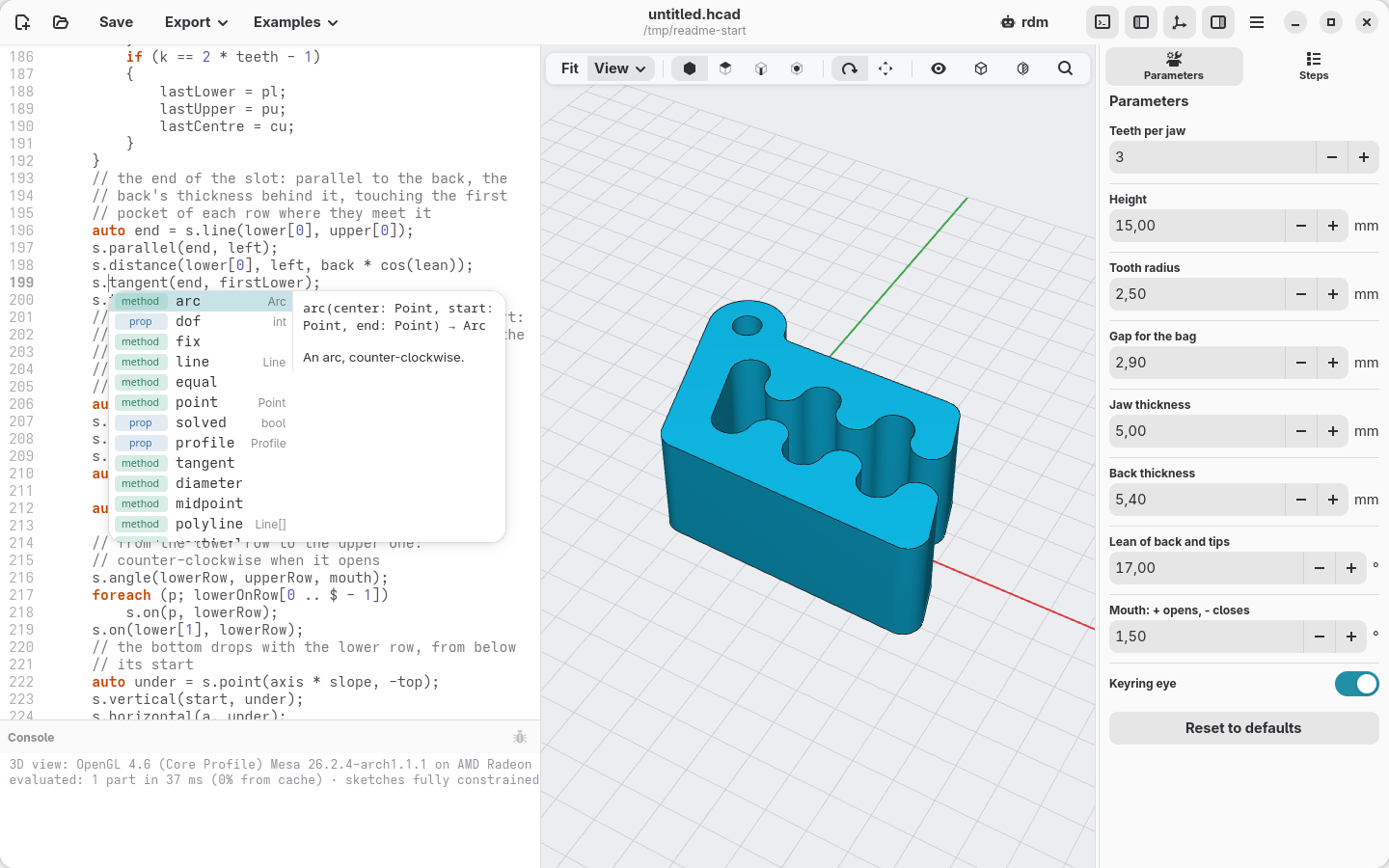
The window opens on a small example: Carlo, the mascot, a clip that keeps
bags of biscuits closed. Change its parameters, edit its code, right-click its faces. The New
button starts a model of your own from a few lines that make Carlo, to
replace with yours.
A model
// Espresso cup: the README's cup, with parameters, a preset, a loft, a handle and a check
/+ A cup. Comments are the usual D ones: // to the
   end of the line, /* blocks */, and /+ nested +/
   blocks like this one. +/
module cup;

import std.shapes;

// @param puts a field in the side panel;
// @preset is a named set of values
@param("Diameter", min: 50.mm, max: 100.mm)
@preset("espresso", 60.mm)
immutable diameter = 80.mm;

@param("Wall", min: 1.mm, max: 4.mm)
immutable wall = 2.mm;

immutable height = diameter * 0.85;

/// The cup's shape, full: narrow at the foot, round below.
Solid body()
{
    auto foot = circle(d: diameter * 0.7);
    auto rim = circle(d: diameter).move(z: height);
    // selectors pick edges and faces by what they are
    return loft([foot, rim])
        .fillet(edges.of(faces.bottom), r: diameter * 0.12);
}

/// The handle: a ring standing on its side, round edges.
Solid handle()
{
    // its sizes follow the cup's
    immutable d = height * 0.6, band = diameter * 0.07;
    immutable thick = diameter * 0.08;
    auto ring = cylinder(d: d, h: thick, center: true)
        - cylinder(d: d - 2 * band, h: thick, center: true);
    return ring
        .fillet(edges.circles, r: diameter * 0.02)
        .rotate(x: 90)
        .move(x: diameter * 0.45, z: height * 0.55);
}

// @part: a body to show and export (one object in 3MF)
@part
Solid cup()
{
    // the handle stops at the wall, not inside
    return body()
        .shell(open: faces.top, thickness: wall)
        + (handle() - body());
}

// the design's requirements, checked after every change
unittest
{
    assert(wall >= 1.2.mm, "walls under 1.2 mm leak");
    // what it holds: the full shape minus the cup
    immutable ml = (body - cup).volume / 1.cm ^^ 3;
    writeln("holds: $(format("%.0f", ml)) ml");
}
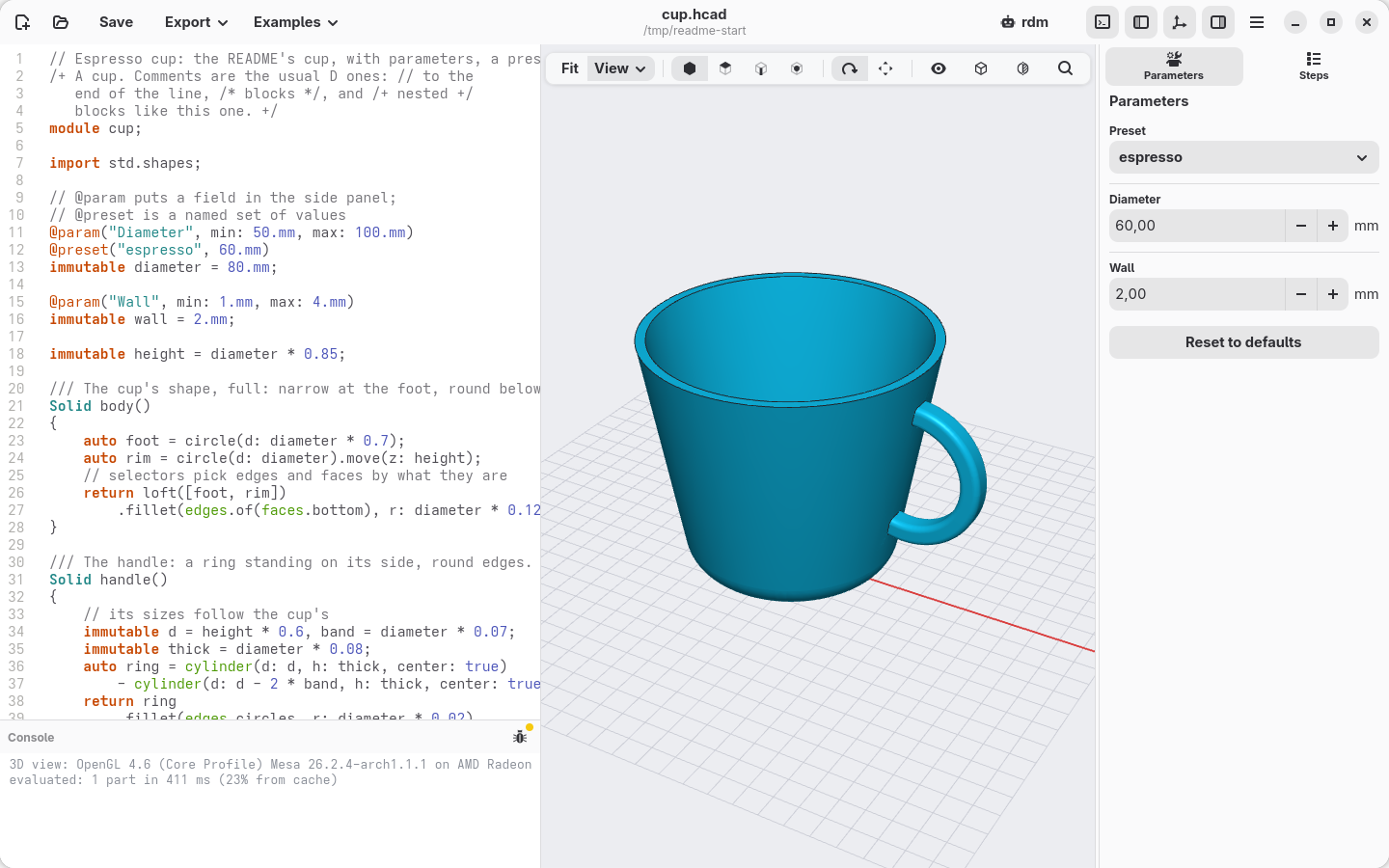
The cup in hackerscad, with the "espresso" preset chosen in the side panel: the
diameter becomes 60 mm, the view follows, and the console shows what the cup holds,
printed by the unittest.
Using hackerscad with an AI agent
hackerscad is new, so it is not in the training data of the models: a model
left to guess writes OpenSCAD or CadQuery instead. Give it both:
- the skill: what hackerscad is, how to work with it, the rules that avoid
most mistakes, and which tools the MCP server offers, so the agent knows they
are there and what to use them for; - the MCP server: the tools themselves, with which the agent checks models,
looks at renders, measures, exports and drives the open application.
The skill alone works too, through the command line; the MCP server alone
leaves the agent to discover the language from the tools.
The easy way: ask your agent
Write this to your agent: it installs the skill, then follows the skill's
instructions to install hackerscad from the releases if it is missing (it asks
you first) and to add the MCP server.
Install the hackerscad skill for all my projects from
https://raw.githubusercontent.com/trikko/hackerscad/main/docs/SKILL.md, with
https://raw.githubusercontent.com/trikko/hackerscad/main/docs/llms-full.txt
next to it, then follow its "Setup and updates" section.
The skill keeps itself up to date: it carries the stamp of the docs it was made
from, checks it against hcad docs --stamp and, when hackerscad has been
updated, regenerates itself with the installed hcad.
By hand
1. Find hcad
Both run hcad, the command line tool, and the agent starts it by itself from
any folder. hcad --version tells whether it is in your PATH. If it is not,
either put it there or use its full path in the commands below:
| System | Full path of hcad |
To put it in the PATH |
|---|---|---|
| Linux (AppImage) | /path/to/hackerscad-…-x86_64.AppImage hcad (the AppImage, then the word hcad) |
ln -s /path/to/hackerscad-…-x86_64.AppImage ~/.local/bin/hcad: a link named hcad runs the command line tool |
| Windows | C:\path\to\hackerscad\bin\hcad.exe |
add C:\path\to\hackerscad\bin to the Path variable |
| macOS | /Applications/hackerscad.app/Contents/Resources/bin/hcad |
in ~/.zshrc: export PATH="/Applications/hackerscad.app/Contents/Resources/bin:$PATH" |
| Built from source | /path/to/hackerscad/bin/hcad |
add /path/to/hackerscad/bin to the PATH |
2. Add the skill
The rules that avoid most mistakes (SKILL.md, or
AGENTS.md for tools that want a rules file) and the whole reference
(llms-full.txt; llms.txt is a short
overview). hcad prints them, so they always match the installed version; in
Claude Code, for example:
mkdir -p ~/.claude/skills/hackerscad
hcad docs --skill > ~/.claude/skills/hackerscad/SKILL.md
hcad docs > ~/.claude/skills/hackerscad/llms-full.txt
The folder for each agent:
| Tool | For all projects | For one project |
|---|---|---|
| Claude Code | ~/.claude/skills/hackerscad/ |
.claude/skills/hackerscad/ |
| Antigravity (IDE, 2.0) | ~/.gemini/config/skills/hackerscad/ |
.agents/skills/hackerscad/ |
| Antigravity CLI | ~/.gemini/antigravity-cli/skills/hackerscad/ |
.agents/skills/hackerscad/ |
| Gemini CLI | ~/.gemini/skills/hackerscad/ |
.gemini/skills/hackerscad/ |
| Codex | ~/.agents/skills/hackerscad/ |
.agents/skills/hackerscad/ |
3. Add the MCP server, too
One command, for all your projects; then restart the agent. In the
application, the main menu's AI Agents gives these commands with the path
of your installation, shows which agent drives the window and what it asked,
and what to ask your agent to check it is connected (it then shows there by its
own name): an agent working on the window that never shows there
is not using hackerscad's tools (it may be clicking through the screen, as
Codex's computer use does on macOS). Name it hcad,
as below: the skill tells the agent its tools (hcad_check, hcad_render…), and
one server is enough (two, under different names, give the agent every tool
twice).
| Agent | With hcad in the PATH |
Check |
|---|---|---|
| Claude Code | claude mcp add -s user hcad -- hcad mcp |
claude mcp list |
| Codex | codex mcp add hcad -- hcad mcp |
codex mcp list |
| Antigravity (CLI and IDE) | agy mcp add hcad hcad mcp |
agy mcp list |
Without hcad in the PATH, the full path takes the place of the secondhcad, the one before mcp. For example, with the AppImage in ~/Apps:
claude mcp add -s user hcad -- ~/Apps/hackerscad-nightly-x86_64.AppImage hcad mcp
codex mcp add hcad -- ~/Apps/hackerscad-nightly-x86_64.AppImage hcad mcp
agy mcp add hcad ~/Apps/hackerscad-nightly-x86_64.AppImage hcad mcp
(the name of the AppImage changes with every version: the link of step 1
does not), or on Windows:
claude mcp add -s user hcad -- C:\path\to\hackerscad\bin\hcad.exe mcp
Other tools take the same server in their MCP settings: the command (hcad,
or its full path) with the argument mcp.
Then ask, for example: "a hexagonal pen holder, 10 cm tall, with a rounded
bottom, as 3MF".
Building
Linux and macOS: install LDC and dub, OpenCascade 7.9, GTK 4, libadwaita,
GtkSourceView 5, then:
dub build -b release          # bin/hcad, the command line tool
dub build -b release :gui     # bin/hackerscad, the application
dub test :core                # the tests
HCAD_TESTS=fast dub test :core   # without the slow ones (threads, sweeps…): seconds
Without -b release dub makes a debug build: handy to work on hackerscad, but
two to ten times slower on large meshes.
The first build compiles the OpenCascade shim (tools/build-native.sh).
Packages:
packaging/linux/build-appimage.sh   # AppImage, built in an Ubuntu 24.04 container (podman)
tools/setup-win-cross.sh            # once: the Windows toolchain and libraries, in build/win
packaging/windows/package.sh        # Windows zip, built on Linux; try it with Wine
packaging/macos/build-occt.sh       # macOS: OpenCascade into build/occt, without the fused multiply-adds that make its mesher loop
packaging/macos/package.sh          # macOS app bundle, on a Mac with Homebrew
tools/docs.sh                       # regenerate the agent documentation in docs/
Credits
hackerscad is built on Open CASCADE Technology,
GTK,
libadwaita,
GtkSourceView,
giD,
bindbc-opengl and
djson. hcad --version and
the About window list them with their licences. The Windows package also
ships Mesa's software OpenGL and Microsoft's Visual C++
runtime (vcruntime140.dll), redistributed under their licences.
It is inspired by OpenSCAD, where a solid is a small
program, and by Onshape, with its features,
constrained sketches and fillets picked on the model.
Screenshots
The startup example on each system, taken by the CI from the packages of the
latest release.
| Linux | Windows | macOS |
|---|---|---|
 |
 |
 |
License
hackerscad is free software: © 2026 Andrea Fontana, licensed under the
GNU General Public License version 3.
The hackerscad Model Exception keeps the license out of
your work: the models you write, and what hackerscad makes from them (STL,
3MF, STEP, images, drawings), are yours under terms of your choice, even when
they use the libraries that come with hackerscad.
Reviews (0)
Sign in to leave a review.
Leave a reviewNo results found