ai-presentation-orchestrator
Health Uyari
- License — License: MIT
- Description — Repository has a description
- Active repo — Last push 0 days ago
- Low visibility — Only 5 GitHub stars
Code Gecti
- Code scan — Scanned 12 files during light audit, no dangerous patterns found
Permissions Gecti
- Permissions — No dangerous permissions requested
This agent automates live AI presentations by pre-generating media and narration, advancing slides deterministically, and handling live audience voice Q&A using LLMs. It completely decouples resource generation from the actual runtime performance.
Security Assessment
The overall risk is rated as Low. A code scan across 12 files found no dangerous patterns, hardcoded secrets, or requests for excessive permissions. However, because the system's architecture relies heavily on external integrations, it inherently makes network requests. It communicates with external APIs (like Claude for LLM generation and TTS), sends webhook triggers to n8n workflows, and interacts with Google and Slack APIs. Additionally, the live Q&A feature accesses the microphone to capture audio. While no malicious data collection or risky shell executions were found, users should securely configure their own API keys as environment variables to prevent accidental exposure.
Quality Assessment
The project is under active development, with its last repository push occurring today. It uses the permissive and standard MIT license, making it highly accessible for modification and reuse. The codebase design is structured cleanly around modular integration layers, meaning individual services can be swapped easily without breaking the core pipeline. The primary concern is its extremely low community visibility. With only 5 GitHub stars, the tool lacks extensive public testing, peer review, and community trust. It should be viewed as an early-stage experimental tool rather than a battle-hardened production system.
Verdict
Safe to use, provided you supply your own API credentials and review the external service configurations before connecting it to live workflows.
Fully automated AI presentation system — pre-generates narration, fires live n8n demo workflows, and answers audience questions via voice Q&A. Zero manual input during the talk.
AI Presentation Orchestrator
Separate the compute from the performance.
Pre-generate everything. Cache it. Walk in and press Enter.


What This Project Demonstrates
- Two-phase system design — generation and runtime are fully decoupled. All LLM calls, TTS synthesis, and video rendering happen before the presentation. The runtime reads a manifest and executes deterministically.
- Cache-first pipeline — every output is stored with a manifest. Partial runs resume from where they stopped. Nothing is regenerated unless explicitly forced.
- Multi-modal orchestration — synchronises audio playback, slide advancement, and live webhook triggers from a single timing source (actual media duration).
- Modular integration layer — TTS, avatar video, n8n, Slack, and Google APIs are all isolated modules. Swapping any one of them does not affect the core pipeline.
- Live voice Q&A — final slide activates a mic listener. Audience questions are captured via speech recognition, answered by Claude in persona, and spoken aloud via TTS. Conversation history is maintained across turns.
- Agentic research workflow — the Evidence Intelligence Engine decomposes a research question into sub-queries, runs dual web and academic search via Perplexity, evaluates evidence quality, and iterates before synthesis.
The Problem
Live AI demos break at the worst moment.
API latency spikes. Video renders for 8 minutes. The webhook times out.
You are standing in front of a room and your terminal is showing a spinner.
The issue is not the tools. It is running generation and performance in the same process.
Architecture
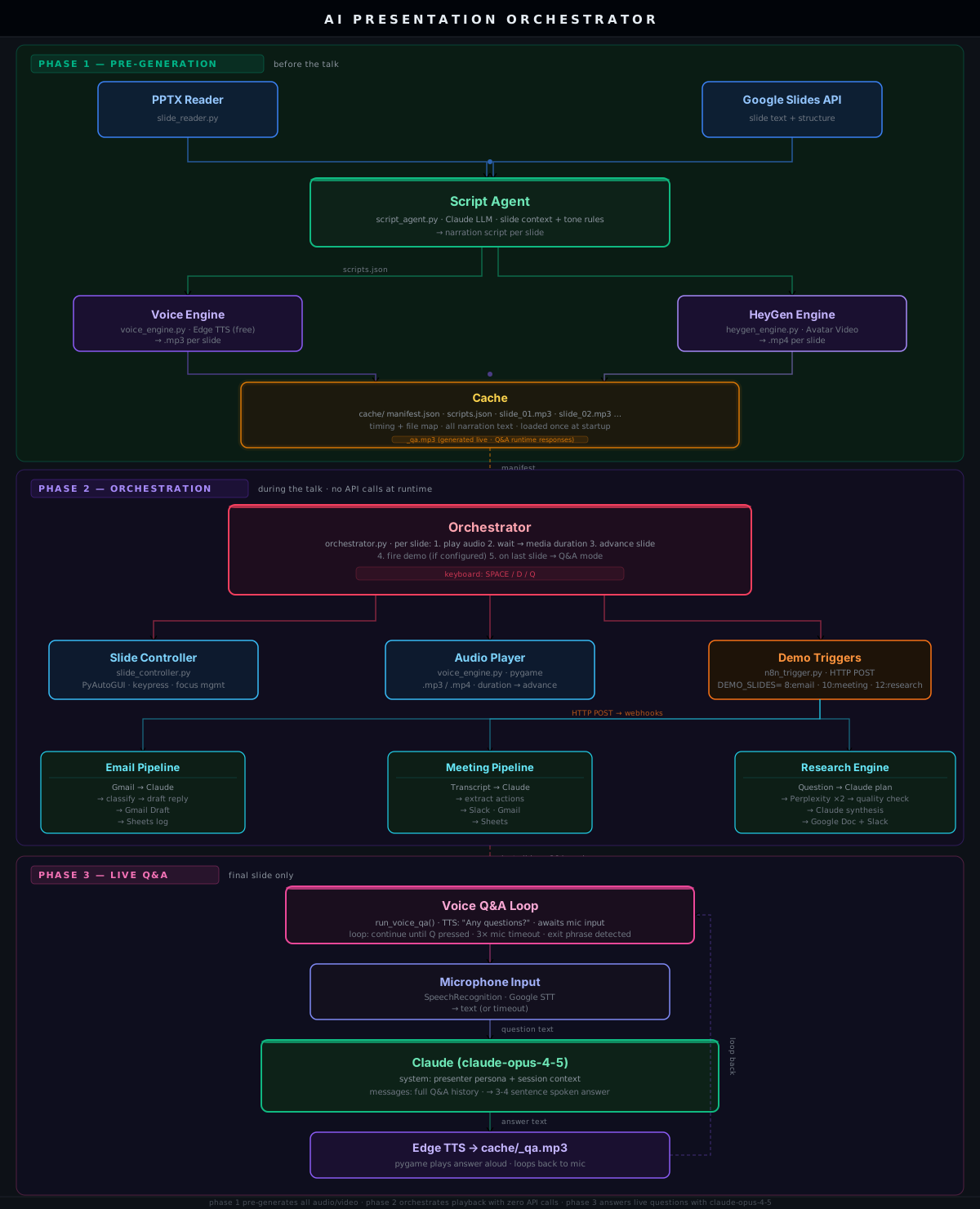
Phase 1 — Pre-generation (python -m core.pre_generate)
Reads every slide, generates narration via Claude, synthesises audio or avatar video,
and writes everything to cache/ with a timing manifest.
Resumable — re-runs skip already-completed slides.
Phase 2 — Orchestration (python -m core.orchestrator)
Reads the manifest. Plays audio. Advances slides. Fires demo webhooks at configured slides.
No API calls. No generation. Deterministic from start to finish.
Phase 3 — Live Q&A (final slide, automatic)
Mic opens. Audience speaks. Claude answers in presenter persona. TTS reads the answer aloud.
Loop continues until Q is pressed, 3 consecutive timeouts, or an exit phrase is detected.
n8n Workflows
Three importable workflows ship with the repo.
Email Pipeline
Gmail Trigger / Webhook
  └─ Claude: classify intent, extract key ask, draft reply
       └─ Escalation Router
            ├─ [escalation]     Gmail Draft + CC colleague
            └─ [no escalation]  Gmail Draft only
                 └─ Log → Google Sheets
Meeting Pipeline
Form / Webhook  ← paste any meeting transcript
  └─ Claude: action items, decisions, risks, follow-up email
       └─ Get attendees → Google Sheets
            ├─ Gmail — follow-up to all attendees
            ├─ Slack — #meeting-actions
            └─ Google Sheets — log row
Evidence Intelligence Engine
Form / Webhook  ← research question or transcript
  └─ Claude: decompose into search plan + sub-queries
       ├─ Perplexity Web Search
       └─ Perplexity Academic Search
            └─ Evidence Evaluator (Claude)
                 ├─ [sufficient]              Brief Writer → Google Doc
                 └─ [insufficient, <2 rounds] refine + retry
                      └─ Slack — #research-briefs
                           └─ Google Sheets — research log
Project Structure
ai-presentation-orchestrator/
│
├── core/
│   ├── orchestrator.py          main runtime controller
│   ├── pre_generate.py          pre-generation pipeline
│   ├── regenerate.py            selective slide regeneration
│   ├── diagnose.py              pre-flight system checks
│   └── logger.py                structured run logging
│
├── agents/
│   ├── script_agent.py          Claude narration script writer
│   ├── slide_controller.py      PyAutoGUI slide advancement + focus control
│   └── slide_reader.py          PPTX parser
│
├── integrations/
│   ├── voice_engine.py          Edge TTS synthesis + audio playback + duration
│   ├── heygen_engine.py         HeyGen avatar video rendering (optional)
│   ├── google_slides_reader.py  Google Slides API reader
│   ├── n8n_trigger.py           n8n webhook triggers
│   └── slack_notifier.py        Slack notifications
│
├── n8n/
│   ├── Email-Pipeline.json
│   ├── Meeting-Pipeline.json
│   └── Evidence-Intelligence-Engine.json
│
├── demo/
│   ├── email_demo.txt
│   ├── meeting_transcript.txt
│   └── research_question.txt
│
├── docs/
│   ├── architecture.svg         system architecture diagram
│   └── RUNBOOK.md               presentation-day checklist
│
├── cache/                       auto-created at runtime — gitignored
├── logs/                        runtime logs — gitignored
├── workflow_monitor.html        live demo status page (no server needed)
├── credentials.example.json
├── env.example
└── requirements.txt
Quick Start
git clone https://github.com/TrippyEngineer/ai-presentation-orchestrator.git
cd ai-presentation-orchestrator

pip install -r requirements.txt

cp env.example .env
# Set ANTHROPIC_API_KEY at minimum — everything else is optional

python -m core.diagnose          # all lines should show ✅

python -m core.pre_generate      # run 15–20 min before the talk
python -m core.orchestrator      # run when ready
ffmpeg is required for audio handling and is not pip-installable:
| OS | Install |
|---|---|
| Windows | gyan.dev/ffmpeg/builds — add bin/ to PATH |
| Mac | brew install ffmpeg |
| Linux | sudo apt install ffmpeg |
Configuration
# Required
ANTHROPIC_API_KEY=sk-ant-...

# Presenter identity — used by the live Q&A persona
PRESENTER_NAME=Your Name
PRESENTER_ROLE=Your Role
ORGANIZATION=Your Organization

# Voice — Edge TTS is free and needs no key (default)
# To use HeyGen avatar video instead:
HEYGEN_API_KEY=...
HEYGEN_AVATAR_ID=...
HEYGEN_VOICE_ID=...

# Demo slide triggers — format: slide_number:workflow_type
DEMO_SLIDES=8:email,10:meeting,12:research

# n8n (required if using live demo triggers)
N8N_WEBHOOK_EMAIL=http://localhost:5678/webhook/email-demo
N8N_WEBHOOK_MEETING=http://localhost:5678/webhook/meeting-demo
N8N_WEBHOOK_RESEARCH=http://localhost:5678/webhook/research-demo

# Optional
SLACK_WEBHOOK_URL=https://hooks.slack.com/services/...
GOOGLE_SLIDES_PRESENTATION_ID=...
GOOGLE_SLIDES_CREDENTIALS_FILE=credentials.json
Controls
| Key | Action |
|---|---|
SPACE |
Pause / resume narration |
D |
Skip demo countdown |
Q |
Quit |
Importing n8n Workflows
- Open n8n → Import from file
- Import each JSON from
n8n/ - Reconnect credentials (Anthropic, Gmail, Google Sheets, Slack, Perplexity)
- Toggle all workflows to Active
- Verify triggers with
python -m integrations.n8n_trigger
The Evidence Intelligence Engine requires a Perplexity API key for web and academic search.
Diagnostics
python -m core.diagnose
| Problem | Fix |
|---|---|
| No audio | Run ffplay -version — if it fails, ffmpeg is not on PATH |
| Slides not advancing | Click the presentation window once to give it keyboard focus |
| Webhook fails | Confirm n8n is running on port 5678 and all workflows are Active |
| Pre-generation crashes | Re-run — completed slides are skipped automatically |
| Q&A mic not working | Run pip install SpeechRecognition pyaudio |
Logs: logs/presentation_YYYYMMDD.log
Workflow Monitor
Open workflow_monitor.html in any browser before the talk.
No server. No dependencies. Shows live status of all three demo pipelines as they run.
Contributing
Open an issue before starting anything significant.good first issue labels are kept current.
License
Yorumlar (0)
Yorum birakmak icin giris yap.
Yorum birakSonuc bulunamadi