spyc
Health Uyari
- License — License: BSD-3-Clause
- Description — Repository has a description
- Active repo — Last push 0 days ago
- Low visibility — Only 6 GitHub stars
Code Uyari
- network request — Outbound network request in .aislop/rules.yml
Permissions Gecti
- Permissions — No dangerous permissions requested
Bu listing icin henuz AI raporu yok.
A Rust TUI file commander where the AI agent in the side pane can query the file commander itself
spyc
The file commander built for collaborating with your coding agents.
Keyboard-driven · MCP-native · Rust · macOS and Linux




Why spyc?
Put an AI coding agent in your terminal and you usually get a chat
window. You still describe your working tree to it, paste paths back
and forth, and lose track of what it's looking at. spyc runs the agent
in a pane beside a keyboard-driven file commander, on macOS and Linux,
and gives it live, structured access to exactly what you're looking at
via a local MCP socket.
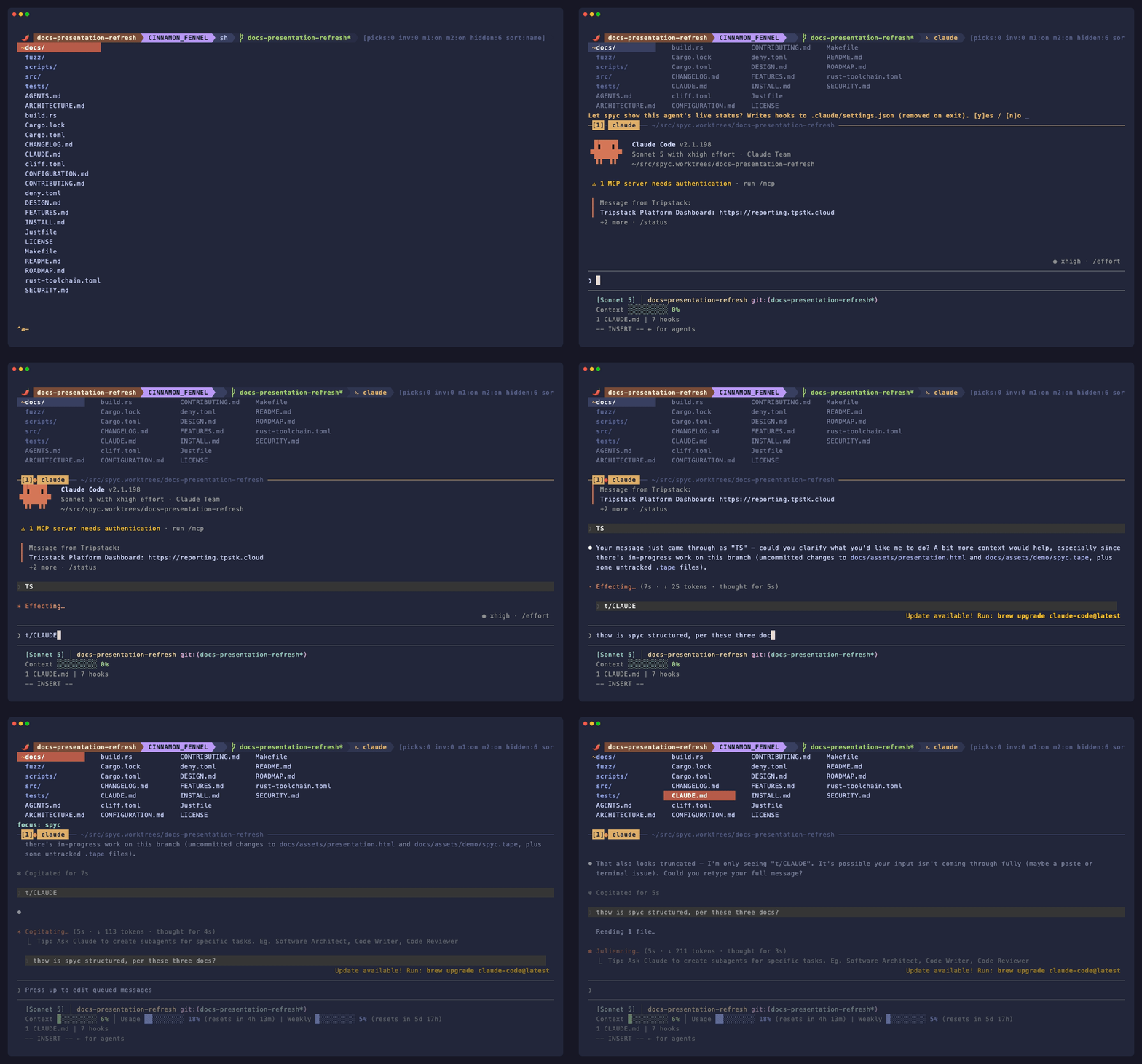
The agent can ask spyc what is the cursor on, what is staged, what is
pinned, what is in this directory — no copy-paste, no path description.
Pick three files and ask a question; the agent sees your selection. When
it mentions a path in its response, press gf to jump straight there.
The file manager is the shared workspace where you and your agents actually
work — not a file list bolted onto a chat window.
What it is
A two-pane terminal program:
- The top pane is a keyboard-driven, vim-flavoured file commander with
git-aware listings. - The bottom pane is a child process — Claude Code by default (Codex,
Gemini, Antigravity, and zot are first-class too), but in practice any
program.
The panes share focus through a screen-style ^a chord prefix, and the
commander exposes a local MCP socket the agent connects to. Everything else
(vi motions, marks, picks, inventory, pager, shell integration) is what you'd
expect from a keyboard-driven file manager — the MCP bridge is what sets spyc
apart from Yazi, Broot, or Ranger.
The name. Say it "spy-see" — near enough to spicy, which is where the
chili comes from. It carries a lineage too: spy and the keyboard-driven file
commanders that came before it, rebuilt from scratch in Rust for the age of
coding agents.
spyc is an independent project, not affiliated with or endorsed by Side Effects Software Inc. or Anthropic.
Quick start
Prerequisites
- A coding agent — Claude Code is the default
(npm install -g @anthropic-ai/claude-code); Codex, Gemini, and Antigravity
also work. spyc runs as a plain file manager without one, but the agent
bridge is the whole point. - Nerd Font (recommended) for the powerline status bar; press
Cinside
spyc for a mono fallback. Install:brew install --cask font-meslo-lg-nerd-font - Linux clipboard helper — yank needs
wl-copy(Wayland) orxclip/xsel(X11); macOS uses the built-inpbcopy. See
INSTALL.md. - Rust 1.88+ — only if you build from source (see BUILD.md).
Install
Pre-built, signed binaries — no Rust toolchain needed:
# macOS & Linux — Homebrew
brew install Tripstack-Corp/tap/spyc

# Debian / Ubuntu — apt (signed repo)
sudo install -d -m 0755 /etc/apt/keyrings
curl -fsSL https://tripstack-corp.github.io/spyc/KEY.gpg | sudo tee /etc/apt/keyrings/spyc.asc >/dev/null
echo "deb [signed-by=/etc/apt/keyrings/spyc.asc] https://tripstack-corp.github.io/spyc ./" | sudo tee /etc/apt/sources.list.d/spyc.list >/dev/null
sudo apt update && sudo apt install spyc
Or grab a tarball from
Releases. To build
from source instead, see BUILD.md. Full setup — terminal,
font, clipboard, MCP, and verification — is in INSTALL.md.
Launch
spyc            # opens in the current directory
spyc -r         # resume a previous session (tabs + each agent's conversation)
Move with hjkl, Enter to open a file/dir, e for $EDITOR, ? for the
full help overlay.
Your first 5 minutes
The whole point is the agent in the side pane seeing exactly what you see.
Try it in a git repo:
- Run
spyc. - Press
ton two or three files to pick them. - Press
^\(Ctrl+Backslash) to open the agent pane — it launchesclaude
by default (install it first; see Prerequisites). - Ask: "How do these files interact?" The agent reads your picks over
MCP — no pasting paths. - When it names a file in its answer, press
gfto jump straight to it.
^a j / ^a k switch focus between the list and the pane.
The MCP bridge
This is what sets spyc apart. On startup it runs a local MCP server and writes
the agent's config automatically — no flags, no setup. The agent can then ask
spyc, at any point:
- What you're looking at —
get_spyc_context: cwd, cursor file, picks,
inventory, active filter, git branch. - Where things are —
search_paths/search_content(gitignore-aware),
plussearch_picksandsearch_inventoryfor state generic filesystem tools
can't see.
Press gf / gF to jump from the agent's output back to a file (and line).
Multiple instances coexist safely, and enterprise managed-mcp.json policies
are respected — details in INSTALL.md.
Running multiple agents
Run agents across several tabs and two problems show up; spyc handles both.
- Which one needs me? Each tab carries a live activity dot — a hot
pulse while the agent works, a settled square when it's blocked (waiting
on you) or done. The agent reports its own state over MCP, so it's right
even while it redraws its UI. A transition into blocked/done fires a desktop
notification naming the tab plus a brief border flash, so the nudge reaches
you in another window. Tunable under[notify]. - Two agents, same files? An advisory scope registry lets agents
declare what they're editing or merging (register_scope/list_scopes/wait_for_scope_clear) so parallel agents stay out of each other's way — no
daemon, in-memory, persisted across-r.
Sessions auto-save (and re-save seconds after any change, so a crash loses
almost nothing); spyc -r restores every tab and resumes each agent's
conversation. Full design:docs/AGENT_ORCHESTRATION.md.
Keybindings
The essentials below. Press ? in spyc for the full overlay, or see
docs/KEYBINDINGS.md for the complete map.
| Key | Action |
|---|---|
h j k l |
Move (counts work: 5j) |
Enter / e |
Open in pager / open in $EDITOR |
t |
Pick / unpick a file (multi-select) |
^\ or F10 |
Toggle the agent pane |
^a j / ^a k |
Switch focus between list and pane |
^a s |
Send picked paths to the pane |
gf / gF |
Jump from pane output to a file (+ line) |
F / :grep |
Fuzzy filename finder / project content search |
? |
Full help overlay |
q |
Quit |
Configuration
spyc reads .spycrc.toml from ~/.spycrc.toml (user) and ./.spycrc.toml
(project); changes apply live (^R to force). Bootstrap a fully-commented
config with every default:
spyc --print-config > ~/.spycrc.toml
You can rebind keys, set colors and layout, tune agent notifications, and
script with Lua. Full reference: CONFIGURATION.md.
Shell users —
^aand^ware reserved. spyc intercepts them as chord
prefixes, so a shell (or tmux) running inside the pane won't see readline'sbeginning-of-line/unix-word-rubout. If you run an interactive shell as
the pane child, rebind the prefixes in.spycrc.toml; inside tmux, keep
spyc's^adistinct from tmux's prefix (orset -s escape-time 0for snappy
input).
Project configs are sandboxed. A
./.spycrc.tomlcan set colors, layout,
ignore masks, and rebind keys to built-in actions — but its executing
bindings (unixshell commands,luascripts,jump) are ignored; only your~/.spycrc.tomlmay bind those. So opening spyc in a cloned repo can't run
commands a malicious.spycrc.tomlplanted there.
Recommended setup
- Terminal: iTerm2 (macOS), WezTerm, Kitty, Ghostty, or Alacritty
- Font: Any Nerd Font for the powerline status bar.
PressCto toggle mono mode if you prefer not to install one. - Claude Code:
npm install -g @anthropic-ai/claude-code - Platforms: macOS and Linux (x86_64, aarch64). Windows via WSL.
See INSTALL.md for detailed setup instructions.
More docs
- FEATURES.md -- complete feature reference
- docs/KEYBINDINGS.md -- the full keymap (the
?overlay in browsable form) - CONFIGURATION.md -- config reference:
.spycrc.toml, notifications, keymap DSL, Lua - INSTALL.md -- install (Homebrew, apt, binary), terminal, font, clipboard, and MCP setup
- BUILD.md -- build from source: Rust toolchain,
make install, cross-compilation - ARCHITECTURE.md -- concurrency model, MVU target shape, persistence, MCP transport
- docs/AGENT_ORCHESTRATION.md -- how the activity dots, notifications, session-resume, and scope registry fit together
- DESIGN.md -- UI design language: components, surfaces, palette, extension checklist
- CHANGELOG.md -- release history
- ROADMAP.md -- strategy, direction, and the decisions log
- CONTRIBUTING.md -- contribution guidelines and SemVer policy
- Issues -- the live backlog: bugs, features, and ideas (labeled, on the roadmap board)
License
BSD-3-Clause. Logo uses Twemoji pepper
artwork (CC-BY 4.0).
Yorumlar (0)
Yorum birakmak icin giris yap.
Yorum birakSonuc bulunamadi