code-airlock
Health Uyari
- License — License: MIT
- Description — Repository has a description
- Active repo — Last push 0 days ago
- Low visibility — Only 6 GitHub stars
Code Gecti
- Code scan — Scanned 3 files during light audit, no dangerous patterns found
Permissions Gecti
- Permissions — No dangerous permissions requested
Bu listing icin henuz AI raporu yok.
Run Claude Code (or another coding agent) unattended, inside a disposable microVM, with its work committed to git so you can review everything from your host.
code-airlock

Run Claude Code, Codex, OpenCode, or another coding agent in a disposable microVM, then review its work as normal git commits.
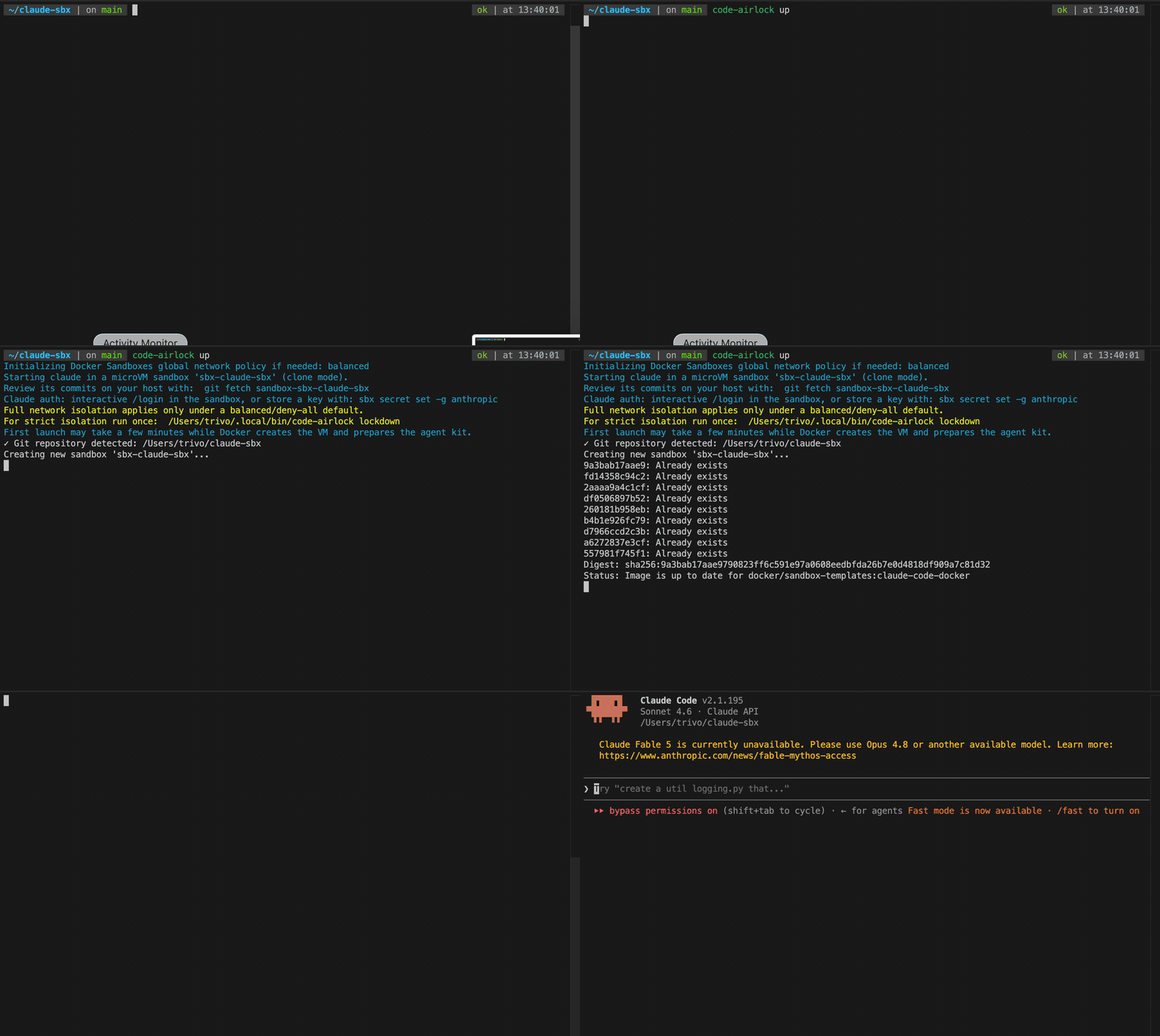
Code Airlock is a small wrapper around Docker Sandboxes for people who want to let coding agents work with fewer prompts without giving them direct access to the host machine.
Why Use It
Coding agents are most useful when they can install packages, run tests, inspect failures, and iterate without asking before every command. That is also exactly when you want a stronger boundary than process-level deny rules.
Code Airlock keeps the workflow simple:
| You want | Code Airlock does |
|---|---|
| Run agents unattended | Starts the selected agent inside a Docker Sandbox microVM |
| Keep your local repo clean | Uses clone mode, so the host repo is mounted read-only |
| Review everything first | Pulls sandbox commits back with fetch, diff, and merge |
| Limit network access | Can apply a configurable allowlist for model APIs and package registries |
| Switch agents | Uses AGENT=claude, AGENT=codex, AGENT=opencode, and other Docker Sandbox agents |
Why Let the Agent Run Freely?
Coding agents are most effective when they can use the tools needed to finish the task: install dependencies, inspect generated files, run test suites, start local services, read logs, and iterate on failures. Over-constraining every shell command often turns the agent into a slower autocomplete loop.
Code Airlock moves the main safety boundary below the agent. The agent can work with more autonomy inside a disposable microVM, while the host repo stays read-only and the resulting changes still come back as commits for review.
Why Not Just Use sbx Directly?
You can. Code Airlock is intentionally a thin wrapper around Docker Sandboxes, not a replacement for it.
Use sbx directly when you want full control over sandbox lifecycle, policies, kits, and one-off experiments. Use Code Airlock when you want the common coding-agent loop already wired together:
- clone mode by default
- stable sandbox naming per repo
- one-command agent startup
- repo-local
AGENTS.mdscaffolding fetch,diff,review, andmergecommands for the sandbox branch- a documented credential and network-policy path for Claude Code, Codex, and OpenCode
The point is to make the safe workflow boring and repeatable while still leaving sbx available underneath.
Why Not Just Configure the Agent Harness Better?
Agent harness rules are useful, and Code Airlock is meant to work with them. Codex approvals, Claude Code permissions, OpenCode settings, AGENTS.md, and custom prompts all help shape what the agent should do.
Those rules are still policy inside the agent process. They do not give you a disposable VM, a read-only host repo, a separate clone for agent commits, or a host-side review step before changes land. They also do not provide a shared wrapper for Claude Code, Codex, OpenCode, and other agents.
Code Airlock treats harness rules as the first layer and Docker Sandboxes as the boundary underneath it. The agent can be configured to behave well; the sandbox limits what happens when it does not.
Quick Start
Install Docker Sandboxes first. On Linux:
curl -fsSL https://get.docker.com | sudo REPO_ONLY=1 sh
sudo apt-get install docker-sbx
sudo usermod -aG kvm $USER
newgrp kvm
sbx login
On macOS and Windows, follow Docker's official install guide.
Install Code Airlock with npm:
npm install -g code-airlock
Or use the standalone shell installer:
curl -fsSL https://raw.githubusercontent.com/Trivo25/code-airlock/main/install.sh | sh
The shell installer also adds a short codelock alias when that command is not already taken:
codelock up
codelock status
codelock attach
The npm package intentionally installs only code-airlock, because codelock is already an npm package name. Add a personal shell alias if you want the shorter command after npm install:
alias codelock=code-airlock
Or clone it manually:
git clone https://github.com/Trivo25/code-airlock.git
cd code-airlock
ln -s "$PWD/code-airlock" ~/.local/bin/code-airlock
The installer writes to ~/.local/bin by default. Choose another location with:
curl -fsSL https://raw.githubusercontent.com/Trivo25/code-airlock/main/install.sh | PREFIX=/usr/local/bin sh
Skip or rename the short alias:
curl -fsSL https://raw.githubusercontent.com/Trivo25/code-airlock/main/install.sh | CODE_AIRLOCK_INSTALL_ALIAS=0 sh
curl -fsSL https://raw.githubusercontent.com/Trivo25/code-airlock/main/install.sh | CODE_AIRLOCK_ALIAS=calock sh
Install - Agent
Already using a coding agent? Send it this:
Install Code Airlock in this environment, then run its first-run checks.

Use npm when available:
npm install -g code-airlock

If npm is unavailable, use:
curl -fsSL https://raw.githubusercontent.com/Trivo25/code-airlock/main/install.sh | sh

After install, make sure code-airlock is on PATH, then run:
code-airlock doctor
code-airlock --dry-run up

Do not start a real sandbox or change network policy unless I explicitly ask.
Run it from the repo you want the agent to work on:
cd ~/code/my-project
code-airlock doctor       # check sbx, virtualization, login, and git
code-airlock --dry-run up # preview the sbx commands without running them
code-airlock init         # optional: add starter AGENTS.md instructions
code-airlock up           # start Claude Code in a sandbox
code-airlock --seed-config up # optionally copy user-level agent customizations
code-airlock status       # see this repo's sandbox and tmux session
On a remote server, keep the agent running after your SSH connection closes:
code-airlock --tmux up # detach with Ctrl-b, then d
code-airlock attach    # reattach later
Use another agent:
AGENT=codex code-airlock up
AGENT=opencode code-airlock up
When the agent has made changes, review them from your host:
code-airlock fetch
code-airlock diff
code-airlock review      # optional: open a visual diff
code-airlock merge
How It Works
Code Airlock starts Docker Sandboxes with --clone:
- Docker creates a private clone inside the sandbox VM.
- The agent edits and commits inside that clone.
- Your host repo stays read-only while the agent runs.
- You fetch the sandbox branch into your local repo and review the diff.
- You merge only when you are satisfied.
This means uncommitted sandbox edits do not come back through the normal flow. If needed, enter the sandbox and commit first:
code-airlock shell
git status
git add -A
git commit -m "describe the agent work"
exit
Then fetch and review from the host.
First-Run Checks
Most setup failures come from missing Docker Sandboxes, missing KVM/virtualization support, or an unauthenticated sbx CLI. Check before launching:
code-airlock doctor
Preview what Code Airlock would run without creating a sandbox:
code-airlock --dry-run up
Dry-run mode prints the sbx and git commands instead of running them. It is useful on machines that cannot run KVM yet, or when you want to understand the workflow before creating a VM.
Remote / Server Runs
Use --tmux to start the sandboxed agent inside a host-side tmux session:
code-airlock --tmux up
This attaches immediately so you can talk to the coding agent. To disconnect without stopping it, press Ctrl-b, then d. This detaches your terminal and leaves the agent running in the tmux session. Reattach later with:
code-airlock attach
For an unattended server run, start the tmux session without attaching:
code-airlock --tmux-detached up
The default session name is code-airlock-<sandbox-name>. Override it with:
TMUX_SESSION=agent-work code-airlock --tmux up
TMUX_SESSION=agent-work code-airlock attach
For a visual review, use:
code-airlock review
This fetches the sandbox branch and opens a Git directory diff using VS Code by default. Your working tree is not modified by the review command.
Use another Git difftool:
REVIEW_TOOL=opendiff code-airlock review
REVIEW_TOOL=vimdiff code-airlock review
Agent Instructions
Agents work better when the repo contains concise project instructions. Code Airlock can create a starter file:
code-airlock init
This writes AGENTS.md in the target repo only if one does not already exist. code-airlock up will mention the command when no AGENTS.md is present, but it will not silently modify your working tree.
Config Seeding
By default, a sandbox starts with a fresh agent home directory. Project files that are committed to Git come through clone mode, but personal commands, skills, subagents, and global instructions from your host home directory do not.
Opt in to copying curated user-level config before the agent starts:
code-airlock --seed-config up
This changes startup from one sbx run call to:
sbx create --clone ...
sbx cp ...
sbx run --name ...
Default seeded paths:
| Agent | Paths |
|---|---|
| Claude Code | ~/.claude/CLAUDE.md, ~/.claude/commands/, ~/.claude/agents/, ~/.claude/skills/ |
| Codex | ~/.codex/AGENTS.md, ~/.codex/AGENT.md, ~/.codex/agents/, ~/.codex/skills/, ~/.codex/prompts/ |
| OpenCode | ~/.config/opencode/AGENTS.md, ~/.config/opencode/opencode.jsonc, ~/.config/opencode/commands/, ~/.config/opencode/agents/, ~/.config/opencode/skills/ |
Code Airlock does not copy auth files, histories, logs, caches, session state, or node_modules by default. Credentials should still go through Docker Sandboxes' secret manager.
Copy explicit extra user-level paths with:
SEED_PATHS="$HOME/.codex/config.toml,$HOME/.claude/settings.json" code-airlock --seed-config up
SEED_PATHS entries must be under $HOME; secret-like paths are skipped. Gitignored project-local files are not copied by default. Prefer committing project instructions such as AGENTS.md, CLAUDE.md, and .claude/commands/ when they are meant to travel with the repo.
Authentication
Model credentials should go through Docker Sandboxes' secret manager or host-side auth flow, not be pasted into the VM.
Common setup:
sbx secret set -g anthropic          # Claude Code API key
sbx secret set -g openai --oauth     # Codex OAuth
sbx secret set -g openai             # Codex/OpenCode API key
Agent-specific notes:
| Agent | Authentication |
|---|---|
| Claude Code | Run code-airlock up and use /login inside Claude, or store an Anthropic key with sbx secret set -g anthropic |
| Codex | Use sbx secret set -g openai --oauth, sbx secret set -g openai, or export OPENAI_API_KEY before launch |
| OpenCode | Store the provider keys you use, such as openai, anthropic, google, xai, groq, aws, or openrouter |
Sandboxes do not carry user-level config such as ~/.claude or ~/.codex into the VM by design. Put project-level config in the repo if the agent needs it.
GitHub Credentials
Code Airlock does not need GitHub credentials for the normal fetch/diff/merge review loop.
Give the sandbox GitHub access only if you want the agent to use gh, open pull requests, create issues, or push directly from inside the VM:
echo "$(gh auth token)" | sbx secret set -g github
Global secrets apply when a sandbox is created. For an existing sandbox, either recreate it or scope the token to that sandbox:
echo "$(gh auth token)" | sbx secret set sandbox-sbx-my-project github
If you use SSH remotes, Docker Sandboxes can forward your host SSH agent when SSH_AUTH_SOCK is set. The private key stays on the host; sandboxed processes can request signatures but cannot read the key.
Network Policy
On first use, Code Airlock initializes Docker Sandboxes' global network policy to balanced if it has not been initialized yet.
Override that default:
GLOBAL_NETWORK_POLICY=deny-all code-airlock up
GLOBAL_NETWORK_POLICY=allow-all code-airlock up
For stricter runs, use:
code-airlock lockdown
Run lockdown after the sandbox exists. It sets Docker Sandboxes' global default to deny-all, then applies Code Airlock's allowlist to the named sandbox.
Undo the global policy change with:
code-airlock unlock
unlock runs sbx policy reset, which restores Docker Sandboxes' policy defaults.
The default allowlist covers Anthropic, OpenAI, GitHub, and npm:
api.anthropic.com,*.anthropic.com,api.openai.com,*.openai.com,github.com,*.github.com,codeload.github.com,objects.githubusercontent.com,registry.npmjs.org,*.npmjs.org
Customize it with sandbox.conf:
# sandbox.conf
AGENT=codex
ALLOW=api.openai.com,*.openai.com,github.com,*.github.com,registry.npmjs.org,*.npmjs.org
If a download fails, inspect blocked hosts:
code-airlock net
Headless Runs
Pass agent arguments after --.
Claude Code:
code-airlock up -- -p "add pagination to the users endpoint and run the test suite"
Codex:
AGENT=codex code-airlock up -- --dangerously-bypass-approvals-and-sandbox "fix the build"
OpenCode defaults to a TUI. Pass OpenCode's own flags after -- when you need session-specific behavior.
Configuration
Copy sandbox.conf.example to sandbox.conf and edit:
cp sandbox.conf.example sandbox.conf
Useful settings:
SANDBOX_NAME=sbx-my-project
AGENT=claude
REPO_DIR=/absolute/path/to/repo
GLOBAL_NETWORK_POLICY=balanced
REVIEW_TOOL=vscode
TMUX_SESSION=code-airlock-sbx-my-project
TMUX_ATTACH=1
SEED_CONFIG=0
SEED_PATHS=$HOME/.codex/config.toml,$HOME/.claude/settings.json
ALLOW=api.anthropic.com,*.anthropic.com,github.com,*.github.com
sandbox.conf is git-ignored.
Commands
| Command | What it does |
|---|---|
up [-- agent-args] |
Create and start the sandbox in clone mode with the selected agent |
doctor |
Check sbx, virtualization/KVM, git, daemon reachability, and login status |
status |
Show this repo's sandbox and tmux session status |
attach |
Attach to this repo's Code Airlock tmux session |
init |
Create a starter AGENTS.md in the target repo |
shell |
Open a shell inside the running sandbox |
fetch |
Fetch the sandbox commits into your local repo |
diff [base] |
Fetch, then show base..sandbox-<name>/base |
review [base] |
Fetch, then open a visual Git difftool review |
merge [base] |
Fetch, then merge the sandbox branch into base |
net |
Show allowed and blocked network hosts |
stop |
Stop the sandbox but keep its VM and commits |
rm |
Remove the sandbox and repo tmux session after offering to fetch commits |
lockdown |
Set the global policy to deny-all and apply the allowlist to an existing sandbox |
unlock |
Reset Docker Sandboxes policies with sbx policy reset |
Global option:
| Option | What it does |
|---|---|
--dry-run |
Print commands instead of running them |
--tmux |
Run up inside a host-side tmux session and attach |
--tmux-detached |
Run up inside a detached host-side tmux session |
--seed-config |
Copy curated user-level agent config before starting |
Security Notes
- The isolation boundary is the Docker Sandbox microVM, not the agent's own permission model.
- Clone mode keeps your host repo mounted read-only.
lockdownsets the default network policy to deny-all for all Docker Sandboxes. Revert withcode-airlock unlock.- Keep the allowlist as narrow as the task allows. Allowed hosts remain possible egress paths.
- Do not give the sandbox broad credentials unless the task truly requires them.
code-airlock rmdeletes the sandbox clone. Fetch or push anything you want to keep first.
Requirements
- macOS: Apple Silicon
- Linux: KVM enabled (
lsmod | grep kvm) - Windows: Windows 11 with Hypervisor Platform, run under WSL2
- Git
- Docker Sandboxes CLI (
sbx)
License
MIT. See LICENSE.
Yorumlar (0)
Yorum birakmak icin giris yap.
Yorum birakSonuc bulunamadi