truss-harness
Health Uyari
- License — License: MIT
- Description — Repository has a description
- Active repo — Last push 0 days ago
- Low visibility — Only 5 GitHub stars
Code Basarisiz
- process.env — Environment variable access in .github/workflows/desktop-release.yml
- process.env — Environment variable access in .github/workflows/pull-request.yml
- process.env — Environment variable access in .github/workflows/truss-go-android-release.yml
- Hardcoded secret — Potential hardcoded credential in packages/agent-host/src/index.test.ts
- exec() — Shell command execution in packages/agent-host/src/index.ts
Permissions Gecti
- Permissions — No dangerous permissions requested
Bu listing icin henuz AI raporu yok.
A modular coding-agent runtime for local models with a CLI, full-screen TUI, VS Code extension, and desktop app built on the same tools, safeguards, and workspace state.
Truss

Truss is a local-first, provider-neutral coding-agent platform. Use the same
models, tools, permissions, workspace memory, and plans from the command line,
terminal, VS Code, or a dedicated desktop workspace.
Create multiple workspace-local managed-agent profiles when a task benefits
from separate models or providers. Chat and Plan agents can work concurrently;
Edit agents are serialized through a workspace write lease so they cannot
mutate the same workspace at the same time.
Bring an Ollama, LM Studio, llama.cpp, or compatible endpoint—or configure a
supported cloud provider with your own API key. Truss does not require a hosted
control plane.
Choose a client
| Client | Best for | Install |
|---|---|---|
| CLI | Scripts and focused coding tasks | npm install --global @truss-harness/cli |
| Terminal UI | Keyboard-first work in the terminal | npm install --global @truss-harness/tui |
| VS Code | Chat, file context, completions, and approvals in the editor | Install from the Marketplace |
| Desktop | A dedicated workspace with files, diffs, terminal, Git, and chat | Download Truss Desktop |
| Truss Go | Continue a trusted Desktop or VS Code session from Android | Explore Truss Go |
Managed agents
Desktop, VS Code, the CLI, and a host-authorized Truss Go connection can
control independent workspace-local agent profiles. Each profile has its own
provider, endpoint, model, mode, and approval policy while credentials remain
with the host. Read the managed-agent guide
for run policy, safety behavior, and CLI commands.
CLI
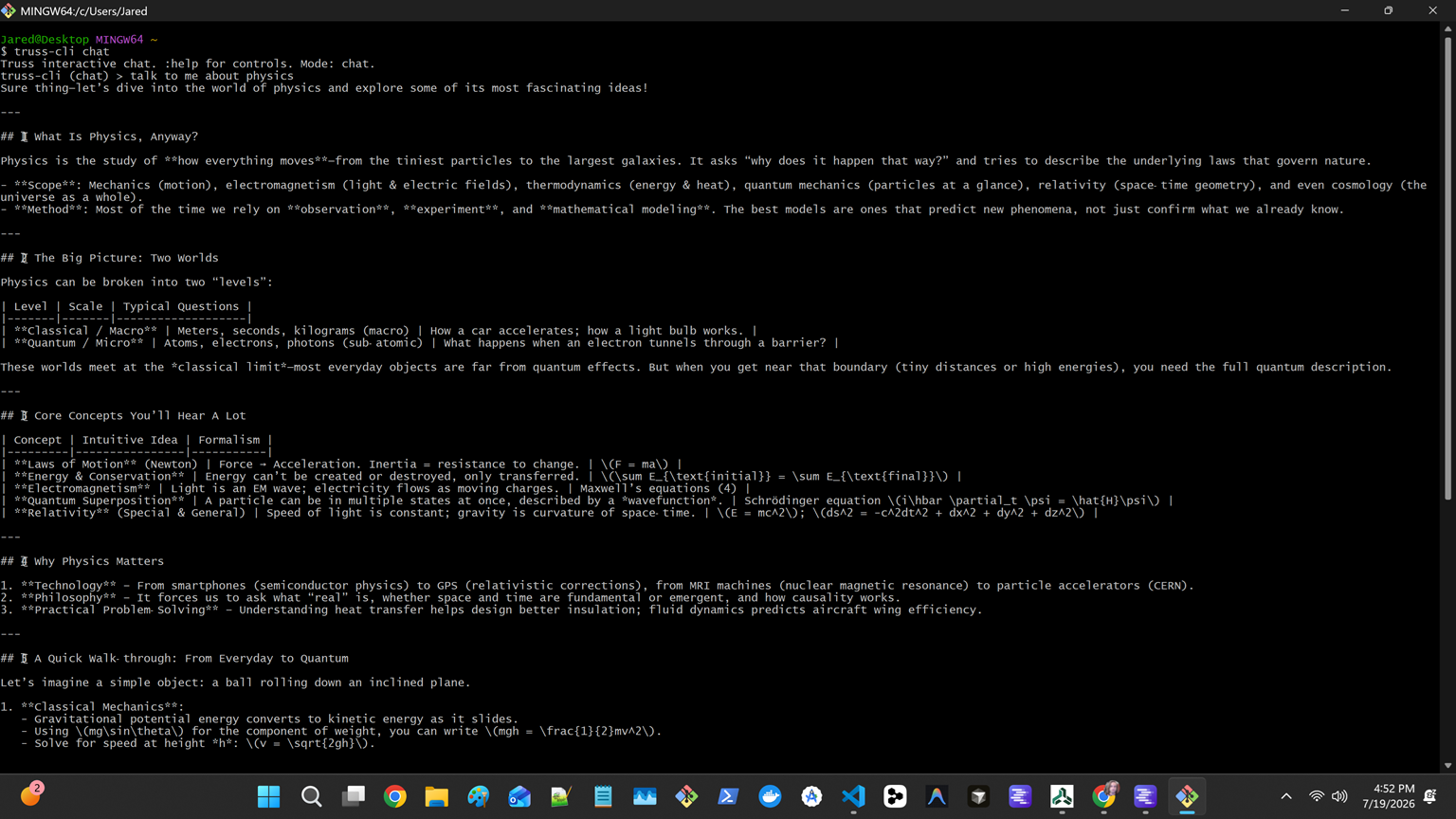
Use the CLI for direct tasks, scripts, and automations.
npm install --global @truss-harness/cli
truss-cli models
truss-cli chat "Review the current diff"
Terminal UI
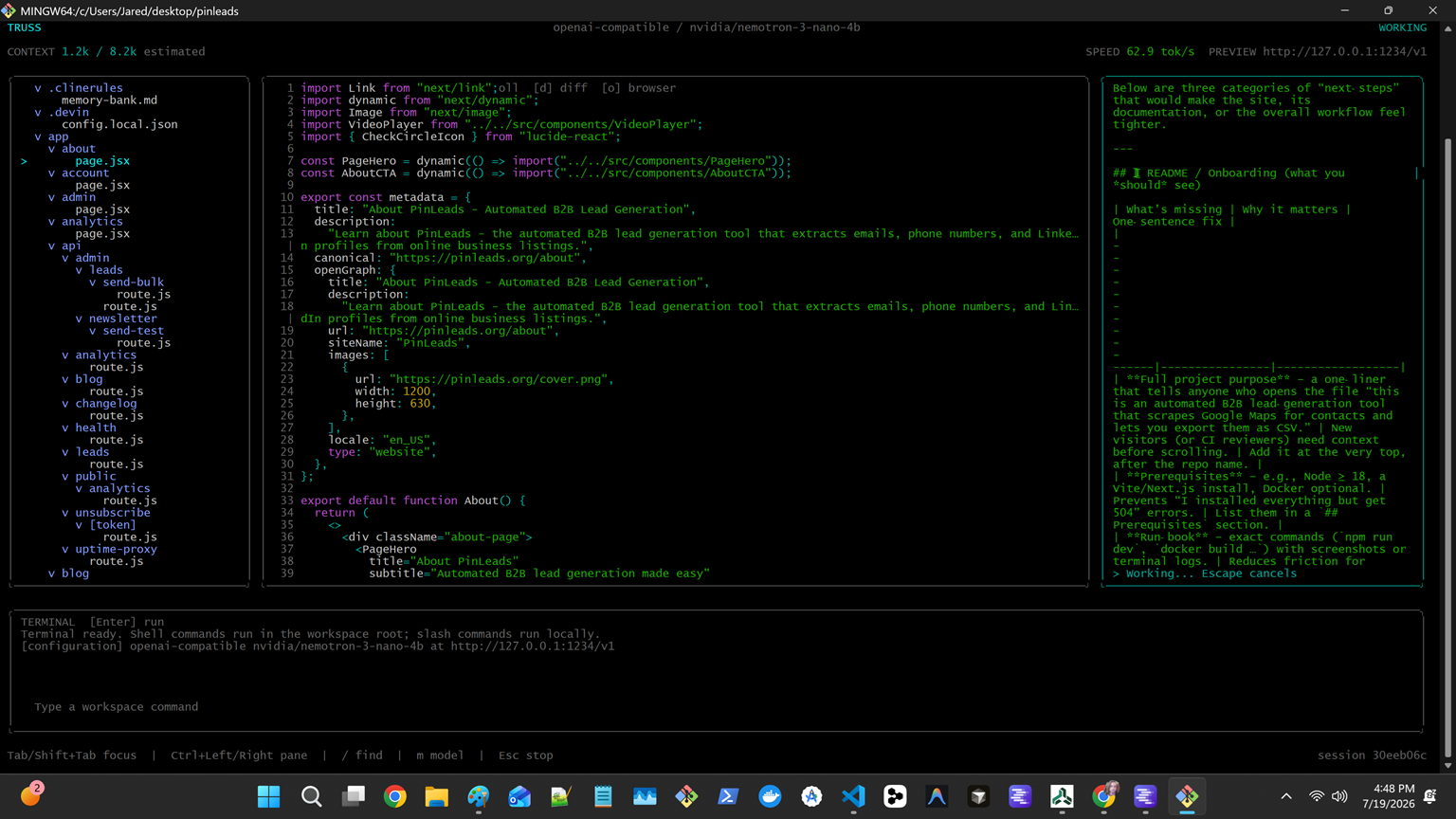
The terminal UI combines chat, files, editing, Git diffs, shell output, model
controls, and approvals in one keyboard-first workspace.
npm install --global @truss-harness/tui
truss-tui
VS Code
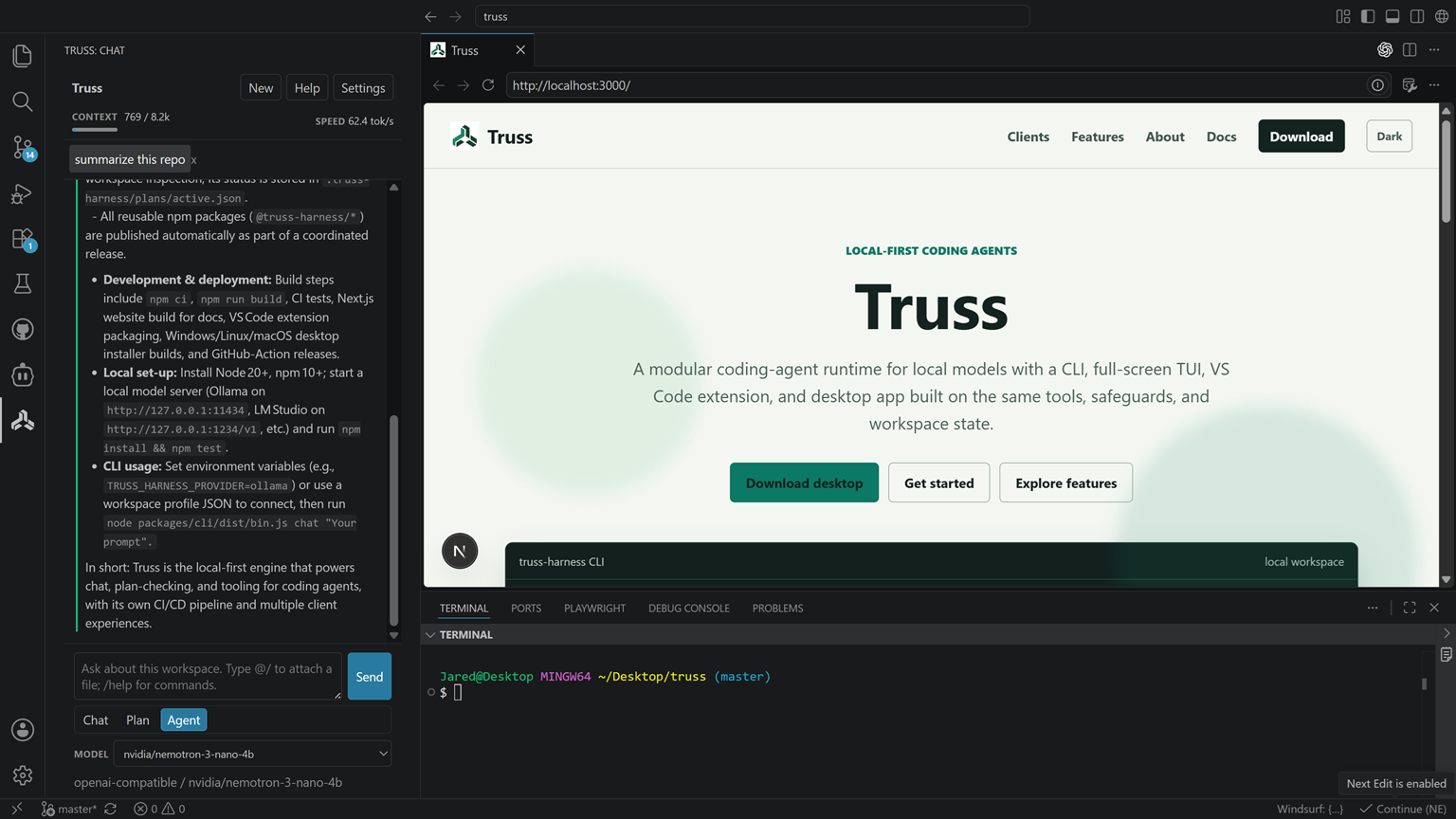
Install the Truss VS Code extension, open the Truss Activity Bar view, then select a detected local server or enter your endpoint and model. The extension supports streaming chat, focused file context, inline completions, agent modes, Git-aware actions, and tool approvals.
Desktop
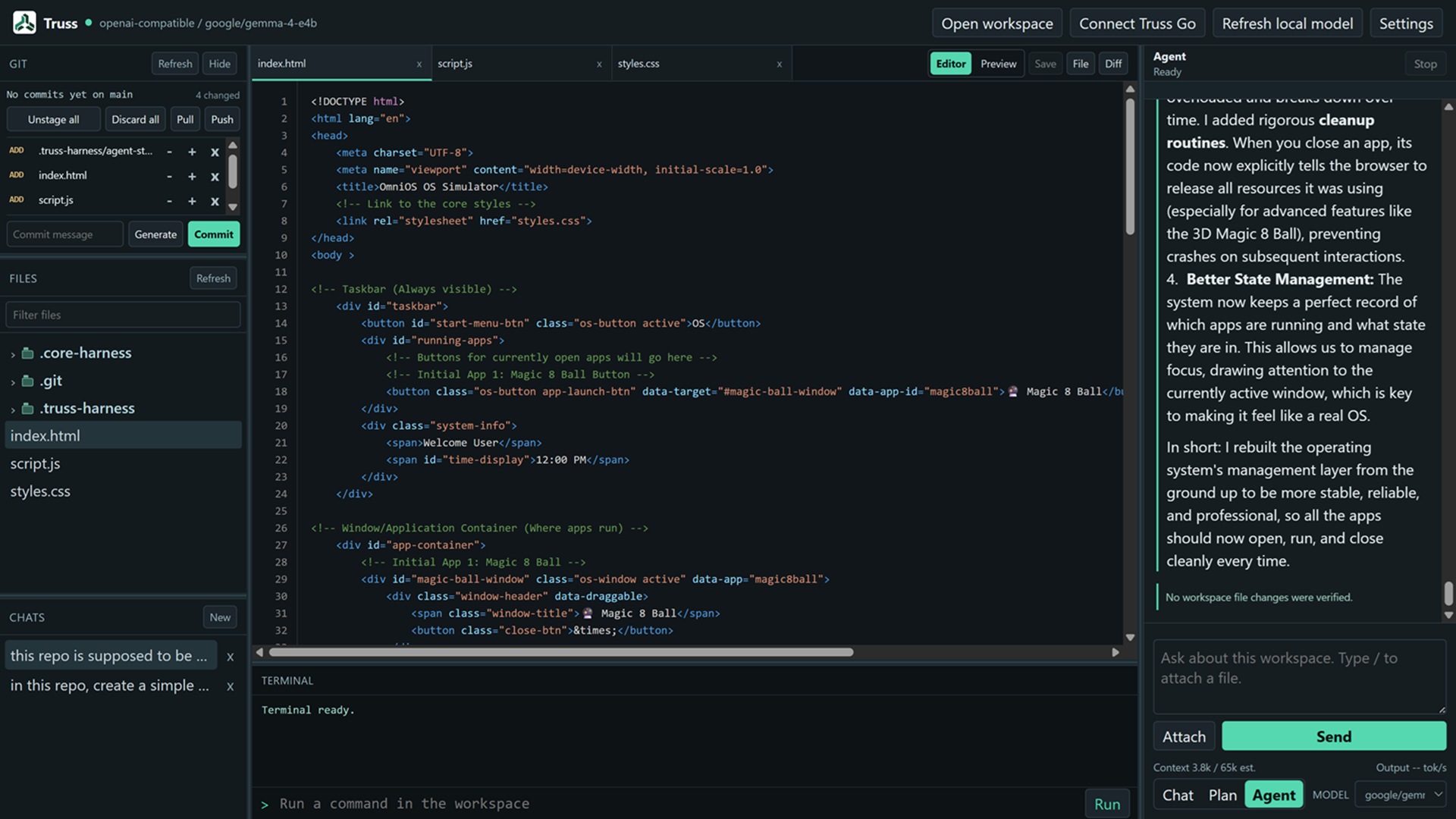
Download Truss Desktop for Windows or Linux. Open a workspace, choose Settings, configure a model endpoint, and select a model. The desktop app includes files, editor and diff views, a terminal, Git controls, persistent chat, MCP settings, and approval controls.
Quick start
- Start a compatible model server. Ollama is the simplest option; LM Studio,
llama.cpp, and other OpenAI-compatible servers also work. - Install the CLI or terminal UI, or install the VS Code extension or desktop
app. - Let Truss discover your local server, or configure a profile explicitly.
Ollama is detected at http://127.0.0.1:11434. Compatible servers are also
probed at common LM Studio and llama.cpp addresses. Check what Truss finds:
truss-cli models
Configuration
The CLI and terminal UI share JSON configuration files. Run these commands to
see the active user and workspace locations, then create a safe workspace
template:
truss-cli config path
truss-cli config init
Example .truss-harness/config.json:
{
  "defaultProfile": "ollama-coder",
  "profiles": {
    "ollama-coder": {
      "provider": "ollama",
      "baseUrl": "http://127.0.0.1:11434",
      "model": "qwen3:8b",
      "mode": "edit",
      "permission": "ask",
      "internetAccess": false
    },
    "lm-studio-fast": {
      "provider": "openai-compatible",
      "baseUrl": "http://127.0.0.1:1234/v1",
      "model": "local-model-id",
      "mode": "plan",
      "permission": "auto-read"
    }
  }
}
Use a profile for a task:
truss-cli chat --profile ollama-coder "Explain the runtime architecture"
truss-cli chat --profile lm-studio-fast --mode edit "Update the tests"
You can also configure a one-off session with environment variables:
| Variable | Purpose |
|---|---|
| TRUSS_HARNESS_PROVIDER | ollama or openai-compatible; defaults to ollama |
| TRUSS_HARNESS_BASE_URL | Model server base URL |
| TRUSS_HARNESS_MODEL | Model name or ID |
| TRUSS_HARNESS_API_KEY | Optional token for a protected endpoint |
| TRUSS_HARNESS_SYSTEM_PROMPT | Optional system prompt |
| TRUSS_HARNESS_MCP_SERVERS | Optional JSON object containing local MCP servers |
The Desktop app and VS Code extension keep endpoint, model, mode, and
permission choices in their own settings. API keys should stay in the client’s
credential flow or environment variables—never commit them to a workspace
configuration file.
Modes and approvals
Choose the mode that fits the task:
| Mode | Access |
|---|---|
| Chat | Conversation only; no workspace tools |
| Plan | Read-only workspace inspection |
| Edit | Reads, writes, search, grep, and terminal execution |
Tool permissions are independent from mode. Use Ask every time to approve
each action, Auto-allow read-only to approve safe inspection automatically,
or Auto-allow all tools only in a workspace you trust.
MCP servers
Truss can load local Model Context Protocol servers over stdio. Add them to
your shared CLI/TUI configuration, or paste the same object into the Desktop or
VS Code MCP settings:
{
  "mcpServers": {
    "filesystem": {
      "command": "npx",
      "args": ["-y", "@modelcontextprotocol/server-filesystem", "."],
      "cwd": ".",
      "enabled": true,
      "readOnly": true
    }
  }
}
Chat mode does not load MCP tools. Plan mode loads only servers marked
readOnly; Edit mode loads every enabled server. Workspace MCP definitions are
ignored by default because they can start local processes; explicitly trust
them with "allowWorkspaceMcpServers": true in your user configuration when
appropriate.
Learn more
Truss is actively developed. Contributions and feedback are welcome.
Yorumlar (0)
Yorum birakmak icin giris yap.
Yorum birakSonuc bulunamadi