aida
Health Uyari
- License — License: Apache-2.0
- Description — Repository has a description
- Active repo — Last push 0 days ago
- Low visibility — Only 9 GitHub stars
Code Uyari
- fs module — File system access in action.yml
- process.env — Environment variable access in examples/rallly/adapters/database.mjs
Permissions Gecti
- Permissions — No dangerous permissions requested
Bu listing icin henuz AI raporu yok.
Turn your app into user guides and narrated tutorials. AIDA works with your coding agent to document your real app, and keeps the docs current from CI.


Turn your app into user guides and narrated tutorials.
AIDA (Agent-driven Instruction and Documentation Automation) works with your coding agent to
write step-by-step walkthroughs of your web app, then runs each one in a real browser against
your running app. Every walkthrough becomes a help page with screenshots, a printable guide and a
narrated video, all from the same file. When a pull request changes a screen, CI re-runs the
walkthroughs it touches and tells you which pages changed and which ones broke.
https://github.com/user-attachments/assets/3ea1357c-b653-4ab3-bf58-d1a0f93d4d0c
Start with one prompt
With your app running locally against a throwaway database, open your coding agent in the app's
repo and paste:
Make help docs for this app with AIDA, the npm package aida-docs (never run `npx aida`: that's an
unrelated package).
1. Run `npx aida-docs init .`
2. Run `npx aida-docs skills install --target . --agent <you>`, where <you> is claude, codex,
   gemini, cursor, copilot, opencode or other.
3. Read the installed aida skill (.claude/skills/aida/SKILL.md or .agents/skills/aida/SKILL.md)
   and follow it, starting with `npx aida-docs doctor --config help/aida.config.ts`.
The agent sets up the help site, maps your app, asks you to approve a list of guides, then writes,
captures and checks each one. Quick start has the same steps by hand.
What you get
You (or your agent) write one walkthrough file per task. Each step says what to do, what to say,
and what the reader should see:
walkthrough: invite-a-teammate
title: Invite a teammate
for: Workspace admins
start:
  signed_in_as: admin
  page: /settings/team
steps:
  - id: open-invite
    title: Open the invite form
    say: Click Invite teammate.
    caption: Click Invite teammate.
    page_text: Click **Invite teammate**.
    actions:
      - do: click
        target: { role: button, name: Invite teammate }
        highlight: true
  # ...enter their email, choose a role, send
aida build replays it against your app and writes:
| Output | What it is |
|---|---|
| Help page | A page on a Next.js help site with numbered, highlighted screenshots, search, print styles and a "last checked" date. A page only publishes if every step passed against the real app. |
| Printable guides | A PDF per guide, a full manual, and a one-page quick reference card. |
| Narrated video | An MP4 per walkthrough with captions (SRT, VTT) and chapters. Narration uses a local voice (Kokoro) by default, so no API key is needed. |
| In-app help (experimental) | One script tag in your app shows the guides for the screen the reader is on and searches the rest. A Show me button runs the guide as a tour in the live app: it rings each control and waits while the reader clicks. No API key. |
| Help chat (experimental) | Answers questions from your guides only, with links to the pages it used. Runs on the site or inside your app via a script tag, using your Anthropic key. |
| Agent connector (experimental) | A read-only MCP server so other agents can search your guides and fetch step-by-step procedures. |
help/
  walkthroughs/invite-a-teammate.yaml         the source of truth
  pages/invite-a-teammate/index.mdx           help page
  pages/invite-a-teammate/screenshots/        step-01.png, step-02.png, ...
  videos/invite-a-teammate/                   .mp4, .srt, .vtt, .chapters.vtt
  pdf/                                        invite-a-teammate.pdf, .card.pdf, manual.pdf
The help site is an ordinary Next.js app in your repo. Edit text and screenshot callouts in the
local Studio (npm run dev in help/, then open /studio) and deploy it anywhere Next.js runs:
Vercel, Netlify, AWS Amplify, Cloudflare, a Node server or a static host.
See it on a real app
Rallly is an open-source meeting scheduler (Next.js,
better-auth, Prisma). We ran AIDA against a local copy with its demo data: 23 walkthroughs, every
one replayed in a real browser, and every output below came out of aida build unedited. The
config, sign-in adapter and walkthroughs are in examples/rallly.
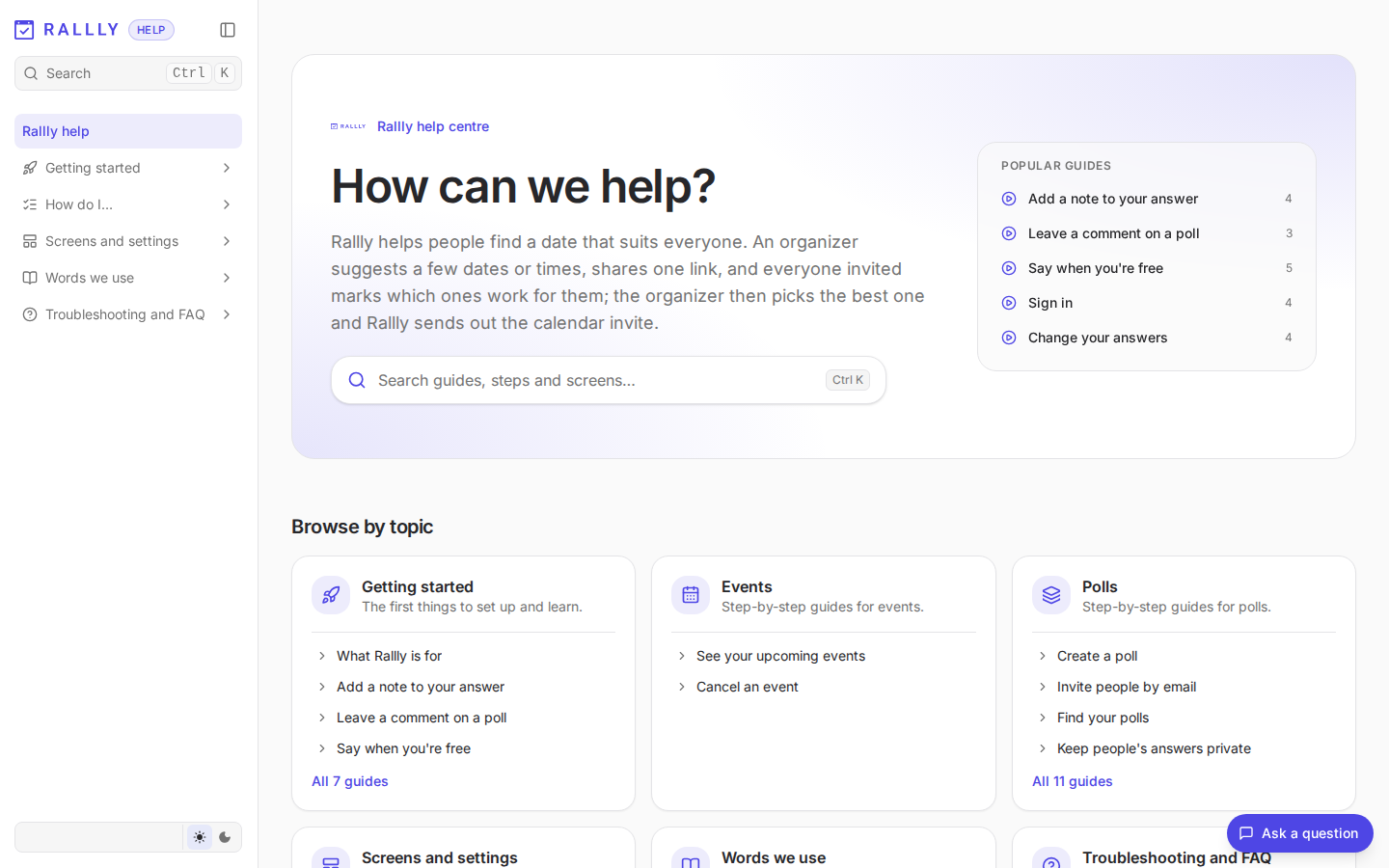
Help site. A home page grouped by topic, and one page per task with numbered screenshots, the
video, PDF downloads and a "checked in the app" date. The brief adds a glossary and a "Good to
know" page of rules.
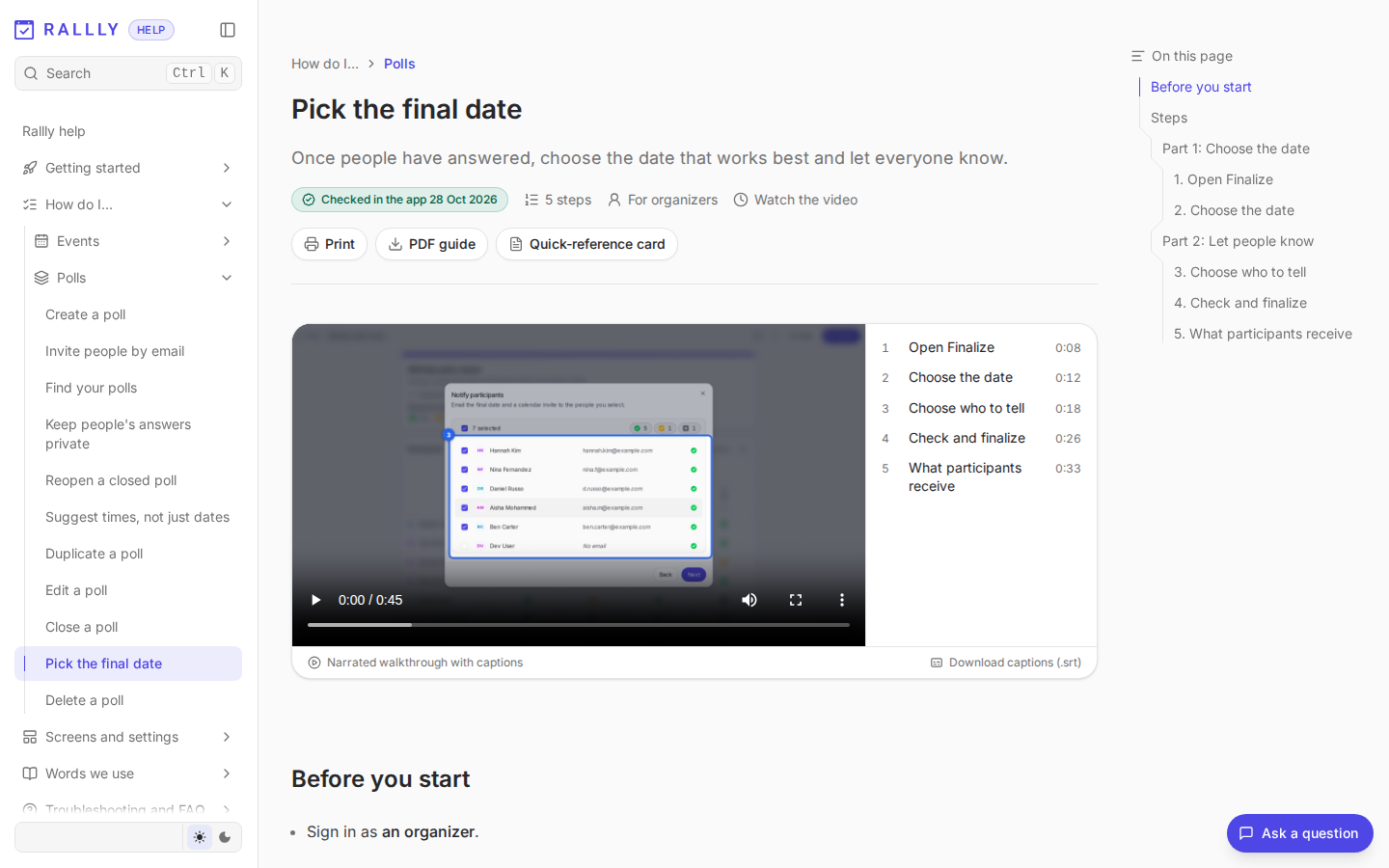
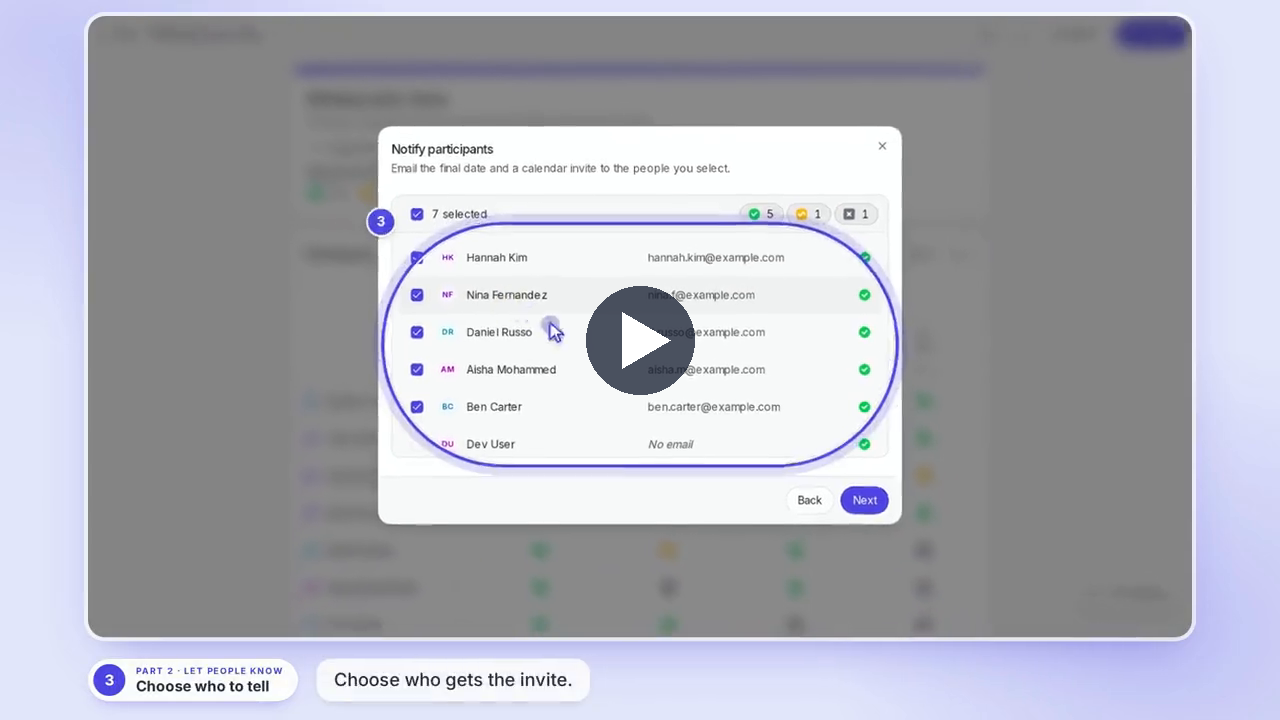
Narrated video. 45 seconds, five steps: open Finalize, pick the date, choose who to tell,
confirm, and the "Date booked" email participants receive (Rallly's real email, caught on the way
out and never sent). Captions and chapters are generated with it.
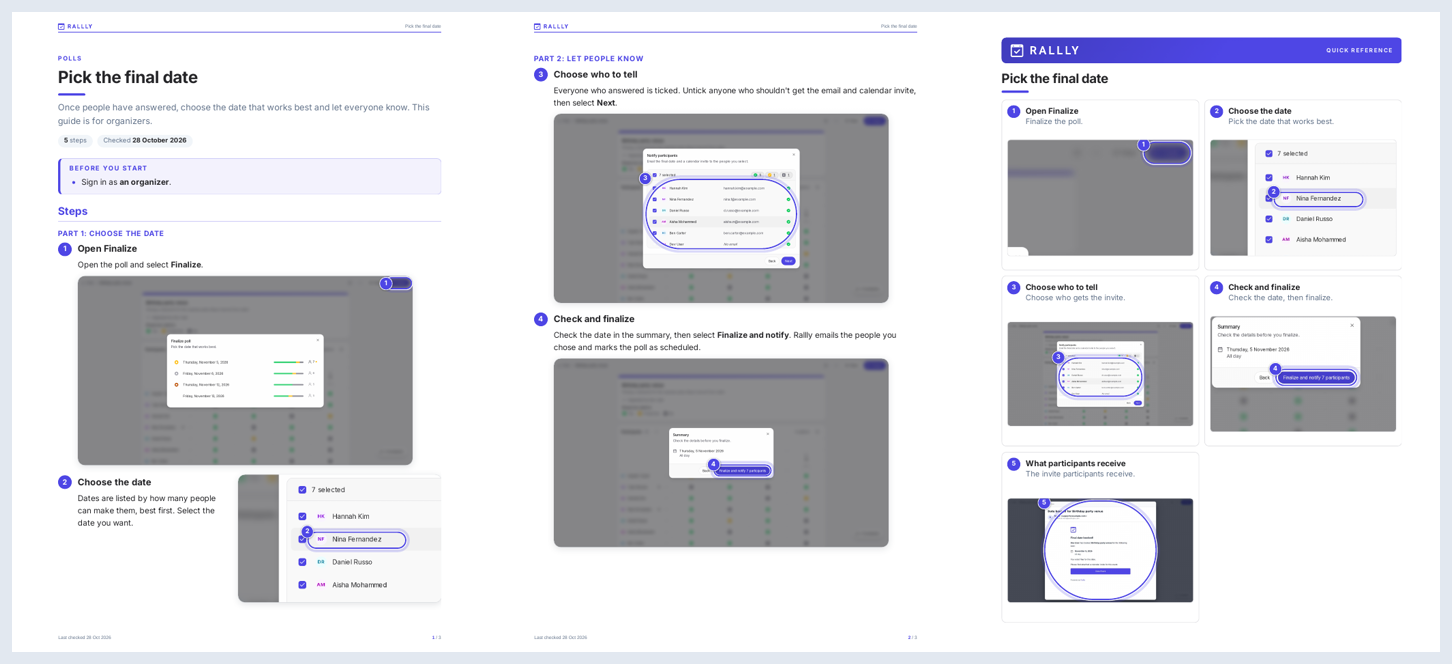
Printable guide and quick reference card. The same steps as an A4 guide and a one-page card.
Download the guide (PDF) ·
Download the card (PDF)
Try it first
npx playwright install chromium
npx aida-docs demo
aida demo needs Node 22+ and ffmpeg, and nothing else: no app, database or sign-in. It
copies a small fictional app (Acme Repairs, data in memory) and four walkthroughs into./aida-demo, captures them in a real browser through the normal safety checks, and prints where
the help page, PDF guide, quick reference card and narrated video are. Pages and PDFs appear after
about three minutes, the video a few minutes later (the first run also downloads a 90 MB voice
model). --no-video is quickest, --site installs and starts the help site, and the folder stays
a working example: edit a walkthrough and run it again.
On Linux, the local voice's runtime also downloads a 260 MB GPU library during install that AIDA
doesn't use; ONNXRUNTIME_NODE_INSTALL=skip npx aida-docs demo skips it.
Quick start
You need Node 22+ and ffmpeg on your PATH, and your app running locally against a throwaway
database. AIDA's package on npm is aida-docs (the aida name on npm is an unrelated package).
npx playwright install chromium

npx aida-docs init ~/my-app                                   # adds ~/my-app/help and installs it
npx aida-docs doctor --config ~/my-app/help/aida.config.ts    # checks the machine and the app, one fix per problem
npx aida-docs skills install --target ~/my-app                # adds the agent skills (--agent codex etc. for other agents)
Or install it once (npm install -g aida-docs) and run aida <command>. To work on AIDA itself,
see Contributing.
Then open your coding agent in ~/my-app and ask:
Make help docs for my app.
The agent maps your app, proposes a list of guides for you to approve, writes and captures each
walkthrough, and fixes what fails. To see the result, run npm run dev in help/ and open the
site. Run npx aida-docs build --config help/aida.config.ts to rebuild it all yourself.
Capture against a production build of your app (next build && next start) rather than the dev
server. docs/setup.md covers the sign-in adapter, the Studio over a tunnel, and
every command.
Supported agents
AIDA's engine is a deterministic CLI that never needs a model. Your coding agent does the judgment
work using the skills in skills/: planning what to document, writing walkthroughs,
repairing broken ones and reviewing the output. They're plain Agent Skills
(SKILL.md folders), so any agent that reads that format can run them. The one Claude-specific
part is the subagent files, which pick a model per job; other agents run every step on the model
you've chosen, which works but costs more on a large app.
| Agent | Install with | Support |
|---|---|---|
| Claude Code | skills install (default) |
Main target, tested end to end. Skills in .claude/skills/, subagents in .claude/agents/, each on a suggested tier: Haiku to map the app, Opus to plan, Sonnet to write, repair and review. |
| Codex, Gemini CLI, OpenCode | --agent codex, gemini, opencode |
Skills in .agents/skills/. Not yet tried end to end. |
| Cursor, GitHub Copilot | --agent cursor, copilot |
Skills in .agents/skills/ (both also read .claude/skills/). Not yet tried end to end. |
| Any other agent | --agent other, or point it at skills/AGENTS.md |
Works if it reads .agents/skills/ or follows a file you point it at. |
| Claude Code GitHub Action (optional) | aida init --ci --claude |
Repairs a broken walkthrough when someone comments @claude on a PR. Uses a Claude Code OAuth token, not an API key. |
How updates work
aida init --ci adds a GitHub workflow. On every pull request it:
- Maps the diff to the walkthroughs it affects, using routes, API calls, components and imports.
If it can't tell, it re-runs them all. - Re-captures only those walkthroughs, plus any they need data from.
- Compares the new screenshots with the published ones and posts one PR comment:
- Cosmetic: the screen changed but every step still works. The pages refresh on merge and
nobody has to do anything. - Broken: a step no longer works. The comment includes the
aida-repaircommand to run in
your agent. - New: a route no walkthrough covers yet, with the
aida-writecommand to draft one. - Possible app bugs are listed separately: for example, a save that returned success while
the screen didn't change. They come with evidence and no repair command, because a person
needs to look at them.
- Cosmetic: the screen changed but every step still works. The pages refresh on merge and
The base workflow uses no model and no API keys. Details and options are in
docs/ci.md.
The same walkthroughs work as end-to-end tests: aida test --junit report.xml replays them as
checks only and fails on a broken step or an app error, and aida export playwright writes them
as Playwright specs for your own suite. At release time, aida whats-new --video cuts one short
"what changed" video from the steps that changed.
Safe by default
- Capture refuses to run unless every database the app could connect to is on your machine (or
is a throwaway you've named exactly). - It warns about real email and SMS senders, and refuses live payment keys.
- Write steps only run against a local app.
- Personal details are blurred in screenshots, and every output is scanned for personal data and
secrets before it publishes. - Demo data uses
example.comaddresses and reserved fictional phone numbers. - An agent can't approve the first production publish. A person has to.
Full details are in docs/setup.md.
Status and roadmap
AIDA is pre-release. It has been run end to end on a few real Next.js apps but hasn't had outside
users yet. Expect rough edges and breaking changes.
Works today
- Walkthrough files with validation, capture in Playwright, and data dependencies between
walkthroughs (needs,leaves,clears) with the capture order worked out for you - Help site (Next.js + Fumadocs) with search, print styles,
llms.txt, and branding read from
your app - PDF guides, a full manual and quick reference cards
- Narrated videos with captions and chapters using the local Kokoro voice
aida demo(every output from a bundled sample app, no setup),aida init,doctor,digest,inspect, and sign-in adapters for Auth.js, better-auth and Supabase Auth apps- Emails in walkthroughs: the app's real email caught locally (never sent), or a written mock;
codes and links in it can be typed into later steps (sign-in by emailed code) - Studio for editing text, callouts and blur boxes, with history and undo
- Agent skills for Claude Code
- PR checks in GitHub Actions: affected walkthroughs, screenshot diffs, and a tiered PR comment
- Safety checks for databases, outbound email, SMS and payments, and personal data
Experimental
- Help chat and agent connector (MCP)
- In-app help: guides for the current screen and "Show me" tours in the live app (one script
tag, no key) - Reader feedback without a key: searches that found nothing and "Was this helpful?" votes, read
byaida suggest aida test(walkthroughs as end-to-end checks, JUnit output) andaida export playwright- A "what changed" video per release (
aida whats-new --video) aida publishadapters for Vercel, Netlify, Amplify, Cloudflare, Node and static export. Dry
runs are tested; most hosts haven't had a real deploy yet.- CI repair through the Claude Code GitHub Action, and keeping docs in a separate repo
- Versioned docs and an auto-generated "What's new" page
- Importing Playwright tests as draft walkthroughs (about a third of calls map automatically)
aida record: click through a task once in a browser window and get a draft walkthrough. Tested
on fixture pages; not yet used by a person on a real app- MiniMax and ElevenLabs voices
- Codex, Gemini CLI, Cursor, Copilot and other agents that read Agent Skills
Planned
- Sign-in helpers for Clerk and Firebase
- A setup path for no-code builders (Lovable, Bolt) that doesn't require opening GitHub
- Longer-term evidence that docs stay current over weeks of real app changes
The detailed plan is in docs/scope.md, and milestone status is in
docs/build-plan.md.
Contributing
npm install
npm test               # fast suite, about five minutes
npm run test:slow      # adds real rendering and Kokoro voice
npm run typecheck
node skills/check.mjs  # validates the agent skills
Read AGENTS.md and CONTRIBUTING.md before changing things.
Report security problems privately: see SECURITY.md.
Licence: Apache-2.0.
Yorumlar (0)
Yorum birakmak icin giris yap.
Yorum birakSonuc bulunamadi