dutis
Health Warn
- No license — Repository has no license file
- Description — Repository has a description
- Active repo — Last push 0 days ago
- Community trust — 255 GitHub stars
Code Pass
- Code scan — Scanned 12 files during light audit, no dangerous patterns found
Permissions Pass
- Permissions — No dangerous permissions requested
No AI report is available for this listing yet.
MacOS Application Extension Manager
Dutis - macOS Default Application Manager
A Rust application for inspecting and safely managing macOS default handlers for filename extensions, UTIs, MIME types, and URL schemes.
Website: tsonglew.github.io/dutis


Features
- 🔍 Scan System Applications: Automatically discovers all installed applications on macOS
- 📱 Application Capability Discovery: Reads declared extensions, UTIs, MIME types, URL schemes, and roles
- 🎯 Keyboard-first TUI: Navigate with arrow keys, search applications as you type, and review changes before confirming them
- ⚙️ Default App Setting: Set default applications for file types using the
duticommand - 🧭 Accurate App Selection: Preserves full application paths, including nested and duplicate names
- 🧩 Modern Metadata Support: Reads legacy document types and modern UTI declarations
- ✅ Verified Updates: Verifies the selected default application after applying it
- 🤖 Agent-ready CLI: Stable JSON output, dry runs, deterministic selectors, and explicit exit codes
- 📋 Declarative Configuration: Plan, diff, apply, and verify a versioned TOML policy
- ↩️ Snapshots and Rollback: Persist pre-change state and restore it through the verified plan pipeline
- 🔌 Local MCP Server: Give agents read-only discovery and planning tools with separately gated writes
- 🛡️ Policy and Audit: Enforce local allowlists and approvals with durable, verified mutation records
- 💡 Explainable Profiles: Generate evidence-backed developer, designer, media, or minimal proposals without changing the system
- 🏢 Fleet-Aware Recommendations: Apply local allowlists, protected targets, and ordered team preferences before proposing applications
- 🧩 Profile Overlays: Extend built-in profiles or add typed team profiles from a strict local configuration
- 👀 Drift Monitoring: Detect association changes continuously, notify through macOS, and optionally remediate through snapshots and policy
- 🔗 Typed Associations: Manage extensions, UTIs, MIME types, URL schemes, and Launch Services roles through one verified pipeline
- 📡 Event Sinks: Stream versioned drift and mutation lifecycle events to private JSONL logs or trusted local commands
- 🌐 HTTPS Event Adapter: Forward events with environment-only credentials, bounded retries, and idempotency headers
- 📦 Durable Event Replay: Queue failed command deliveries locally and replay them without repeating the original mutation
- 📊 Delivery Health: Summarize pending and dead-letter counts without exposing event payloads
- 🍎 Native Role Inspection: Read separate viewer, editor, and shell defaults directly from macOS Launch Services
Installation
Prerequisites
- macOS 10.14 or later
duti(brew install duti) when changing default applications; the Homebrew formula installs it automatically
Via Homebrew (Recommended)
brew install tsonglew/tap/dutis
The tap installs universal dutis and dutis-event-http binaries for Apple
Silicon and Intel Macs, together with the duti runtime dependency.
Use with coding agents
For requests such as "which app opens PDFs?" or "make VS Code the default for
Markdown files", install the Dutis skill as well as
the CLI. Installing Dutis with Homebrew alone does not register the skill with
your agent. With Node.js installed, make the skill available to Codex globally:
npx skills add tsonglew/dutis --skill dutis --global --agent codex
For Claude Code, replace codex with claude-code. Omit --global to install
for the current project only. The command above installs the latest skill from
GitHub; to use the copy bundled with your installed Homebrew release instead:
npx skills add "$(brew --prefix dutis)/share/dutis/skills/dutis" --skill dutis --global --agent codex
Restart the agent session after installation so it can discover the skill. The
skill guides the agent through inspection, preview, and verification; it does
not install the dutis executable. See the Homebrew guide
for a direct symlink option.
To expose Dutis as read-only MCP tools, register its local server with your
client. For example, for Codex:
codex mcp add dutis -- dutis mcp
For Claude Code and other clients, see the MCP server guide.
MCP registration and skill installation are separate: either can be used on its
own, and both require the local dutis executable. The server advertises write
tools only when explicitly enabled.
Install duti
Browsing applications does not require duti. To change a default application, install it with:
brew install duti
Manual Installation
Build from Source
# Clone the repository
git clone https://github.com/tsonglew/dutis.git
cd dutis

# Build the project
cargo build --release

# Run the application
cargo run
Install from binary
cargo install --path .
Interactive Mode
Run dutis without a subcommand to open the guided terminal menu. It lets you:
- Inspect an extension: See its current default and applications that
declare support for it. - Review and change its default: Compare the current and proposed
handlers before an explicit[y/N]confirmation. Declining or pressing
Enter leaves the system unchanged. - Browse installed applications: Page through application names, paths,
and bundle identifiers without starting a change. - Check readiness: See scan coverage and whether
dutiis available for
mutations. - Discover advanced workflows: Get direct pointers to typed handlers,
recommendations, declarative configuration, snapshots, drift monitoring,
and MCP.
Every interactive mutation passes through the same policy, safety snapshot,
audit, and post-change verification pipeline as the non-interactive CLI. Every
submenu supports a clear path back to the main menu.
When stdin, stdout, and stderr are attached to a capable terminal, Dutis uses a compact
keyboard-first interface: arrow keys move the selection, Enter opens it, Esc orq returns, and application lists support type-to-filter fuzzy search. When
input is piped or the terminal is non-interactive, Dutis automatically falls
back to the numbered text interface so scripts and accessibility workflows
remain predictable. Set DUTIS_TUI=plain to request the text interface
explicitly.
Command Line Mode
Use explicit commands from shell scripts or AI agents. A leading dot on an
extension is optional.
# Inspect installed applications and supported handlers
dutis list
dutis query md
dutis get .md

# Inspect typed Launch Services handlers
dutis handler query uti public.plain-text --role viewer
dutis handler query mime text/plain --role editor
dutis handler query url-scheme https
dutis handler get uti public.plain-text --role viewer
dutis handler get mime text/plain --role editor
dutis handler get url-scheme https
dutis handler defaults extension txt --json

# Emit a versioned JSON response
dutis query json --json

# Preview a change without mutating the system
dutis set md com.microsoft.VSCode --dry-run --json

# Apply and verify a change; --yes is required for non-interactive writes
dutis set md com.microsoft.VSCode --yes

# Preview a typed handler change (URL schemes use the implicit `all` role)
dutis handler set uti public.plain-text com.apple.TextEdit --role viewer --dry-run
dutis handler set url-scheme https com.apple.Safari --yes

# Check local readiness
dutis doctor --json
Manage several associations as one reviewed, idempotent plan:
cp dutis.example.toml dutis.toml
dutis plan dutis.toml --json
dutis diff dutis.toml
dutis apply dutis.toml --dry-run
dutis apply dutis.toml --plan-digest <reviewed-digest> --yes
apply rebuilds the plan immediately before changing the system and rejects a
stale digest. Every change is verified, unchanged entries are skipped, and
partial failures include a result for every association. See the
declarative configuration guide for the
schema and safety contract.
Typed queries return compact application candidates with the exact matching
Info.plist declarations. Full list --json output also includes each
application's registered handlers and imported/exported type definitions. See
application metadata for evidence and role
matching rules.
Role-specific handler get queries and verification use native macOS Launch
Services reads. handler defaults returns the complete role matrix. See
native Launch Services reads.
Create, inspect, and restore local snapshots:
dutis snapshot create --config dutis.toml
dutis history
dutis rollback <snapshot-id> --dry-run
dutis rollback <snapshot-id> --yes
Real declarative applies and rollbacks automatically store a safety snapshot
before the first mutation. See snapshots and rollback
for storage, recovery behavior, and the safe limitation around removing an
association.
Run the local MCP server in its default read-only mode:
dutis mcp
Mutation tools are registered only with --allow-writes and require both a
fresh plan digest and the server-side DUTIS_MCP_APPROVAL_TOKEN. See the
MCP server guide for client configuration, tool schemas,
and the audit contract.
Inspect policy decisions and persistent mutation records:
dutis policy show --json
dutis policy check dutis.toml --json
dutis audit --json
Explore built-in profiles and generate a read-only recommendation:
dutis profile list
dutis profile show developer --json
dutis recommend developer --json
Customize built-ins or add team profiles with$DUTIS_STATE_DIR/profiles.toml (or DUTIS_PROFILE_FILE). Start fromdutis.profiles.example.toml; overlays support
extensions, UTIs, MIME types, URL schemes, roles, ordered candidates, and
explicit replacement of built-in candidates.
Recommendations use the effective local policy before selecting a target.
Teams can deploy preferences without a remote control plane:
[recommendations]
preferred_applications = ["com.microsoft.VSCode"]

[recommendations.extensions]
md = ["com.microsoft.VSCode", "com.apple.TextEdit"]

[[recommendations.handlers]]
kind = "uti"
identifier = "public.plain-text"
role = "viewer"
applications = ["com.apple.TextEdit", "com.microsoft.VSCode"]

[[recommendations.handlers]]
kind = "url_scheme"
identifier = "vscode"
applications = ["com.microsoft.VSCode"]
Results show each candidate's source, policy eligibility, installed paths,
declared target support, the proposed TOML, a deterministic plan digest, and
the effective policy assessment. Typed UTI, MIME, and URL-scheme preferences
require an exact compatible declaration from the installed application. They
never change system associations.
Review profiles and recommendations for
selection rules and the safe path from a proposal to an approved apply.
Check a declared configuration once or monitor it continuously:
dutis watch dutis.toml --once --json
dutis watch dutis.toml --interval-seconds 60 --notify
Install an optional per-user LaunchAgent that keeps the monitor running:
dutis launch-agent install dutis.toml --interval-seconds 300 --notify
dutis launch-agent status
Monitoring is read-only by default. Automatic remediation requires--remediate --yes --requester <identity> and always passes through policy,
audit, safety snapshot, apply, and verification. See
drift detection.
Send drift and mutation lifecycle events to automation without parsing human
output:
dutis --event-log ./dutis-events.jsonl watch dutis.toml --once --json
dutis --event-command /absolute/path/to/event-handler apply dutis.toml \
  --plan-digest <reviewed-digest> --requester codex --yes
Event options are global and can appear before or after a subcommand. The same
settings can be provided through DUTIS_EVENT_LOG, DUTIS_EVENT_COMMAND, andDUTIS_EVENT_OUTBOX. See event sinks for the schema,
command contract, LaunchAgent behavior, and delivery guarantees.
To forward events over HTTPS without placing credentials in Dutis arguments,
configuration, or audit records, use the bundleddutis-event-http command:
export DUTIS_HTTP_ENDPOINT='https://events.example.com/hooks/dutis'
export DUTIS_HTTP_BEARER_TOKEN='replace-with-a-scoped-token'
export DUTIS_EVENT_COMMAND="$(command -v dutis-event-http)"
dutis-event-http --check --json

# Inspect and replay failed command deliveries
dutis events health --json
dutis events pending --json
dutis events replay --limit 100 --json
dutis events archive --max-attempts 5 --older-than-days 30 --json
dutis events archive --max-attempts 5 --older-than-days 30 --yes
dutis events dead-letters --json
dutis events purge --older-than-days 90 --json
dutis events purge --older-than-days 90 --yes
Failed event-command deliveries are stored automatically under the Dutis state
directory. Override that location with --event-outbox orDUTIS_EVENT_OUTBOX. Replay keeps the original event ID so remote consumers
can deduplicate retries. See durable event replay.
Archive and purge commands are previews unless --yes is present, so pending
deliveries are never removed by an implicit retention policy.events health is read-only and reports stable counts, retry totals, time
ranges, and type/source breakdowns without event IDs or payload contents. The
same summary is available to read-only MCP clients as dutis_event_health.
All write paths enforce the same local policy before mutation and record the
requester, reviewed plan, result, and verification. See the
policy and audit guide. A reusable agent workflow is
included at skills/dutis/SKILL.md.
Homebrew installs it under $(brew --prefix dutis)/share/dutis/skills/dutis.
Applications can be selected by exact bundle ID, exact application path, or an
unambiguous application name. JSON responses use API version 1. Exit codes are0 for success, 2 for usage errors, 3 for no match, 4 for ambiguous
selectors, 5 for an unavailable dependency, and 6 for operation failure.
Declarative apply uses 7 for a stale plan. Apply and event replay use 8 for
partial failure.
Policy denial uses exit code 9.
The product and engineering sequence for declarative configuration, rollback,
MCP, agent policies, profiles, drift detection, and event delivery is documented in the
Agent Roadmap.
How It Works
Application Scanning
- System Directories: Scans
/Applications,/System/Applications, and~/Applications - Info.plist Parsing: Reads document types, URL types, roles, extensions, UTIs, and MIME types
- Modern Metadata: Keeps handler registrations separate from exported and imported UTI definitions
Default App Setting
- Bundle ID Detection: Reads the selected application's bundle identifier
- duti Integration: Sets extension, UTI, MIME, and URL-scheme handlers with the requested Launch Services role
- Verification: Reads the resulting association back before reporting success
Technical Details
Architecture
- Modular Design: Separates application scanning and plist parsing from the interactive flow
- macOS Native: Works with application bundles and Launch Services through
duti - Error Handling: Comprehensive error handling using
anyhow
Dependencies
- anyhow: Error handling and propagation
- colored: Terminal output formatting and colors
- dialoguer: Keyboard navigation, searchable selectors, and confirmations
- plist: Native XML and binary plist parsing
- clap: Command parsing and generated help
- serde / serde_json: Versioned machine-readable output
- toml: Strict declarative configuration parsing
- sha2: Deterministic reviewed-plan digests
- time: Portable RFC 3339 snapshot timestamps
Releases
After a version bump is merged into master, CI validates the commit, creates the matching version tag, publishes a universal macOS binary and checksum, then updates the tsonglew/homebrew-tap repository. Maintainer setup and release instructions are documented in docs/releasing.md.
Contributing
Contributions are welcome! Please feel free to submit a Pull Request.
Community
Star History
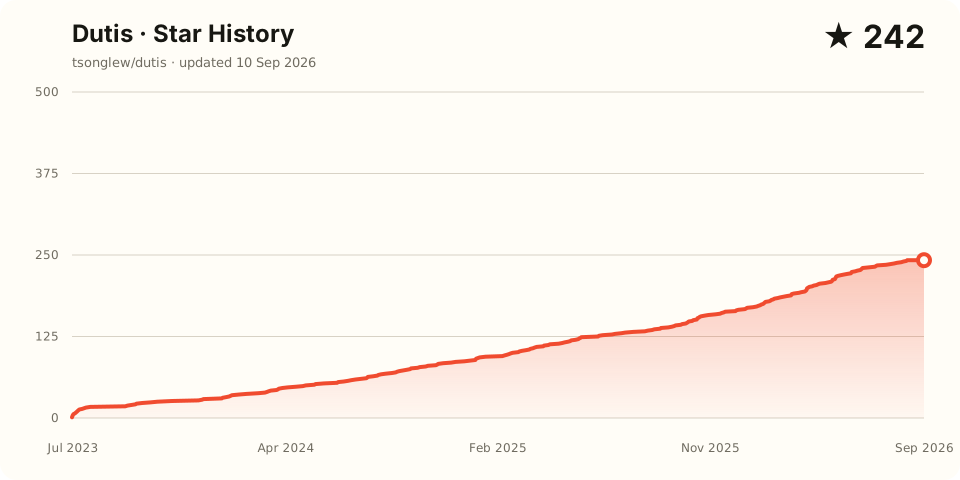
The chart is regenerated daily by GitHub Actions using an ephemeral repository
token; no personal access token or individual stargazer identity is published.
Contributors
License
This project is licensed under the MIT License.
Support
If you encounter any issues or have questions, please create an issue on GitHub.
Reviews (0)
Sign in to leave a review.
Leave a reviewNo results found