claude-code-statusline
Health Uyari
- License — License: MIT
- Description — Repository has a description
- Active repo — Last push 0 days ago
- Low visibility — Only 5 GitHub stars
Code Gecti
- Code scan — Scanned 2 files during light audit, no dangerous patterns found
Permissions Gecti
- Permissions — No dangerous permissions requested
Bu listing icin henuz AI raporu yok.
Lightweight Claude Code status line — one ~170-line Bash script, zero dependencies (no jq, Node, Python, daemon or config). ~8 ms per render. Session name, git branch, model, effort bar (with ultracode), context window, 5h/7d rate limits, prompt-cache countdown.
claude-code-statusline
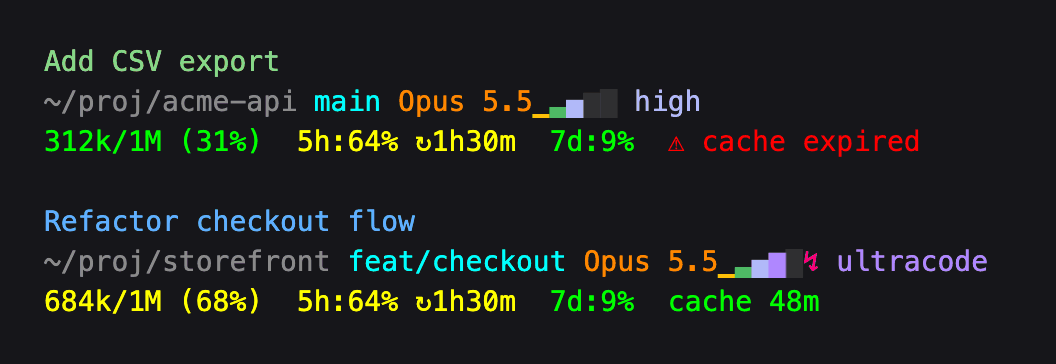
A lightweight multi-line status line for Claude Code: session name, git branch, model, effort level, context window, 5h / 7d rate limits, and a prompt-cache countdown. One Bash script, nothing to install.
Why another status line?
Most Claude Code status lines are small apps: a Node package run through npx, a compiled binary, a Python daemon, or a shell framework with themes and a config file. That's great if you want a dashboard. This project goes the other way: show the few things you actually glance at, and cost your machine next to nothing.
- One file.
statusline.shis ~170 lines of Bash and awk plus comments. Read it in ten minutes, change it in place. - Fast. ~8 ms per render on an Apple M4 Pro with the stock macOS bash, under 3 MB peak memory — and ~1.5 ms of that is bash itself starting. A single
awkpass parses the whole session JSON, and the git branch is read straight from.git/HEAD, with nogitprocess. - Nothing in the background. No daemon, no cache files, no config file, no network calls. It runs only when Claude Code asks for a redraw: after each message, and once a minute (
refreshInterval) so the countdowns keep moving while you're idle. - Uses what Claude Code already sends. Session name, effort level, context window, rate limits and prompt cache all come from the JSON on stdin — no API calls, no transcript parsing (the one exception: at
xhigheffort, a fast grep of the transcript to tell ultracode apart). - Nothing to install. Needs only bash, awk and grep, which every macOS and Linux system already has — no
jq, no Homebrew. Tested with bash 3.2 through 5.3 and the macOS, GNU, mawk and BusyBox awks.
Install
No dependencies: works out of the box on macOS and Linux.
git clone https://github.com/TurboKach/claude-code-statusline.git
cd claude-code-statusline
./install.sh
The installer symlinks ~/.claude/statusline-command.sh to the cloned statusline.sh and points the statusLine setting in ~/.claude/settings.json at it, with a 60-second refreshInterval (other settings preserved, a timestamped backup saved alongside). No restart needed — the bar updates on its next render.
Keep the clone around, since the install is a symlink to it. Update with git pull; if you installed before the cache countdown existed, run ./install.sh once more so it ticks while you're idle.
What it shows
- Line 1 — session name. Your
/renamename, or Claude's auto-generated session title, colored per project (each launch directory gets a stable hue, so parallel sessions are easy to tell apart). Hidden until the session has a name. - Line 2 — where and how. Working directory, git branch (or short SHA when detached), model name, and an effort bar: one cell per reasoning level the model supports (
low · medium · high · xhigh · maxon Opus 4.8), lit up to the active level in Claude Code's own/effortcolors, followed by the level name. When ultracode is active (xhigh effort driving a multi-agent workflow), the bar fills to thexhighcell, a magenta↯appears after it, and the label readsultracode. The bar hides on models without effort levels. - Line 3 — budget. Context-window usage (
used / max (pct%)) and the 5-hour / 7-day rate-limit meters, green → yellow at 50% → red at 75%. From 90% the context reads⚠first: time to/compactat a point you choose. From 50% a meter adds↻and the time until that window resets. Rate limits appear for Claude.ai Pro / Max subscribers after the first response. Last comes the prompt cache:cache 42mis the time until Claude's cached copy of the conversation expires (1 hour on a Claude subscription, 5 minutes with an API key or once you're on usage credits), colored the same way by how much of that time has passed. Each message restarts it. Once it runs out it reads⚠ cache expiredin red: your next message re-sends the whole conversation, so it's slower and costs more. Appears after the first response.
Customize
Everything lives in statusline.sh:
- Project colors —
proj_hues=(...), the 8 ANSI-256 colors assigned per project. - Other colors — the
--- Colors ---block near the top.
Because the install is a symlink, edits show up on the next render.
Uninstall
Remove the statusLine block from ~/.claude/settings.json (a timestamped backup sits next to it), then optionally rm ~/.claude/statusline-command.sh.
License
Yorumlar (0)
Yorum birakmak icin giris yap.
Yorum birakSonuc bulunamadi