abaqus-mcp-pro
Health Uyari
- License — License: MIT
- Description — Repository has a description
- Active repo — Last push 0 days ago
- Low visibility — Only 5 GitHub stars
Code Gecti
- Code scan — Scanned 12 files during light audit, no dangerous patterns found
Permissions Gecti
- Permissions — No dangerous permissions requested
Bu listing icin henuz AI raporu yok.
Professional MCP server suite for Abaqus/CAE — 100+ tools, dual transport, capsule tracking, physics contracts, and skills integration


  ___  ______   ___   _____  _   _  _____  ___  ___ _____ ______  ______ ______  _____
 / _ \ | ___ \ / _ \ |  _  || | | |/  ___| |  \/  |/  __ \| ___ \ | ___ \| ___ \|  _  |
/ /_\ \| |_/ // /_\ \| | | || | | |\ `--.  | .  . || /  \/| |_/ / | |_/ /| |_/ /| | | |
|  _  || ___ \|  _  || | | || | | | `--. \ | |\/| || |    |  __/  |  __/ |    / | | | |
| | | || |_/ /| | | |\ \/ /| |_| |/\__/ / | |  | || \__/\| |     | |    | |\ \ \ \_/ /
\_| |_/\____/ \_| |_/ \_/\_\ \___/ \____/  \_|  |_/ \____/\_|     \_|    \_| \_| \___/
AI-Native Abaqus Automation -- MCP Server + 3D Viewer + Solver Doctor
What is it?
ABAQUS MCP Pro connects your AI assistant directly to Abaqus/CAE over a TCP socket bridge.
You describe the simulation task in natural language, and the AI executes it in real time -
building geometry, assigning materials, submitting jobs, diagnosing errors, and visualizing results.
"Create a cantilever beam with a 10 kN tip load, mesh with C3D8R elements, and submit the job."
The AI handles every step through MCP tools, and the model updates live in your Abaqus window.
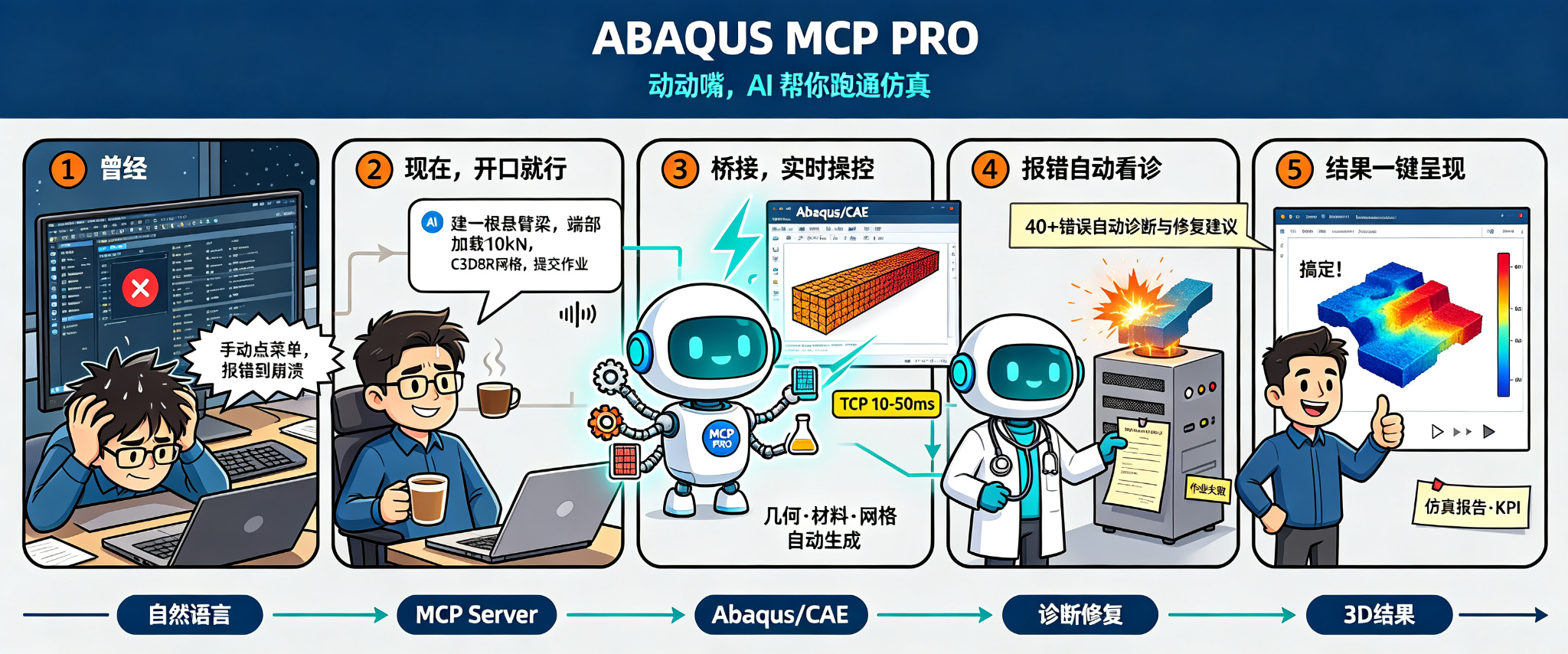
ABAQUS MCP Pro - AI-Native Abaqus Automation Workflow
Engineering validation status
2026-09-30: 1.1.0rc2 adds parsed-frame caching and geometry reuse, authenticated task history, friction/plastic contact examples, and project comparison reports. 391 Python and 43 frontend tests pass. Real CAE menu start/stop, GUI job submission/monitoring and ODB access passed on Abaqus 2026. Browser visual/GPU and other Abaqus versions remain unverified. See rc2 evidence and limitations.
Historical baseline: On 2026-09-28, the six reference cases and three-point load scan passed on a real local Abaqus 2026 installation. ODB/VTU numerical comparisons and noGUI kernel/socket checks passed; 379 software tests pass. GUI menu interaction, other Abaqus versions and large-model performance remain unverified. See real validation evidence. See delivery evidence, capabilities and migration, and reference workflow.
Quick Start
# 1. Install
cd viewer
npm ci
npm run build
cd ..
pip install -e .
abaqus-mcp-pro-setup

# 2. Launch Abaqus/CAE, then activate the plugin
#    Plug-ins > ABAQUS MCP Pro > Start MCP Bridge

# 3. Connect your AI client
codex mcp add abaqus-mcp-pro -- python -m abaqus_mcp_pro.server

# 4. Start talking to Abaqus
#    "Create a tensile bar model with steel properties..."
Highlights
Lightning LatencyTCP socket bridge. No file I/O, no polling. |
138 MCP ToolsModel . Job . ODB . KPI . Capsule . Contract . Report . Viewport . Doctor |
Live in GUIGeometry, mesh, and results update in your current Abaqus window. |
3D Result ViewerODB to VTU to Three.js browser visualization. Vite + authenticated Python HTTP service; built assets included in wheels. |
Solver Doctor40+ error patterns auto-diagnosed with fix suggestions + converge advisor. |
Local OnlyBridge listens on 127.0.0.1:48152. Data never leaves your machine. |
Architecture
System Overview
+------------------+
|  AI Client       |  "Create a steel bracket..."
|  (Codex/Claude)  |
+--------+---------+
         | stdio (MCP)
         v
+------------------+
|  MCP Server      |  server.py - 138 tools, 13 prompts, 74 resources
|  (Python)        |
+--------+---------+
         | TCP :48152
         v
+------------------+
|  GUI Plugin      |  agent.py - runs inside Abaqus/CAE kernel
|  (inside Abaqus) |
+--------+---------+
         | Abaqus Python API
         v
+------------------+
|  Abaqus/CAE      |
|  Kernel          |
+------------------+
3D Viewer Pipeline
+----------+    export_to_vtk.py     +----------+    Three.js     +----------+
|  .odb    |  --------------------> |  .vtu    |  -------------> | Browser  |
|  (Abaqus)|  (element-nodal avg     |  (VTK    |  (vtuparser.js  |  Viewer  |
|          |   + invariant extract)  |   ASCII)  |   + viewer3d)  |  local   |
+----------+                        +----------+                 +----------+
       |                                  |
       |         +----------------+         |
       +-------->|  model.json    |<--------+
                 |  (metadata)    |
                 +----------------+
The exporter (Liujie-SYSU/odb2vtk based) runs inside Abaqus Python, extracts
nodal-averaged field data and stress invariants, and writes standard VTK
Unstructured Grid (.vtu) files. The browser viewer parses these files directly -
no intermediate JSON conversion, no cloud upload.
Browser 3D Result Viewer
2026-10-13 VTU display update: boundary/feature edges are visible by default. Optional mesh edges follow exterior element perimeters without quad triangulation diagonals; shared internal solid faces are removed. Per-fragment scalar mapping offers 12-band, 24-band and continuous contours with an Engineering Spectrum palette. Cinematic tone mapping and the background grid are disabled. Edges follow deformation, body filtering and clipping. High-order cells remain corner-linearized; extrapolation/averaging semantics are unchanged and this is not full Abaqus/CAE postprocessing parity.
The agreed result-sharing direction is ODB → lightweight export → local preflight → optional Miaoda publication → share link. Keep local viewing available and reuse one viewer for local and hosted results. Generic preflight and cloud publication are planned work; the current per-result deployment is not yet a reusable MCP tool. See implementation status and roadmap.
1.1.0rc2 (2026-09-30, local release candidate) defaults static results to the final frame and Mises, adds CPRESS/COPEN/CSHEAR/CSLIP with contact-pair identity, independent mesh-body visibility and contact-output surface filtering. Units are explicitly declared, never inferred. See iteration evidence and remaining gates.
Successful submit_job_no_gui(wait=True) calls automatically export and return viewer.url; submit_job(wait=True) does the same when its ODB is locally accessible. After a nonblocking job completes, call open_result_viewer(odb_path, unit_system). Use view_result=False to disable automatic export. Batch reference verification supports abaqus-mcp-pro-verify --run --viewer; solver acceptance and viewer status are recorded separately.
ODB to VTU to Three.js. One command.
# Start the viewer server
python viewer/serve_viewer.py
# -> http://localhost:8080
Enter an ODB path, click Export from ODB, and inspect results instantly:
The ordinary startup URL opens an empty viewer without loading a sample or historical result. After export, ?task=<task ID> in the address bar identifies that exact result and preserves it on refresh. To open the result in another browser, append the server's startup #token=... fragment. Missing or failed results show an error without falling back to a sample. The top bar shows the source ODB path.
- Rotate / pan / zoom with direct Trackball controls, no release inertia, synchronized pointer bounds on resize, and redraws only when the camera or display changes. Dragging does not trigger a probe click.
- Navigation sensitivity - rotation and wheel/zoom sliders in Display Settings apply immediately and persist in this browser. Pointer and wheel samples are processed between render frames so fast input is retained.
- Field coloring - S, U, PEEQ, RF, E, SDV with Engineering Spectrum by default and a matching legend
- Total displacement - exporting U includes
U_magnitude(U Magnitude), computed assqrt(U1² + U2² + U3²)in the selected length unit. Re-export older results to add it; use U1/U2/U3 to inspect direction. - Deformed shape enabled by default, with configurable scale factor; feature edges are also enabled by default
- Animation playback across all frames
- Wireframe overlay toggle
- Probe/pick - click any element to read field values
- PBR rendering with RoomEnvironment for realistic lighting
- Multi-frame support via .vtu per-frame export
- Export caching - re-export only when ODB or parameters change
|
From Python (inside Abaqus): |
From MCP (via AI): |
Export Format
| File | Format | Description |
|---|---|---|
| model.json | JSON | Metadata: element types, field list, frame index, bounds |
| frame_NNNN.vtu | VTK XML ASCII | UnstructuredGrid: nodes, elements, cell types, nodal field data |
The .vtu files are standard VTK XML format - they open in ParaView, PyVista, F3D,
or any VTK-compatible viewer. No proprietary format lock-in.
Supported Element Types
3D Solid: C3D4, C3D5, C3D6, C3D8/R/I, C3D10/M, C3D15, C3D20/R/H
Shell: S3/R, S4/R, S6, S8/R, S9, STRI3, STRI65
Membrane: M3D3, M3D4/R, M3D6, M3D8/R, M3D9
Beam/Truss: B21, B22, B31/H, B32/H, B33, T2D2/3, T3D2/H/3, R2D2, R3D3/4
Exported Field Variables
| Symbol | Description | Invariants |
|---|---|---|
| S | Stress tensor | Mises, Tresca, Press, Inv3, MaxPrincipal, MidPrincipal, MinPrincipal |
| U | Displacement | Magnitude, U1, U2, U3 |
| PEEQ | Equivalent plastic strain | - |
| RF | Reaction force | Magnitude, RF1, RF2, RF3 |
| E | Strain tensor | 6 components |
| SDV | Solution-dependent variables | Per-element SDV values |
Tools Reference
| Category | Tool | What it does |
|---|---|---|
| Bridge | ping | Connection health + session status |
| check_abaqus_connection | Human-readable status report | |
| Code | run_python | Execute arbitrary Python in Abaqus kernel |
| execute_script | Compatibility wrapper (stdout text) | |
| set_workdir | Change working directory | |
| Model | get_model_info | Parts, materials, steps, loads, BCs |
| check_model_integrity | Validate model health and consistency | |
| Job | list_jobs | All jobs and their status |
| submit_job | Submit and wait for completion | |
| monitor_job_status | Tail .sta / .msg diagnostics | |
| diagnose_job | Solver Doctor: 40+ error patterns | |
| ODB | inspect_odb | Frames, variables, sections |
| get_odb_info | Compatibility wrapper | |
| extract_kpis | ODB Lens: KPI extraction | |
| export_result_mesh | Export ODB to JSON (legacy v1) | |
| export_odb_to_vtk | Export ODB to VTU for 3D viewer (Liujie-SYSU/odb2vtk) | |
| Doctor | check_silent_failures | Detect silent model issues (non-error but wrong) |
| converge_advice | Convergence advisor with ranked fix suggestions | |
| Capsule | create_capsule | Save experiment state snapshot |
| list_capsules | List saved capsules | |
| load_capsule | Load a saved capsule | |
| delete_capsule | Delete a saved capsule | |
| compare_capsules | Diff two capsules | |
| Contract | check_physics_contracts | Validate physics contracts |
| Report | generate_report | Simulation report (Markdown) |
| Viewport | capture_viewport | Screenshot as base64 |
| get_viewport_image | Compatibility wrapper |
Plus 50+ extended tools for specific Abaqus operations:
create_part_*, create_*material, createsection, createstep,
createload (force, pressure, gravity, moment, heat flux, shell edge),
createbc (displacement, velocity, acceleration, temperature, encastre, pinned, symmetry),
create*_constraint (tie, coupling, rigid body, equation, MPC, embedded region),
create_contact, create_surface, create_set, generate_mesh, seed_part, set_element_type
create_instance, rotate_instance, translate_instance, create_reference_point
... and many more.
Installation
Prerequisites
| Requirement | Version |
|---|---|
| Python | 3.10+ |
| Abaqus | 2024+ (Python 3.10) |
| AI Client | Codex, Claude Desktop, etc. |
Install
cd viewer
npm ci
npm run build
cd ..
pip install -e .
abaqus-mcp-pro-setup          # Install GUI plugin into Abaqus
Viewer Dependencies
cd viewer
npm install                    # Three.js + Vite
cd ..
pip install fastapi uvicorn    # Viewer server (optional)
Environment Variables
| Variable | Default | Description |
|---|---|---|
| ABAQUS_MCP_HOST | 127.0.0.1 | TCP host |
| ABAQUS_MCP_PORT | 48152 | TCP port |
| ABAQUS_MCP_TIMEOUT | 60 | Socket timeout (seconds) |
| ABAQUS_MCP_MAX_MESSAGE_BYTES | 33554432 | Max message size |
| ABAQUS_MCP_PLUGIN_DIR | ~/abaqus_plugins | Plugin install directory |
| ABAQUS_MCP_HOME | auto-detect | File IPC working directory |
Modes of Operation
# GUI mode (primary) - launch Abaqus/CAE, activate plugin

# noGUI mode - batch execution
abaqus cae noGUI=scripts/start_abaqus_mcp_pro_agent.py

# File IPC fallback
abaqus cae noGUI=scripts/start_abaqus_mcp_pro_ipc.py
CLI Tools
abaqus-mcp-pro-check     # Check bridge connectivity
abaqus-mcp-pro-doctor    # Full system diagnostics
abaqus-mcp-pro-setup     # Install / update GUI plugin
Python API
from abaqus_mcp_pro.client import AbaqusBridgeClient

client = AbaqusBridgeClient(timeout=60)
result = client.execute(
    "from abaqus import mdb; result = list(mdb.models.keys())"
)
print(result["return_value"])  # ["Model-1", ...]
Project Structure
abaqus-mcp-pro/
+-- src/abaqus_mcp_pro/
|   +-- server.py                 # MCP stdio server
|   +-- tools.py                  # Core + extended MCP tools
|   +-- resources.py              # MCP resources
|   +-- prompts.py                # 13 MCP prompts
|   +-- skills.py                 # 74 skill resources
|   +-- transport.py              # Socket + file IPC
|   +-- solver_diagnosis.py       # Solver Doctor: 40+ patterns
|   +-- convergence_advisor.py    # Convergence fix suggestions
|   +-- silent_failures.py        # Silent failure detection
|   +-- odb_lens.py               # ODB Lens: KPI extraction
|   +-- capsule.py                # Experiment state tracking
|   +-- contracts.py              # Physics contracts
|   +-- report.py                 # Report generation
|   +-- abaqus_tools.py           # Core Abaqus wrappers
|   +-- abaqus_tools_extended.py  # Extended operation wrappers
|   +-- abaqus_docs.py            # Abaqus doc search
|   +-- agent.py                  # Abaqus-side TCP agent
|   +-- gui_plugin.py             # Abaqus/CAE GUI plugin
|   +-- file_ipc_plugin.py        # File IPC fallback
|   +-- client.py                 # TCP client
|   +-- protocol.py               # JSON protocol
|   +-- cli.py                    # CLI entry points
|   +-- pywinauto_tools.py        # Windows GUI automation
+-- viewer/
|   +-- serve_viewer.py           # One-click viewer server
|   +-- viewer_server.py          # legacy viewer launcher
|   +-- cache.py                  # Export cache manager
|   +-- package.json              # Vite + Three.js
|   +-- vite.config.js            # Vite build config
|   +-- index.html                # Viewer entry point
|   +-- src/
|   |   +-- main.js               # V2 viewer entry (Vite)
|   |   +-- viewer3d.js           # Three.js scene
|   |   +-- vtuparser.js          # VTU parser

|   |   +-- loader.js             # Model loading UI
|   |   +-- ui.js                 # UI controls
|   |   +-- odbexport.js          # ODB export trigger
|   |   +-- measure.js            # Measurement tools
|   |   +-- colormaps.js          # Colormaps
|   |   +-- style.css             # Viewer styles
|   +-- export/
|   |   +-- __init__.py
|   |   +-- export_to_vtk.py      # ODB -> VTU (Liujie-SYSU)
|   |   +-- _vtu_mcp_helper.py      # MCP tool template (VTU)
|   +-- dist/                     # Vite build output
|   +-- samples/                  # Sample VTU files
+-- scripts/                      # noGUI launchers
+-- examples/                     # End-to-end scripts
+-- tests/                        # Test suite
+-- docs/                         # MkDocs documentation
+-- dev/                          # Dev utilities
+-- skills/                       # AI skills knowledge base
+-- MechAgent/                    # MechAgent integration
+-- pyproject.toml
+-- CHANGELOG.md
+-- CONTRIBUTING.md
+-- README.md
Troubleshooting
| Symptom | Fix |
|---|---|
| WinError 10061 connection refused | Start bridge: Plug-ins > ABAQUS MCP Pro > Start MCP Bridge |
| Connection timeout | Start plugin first, then MCP server |
| Module abaqusGui can only be used... | Use Plug-ins menu, not File > Run Script |
| Model not in GUI | abaqus-mcp-pro-check -> verify MainThread |
| Codex cant see tools | codex mcp list -> restart Codex |
| abaqus-mcp-pro-server not found | Reinstall or run abaqus-mcp-pro-doctor |
| Viewer shows blank page | cd viewer && npm install && npx vite build then restart |
Credits
- Abaqus-Control-MCP - TCP socket bridge, AST diagnostics
- CAE-Agent-Hub - High-level tools & architecture
- abaqus-mcp - File-based IPC transport
- Codex_MCP_Abaqus - noGUI mode & examples
- Liujie-SYSU/odb2vtk - Element-nodal averaging, invariant extraction, VTK export
- MechAgent - Multi-agent CAE collaboration framework
MIT License . View License
Made with for the CAE community
Project history and result comparisons (1.1.0rc2)
abaqus-mcp-pro-project history runs
abaqus-mcp-pro-project compare runs/<run-id> --output reports/scan
MCP tools: list_project_runs, compare_project_runs. Reports include JSON, CSV and standalone HTML. Units and KPI selectors must match to compare values; failed cases remain visible and cannot become baselines. The viewer ODB panel also provides authenticated export-task history and diagnostic log tails. See rc2 delivery.
Yorumlar (0)
Yorum birakmak icin giris yap.
Yorum birakSonuc bulunamadi