mcp-chaos-rig
Health Gecti
- License — License: MIT
- Description — Repository has a description
- Active repo — Last push 0 days ago
- Community trust — 10 GitHub stars
Code Basarisiz
- rm -rf — Recursive force deletion command in package.json
- process.env — Environment variable access in src/api.ts
- exec() — Shell command execution in src/db.ts
- process.env — Environment variable access in src/index.ts
- process.env — Environment variable access in src/server.ts
- Hardcoded secret — Potential hardcoded credential in src/state.ts
Permissions Gecti
- Permissions — No dangerous permissions requested
This tool is a local testing server designed for developers building MCP clients. It allows you to intentionally simulate API failures, authentication issues, and flaky tool responses on demand.
Security Assessment
Overall risk is rated as High. The automated audit raised several critical flags. It detected a potential hardcoded credential in the state file and found a recursive force deletion command in the package configuration. Additionally, the tool utilizes shell command execution in its database module. While accessing environment variables and making network requests are expected behaviors for an OAuth and server-testing utility, the combination of hardcoded secrets, destructive file deletion commands, and shell execution requires extreme caution. It should strictly be run in isolated, non-production environments.
Quality Assessment
The project exhibits solid foundational health. It is actively maintained, with the most recent code push occurring today, and is clearly documented to solve a specific developer problem. It uses a standard MIT license. However, community trust is currently very low, indicated by only 10 GitHub stars, meaning the codebase has not yet undergone widespread peer review.
Verdict
Use with caution—while extremely useful for testing, it contains risky code patterns and must only be run in secure, isolated development environments.
A local MCP server that breaks on demand. Test your client against auth failures, disappearing tools, flaky responses, and token expiry, all from a web UI.

MCP Chaos Rig
A local MCP server that breaks on demand. Test your client against auth failures, disappearing tools, flaky responses, and token expiry, all from a web UI.



The problem
You're building an MCP client. You need to test OAuth flows, token refresh, tool discovery, error handling, and session lifecycle. Production servers don't fail on command. You need a server that does.
What Chaos Rig does
Run a local MCP server where you control everything:
- Break authentication: force 401s and 500s mid-session, expire tokens on demand, reject refresh tokens
- Break tools: disable tools to trigger
tools/changed, switch schema versions live - Break reliability: add random latency, make tool calls fail at configurable rates
- See everything: live request log shows inbound JSON-RPC calls and outbound SSE responses, with click-to-expand bodies
Test scenarios
| Scenario | How to test it |
|---|---|
| OAuth 2.1 consent flow | Use the interactive consent page: approve, decline, invalid code, tampered state |
| Fixed header auth | Switch to Headers mode, configure key-value pairs, verify client sends them |
| Missing/wrong headers | Send requests with missing or mismatched headers — 401 with details |
| Token rejection mid-session | Toggle "Reject OAuth" to 401 or 500 while client is connected |
| Token expiry and refresh | Set access token TTL to a short value, watch the client refresh |
| Reject refresh tokens | Toggle "Reject refresh tokens" to force re-authentication |
| Wrong client refreshing | Enable "Enforce refresh token ownership" — catches clients that lose credentials and re-register |
| Scope discovery conflict | Set different scopes in metadata vs WWW-Authenticate header, test which the client trusts |
| Tool disappearing | Disable a tool in the Tools tab. Clients receive tools/changed |
| Tool schema changing | Switch echo or add between v1 and v2 schemas |
| Flaky tool calls | Set failure rate 0-100%. Failed calls return isError: true |
| Slow responses | Enable slow mode with configurable latency range |
| PKCE code exchange | OAuth consent page offers "Wrong Code" and "Wrong State" options |
| Database-backed tools | CRUD operations on a real SQLite contact database |
Quick start
npx mcp-chaos-rig
Control panel at localhost:4100/ui, MCP endpoint at http://localhost:4100/mcp. Requires Node 20+.
If you prefer a global install:
npm install -g mcp-chaos-rig
mcp-chaos-rig
Or run from source:
git clone https://github.com/Typewise/mcp-chaos-rig.git
cd mcp-chaos-rig
npm install
npm run dev
Remote access
If your production environment needs to reach Chaos Rig, expose it via a tunnel (ngrok, Cloudflare Tunnel, etc.) and set BASE_URL so OAuth redirects resolve correctly:
BASE_URL=https://your-tunnel.example.dev npx mcp-chaos-rig
Auth state
All state is in-memory and resets on restart. Bearer starts with token test-token-123 (valid until changed). OAuth tokens expire per TTL. Refresh tokens track ownership per client when enabled. After restart, do one refresh with ownership off to re-seed, then turn it on.
Control panel tabs
Server
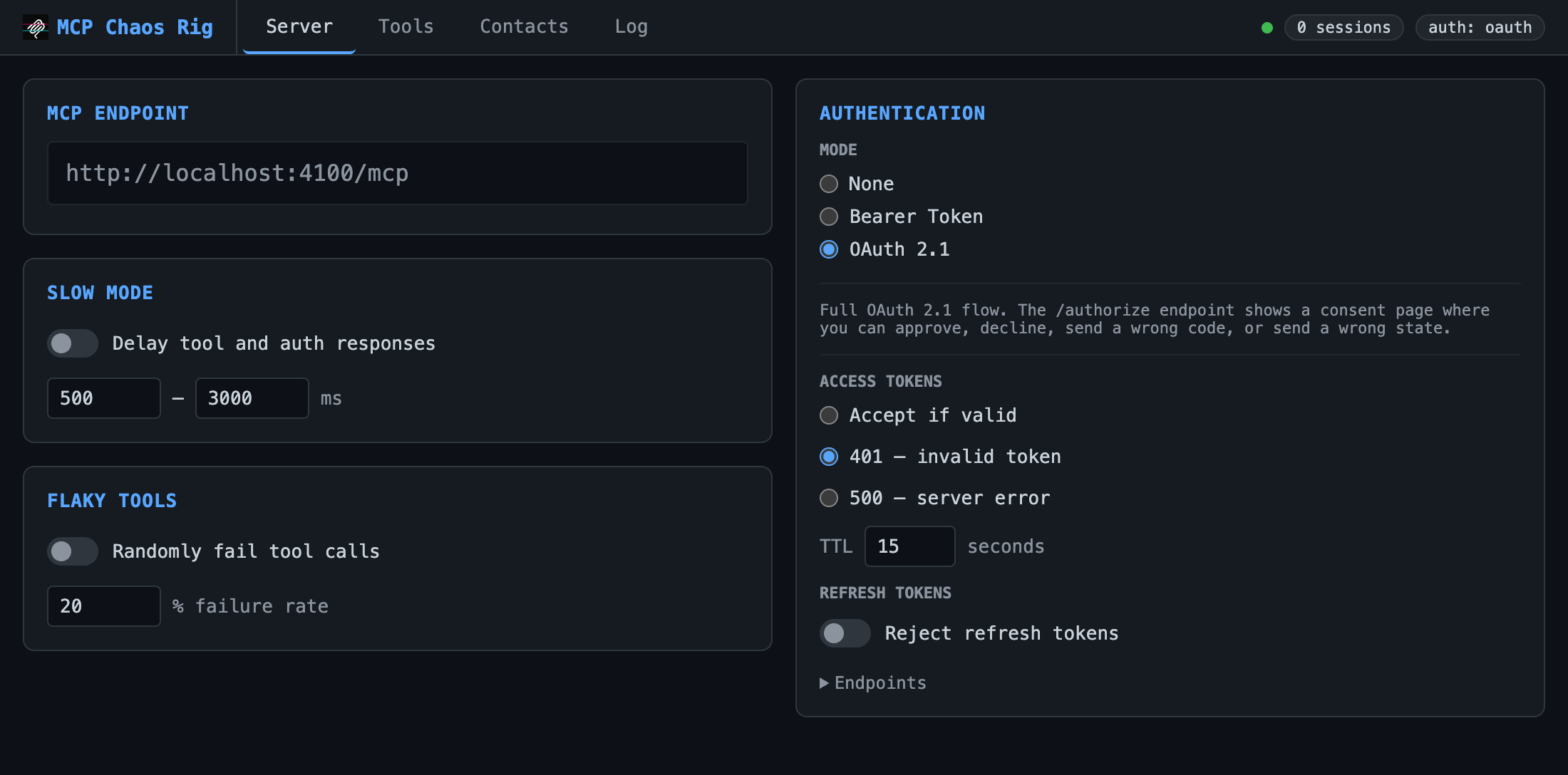
Configure auth mode, slow mode (random latency), and flaky tools (% failure rate).
| Auth mode | Behavior |
|---|---|
| None | All requests pass through |
| Bearer | Requires Authorization: Bearer test-token-123 |
| OAuth 2.1 | Full authorization flow with interactive consent page |
Bearer and OAuth modes support fault injection: force 401 or 500 responses to test error handling.
OAuth mode adds controls for access token TTL, refresh token rejection, and refresh token ownership enforcement. OAuth endpoints are listed in a collapsible section.
Tools
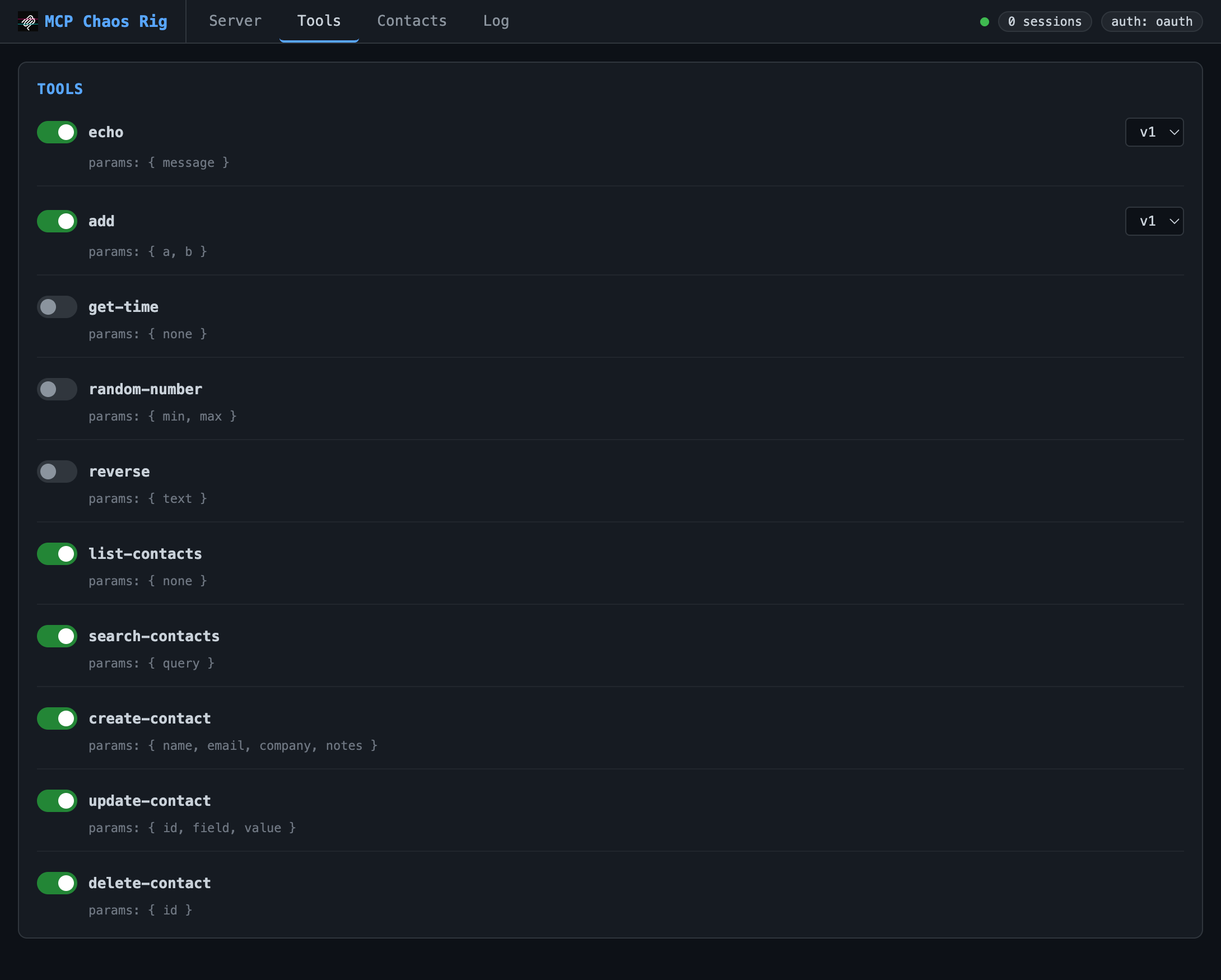
Toggle tools on/off. Disabling sends tools/changed to connected clients. Some tools (echo, add) support version switching.
Available tools:
echo: returns your message (v2 adds format options)add: sums two numbers (v2 accepts an array)get-time: current server time as ISO 8601random-number: random integer in a rangereverse: reverses a stringlist-contacts,search-contacts,create-contact,update-contact,delete-contact: SQLite CRUD
Contacts
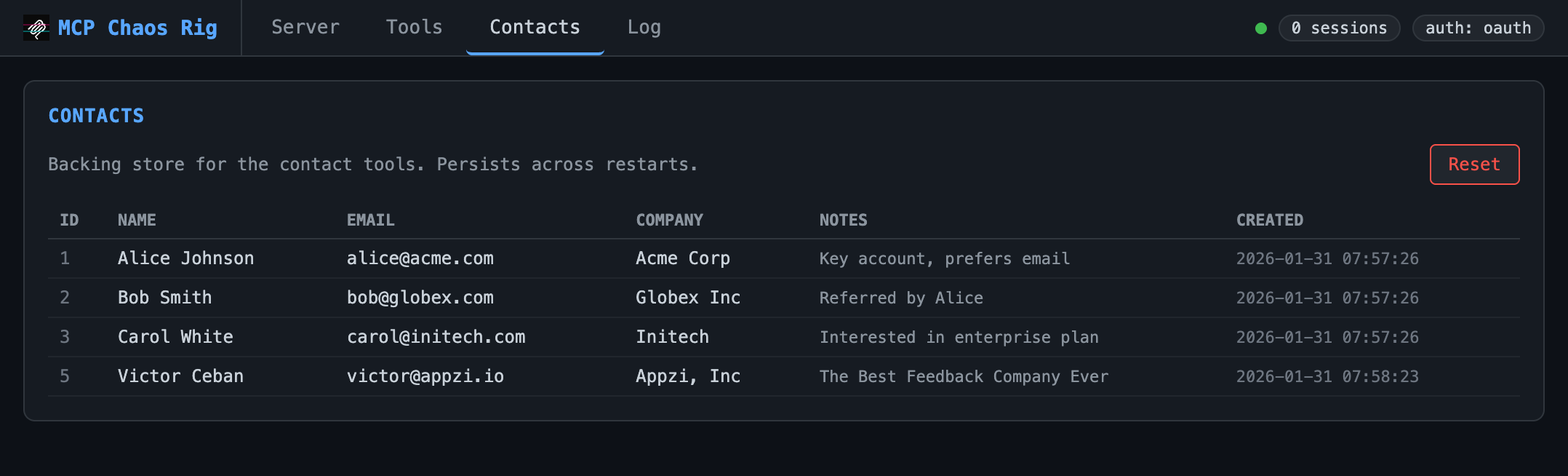
View and reset the SQLite database backing the contact tools. Starts with three seed records.
Log
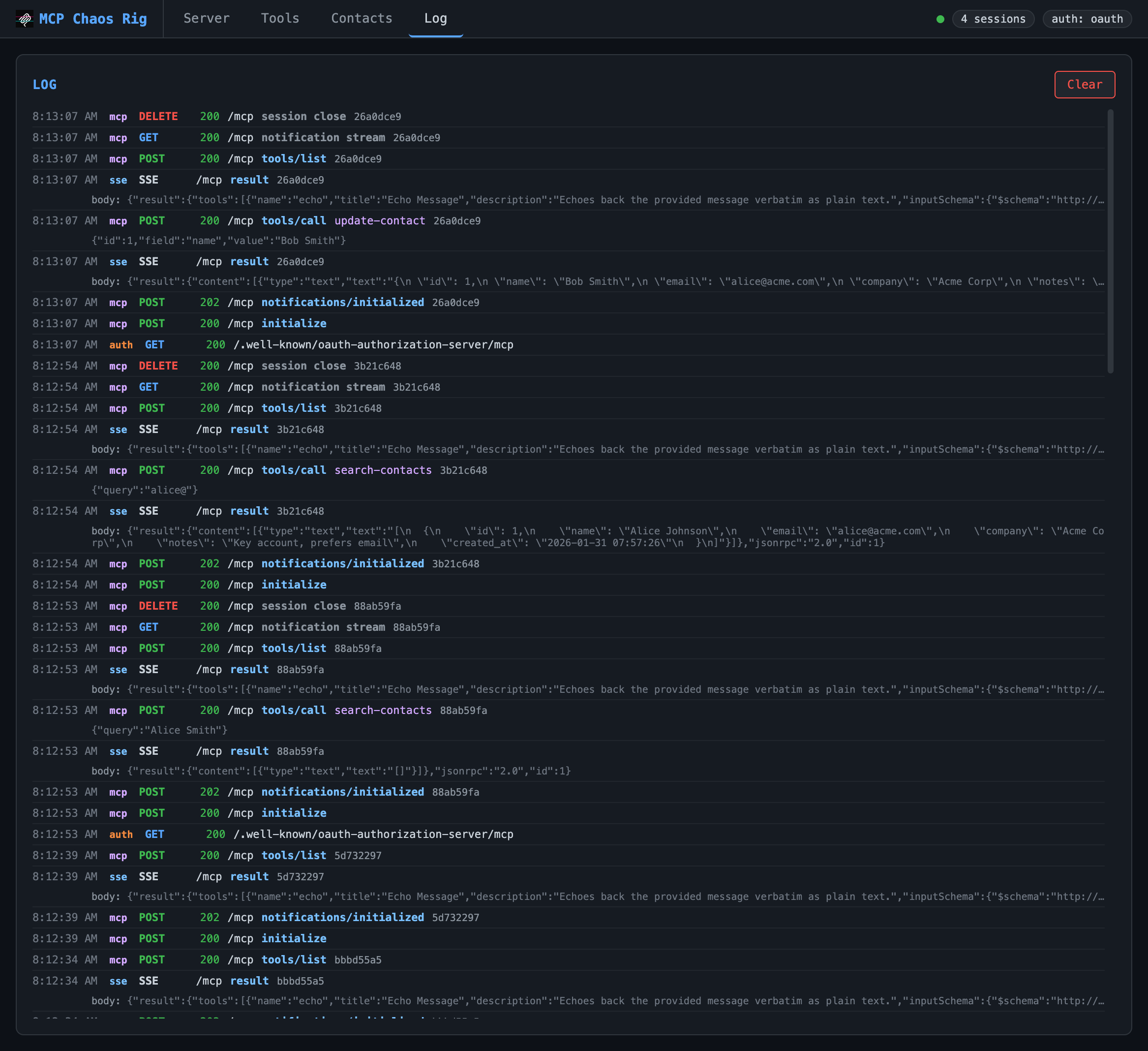
Live request log showing inbound requests and outbound SSE responses. Displays timestamp, source (mcp/auth/sse), method, status, JSON-RPC method, tool name, and arguments. Click any truncated body or args line to expand it. Keeps last 200 entries.
OAuth consent page
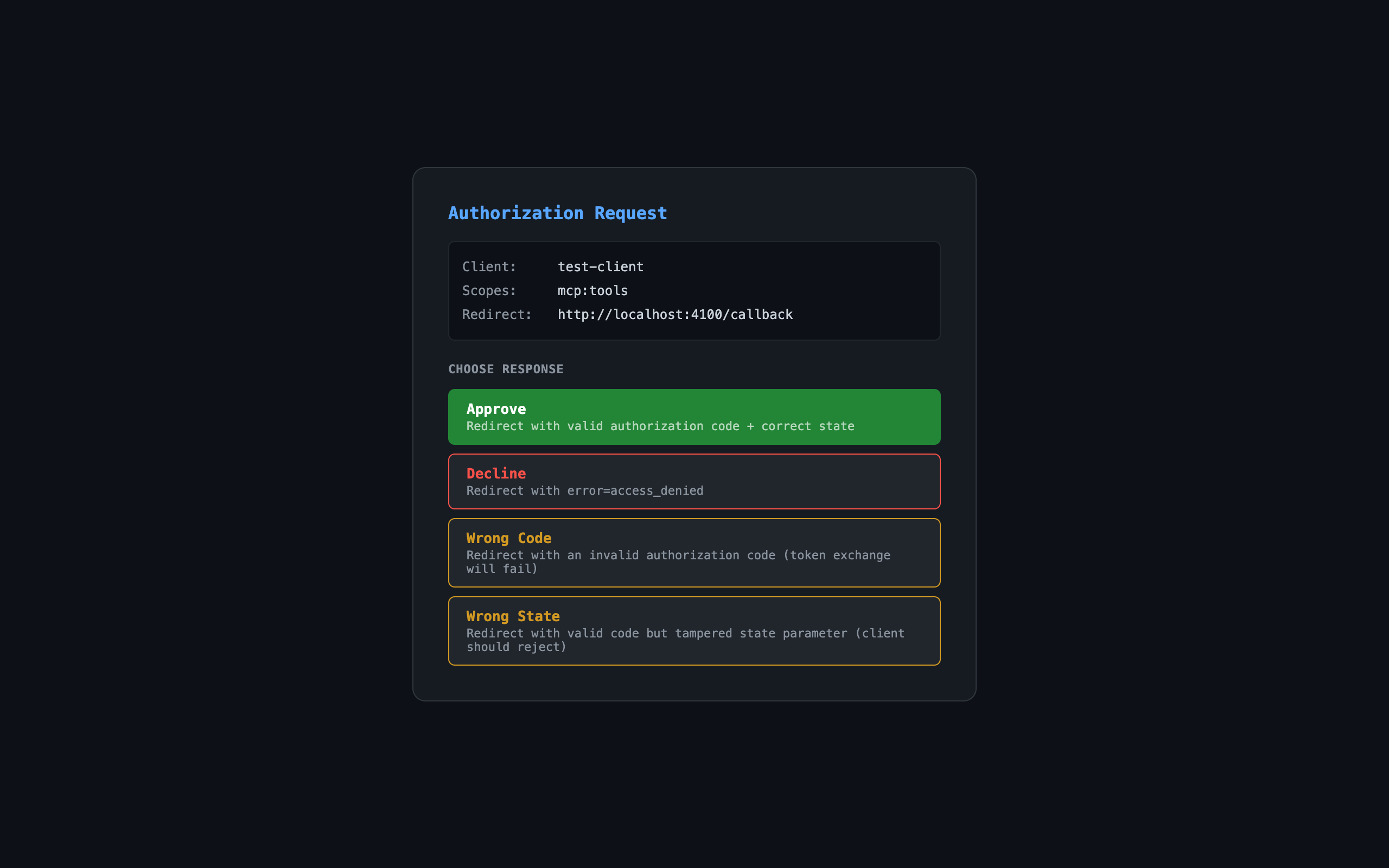
When auth mode is OAuth, the authorization endpoint shows an interactive consent page:
| Button | Result |
|---|---|
| Approve | Redirects with valid authorization code |
| Decline | Redirects with error=access_denied |
| Wrong Code | Redirects with invalid code (token exchange fails) |
| Wrong State | Redirects with tampered state parameter |
Links
Yorumlar (0)
Yorum birakmak icin giris yap.
Yorum birakSonuc bulunamadi