remotepower
Health Uyari
- License — License: MIT
- Description — Repository has a description
- Active repo — Last push 0 days ago
- Low visibility — Only 6 GitHub stars
Code Basarisiz
- rm -rf — Recursive force deletion command in packaging/install-demo.sh
- rm -rf — Recursive force deletion command in packaging/seed-demo-data.py
Permissions Gecti
- Permissions — No dangerous permissions requested
Bu listing icin henuz AI raporu yok.
Remote management dashboard with CVE scanning, patch alerts, browser SSH, SNMP polling, AI assistant, monitoring, MCP server, and OIDC SSO. Self-hosted
RemotePower

Self-hosted remote management for your Linux fleet — and your homelab.
Web dashboard, push-based agents, no inbound ports. Set it up in five minutes.




Live demo · Install · Features · Docs
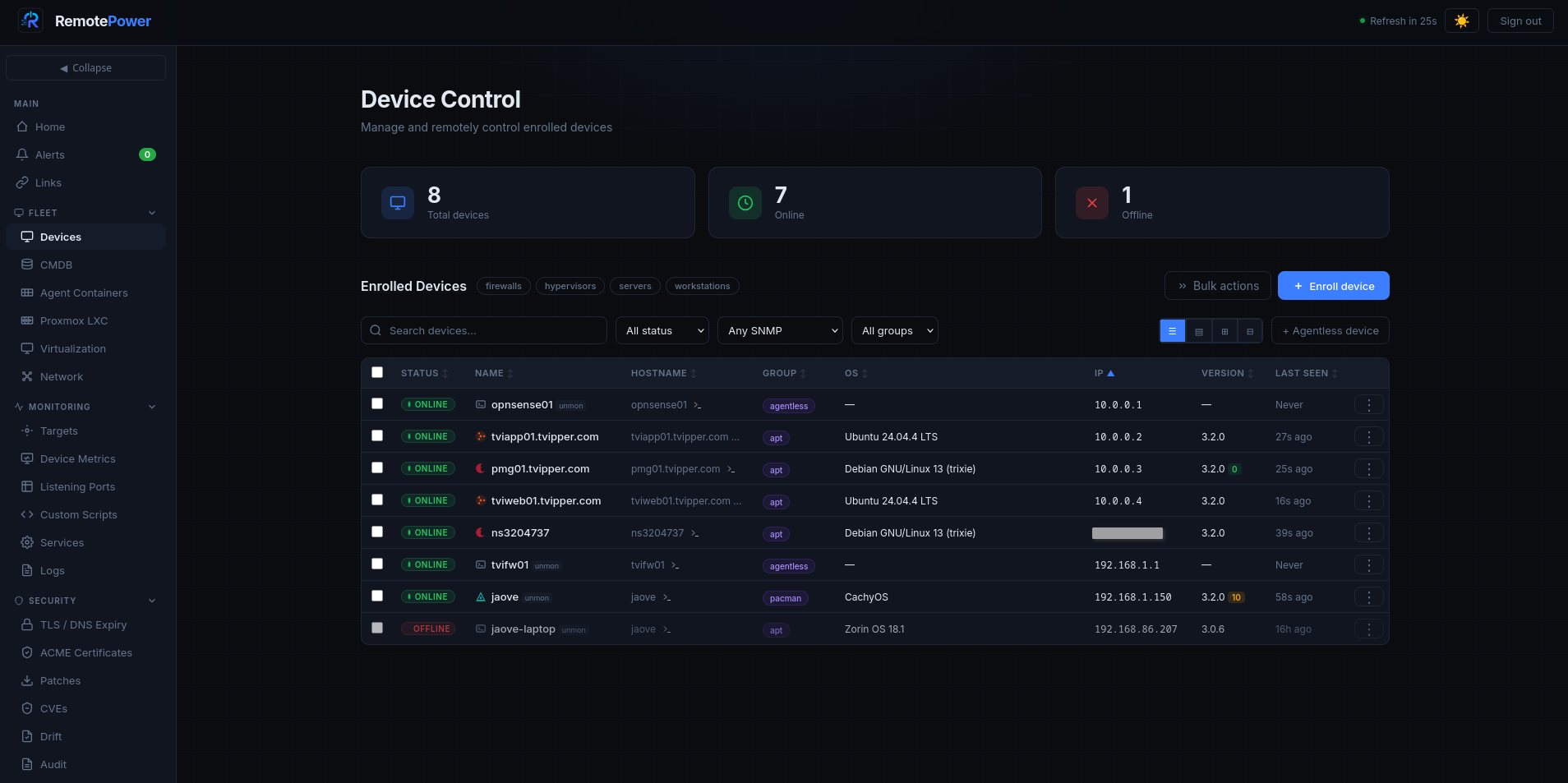
Dashboard |
Device drawer |
Browser SSH terminal |
Monitoring |
Logs |
CVEs |
Patches |
Custom scripts |
CMDB |
Proxmox snapshots |
IaC generator |
Settings |
AI assistant |
Claude (AI host integration) |
What is it?
A web dashboard that manages your Linux machines (and Windows, kind of) without
opening firewall ports on them. Each host runs a small Python agent that polls
the central server every 60 seconds — outbound HTTPS only. Enrolment is a 6-digit
PIN, like pairing a console controller.
Deliberately small: nginx + Python CGI + flat JSON files. No database, no Node.js,
no Redis, no Kubernetes. The whole /var/lib/remotepower/ directory backs up withtar. Tested on real homelabs running 5–50 devices, fine up to a few hundred.
Quick start
# Server (gets you nginx + fcgiwrap + Python deps + an admin password)
git clone https://github.com/tyxak/remotepower && cd remotepower
sudo bash install-server.sh

# Or: Docker
docker compose up -d
The installer prints the URL and the auto-generated admin password. Log in,
change the password under Settings → Account, then enroll your first client:
# On the host you want to manage
sudo bash install-client.sh
# Paste the server URL and the 6-digit PIN from the dashboard.
Shows up in the dashboard within ~60 seconds.
Browser SSH terminal is one more command: sudo bash packaging/install-webterm.sh.
For longer install paths (Docker, demo vhost, Windows client, Ansible-driven
enrolment), see docs/install.md.
Try the live demo
A read-only demo deployment runs at https://demoremote.tvipper.com —
seeded with synthetic devices, alerts, CVE findings, and metrics so
you can poke around without installing anything.
URL:      https://demoremote.tvipper.com
Username: demo
Password: demo
The demo is reset every few hours, so feel free to break things.
What you can do with it
- 🟢 See what's up — Live status every 60 s. CPU / RAM / disk sparklines. Service matrix. Containers. CVE findings.
- ⚡ Run commands — Shutdown, reboot, WoL, arbitrary shell, multi-line scripts with dry-run lint, batch across many devices, scheduled (cron) and one-shot.
- 🌐 Browser SSH — Real xterm.js terminal proxied through a hardened daemon. asciinema session recordings.
- 🐳 docker compose — Up / down / restart / pull / logs on projects the agent discovered under
/opt /home /docker /srv. - 🖥️ Proxmox — Connect a Proxmox VE node — start/stop QEMU VMs and LXC containers, manage snapshots, all server-to-API.
- 🔍 Configuration drift — Hashes
sshd_config,sudoersand friends against a baseline; diff, accept, or ignore changes. - 🚨 Alerts inbox (v3.2) — Every fired event lands in a mutable ledger with acknowledge / resolve / auto-resolve lifecycle. Recover events (device_online, service_recover, snmp_recover) clear the matching open row automatically. Per-event filter, bulk-resolve, clear-resolved.
- 🔔 Outbound notifications — Discord / ntfy / Slack / Pushover / Teams / Gotify / generic JSON webhooks, multi-destination with per-event filters. Email too. Skipped/disabled deliveries reported separately so quiet fleets don't show a phantom failure rate.
- 📥 Inbound webhooks & syslog (v3.2) — Receive alerts from Grafana, Alertmanager, Authelia/Authentik, n8n, Home Assistant. Ingest syslog from rsyslog
omhttp/ fluent-bit / curl. Both feed the same Alerts inbox. - 📦 CMDB built in — Asset metadata, encrypted credentials vault (AES-GCM + PBKDF2), Markdown docs per asset, network topology map, agentless devices.
- 🛡️ CVE scanning — OSV.dev-backed, CVSS v3.1-scored, severity-ranked, per-CVE ignore list.
- 📡 SNMPv2c polling (v3.2) — Pure-stdlib client polls every 5 min: sys-group, hrProcessorTable per-CPU load, hrStorageTable filesystems, UCD-SNMP load averages, vendor MIBs (Mikrotik temp/voltage/CPU MHz, Ubiquiti UAP/UDM/USW model+firmware). Threshold-driven
metric_warning/metric_critical/snmp_unreachable/snmp_deadevents for agentless devices alongside agented hosts. - 🔑 Auth that scales — bcrypt + TOTP 2FA. LDAP/AD. OIDC / OpenID Connect (v3.2) — Authelia, Authentik, Keycloak, Pocket-ID, Google. Named API keys (admin/viewer/mcp roles). Enrolment tokens for cloud-init / Ansible.
- ✨ AI assistant — Optional LLM integration (Ollama, LocalAI, Anthropic, OpenAI, DeepSeek). Explain output, triage CVEs, prioritise patches, generate scripts — all with regex-based secret redaction. Disabled by default.
- 🤖 MCP server with write tools (v3.2 Stage 4) — 12 read tools + 4 write tools (
reboot_device,run_saved_script,force_package_scan,force_acme_rescan). Per-devicerequire_confirmationqueues destructive actions for human approval; audit log records the AI host name and natural-language prompt that triggered each call. - 📈 Metrics & integrations — Prometheus
/api/metricsfor Grafana./api/statusfor Uptime Kuma / Homepage./api/digestfor cron-driven email summaries. - 📲 Installable PWA — Chrome install prompt in the header. Service worker pre-caches the app shell; API calls are always network-only. Works on desktop and mobile.
- 🔬 Custom monitoring scripts — Define bash health checks server-side, assign to devices — agent runs them every 5 minutes. Exit 0 = OK. Fleet results page, edge-triggered alerts, inline AI generation.
- 🗓️ Calendar, schedule, maintenance windows — Cron + one-shot scheduled commands, recurring calendar events (daily/weekly/monthly/yearly), maintenance windows that suppress webhook alerts globally or per-device.
- 📝 IaC generator — Terraform / Ansible / Pulumi / cloud-init / Salt from live host inventory across 18 categories. AI renders the output.
- 🩺 Server self-monitoring — Site-health card (load avg, memory %, sessions, devices-online %), disk usage breakdown, audit log size, scheduled backup state, webhook delivery rate (inbound + outbound, separate), MCP confirmation queue.
Full feature inventory: docs/features.md.
Security
v3.0.2 ships with an end-to-end security audit covering the server, agent,
WebTerm handshake, CMDB vault, LDAP, TOTP, API keys, AI provider, and Proxmox
integration. Posture in brief: PBKDF2-HMAC-SHA256 passwords at OWASP-2023
parameters, header-based session tokens (CSRF-safe by construction), AES-GCM
encryption for the CMDB vault, mandatory TLS verification for outbound calls,
hardened agent state-file handling against local symlink attacks. Full
posture, threat model, and operator hardening checklist:
docs/security.md.
Documentation
Everything lives in docs/ — start with the index there. The
essentials:
| Topic | Where |
|---|---|
| Install (Linux, Docker, demo, Windows) | docs/install.md |
| Full feature inventory | docs/features.md |
| Architecture + on-disk layout | docs/architecture.md |
| API reference (endpoints + OpenAPI) | docs/api.md — interactive: /swagger.html |
| Reference manual | docs/Manual.html |
| Security notes | docs/security.md |
| Troubleshooting | docs/troubleshooting.md |
| Upgrading | docs/upgrading.md |
Full release history — every version, newest first — is in
CHANGELOG.md.
TL;DR
Swiss army knife. Everything you need for your fleet or homelab.
CMDB, documentation, network map, Proxmox snapshots, remote management (with a
browser-based web terminal), fire off bash scripts or commands, monitoring,
custom monitoring scripts, logs with regex search, cert-expiry dashboard, ACME
integration, patch management, alerting, notifications, configuration drift
detection, audit log, calendar, tasks, maintenance windows, MCP server with
write tools, IaC generator, proper documentation, full API with Swagger,
LDAP, OIDC / OpenID Connect, fleet dashboard, agent auto-update… And the best
of it: heavily connected to your own local AI (Ollama, LocalAI) or online AI
(Anthropic, OpenAI, DeepSeek), if you like.
License
MIT — see LICENSE.
Yorumlar (0)
Yorum birakmak icin giris yap.
Yorum birakSonuc bulunamadi