CodeShellManager
Health Uyari
- License — License: MIT
- Description — Repository has a description
- Active repo — Last push 0 days ago
- Low visibility — Only 5 GitHub stars
Code Gecti
- Code scan — Scanned 8 files during light audit, no dangerous patterns found
Permissions Gecti
- Permissions — No dangerous permissions requested
Bu listing icin henuz AI raporu yok.
Workspace manager for AI coding shells and agents.
CodeShellManager




🌐 umage.ai/products/code-shell-manager — product page, screenshots, and latest news
A Windows desktop app for running multiple AI coding agents side-by-side — Claude Code, Codex, GitHub Copilot, or any CLI tool — in a tabbed and grid-layout terminal host.
Built with WPF + xterm.js + Windows ConPTY for full pseudo-terminal fidelity.
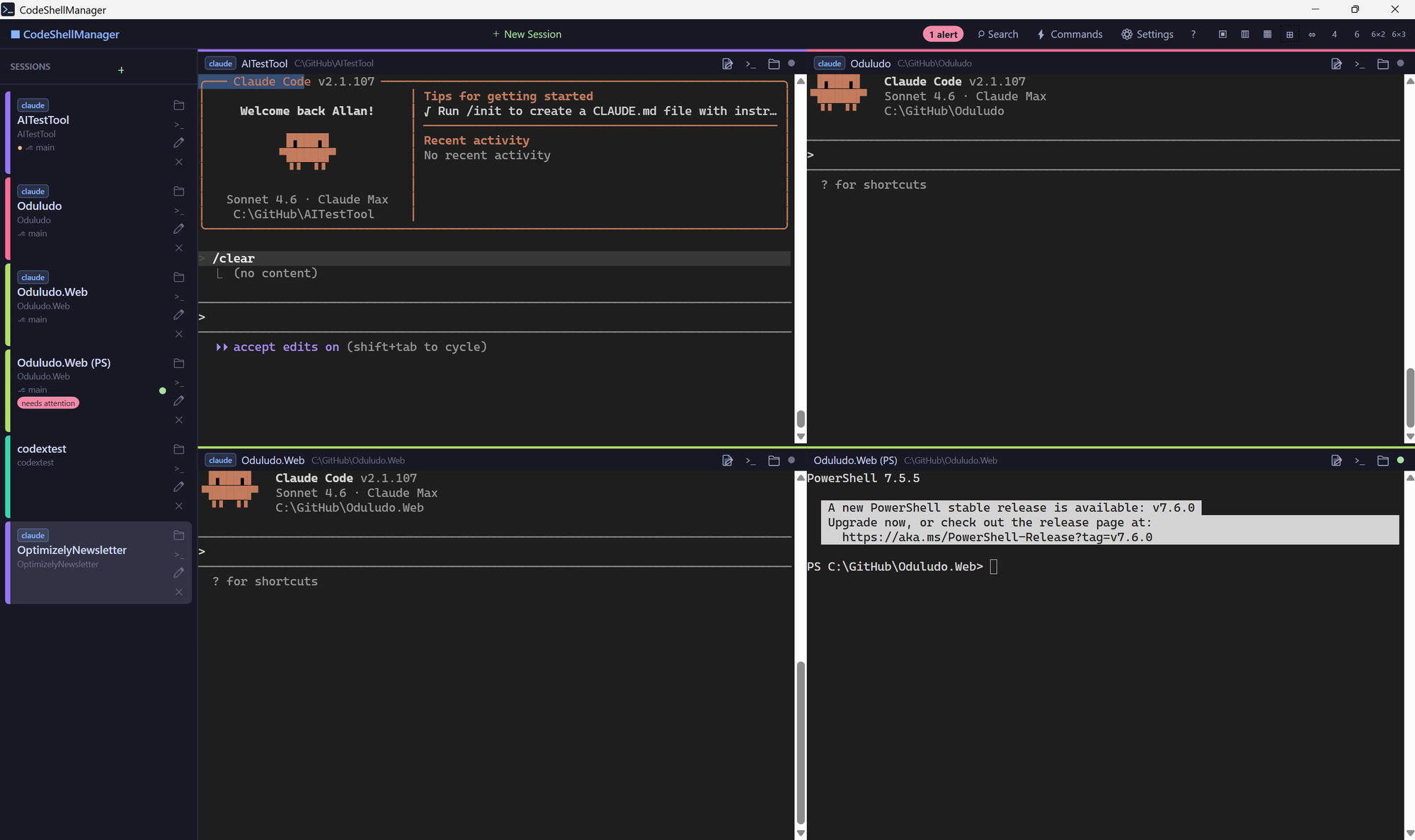
Features
- Multi-terminal grid — run up to 18 sessions simultaneously in configurable layouts (1, 2, 3, 4, 6 columns; 2×2, 6×2, 6×3 grids); the active pane is highlighted with a 2px accent ring so it's easy to spot
- Sleep & wake — 💤 button parks a session: PTY torn down, but the session (and its notes) stays in the sidebar so you can wake it later from where you left off. Great when you have many long-running projects but only need a few live at once.
- Full-text search — all terminal output indexed to SQLite FTS5; instant search across every session, ever
- Per-project notepad — collapsible 📝 notes panel on every terminal, auto-saved and searchable
- Alert detection — detects when Claude is waiting for input or tool approval; green/orange dot indicators
- Git status — shows branch and dirty state in the sidebar per session
- Session rename — double-click any session name or click ✏ to rename inline
- Auto-resume — automatically resumes the last Claude Code session when restoring on startup (
--resume <id>); toggleable in Settings - SSH remote sessions — connect to remote hosts using your existing SSH config; sessions persist across restarts
- Session history — clicking a search result from a closed session offers to relaunch it
- Configurable launch commands — customise the commands available in the New Session dialog
- Claude badge — sessions running
claudecommands get a visual indicator - Tray icon — minimises to system tray; balloon notifications for alerts
- Settings window — all options configurable; persisted as JSON
Requirements
- Windows 10 version 1903+ or Windows 11
- Microsoft Edge WebView2 Runtime (pre-installed on Windows 11; available as a free download for Windows 10)
Note: The
.msiinstaller does not bundle the WebView2 runtime. If you're on Windows 10 and see a blank terminal pane, install the WebView2 runtime from the link above.
Installation
winget (recommended)
winget install UmageAI.CodeShellManager
Future updates pick up automatically with winget upgrade UmageAI.CodeShellManager (or winget upgrade --all).
Download from Releases
- Go to Releases
- Download either:
CodeShellManager-x.y.z-Setup.msi— installer (adds Start Menu + Desktop shortcuts, supports uninstall via Apps & Features)CodeShellManager-x.y.z-win-x64.zip— portable; extract and runCodeShellManager.exe
Build from source
Requirements: .NET 10 SDK, Windows 10/11
git clone https://github.com/umage-ai/CodeShellManager.git
cd CodeShellManager
dotnet run --project src/CodeShellManager/CodeShellManager.csproj
Command-line flags
| Flag | Effect |
|---|---|
--clean |
Start with no preloaded sessions and skip writing state.json for the run. Useful when developing — your saved sessions/settings are left untouched. |
Keyboard Shortcuts
| Key | Action |
|---|---|
Ctrl+T |
New session |
Ctrl+W |
Close active session |
Ctrl+F |
Toggle search |
Ctrl+Tab |
Cycle sessions |
Escape (in search) |
Close search panel |
Layout Options
Click the layout buttons in the toolbar (right side):
| Button | Layout |
|---|---|
| ▣ | Single pane |
| ▥ | 2 columns |
| ▦ | 3 columns |
| ⊞ | 2×2 grid |
| ⇔ | 2 rows |
| 4 | 4 columns |
| 6 | 6 columns |
| 6×2 | 6 columns × 2 rows (12 panes) |
| 6×3 | 6 columns × 3 rows (18 panes) |
Contributing
Issues and pull requests are welcome. See CLAUDE.md for architecture notes and coding conventions.
License
MIT — see LICENSE.
By umage.ai
Yorumlar (0)
Yorum birakmak icin giris yap.
Yorum birakSonuc bulunamadi