claude-nonstop
Health Uyari
- License — License: MIT
- Description — Repository has a description
- Active repo — Last push 0 days ago
- Low visibility — Only 5 GitHub stars
Code Gecti
- Code scan — Scanned 12 files during light audit, no dangerous patterns found
Permissions Gecti
- Permissions — No dangerous permissions requested
Bu listing icin henuz AI raporu yok.
claude-nonstop by Umer Jahangier: keep Claude Code, Codex and the Claude desktop app working through usage limits. Switches to your next account, then your API keys, automatically. Free, open source. macOS, Windows, Linux.
claude-nonstop
Keep Claude Code working through plan limits. claude-nonstop is a free, open-source tool that keeps Claude Code working when your Claude subscription hits its session or weekly limit: it starts your next session on your next account, and when every account is out, it moves to your API keys, one by one. You keep typing claude like always.
Any subscription, any tool. The same local gateway also takes ChatGPT accounts and OpenAI API keys, and answers Codex, Cursor and any OpenAI-compatible tool as well as Claude Code. A Codex session can run on your Claude subscription; Claude Code can run on your ChatGPT one. See Other tools and accounts.




Website: umer-jahangier.github.io/claude-nonstop · Guides: usage limits, several accounts, Codex on Claude, all guides · npm: @umer-jahangier/claude-nonstop · Made by Muhammad Umer (Umer Jahangier)
account 1 → account 2 → … → API key 1 → API key 2 → …
That's the default order. Mix it however you like (say Work account, then a key, then Main account), and pause any account or key you want kept but not used.
Contents
- What you get
- Install
- Set it up in two minutes
- Everyday use
- The web page
- The Claude desktop app
- Other tools and accounts
- Commands
- How it works
- Security and privacy
- What setup changes on your computer
- Updating
- Troubleshooting
- Uninstall
- FAQ
- Advanced options
- Development
What you get
- Subscriptions first. Every session starts on the first account that still has usage left. API keys are only used once every account is out.
- Never stalls at a limit. If an account runs out in the middle of your work, the same conversation reopens on your next account, then on your API keys, and carries on by itself. With nothing else left, it waits for the reset and continues on its own.
- Keys switch mid-request. A local gateway sends each request with your first working key. If a key runs out of credit, the same request goes out again on the next key, and your session never notices.
- Your chats stay. Every account and key shares one Claude Code history, so it's always the same conversation, and
claude --resumeshows all of them. In the desktop app, your claude.ai chats and earlier sessions can be brought into third-party mode with one import. - One command to install, nothing to configure by hand. It brings its own Node.js, installs Claude Code if you don't have it, and sets everything up.
- A web page at
https://claude.nonstopto add accounts and keys, see what's in use, and switch lines by dragging a cable. Dark by default, with Light and Automatic (your computer's setting) one click away. - Works in the terminal and in the Claude desktop app, on macOS, Windows and Linux.
- ChatGPT accounts and OpenAI keys too. Add them next to your Claude ones. Codex, Cursor and other OpenAI-format tools point at the same gateway, and every tool can run on every line: requests are translated between Anthropic's and OpenAI's formats on the way.
- Your secrets stay on your computer, encrypted. Keys are only ever sent to Anthropic.
- Updates itself from GitHub releases.
Install
Open a terminal and paste one command. You don't need to install anything first.
macOS and Linux
curl -fsSL https://raw.githubusercontent.com/umer-jahangier/claude-nonstop/main/install.sh | sh
Windows (in PowerShell)
irm https://raw.githubusercontent.com/umer-jahangier/claude-nonstop/main/install.ps1 | iex
The installer takes about a minute. It:
- installs claude-nonstop and its own copy of Node.js into
~/.claude-nonstop(%USERPROFILE%\.claude-nonstopon Windows), and installs Claude Code too, or updates it if it's older than 2.1.234; - gives the web page its short address,
https://claude.nonstop, with a certificate your computer trusts; - sets up the Claude desktop app to run on your API keys, if you have it;
- starts the local gateway now, and every time you log in;
- makes plain
claudego through claude-nonstop; - opens the web page.
What you'll be asked
Steps 2 and 3 change things outside your home folder, so your computer asks first. All of it is optional: decline anything and the rest still works.
| macOS | Windows | Linux | |
|---|---|---|---|
Short address claude.nonstop |
Your password, once | One "Allow changes?" confirmation | Your password (sudo), once |
| Trusted certificate (no "Not secure") | Your password again, to trust it | One "Install this certificate?" confirmation | Nothing to approve (needs certutil, see Troubleshooting) |
| Claude desktop app | System Settings opens with a profile: double-click it, click Install (why it says "author unknown") | Included in the confirmation above | Included in the password prompt above |
Say no to the short address and the page lives at http://claude-nonstop.localhost instead, which works on every computer with no setup at all.
Open a new terminal window after installing, so plain
claudegoes through claude-nonstop.
Set it up in two minutes
- Open the web page. The installer opens it for you. Later, run
claude-nonstop ui(it signs you in with a one-time link, so only you can use the page), or go tohttps://claude.nonstop. - Add your accounts. Your normal Claude Code login is already there as Main account. For each extra Claude subscription, click Add Account…, give it a name, and sign in on Anthropic's page that opens in your browser. As soon as you're signed in, the page checks whether the account has usage left.
- Add your API keys. Click Add API Key… and paste a key from platform.claude.com/settings/keys. Each key is tested as soon as you save it.
You never need to press Check. The gateway checks every account and key when it starts, and the page checks again whenever you open it or switch back to it. Anything with a clear answer from the last 5 minutes is skipped. While a check runs, its row shows Checking….
That's it. From now on, just run claude:
$ claude
claude-nonstop: checking Main account...
claude-nonstop: Main account: You've hit your session limit · resets 3:45pm
claude-nonstop: checking Work...
claude-nonstop: using Work (subscription)
Everyday use
- Just type
claude. claude-nonstop picks the first account with usage left, or your first working key when every account is out. Everything else about Claude Code stays the same. - VS Code, Cursor, and any other Claude Code that reads your user settings use the same gateway. Setup writes the gateway address into Claude Code's settings, so those installs walk your accounts and then your API keys without a separate sign-in. Start a new chat after setup so the editor picks that up. On a machine running as root, setup also turns off bypass-permissions mode, which Claude Code refuses to start with as root.
- Hit a limit in the middle of your work? Nothing to do. claude-nonstop reopens the same conversation on your next account (or your API keys) and tells Claude to continue where it left off. You'll see Claude Code restart for a moment, then the work carries on.
- Only one account, or everything is out? Claude Code waits in the open session and continues the task by itself when your limit resets (shown as Continuing automatically at 3:45pm). On API keys, claude-nonstop does the waiting and continues as soon as an account or a key has usage again. Leave the terminal open.
- Running on API keys? When a key runs out, the next key takes over on the very same request.
- Want a particular line right now? On the web page, drag the cable's plug onto it, or choose Use This Account / Use This Key in its … menu. A key switches at once, even mid-session; an account applies to your next session. Click Use Automatic to hand control back.
- Force a mode for one session:
claude-nonstop --apiuses only API keys,claude-nonstop --subonly subscription accounts. - Keep an eye on it. The page's Activity list shows every request, switch and new session as it happens, and its tab icon turns red when every API key is used up.
The web page
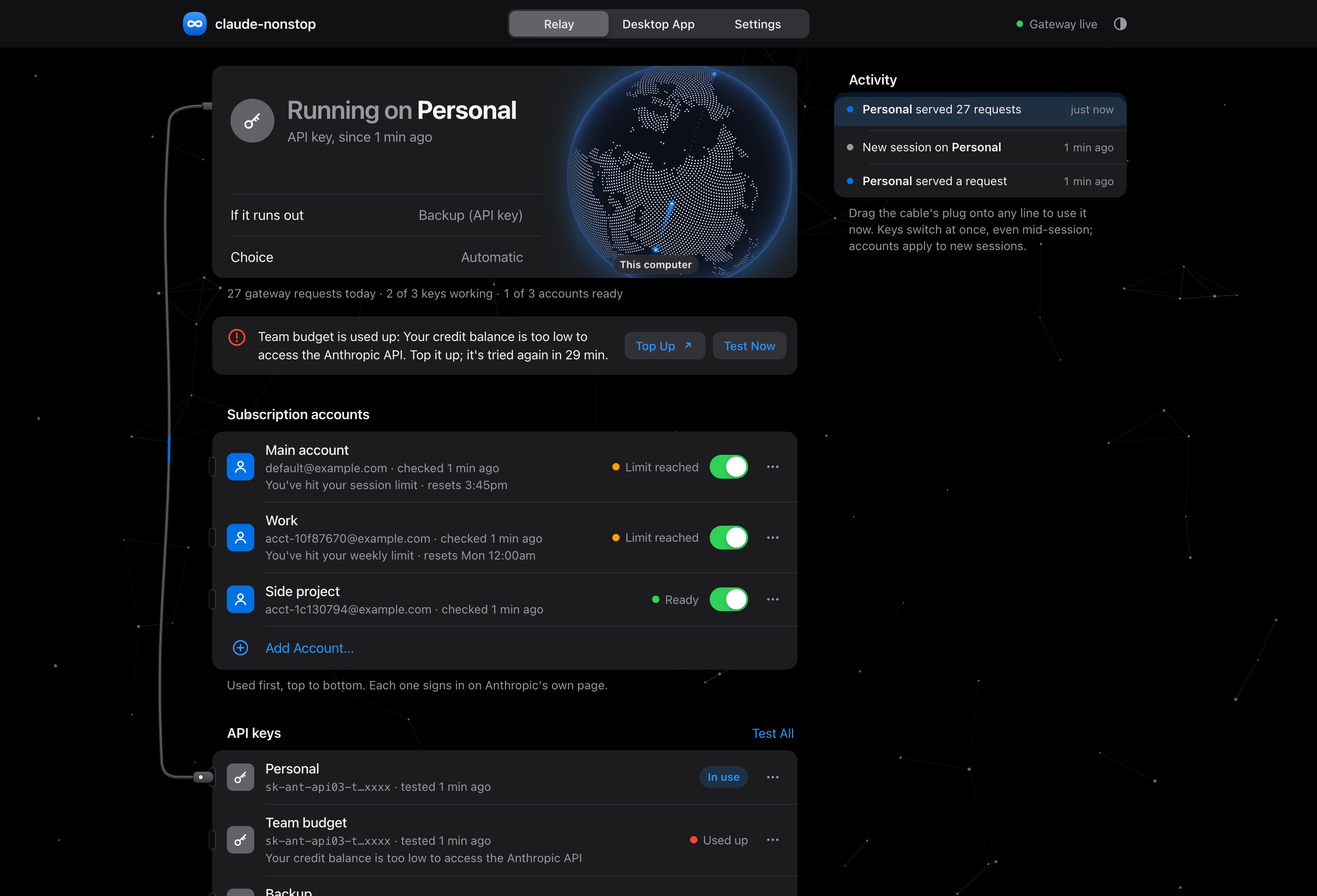
| Part | What it does |
|---|---|
| Status card | The line in use (or the one your next session starts on), what takes over if it runs out, and whether you're on Automatic |
| Alerts | Anything that needs you: an account that isn't signed in, a used-up key (with a Top Up link), no keys yet |
| Accounts and API keys | One list, tried top to bottom. Drag a line by its ≡ handle (or focus it and press ↑/↓) to mix accounts and keys in any order. Each line has a switch to pause it and a … menu: Use This Account/Key, Check Usage or Test Key, Sign In Again, Rename, Pause/Resume, Move Up/Down, Remove. Test All Keys tests every key |
| The cable | Plugged into the line in use. Drag its plug onto another line to switch to it; the plug's light blinks for every request |
| Globe | A light travels from your computer to Anthropic and back for every gateway request. Drag it to spin it |
| Activity | Every request, key switch and new session, live |
| Desktop App tab | Sets up the Claude desktop app with one click, with manual steps as a fallback |
| Settings tab | Appearance (Dark by default, Light, or Automatic to follow your computer), how long a used-up key or a limited account is skipped, and what's set up on this computer |
Addresses. Any of these opens the page:
| Address | When |
|---|---|
https://claude.nonstop (or https://claude-nonstop) |
After setup added the short address. http:// sends you to https:// |
http://claude-nonstop.localhost |
Always works, no setup needed |
http://claude-nonstop.localhost:43117 |
Always works too, even if something else on your computer already uses port 80 or 443 |
The Claude desktop app
The desktop app can run on your subscription accounts and API keys through claude-nonstop, switching between them as lines run out, while a plain Claude.ai sign-in stays one click away on its sign-in screen.
The installer sets it up for you using the settings locations Anthropic documents for the app (configuration reference):
- Windows: registry policy under
HKLM\SOFTWARE\Policies\Claude, in the installer's one confirmation. - Linux:
/etc/claude-desktop/managed-settings.json, in the installer's one password prompt. - macOS: a configuration profile. macOS only lets you approve profiles yourself, so System Settings opens with it: double-click claude-nonstop for the Claude desktop app, then click Install. (If you closed it, it's under System Settings → General → Device Management.) macOS will say "The author of this profile is unknown": that's expected, and here's why.
Then quit and reopen the desktop app. Its sign-in screen offers the third-party option, which runs on your API keys through claude-nonstop, and Claude.ai for your subscription. Pick the third-party option when your subscription is out.
In third-party mode the desktop app walks your order too. Each request goes out on the first subscription account with usage left, on that account's own Claude Code sign-in; when an account hits its limit, the same request goes out again on the next line, and when every account is out, on your API keys. The cable, Use This Account and your order apply to the desktop app just as to the terminal. The page's Desktop app line shows the account or key it's on.
Usage left. Each account's line shows how much of its plan is used: the session (its 5-hour window) and the week, with when each resets, read from the same place Claude Code's /usage reads, with that account's own sign-in. It refreshes every 5 minutes while the gateway runs, with every account check, and when the page opens; claude-nonstop status shows it too. API keys have no such readout: Anthropic shows a key's credit only in the Console, so a key's line shows its last test instead.
Switch alerts. claude-nonstop watches the account your desktop app signs in to (pick it on the page's Settings → Claude desktop app; the Main account by default). While the app is open it checks that account at most every 10 minutes, and when the advice changes it tells you on the page and with a notification: "SXL-Acc reached its limit: switch the desktop app to the third-party option", then later "SXL-Acc has usage again: switch back to Claude.ai to stop spending API credit". If no key can take over either, it says so instead. The switch itself is yours to make on the app's sign-in screen. Turn the alerts off with Switch alerts.
API keys are used as plain API. Every request the gateway sends on a key goes out as an ordinary API request, with no Claude Code identity in its headers or its system prompt, so it's billed as plain API use: credit that lists only API under Applies to (promotional credit, say) works. Subscription accounts are different: Anthropic takes only Claude Code's own requests on a sign-in, so those go out as Claude Code.
SSH sessions in the desktop app. In third-party mode the app refuses SSH sessions while the gateway is at 127.0.0.1, because Claude Code on the server would have to reach it. claude-nonstop ssh add <host> sets a server up for them: it points claude.nonstop at 127.0.0.1 there and adds the gateway's certificate authority to its trust store (root or password-free sudo needed), and the gateway then keeps a reverse tunnel open to it, so the server's 127.0.0.1:43118 leads back to the gateway on this computer. The desktop app is given https://claude.nonstop:43118, which works on both machines. claude-nonstop ssh shows each server's tunnel, and claude-nonstop ssh remove <host> undoes it.
Your chats come along. Third-party mode keeps its own history, separate from claude.ai. claude-nonstop turns on Anthropic's import: in the desktop app, open Settings → Import & export → Import… to bring over your claude.ai chats and projects and the Code and Cowork sessions already on this computer. A new chat also offers the import when it finds earlier sessions. It's a copy: your claude.ai history stays where it is, and running it again adds only what's new.
Browser, extensions, plugins and connectors work as before. Third-party mode turns some of these off unless they're switched on, so claude-nonstop switches them on: the built-in browser in Code sessions (with its address bar, not just the localhost preview), desktop extensions, and Anthropic's plugin marketplace in Claude Code. The app also hides its connector directory and its Add button in third-party mode, so claude-nonstop brings the directory back as a plugin marketplace: open Directory → Organization → nonstop-connectors in the desktop app to browse the 480 connectors from Anthropic's connector directory that work in third-party mode (Canva, Notion, Figma, Linear, Atlassian, Miro and more), install the ones you want, and sign in to each when you first use it. The list lives in this repository's connectors folder and the app fetches updates by itself. For a server that isn't in the directory, add it on the page's Desktop App tab or with claude-nonstop connectors add <name> <https-url>; on a Mac, each change to that list means approving the updated profile in System Settings. Connectors made by Anthropic itself (such as Gmail, Google Drive or Microsoft 365) only work on the Claude.ai sign-in.
Installed the desktop app later? Run claude-nonstop desktop, or click Set Up Automatically on the page's Desktop App tab.
Other tools and accounts
The gateway speaks three formats: Anthropic's Messages API (/v1/messages, Claude Code and the Claude desktop app), OpenAI's Responses API (/v1/responses, Codex) and OpenAI's Chat Completions API (/v1/chat/completions, Cursor and most OpenAI-compatible tools). A request in any of them walks your order and goes out on the first line with usage left, whatever service that line is on. Same format and service: it goes through as it came. Different: it's translated on the way out and the answer translated on the way back, tool calls, images and streaming included. A request for a model from the other service (say gpt-5.5 arriving at a Claude account) goes to that line's default model, claude-sonnet-5-5 and gpt-5.5 unless you change models in the web page's Settings or config.json.
ChatGPT accounts. claude-nonstop accounts add "Work" --chatgpt, or Add Account… on the web page and pick ChatGPT. OpenAI's own sign-in page opens, the way Codex signs in; the sign-in lands in claude-nonstop's encrypted vault and renews itself. Already signed in to Codex on this computer? Add --import-codex (or tick the box on the page) to take that sign-in over instead. Requests on a ChatGPT account go to the Codex backend as Codex, which is the only way OpenAI takes a subscription sign-in. Usage comes back with every answer and shows on the account's line like a Claude account's. The Codex backend serves only the models on its own list for the account (GPT-6 names at the time of writing, which it may change at any point): claude-nonstop asks each account for that list and sends the model a tool asked for when it's there, otherwise the account's first choice, so a tool asking for an older or a Claude name still gets an answer. /v1/models lists them.
OpenAI API keys. Paste one where you'd paste a Claude key; it's told apart by how it looks (sk-… rather than sk-ant-api…). Keys next to each other in the order still work as one team, even across services.
Codex. When Codex (the codex command or the Codex app) is on this computer, claude-nonstop setup points it at the gateway by writing a claude-nonstop model provider into ~/.codex/config.toml and selecting it; claude-nonstop connect codex does the same on its own, and claude-nonstop uninstall puts Codex's earlier model settings back. Codex then needs no OpenAI sign-in: run codex as usual and its requests go out on whichever line is next, a Claude account included. The lines it writes:
model = "gpt-5.5"
model_provider = "claude-nonstop"

[model_providers.claude-nonstop]
name = "claude-nonstop"
base_url = "http://127.0.0.1:43117/v1"
wire_api = "responses"
experimental_bearer_token = "<gateway token>"
requires_openai_auth = false
Cursor. In Cursor's model settings turn on Override OpenAI Base URL, enter http://127.0.0.1:43117/v1 and the gateway token as the API key (claude-nonstop connect cursor prints both). This is Cursor's own-key mode, which Cursor limits: Tab completions and some agent features stay off, and requests still pass through Cursor's servers.
Anything else that takes an OpenAI base address: OPENAI_BASE_URL=http://127.0.0.1:43117/v1 and OPENAI_API_KEY=<gateway token>.
Claude Code on a ChatGPT account. When a session starts on a ChatGPT line (or moves to one at a limit), claude-nonstop runs Claude Code through the gateway on that account, so Claude Code keeps working on GPT answers. The reverse happens by itself too: Codex pointed at the gateway runs on your Claude accounts when they're next in your order.
Commands
| Command | What it does |
|---|---|
claude |
Claude Code through claude-nonstop (after setup) |
claude-nonstop [claude args] |
The same, without the shortcut |
claude-nonstop --api [args] |
Use API keys only |
claude-nonstop --sub [args] |
Use subscription accounts only |
claude-nonstop ui |
Open the web page |
claude-nonstop status |
What's set up, what's in use, and your order |
claude-nonstop move <n> up|down |
Move account or key n (its number in status) one place |
claude-nonstop pause <n> / resume <n> |
Stop using account or key n without removing it, or use it again |
claude-nonstop keys |
Test every API key |
claude-nonstop keys add [name] |
Save a Claude or OpenAI key (typed hidden, or piped on stdin) |
claude-nonstop keys remove <n> |
Remove key number n |
claude-nonstop accounts |
List accounts and who each one is signed in as |
claude-nonstop accounts add [name] |
Add a Claude account and sign in to it |
claude-nonstop accounts add [name] --chatgpt |
Add a ChatGPT account and sign in to it (--import-codex takes Codex's existing sign-in) |
claude-nonstop connect [codex|cursor] |
Point Codex at the gateway (done by setup too), and show how to point Cursor or any OpenAI-compatible tool at it |
claude-nonstop accounts login <n> |
Sign in to account n again |
claude-nonstop accounts check |
Check which accounts have usage left |
claude-nonstop accounts on <n> / off <n> |
Turn account n on or off |
claude-nonstop accounts remove <n> |
Sign out of account n and remove it |
claude-nonstop desktop |
Set up the Claude desktop app |
claude-nonstop connectors |
List the connectors the desktop app shows when it runs on your API keys |
claude-nonstop connectors add <name> <https-url> |
Add a connector (signs in with OAuth; --no-oauth for servers without sign-in) |
claude-nonstop connectors remove <name> |
Remove a connector |
claude-nonstop setup |
Run the whole setup again (safe to repeat) |
claude-nonstop service install / uninstall |
Start the gateway at login, or stop doing so |
claude-nonstop shell install / uninstall |
Make plain claude go through claude-nonstop, or undo it |
claude-nonstop update |
Install the newest version now |
claude-nonstop uninstall [--purge] |
Remove claude-nonstop (--purge also deletes your saved keys and accounts) |
Claude Code's own subcommands (claude mcp, claude doctor, claude update, claude --version, …) pass straight through.
How it works
Your order. Accounts and keys sit in one list that you arrange, for example Work account, then a key, then Main account. A session starts on the first line with usage left and moves down the list as lines run out. A paused line keeps its place and its sign-in or key, but is skipped until you resume it. Keys next to each other in the list work as a team: when one runs out, the gateway sends the request again on the next one, mid-request. When the whole team is out, the session moves on to the line after it.
Choosing an account. Before a session starts, claude-nonstop asks each account, in order, whether it has usage left. Each check is one tiny Haiku request run by Claude Code itself. An account that hit its limit is skipped for 10 minutes before it's asked again (change this in Settings).
Extra accounts. Each extra account is its own Claude Code configuration folder (CLAUDE_CONFIG_DIR, the documented way to stay signed in to several accounts). You sign in on Anthropic's own page, and Claude Code stores the login in its own credential store; claude-nonstop never sees or stores subscription credentials. Your history, settings, plugins, skills and MCP servers are shared by every account, so they all feel the same and claude -c works across them.
Mid-session. claude-nonstop starts Claude Code with a few background hooks (StopFailure and friends, documented Claude Code features). When a turn stops on a usage limit or a used-up key, the hook tells claude-nonstop, which checks the next lines in your relay. If one has usage, it reopens the same conversation there with claude --resume <session> "Continue where you left off.", keeping the flags you started with. If nothing has usage, it leaves the session alone: on a claude.ai account, Claude Code's own automatic continue picks the task up at the reset; on API keys, claude-nonstop checks again every few minutes and reopens the conversation when something frees up. Your own hooks and --settings keep working alongside.
Back to your subscription. In Automatic mode, a session that ended up on API keys doesn't stay there: every 5 minutes claude-nonstop asks the accounts above the keys in your order whether they have usage again, and when one does, the conversation moves back to it as soon as Claude finishes its current turn (claude --resume <session>, with nothing typed for you). When you've plugged the cable into a line yourself, sessions stay on it.
API keys. Claude Code talks to the gateway at http://127.0.0.1:43117, which forwards each request to Anthropic with your first working key. A key that answers credit balance too low, spend limit reached, invalid or not allowed is marked used up, the same request is sent again on the next key, and the used-up key is skipped for 30 minutes before it's tried again, in case you topped it up. If the gateway isn't running, claude-nonstop hands Claude Code a key helper instead, which picks a key again every two minutes.
Rate limits (429) and outages (5xx) stay on the current key: keys in one organization share one rate limit, and Claude Code already retries these. If your keys belong to separate organizations and you'd like rate-limited keys skipped too, change one line in src/classify.js.
Security and privacy
- Everything runs on your computer. The gateway and the web page accept connections from this computer only, and answer only to their own names.
- API keys are encrypted at rest (AES-256-GCM). The encryption key is held by the macOS Keychain, Windows DPAPI or the Linux Secret Service; headless Linux machines without one fall back to a file only you can read, and the page tells you when that's the case.
- Keys are only sent to the service they belong to: Claude keys to
api.anthropic.com, OpenAI keys toapi.openai.com, ChatGPT sign-ins tochatgpt.com. After you save a key, only a masked form is ever shown again. - The web page needs a one-time link from
claude-nonstop ui, which becomes an HttpOnly, SameSite=Strict cookie. Every request also carries a header other websites can't send, so pages you visit can't reach it. - The gateway has its own random token, so other programs on your computer can't spend your keys.
- HTTPS uses a certificate made on your computer. The certificate authority that signs it is used once, for this computer's own names, and its private key is thrown away immediately: it's never saved, so it can never sign anything else. It is also name-constrained: browsers, macOS and OpenSSL accept what it signs only for
claude.nonstop,claude-nonstop,localhost(and*.localhost),127.0.0.1and::1, so it couldn't vouch for any other site even in principle. Uninstalling removes it from your trusted certificates. - Updates are signed. Each release carries its own tarball and an Ed25519 signature over its version and SHA-256, made with a key that stays on the publisher's computer, never on GitHub. Installed copies check that signature against keys built into them, plus the version inside the tarball, and install nothing that doesn't match, so a release published through a hijacked repository or GitHub account can't reach your computer. Set
"autoUpdate": falsein~/.claude-nonstop/config.jsonto update only when you runclaude-nonstop update, which checks the same way. - Code sessions in the desktop app may reach any site by default, as in a normal install. For projects with secrets or customer data, turn on Strict sandbox in the web page's Settings: the desktop app then keeps its own allowlist of sites, and the change is applied right away.
- The globe's "This computer" spot is guessed from your timezone inside the page. It's never sent anywhere.
- No telemetry. The only outside connections claude-nonstop makes are to Anthropic and OpenAI (your requests, sign-ins and the account checks) and to GitHub (to check for updates).
What setup changes on your computer
Nothing is hidden. Here's everything, and how each part is undone:
| What | Where | Undone by |
|---|---|---|
| The app, its Node.js, your encrypted keys and settings | ~/.claude-nonstop |
claude-nonstop uninstall --purge |
The claude shortcut |
A marked block in your zsh, bash and fish startup files; on Windows, a claude.cmd placed first on your user PATH |
claude-nonstop shell uninstall |
| Codex's model provider | model, model_provider and a [model_providers.claude-nonstop] table in ~/.codex/config.toml (earlier values kept in ~/.claude-nonstop/codex.json) |
claude-nonstop uninstall |
| Start at login | macOS LaunchAgent dev.claude-nonstop.gateway; Linux systemd user service claude-nonstop (or an autostart entry); Windows HKCU\…\Run entry |
claude-nonstop service uninstall |
| Short address | A marked block in your hosts file (/etc/hosts, or C:\Windows\System32\drivers\etc\hosts) |
claude-nonstop uninstall |
| Trusted certificate | macOS login keychain; Windows current-user root store; Linux browser certificate stores | claude-nonstop uninstall |
| Desktop app settings | macOS profile; Windows HKLM\SOFTWARE\Policies\Claude; Linux /etc/claude-desktop/managed-settings.json |
claude-nonstop uninstall (macOS: remove the profile in System Settings → General → Device Management) |
| Linux only: permission to use ports 80 and 443 | Given to claude-nonstop's own Node.js, never a system-wide one | Removed with ~/.claude-nonstop |
Updating
claude-nonstop checks GitHub for a new release every hour (and a minute after it starts) and installs it by itself, so you rarely need to do anything. It installs only releases signed with the claude-nonstop release key (see Security and privacy). To update right now:
claude-nonstop update
Running the install command again also updates. It skips everything that's still set up, so it normally asks nothing.
Troubleshooting
Start with claude-nonstop status: it shows what's set up, what's in use and how each account and key last checked out.
- Plain
claudedoesn't go through claude-nonstop. Open a new terminal window. If it still doesn't, runclaude-nonstop shell installand open another one. - The page doesn't open. Make sure the gateway runs:
claude-nonstop service installstarts it now and at every login. Then runclaude-nonstop ui.http://claude-nonstop.localhostalways works as a fallback. claude.nonstopisn't found, or shows "Not secure". Runclaude-nonstop setupagain and allow the prompts. Typing it into the address bar for the first time? Includehttps://, so the browser doesn't search for it.- Linux: the certificate wasn't trusted. Browsers there read certificates through NSS. Install its tools (
sudo apt install libnss3-toolson Debian and Ubuntu,sudo dnf install nss-toolson Fedora), then runclaude-nonstop setupagain. - A session didn't continue by itself after a limit. Check
claude-nonstop status: the Claude Code line should show 2.1.234 or newer (runclaude updateif not). Keep the terminal open while it waits, and start sessions withclaude(orclaude-nonstop) so claude-nonstop can look after them. - An account says "Not signed in". Click Sign In… in its alert, or run
claude-nonstop accounts login <n>. - Every key shows "Used up". Top one up at platform.claude.com/settings/billing, then click Test Now on it, or Forget All Cooldowns in Settings.
- The desktop app doesn't offer the third-party option. Quit it completely and reopen it. On macOS, check the profile is installed under System Settings → General → Device Management. Then run
claude-nonstop status: the Desktop app line should say it's set up. - The desktop app says "Gateway was unreachable". The gateway isn't running: run
claude-nonstop service install. - Something else uses port 80 or 443. claude-nonstop leaves it alone and serves the page on port 43117 instead;
claude-nonstop uiopens the right address, andhttp://claude-nonstop.localhost:43117always works. - Logs.
~/.claude-nonstop/claude-nonstop.log(which line was chosen, key switches) and~/.claude-nonstop/gateway.log.
Uninstall
claude-nonstop uninstall          # keeps your saved keys and accounts
claude-nonstop uninstall --purge  # also deletes them
This stops the gateway, removes the claude shortcut, the short address, the trusted certificate and the desktop app settings (on macOS, remove the profile in System Settings → General → Device Management), and tells you about anything it couldn't undo. Installed with npm? Finish with npm uninstall -g @umer-jahangier/claude-nonstop.
FAQ
What is claude-nonstop?
A free, open-source (MIT) tool that keeps Claude Code, Codex and the Claude desktop app working through usage limits. When the account you're on hits its session or weekly limit, it moves your work to the next account in your order, then to your API keys. It runs on Claude and ChatGPT accounts and on Anthropic and OpenAI API keys, on macOS, Windows and Linux.
Who makes claude-nonstop?
Muhammad Umer (Umer Jahangier, @umer-jahangier on GitHub), an AI and full-stack engineer in Lahore, Pakistan. Issues and pull requests are welcome here.
How do I keep using Claude Code after hitting the usage limit?
Add a second account or an API key. When the account you're on hits its limit, claude-nonstop reopens the same conversation on the next line in your order with claude --resume and tells Claude to continue where it left off. With only one account, Claude Code waits in the open session and continues by itself when the limit resets.
Is this the claude-nonstop package on npm?
No. Several unrelated projects share the name, including the npm package called plain claude-nonstop, by another author. This one is umer-jahangier/claude-nonstop, and on npm it's @umer-jahangier/claude-nonstop. The one-line command in Install is the recommended way: it updates itself from this repository's releases.
Is this allowed?
claude-nonstop runs the unmodified Claude Code and uses only documented features. Every account and key you add must be your own: each teammate installs claude-nonstop and adds their own. Sharing a subscription account between people is against Anthropic's and OpenAI's terms.
Running one service's subscription from another company's tool (Codex on a Claude account, Claude Code on a ChatGPT account) is your call to make: both providers take a subscription only from their own client, so the gateway presents each request as that client. Their terms don't cover this, and either could stop accepting it or act on the account. Use it with that in mind.
Why does it ask for my password?
Only for the short address, the trusted certificate and the desktop app settings, which live outside your home folder. Decline and everything else still works, at http://claude-nonstop.localhost.
Why does macOS say the profile's author is unknown?
When you install the desktop app profile, macOS shows "The author of this profile is unknown. Make sure you trust the sender before installing." It says this about every profile that isn't digitally signed, whatever is inside.
The claude-nonstop profile isn't signed because it's made on your own Mac during setup: it holds your computer's private gateway key, so no one could sign it in advance. It's safe to install, and you can check exactly what it does before you click Install:
- What it contains: six settings for the Claude desktop app. Its third-party provider is set to gateway, the gateway address is
http://127.0.0.1:43117(this computer), the gateway key is your local claude-nonstop token, the auth scheme is bearer, the import of your earlier chats is turned on, and Code sessions may reach any site (coworkEgressAllowedHostsset to["*"], so the app doesn't force strict sandbox mode). Turn Strict sandbox on in the web page's Settings to keep that restriction instead. In System Settings, click the profile, then Settings to see them. - What it doesn't do: it installs no certificates, changes no system settings, and touches no other app.
- Undoing it: remove it any time in System Settings → General → Device Management. The file is also saved at
~/.claude-nonstop/claude-nonstop-desktop.mobileconfigif you'd like to read it.
Rather not install a profile at all? Set the desktop app up by hand with the values on the page's Desktop App tab.
Will I still see limit messages?
Only when every account and key is out. When one line runs out, Claude Code may show its limit notice for a second or two while the conversation reopens on the next line; then it carries on. When everything is out, you'll see Claude Code's own Continuing automatically at … line while it waits for the reset.
Do I need API keys?
No. With only subscription accounts, claude-nonstop moves from one to the next. Keys are the fallback for when every account is out.
Does it change how Claude Code behaves?
No. It picks which account or key a session uses, then runs Claude Code as usual.
Can my teammates use it?
Yes. Send them this page; each of them installs it and adds their own accounts and keys.
Advanced options
Installer environment variables:
| Variable | Effect |
|---|---|
CLAUDE_NONSTOP_SKIP_CLAUDE=1 |
Don't install Claude Code |
CLAUDE_NONSTOP_REF=<tag or commit> |
Install a specific version instead of the latest release |
CLAUDE_NONSTOP_SETUP_ARGS="…" |
Flags to pass to claude-nonstop setup (see below) |
CLAUDE_NONSTOP_BIN_DIR=<dir> |
macOS and Linux: where to put the claude-nonstop command (default ~/.local/bin) |
For example, to install without the shortcut and without opening the page:
curl -fsSL https://raw.githubusercontent.com/umer-jahangier/claude-nonstop/main/install.sh | CLAUDE_NONSTOP_SETUP_ARGS="--yes --no-shell --no-open" sh
claude-nonstop setup flags:
| Flag | Effect |
|---|---|
--yes |
Don't ask questions |
--no-open |
Don't open the web page at the end |
--no-service |
Don't start the gateway at login |
--no-shell |
Don't make plain claude go through claude-nonstop |
--no-hosts |
Skip the short address (and with it, HTTPS) |
--no-desktop |
Don't set up the Claude desktop app |
--no-system |
Skip everything that needs administrator rights |
Other environment variables: CLAUDE_NONSTOP_HOME moves the data folder (default ~/.claude-nonstop); CLAUDE_NONSTOP_PORT changes the gateway port (default 43117).
Prefer npm? npm install -g @umer-jahangier/claude-nonstop, then run claude-nonstop setup. The command is still claude-nonstop. (This needs Node.js 18 or newer, and doesn't update itself: update with the same npm install -g.) Not the unscoped claude-nonstop package, which is an unrelated project.
Development
Releases are published with node scripts/release.js <version> --notes "...": it tags the commit, builds the tarball with git archive, signs it with the release key in ~/.config/claude-nonstop/, and attaches both to the GitHub release. A release made any other way is refused by installed copies.
git clone https://github.com/umer-jahangier/claude-nonstop
cd claude-nonstop
npm test
No dependencies. Tests run against a fake Claude API and a fake claude binary, and CI runs them on macOS, Windows and Linux with Node 18, 20 and 22, plus the installers end to end. The web page is a single file, src/ui/index.html; its design system is in DESIGN.md. See CONTRIBUTING.md to send a change, SECURITY.md to report a vulnerability, and CHANGELOG.md for every release.
The connector marketplace is generated. To refresh it from claude.com/connectors (each server is checked for how it signs in), run node scripts/build-directory.js && node scripts/build-marketplace.js, then claude plugin validate connectors.
claude-nonstop is made by Muhammad Umer (Umer Jahangier). It's an independent project and isn't affiliated with or endorsed by Anthropic or OpenAI. Claude and Claude Code are trademarks of Anthropic; ChatGPT and Codex are trademarks of OpenAI. MIT licensed.
Yorumlar (0)
Yorum birakmak icin giris yap.
Yorum birakSonuc bulunamadi