adhd-hub
Health Warn
- License — License: MIT
- Description — Repository has a description
- Active repo — Last push 0 days ago
- Low visibility — Only 5 GitHub stars
Code Pass
- Code scan — Scanned 12 files during light audit, no dangerous patterns found
Permissions Pass
- Permissions — No dangerous permissions requested
No AI report is available for this listing yet.
Self-hosted source of truth for half-finished plans, migrations, and setups for coding agents.
ADHD Progress Hub



Self-hosted source of truth for half-finished plans, migrations, and setups — so coding agents (Cursor, Codex, Claude Code, …) can check overlap, save progress, and nudge you later.
Inspired by claude-adhd (see ATTRIBUTION.md). This project is tool-agnostic: MCP over Streamable HTTP (plus an optional local stdio transport) + REST, optional OpenClaw notifications, and an optional local transcript indexer (summaries only).
Screenshots
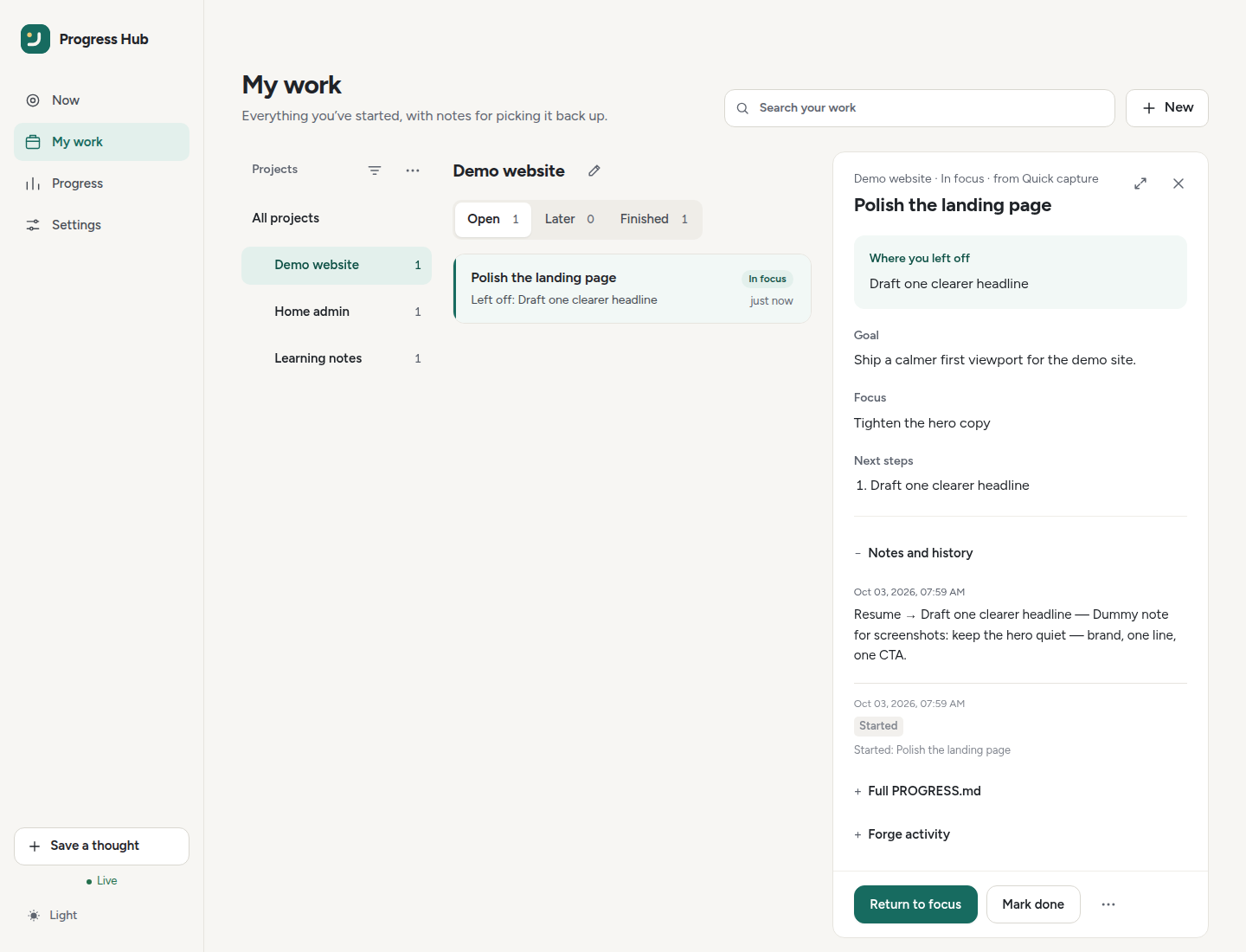
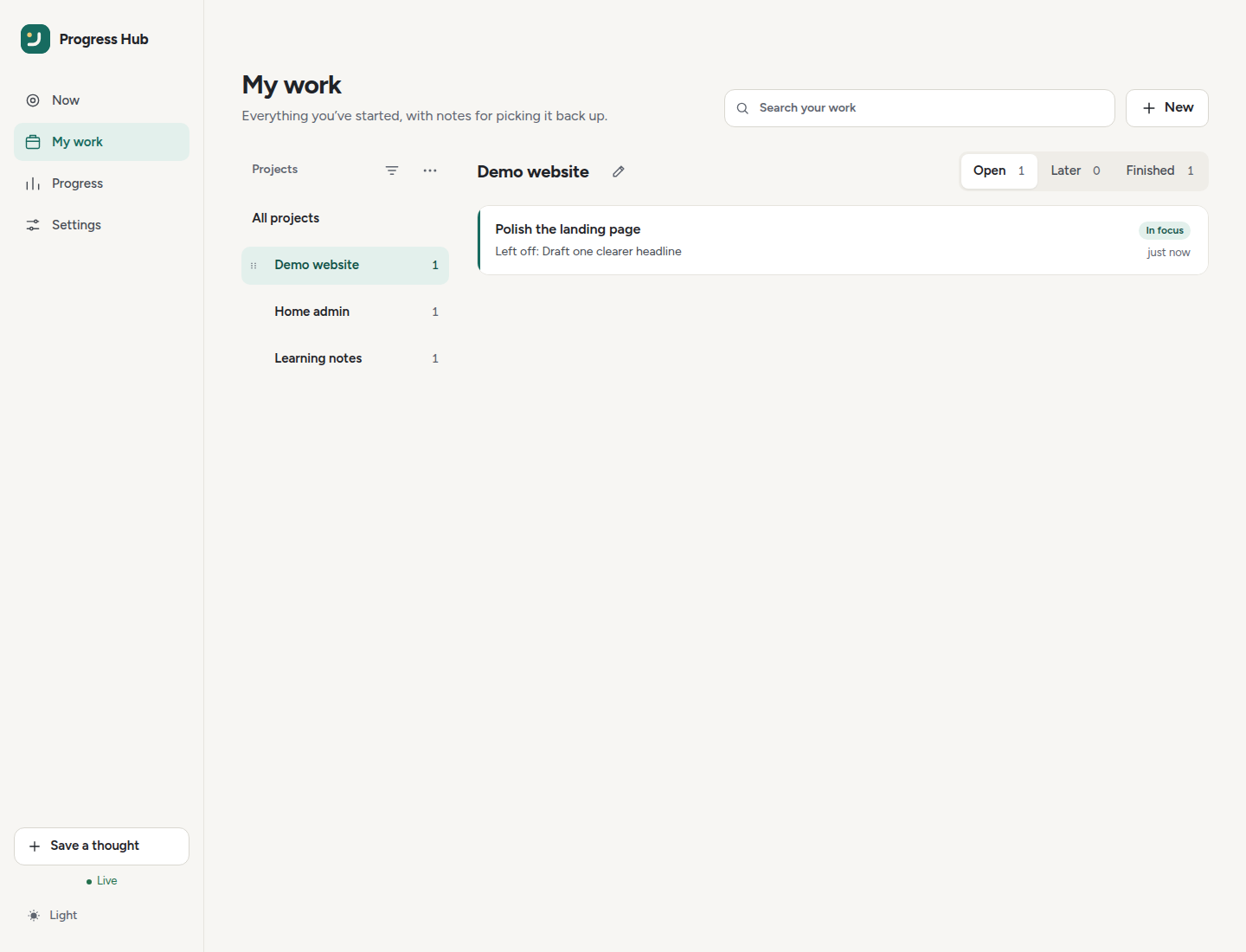
My work with Notes & context (projects list, calm rows, and the reader opened beside them):
| Now | My work | Progress | Settings |
|---|---|---|---|
 |
 |
 |
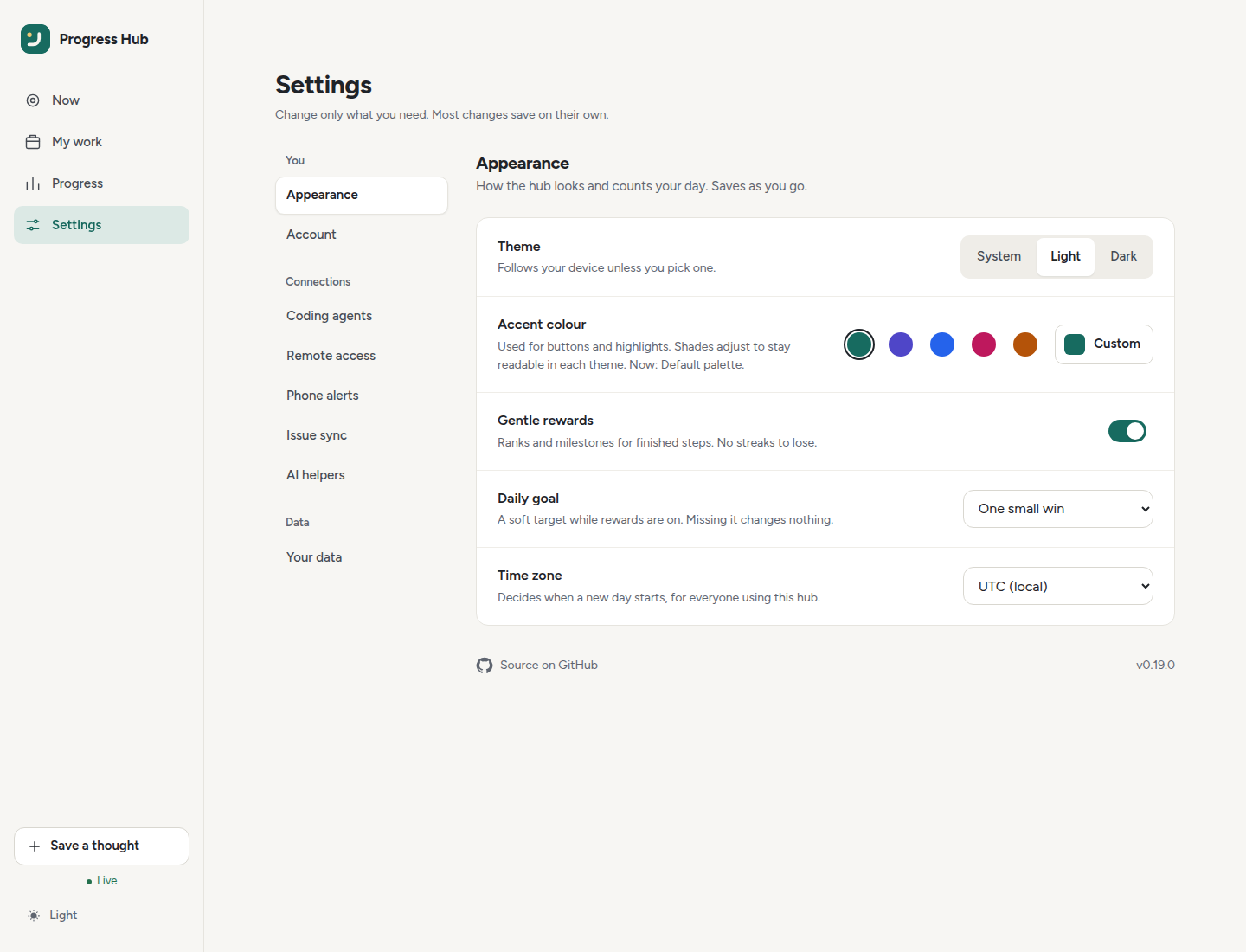 |
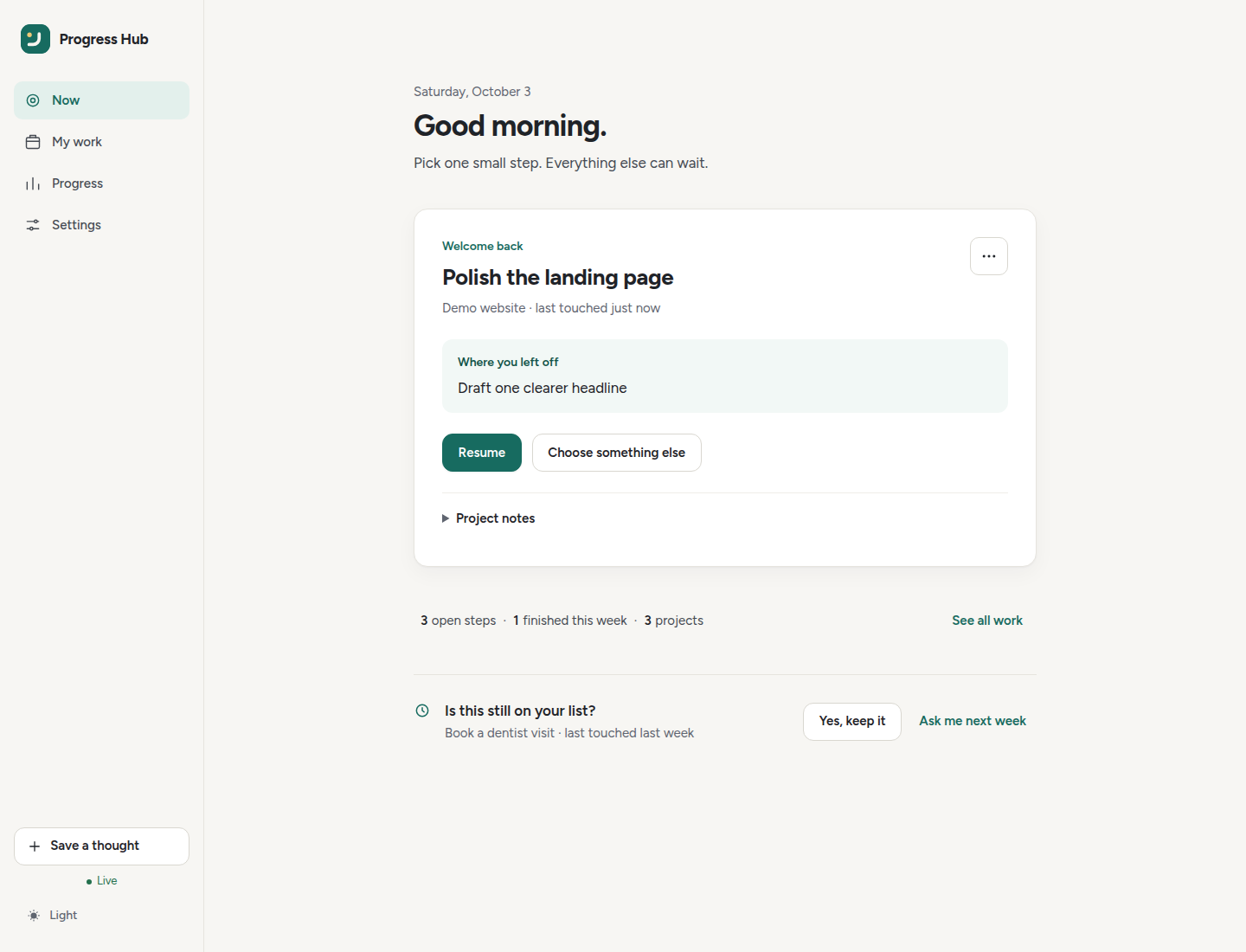
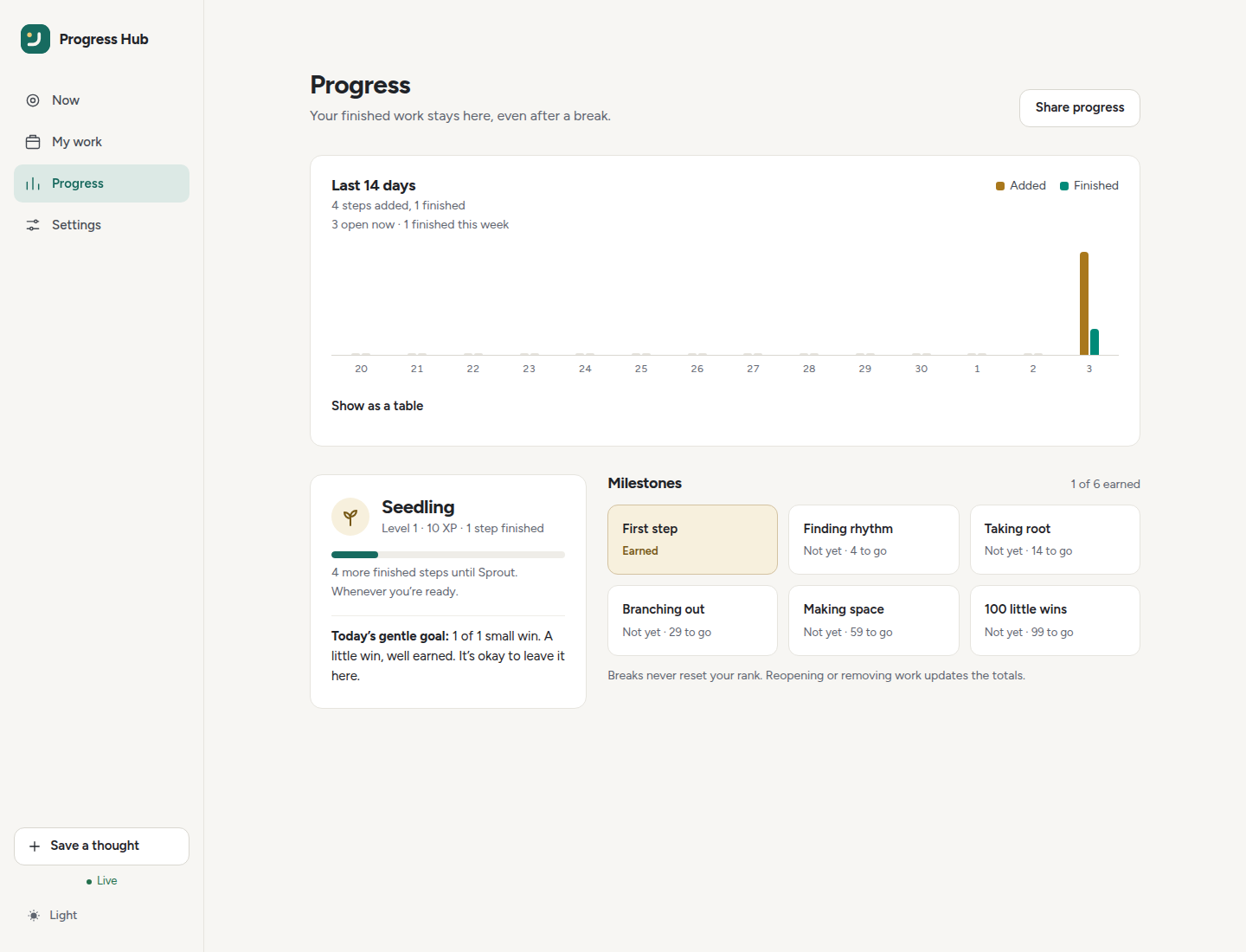
Gallery shots use dummy demo data (Now shows a saved “Where you left off” step and a gentle “Is this still on your list?” check). More UI detail: Dashboard · Notes & context.
Why
You start a Proxmox migration / homelab setup / refactor in Cursor Cloud, continue on a Dev LXC, forget for a week, then rediscover a half-finished chat — or you don’t. The hub keeps:
- Threads — open / blocked / done / dismissed work items
- Progress wiki —
data/wiki/projects/<slug>/PROGRESS.md - Overlap checks — “am I about to redo something half-done?”
- Reminders — once / session / daily / random
- OpenClaw bridge (optional) — chat nudges + memory sync when you’re away from the IDE
Quick start
Docker Compose with a published image is the recommended persistent server install. See the full installation guide for a ready-to-copy Compose file, docker run, source/uv, upgrades, backups, reverse proxies, and client-only CLI installs. Every server setting is documented in the environment variable reference. Hub state (SQLite including project tags and scan-line cache, plus ai.json AI settings) lives under /data in the container — mount a named volume or bind there and keep ADHD_HUB_DATA_DIR=/data (see What lives under /data).
Docker from this checkout
The repository Compose file builds the current checkout:
cp .env.example .env   # set a real ADHD_HUB_AUTH_TOKEN
docker compose up -d --build
curl -fsS http://127.0.0.1:8787/api/health
For a released server without a source checkout, use ghcr.io/uniskela/adhd-hub:latest (or a pinned X.Y.Z) as shown in the installation guide.
Run from source with uv
cp .env.example .env   # set ADHD_HUB_AUTH_TOKEN
uv sync
uv run adhd-hub serve --host 127.0.0.1 --port 8787
Local MCP over stdio
For MCP clients that launch a local subprocess, the same Hub tool catalog can run over stdio:
adhd-hub mcp-stdio
Generic MCP config:
{
  "mcpServers": {
    "adhd-hub": {
      "command": "adhd-hub",
      "args": ["mcp-stdio"]
    }
  }
}
Stdio is an optional local mode: it uses the configured Hub data directory and the same MCP tools, but it does not start the REST API, dashboard, or background scheduler. It has no bearer header because the MCP connection is the local child process itself. For a persistent/shared Hub, remote agents, OAuth, dashboard access, and scheduled reminders, keep using adhd-hub serve/Docker and the Streamable HTTP /mcp endpoint.
See the MCP tool contract for parameter metadata, output compatibility, side effects and local regression checks.
Published images (only after a manual release-PR merge by uniskela):
:latest,X.Y.Z, andX.Yon the Git tag created for that release (for example0.20.2,0.20)
Releases (Release Please): after uniskela manually merges a PR to main with Conventional Commits (feat:, fix:, feat!:…), Release Please opens or updates a release PR. It never auto-merges that PR. When uniskela manually merges the release PR, Release Please creates vX.Y.Z and then publishes the matching multi-architecture images. The publish workflow has no direct push, PR, or manual trigger. Squash merges use the PR title as the subject (body bullets do not count); keep titles conventional for release-surface work — see AGENTS.md / CONTRIBUTING.md.
Pre-1.0 bumps (see release-please-config.json): fix: → patch, feat: → minor, feat!: / breaking → minor (not 1.0.0 yet).
Documentation, chore, test, and CI-only merges do not open a release PR, even if their subject accidentally starts with feat:. A feature, fix, performance, revert, or explicit breaking-change subject reaches Release Please only when that commit changes a shipped runtime surface (src/, package metadata/lockfile, Dockerfile, or docker-compose.yml). A generated release PR continues through the tag-and-publish step after uniskela manually merges it.
docker pull ghcr.io/uniskela/adhd-hub:latest
docker pull ghcr.io/uniskela/adhd-hub:0.20.2
Repo secrets for Docker Hub: DOCKERHUB_USERNAME, DOCKERHUB_TOKEN. GHCR uses GITHUB_TOKEN (packages: write). After a successful image publish, the same Hub secrets push this README (Hub truncates at 25k bytes) and the GitHub repository short description onto uniskela/adhd-hub (DOCKERHUB_TOKEN must be a Hub PAT with Read, Write, and Delete).
Connect Cursor
Marketplace plugin (recommended for Cursor): install adhd-hub-cursorskill (Marketplace once published, or local/dev install of that repo). With a Hub already running, set plugin variables ADHD_HUB_MCP_URL ({base}/mcp) and ADHD_HUB_AUTH_TOKEN, then verify MCP tools and skills. That plugin ships the Hub rule + session/projects/env-check skills with Marketplace wiring; Hub remains the skill source of truth (Cursor plugin skill sync).
Project / CLI connect (monorepos, adhd-hub connect, or non-Marketplace setups): merge adapters/cursor-mcp.json into your MCP config (URL + bearer via ${env:ADHD_HUB_AUTH_TOKEN}), install the rule from adapters/cursor-rule.mdc into .cursor/rules/, and optionally install skills:
# Install from the published repository:
npx skills add uniskela/adhd-hub -g
# Or, while developing an unreleased local checkout:
npx skills add ./skills -g
Or use adhd-hub connect … --agents cursor --cursor-rule --skills — see docs/connect.md.
Optional third-party companions (i-have-adhd, Superpowers, Ponytail, Graphify, Context7, agent-browser, RTK, Serena, Humanizer): see docs/coding-companions.md. Choose only the tools that fit your workflow; Hub Settings → Coding agents and adhd-hub connect --with-* provide the supported opt-in install paths.
For calm, resumable project notes and plans, use the ADHD-friendly writing guide: one visible Now action, brief context, and a concrete return cue.
Documentation site: uniskela.com/docs/adhd-hub (Zensical via uniskela/.com). A GitHub Pages mirror stays at uniskela.github.io/adhd-hub until the Pages cutover. Preview locally with uv sync --extra dev && uv run zensical serve. The Pages workflow deploys only from main after uniskela merges documentation changes; it does not run for pull requests or manual dispatches.
- MCP (recommended persistent/shared transport):
http://<host>:8787/mcp - MCP (optional local subprocess transport):
adhd-hub mcp-stdio - REST docs:
http://<host>:8787/docs - UI:
http://<host>:8787/ui/
MCP tools
| Tool | Purpose |
|---|---|
session_digest |
Compact open threads (goal/focus/next/resume) + reminders |
check_overlap |
Rank open threads vs what you’re starting (goal/title/focus) |
suggest_duplicate_threads |
Review same-outcome evidence and safe merge eligibility |
request_thread_merge |
Queue a local duplicate merge for explicit human confirmation |
thread_merge_history |
Read retained source threads, notes and events under their original IDs |
resolve_project |
Map workspace path → project slug |
list_projects / upsert_project |
Project registry (+ optional forge overrides) |
rename_project / delete_project |
Queue rename/delete for /ui confirmation (not applied immediately) |
list_pending_actions |
See delete/rename requests waiting for you |
list_open_threads |
List unfinished work |
upsert_thread |
Create/update a thread (one finishable outcome) |
upsert_progress |
Update thread state + PROGRESS.md (thread_id when known) |
pause_thread |
Leave a concrete resume step |
mark_done |
Close a known thread |
set_reminder |
once / session / daily / random |
Using this project with AI coding agents
If you use Codex, Cursor, Claude Code, or another assistant with Context7 MCP, you can ask it to consult the project's documentation before setting up or integrating the Hub. Context7 is optional and separate from ADHD Progress Hub's own MCP server.
Use Context7 MCP to resolve the official documentation library for
uniskela/adhd-hub(expected ID:/uniskela/adhd-hub), then retrieve guidance for installation, agent connections, MCP transports and tools, authentication, and troubleshooting. Match the guidance to my installed ADHD Progress Hub version. If the library is still indexing or doesn't cover that version, check the maintained documentation and linked source files instead.
Optional OpenClaw
Install the Hub skills for OpenClaw:
npx skills add uniskela/adhd-hub -g -a openclaw
Pairing (recommended): In Settings → Phone alerts, click Start pairing, copy the prompt into OpenClaw, then Approve what it submits. OpenClaw never needs ADHD_HUB_AUTH_TOKEN — only the short pairing code. Full steps: OpenClaw connection and alerts.
Manual path: Enable private hooks on the OpenClaw gateway. Then in Settings → Phone alerts, save the webhook or agent URL, bearer token, alert schedule, stale age, cooldown, and alert size. Use Save and send a test to verify the route.
The bearer token is encrypted before it is written to the Hub data directory and is never returned to the browser. Environment variables remain available for initial provisioning:
ADHD_HUB_OPENCLAW_WEBHOOK_URL=http://openclaw:18789/hooks/wake
ADHD_HUB_OPENCLAW_TOKEN=<OpenClaw hook bearer token>
# optional richer path:
# ADHD_HUB_OPENCLAW_AGENT_URL=http://openclaw:18789/hooks/agent
Environment changes require a restart; web UI changes apply immediately. The stale-work job sends OpenClaw one concise, non-nagging reminder and stays quiet when there is no stale work. Keep both services on your LAN or Tailscale. See the OpenClaw guide for details.
Optional transcript indexer
On a machine that has local transcripts (does not upload raw chats — only heuristic summaries):
uv run adhd-hub index --dry-run
uv run adhd-hub index
Roots (override in config.toml [indexer]):
- Cursor:
~/.cursor/projects/**/agent-transcripts/**/*.jsonl - Codex:
~/.codex/sessions/**/*.jsonl - Claude Code:
~/.claude/projects/**/*.jsonl
Homelab / Tailscale
See docs/deploy-homelab.md. Typical pattern: Docker on Proxmox LXC, publish :8787 on Tailscale, point Cursor Cloud + Windows + Dev LXC MCP clients at http://<tailscale-ip>:8787/mcp. When Cloud cannot join Tailscale, use a controlled HTTPS tunnel (Remote MCP access) or the forge mailbox — never anonymous /mcp.
Optional forge sync (GitHub / Gitea)
Open http://127.0.0.1:8787/ui/ after serve / compose. Project-first dashboard: pick a project, do Next up, Settings (token / timezone / forge) stays out of the way. Timezone defaults to your browser local zone on first visit (ADHD_HUB_TIMEZONE / data/prefs.json).
- Wiki sync — pushes
INDEX.md+projects/<slug>/PROGRESS.md(primary memory: repo root; otherwise under Wiki path) - Board sync — mirrors threads as Issues with labels
adhd-hub+project:<slug>; optionally attaches to a Gitea/GitHub project board id - Primary memory repo — seeds
README.md/AGENTS.md; leave Wiki path blank so files land atprojects/<slug>/(e.g.…/alex/projects/projects/adhd-hub) - Import from forge — if the repo already has
projects/*/PROGRESS.md, Settings → Issue sync → Scan for projects (or after Sync) offers to register missing projects and pull progress files
Configure in Settings or via ADHD_HUB_FORGE_* env / data/forge.json. Rename/delete projects from the project panel (delete is safe by default — progress/forge files only removed if you opt in).
Note: Hub “wiki” = normal markdown files in the repo (INDEX.md, projects/*/PROGRESS.md). That is separate from Gitea/GitHub’s built-in Wiki feature. Issues show under the Issues tab when board sync works. Projects boards only if you set a project id/number.
Cloud / remote mailbox: enable Import cloud-agent issues (inbox) and set Inbox authors (fail closed: empty allowlist imports nothing). The Hub polls open issues from those usernames that either have the adhd-hub label or a title starting with [ADHD] (Cursor Cloud, Codex/ChatGPT, Claude, etc.), creates threads, then closes them with adhd-hub-synced (never deletes). Title prefix is enough when agents cannot set labels. Optional source:* labels record the tool. Agents should use a short Goal/Focus/Next/Resume body and may append a Made-with footer under ## Attribution. See docs/forge-issue-inbox.md.
PAT permissions: see docs/forge-permissions.md for GitHub (fine-grained + classic) and Gitea scopes.
Privacy
- Default store: SQLite + markdown wiki under
data/ - Auth: REST and MCP accept bearer tokens.
/ui/supports a separate dashboard password, withADHD_HUB_AUTH_TOKENfor initial setup and recovery. Both issue a 12-hour HttpOnly, SameSite=Strict session cookie; credentials are never stored in localStorage. See password setup and recovery. Log out revokes the session. Browser sessions are stored in SQLite (data/browser_sessions.sqlite3) and survive a restart; login throttles stay in process memory. HTTPS sets the Secure cookie flag (configure trusted proxy headers when terminating TLS upstream). - Default-token development mode is allowed only with a loopback bind. Set a long random token before binding to
0.0.0.0; generate one withpython -c "import secrets; print(secrets.token_urlsafe(32))". Use HTTPS for remote access. - Cookie-authenticated writes require
X-Hub-Request: 1and a matching Origin when present. CLI and MCP clients continue using bearer auth. - Settings precedence is process environment, then the first nonempty TOML file (
--config,./config.toml, or~/.config/adhd-hub/config.toml), then.env.ADHD_HUB_PUBLIC_URLsets the externally reachable Hub base URL used for browser/deep links, forge links, install/connect output, and MCP OAuth discovery. - Bind
127.0.0.1for local-only, or Tailscale-only — do not expose publicly without a reverse proxy / tunnel terminator and strong token (Remote MCP access) - Migrate instances with
/uibackup zip or forge Import (see docs/deploy-homelab.md). Optional passphrase backups use a versioned envelope: new exports are salted scrypt + Fernet (v2); v1 SHA-256 passphrase files still decrypt.
Adapters
| Tool | Snippet |
|---|---|
| Cursor | Marketplace: adhd-hub-cursorskill; project: adapters/cursor-mcp.json, adapters/cursor-rule.mdc |
| Codex | adapters/codex.md |
| Claude Code | adapters/claude-code.md |
| OpenClaw | adapters/openclaw.md |
Add Hub guidance to another project
Install a reversible, project-local AGENTS.md section that keeps coding-agent sessions connected to the Hub:
adhd-hub setup /path/to/project
Add --install-skills to install Hub skills (session, projects, env-check) globally for every skills.sh agent, or pass --skills-source /path/to/adhd-hub/skills while developing locally. Skill installation is opt-in because it changes global skill directories. Use connect --skills --agents ... when you want selected agent targets. See project agent setup. Keep connected projects aligned with canonical Hub skills using project sync. For stronger Cursor enforcement than rules alone, opt into continuity guard with adhd-hub setup . --continuity-guard.
Connect (one-liner)
With the Hub running and ADHD_HUB_PUBLIC_URL set for remote clients, copy the command from Settings → Coding agents (no server token in the command):
# macOS / Linux / WSL / Git Bash
curl -fsSL http://<hub-host>:8787/install.sh | sh -s -- /path/to/project
# Windows PowerShell
irm http://<hub-host>:8787/install.ps1 | iex
The CLI opens your browser (or prints a one-time code). Press Allow in the browser prompt, or type the code under Settings → Coding agents and choose Allow this computer. A session is saved on disk; do not export ADHD_HUB_AUTH_TOKEN into your profile for this step.
Install scripts prefer this Hub's /install/cli-wheel.url (a PEP 427 wheel matching the server), falling back to git+https. Choose agents in Settings → Coding agents (baked into /install.sh and /install.ps1), or pass --agents / ADHD_HUB_CONNECT_AGENTS. Hub alias claude maps to skills.sh claude-code; there is no Cursor-only default. Details: docs/connect.md.
adhd-hub doctor --hub http://<hub-host>:8787 --project /path/to/project
connect and doctor print a scannable report: outcome banner and Hub URL, then Do next (success) or Fix these (failure). Color is on for a TTY unless NO_COLOR or ADHD_HUB_NO_COLOR is set. Layout: docs/connect.md.
adhd-hub connect merges MCP configs, writes the reversible AGENTS.md block, and can install Cursor rules, global skills, OpenClaw skills, register the project, and scan --find-roots.
To point an already-connected machine at a different Hub (for example localhost → HTTPS):
adhd-hub use-hub https://adhd-hub.example.com --project /path/to/project --agents cursor,codex,claude
Roadmap
The single public roadmap lives in docs/plans/improvement-roadmap.md. GitHub issue #15 is the canonical tracker when current status changes faster than the docs.
Current sequence:
- Shipped — Foundation B3 #75 in v0.15.0 via #152: durable activity/event history, live UI invalidation, sync health and history.
- Shipped — Wave 6 #52 in v0.16.0 via #159, #160, #161, and #162: heuristic and opt-in local LLM thread scan-lines, project tags, filters, last-touch cues, and organiser suggestions with confirm.
- Now — Wave 7 #54: soft stale triage and calm Next-up ranking shipped in v0.18.0; merge/dedupe suggestions and return-cue coaching remain.
- Next — Wave 8 #55: progress compaction, local search, mobile capture and energy/context modes.
- Then: activity insights #72.
- Later: shared/discovery surfaces #56.
- Deferred/opt-in: Slack/Discord/calendar integrations #20.
- Independent maintenance: MCP schema quality #117 and the remaining CI lockfile cleanup #102.
Dashboard comfort
The dashboard includes light/dark/system themes, a focus view, quick task capture, and optional XP, levels, and daily goals. See dashboard preferences.
Development
uv sync --all-extras
uv run pytest
uv run ruff check src tests
See CONTRIBUTING.md.
License
MIT — LICENSE
Brand and rewards
See the brand guide for the logo, colours, and UI patterns. Current optional ranks, badges and shareable progress are documented in dashboard preferences; future public/competitive reward ideas are not part of the active roadmap.
Reviews (0)
Sign in to leave a review.
Leave a reviewNo results found