oh-my-pi-gui
Health Uyari
- License — License: NOASSERTION
- Description — Repository has a description
- Active repo — Last push 0 days ago
- Low visibility — Only 6 GitHub stars
Code Gecti
- Code scan — Scanned 12 files during light audit, no dangerous patterns found
Permissions Gecti
- Permissions — No dangerous permissions requested
Bu listing icin henuz AI raporu yok.
Native Windows GUI for Oh My Pi: sessions, models, providers, MCP, plugins, context, and browser tools.
Oh My Pi GUI
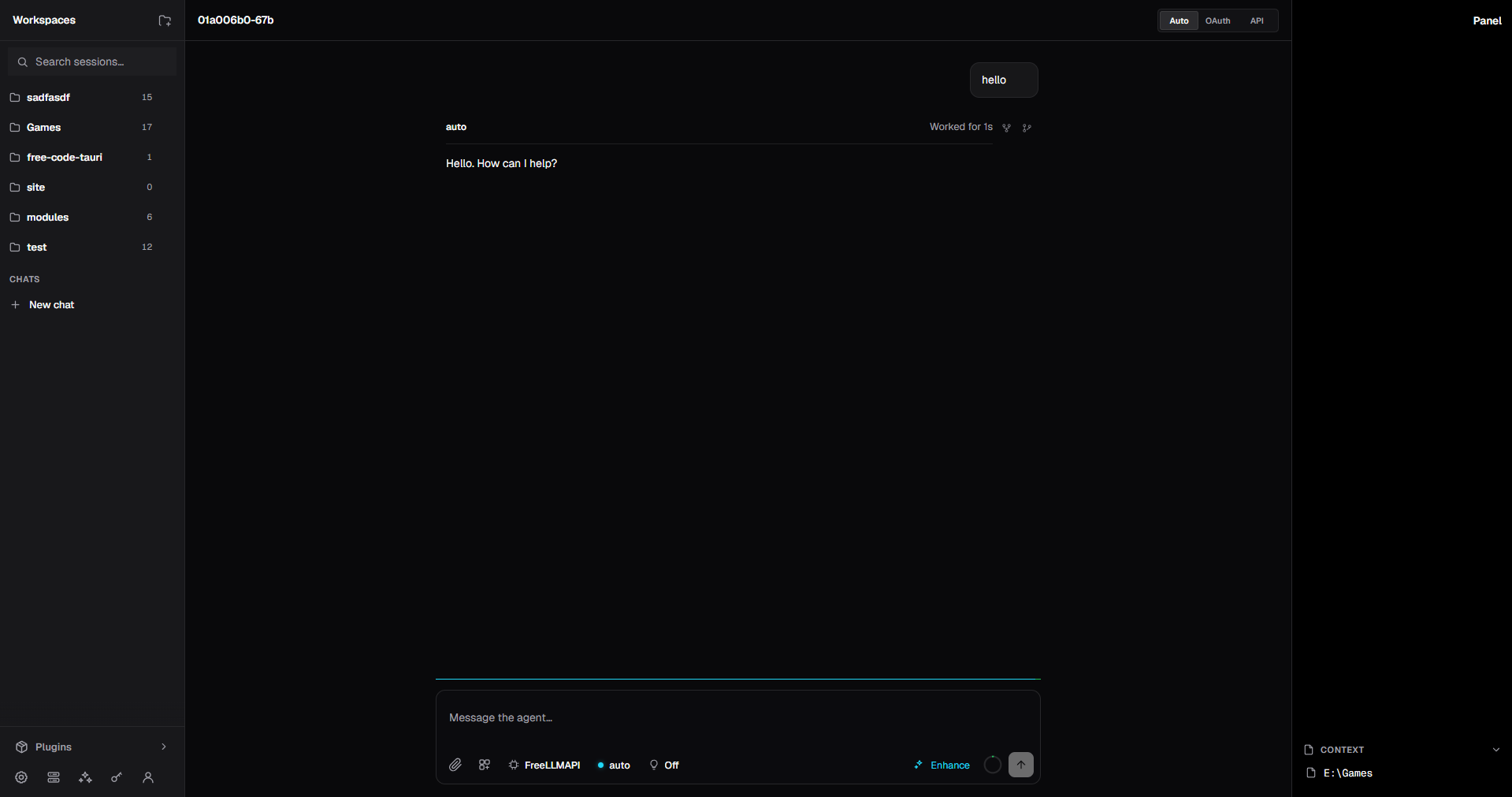
A native Windows desktop interface for Oh My Pi. Keep the full Pi agent workflow, with sessions, models, tools, MCP, plugins, browser surfaces, and context in one focused workspace.
Source · Oh My Pi upstream · MIT license
Oh My Pi GUI is for people who want Pi's agent runtime without spending the whole day in a terminal. It is a Desktop/Tauri layer around OMP's native runtime, so the same agent, tools, skills, plugins, and provider registry remain available.
Why use it
- One place for real work. Keep projects and sessions in a workspace rail, switch between them, and continue work without losing the active run.
- Provider control that reflects reality. Choose
Auto,OAuth, orAPI; the picker is built from OMP's available credentials and model registry. - Transparent execution. Streaming answers, thinking, tool calls, browser actions, progress, errors, and cancellation stay in chronological order.
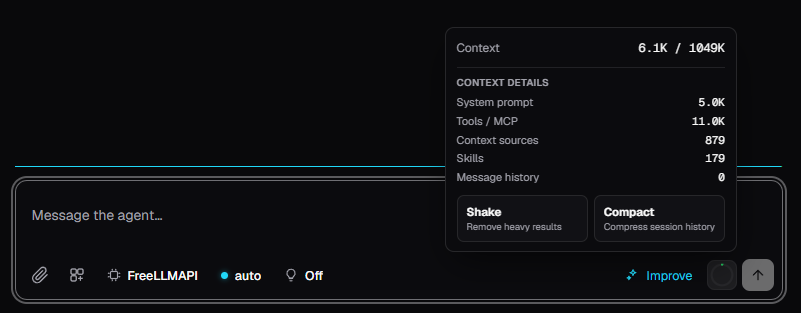
- A visible context budget. Inspect what fills the context window, including system context, tools, MCP, skills, sources, and message history.
- Power without a second ecosystem. Use OMP's own agent runtime, native web tools, skills, plugins, MCP servers, and model roles from the Desktop UI.
More screens
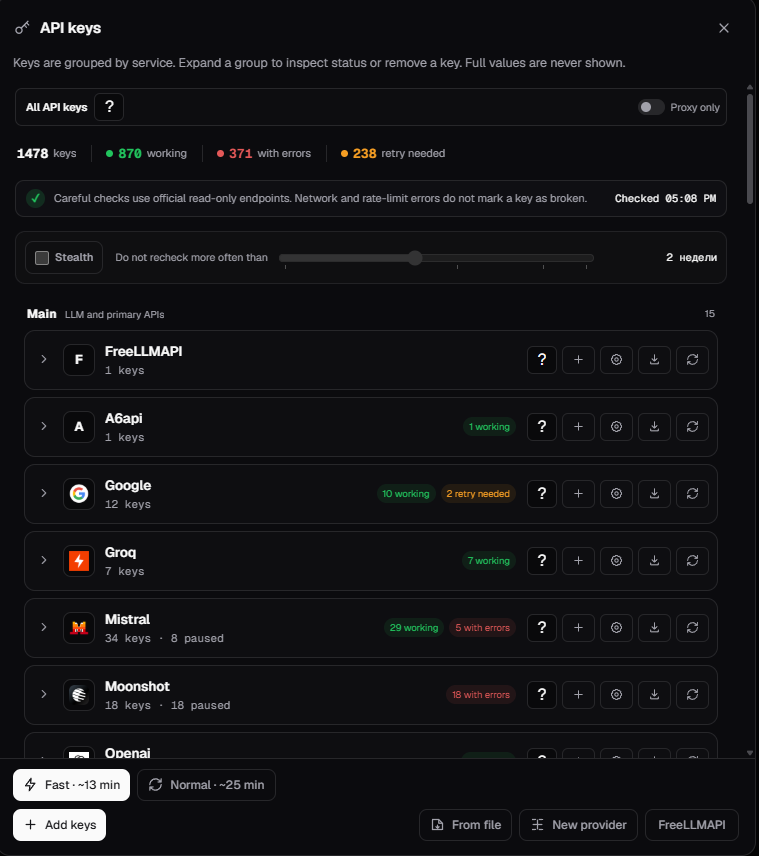
API key pools
Manage provider keys without exposing their values. Check health, see working/error/retry-needed counts, rotate through eligible keys, and configure a provider without leaving the app.
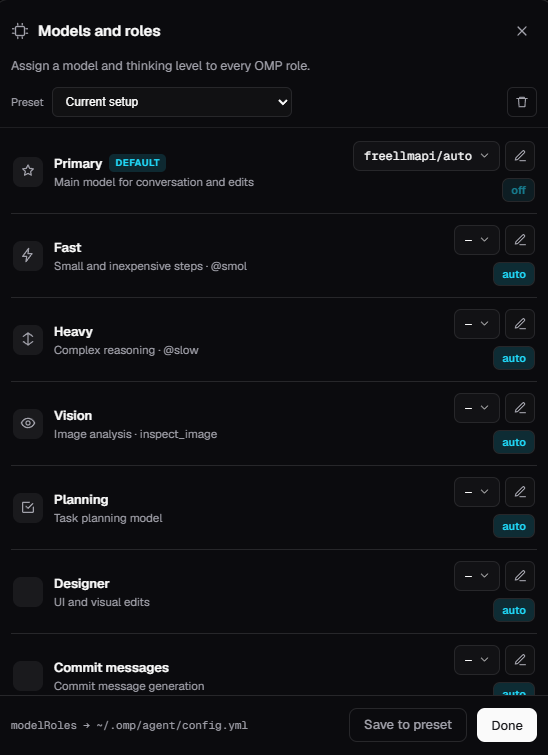
Models and roles
Assign different models and thinking levels to OMP roles such as Primary, Fast, Heavy, Vision, Planning, and Commit messages.
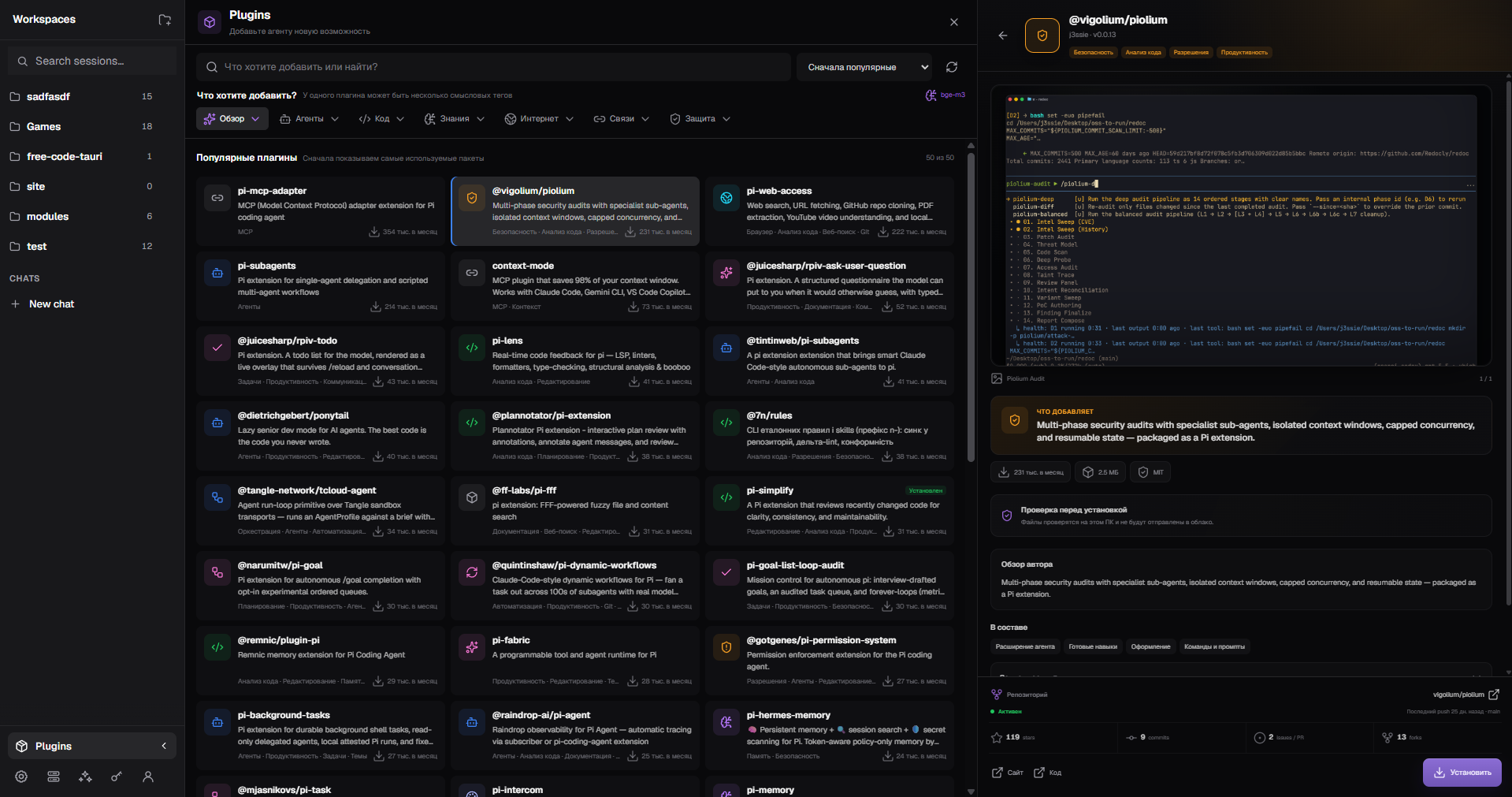
Plugins and MCP ecosystem
Browse and inspect Pi extensions, skills, and MCP-oriented tools from the same Desktop workspace.
Context controls
See what is consuming the current context window and use the available context actions before a long session becomes unwieldy.
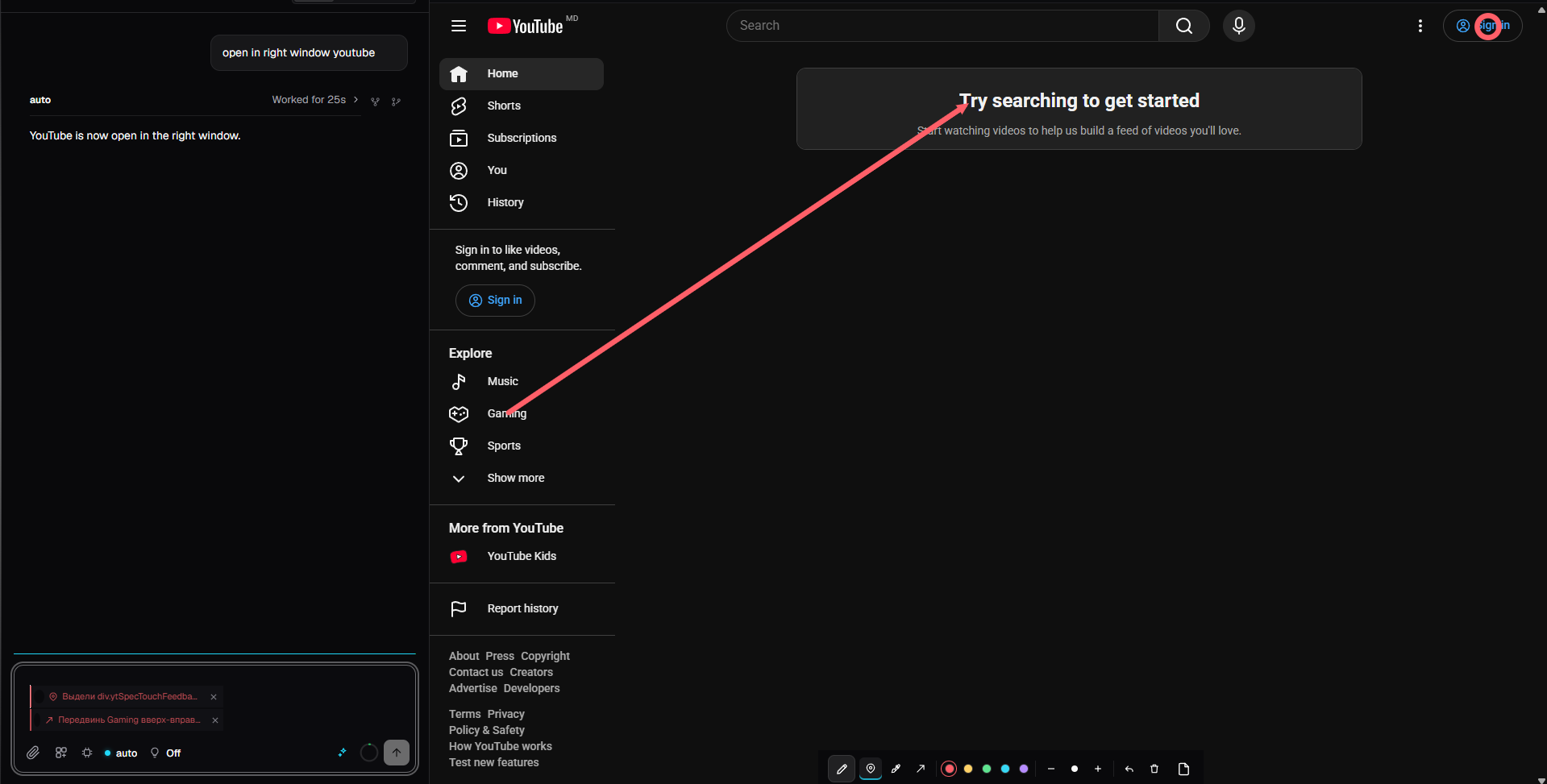
Browser surface
Use browser-backed tools in the right-side surface while the agent continues the conversation in the main pane.
What is included
Agent workspace
- Multiple workspaces and sessions
- Streaming responses and thinking
- Tool activity in transcript order
- Background execution, cancellation, recovery, and restart
- Session search, branching, context inspection, and token usage
Models and credentials
- OAuth accounts, API-key pools, and automatic routing
- OMP registry-backed provider and model discovery
- Thinking-level selection and model roles
- Key rotation, cooldown, quarantine, health checks, and cleanup of irreversibly invalid keys
- Provider-specific model visibility controls
Tools and integrations
- File editing, search, shell, LSP, debugger, Python, JavaScript, and browser tools
- MCP servers and system-context controls
- Skills, plugins, subagents, tasks, and slash commands
- Native web search and fetch through OMP's provider system
- Optional local semantic context support with on-demand model installation
Optional FreeLLMAPI
FreeLLMAPI is not bundled in the repository. From Desktop Settings you can install, update, start, stop, and enable it locally when you need its compatible provider routes. Its runtime files, credentials, and caches stay outside this repository.
Start on Windows
The simplest path is intentionally short:
- Download the repository from Code → Download ZIP and extract it, or clone it with Git.
- Open the extracted folder.
- Double-click
Desktop.cmd.
On the first launch, the bootstrap script prepares missing local dependencies and native components automatically. That first run can take a while and may request administrator permission for official Windows build components. Later launches reuse the local bootstrap cache.
The launcher is designed for Windows 10 or newer. An internet connection is needed on first launch so it can download Bun, JavaScript dependencies, native components, and any missing Windows runtime prerequisites.
Developers
For a source development loop, install Bun and the Rust toolchain, then run:
bun install
bun run desktop:dev
Useful checks:
bun check
cargo check -p pi-desktop
bun run desktop:build
The standard OMP CLI remains available through bun run dev.
Privacy and scope
This repository does not contain API keys, OAuth tokens, cookies, browser profiles, FreeLLMAPI, downloaded embedding models, or user session data. Credentials and local runtime state stay user-scoped on the machine. Public requests do not receive private browser state unless the user explicitly enables a compatible local flow.
Oh My Pi GUI does not replace the OMP core. It provides a native Desktop surface for the upstream runtime and keeps upstream provider, tool, skill, plugin, and MCP behavior as the source of truth.
Project layout
| Path | Purpose |
|---|---|
packages/ai |
Provider clients, streaming, credentials, and model requests |
packages/catalog |
OMP model registry, provider descriptors, and discovery |
packages/agent |
Agent runtime, tools, state, and task execution |
packages/coding-agent |
OMP CLI, RPC mode, skills, plugins, and web tools |
packages/desktop |
Tauri frontend, bridge, sessions, picker, and settings |
crates/pi-desktop |
Native Tauri commands and process lifecycle |
packages/wire |
Typed RPC contracts shared by runtime and Desktop |
License and upstream
Oh My Pi GUI is released under the MIT license. It builds on Oh My Pi and preserves the upstream project's notices and license. See LICENSE for the complete text.
Issues, improvements, and feedback are welcome in the repository discussions and pull requests.
Yorumlar (0)
Yorum birakmak icin giris yap.
Yorum birakSonuc bulunamadi