dsh-code
Health Uyari
- License — License: MIT
- Description — Repository has a description
- Active repo — Last push 0 days ago
- Low visibility — Only 8 GitHub stars
Code Basarisiz
- process.env — Environment variable access in cordis.patch.yml
- exec() — Shell command execution in src/app.ts
Permissions Gecti
- Permissions — No dangerous permissions requested
Bu listing icin henuz AI raporu yok.
Claude-Code-style TUI bundle for DeepSeek Harness
dsh-code
English | 中文
A Claude-Code-style interactive terminal (TUI) bundle for DeepSeek Harness (dsh), installed as an out-of-tree plugin bundle over the official @deepseek-ai/dsh-base — the same plugin ecosystem the official web surface composes, nothing forked.
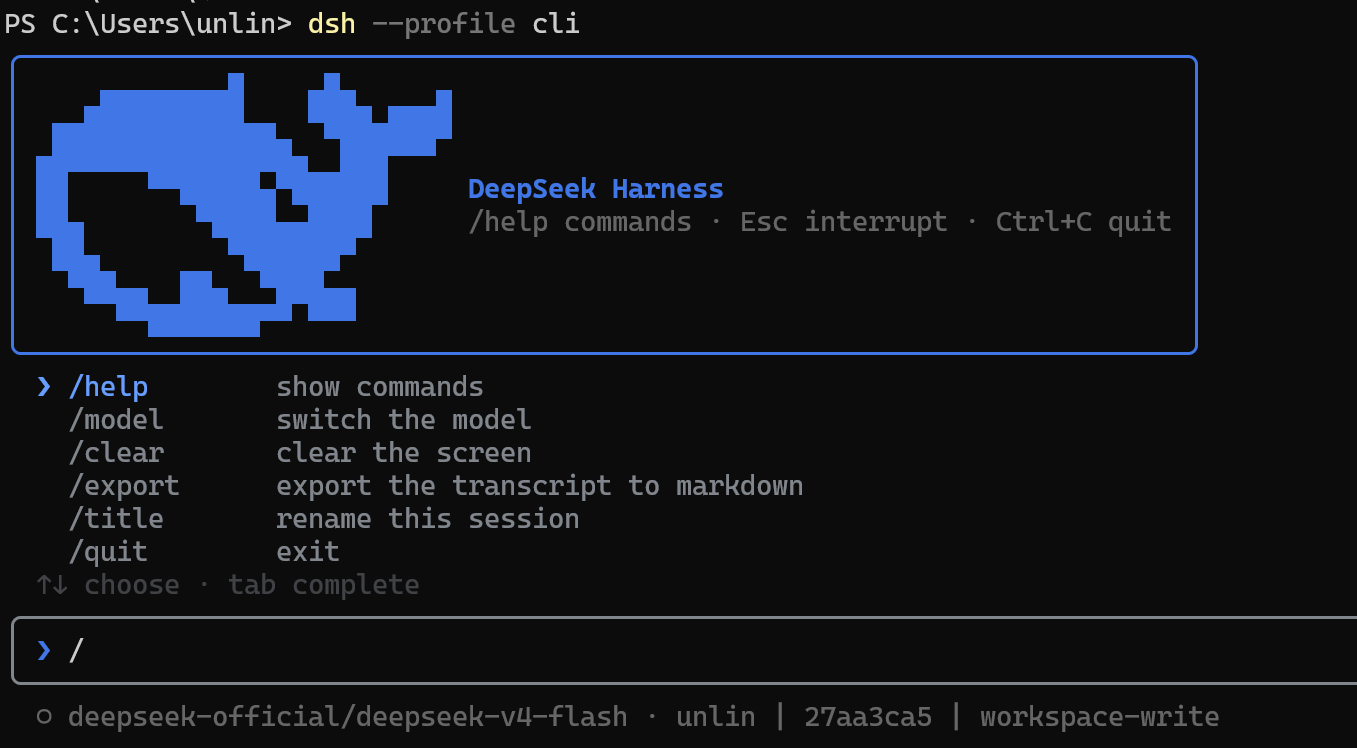
What you get
- DeepSeek-blue banner: the whale wordmark rasterized half-block from the exact FishLogo path, in a compact content-hugging header
- Live transcript streamed from the durable session log: user prompts, streaming assistant text, compact tool-call and slash-command rows with running/done/error marks, todo snapshots
- Tool approval y/n bar: when the agent asks for permission (a sandbox escalation, a hook's
askdecision), an amber bar shows the reason plus the paired command line;yallows once,nrejects /modelpanel: list every provider route the livellmregistry advertises, switch the session's model for the next step; a resumed session restores its own last model- Session resume:
--resume <id|prefix>continues a persisted session,--continuepicks the newest one for the working directory; the full transcript replays from the log and appends to the same durable session - Slash-command passthrough: every command registered in the shared
ctx.commandsregistry (the same surface the web composer dispatches) is executable from the terminal, with a completion menu on/; user-invocable skills join the same menu (markedskill), and an unknown/namefalls through to the prompt so the host's skill injection picks it up - Todo panel: the live todo list renders inline with done/active/pending counts and three-state markers, cleared at each fresh turn (mirroring the web TodoPanel)
- Thinking lines: model reasoning renders as a Claude-Code-style
✻fold — collapsed to a dim marker with a character count, expanded to dim-italic text, live-streamed while the model thinks; Ctrl+R toggles globally - Terminal markdown: assistant replies render through a pure GFM-subset renderer (headings, fenced/inline code, emphasis, lists, quotes, links) wrapped to the terminal width; streaming stays plain until the message settles
- Ctrl+O history inspector: browse one retained transcript entry at a time without replacing the composer or status footer; ←/→ switches entries, ↑/↓ and PageUp/PageDown scroll the complete content, and
g/Gjump to either end - Structured tool details: persisted edit/write diffs, numbered read windows, web-search sources, fetch summaries, and bounded raw output remain compact in the transcript and expand into their full presentation inside Ctrl+O
- ask_user_question bar: the model's questions appear as an option menu (↑/↓, space multi-select,
ccustom answer, Esc interrupts); plan reviews (exit_plan_mode) arrive through the same bar with the approve option highlighted - @ mentions:
@completion over workspace files and persisted sessions; session mentions expand into bounded read-only snapshots injected as sourced context before the prompt - Plan mode and permissions:
⧉ planand⛨ <preset>badges in the status line;/permission <name>switches the session preset, Shift+Tab cycles through them (the registry's own/plancommand enables plan mode) - Local terminal workflows:
/helpopens the complete key/command/skill surface,/exportwrites the folded transcript to Markdown,/titlepins a session title, Ctrl+K deletes to end of line, Ctrl+L redraws the terminal, and bare workspace paths participate in Tab completion - Input with history (↑/↓), cursor editing (←/→, Ctrl+A/E/U), Tab completion for slash commands, skills, and @ mentions; submitting while the agent runs steers the live turn (consumed at the next step boundary),
Escor Ctrl+C interrupts it, Ctrl+C on an empty idle input exits, Ctrl+D refuses to exit mid-turn - A blended status line: Claude-Code-style identity facts (model, working directory, git branch, title/session, plan, permission preset, goal and sandbox overrides) beside the web composer's figures (turns/steps, llm and tool wall time, TTFT, decode tok/s, context occupancy, cache hit, token totals)
- Bounded live rendering: streaming output, Ctrl+O,
/help,/model, approvals, and question/plan-review panels stay within terminal-aware viewports; the composer remains directly above its status footer, and a debounced resize reflows the screen once at the settled width
Install
Requires Node ^22.19 || >=24 and the dsh CLI (npm i -g @deepseek-ai/dsh@next).
dsh plugin --profile cli add dsh-code       # from npm, once published
dsh plugin --profile cli add github:unlinearity/dsh-code  # track this repo
dsh plugin --profile cli add file:C:/path/to/dsh-code     # local checkout
Then:
dsh --profile cli                    # fresh session
dsh --profile cli --continue         # resume the newest session in this directory
dsh --profile cli --resume abc123    # resume by session id or unique prefix
dsh --profile cli --session my-id    # fresh session under an explicit id
Set DEEPSEEK_API_KEY in your environment (or a .env in the launch directory or $DSH_HOME).
Git-hosted plugins build on install via their install scripts, which pnpm blocks until allowed: if an add fails, append the key it prints under allowBuilds in ~/.dsh/profiles/cli/pnpm-workspace.yaml and re-run.
Develop
pnpm install
pnpm test         # vitest unit tests
pnpm typecheck
pnpm build        # tsdown bundles lib/*.mjs, tsc emits lib/types
pnpm run gen:whale   # regenerate src/whale-glyph.ts from the vendored logo path
The whale glyph is generated from the DeepSeek fish-logo path vendored in scripts/fish-logo.ts (source: deepseek-harness, MIT).
License
MIT. The vendored fish-logo geometry is from DeepSeek Harness (MIT).
Yorumlar (0)
Yorum birakmak icin giris yap.
Yorum birakSonuc bulunamadi