OpenSwarm
Health Gecti
- License — License: MIT
- Description — Repository has a description
- Active repo — Last push 0 days ago
- Community trust — 840 GitHub stars
Code Uyari
- process.env — Environment variable access in action.yml
- fs module — File system access in action.yml
Permissions Gecti
- Permissions — No dangerous permissions requested
This tool orchestrates multiple autonomous AI coding agents, specifically powering Claude Code instances. It acts as an automated development team that pulls tasks from Linear, writes and reviews code, and reports updates to Discord, all while utilizing a vector database for long-term project memory.
Security Assessment
Risk Level: Medium. The tool inherently executes shell commands by design, using CLI adapters to prompt underlying AI models directly on your system. It makes external network requests to third-party APIs (Linear, Discord, and AI providers) and manages a web dashboard. The automated code scan found no hardcoded secrets or dangerous patterns in the analyzed files, and the project does not request explicitly dangerous permissions. However, because it is designed to autonomously write and execute code, it requires access to highly sensitive API keys and local system resources.
Quality Assessment
The project is highly active, with its most recent code push happening today. It enjoys solid community trust, backed by 330 GitHub stars. The repository is well-documented with a clear description and robust instructions, and it is legally safe for integration under the standard MIT license.
Verdict
Use with caution — while the code itself is clean, actively maintained, and well-licensed, its core function of autonomously executing AI-driven code changes requires strict local oversight and secure handling of API keys.
OpenSwarm — Autonomous AI dev team orchestrator powered by Claude Code CLI. Discord control, Linear integration, cognitive memory.






Autonomous AI agent orchestrator — Codex, GPT, OpenRouter (any model), local models (Ollama/LM Studio), and Claude Code (
claude -p)
💬 Help shape OpenSwarm. Share feature ideas, vote on the roadmap, and ask questions in GitHub Discussions. The roadmap is built in the open — your feedback decides what ships next.
OpenSwarm orchestrates multiple AI agents as autonomous code workers. It picks up issues from Linear or a built-in local tracker, runs Worker/Reviewer pair pipelines, reports through a pluggable notifier (Discord, Slack, Telegram, webhook), and retains long-term memory via LanceDB. Workers run on OpenAI Codex/GPT, any OpenRouter model, local open-source models (Ollama, LM Studio), or Claude Code (claude -p, opt-in) — with cost-aware routing measured on an L0–L6 benchmark ladder.
Verified on real GitHub issues: the agentic harness solves SWE-bench Lite instances graded by the official harness. Hybrid mode — a frontier model diagnoses read-only, a lightweight model implements with a verification loop — resolved 3/3 attempted instances that every single lightweight model had failed, at a fraction of frontier-only cost. Workers also learn each repository over time: task outcomes are stored as per-repo knowledge and recalled into future prompts. (benchmark rubric & results)
Sponsors
OpenSwarm is proudly supported by Atlas Cloud — an enterprise AI infrastructure platform serving fast, stable LLM, image, and video APIs (partnered with OpenRouter and SGLang).
As an official provider sponsor, Atlas Cloud ships as the built-in atlascloud adapter (OpenAI-compatible Chat Completions, ATLASCLOUD_API_KEY) and provides ongoing monthly API credits that keep the project's autonomous runs going. To run OpenSwarm on Atlas Cloud, grab a key at atlascloud.ai, set ATLASCLOUD_API_KEY, and select adapter: atlascloud.
Quick Start
npm install -g @intrect/openswarm
openswarm init         # interactive setup wizard — provider auth + Linear OAuth + config
openswarm doctor       # verify your environment (runtime, native deps, providers, ports)
openswarm              # launches the TUI chat
openswarm init walks you through provider authentication, optional Linear OAuth (team/project picker), and writes a validated config.yaml. Prefer wiring a provider by hand? You need one first: openswarm auth login (ChatGPT OAuth, used by codex/gpt), openswarm auth login --provider openrouter (or export OPENROUTER_API_KEY=…), or just have an authenticated claude on PATH. Check what's wired with openswarm auth status, and diagnose any gaps with openswarm doctor.
What openswarm init sets up
The wizard asks three questions, detects what you already have, and writes the config for you:
- AI provider (worker/reviewer) — it auto-detects existing auth and offers inline login:
codex-responses— ChatGPT subscription via OAuth (Codex models, native loop) — easiest startcodex— externalcodexCLI ·openrouter— any model (API key/OAuth) ·gpt— OpenAI OAuthlmstudio/local— local servers, no account ·claude—claude -pCLI (opt-in fallback)
- Task backend —
localSQLite issue store (no account) orlinear(OAuth browser login or API key, then an arrow-key team → project picker for this repo) - Notification channel (optional) —
none/discord/slack/telegram/webhook
It then writes .env (secrets, chmod 600), config.yaml (validated), and — if you mapped a Linear project — openswarm.json (this repo → Linear team/project). Finally it prints next steps and can launch browser OAuth.
Re-running in a repo that already has
config.yamlis refused unless you pass--force, andinitrefuses to overwrite aconfig.yamlthat symlinks into the daemon's global config. For CI / non-interactive use,openswarm init --yeswrites a sample config only.
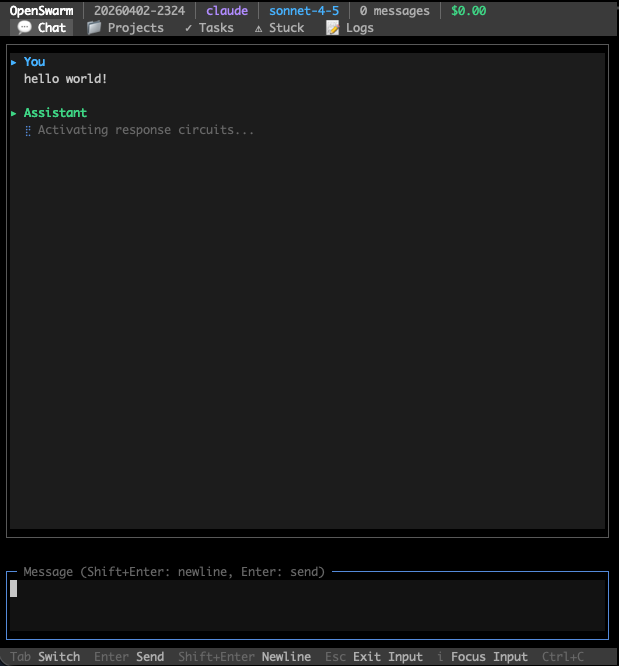
TUI keyboard shortcuts
| Key | Action |
|---|---|
Tab |
Switch tabs (Chat / Projects / Tasks / Stuck / Issues / Logs) |
Enter |
Send message |
Shift+Enter |
Newline |
i |
Focus input |
Esc |
Exit input focus |
Ctrl+C |
Quit |
Status bar shows: provider · model · message count · cumulative cost
CLI Commands
openswarm                        # TUI chat (default)
openswarm chat [session]         # Simple readline chat
openswarm resume                 # Reopen the most recent chat session (conversation + goal)
openswarm start                  # Start full daemon (requires config.yaml)
openswarm run "Fix the bug" -p ~/my-project   # Run a single task
openswarm exec "Run tests" --local --pipeline # Execute via daemon
openswarm init                   # Interactive setup wizard (provider auth, Linear OAuth, config)
openswarm provider               # Show/switch the active provider (interactive picker)
openswarm provider claude        # Switch straight to a provider — a running daemon switches in place
openswarm doctor                 # Diagnose environment (runtime, native deps, providers, ports)
openswarm validate               # Validate config.yaml

# Code review
openswarm review                 # Review the working-tree changes
openswarm review --max           # Full-codebase audit: fan reviewer subagents over areas
                                 #   → report at .openswarm/audit/ + PM-synthesized Linear
                                 #   issues by default (≤10 cohesive, master + sub-issues)
openswarm review --max --fix     # after the audit, dependency-related findings are grouped;
                                 #   independent fix units run in isolated sandboxes, then
                                 #   a PR is published only after every re-review and trusted
                                 #   deterministic repository check passes
                                 #   add --in-place to edit the current working tree instead
openswarm review --max --concurrency 8   # widen the fan-out — areas auto-split to fill the pool
                                 # more --max flags: --no-linear (report only) · --issues-per-area
                                 #   (legacy spray) · --issues <id> (set parent) · --fallback
                                 #   <adapter> · --out <file> · --dry-run (print the plan)

# CI / test gate auto-fix (npm / Cargo / Python auto-detected)
openswarm fix                    # Run the checks (package.json scripts, or cargo check+test,
                                 #   or ruff/mypy/pytest), fan a fix-worker out over the
                                 #   failures, re-run until green
openswarm fix --checks lint,test # only these checks · --concurrency <n> · --rounds <n> (default 3)
                                 # any language: put {"checks": {"test": "pytest -x"}} in openswarm.json

# PR autopilot (on-demand — conflict → comments → CI; does not merge)
openswarm pr status              # Snapshot: conflicts, CI, CHANGES_REQUESTED / critical comments
openswarm pr status --json       # Machine-readable; exit 0 only when merge-ready
openswarm pr fix                 # One-shot fix for the current branch's open PR (or --number N)
openswarm pr review              # Re-apply reviewer feedback only (Claude, Codex, or CHANGES_REQUESTED) — no conflict/CI work
openswarm pr review --fresh      # Run a brand-new code review of the PR diff and post it as a comment
openswarm pr review --all        # Review every open PR in the repo instead of just one (combine with --fresh)
openswarm pr watch               # Loop fix until merge-ready or --rounds exhausted (default 5)
openswarm pr create              # Local fix → commit → push → gh pr create (from feature branch)
openswarm pr create --no-fix --issue INT-123 --title "feat: …"  # skip local fix; set issue id

# Code Registry & BS Detector
openswarm check --scan           # Scan repo → register all entities
openswarm check src/foo.ts       # File brief (entities, tests, risk)
openswarm check --bs             # BS pattern scan (bad code smells)
openswarm check --stats          # Registry statistics
openswarm check --high-risk      # High-risk entities
openswarm check --search "name"  # Full-text search
openswarm annotate "funcName" --deprecate "reason"
openswarm annotate "funcName" --tag "needs-refactor"
openswarm annotate "funcName" --warn "error/security: SQL injection"
openswarm review exit codes
review is designed to work as a CI merge gate, and CI reads nothing but the
exit code:
| Exit | Meaning |
|---|---|
0 |
The gate ran and did not reject (approve/revise), or there was nothing to review |
1 |
The gate ran and the verdict is reject — with --fix, also when any area is left unresolved or deterministic verification did not pass |
2 |
The gate did not run — no verdict was produced (provider usage limit, adapter failure, unparseable reviewer output). Never treat this as a pass |
Treat any non-zero exit as a failed check. The 1/2 split lets a workflow
retry or alert differently when the gate could not run at all (e.g. a quota
window exhausted — stderr names the cause and, when known, the reset time).
Running the gate in CI
A composite action wraps the whole flow — install, diff against the PR base,
review, and map the exit code onto the job result:
permissions:
  contents: read
  security-events: write   # only needed for the SARIF upload

steps:
  - uses: actions/checkout@v4
    with: { fetch-depth: 0 }   # the merge base has to be present to diff against
  - uses: actions/setup-node@v4
    with: { node-version: '22' }
  - id: review
    uses: unohee/OpenSwarm@main
    with:
      adapter: openrouter   # a hosted runner has no config; without this the CLI
                            # falls back to its `codex` default
    env:
      OPENROUTER_API_KEY: ${{ secrets.OPENROUTER_API_KEY }}
  - if: always() && steps.review.outputs.sarif-file != ''
    uses: github/codeql-action/upload-sarif@v3
    with: { sarif_file: ${{ steps.review.outputs.sarif-file }} }
Inputs: path (which checkout to review), base (defaults to the merge base of
the PR head and its base branch), adapter, read-only, version,sarif-file, and fail-on-gate-not-run — the last defaults to true because a
review that did not happen must not read as a pass.
Outputs: decision, gate-ran, sarif-file.
Reviewing pull requests safely
The reviewer reads attacker-authored files with your provider credential in the
environment. Two properties keep that from becoming code execution:
read-only defaults to true, which denies the reviewer every mutating tool
including bash. It is enforced per adapter, and an adapter that cannot enforce
it refuses to run rather than quietly ignoring the flag:
| Adapter | How read-only is enforced |
|---|---|
openrouter, atlascloud, gpt, codex-responses, local/lmstudio |
The agentic loop withholds the mutating, web, and MCP tools, and the executor refuses them if called anyway |
claude |
--permission-mode default with an allowlist of Read/Grep/Glob, instead of bypassPermissions |
codex |
--sandbox read-only instead of workspace-write |
| anything else | Refused — spawnCli will not start a read-only run on an adapter that has not declared enforcement |
The reviewed checkout never becomes the working directory. OpenSwarm looks
for its own config.yaml in the current directory first, so a config committed
to the pull request would otherwise choose the run's adapter, model, and MCP
servers. The action runs from the runner temp and points --path at the
checkout instead.
Run the action's code from a trusted ref. uses: unohee/OpenSwarm@main
already does this — the action code comes from this repository, not from the
pull request. It is only uses: ./ that is unsafe, because after checking out a
pull request that path holds action.yml as the contributor wrote it, with your
secrets in scope. If you self-host the action, check it out from your default
branch into its own path and the pull request into another, then point path at
the latter — see.github/workflows/review-gate.yml, which
does exactly that to dogfood this repository.
To run it automatically, the trigger is pull_request_target. Apull_request run from a fork gets no secrets, so the provider key would be
empty and every fork PR would fail as gate-not-run.
For scripting without the action, --json prints the verdict on stdout under a
versioned schema (the human report is suppressed so openswarm review --json | jq works), and --sarif <file> writes SARIF 2.1.0 for code scanning. Findings
are reported at warning: the verdict is what blocks, while individual
follow-ups are advisory and some accompany an approve.
.github/workflows/review-gate.yml in this repository dogfoods the action. It isworkflow_dispatch only — the gate calls a paid model on every run, so enabling
it for every pull request is left as an explicit choice.
Deterministic verification
Autonomous pipelines enable baseline-diff verification by default: OpenSwarm runs repository test/typecheck commands once, compares a failing head against the merge base, and gives the reviewer structured evidence so pre-existing failures do not block unrelated work. Add .openswarm/verify.yaml for repository-specific commands (see templates/verify.example.yaml), or let OpenSwarm discover standard Node, Python, Rust, and Go checks. Configure the behavior under autonomous.verify; the legacy guards.qualityGate whole-tree check is deprecated.
The Linux sandbox
On Linux, verification runs each command inside bubblewrap and fails closed
when it cannot — running a worker's code unsandboxed to decide whether to
trust it defeats the point. On macOS it uses the platform sandbox and needs no
setup.
Installing the package is not always enough, and CI is where that bites:
| Environment | What it takes |
|---|---|
GitHub Actions ubuntu-latest |
sudo apt-get install -y bubblewrap and sudo sysctl -w kernel.apparmor_restrict_unprivileged_userns=0. Measured 2026-08-01: the image sets that restriction to 1, and with it set even bwrap --unshare-user fails at setting up uid map: Permission denied. This repository's own CI asserts the recipe so it cannot go stale. |
| Docker, default seccomp | --security-opt seccomp=unconfined; add --cap-add SYS_ADMIN if the runtime also drops the capability |
| Debian/Ubuntu host | apt-get install -y bubblewrap, usually nothing else |
| Alpine | apk add bubblewrap |
When the sandbox is unavailable, OpenSwarm says which of these applies rather
than reporting a bare failure: it runs bwrap to find out instead of guessing
from sysctls, quotes bwrap's own error, and prints the matching fix.
For crash recovery, fenced execution leases, outbox semantics, rollout modes, and
repository admission policy, see Durable autonomous loop.
openswarm exec options
| Option | Description |
|---|---|
--path <path> |
Project path (default: cwd) |
--timeout <seconds> |
Timeout in seconds (default: 600) |
--local |
Execute locally without daemon |
--pipeline |
Full pipeline: worker + reviewer + tester + documenter |
--worker-only |
Worker only, no review |
-m, --model <model> |
Model override for worker |
Exit codes: 0 success · 1 failure · 2 timeout
Full Daemon Setup
For autonomous operation (Linear issue processing, Discord control, PR auto-improvement), you need a full config:
Prerequisites
- Node.js >= 22
- At least one LLM provider:
- OpenAI Codex —
codex-responses(ChatGPT OAuth, native loop, no extra binary) is the smoothest start;codexdelegates to the external Codex CLI.openswarm auth loginhandles the ChatGPT OAuth - OpenRouter — any model;
OPENROUTER_API_KEYoropenswarm auth login --provider openrouter - OpenAI GPT —
openswarm auth login --provider gpt - Local — LM Studio (
lmstudio,:1234) or Ollama (local,:11434), auto-detected, no auth - Claude Code CLI (
claude -p) — opt-in fallback; an authenticatedclaudeon PATH
- OpenAI Codex —
- Native build toolchain —
better-sqlite3and@lancedb/lancedbare native modules. Prebuilt binaries cover common platforms; if yours lacks one,npm installbuilds from source and needspython3+ a C/C++ toolchain (build-essentialon Linux, Xcode Command Line Tools on macOS) - For autonomous mode only (optional): Linear — sign in with
openswarm auth login --provider linear(OAuth PKCE) or use an API key + team ID; Discord bot token (message content intent); GitHub CLI (gh) for CI monitoring
Configuration
After the global install, run the wizard in the directory you want the daemon to manage — it writes everything for you:
openswarm init      # writes config.yaml + .env (provider, task backend, notifications)
openswarm doctor    # verify providers, native deps, ports
See What openswarm init sets up for the prompts. Prefer to edit by hand? config.yaml supports ${VAR} / ${VAR:-default} substitution (resolved from .env) and is validated with Zod. A minimal .env (the wizard writes only what your choices need):
LINEAR_API_KEY=your-linear-api-key      # or: openswarm auth login --provider linear
LINEAR_TEAM_ID=your-linear-team-id
DISCORD_TOKEN=your-discord-bot-token    # only if you chose the discord notifier
DISCORD_CHANNEL_ID=your-channel-id
Key configuration sections
| Section | Description |
|---|---|
discord |
Bot token, channel ID, webhook URL |
linear |
API key, team ID |
github |
Repos list for CI monitoring |
agents |
Agent definitions (name, projectPath, heartbeat interval) |
autonomous |
Schedule, pair mode, role models, decomposition settings |
prProcessor |
PR auto-improvement schedule, retry limits, conflict resolver config |
CLI Adapter (Provider)
adapter: codex # codex · codex-responses · cc-router · cursor · gpt · openrouter · atlascloud · lmstudio · local · claude
adapter accepts one of the registered values below (validated by Zod). For a ChatGPT subscription, codex-responses is the smoothest first-run choice — it runs OpenSwarm's native loop over the Responses API with no extra binary. Switch at runtime via Discord, e.g. !provider codex-responses / !provider openrouter.
| Adapter | Backend | Models | Auth |
|---|---|---|---|
codex-responses |
OpenAI Responses API (native loop, no CLI binary) | gpt-5.6-terra (default), gpt-5.6-sol, gpt-5.6-luna | ChatGPT OAuth |
codex |
OpenAI Codex CLI (delegated) | gpt-5-codex (default), o3, o4-mini | ChatGPT OAuth / codex CLI auth |
cc-router |
Local CC-Router Responses endpoint (native loop) | Router's live model catalog | Existing CC-Router account pool |
cursor |
Cursor Agent CLI (delegated, sandbox enabled) | Cursor account model catalog | Existing cursor-agent login session |
gpt |
OpenAI Chat API | gpt-4o (default), o3, … | OAuth PKCE |
openrouter |
OpenRouter API (native agentic loop) | any OpenRouter model — gpt-5, gemini-2.5, deepseek, glm, qwen, … | OPENROUTER_API_KEY or OAuth PKCE |
atlascloud |
Atlas Cloud API (native agentic loop) · sponsor | Atlas models — deepseek-v4-pro (default), qwen3.5-flash, … | ATLASCLOUD_API_KEY |
lmstudio |
LM Studio (OpenAI-compatible, local) | loaded LM Studio model (LMSTUDIO_MODEL) |
None |
local |
Ollama (local, auto-detected) | gemma, llama, qwen, mistral, … | None |
Claude Code (
claude -p) is supported as an opt-in fallback (and powers theclaude -pchat path) — install theclaudeCLI and authenticate it;openswarm initandopenswarm doctordetect it. It is a validadapter:value, but opt-in: nothing falls back to it automatically. Switch to it when another provider runs out of quota withopenswarm provider claude.
The openrouter adapter runs OpenSwarm's own agentic tool loop (read/search/edit/bash with verification guards), enables ZDR (data_collection: deny) for non-OpenAI models, and applies Anthropic prompt caching automatically. Local backends are auto-detected on standard ports (Ollama :11434, LM Studio :1234); use lmstudio for a dedicated LM Studio endpoint (LMSTUDIO_BASE_URL, default http://localhost:1234).
Autonomous coordination and supervision
Each autonomous run snapshots the current Claude Code instruction hierarchy (~/.claude/CLAUDE.md, user rules, repository CLAUDE.md/AGENTS.md, and matching .claude/rules) once and applies the same capsule to orchestrator, worker, reviewer, Codex, CC-Router, and Cursor. The dashboard shows the capsule digest and source/error counts, not the rule bodies.
adapterRouting.primary must name the adapter the worker actually runs (adapter: at the top of the config, or roles.worker.adapter); a policy whose primary is some other adapter is ignored, and the fallbacks never engage. Role MCP grants and the coordination tools (coordination_read, coordination_peers, coordination_publish, coordination_thread_*, ask_human) additionally require an adapter that runs OpenSwarm's own tool loop — codex-responses, cc-router, gpt, openrouter, atlascloud, lmstudio, local. The delegated CLIs (codex, claude, cursor) bring their own tool loop, so those grants do not reach them; OpenSwarm logs a warning rather than pretending they applied.
A configured coordinationBoardIssueId turns one project-scoped tracker issue into the durable agent board. Worker advice/delegation, Discord questions, adapter routes, periodic reviews, and MCP denials are visible through GET /api/coordination, SSE, and the AGENT COORDINATION dashboard panel. Tool arguments, prompts, credentials, and rule bodies are redacted or omitted.
With autonomous.enabled: false, the runner still accepts explicit issue-board
and openswarm work dispatches without selecting backlog work. Transient
durable-admission deferrals remain queued across a hard restart: only rows
recorded as explicit claim_deferred work are rebuilt, at their originalRETRY_AT deadline. Operator waits, provider backoffs, failures, terminal
tracker cards, and publication reconciliation are never promoted by this path.
The transient inbox and the repository discussion board have separate jobs./threads stores topics, messages, subscriptions, unread cursors, and CAS
resolution in the automation SQLite database under the canonical Git repository
cell, so sibling worktrees and daemon restarts share one history. Replies wake
subscribed agents on their task-scoped inbox; /orchestration remains the live
event/agent graph.
autonomous:
  coordinationBoardIssueId: AGT-3993
  adapterRouting:
    primary: codex-responses
    fallbacks: [cc-router, cursor]
    allowReasons: [quota, infra, capability]
  mcpPolicies:
    orchestrator:
      servers: [github, linear, cloudflare]
      writeTools: [linear__save_comment]
  periodicReviews:
    - { profile: hygiene, schedule: "43 */6 * * *" }
  # Frontier project supervisor. Events provide the fast path; cron reconciles
  # anything missed while the daemon was down.
  orchestrator:
    enabled: true
    schedule: "17 */2 * * *"
    eventDriven: true
    eventDebounceMs: 1000
    adapter: codex-responses
    model: gpt-5.6-sol
    reasoningEffort: high
    timeoutMs: 600000
    maxTurns: 12
Every agent has a call sign — Magos Corvax-Vigilis, Adept Ferrus-Umbra — and messages are addressed to it. The name is derived from the repository, task, and role rather than randomly assigned, so it is stable across a restart or a retry and doubles as the agent's mailbox address; the worker and the reviewer on one task never share one. Call signs appear in the dashboard, in board comments, and in each agent's own prompt.
The project supervisor is separate from worker provider switching: pin itsadapter and model explicitly when it must remain on the frontier tier. Only
native-loop adapters can receive the role-scoped MCP tools while also enforcingshellTools: false; delegated codex, claude, and cursor CLIs fail closed.
External MCP servers are optional: with no mcpPolicies.orchestrator entry, or
when discovery is temporarily unavailable, the supervisor still runs with only
the repository-scoped coordination inbox, thread tools, and a native cache-first
tracker bridge. The bridge reads the daemon heartbeat cache before any single-
issue lookup, can save only an idempotent comment to an issue already linked on
that repository's coordination board, and is available only to the orchestrator
role. This lets the supervisor settle evidence-backed worker questions without
copying OAuth state or granting every worker broad Linear access. No external
tool is granted implicitly, and decisions requiring new business authority stay
with the operator.
External human-facing surfaces have a stricter global boundary than the role
grant above. Slack, Discord, email, Notion, and other messaging/collaboration
servers are identified from the configured server descriptor, endpoint/package
identity, tool action, and MCP annotations; custom opaque aliases should setmcp.servers.<name>.surface: human. Only actions containing an explicitread, list, get, search, or fetch verb are exposed or dispatched.send, post, create, update, delete, unknown actions, and equivalent
mutations fail closed even if a role includes their exact name in writeTools
or destructiveTools. MCP annotations are untrusted hints: they may tighten the
decision but cannot turn a mutating action into a read. GitHub, Linear,
Cloudflare, database/server tools, and sandbox-local data tools keep their
existing role-scoped write contract.
Generic MCP HTTP/proxy tools are reclassified again at dispatch from their
actual destination, method, and body arguments. An explicit GET, HEAD, orOPTIONS to Slack, Discord, Notion, Gmail, or a human-facing Microsoft Graph
path remains readable; a write, dynamic destination, or ambiguous call fails
before the MCP server is invoked. Concrete writes through a generic transport
also require a write-declaring tool descriptor, the server to declaresurface: devops, data, or sandbox, and (for autonomous roles) the same
exact writeTools grant as any other mutation.
Microsoft Graph device/directory paths remain DevOps; mail, message, calendar,
chat, drive, and other human-facing paths do not. Specialized tools do not scan
ordinary payload text, so a GitHub issue body that merely quotes a Slack URL is
not mistaken for a network destination.
For unattended deployments, enable the complete execution boundary explicitly:
humanSurfaceReadOnly:
  enabled: true
  sandboxExecutor:
    enabled: true
    socketPath: /run/openswarm-sandbox/executor.sock
    allowedRoots: [/work]
    connectTimeoutMs: 1000
    maxRequestBytes: 65536
    maxOutputBytes: 524288
    maxTimeoutMs: 900000
    maxConcurrent: 8
With this switch on, OpenSwarm does not attempt to classify arbitrary programs.
It keeps compiler-spawning diagnostics disabled, refuses delegated CLI adapters
before availability/model discovery or command construction, and exposes nativebash only through the separately deployed companion after exact attestation.
The main daemon never spawns that command. The sidecar has network_mode: none,
no daemon config/env file/provider state/warehouse/HOME or host service sockets,
and a minimal child environment. Its trusted server can register a /work
checkout, but each command receives a new bwrap mount/PID namespace with only
that inode-stable workspace writable, git metadata and linked dependencies
read-only, /run hidden, and known sensitive workspace files overlaid. The
sidecar TCB still sees the broad /work mount to perform registration and mask
preflight; do not describe the TCB itself as secret-free.
Use a native-loop adapter; local web chat remains available with file tools,
read-only web access, and policy-filtered MCP tools. Approved typed DevOps/data
writes keep their existing role grants. OpenSwarm-owned Discord, Slack,
Telegram, and generic webhook notification/send paths are all disabled—there is
no operator-control-plane exception. The default is false for compatibility;
the MCP human-surface descriptor and dispatch checks still apply regardless.
Once enabled, the boundary is monotonic for that process so an incidental config
lookup cannot downgrade it; restart with enabled: false to disable it.
Linux deployment readiness gate: strict mode does not turn an unsandboxed
shell back on just to recover build throughput. Repository-local build/test
execution is available only after the sidecar proves loopback works while no
veth/default route/external TCP/UDP/DNS path exists, and proves its bwrap
mount/PID namespace with a real command. The Unix protocol is one newline-
delimited JSON frame per connection with hard request/response caps, exact-key
schemas, private same-uid directory/socket checks, an executor boot generation,
and an opaque inode-bound workspace token. It is not a durable job ledger: if a
side-effecting RPC loses its response, OpenSwarm reportsOUTCOME_UNKNOWN_DO_NOT_RETRY, stops the loop, preserves the worktree and parks
the durable run for explicit inspection/redispatch instead of replaying it.
Server/database mutations are safe only through explicitly surfaced, role-
granted DevOps/data MCP tools. If the host cannot create the verification
namespace (for example, bwrap is blocked by the container runtime) and no
typed MCP grant is provisioned, the deployment is coordination/file-only and is
blocked for autonomous development. Do not compensate by enabling native or
delegated shell access: that would also restore the unclassifiable human-API
write path. On such a host, first make the existing sandbox probe pass or add
the narrowly scoped MCP server/tool grants, then re-run the build/test and
zero-write checks.
One sweep runs at a time per daemon and repository, concurrent daemons contend
on a file lock, and shutdown aborts then drains an active supervisor call. An
unchanged set of open board items is not sent to the model again. The deprecatedorchestratorSchedule key is still accepted as a cron-only, daemon-provider
compatible configuration, but new deployments should use orchestrator.
The native-loop supervisor also receives its repository-cell coordination
identity, so it can discover peers and create, join, or reply to durable threads
without gaining shell access to a worktree.
When cached tracker/dependency facts still leave a real tie, conflict cohort,
or high-impact ordering question, orchestrators can open a durable priority
council on an existing cross-task coordination thread. A proposal contains 2–8
options and the versioned cached evidence behind them; opening it never queries
Linear.
Eligibility is frozen from recently active independent peers, candidate-task
participants may submit evidence but cannot vote, and each actor+task pair gets
one equal-weight ranked ballot. Finalization is version-CAS guarded and records
quorum, cross-task/cross-role participation, tally, cited evidence, expiry, and
the deterministic taskId then optionId tie-break, independent of proposal
array order. Only an orchestrator may open a council through agent tools; the
authenticated operator HTTP route remains available for explicit intervention.
The resulting signal is deliberately advisory. coordination_council_consume
is orchestrator-only and can reorder only the existing option cohort's slots
when the council and cached snapshot versions still match. Its authority
contract explicitly forbids starting tasks, bypassing dependencies or file
leases, merging, destructive tools, and tracker mutation. The HTTP API exposes
list/read, operator proposal/evidence, and CAS finalization under/api/coordination/councils; it intentionally has no vote endpoint because a
request body cannot establish an agent's actor/task identity. Ballots use the
trusted agent-tool context instead.
For automatic Decision Engine consumption, include scheduling_facts for every
option (priority, topology/due fields, downstream count, blockers, and tracker
state) and open with snapshot_version: auto. OpenSwarm stores a canonicalsched-v1 digest, recomputes it from the already-fetched task cache on each
heartbeat, CAS-consumes at most the newest matching finalized council, and then
changes only those tasks' existing slots. Repository scope comes only from a
task's explicit project path or the linear.projectId in that repository'sopenswarm.json; an absent or ambiguous mapping fails closed. A missing
database, manual-only or no-quorum decision, stale facts, CAS race, partial
cohort, cross-repository match, or invalid authority is a no-op that preserves
deterministic ordering; none of these paths triggers another Linear request.
Blocking questions are sent to the configured Discord channel as !answer <correlation-id> <answer>. Only users in DISCORD_ALLOWED_USERS can settle them. The asking run stops and reports rather than guessing a default, and the question stays open on the board until someone answers — the answer is addressed back to the call sign that raised it, so the next run of that agent reads it from its inbox. When Discord is not configured the tool says so instead of claiming the operator was paged.
Per-role adapter overrides (each role may pick its own valid adapter + model):
autonomous:
  defaultRoles:
    worker:
      adapter: codex-responses
      model: gpt-5.6-terra
    reviewer:
      adapter: openrouter
      model: anthropic/claude-sonnet-4
Optional backlog grooming runs a read-only Planner over the fetched open queue
states for a mapped project (Todo, In Progress, In Review, and Backlog)
and compares them with the current repo. Keep mode: comment while validating
recommendations; mode: apply can update drifted descriptions and move strongly
stale issues to Done.
autonomous:
  backlogGrooming:
    enabled: false
    cadenceHours: 24
    mode: comment
    plannerModel: gpt-5.6-terra
    maxIssues: 80
Agent Roles
autonomous:
  defaultRoles:
    worker:
      model: gpt-5.6-terra            # balanced default implementation
      escalateModel: gpt-5.6-sol      # frontier retry after a failed attempt
      escalateAfterIteration: 2
      timeoutMs: 1800000
    reviewer:
      model: gpt-5.6-sol              # correctness gate
      timeoutMs: 600000
    tester:
      enabled: false
      model: gpt-5.6-terra            # LLM fallback after deterministic verify
    documenter:
      enabled: false
      model: gpt-5.6-luna
    auditor:
      enabled: false
      model: gpt-5.6-sol
    skill-documenter:
      enabled: false
      model: gpt-5.6-luna
  jobProfiles:
    - name: light
      minMinutes: 1
      maxMinutes: 29
      effort: low
      roles:
        worker: gpt-5.6-luna
        reviewer: gpt-5.6-terra
    - name: heavy
      minMinutes: 30
      effort: high
      roles:
        worker: gpt-5.6-terra
        reviewer: gpt-5.6-sol
The native Codex adapter uses Terra when no model is pinned. Draft analysis uses
Luna because it runs for every task; decomposition and hard review stay on Sol.
Running the daemon
With the global install, the openswarm CLI manages the daemon directly — no repo or npm run scripts needed:
openswarm start               # start the daemon in the background
openswarm start --foreground  # run attached (logs stream to the terminal)
openswarm status              # pid, uptime, log path
openswarm stop                # stop the daemon
openswarm dash                # open the web dashboard (:3847)
From source / development (contributors): clone the repo and use the
npm run …scripts (npm run dev,npm start,npm run service:installfor a macOS launchd service,docker compose up -d). See CONTRIBUTING.md.
Run with Docker
The repository ships a production image for the headless daemon (web dashboard on :3847, openswarm CLI on PATH). Published images live at ghcr.io/unohee/openswarm (tagged per release); building locally works the same way:
# Pull a release, or build from the repo
docker pull ghcr.io/unohee/openswarm:latest   # or: docker compose build

cp config.example.yaml config.yaml            # edit adapter/projects/keys
export OPENSWARM_WEB_TOKEN=$(openssl rand -hex 24)  # required to expose the dashboard
docker compose up -d                          # normal daemon
curl http://localhost:3847/api/health         # daemon health (token-less)
Strict native-shell execution is an opt-in deployment. It adds the isolated
companion and makes the daemon wait for its real health proof before startup:
# Ubuntu/AppArmor hosts: install the repository-scoped companion profile.
# This keeps AppArmor enforced; do not use apparmor=unconfined.
sudo install -m 0644 deploy/apparmor/openswarm-sandbox-executor \
  /etc/apparmor.d/openswarm-sandbox-executor
sudo apparmor_parser -r /etc/apparmor.d/openswarm-sandbox-executor

sudo install -d -o 1001 -g 1001 -m 0700 sandbox-socket
export OPENSWARM_IMAGE="openswarm:$(git rev-parse --short=12 HEAD)"
export OPENSWARM_WORKSPACE="$(pwd)/workspace" # use the real absolute workspace root
docker compose -f docker-compose.yml -f docker-compose.strict-sandbox.yml build
docker compose -f docker-compose.yml -f docker-compose.strict-sandbox.yml up -d
Set both humanSurfaceReadOnly.enabled andhumanSurfaceReadOnly.sandboxExecutor.enabled to true in config.yaml.
Before starting, confirm that OPENSWARM_WORKSPACE contains every configured/work/<repo> checkout. After the build, both services must resolve to the
same OPENSWARM_IMAGE image ID; keep the prior immutable image tag for
rollback. Do not rely on a pre-existing mutable openswarm:latest image.
Without OPENSWARM_WEB_TOKEN the dashboard binds only inside the container — an unauthenticated 0.0.0.0 bind is refused by design — so the published port answers nothing while the daemon itself keeps running. With the token set, browser/API access from the host sends it as the X-OpenSwarm-Token header (/api/health stays token-less).
The compose file wires the persistent and local-data mounts that matter:
| Mount | Purpose |
|---|---|
./config.yaml → /app/config.yaml |
daemon configuration (read-only) |
openswarm-state → /home/openswarm/.openswarm |
task state, auth profiles, coordination board — must persist, and one container per state volume (two daemons sharing it would fight over locks and double-process issues) |
./workspace → /work |
the repositories the daemon works on; point autonomous.allowedProjects at /work/<repo> |
./sandbox-socket → /run/openswarm-sandbox |
private uid-1001/mode-0700 Unix-socket directory; daemon read-only, sidecar read-write |
../openswarm-warehouse → /warehouse |
agent-readable, Git-external local assets (read-only) |
../openswarm-warehouse → /warehouse-rw |
operator upload path used only by the authenticated /warehouse web UI |
Notes:
- Provider CLIs are not baked in. The default
codex-responsesadapter runs OpenSwarm's own tool loop against OAuth state — log in on the host (openswarm auth login) and mount~/.codex/ reuse the state volume. For the delegated CLI adapters (claude,codex,cursor), derive your own image:FROM ghcr.io/unohee/openswarm+npm install -g <cli>. - Git identity: mount
~/.gitconfigor setGIT_AUTHOR_NAME/GIT_AUTHOR_EMAIL(andGH_TOKENforgh) so worker commits and PRs attribute correctly. - Verify sandbox:
bubblewrapis installed but fail-closed under Docker's default seccomp profile. Enabling it requiressecurity_opt: [seccomp=unconfined]+cap_add: [SYS_ADMIN](commented indocker-compose.yml) — weigh that against your threat model. - Strict shell companion: the optional compose override starts a root launcher only long enough for
setprivto enter uid/gid 1001. The non-root Node server retains ambientSYS_ADMIN,SETUID, read-onlyDAC_READ_SEARCH, andNET_ADMINbecause bubblewrap 0.8 rejects capabilities at a non-root uid and resolves--bind-fdsources through/proc/self/fd: each execution usesSETUIDto launch bwrap as uid 0, whileDAC_READ_SEARCHlets that launcher traverse mode-0700 worktrees without granting writes. Every command receives its own network namespace;NET_ADMINonly raises that namespace's loopback interface so localhost test servers work, while two concurrent workspaces can bind the same port without seeing each other. It then immediately returns the requested command to uid 1001 with permitted/effective/inheritable/ambient capabilities cleared.SETGIDis used only by the initial launcher and is not retained by Node. The production probe requires child uid 1001, zero active capabilities, isolated concurrent localhost listeners, and failed external TCP/UDP/DNS before the socket becomes ready. The Compose override requires the repository'sopenswarm-sandbox-executorAppArmor profile: Docker's default profile denies bubblewrap mounts and Ubuntu's global/usr/bin/bwrapprofile strips the namespace setup capability. The scoped profile keeps AppArmor enforced and inherits/usr/bin/bwrapinstead of transitioning to that global child profile. If it is missing or the real host still denies bwrap, the container stays unhealthy and strict bash remains unavailable. Do not addapparmor=unconfinedas a workaround..env,.env.*,.dev.vars,.envrc,.npmrc,.pypirc,.netrc, credential/key files, and secret directories are masked inside command namespaces even while empty; only.env.example,.env.sample, and.env.templateare intentional examples. - Strict deterministic verification: disposable HEAD/base Git sandboxes are created beneath the configured
/workroot and their commands use the same attested companion. A missing socket, root mismatch, or contract failure becomes a blocking security result; the main daemon never falls back to its ownbwrapor unsandboxed shell. - Local asset warehouse: create
../openswarm-warehouse/INDEX.md, then open/warehousein the dashboard to browse, download, or upload. Agents are prompted to inspect/warehouse/INDEX.mdbefore asking for gitignored data. See docs/WAREHOUSE.md.
Architecture
                         ┌──────────────────────────┐
                         │       Linear API          │
                         │   (issues, state, memory) │
                         └─────────────┬────────────┘
                                       │
                 ┌─────────────────────┼─────────────────────┐
                 │                     │                     │
                 v                     v                     v
  ┌──────────────────┐  ┌──────────────────┐  ┌──────────────────┐
  │ AutonomousRunner │  │  DecisionEngine  │  │  TaskScheduler   │
  │ (heartbeat loop) │─>│  (scope guard)   │─>│  (queue + slots) │
  └────────┬─────────┘  └──────────────────┘  └────────┬─────────┘
           │                                            │
           v                                            v
  ┌──────────────────────────────────────────────────────────────┐
  │                      PairPipeline                            │
  │  ┌────────┐   ┌──────────┐   ┌────────┐   ┌─────────────┐  │
  │  │ Worker │──>│ Reviewer │──>│ Tester │──>│ Documenter  │  │
  │  │(Adapter│<──│(Adapter) │   │(Adapter│   │  (Adapter)  │  │
  │  └───┬────┘   └──────────┘   └────────┘   └─────────────┘  │
  │      │  ↕ StuckDetector                                      │
  │  ┌───┴────────────────────────────────────────────────────┐  │
  │  │ Adapters: Codex | GPT | OpenRouter | Local (Ollama)   │  │
  │  └────────────────────────────────────────────────────────┘  │
  └──────────────────────────────────────────────────────────────┘
           │                     │                     │
           v                     v                     v
  ┌──────────────┐  ┌──────────────────┐  ┌──────────────────┐
  │  Discord Bot │  │  Memory (LanceDB │  │  Knowledge Graph │
  │  (commands)  │  │  + Xenova E5)    │  │  (code analysis) │
  └──────────────┘  └──────────────────┘  └────────┬─────────┘
                                                    │
                                           ┌────────┴─────────┐
                                           │  Code Registry   │
                                           │  (SQLite + FTS5) │
                                           │  + BS Detector   │
                                           └──────────────────┘
Features
- Multi-Provider Adapters — Pluggable adapter system: OpenAI Codex/GPT, OpenRouter (any model, native agentic loop), local models (Ollama, LM Studio), and Claude Code (
claude -p, opt-in) with runtime provider switching - Code Registry — SQLite-backed entity registry tracking every function/class/type across 8 languages, with complexity scoring, test mapping, and risk assessment
- BS Detector — Built-in static analysis engine that detects bad code patterns (empty catch, hardcoded secrets,
as any, etc.) with pipeline guard integration - Autonomous Pipeline — Cron-driven heartbeat fetches Linear issues, runs Worker/Reviewer pair loops, and updates issue state automatically
- Worker/Reviewer Pairs — Multi-iteration code generation with automated review, testing, and documentation stages
- Codebase Audit (
review --max) — fans reviewer subagents out over directory-shaped areas (auto-split to fill--concurrency), aggregates a deduped verdict into a markdown report, and synthesizes ≤10 cohesive Linear issues via a PM agent. Bothreviewmodes consult repository-local prior review logs; resolved/stale findings are not repeated, and byte-identical duplicate follow-ups are suppressed while unresolved issues remain visible.--fixgroups findings by repository dependency closure, injects the package manager/manifests/verification contract and repo knowledge, runs only independent fix units concurrently in isolated sandboxes, and promotes disjoint in-scope diffs into an audit worktree. It publishes the PR only when every area re-approves and trusted deterministic verification passes; unavailable dependencies/checks fail closed.--in-placekeeps edits in the current working tree but uses the same gates. Language-agnostic; codex usage-limit aware with automaticclaudefallback - CI / test gate auto-fix (
openswarm fix) — runs the project's objective checks (lint / typecheck / build / test), groups the failures by file into areas, fans a fix-worker out over each, then re-runs the checks and repeats until green (or the round budget). Deterministic convergence — unlike the review fix pass, it verifies its own work. Multi-language: auto-detects npm scripts,Cargo.toml(cargo check/test, clippy on request), and Python tooling (ruff/mypy/pytest, gated on the repo's config); any other toolchain via a"checks"map inopenswarm.json - PR autopilot (
openswarm pr) — on-demand surface over the daemon's PRProcessor +commitAndCreatePR.statusreports conflicts / review feedback / CI;fixruns one autopilot pass (conflict → comments → CI);reviewre-applies reviewer feedback only, skipping conflict/CI work — recognizes Claude, Codex, and any formalCHANGES_REQUESTEDreview;review --freshinstead runs a brand-new code review of the PR's current diff (the same revieweropenswarm reviewuses) and posts the verdict as a PR comment, independent of any existing feedback;review --allreviews every open PR in the repo sequentially (combine with--fresh) instead of just the current branch's PR or--number;watchloops until merge-ready;createpublishes the current feature branch (local fix → commit → push →gh pr create). Never merges or enables auto-merge. - Decision Engine — Scope validation, priority-based task selection, and workflow mapping
- Cognitive Memory — LanceDB vector store with Xenova/multilingual-e5-base embeddings for long-term recall across sessions
- Repo Knowledge Loop — workers learn each repository over time: task outcomes (success patterns, review-rejection pitfalls) are stored per-repo and recalled into the next worker prompt
- SWE-bench Verified — the agentic harness solves real SWE-bench Lite issues, graded by the official harness; hybrid mode (frontier diagnosis + lightweight implementer) resolved 3/3 attempted instances (benchmarks/RUBRIC.md)
- Knowledge Graph — Static code analysis, dependency mapping, impact analysis, and file-level conflict detection across concurrent tasks
- Discord Control — Full command interface for monitoring, task dispatch, scheduling, provider switching, and pair session management
- Rich TUI Chat — Claude Code inspired terminal interface with tabs, streaming responses, and geek-themed loading messages
- Dynamic Scheduling — Cron-based job scheduler with Discord management commands
- PR Auto-Improvement — Monitors open PRs, auto-fixes CI failures, auto-resolves merge conflicts, and retries until all checks pass
- Long-Running Monitors — Track external processes (training jobs, batch tasks) and report completion
- Web Dashboard — Real-time pipeline stages, cost tracking, worktree status, and live logs on port 3847
- Failure Safety — Provider quota holds, bounded retry backoff, durable leases, and repository conflict fencing without artificial throughput caps
- i18n — English and Korean locale support
How It Works
Linear (Todo/In Progress)
  → Fetch assigned issues
  → DecisionEngine filters & prioritizes
  → Resolve project path via projectMapper
  → PairPipeline.run()
    → Worker generates code (via the configured adapter)
    → Reviewer evaluates (APPROVE/REVISE/REJECT)
    → Loop up to N iterations
    → Optional: Tester → Documenter stages
  → Update Linear issue state (Done/Blocked)
  → Report to Discord
  → Save to cognitive memory
Memory System
Hybrid retrieval: 0.60 × similarity + 0.25 × importance + 0.15 × recency
Memory types: belief · strategy · user_model · system_pattern · constraint
Background: decay, consolidation, contradiction detection, distillation.
Embeddings run locally via @huggingface/transformers (ONNX, no external
service). The default is Xenova/multilingual-e5-base (768d, int8), stored text is
embedded as a passage: and searches as a query: per the E5 asymmetric
convention. Weights are cached in ~/.openswarm/models so reinstalling OpenSwarm
does not discard them.
| Variable | Purpose |
|---|---|
OPENSWARM_EMBEDDING_MODEL |
Hugging Face repo id. Models outside the known table must also set OPENSWARM_EMBEDDING_DIM. |
OPENSWARM_EMBEDDING_DIM |
Vector dimension. Required for unknown models — a wrong value silently produces an unsearchable table. |
OPENSWARM_EMBEDDING_DTYPE |
ONNX weight variant: q8 (default), q4, q4f16, fp16, fp32. |
OPENSWARM_MODEL_CACHE_DIR |
Override the weight cache location. |
Changing any of these invalidates every stored vector: the store records an
embedding signature and warns when it no longer matches the active encoder.
Rebuild with openswarm memory reembed (stop the daemon first, or pass --force).
Repo knowledge loop — every completed task writes repo-scoped knowledge
(success → system_pattern with files changed + approach, review rejection →constraint pitfall), and the next task on the same repo recalls the most
relevant entries into the worker prompt as a "Repository Knowledge" section.
Workers get better at a codebase the more they work on it. Workers can also actively query accumulated repo knowledge mid-task via the search_memory tool.
Benchmarks (L0–L6)
benchmarks/ contains a difficulty ladder for routing models by measured
capability — synthetic L0–L5 tasks with deterministic grading, and L6 = real
GitHub issues (SWE-bench Lite) solved by the OpenSwarm harness and graded by
the official swebench harness. Headline: hybrid mode (frontier read-only
diagnosis + lightweight implementer with a verification loop) resolved 3/3
attempted instances that every single lightweight model had failed. See
benchmarks/RUBRIC.md for the rubric, measured results,
and the harness defects the benchmark uncovered.
Discord Commands
Task Dispatch
| Command | Description |
|---|---|
!dev <repo> "<task>" |
Run a dev task on a repository |
!dev list |
List known repositories |
!tasks |
List running tasks |
!cancel <taskId> |
Cancel a running task |
Agent Management
| Command | Description |
|---|---|
!status |
Agent and system status |
!pause <session> |
Pause autonomous work |
!resume <session> |
Resume autonomous work |
!log <session> [lines] |
View recent output |
Linear Integration
| Command | Description |
|---|---|
!issues |
List Linear issues |
!issue <id> |
View issue details |
!limits |
Agent daily execution limits |
Autonomous Execution
| Command | Description |
|---|---|
!auto |
Execution status |
!auto start [cron] [--pair] |
Start autonomous mode |
!auto stop |
Stop autonomous mode |
!auto run |
Trigger immediate heartbeat |
!approve / !reject |
Approve or reject pending task |
Worker/Reviewer Pair
| Command | Description |
|---|---|
!pair |
Pair session status |
!pair start [taskId] |
Start a pair session |
!pair run <taskId> [project] |
Direct pair run |
!pair stop [sessionId] |
Stop a pair session |
!pair history [n] |
View session history |
!pair stats |
View pair statistics |
Scheduling
| Command | Description |
|---|---|
!schedule |
List all schedules |
!schedule run <name> |
Run a schedule immediately |
!schedule toggle <name> |
Enable/disable a schedule |
!schedule add <name> <path> <interval> "<prompt>" |
Add a schedule |
!schedule remove <name> |
Remove a schedule |
Other
| Command | Description |
|---|---|
!ci |
GitHub CI failure status |
!provider <codex|codex-responses|openrouter|gpt|atlascloud|lmstudio|local> |
Switch CLI provider at runtime |
!codex |
Recent session records |
!memory search "<query>" |
Search cognitive memory |
!help |
Full command reference |
Project Structure
src/
├── index.ts                 # Entry point
├── cli.ts                   # CLI entry point (run, exec, chat, init, validate, start)
├── cli/                     # CLI subcommand handlers
│   └── promptHandler.ts     # exec command: daemon submit, auto-start, polling
├── core/                    # Config, service lifecycle, types, event hub
├── adapters/                # Provider adapters (codex, codex-responses, gpt, openrouter, local, lmstudio), agentic loop
├── agents/                  # Worker, reviewer, tester, documenter, auditor
│   ├── pairPipeline.ts      # Worker → Reviewer → Tester → Documenter pipeline
│   ├── agentBus.ts          # Inter-agent message bus
│   └── cliStreamParser.ts   # Claude CLI output parser
├── orchestration/           # Decision engine, task parser, scheduler, workflow
├── automation/              # Autonomous runner, cron scheduler, PR processor
├── memory/                  # LanceDB + Xenova embeddings cognitive memory
├── knowledge/               # Code knowledge graph (scanner, analyzer, graph)
├── registry/                # Code entity registry, BS detector, entity scanner
├── issues/                  # Local issue tracker (SQLite + GraphQL + Kanban UI)
├── discord/                 # Bot core, command handlers, pair session UI
├── linear/                  # Linear SDK wrapper, project updater
├── github/                  # GitHub CLI wrapper for CI monitoring
├── support/                 # Web dashboard, planner, rollback, git tools
├── locale/                  # i18n (en/ko) with prompt templates
└── __tests__/               # Vitest test suite
State & Data
| Path | Description |
|---|---|
~/.openswarm/ |
State directory (memory, codex, metrics, workflows) |
~/.openswarm/registry.db |
Code entity registry (SQLite) |
~/.openswarm/issues.db |
Local issue tracker (SQLite) |
~/.claude/openswarm-*.json |
Pipeline history and task state |
~/.config/openswarm/telemetry.json |
Anonymous install id + opt-out notice flag |
config.yaml |
Main configuration |
dist/ |
Compiled output |
Privacy & Telemetry
OpenSwarm collects anonymous, opt-out usage telemetry to understand how it's
actually used (npm downloads and GitHub stars don't tell us). A single event is
sent per command invocation.
What is sent (and nothing else):
| Field | Example | Why |
|---|---|---|
| Random install id | V1StGXR8_Z5j... (nanoid) |
De-duplicate installs — anonymous, local-only |
| Command | start, run, chat |
Which features are used |
| Version | 0.9.3 |
Version adoption |
| OS / arch | darwin / arm64 |
Platform support priorities |
| Node version | 22.3.0 |
Runtime support |
| Adapter family | codex |
Which providers are popular |
| Error flag | 0 / 1 |
Failure rate (boolean only) |
Never sent: source code, prompts, file paths, repo or issue names, Linear/Discord
content, environment variables, API keys, or any personal data.
How to opt out (any one):
export OPENSWARM_TELEMETRY=0 # or DO_NOT_TRACK=1
# config.yaml
telemetry:
  enabled: false
CI environments (CI / GITHUB_ACTIONS) are excluded automatically. The collector
is a Cloudflare Worker writing to a private D1 table; telemetry never blocks or slows
the CLI (fire-and-forget with a short timeout, and failures are silently ignored).
Tech Stack
| Category | Technology |
|---|---|
| Runtime | Node.js 22+ (ESM) |
| Language | TypeScript (strict mode) |
| Build | tsc |
| Agent Execution | Claude Code, OpenAI GPT/Codex, Ollama/LMStudio/llama.cpp |
| Local DB | better-sqlite3 (WAL mode, FTS5) |
| Task Management | Linear SDK (@linear/sdk) |
| Communication | Discord.js 14 |
| Vector DB | LanceDB + Apache Arrow |
| Embeddings | Xenova/transformers (multilingual-e5-base, 768D) |
| Scheduling | Croner |
| Config | YAML + Zod validation |
| Linting | oxlint |
| Testing | Vitest |
Changelog
Full version history lives in CHANGELOG.md and the
GitHub Releases page.
Latest — v0.17.7: openswarm stop now actually stops a launchd-managed
daemon, a dashboard project disable survives a daemon restart, failed-session
partial work is committed to its branch before the worktree is preserved, and
Lance memory writes retry instead of colliding under review --max. Adds the
Atlas Cloud provider adapter. See CHANGELOG.md for the rest.
Troubleshooting
Korean / multibyte input doubles over mobile SSH (e.g. Termius)
If the chat TUI shows each Hangul (or other multibyte) character twice —이이렇렇게 쓰쓰이는것 — while ASCII characters look fine, the cause is almost
always client-side local / predictive echo in the mobile SSH app drawing an
extra copy of wide characters. The keystroke reaches OpenSwarm once; the terminal
paints it twice.
Fix it in the SSH client:
Termius → Host/Terminal settings → turn Local Echo (a.k.a. predictive
echo) off, and ensure the encoding is UTF-8.Confirm the server side is fine by running with diagnostics:
OPENSWARM_DEBUG_INPUT=1 openswarm chatType a few Korean characters, then inspect
~/.openswarm/input-debug.log. If a
single keypress logs one code point (cp=[51060]) but you saw two glyphs,
the doubling is terminal echo (client-side). If it logs the code point twice
in one event, it's an app-level issue — please attach the log to
a bug report.
Contributing
Contributions are welcome — OpenSwarm is MIT-licensed and accepts pull requests from anyone. See CONTRIBUTING.md for development setup, the local check gates, branch/commit conventions, and the PR process. By participating you agree to the Code of Conduct.
- 🐛 Report a bug
- 💡 Share an idea — the roadmap is built in the open
- 🔧 Fork the repo, branch from
main, and open a PR (CI runs lint → typecheck → build → test) - 🔒 Found a security issue? See SECURITY.md — please don't file it publicly
License
MIT © Heewon Oh
Yorumlar (0)
Yorum birakmak icin giris yap.
Yorum birakSonuc bulunamadi