OpenRive
Health Pass
- License — License: NOASSERTION
- Description — Repository has a description
- Active repo — Last push 0 days ago
- Community trust — 14 GitHub stars
Code Fail
- rm -rf — Recursive force deletion command in .github/workflows/wiki.yml
- process.env — Environment variable access in apps/cli/src/commands.ts
Permissions Pass
- Permissions — No dangerous permissions requested
No AI report is available for this listing yet.
Build inetractive UIs, motion, and game experiences in the OpenRive Editor, or let an AI agent generate them through the CLI, Your creations run natively across mobile, desktop, web, consoles, TVs, and vehicles
OpenRive
An open-source, local-first editor for Rive .riv animations.
Design, animate, build state machines, and export files that play in every official Rive runtime.
No accounts. No cloud. Your files stay on your machine or your own server.
Run locally · Self-host · Documentation · Contribute · Donate
Why OpenRive
- Real
.rivfiles. OpenRive reads and writes the actual Rive runtime format. The reader/writer is generated from
rive-runtime's type definitions, and unmodified files round-trip byte for
byte. This is checked against the runtime's 437 test files. - Official rendering. The canvas is drawn by the official Rive WASM runtime, served locally, so what you see is what
your app shows. Rive's SDKs are also vendored as git submodules, so you can patch and build the runtime yourself
(docs). - Local and login-free. Projects live in PostgreSQL — embedded on your machine, a server when you self-host. Local
users with roles replace accounts, and an optional access token protects a shared instance. - Everywhere you work. A web app, a desktop build (Electrobun), a terminal UI, an MCP server for AI assistants and
a REST API, all sharing one editing core.
Features
| Design | Artboards, shapes (rectangle, ellipse, triangle, polygon, star), pen paths with vertex editing, groups, text with embedded fonts, fills and strokes (solid, linear and radial gradients), trim paths, blend modes, clipping |
| Assets | Assets tab: import PNG/JPG/WebP images (embedded in the .riv), SVGs (converted to editable vector shapes) and fonts; drag onto the canvas |
| Animate | Timelines with auto-keying, keyframe editing, hold, linear and cubic easing with a curve editor, ping-pong and loops |
| Interactivity | State machines with layers, transitions, conditions, pointer listeners (including "follow the cursor"), live preview on the stage |
| Data binding | Number, boolean, trigger, string and color properties that drive transitions and your app — and one-click conversion of Rive's deprecated state machine inputs (docs) |
| Theme colors | Define colors once, link fills, strokes and keyframes to them, and switch themes (Light/Dark) to recolor the whole file |
| Code | Automation scripts (JavaScript on the OpenRive API) and ready-to-paste embed code for Web, React, Flutter, iOS and Android |
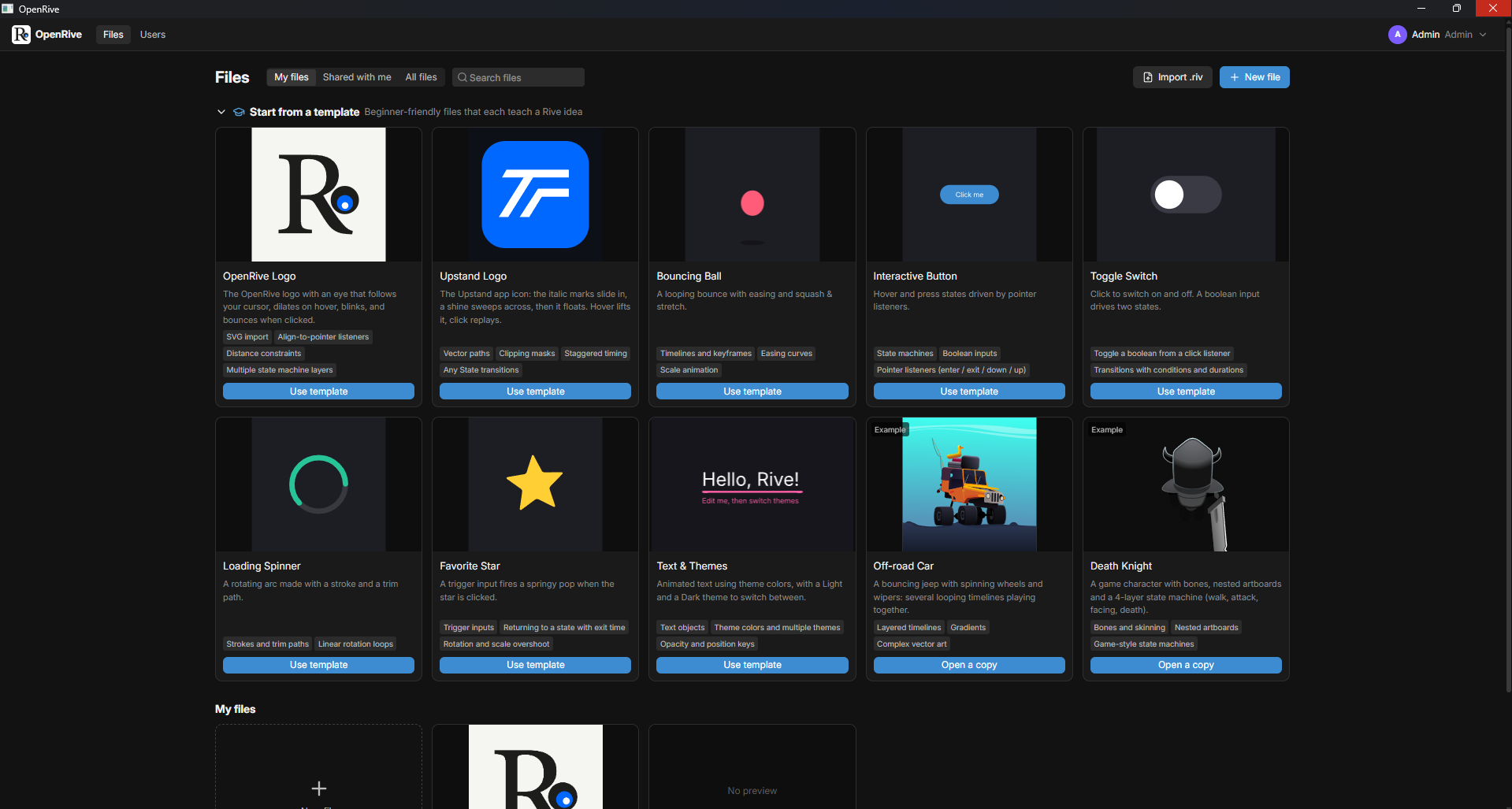
| Templates | Interactive OpenRive logo, Upstand logo, bouncing ball, button, toggle, spinner, star, text and themes, plus two example files (off-road car, death knight) |
| Productivity | 60+ rebindable keyboard shortcuts, context menus everywhere, editing presets, undo/redo, copy/paste between files |
| Preview | Full-screen preview with state machine inputs, view model (data binding) controls and an event log; export it as a standalone bundle (index.html + index.js + runtime) that plays anywhere (docs) |
| Team | Local users when running solo; sign-in with passwords, an admin dashboard and enforced Admin / Editor / Viewer roles when self-hosted |
| Tools | openrive terminal UI and CLI, MCP server (30 tools), REST API, Docker, desktop builds |
| Stack | Bun · Next.js 16 · React 19 · Zustand · Drizzle ORM + PostgreSQL · zod · Turborepo (Better-T-Stack) |
Quick start
git clone https://github.com/UpstandPlatform/OpenRive.git
cd OpenRive
bun install
bun run dev
Open http://localhost:3000. On first run you'll find an interactive Welcome to OpenRive project: move your mouse
over the logo's eye. No database to set up — OpenRive runs an embedded PostgreSQL until you point DATABASE_URL at a
server.
Needs Bun 1.4+. Full guide: Running locally
Desktop app
Prebuilt installers for macOS, Windows and Linux are attached to every release, or build your own:
bun run build:desktop
Full guide: Desktop app
Terminal UI
bun run cli # or `openrive` after `bun link`
An OpenTUI interface for browsing, creating, exporting and deleting projects — plus the same
scriptable commands (openrive new, export, validate, users, db status). See CLI.
Self-hosting
cp .env.example .env            # set OPENRIVE_ACCESS_TOKEN and POSTGRES_PASSWORD
docker compose up -d            # OpenRive + PostgreSQL
Works with Docker Desktop on Windows, macOS and Linux, or any server running Docker. A single-container
file-storage variant is also available (docker-compose.standalone.yml).
Full guide: Self-hosting
Documentation
All docs live in docs/:
- Running locally · Self-hosting · Desktop app · Configuration · Storage & PostgreSQL
- User guide · Keyboard shortcuts · Templates · Theme colors · Text & assets · Code panel
- CLI & terminal UI · MCP server · REST API
- Architecture · The .riv format · Troubleshooting
Contributing
Contributions of all sizes are welcome: bug reports, templates, docs, features and file-format coverage.
- Start with CONTRIBUTING.md
- In-depth guides live in
contribution/: development setup, code style, testing, adding
templates, writing docs, and collaborating with AI agents and skills - Use the issue templates for bugs, feature requests and template ideas
Donations
OpenRive is free and open source. If it saves you time, you can support its development:
| Network | Address |
|---|---|
| TON | UQBglMTG79v4lv6j0CyhJSKaB8vNr704qUgcyA0CkUtGEZ7q |
Thank you! Stars, bug reports and pull requests help too.
License
OpenRive is released under the MIT License.
OpenRive is an independent project and is not affiliated with or endorsed by Rive Inc. "Rive" is a trademark of
its owner. The bundled Rive WASM runtime and the example files in public/examples are © Rive and distributed under
the MIT license (see apps/web/public/examples/LICENSE-rive-runtime.txt). The Inter font is distributed under the SIL Open Font
License (apps/web/public/fonts/OFL.txt).
Reviews (0)
Sign in to leave a review.
Leave a reviewNo results found