crw

mcp
Security Audit
Pass
Health Pass
  • License — License: AGPL-3.0
  • Description — Repository has a description
  • Active repo — Last push 0 days ago
  • Community trust — 21 GitHub stars
Code Pass
  • Code scan — Scanned 12 files during light audit, no dangerous patterns found
Permissions Pass
  • Permissions — No dangerous permissions requested
Purpose
This tool is a lightweight web scraper and crawler written in Rust. It acts as a Firecrawl alternative and provides a built-in MCP server to easily give AI agents like Claude or Cursor web scraping capabilities.

Security Assessment
By design, this application makes extensive external network requests to scrape and crawl public web pages on the user's behalf. The automated code scan did not find any dangerous patterns, hardcoded secrets, or requests for dangerous local permissions. It is distributed as a single binary, which inherently executes with the permissions of the user running it. The primary attack surface is the standard network activity associated with a web scraper. Overall risk: Low.

Quality Assessment
The project is actively maintained, with the most recent push happening just today. It uses the AGPL-3.0 license, which is a strong copyleft license, meaning any modifications or network use must share the source code. Community trust is currently minimal but positive, sitting at 21 GitHub stars. The installation is streamlined via standard package managers like npm, pip, and Cargo.

Verdict
Safe to use, but be mindful of the AGPL-3.0 copyleft licensing requirements if integrating into a larger commercial project.
SUMMARY

⚡Lightweight Firecrawl alternative in Rust — 91.5% coverage, 5x faster, 3MB RAM. Web scraper & crawler with MCP server for Claude, LLM extraction, JS rendering.

README.md

fastCRW

The web scraper built for AI agents. Single binary. Zero config.

crates.io CI License GitHub Stars fastcrw.com Discord

Works with: Claude Code · Cursor · Windsurf · Cline · Copilot · Continue.dev · Codex

MCP IntegrationInstallationAPI ReferenceCloudJS RenderingConfigurationDiscord

English | 中文


Don't want to self-host? fastcrw.com is the managed cloud — global proxy network, auto-scaling, dashboard, and API keys. Same Firecrawl-compatible API. Get 500 free credits →

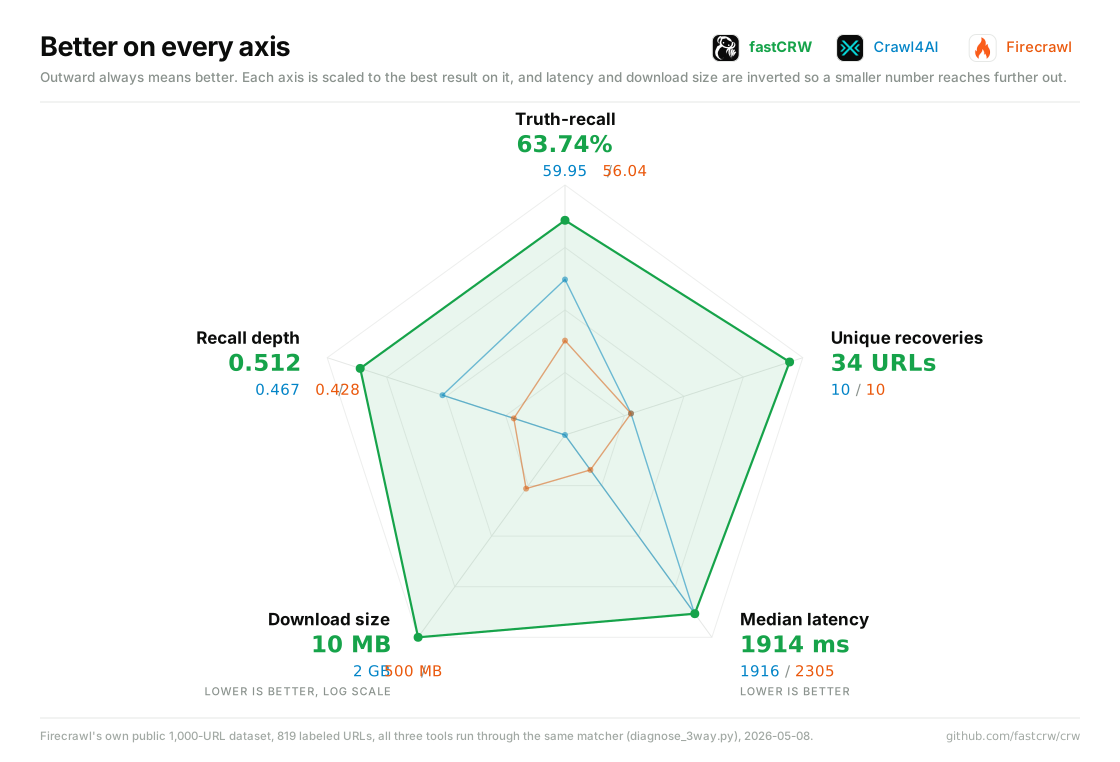
CRW is the open-source web scraper built for AI agents. Built-in MCP server (stdio + HTTP), single binary, ~6 MB idle RAM. Give Claude Code, Cursor, or any MCP client web scraping superpowers in 30 seconds. Firecrawl-compatible API — 5.5x faster, 75x less memory, 92% coverage on 1K real-world URLs.

Built-in MCP server. Single binary. No Redis. No Node.js.

# npm (zero install):
npx crw-mcp

# Python:
pip install crw

# Direct binary (no package manager):
curl -fsSL https://github.com/us/crw/releases/latest/download/crw-mcp-darwin-arm64.tar.gz | tar xz
# Replace darwin-arm64 with your platform: darwin-x64, linux-x64, linux-arm64, win32-x64, win32-arm64

# Cargo:
cargo install crw-mcp

# Docker:
docker run -i ghcr.io/us/crw crw-mcp

Listed on the MCP Registry

What's New

0.3.0 (2026-04-02)

Features

  • renderer: escalate to JS renderer on HTTP 401/403 responses (88c8aa5)

Bug Fixes

  • use GitHub latest release instead of pinned version for binary download (4afcb1a)

0.2.1 (2026-03-28)

Bug Fixes

  • make crw-mcp npm wrapper executable (576a9eb)
  • use latest tag in server.json OCI identifier (7ec3b82)

0.2.0 (2026-03-28)

Features

  • add MCP Registry support for official server discovery (154b9f5)

Full changelog →

Why CRW?

CRW gives you Firecrawl's API with a fraction of the resource usage. No runtime dependencies, no Redis, no Node.js — just a single binary you can deploy anywhere.

Metric CRW (self-hosted) fastcrw.com (cloud) Firecrawl Crawl4AI Spider
Coverage (1K URLs) 92.0% 92.0% 77.2% 99.9%
Avg Latency 833ms 833ms 4,600ms
P50 Latency 446ms 446ms 45ms (static)
Noise Rejection 88.4% 88.4% noise 6.8% noise 11.3% noise 4.2%
Idle RAM 6.6 MB 0 (managed) ~500 MB+ cloud-only
Cold start 85 ms 0 (always-on) 30–60 s
HTTP scrape ~30 ms ~30 ms ~200 ms+ ~480 ms ~45 ms
Proxy network BYO Global (built-in) Built-in Cloud-only
Cost / 1K scrapes $0 (self-hosted) From $13/mo $0.83–5.33 $0 $0.65
Dependencies single binary None (API) Node + Redis + PG + RabbitMQ Python + Playwright Rust / cloud
License AGPL-3.0 Managed AGPL-3.0 Apache-2.0 MIT
Full benchmark details

CRW vs Firecrawl — Tested on Firecrawl scrape-content-dataset-v1 (1,000 real-world URLs, JS rendering enabled):

  • CRW covers 92% of URLs vs Firecrawl's 77.2% — 15 percentage points higher
  • CRW is 5.5x faster on average (833ms vs 4,600ms)
  • CRW uses ~75x less RAM at idle (6.6 MB vs ~500 MB+)
  • Firecrawl requires 5 containers (Node.js, Redis, PostgreSQL, RabbitMQ, Playwright) — CRW is a single binary

Crawl4AI vs Firecrawl vs SpiderIndependent benchmark by Spider.cloud:

Metric Spider Firecrawl Crawl4AI
Static throughput 182 p/s 27 p/s 19 p/s
Success (static) 100% 99.5% 99%
Success (SPA) 100% 96.6% 93.7%
Success (anti-bot) 99.6% 88.4% 72%
Latency (static) 45ms 310ms 480ms
Latency (SPA) 820ms 1,400ms 1,650ms

Firecrawl independent reviewScrapeway benchmark: 64.3% success rate, $5.11/1K scrapes, 0% on LinkedIn/Twitter.

Resource comparison:

Metric CRW Firecrawl
Min RAM ~7 MB 4 GB
Recommended RAM ~64 MB (under load) 8–16 GB
Docker images single ~8 MB binary ~2–3 GB total
Cold start 85 ms 30–60 seconds
Containers needed 1 (+optional sidecar) 5

Features

  • 🔧 MCP server — built-in stdio + HTTP transport for Claude Code, Cursor, Windsurf, and any MCP client
  • 🔌 Firecrawl-compatible API — same endpoint family and familiar request/response ergonomics
  • 📄 6 output formats — markdown, HTML, cleaned HTML, raw HTML, plain text, links, structured JSON
  • 🤖 LLM structured extraction — send a JSON schema, get validated structured data back (Anthropic tool_use + OpenAI function calling)
  • 🌐 JS rendering — auto-detect SPAs with shell heuristics, render via LightPanda, Playwright, or Chrome (CDP)
  • 🕷️ BFS crawler — async crawl with rate limiting, robots.txt, sitemap support, concurrent jobs
  • 🔒 Security — SSRF protection (private IPs, cloud metadata, IPv6), constant-time auth, dangerous URI filtering
  • 🐳 Docker ready — multi-stage build with LightPanda sidecar
  • 🎯 CSS selector & XPath — extract specific DOM elements before Markdown conversion
  • ✂️ Chunking & filtering — split content into topic/sentence/regex chunks; rank by BM25 or cosine similarity
  • 🕵️ Stealth mode — browser-like UA rotation and header injection to reduce bot detection
  • 🌐 Per-request proxy — override the global proxy per scrape request

Cloud vs Self-Hosted

Feature Self-hosted Cloud (fastcrw.com)
Setup cargo install crw-server Sign up → get API key
Infrastructure You manage Fully managed
Proxy Bring your own Global proxy network
Scaling Manual Auto-scaling
API Firecrawl-compatible Same Firecrawl-compatible API

Both use the same Firecrawl-compatible API — your code works with either. Switch between self-hosted and cloud by changing the base URL.

Quick Start

MCP (AI agents — recommended):

claude mcp add crw -- npx crw-mcp

That's it. Claude Code now has crw_scrape, crw_crawl, crw_map tools. For Cursor, Windsurf, Cline, and other MCP clients, see MCP Server.

CLI (no server needed):

cargo install crw-cli
crw https://example.com

Self-hosted server:

cargo install crw-server
crw-server

Enable JS rendering (optional):

crw-server setup

This downloads LightPanda and creates a config.local.toml for JS rendering. See JS Rendering for details.

Cloud (no setup):

curl -X POST https://fastcrw.com/api/v1/scrape \
  -H "Authorization: Bearer YOUR_API_KEY" \
  -H "Content-Type: application/json" \
  -d '{"url": "https://example.com"}'

Get your API key at fastcrw.com — 500 free credits included.

Docker:

docker run -p 3000:3000 ghcr.io/us/crw:latest

Docker Compose (with JS rendering):

docker compose up

Scrape a page:

curl -X POST http://localhost:3000/v1/scrape \
  -H "Content-Type: application/json" \
  -d '{"url": "https://example.com"}'
{
  "success": true,
  "data": {
    "markdown": "# Example Domain\nThis domain is for use in ...",
    "metadata": {
      "title": "Example Domain",
      "sourceURL": "https://example.com",
      "statusCode": 200,
      "elapsedMs": 32
    }
  }
}

Use Cases

  • RAG pipelines — crawl websites and extract structured data for vector databases
  • AI agents — give Claude Code or Claude Desktop web scraping tools via MCP
  • Content monitoring — periodic crawl with LLM extraction to track changes
  • Data extraction — combine CSS selectors + LLM to extract any schema from any page
  • Web archiving — full-site BFS crawl to markdown

API Endpoints

Method Endpoint Description
POST /v1/scrape Scrape a single URL, optionally with LLM extraction
POST /v1/crawl Start async BFS crawl (returns job ID)
GET /v1/crawl/:id Check crawl status and retrieve results
DELETE /v1/crawl/:id Cancel a running crawl job
POST /v1/map Discover all URLs on a site
GET /health Health check (no auth required)
POST /mcp Streamable HTTP MCP transport

LLM Structured Extraction

Send a JSON schema with your scrape request and CRW returns validated structured data using LLM function calling.

curl -X POST http://localhost:3000/v1/scrape \
  -H "Content-Type: application/json" \
  -d '{
    "url": "https://example.com/product",
    "formats": ["json"],
    "jsonSchema": {
      "type": "object",
      "properties": {
        "name": { "type": "string" },
        "price": { "type": "number" }
      },
      "required": ["name", "price"]
    }
  }'
  • Anthropic — uses tool_use with input_schema for extraction
  • OpenAI — uses function calling with parameters schema
  • Validation — LLM output is validated against your JSON schema before returning

Configure the LLM provider in your config:

[extraction.llm]
provider = "anthropic"        # "anthropic" or "openai"
api_key = "sk-..."            # or CRW_EXTRACTION__LLM__API_KEY env var
model = "claude-sonnet-4-20250514"

MCP Server

CRW works as an MCP tool server for any AI assistant that supports MCP. It provides 4 tools: crw_scrape, crw_crawl, crw_check_crawl_status, crw_map.

Also available on the MCP Registry

Install:

# npm (zero install):
npx crw-mcp

# Python:
pip install crw

# Direct binary (no package manager):
curl -fsSL https://github.com/us/crw/releases/latest/download/crw-mcp-darwin-arm64.tar.gz | tar xz
# Replace darwin-arm64 with your platform: darwin-x64, linux-x64, linux-arm64, win32-x64, win32-arm64

# Cargo:
cargo install crw-mcp

# Docker:
docker run -i ghcr.io/us/crw crw-mcp

Claude Code

claude mcp add crw -- npx crw-mcp

Claude Desktop

Edit your config file:

OS Path
macOS ~/Library/Application Support/Claude/claude_desktop_config.json
Windows %APPDATA%\Claude\claude_desktop_config.json
Linux ~/.config/Claude/claude_desktop_config.json
{
  "mcpServers": {
    "crw": {
      "command": "npx",
      "args": ["crw-mcp"]
    }
  }
}

Cursor

Edit ~/.cursor/mcp.json (global) or .cursor/mcp.json (project):

{
  "mcpServers": {
    "crw": {
      "command": "npx",
      "args": ["crw-mcp"]
    }
  }
}

Windsurf

Edit ~/.codeium/windsurf/mcp_config.json:

{
  "mcpServers": {
    "crw": {
      "command": "npx",
      "args": ["crw-mcp"]
    }
  }
}

Cline (VS Code)

{
  "mcpServers": {
    "crw": {
      "command": "npx",
      "args": ["crw-mcp"],
      "alwaysAllow": ["crw_scrape", "crw_map"],
      "disabled": false
    }
  }
}

Continue.dev (VS Code / JetBrains)

Edit ~/.continue/config.yaml:

mcpServers:
  - name: crw
    command: npx
    args:
      - crw-mcp

OpenAI Codex CLI

Edit ~/.codex/config.toml:

[mcp_servers.crw]
command = "npx"
args = ["crw-mcp"]

Other MCP Clients

Any MCP-compatible client can connect to CRW using the standard JSON format:

{
  "mcpServers": {
    "crw": {
      "command": "npx",
      "args": ["crw-mcp"]
    }
  }
}

Tip: The stdio binary (crw-mcp) works with any client. For clients that support HTTP transport, use http://localhost:3000/mcp directly — no binary needed.

See the full MCP setup guide for detailed instructions, auth configuration, and platform comparison.

JS Rendering

CRW auto-detects SPAs by analyzing the initial HTML response for shell heuristics (empty body, framework markers). When a SPA is detected, it renders the page via a headless browser.

Quick setup (recommended):

crw-server setup

This automatically downloads the LightPanda binary to ~/.local/bin/ and creates a config.local.toml with the correct renderer settings. Then start LightPanda and CRW:

lightpanda serve --host 127.0.0.1 --port 9222 &
crw-server

Supported renderers:

Renderer Protocol Best for
LightPanda CDP over WebSocket Low-resource environments (default)
Playwright CDP over WebSocket Full browser compatibility
Chrome CDP over WebSocket Existing Chrome infrastructure

Renderer mode is configured via renderer.mode: auto (default), lightpanda, playwright, chrome, or none.

With Docker Compose, LightPanda runs as a sidecar — no extra setup needed:

docker compose up

Architecture

┌─────────────────────────────────────────────┐
│                 crw-server                  │
│         Axum HTTP API + Auth + MCP          │
├──────────┬──────────┬───────────────────────┤
│ crw-crawl│crw-extract│    crw-renderer      │
│ BFS crawl│ HTML→MD   │  HTTP + CDP(WS)      │
│ robots   │ LLM/JSON  │  LightPanda/Chrome   │
│ sitemap  │ clean/read│  auto-detect SPA     │
├──────────┴──────────┴───────────────────────┤
│                 crw-core                    │
│        Types, Config, Errors                │
└─────────────────────────────────────────────┘

Configuration

CRW uses layered TOML configuration with environment variable overrides:

  1. config.default.toml — built-in defaults
  2. config.local.toml — local overrides (or set CRW_CONFIG=myconfig)
  3. Environment variables — CRW_ prefix with __ separator (e.g. CRW_SERVER__PORT=8080)
[server]
host = "0.0.0.0"
port = 3000
rate_limit_rps = 10        # Max requests/second (global). 0 = unlimited.

[renderer]
mode = "auto"  # auto | lightpanda | playwright | chrome | none

[crawler]
max_concurrency = 10
requests_per_second = 10.0
respect_robots_txt = true

[auth]
# api_keys = ["fc-key-1234"]

See full configuration reference for all options.

Integration Examples

Python:

import requests

response = requests.post("http://localhost:3000/v1/scrape", json={
    "url": "https://example.com",
    "formats": ["markdown", "links"]
})
data = response.json()["data"]
print(data["markdown"])

Node.js:

const response = await fetch("http://localhost:3000/v1/scrape", {
  method: "POST",
  headers: { "Content-Type": "application/json" },
  body: JSON.stringify({
    url: "https://example.com",
    formats: ["markdown", "links"]
  })
});
const { data } = await response.json();
console.log(data.markdown);

CrewAI (crewai-crw — CRW tools for CrewAI):

pip install crewai-crw
from crewai import Agent, Task, Crew
from crewai_crw import CrwScrapeWebsiteTool, CrwCrawlWebsiteTool, CrwMapWebsiteTool

scrape_tool = CrwScrapeWebsiteTool()  # uses localhost:3000 by default

researcher = Agent(
    role="Web Researcher",
    goal="Research and summarize information from websites",
    backstory="Expert at extracting key information from web pages",
    tools=[scrape_tool],
)

task = Task(
    description="Scrape https://example.com and summarize the content",
    expected_output="A summary of the page content",
    agent=researcher,
)

crew = Crew(agents=[researcher], tasks=[task])
result = crew.kickoff()

LangChain (langchain-crw — CRW document loader):

pip install langchain-crw
from langchain_crw import CrwLoader

# Self-hosted (default: localhost:3000)
loader = CrwLoader(url="https://example.com", mode="scrape")
docs = loader.load()
print(docs[0].page_content)  # clean markdown

# Cloud (fastcrw.com)
loader = CrwLoader(
    url="https://example.com",
    api_url="https://fastcrw.com/api",
    api_key="crw_live_...",
    mode="crawl",
    params={"max_depth": 3, "max_pages": 50},
)
docs = loader.load()

More integrations (PRs pending): Flowise · Agno · n8n · All integrations

Docker

Pre-built image from GHCR:

docker pull ghcr.io/us/crw:latest
docker run -p 3000:3000 ghcr.io/us/crw:latest

Docker Compose (with JS rendering sidecar):

docker compose up

This starts CRW on port 3000 with LightPanda as a JS rendering sidecar on port 9222. CRW auto-connects to LightPanda for SPA rendering.

Benchmark

Tested on Firecrawl's scrape-content-dataset-v1 (1,000 real-world URLs, JS rendering enabled):

Metric CRW Firecrawl v2.5 Crawl4AI Spider
Coverage 92.0% 77.2% 99.9%
Avg Latency 833ms 4,600ms
P50 Latency 446ms 45ms (static)
Noise Rejection 88.4% noise 6.8% noise 11.3% noise 4.2%
Cost / 1,000 scrapes $0 (self-hosted) $0.83–5.33 $0 $0.65
Idle RAM 6.6 MB ~500 MB+ cloud

CRW hits a sweet spot: near-Spider speed with Firecrawl API compatibility and ~75x less RAM. Unlike Crawl4AI (Python + Playwright), CRW ships as a single Rust binary with no runtime dependencies.

Run the benchmark yourself:

uv pip install datasets aiohttp
uv run python bench/run_bench.py

Crates

Crate Description
crw-core Core types, config, and error handling crates.io
crw-renderer HTTP + CDP browser rendering engine crates.io
crw-extract HTML → markdown/plaintext extraction crates.io
crw-crawl Async BFS crawler with robots.txt & sitemap crates.io
crw-server Axum API server (Firecrawl-compatible) crates.io
crw-cli Standalone CLI (crw binary, no server needed) crates.io
crw-mcp MCP stdio proxy binary crates.io

See docs/crates.md for usage examples and cargo add instructions.

Documentation

Full documentation: docs/index.md

Security

CRW includes built-in protections against common web scraping attack vectors:

  • SSRF protection — all URL inputs (REST API + MCP) are validated against private/internal networks:
    • Loopback (127.0.0.0/8, ::1, localhost)
    • Private IPs (10.0.0.0/8, 172.16.0.0/12, 192.168.0.0/16)
    • Link-local / cloud metadata (169.254.0.0/16 — blocks AWS/GCP metadata endpoints)
    • IPv6 mapped addresses (::ffff:127.0.0.1), link-local (fe80::), ULA (fc00::/7)
    • Non-HTTP schemes (file://, ftp://, gopher://, data:)
  • Auth — optional Bearer token with constant-time comparison (no length or key-index leakage)
  • robots.txt — respects Allow/Disallow with wildcard patterns (*, $) and RFC 9309 specificity
  • Rate limiting — configurable per-second request cap with token-bucket algorithm (returns 429 with error_code)
  • Resource limits — max body size (1 MB), max crawl depth (10), max pages (1000), max discovered URLs (5000)

Community

Don't be shy — join us on Discord! Ask questions, share what you're building, report bugs, or just hang out.

Contributing

Contributions are welcome! Please open an issue or submit a pull request.

  1. Fork the repository
  2. Install pre-commit hooks: make hooks
  3. Create your feature branch (git checkout -b feat/my-feature)
  4. Commit your changes (git commit -m 'feat: add my feature')
  5. Push to the branch (git push origin feat/my-feature)
  6. Open a Pull Request

The pre-commit hook runs the same checks as CI (cargo fmt, cargo clippy, cargo test). You can also run them manually with make check.

License

CRW is open-source under AGPL-3.0. For a managed version without AGPL obligations, see fastcrw.com.

Reviews (0)

No results found