agentdock
Health Gecti
- License — License: Apache-2.0
- Description — Repository has a description
- Active repo — Last push 0 days ago
- Community trust — 82 GitHub stars
Code Basarisiz
- spawnSync — Synchronous process spawning in examples/browser-runner/browser-runner.js
- process.env — Environment variable access in examples/browser-runner/browser-runner.js
- network request — Outbound network request in examples/browser-runner/browser-runner.js
- rm -rf — Recursive force deletion command in scripts/backup-agentdock.sh
Permissions Gecti
- Permissions — No dangerous permissions requested
Bu listing icin henuz AI raporu yok.
Secure MCP runtime for AI agents to operate local machines, servers, and containers with multi-device orchestration.
English | 简体中文
AgentDock
Give AI agents secure, controlled access to every machine you operate.
Open ChatGPT in your browser and manage multiple computers and servers from one conversation. Write code, change configuration, run commands, and deploy in the real environment where the work belongs—without consuming a dedicated Codex coding quota.
AgentDock is an independent tool runtime for AI agents. It exposes unified, secure, and controlled file, command, Git, Skill, MCP, browser automation, and task execution capabilities across local computers, remote servers, and containers. Connect multiple AgentDock instances to coordinate work across devices without constantly switching between machines.
Quick Start · Documentation · Releases · Issues





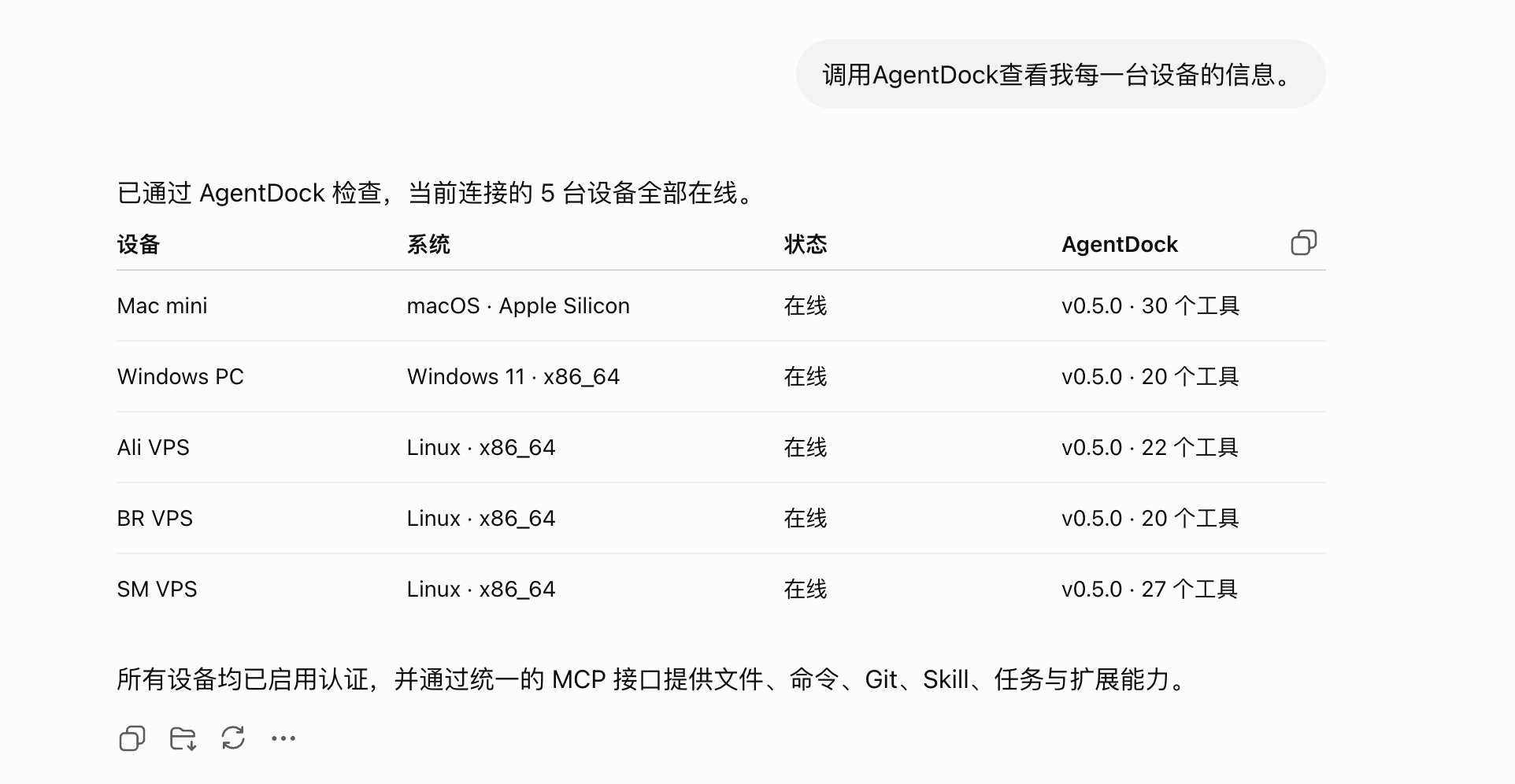
What is AgentDock?
AgentDock is an independent tool runtime for AI agents.
It packages file-system access, command execution, Git, Skills, dynamic MCP, browser automation, and recoverable tasks into a unified MCP interface. MCP-compatible clients such as ChatGPT, Claude, and Codex can then operate local computers, remote servers, and container environments through the same tool model.
In addition to project development and device operations similar to Codex, you can deploy AgentDock on several machines and connect all of them to the same AI conversation for cross-device control.
AgentDock does not provide a chat interface or perform model inference. It focuses on one responsibility:
Let AI agents operate real environments within explicit permission boundaries and return structured, traceable, and verifiable results.
              ChatGPT / Claude / Codex
                        │
                        │ MCP (multiple instances supported)
          ┌─────────────┼─────────────┐
          ▼             ▼             ▼
   ┌───────────┐ ┌───────────┐ ┌───────────┐
   │ AgentDock │ │ AgentDock │ │ AgentDock │
   │ Local Mac │ │ LAN Host  │ │ Cloud VPS │
   └─────┬─────┘ └─────┬─────┘ └─────┬─────┘
         │             │             │
         ▼             ▼             ▼
   Files · Shell · Git  Tunnels       Proxy · Deploy
What can AgentDock do?
- Manage multiple computers and servers directly from ChatGPT without repeatedly switching SSH sessions
- Write code, modify projects, run tests, and operate Git in the real local or remote environment without depending on a dedicated coding-agent quota
- Manage VPS hosts, Docker services, reverse proxies, and deployment configuration
- Inspect logs, processes, ports, and actual runtime state
- Operate authenticated web pages and macOS desktop applications
- Connect multiple AgentDock instances and coordinate cross-device work in one conversation
- Extend capabilities through Skills and dynamic MCP servers
- Persist long-running task state and continue after an interruption
- Use the same tool model across macOS, Linux, Windows, and containers
Use case: complete a tunnel across devices
Suppose you have a computer behind NAT. Making it reachable externally usually requires work on two devices:
- Local computer: start and verify the tunnel client
- Server: configure forwarding, ports, domains, and the reverse proxy
Previously, you had to log in to both machines and switch back and forth. With AgentDock installed on each device and connected to the same ChatGPT conversation, the AI can operate both environments and complete the entire workflow.
The same pattern applies to multi-host deployments, local-to-public integration testing, cross-environment troubleshooting, batch configuration, and status inspection.
Why AgentDock?
| Capability | Description |
|---|---|
| Operate devices from the web | Connect through MCP from ChatGPT or another client and work with real computers and servers in a conversation |
| Multi-device coordination | Connect multiple AgentDock instances to the same conversation and execute across devices |
| Unified tool entry point | Expose files, commands, Git, Skills, tasks, and browser capabilities through one MCP service |
| Consistent local and remote behavior | Use the same tool model on macOS, Linux, Windows, VPS hosts, and Docker |
| Execution outside coding quotas | Code changes, commands, and configuration run on your own devices rather than through a dedicated coding-agent execution quota |
| Explicit execution boundaries | Constrain paths, permissions, timeouts, output size, and sensitive data |
| Structured results | Keep tool-call state, command exit state, stdout, and stderr distinct |
| Extensible runtime | Add independent Skills and dynamic MCP servers without placing every integration in the core binary |
| Recoverable tasks | Track steps, checkpoints, blockers, recovery, final review, and completion conditions |
| Production-oriented deployment | Provide Docker, systemd, macOS, and Windows installation options with regularly published artifacts |
Quick start
Regular users do not need to download source code, install Go, or build an image.
Start here: Install AgentDock
Docker deployment
Release images are published to both GitHub Container Registry and Docker Hub. The Compose file attached to each release uses GHCR by default, and the production image runs as a non-root user.
mkdir agentdock
cd agentdock

curl -fL \
  https://github.com/uvwt/agentdock/releases/latest/download/docker-compose.yml \
  -o docker-compose.yml

export AGENTDOCK_AUTH_TOKEN="$(openssl rand -hex 32)"

docker compose pull
docker compose up -d
Check the service:
docker compose ps
docker compose logs -f
Default MCP URL:
http://127.0.0.1:18766/mcp
Stop the service:
docker compose down
See Docker installation for configuration, persistence, and client setup.
Connect an AI client
AgentDock exposes tools over MCP Streamable HTTP. The exact client syntax varies, but a typical configuration looks like this:
{
  "mcpServers": {
    "agentdock": {
      "url": "http://127.0.0.1:18766/mcp",
      "headers": {
        "Authorization": "Bearer <AGENTDOCK_AUTH_TOKEN>"
      }
    }
  }
}
You may omit the Authorization header only when AgentDock listens exclusively on a loopback address and authentication is intentionally disabled. Any LAN or public deployment must use authentication together with HTTPS and network access controls.
Platform installation
| Platform | Documentation |
|---|---|
| Docker | Docker installation |
| Linux | Automated Linux installation |
| Linux / VPS | Manual systemd deployment |
| macOS | macOS installation |
| Windows | Native Windows installation |
Each guide includes installation commands, startup checks, the MCP URL, and authentication details. Advanced documentation covers browser automation, macOS desktop control, Windows and WSL, reverse proxies, and data migration.
Updates
Release binaries can report their version and update themselves:
agentdock --version
agentdock update
agentdock update downloads the latest release for the current platform, verifies its SHA-256 checksum, validates the new binary, backs up the current binary, and replaces it. If it detects a LaunchAgent, systemd service, Windows Service, or Windows user startup entry, it restarts the service and verifies the new version. A failed update restores the previous binary. Development builds cannot use this command.
Core capabilities
Files and commands
- Read and search UTF-8 text, traverse directories, and apply structured edits
- Atomic file writes, path boundaries, and private-directory protection
- Command execution with timeout and output limits
- Separate stdout, stderr, and exit status
- Long-running command sessions, PTY, observation, input, and termination
- Output truncation and sensitive-value redaction
- macOS, Linux, Windows, and WSL support
Git and GitHub
- Read repository status, diffs, and history
- Create commits, pull, and push
- Check access to GitHub repositories
- Inspect state before a change and verify the resulting diff afterward
Skills and dynamic MCP
- Validate, install, activate, and roll back Skill packages
- Stable, development, canary, and pinned release channels
- Isolated environment variables and runtimes for each Skill
- Register, enable, disable, refresh, and remove dynamic MCP servers
- Streamable HTTP and stdio transports
- Search tools, inspect schemas, and perform controlled calls
- Configuration isolation between MCP servers
Browser and desktop automation
- Start, close, and clean up browser sessions
- Navigate, click, type, select, and wait
- Inspect page text, interactive elements, errors, and network responses
- Persist login state, use dedicated browser profiles, and capture screenshots
- Use system Chrome and macOS desktop automation
Recoverable tasks
- Persist task state
- Define explicit goals, steps, and completion conditions
- Record staged checkpoints
- Track blockers and resume after interruption
- Perform final review and evidence-based completion checks
- Reuse workflow templates
Recall and NexusDock integration
AgentDock can optionally connect to NexusDock to provide centralized capabilities for multiple devices and agents:
- Long-term project memory
- Runbooks and experience records
- Workflow templates
- Private notes
- Multi-device state coordination
NexusDock is optional. Without it, AgentDock still provides its core file, command, Git, Skill, MCP, browser, and task capabilities independently.
Connect ChatGPT with OAuth
OAuth is recommended when ChatGPT connects to a public AgentDock instance through a custom MCP plugin. AgentDock supports Authorization Code, PKCE S256, dynamic client registration, and Refresh Tokens. ChatGPT can register itself automatically, so you do not need to create a Client ID or Client Secret manually.
Configure at least:
AGENTDOCK_OAUTH_ENABLED=true
AGENTDOCK_SERVER_URL=https://agentdock.example.com
AGENTDOCK_OAUTH_PASSWORD=***
AGENTDOCK_OAUTH_TOKEN_SECRET=***
Then open Settings > Plugins > Advanced settings in ChatGPT, enable developer mode, and create a plugin using this MCP Server URL:
https://agentdock.example.com/mcp
After you save the plugin, the browser opens the AgentDock authorization page. Confirm that the request belongs to the plugin you just created, enter AGENTDOCK_OAUTH_PASSWORD, finish authorization, and verify the connection with server_info or another read-only tool call.
A public endpoint must use HTTPS. AGENTDOCK_SERVER_URL must contain only the origin, without /mcp. See Connect ChatGPT to AgentDock for the complete procedure, endpoint checks, and troubleshooting.
Image variants
| Image tag | Purpose |
|---|---|
latest / <version> |
Production runtime image without the Go toolchain |
dev-latest / dev-<version> |
Development image with Go, C, and C++ build tools |
browser-latest / browser-<version> |
Browser automation image with Chromium |
Production images are published to:
ghcr.io/uvwt/agentdock
agentdockio/agentdock
Pin a specific version in production instead of depending on latest indefinitely:
services:
  agentdock:
    image: ghcr.io/uvwt/agentdock:<version>
Runtime directories
| Path | Purpose |
|---|---|
~/AgentDock |
Default working directory for relative file operations |
~/.agentdock |
AgentDock state, configuration, sessions, and extension data |
Docker deployments use named volumes for persistent data by default to avoid Linux bind-mount UID and GID conflicts. Mount only the host paths AgentDock actually needs; do not mount the entire host root.
Ports
| Runtime mode | Default URL |
|---|---|
| Published Docker configuration | http://127.0.0.1:18766/mcp |
| Source development mode | http://127.0.0.1:8765/mcp |
Ports are configurable. Clients must use the address defined by the actual deployment.
Security model
AgentDock operates real host or container resources. Treat it as infrastructure and design deployment and authorization accordingly.
Network security
- Authentication may be disabled only for a trusted deployment bound exclusively to a loopback address
- A non-loopback listener must use a Bearer Token or OAuth
- Public deployments must use HTTPS
- Combine the service with a firewall, reverse proxy, and network access controls
- Never expose an unauthenticated MCP service directly to the public internet
Permission boundaries
- Run AgentDock under a dedicated system user
- Grant only the file permissions required for the task
- Mount only necessary directories into Docker
- Do not grant unnecessary root access, Docker Socket access, or host privileges
- Store Skill and dynamic MCP secrets in their isolated environments
Execution verification
- Keep command exit state separate from tool-call state
- Inspect the actual diff after changing files
- Verify processes, ports, logs, and service responses after deployment
- Define explicit completion conditions for long-running tasks
- Do not treat “the command ran” as proof that the task succeeded
Run from source
This section is for contributors and developers who need to debug the runtime.
git clone https://github.com/uvwt/agentdock.git
cd agentdock

make check
make run
Source development mode listens on:
http://127.0.0.1:8765/mcp
Development and contribution
Run the full check before submitting code:
make check
GitHub Actions continuously run tests, static checks, builds, and release validation.
User documentation is maintained separately in uvwt/agentdock-docs. Changes to user-visible behavior, configuration, installation, or tool schemas should update the matching documentation in the same change set.
Submit bugs and feature requests through GitHub Issues.
Project scope
AgentDock is a tool runtime, not a complete AI application platform.
It does not include a chat interface, model inference service, model account, or API quota, and it does not bypass authentication or operating-system security controls. ChatGPT, Claude, Codex, and other MCP-compatible agent clients can call AgentDock; the exact integration depends on each client's supported MCP transport and authentication features.
Related links
License
Apache License 2.0. See LICENSE.
Yorumlar (0)
Yorum birakmak icin giris yap.
Yorum birakSonuc bulunamadi