open-bone
Health Gecti
- License — License: MIT
- Description — Repository has a description
- Active repo — Last push 0 days ago
- Community trust — 10 GitHub stars
Code Basarisiz
- process.env — Environment variable access in .github/workflows/publish-npm.yml
- fs module — File system access in .github/workflows/publish-npm.yml
- rm -rf — Recursive force deletion command in .github/workflows/publish-unity.yml
- process.env — Environment variable access in .github/workflows/release-desktop.yml
- fs module — File system access in .github/workflows/release-desktop.yml
Permissions Gecti
- Permissions — No dangerous permissions requested
Bu listing icin henuz AI raporu yok.
Open-source 2D skeletal animation (Spine-style rigging) with Rive-style state machines, sandboxed scripting and an MCP server for AI agents

OpenBone
Open-source 2D skeletal animation. Rig it like Spine, make it interactive like Rive, play it in every engine, and let an AI agent animate it for you.
Website and docs · Live examples · Quick start · Download












Windswept: one .obone file with physics-driven hair, mesh grass and tree, drifting fog and petals, a lip-synced Japanese voice, music and buttons. An AI agent built it with the OpenBone MCP server.
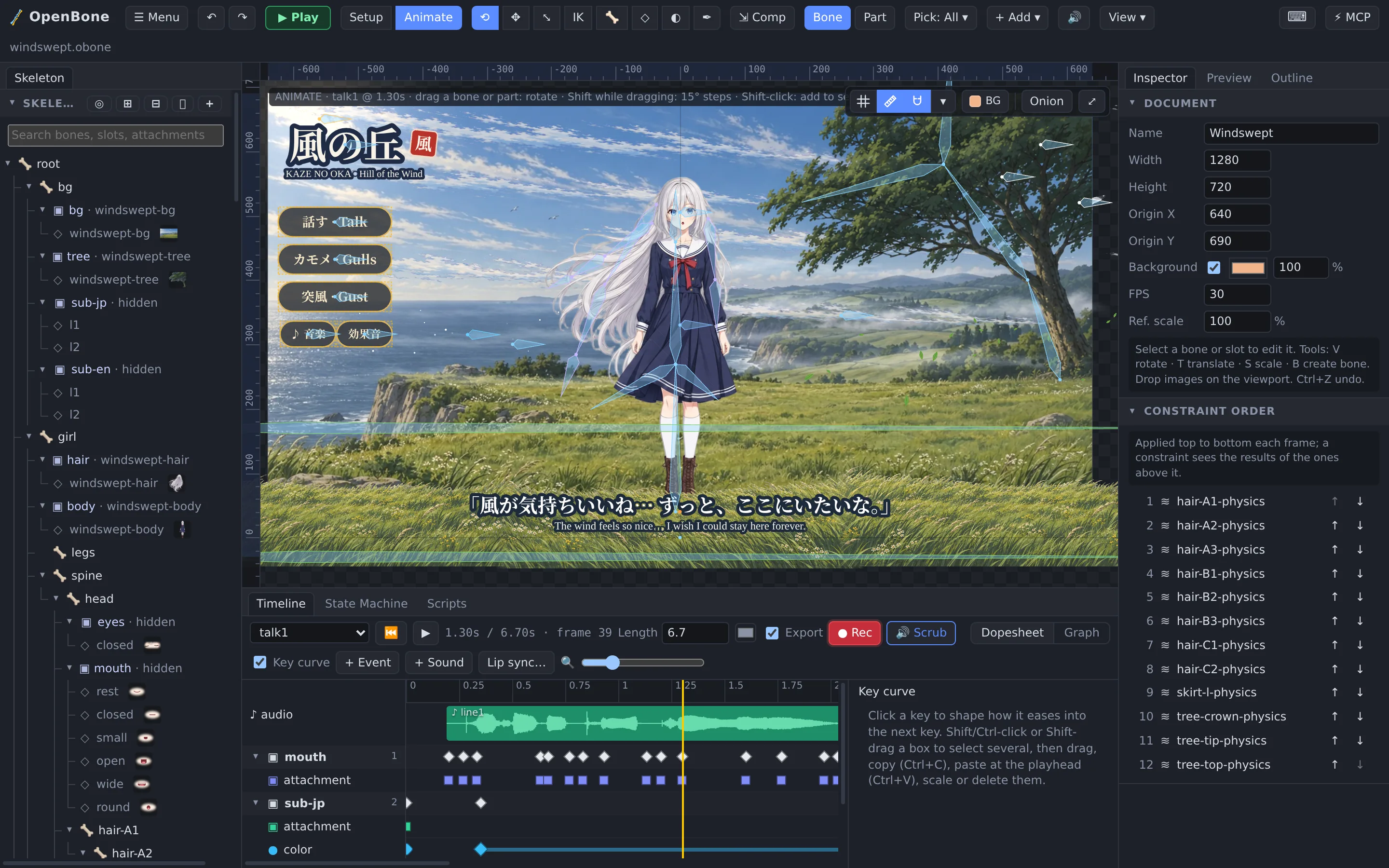
- Rig like Spine: bones, weighted meshes with free-form deformation, IK, transform, path and physics constraints, skins, clipping, two-colour tint, texture atlases.
- Make it interactive like Rive: state machines with inputs, pointer listeners, live text, input bindings and sandboxed scripts.
- Text that looks the same everywhere: fonts travel inside the project, so every runtime draws your text in your typeface, Japanese included.
- Sound built in: sounds on the timeline, events and states, a mixer with buses and mute buttons, lip sync from a voice recording, and video exports with the sound mixed in.
- Play it anywhere: web (WebGL, Canvas, PixiJS, Phaser, Three.js, CanvasKit) and native runtimes for C/C++ (Godot, Unreal, Cocos2d-x, SDL2, SFML, OpenGL), C# (Unity, MonoGame), Java (libGDX, Android), Swift, Flutter and Haxe, all checked against one conformance suite.
- Let an agent do it: every edit is an MCP tool, and the editor shows an agent's work live.
- Export everything: JSON, binary, atlases, PNG and JPEG frames, GIF, APNG, PSD, sprite sheets, AVI, MOV, MP4 and WebM with sound, and a self-contained web page.
Everything in this repository is MIT and built only on permissively licensed open-source dependencies.
Releases
Download the desktop app for Windows, macOS or Linux from the latest release
(all releases). What changed in each version is in
CHANGELOG.md; the runtimes and packages for each engine are listed under Install.
Security fixes, the latest audit and how to report a vulnerability: SECURITY.md.
A word from UXCentury
We built OpenBone because 2D animation tools shouldn't lock artists and developers into one vendor's editor, file
format or runtime licence. Rigging, interactivity and playback in every major engine belong in the open, so OpenBone
is MIT from the editor down to the last runtime, and it stays that way.
It is also built for how people work now: every edit is a tool an AI agent can use, and you watch it happen live in the
editor. Try it, break it, and tell us what you make: issues and pull
requests are welcome.
— The UXCentury team
Quick start
pnpm install
pnpm dev
The editor opens at http://localhost:5180 with the Walker example. ☰ Menu → Examples… opens the others; press ▶ Play to run one, or ⬇ Download to save it as a single .obone file with its art and sound inside.
| Example | What it shows |
|---|---|
| Windswept | A girl on a windy cliff: physics hair and skirt, a wind-blown tree and grass, drifting fog, clouds, petals and gulls, two Japanese lines lip-synced with subtitles, music and ambience, and buttons: Talk, Gulls and Gust, plus mute buttons for the music and the sound effects |
| Walker | IK legs, a scarf mesh, an idle/walk blend eased by a script, a jump, a forest scrolling in parallax (click the path to walk, click him to jump) |
| Knight | Walk along a scrolling castle road, attack with swing and clang, salute with a spoken greeting |
| Pip the fox, Robot | Lip sync to a real voice and to a robot voice |
| Tail | A painted tail mesh bending along a path, spring antennae, a camera pan on a second state-machine layer |
| Rocket | Click to launch: particles, ignition and engine sounds, a landing back on the pad |
| Pearl of the Deep | A slot game in examples/slot: sprite-sequence reels driven by one script, five paylines, a multiplier reel with nudges, a meshed sea-serpent mascot, coin particles, music and sound effects (demo credits only) |
| Crash game | A staged flow (idle → fly-out → flying → crash or cash-out), a live multiplier text, input bindings driving the parallax |
| Button | A state machine with a clipping mask, hover and click sounds |
| Campfire | Sprite-sequence flames, flickering firelight, a bending flame mesh, a crackle loop |
The characters, backgrounds, sounds and voices were made with ElevenLabs (licence); the button and the explosion frames with Canva (licence). The player demo is at http://localhost:5180/player.html. To host the examples elsewhere (a GitHub Release, a CDN), build with VITE_OPENBONE_EXAMPLES_URL=https://…/.
pnpm test
Runtimes
| Platform | Package | Engines | Notes |
|---|---|---|---|
| TypeScript | @openbone/runtime |
any | The reference runtime: posing, constraints, mixing, state machines, listeners, particles, text, audio commands, bounding-box queries |
| Web player | @openbone/player |
browser | <openbone-player> element and Player class, WebGL2 or Canvas2D, Web Audio |
| Web renderers | @openbone/render-webgl, @openbone/render-canvas |
browser, Node | Batched WebGL2 with stencil clipping; Canvas2D for the editor and headless PNG/GIF |
| Web engines | @openbone/pixi, phaser, three, canvaskit |
PixiJS v8, Phaser 3, Three.js r160+, CanvasKit | Same batches as the WebGL renderer, checked frame for frame; engine pointer events |
| C / C++ | runtimes/cpp |
Godot 4, Cocos2d-x 4, SDL2, SFML, GLFW/OpenGL, Unreal 5, any | C++17 port with a stable C API (openbone.h); scripts in embedded QuickJS; plays sound in Godot, Cocos2d-x, SDL2 and SFML |
| C# / Unity / MonoGame | runtimes/csharp |
.NET Standard 2.1, Unity 2021.3+, MonoGame 3.8 | OpenBone.Runtime (scripts in Jint), the com.openbone.runtime package: importer, components, mesh, AudioSource bridge (tested in Unity 6), and OpenBone.MonoGame: renderer, player, SoundEffect bridge, DesktopGL sample |
| Java / Android | runtimes/java |
any JVM (Java 11+), libGDX 1.14, Android 7+ | Pure Java port; libGDX renderer and sound; Kotlin OpenBoneView with sound (SoundPool, MediaPlayer) |
| Swift | runtimes/swift |
iOS 15+, macOS 12+ | Swift API over the C API; Metal OpenBoneView (UIKit, AppKit) and SwiftUI OpenBonePlayer, with sound (AVFoundation) |
| Flutter | runtimes/flutter/openbone |
Flutter 3.41+ (Android, iOS, macOS, Linux, Windows) | dart:ffi plugin over the C API; OpenBoneWidget with sound (flutter_soloud); Swift Package Manager and CocoaPods |
| Haxe | runtimes/haxe |
Haxe 4.3+ (JS, eval, Python checked; any target) | Pure Haxe port with no dependencies; state machine scripts on the JS target |
Every native runtime implements docs/runtime-spec.md and passes the conformance suite: the same poses, draw lists, events, audio commands and state-machine steps as the TypeScript runtime, for every example. CI runs each one on Linux, macOS and Windows where it applies. Demos of the knight in each web engine: pnpm --filter @openbone/examples engines, then http://localhost:5190.
Install
Packages are published from each release (from 0.2.1 on; see docs/releasing.md).
| Platform | Install |
|---|---|
| Web / Node | npm install @openbone/player (or runtime, pixi, phaser, three, canvaskit, …); CLI: npx openbone --help; MCP server: npx -y @openbone/mcp |
| .NET / MonoGame | dotnet add package OpenBone.Runtime (+ OpenBone.Scripting.Jint for scripts, OpenBone.MonoGame) |
| Unity 2021.3+ | Package Manager → Add package from git URL: https://github.com/UXCentury/open-bone.git#upm, or openupm add com.openbone.runtime |
| Java / Android | implementation("io.openbone:openbone-runtime:0.3.0") (+ openbone-scripting, openbone-gdx, openbone-android) from Maven Central |
| Swift | Xcode → Add Package Dependencies → https://github.com/UXCentury/open-bone, product OpenBone |
| Flutter | flutter pub add openbone |
| Godot 4.4+ | AssetLib tab → OpenBone, or unzip openbone-godot-<version>.zip from the releases into your project |
| C / C++ | add_subdirectory(runtimes/cpp) from a checkout (QuickJS and nlohmann/json are vendored) |
Tools
Let an agent animate (MCP)
This repo ships .mcp.json, so Claude Code picks up the openbone server automatically. For other clients:
{ "mcpServers": { "openbone": { "command": "npx", "args": ["-y", "@openbone/mcp"] } } }
From a checkout instead of npm: "command": "pnpm", "args": ["exec", "tsx", "/path/to/OpenBone/packages/mcp/src/bin.ts"].
Then ask: "Create a project at ~/anim/robot.obone: a robot with IK arms, an idle and a wave animation, and a state machine that waves when clicked." Click ⚡ Connect MCP in the editor to watch it happen live. See docs/mcp.md.
CLI
pnpm cli render examples/walker.obone --animation walk --time 0.25 --out walk.png
pnpm cli export 'examples/*.obone' --format atlas --out build/atlas --strip-whitespace --polygons --premultiplied
Formats: json, obonb, atlas, png, jpeg, gif, apng, psd, avi, mov, spritesheet, web. Quote globs; the CLI expands them. pnpm cli lists every command (validate, summary, render, gif, simulate, export, apply, ops, mcp).
Desktop app
Installers for Windows (.msi, .exe), macOS (.dmg, Apple Silicon and Intel) and Linux (.deb, .rpm,.AppImage) are attached to each GitHub Release. To run or build it
from source:
pnpm desktop
pnpm desktop:build
Needs Rust and the Tauri system dependencies (on Linux: webkit2gtk-4.1, GTK 3). docs/releasing.md
covers the installers, releases and code signing.
Embed in a website
<script type="module">
  import { definePlayerElement } from "@openbone/player";
  definePlayerElement();
</script>
<openbone-player src="walker.obone" state-machine="character"></openbone-player>
<script>
  const p = document.querySelector("openbone-player");
  p.setInput("speed", 1);
  p.addEventListener("openbone-event", (e) => console.log(e.detail.name));
</script>
Features
Rigging: bones, slots, skins, constraints- Bones with parent/child hierarchy, length, rotation, translation, scale and shear, and inherit modes (normal, only translation, no rotation, no scale) that can be keyed per frame.
- Slots with draw order, colour/alpha tint, two-colour tint (a keyable dark colour for the image's shadows) and blend modes (normal, additive, multiply, screen).
- Skins: create, duplicate, rename and delete outfits and switch them live; attachments can override the default skin per outfit. Skin bones and skin constraints exist only in the skins that list them.
- Constraints, applied in a default or custom order:
- IK: 1- and 2-bone, mix, bend direction, softness, stretch, compress and uniform scaling.
- Transform: rotate/translate/scale/shear mixes, world or local space, absolute or relative.
- Path: place and rotate a bone chain along a bezier path, with position, spacing and rotate modes, and constant speed (bones evenly spaced along uneven curves).
- Physics: secondary motion (hair, cloth, tails) with inertia, strength, damping, gravity and wind; deterministic. Gravity, wind and IK softness follow the rig's reference scale.
- Sliders: a bone's property or a number input scrubs an animation (corrective shapes, shadows, dials).
- Regions (images), vector shapes (rect, rounded rect, ellipse, polygon with fill and stroke), points and bounding boxes (hit areas, optionally weighted to bones). Game code can ask which boxes contain a point, cross a segment or overlap a rectangle or another skeleton, in every runtime.
- Meshes: deformable, weighted to bones, with deform keys (free-form deformation: drag vertices in Animate mode). Linked meshes reuse a mesh's geometry and weights with another image and can follow its deform keys. Trace mesh builds a mesh from an image's visible pixels, and re-tracing a weighted mesh binds it to the same bones again.
- Clipping masks: slots after the mask, up to an end slot, are drawn only inside its outline.
- Bezier paths for path constraints, drawn and edited with the Pen tool (smooth, mirrored or broken handles), optionally bound to bones.
- Sprite sequences from numbered images, sprite sheets (grid, TexturePacker or Aseprite JSON) or a ZIP of frames: own fps, loop / once / ping-pong / hold-last, driven by time, keys or a number input.
- Particle emitters on any slot: rate and bursts, shapes, world or local space, lifetime, speed, gravity, drag, size, rotation and colour over life, dots, squares, sparks or any image as the particle. Presets (fire, smoke, sparks, confetti, exhaust, coins) plus your own presets, saved once and usable in every project. Seeded, so previews and exports match.
- Text attachments (font, size, weight, colour, alignment, outline) whose content can be a live template bound to inputs.
- Embedded fonts: TTF/OTF files (WOFF2 for the web) carried by the project like images and sounds; the family, weight and style are read from the file. Every runtime draws text with them before any installed font, so it looks the same in the editor, the web player, exports and each engine.
- Texture atlas packing: rotation, scaling (several scales in one pack), whitespace stripping, polygon outlines, alias (identical images stored once), blank-image skipping, edge padding and bleed, page size rules, PNG or JPEG pages, premultiplied alpha, and filter, wrap and pixel format for the runtimes.
- Per-property timelines: bone transforms, slot colour and attachment, constraint values, mesh and path deform, sequence frame, particles, draw order.
- Key editing: multi-select (Shift/Ctrl-click, box, Ctrl/⌘+A), drag and nudge, copy and paste across animations, scale in time, change curves or delete together.
- Linear, stepped and bezier curves; a Graph view for value curves and bezier handles.
- Dopesheet grouped by bone, slot and constraint, with ● Rec, auto-key, hold bars, events (int/float/string payloads) and an audio lane with waveforms.
- Free-form deformation: with the Mesh tool in Animate mode, dragging vertices keys a deform at the playhead (weighted meshes and soft selection included).
- Per-animation export switch and colour; track mixing and cross-fades (values only the outgoing animation keys ease back to the setup pose); onion skin.
- State machines with layers, bool/number/string/trigger inputs, animation and 1D blend states, any-state transitions, conditions, exit times, cross-fades, "on complete" hand-offs and inputs set on enter.
- Live data: text templates (
{multiplier:0.00}x) and input bindings that drive bone, slot and constraint properties from a number input. - Pointer listeners on hit boxes (down, up, enter, exit, move, click) that set inputs, fire triggers, report events, play sounds, start particles or run scripts.
- Checks catch mistakes such as a trigger whose sound only plays when its button is clicked (silent when the game or a page button fires it); the State Machine panel marks the listener.
- Sandboxed scripts (QuickJS, memory cap and per-call deadline) with an
obAPI:onStart,onUpdate,onEvent,onPointer.
- Sounds from WAV, MP3 or OGG (embedded or by path), each with a bus, volume, rate, loop and fades.
- Played by audio keys, events, state hooks and listener actions; looping sounds fade out when their state or animation ends.
- Mixer: named buses with volume and mute, and a master volume. The runtimes emit play / stop / fade commands; the editor, the web player, Godot, Cocos2d-x, the SDL2 and SFML samples, Unity, Flutter, Swift (
OpenBoneView), libGDX and Android (OpenBoneView) play them. Unreal only emits them. - Lip sync keys a mouth slot's images to a voice recording (see the Fox and Robot examples).
- Tools: select, rotate, translate, scale, Pose (drag a bone and its parents bend to follow), create bone, Pen (paths and bounding boxes), mesh editing with soft selection, and weights (brush or direct values, lock bones, Smooth, Auto, Prune, Swap) with Spine-style bone colours, a weight overlay and vertex pies.
- Bones or parts: the Bone | Part switch decides whether dragging a picture moves its bone or the picture itself; parts get their own move, rotate and scale gizmos, and rotating shows the angle live. A hover preview outlines what a click will grab, and a pick filter rules out bones or parts.
- Setup and Animate modes, undo/redo for every change, Compensate (move a bone while its children stay put), multi-selection of bones and parts (Shift/Ctrl-click, box), flip and rotate parts or bones from the right-click menu.
- Views: 3D view (every part on its own layer in depth, with 3D bones, to check the stacking), Order view (the draw order side by side), bones only, mesh wireframes; lock and show only selected for parts and bones.
- Photoshop import: every layer becomes an image, slot and region in place; groups can become bones.
- Folders for slots, skins, animations, events, constraints and state machines; Import from project… to copy animations, skins or a whole skeleton from another file.
- Skeleton tree with search, eyes and locks; viewport grid, rulers, guides and smart snapping.
- Dockable workspace with your own saved layouts, Play mode (run it as shipped, with inputs and logs), Preview, Outline and Stats panels; eyes, locks and the camera are remembered per project.
- Command palette (Ctrl/⌘+K) to find any action by name, tool hints in the status line, live art reloading from your paint or audio app, rebindable keyboard shortcuts (⌘ on macOS, Ctrl elsewhere), and a live MCP connection.
- Project (
.obone) and data: JSON or compact binary (.obonb, about 40% of JSON), with atlas packing and clean-up options. - Images: PNG and JPEG (one frame or a ZIP of frames), animated GIF and APNG, layered PSD.
- Video: MP4 (H.264), WebM (VP9, with transparency where the browser supports it), MOV and AVI, all with sound.
- Web: the
<openbone-player>component with your animation, a demo page and embed snippets (ZIP), or one self-contained HTML file. The player clips to the artboard and fills the screen in full screen; fit, clipping and full-screen fit are export options. - Engine packs: sprite sheets for Unity, Godot 4, Flutter and generic engines, plus WebView packages for Flutter, Android and iOS. For full rigs in an engine, use the native runtimes above.
Documentation
The OpenBone website has step-by-step guides with screenshots (first rig,
animating, state machines, audio and lip sync, particles, physics, exporting, MCP, CLI), quick starts for every engine,
every example running live, and the reference docs below. Its source is apps/website.
- docs/architecture.md: how the editor, runtime and tools fit together
- docs/format.md: the
.obone/.obonbfile format - docs/runtime-spec.md and conformance/: what a runtime must do, and the tests that prove it
- docs/mcp.md: the MCP server and its tools
- docs/engine-exports.md: sprite-sheet and WebView engine packs
- CHANGELOG.md: what changed in each version
- CONTRIBUTING.md: how to contribute, the rules and best practices
| Path | What it is |
|---|---|
packages/core |
Document model, the op registry (every edit: validated with zod, undoable, replayable), undo/redo store, validation, atlas packing |
packages/runtime |
The reference runtime: pose solver, constraints, animation mixing, state machines, listeners, particles, text, audio commands |
packages/scripting |
QuickJS-WASM sandbox for document scripts |
packages/render-webgl, packages/render-canvas |
WebGL2 and Canvas2D renderers |
packages/player |
<openbone-player>, the Player class, Web Audio playback, the WebView bundle |
packages/pixi, phaser, three, canvaskit, engine-kit |
Web engine runtimes and their shared batching |
packages/export |
Image, video, ZIP, sprite-sheet and engine-pack exporters |
packages/mcp, packages/cli |
MCP server (stdio and HTTP, live bridge to the editor) and the openbone CLI |
apps/editor, apps/desktop |
The SolidJS editor and its Tauri 2 desktop shell |
apps/website |
The documentation website (Astro Starlight), with live players and screenshots captured from the editor |
runtimes/cpp, csharp, java, swift, flutter, haxe |
Native runtimes and their engine integrations |
conformance |
Reference results every runtime is tested against |
examples |
The example projects, their art and sound, and the script that builds them |
Open-source credits
OpenBone stands on the shoulders of these open-source projects. Thank you to everyone who builds and maintains them. Every dependency is permissively licensed; a test checks the JavaScript ones, and the editor lists them with their versions under ☰ Menu → About OpenBone.
Editor, web player and tools
| Project | Used for | Licence |
|---|---|---|
| SolidJS | The editor's user interface | MIT |
| Tauri and its dialog, fs and opener plugins, Serde | The desktop app for Windows, macOS and Linux | MIT or Apache-2.0 |
| Model Context Protocol SDK | The MCP server AI agents talk to | MIT |
| Zod | Checking MCP tool inputs | MIT |
| quickjs-emscripten | Sandboxed state-machine scripts on the web | MIT |
| earcut | Triangulating traced meshes | ISC |
| @napi-rs/canvas | Rendering frames in Node (CLI, MCP) | MIT |
| Noto Serif CJK JP (subset) | The font embedded in the Windswept example | SIL OFL 1.1 |
| gifenc | GIF export | MIT |
| ag-psd | PSD export | MIT |
| mp4-muxer, webm-muxer | MP4 and WebM video export in the browser | MIT |
| idb-keyval | Remembering projects and settings in the browser | Apache-2.0 |
| esbuild | Bundling the player for web exports | MIT |
| ws | The editor's live MCP connection | MIT |
| PixiJS, Phaser, three.js, CanvasKit | The web engine integrations, and the editor's 3D view (three.js) | MIT; CanvasKit BSD-3-Clause |
| FFmpeg | MP4/WebM encoding and MP3/OGG decoding in the CLI and MCP exports, when installed. It is not bundled; it is called as a separate program | LGPL/GPL (not distributed with OpenBone) |
Building and testing use TypeScript, Vite, Vitest, tsx and pnpm. The full list is in About OpenBone.
Native runtimes
| Project | Used for | Licence |
|---|---|---|
| QuickJS-ng (from Fabrice Bellard's QuickJS) | Scripts in the C/C++, Swift and Flutter runtimes (vendored) | MIT |
| nlohmann/json | Reading .obone files in C/C++ (vendored) |
MIT |
| godot-cpp | The Godot 4 GDExtension | MIT |
| SDL2, SFML, GLFW | The C++ sample renderers | zlib |
| stb_image | Loading images in the C++ samples | MIT or public domain |
| Jint | Scripts in the C# runtime | BSD-2-Clause |
| MonoGame | The MonoGame renderer and sample | Ms-PL |
| FontStashSharp | Text in the document's fonts in MonoGame | zlib |
| libGDX | The libGDX renderer and sample (with gdx-freetype for text) | Apache-2.0 |
| quickjs-kt, kotlinx.coroutines | Scripts in the Java and Android runtime | Apache-2.0 |
| flutter_soloud (SoLoud), ffi | Sound and the native bridge in the Flutter plugin | MIT, zlib; BSD-3-Clause |
The engines themselves (Unity, Unreal Engine, Cocos2d-x, Godot, Flutter) are not part of OpenBone; the integrations build against them in your project.
Art and sound in the examples
The example characters, backgrounds, sounds, music and voices were made with ElevenLabs (licence); the button and the explosion frames with Canva (licence).
Versions
One version covers the whole repo: pnpm version:set <major|minor|patch|x.y.z> updates every package, the editor and the desktop app, and pnpm version:check fails when they drift. The editor shows its version, commit and build date under ☰ Menu → About OpenBone.
OpenBone is made by UXCentury.
Contributing
Contributions are welcome: bug reports, fixes, runtime ports, engine integrations, docs and examples. Read CONTRIBUTING.md for the rules (MIT, permissive dependencies only, clean room, one format for every runtime) and the checks to run before opening a pull request. Report security problems privately as described in SECURITY.md.
Open core
OpenBone (editor, runtimes, player, MCP, CLI) is and stays MIT. A hosted OpenBone Cloud (accounts, cloud projects, real-time collaboration, hosted MCP, asset CDN) is planned as a separate service built on these packages. The editor talks to storage through one place (apps/editor/src/storage.ts), so a cloud backend can slot in without forking.
Clean-room note
OpenBone is an independent implementation. It does not use or derive from Esoteric Software's Spine runtimes or editor, or from Rive's editor. Formats, solvers and APIs are our own, built from public math (affine transforms, analytic IK, cubic bézier easing).
Yorumlar (0)
Yorum birakmak icin giris yap.
Yorum birakSonuc bulunamadi