anydesign
Health Gecti
- License — License: MIT
- Description — Repository has a description
- Active repo — Last push 0 days ago
- Community trust — 100 GitHub stars
Code Gecti
- Code scan — Scanned 10 files during light audit, no dangerous patterns found
Permissions Gecti
- Permissions — No dangerous permissions requested
Bu listing icin henuz AI raporu yok.
Claude skill that analyzes images, websites, and Figma files and generates a structured design.md with token system, component inventory, and reconstruction notes.
anydesign
Turn any image, website, or Figma file into a structured
design.md(with token system,
component inventory, and reconstruction notes) that any AI builder or human designer
can act on.



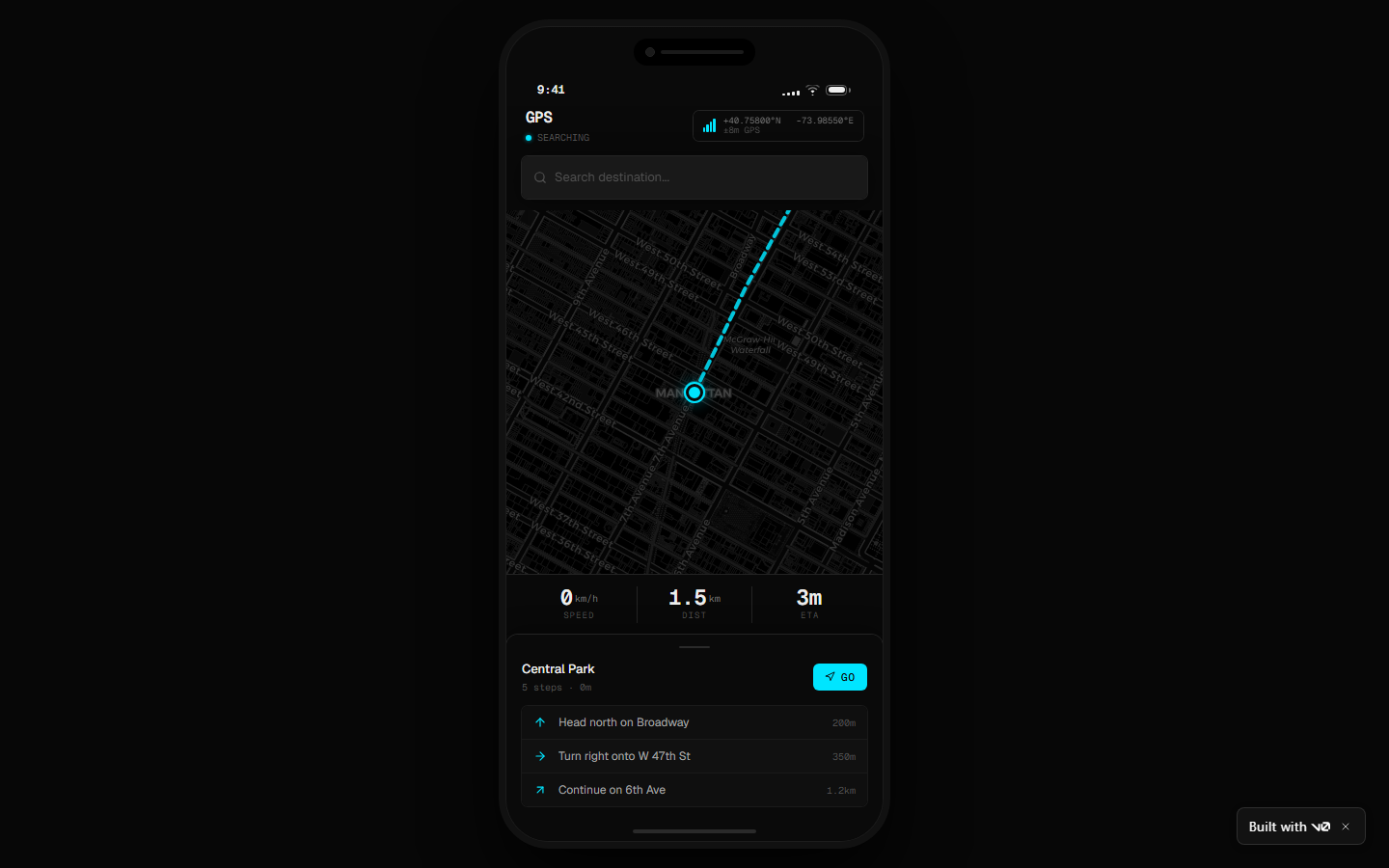
↑ This running app at v0-anydesignexample.vercel.app was built by v0 from a design.md generated by this skill. The skill output is portable — v0, Lovable, Cursor, Claude Code, Bolt, or a human designer can all consume it.
What this is
anydesign runs in Claude, but its output is universal.
- The skill itself is a Claude Agent Skill — install it in Claude Code or claude.ai and Claude knows how to analyze any visual reference you give it.
- The output is plain Markdown + W3C DTCG JSON — feed it to any AI builder (v0, Lovable, Cursor, Bolt, Claude Code, Windsurf), hand it to a designer, or paste it into a brief. No lock-in.
- The four companion Python scripts in
scripts/are standalone CLI tools — usable in any workflow, with or without Claude.
It's not a description generator. It's a design diagnostics tool.
What you get
When you point anydesign at a visual source, it produces:
design.md— a 7-section structured document with TL;DR, visual identity, full design system (colors, typography, spacing, radii, shadows, borders), component inventory, layout & composition, reconstruction notes, and open questions.design-tokens.json— structured tokens in the W3C Design Tokens Community Group (DTCG) format ($value/$type), directly consumable by Style Dictionary, Figma Variables, Tokens Studio, or any DTCG-compliant tooling.design-a11y.md(optional) — WCAG 2.1 contrast report for the extracted color pairs with AA/AAA pass-fail markers and interpretation.
Every inference carries a confidence level (✅ high / ⚠️ medium / ❓ low) so the output is honest about what was directly observed vs. reasonably inferred.
Copy a single element (element mode)
Sometimes you don't want the whole system — you want that navbar, that pricing card,
that 3D illustration. Say so ("copy this navbar", "recreate this graphic") and the skill
switches to element mode: it captures just the element and produces a focusedelement.md instead of a full design.md.
The element is classified into one of three kinds, which determines what you get:
| Kind | Example | Output |
|---|---|---|
code |
Navbar, card, button, hero section | Scoped token spec + ready-to-paste reconstruction prompt for v0 / Claude Code / Lovable |
asset |
3D illustration, mascot, photographic art | Token-grounded prompt for generative image models (gpt-image, Midjourney, Stable Diffusion) |
hybrid |
A card containing an illustration | Code spec + nested asset prompt |
The image prompts are the differentiator: instead of an impressionistic description, the
prompt embeds the exact extracted palette (hex codes), observed lighting, and the parent
brand's mood — so the regenerated asset belongs to the source design instead of being a
generic pretty image. On URLs, element capture is DOM-precise:capture_site.py --selector "header.navbar" screenshots only the element and saves itsouterHTML.
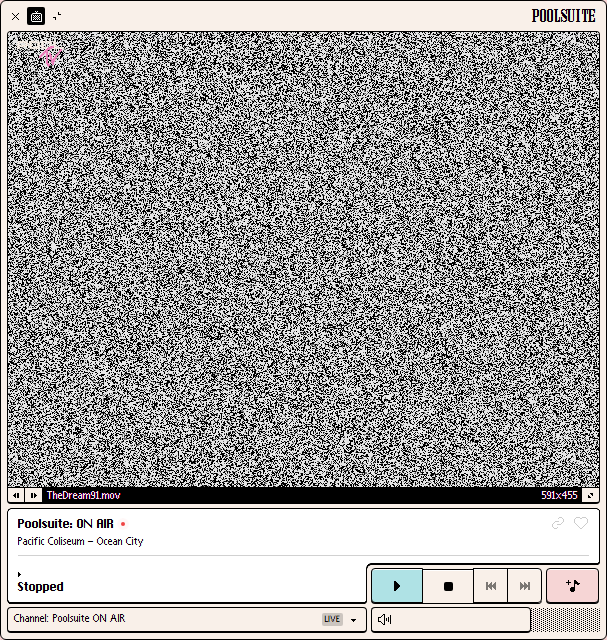
See a real run inexamples/poolsuite-player-element/ — element
mode pointed at the retro Mac OS player window of
poolsuite.net, producing a hybrid element.md with the
pixel-sampled palette, the verbatim bevel-shadow system, a v0-ready reconstruction
prompt, and a token-grounded VHS-still image prompt.
| Captured element (poolsuite.net) | Rebuilt by v0 from the element.md |
|---|---|
 |
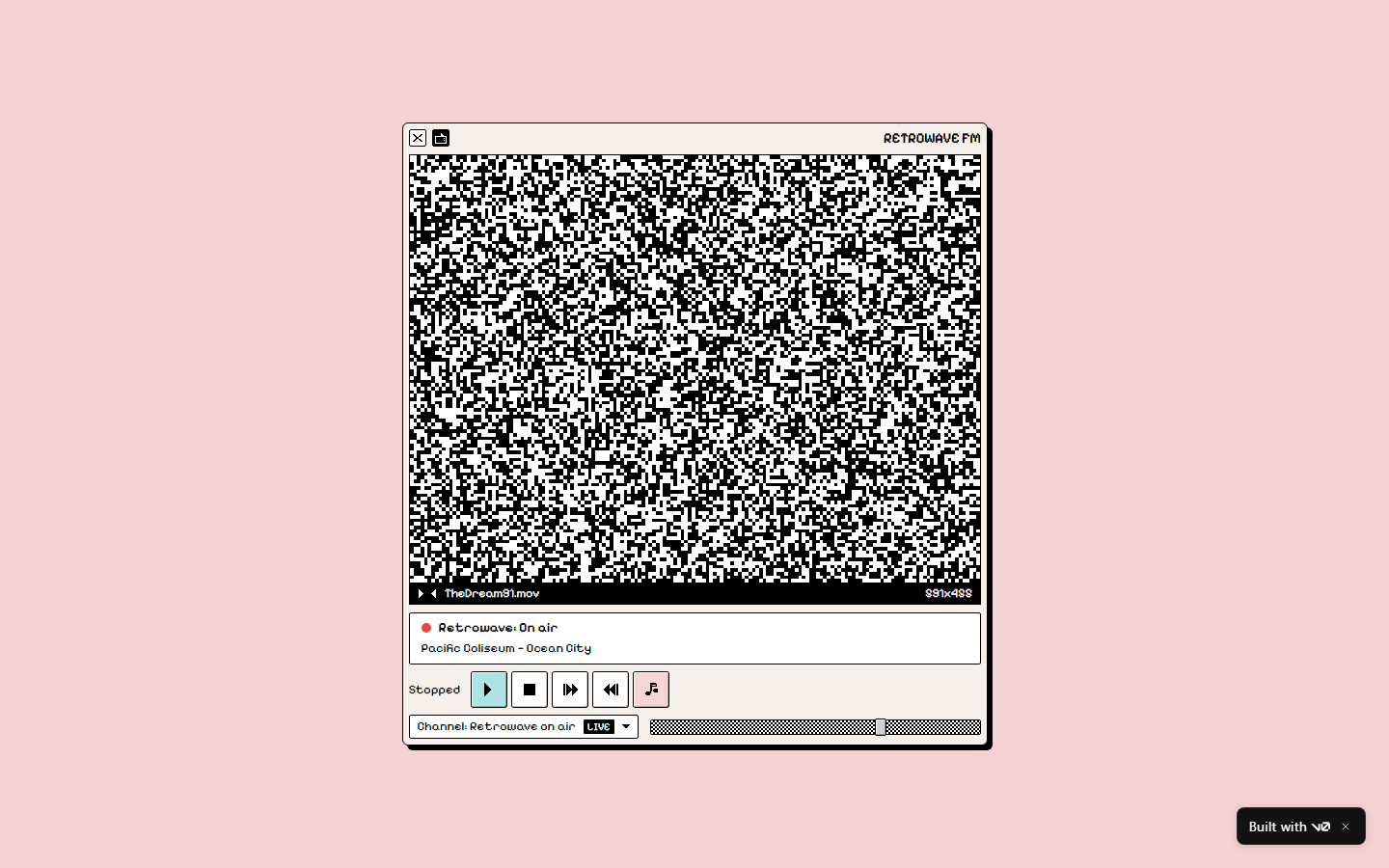 |
The rebuild is live at
retro-radio-player-zz.vercel.app —
generated by pasting the element.md reconstruction prompt into v0 (two iterations,
placeholder branding per the IP guardrail).
Real run on a real site — vercel.com
Want to see what it produces on a recognizable production site? Openexamples/vercel-landing/.
It contains a real end-to-end run against the live Vercel homepage: 808 CSS custom
properties extracted from 6 stylesheets + 2 inline blocks, the full Geist design-system
token map in DTCG, real desktop screenshot, and a WCAG contrast report. Nothing
invented — every hex code is verbatim from Vercel's live CSS.
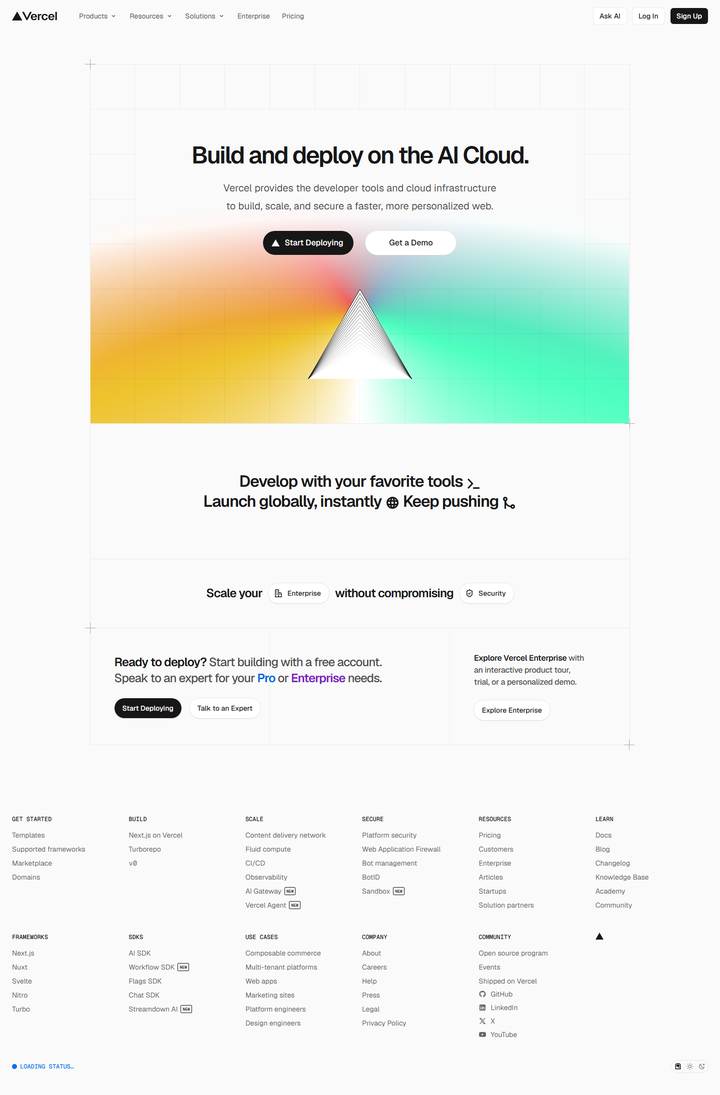
↑ The actual screenshot the skill captured and analyzed. See design.md and design-tokens.json for the full output.
A smaller synthetic example lives at examples/landing-example/ for quick orientation.
Works with any AI builder
The deliverable is plain text. Anything that reads Markdown can use it.
| Tool | How to use the output |
|---|---|
| v0 | Paste design.md as the project brief — see the live v0 demo generated by this exact flow |
| Lovable | Same — paste design.md and iterate visually |
| Cursor / Windsurf | Drop design.md into your context, then ask for components |
| Claude Code | Provide design.md + design-tokens.json in a fresh session, ask for the build |
| Bolt | Paste design.md as the prompt |
| Style Dictionary / Tokens Studio / Figma Variables | Import design-tokens.json directly (DTCG format) |
| Notion / Linear / Figma docs | Paste design.md as a designer brief |
| A human | Open design.md in any editor and read it |
The design.md is intentionally structured (TL;DR → identity → tokens → components → layout → reconstruction notes) so AI builders can quote-extract specific sections.
Standalone CLI scripts
The six scripts in scripts/ are pure Python and work without Claude.
Use them in any workflow:
| Script | What it does | Dependencies |
|---|---|---|
extract_css_vars.py |
Fetch a URL, find every linked stylesheet + inline <style>, extract all --* custom properties grouped by category |
stdlib only |
capture_site.py |
Multi-viewport Playwright screenshots with cookie banner auto-dismiss, scroll-capture for lazy content, and single-element capture (--selector) |
playwright |
extract_colors.py |
Dominant color extraction from a local image (Pillow quantization) | Pillow |
check_contrast.py |
WCAG 2.1 contrast checker — accepts multiple pairs or a pairs file, emits a markdown table | stdlib only |
lint_design_md.py |
Validates a design.md against the spec: YAML frontmatter, {token.refs} resolve, 1:1 component mapping, Section 6 non-empty |
stdlib only |
verify_design.py |
Audits a design-tokens.json against a live URL — reports drift between declared values and current CSS. The differentiator: lets you check if your captured tokens still match the brand. |
stdlib only |
export_for_claude_design.py |
Generates a multi-format bundle (PPTX, DOCX, CSS, Tailwind config, README) ready to upload as brand assets in claude.ai/design. See the Claude Design section below. | pyyaml, python-pptx, python-docx |
# Pull design tokens from any URL — no Claude needed
python scripts/extract_css_vars.py https://vercel.com/ --pretty

# Multi-viewport responsive captures
python scripts/capture_site.py https://your-site.com --viewports desktop,tablet,mobile

# Capture a single element (screenshot + outerHTML)
python scripts/capture_site.py https://your-site.com --selector "header.navbar" -o element.png

# WCAG contrast check
python scripts/check_contrast.py --pair "#111,#FFF" --pair "#3B82F6,#FFF"

# Validate a generated design.md
python scripts/lint_design_md.py path/to/design.md

# Audit declared tokens vs live site (the audit tool)
python scripts/verify_design.py path/to/design-tokens.json https://vercel.com/

# Bundle a design.md + tokens for upload to claude.ai/design
python scripts/export_for_claude_design.py path/to/design.md --out my-brand-bundle/
Each script has --help.
Use with Claude Design
Claude Design (Anthropic Labs, launched April 2026) builds
a persistent design system from "brand and product assets" you upload during setup —
PPTX decks, DOCX briefs, code repos. Every future project in your org defaults to that
system.
anydesign produces DTCG tokens and structured markdown, but Claude Design doesn't ingest
either directly. The export_for_claude_design.py script bridges the gap.
python scripts/export_for_claude_design.py path/to/design.md --out my-brand/
This emits a my-brand/ folder with five artifacts, each targeting one of Claude Design's
setup inputs:
| File | What Claude Design does with it |
|---|---|
brand-kit.pptx |
Primary asset — cover, atmosphere, color swatches, typography samples, components, Do's/Don'ts. Claude Design ingests PPTX directly. |
brand-overview.docx |
The full design.md rendered as Word. Use as the brand brief in the setup flow. |
tokens.css |
CSS custom properties generated from your DTCG tokens. Push to a small repo and link it under "Code repository" — Claude Design's extractor reads :root { --... }. |
tailwind.config.ts |
Same path as tokens.css, in Tailwind v3 config form. Either format works. |
README-claude-design.md |
Upload instructions and troubleshooting. |
Workflow:
- Run
anydesignon your reference (image, URL, or Figma file) → getdesign.md+design-tokens.json. - Run
python scripts/export_for_claude_design.py design.md→ get the bundle. - Open claude.ai/design, create a new project, and upload the bundle in the design-system setup step.
- Claude Design extracts colors, typography, and components from the bundle. Review and adjust.
- Every future project in your org now uses this brand as the default.
This is the only path today that gets your captured design system persistently into
Claude Design — pasting design.md as a prompt works for a single project but doesn't
build the design-system layer.
See examples/vercel-landing/claude-design-bundle/ for a real bundle generated from the Vercel run.
Installation
1. Clone the repo
git clone https://github.com/uxKero/anydesign.git
2. Copy the skill folder into your Claude skills directory
# For personal skills (all projects)
cp -r anydesign ~/.claude/skills/

# OR for a single project
cp -r anydesign /path/to/project/.claude/skills/
3. (Optional) Install Python dependencies for the companion scripts
pip install -r requirements.txt
playwright install chromium  # only if you'll use capture_site.py
First-time Chromium install is ~300MB.
4. (Optional) Connect the Figma MCP
To analyze Figma files, connect the Figma MCP from the Claude app
(Settings → Connectors). The skill uses these tools when available:get_metadata, get_variable_defs, get_design_context, get_screenshot.
Use cases
The skill activates automatically when Claude detects design-analysis intent in your
message. You don't need to write "use anydesign". Here are real scenarios:
🎨 Replicating a reference for a client project
"I love how Linear's landing page feels. Can you analyze it so I can brief my team
on something similar for our SaaS?"
The skill fetches the HTML, identifies it as content-rich (no Playwright needed),
extracts CSS custom properties from linked stylesheets as explicit tokens, and produces
a design.md you can paste into a Notion brief. You also get design-tokens.json in
DTCG format to feed straight into Style Dictionary or Figma Variables.
🧩 Extracting tokens from a Pinterest reference
"I have this screenshot saved from Dribbble. Pull the palette and typography so I
can start building a moodboard."
You upload the PNG. The skill uses direct vision to extract colors (and optionally callsextract_colors.py for pixel-precise dominant colors), identifies the likely typeface,
infers the spacing unit, and marks each inference with a confidence level. The "Open
Questions" section tells you what you'd need a clearer reference for.
🪄 Copying one element — including non-code art
"I love this 3D glass blob in their hero. Give me a prompt so I can generate
something like it for my own palette."
Element mode kicks in. The skill crops the element, runs extract_colors.py for the
exact dominant hexes, and produces an element.md whose generative image prompt embeds
the real palette, lighting, and mood — plus a "Consistency notes" section telling you
which hex to swap to re-tokenize the asset for your brand. Works the same for code
elements ("copy this navbar") — there you get a scoped spec + reconstruction prompt
instead.
🛠️ Briefing v0 or Claude Code for a from-scratch build
"I want a portfolio site that looks like vercel.com but simpler. Generate a design
brief I can hand to v0."
The skill analyzes vercel.com, frames the output with Reconstruction emphasis, and
gives you a design.md you paste straight into v0 — see the
live demo for proof that the workflow lands.
🎯 Auditing a Figma file before handoff to dev
"Here's the Figma file for our new dashboard. Make sure the tokens are consistent
before I send it to engineering."
The skill uses the Figma MCP to pull get_variable_defs (explicit tokens defined by the
designer) and get_design_context (actual usage). It cross-references both and flags
inconsistencies in the "Open Questions" section — like spacing values that don't match
the declared scale.
🔍 Comparing design vs. production implementation
"Here's the Figma file and here's the live site. Did the team build what was
designed?"
You pass both. The skill analyzes each and adds an extra discrepancies section:
tokens that diverged, components that look different, missing states.
📚 Documenting a legacy product's visual language
"We've never had a design system. Can you extract one from our current production
site?"
The skill scans your site, infers the implicit system (the one your team built without
naming it), and gives you a starting point for a real design system: documented colors,
typography scale, component variants observed. You now have a baseline to refine
instead of starting from zero.
♿ Accessibility quick-check on a brand palette
"We have a brand palette. Do the text/background combinations meet WCAG AA?"
After tokens are extracted, the skill runs check_contrast.py over the relevant pairs
and emits design-a11y.md with WCAG 2.1 ratios and pass/fail markers for AA and AAA
(both normal and large text). You see at a glance which combinations need adjusting.
How the skill thinks
It follows a strict 5-step workflow that you can read in detail in SKILL.md:
Step 1 — Identify source and emphasis
   ↓
Step 2 — Capture material
         (vision / HTML + CSS vars / Playwright multi-viewport fallback / Figma MCP)
   ↓
Step 3 — Layered analysis (Identity → System → Components → Layout → Reconstruction)
   ↓
Step 4 — Generate design.md + design-tokens.json (+ optional design-a11y.md)
   ↓
Step 5 — Deliver + suggest next step
The "layered analysis" goes from general to specific — never jumping from "mood" to
"tokens" without passing through "system". This is what makes the output coherent
instead of just a list of observations.
Project structure
anydesign/
├── SKILL.md                       Main instructions (the "brain")
├── README.md                      This file
├── LICENSE                        MIT
├── CHANGELOG.md                   Version history
├── requirements.txt               Optional Python deps for companion scripts
├── references/                    Loaded on-demand during the skill workflow
│   ├── capture-flows.md           How to capture each source type
│   ├── analysis-framework.md      The 5 analysis layers in detail
│   ├── token-extraction.md        How to infer tokens with rigor (+ DTCG format)
│   ├── output-template.md         design.md template
│   └── element-copy.md            Element mode: element.md template + image prompts
├── scripts/                       Standalone CLI tools (work without Claude)
│   ├── capture_site.py            Multi-viewport Playwright capture
│   ├── extract_css_vars.py        CSS custom properties extractor
│   ├── extract_colors.py          Dominant color extractor (images)
│   ├── check_contrast.py          WCAG 2.1 contrast checker
│   ├── lint_design_md.py          design.md spec validator
│   └── verify_design.py           Live-URL drift auditor for design-tokens.json
└── examples/                      Sample outputs
    ├── vercel-landing/            Real run against vercel.com
    ├── landing-example/           Smaller synthetic example
    └── v0-downstream-demo/        Proof that the output works with v0
The skill uses progressive disclosure: SKILL.md stays compact, and reference files
load only when the workflow reaches the corresponding step. This keeps Claude's context
window efficient.
License
MIT. See LICENSE.
Yorumlar (0)
Yorum birakmak icin giris yap.
Yorum birakSonuc bulunamadi