aimx
Health Warn
- License — License: MIT
- Description — Repository has a description
- Active repo — Last push 0 days ago
- Low visibility — Only 5 GitHub stars
Code Fail
- rm -rf — Recursive force deletion command in install.sh
- rm -rf — Recursive force deletion command in portcheck.sh
Permissions Pass
- Permissions — No dangerous permissions requested
No AI report is available for this listing yet.
🐦⬛ SMTP for AI agents. No middleman.
AIMX — AI Mail Exchange

SMTP for AI agents. No middleman.
The internet's oldest protocol, rebuilt for AI agents.
Runs entirely on your box. No third parties.
Your mail, your machine, end to end.
Human-friendly setup. LLM-friendly everything else.



AIMX (AI Mail Exchange) is a self-hosted email server (SMTP) and MCP stdio server that gives AI agents their own email addresses. Plugs into Claude Code, Codex CLI, Gemini CLI, Goose, and any other agent harness. No Gmail, no OAuth, no SaaS. Runs on the same VPS you already provisioned for your agents.
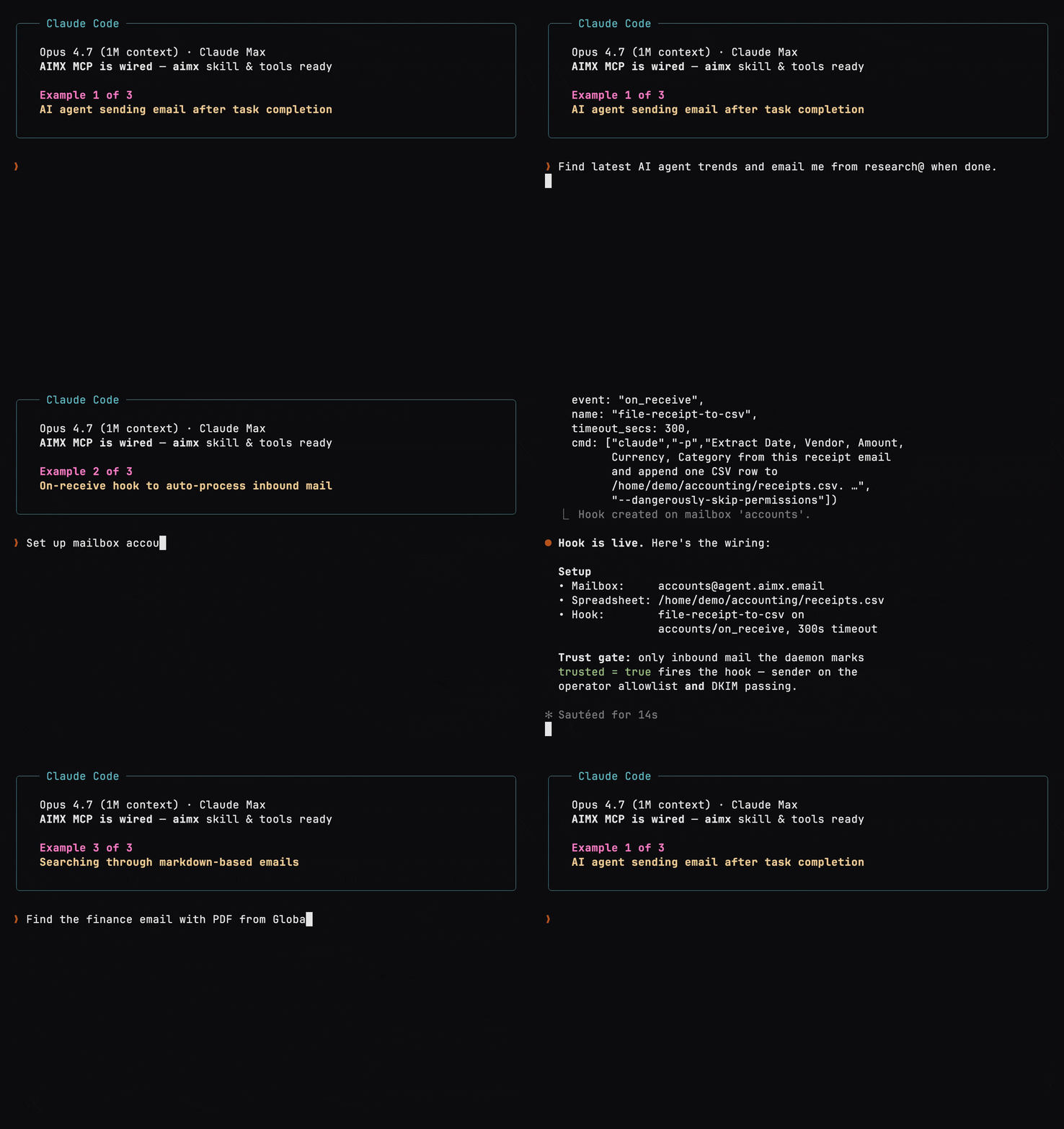
Features
- Single binary. With human-friendly guided set up process.
- Markdown-based email, coupled with clean TOML frontmatter. Friendly for your LLMs, RAGs and AI brains.
- Direct MTA-to-MTA. Email has become send-and-pray best-effort. AIMX turns it back into direct server-to-server delivery, like an API call.
- Instant hooks Inbound mail fires
on_receivehooks the moment SMTPDATAcompletes. Outbound delivery firesafter_sendhooks when the MX attempt resolves. No cron, no heartbeat. - Trust modeling. Built-in DKIM-based trust model. Widely compatible. Minimizes prompt injection attacks.
- Built-in MCP server. Stdio MCP. Efficient. MCP server only runs on demand, kills off when done.
- No third parties. Mail lives on your server,. No need to trust and third-party servers with your sensitive data.
- One-line agent integration. Integrates directly into your favorite AI agents: OpenClaw, Hermes, NanoClaw, Claude Code, etc.
- IPv6-ready. IPv4 by default, but future-proof with IPv6 support.
- MIT licensed. Free and open source.
Read the Book to learn more.
Contributions are welcomed!
Requirements
- A Linux server with port 25 open (inbound and outbound)
- A domain or subdomain you control
Quick start
curl -fsSL https://aimx.email/install.sh | sh
This will lead you to a guided setup with the following steps:
- Preflight checks on port 25
- Set up domain and DNS
- Set up STARTTLS certificate
- Set up trust policy
- Install AIMX service
- Set up MCP for agent(s)
To upgrade, simply run sudo aimx upgrade.
How to build
git clone https://github.com/uzyn/aimx.git
cd aimx
cargo build --release
sudo cp target/release/aimx /usr/local/bin/

# Run setup and follow the guided instructions
sudo aimx setup
CLI Commands
Usage: aimx [OPTIONS] <COMMAND>

Operations (as current user):
  send         Send an email
  mailboxes    Manage mailboxes
  hooks        Manage hooks
  agents       Manage AI agent MCP wiring
  mcp          Start the stdio MCP server (for AI agents)

Server administration:
  setup        Run the interactive setup wizard
  serve        Start the SMTP daemon
  doctor       Show server health, DNS, and recent logs
  logs         Tail the aimx service log
  dkim-keygen  Generate a DKIM keypair
  portcheck    Check port 25 connectivity (inbound, outbound)
  uninstall    Uninstall the aimx service (config and data retained)
  upgrade      Fetch the latest release and swap the installed binary

  help         Print help for a subcommand

Options:
      --data-dir <DATA_DIR>  Data directory override (default: /var/lib/aimx) [env: AIMX_DATA_DIR=]
  -V, --version              Print version
  -h, --help                 Print help
MCP server for AI agents
AIMX is a standard MCP stdio server — any MCP-compatible harness connects to it. The harnesses below ship pre-wired: aimx agents setup installs the MCP config and skill bundle in one command. For anything else, see Any MCP-compatible client (manual wiring).
| Agent | MCP | Skill / Recipe |
|---|---|---|
| Claude Code | ✅ Auto-wired | ✅ ~/.claude/skills/aimx/ |
| Codex CLI | ✅ Auto-wired | ✅ ~/.codex/skills/aimx/ |
| NanoClaw | ✅ Auto-wired (<fork>/.mcp.json; default ~/nanoclaw, override with $NANOCLAW_HOME) |
✅ <fork>/skills/aimx/ |
| Goose | ✅ Bundled in the recipe; activate with goose run --recipe aimx |
✅ ~/.config/goose/recipes/aimx.yaml |
| OpenClaw | ✅ Run the guided openclaw mcp set aimx '...' command after setup. |
✅ ~/.openclaw/skills/aimx/ |
| OpenCode | ✅ Paste the printed JSONC block into opencode.json after setup. |
✅ ~/.config/opencode/skills/aimx/ |
| Gemini CLI | ✅ Merge the printed JSON block into ~/.gemini/settings.json after setup. |
✅ ~/.gemini/skills/aimx/ |
| Hermes | ✅ Paste the printed YAML in ~/.hermes/config.yaml after setup. |
✅ ~/.hermes/skills/aimx/ |
Available MCP tools:
mailbox_list: list all mailboxes with message countsmailbox_create: create a new mailboxmailbox_delete: delete a mailboxemail_list: list emails with optional filters (unread, from, since, subject)email_read: read full email contentemail_send: compose and send an emailemail_reply: reply to an email with correct threadingemail_mark_read: mark an email as reademail_mark_unread: mark an email as unread
For more details, see the MCP documentation and the agent integration guide.
Configuration
A single TOML file at /etc/aimx/config.toml is everything. aimx setup writes the initial file for you; edit it directly to add mailboxes, override defaults, or attach hooks.
Top-level
| Setting | Type | Default | Description |
|---|---|---|---|
domain |
string | (required) | The email domain (e.g. agent.yourdomain.com). |
data_dir |
string | /var/lib/aimx |
Where mailboxes are stored on disk. |
dkim_selector |
string | aimx |
Selector name used in your DKIM TXT record. |
trust |
string | none |
Default trust policy: none or verified. |
trusted_senders |
array | [] |
Default sender allowlist (globs, e.g. *@yourcompany.com). |
enable_ipv6 |
bool | false |
Opt into IPv6 outbound delivery. |
verify_host |
string | https://check.aimx.email |
Preflight port 25 checking service used by aimx portcheck and aimx setup. |
Mailbox [mailboxes.<name>]
| Setting | Type | Default | Description |
|---|---|---|---|
address |
string | (required) | Email address pattern (e.g. support@… or *@… for catchall). |
owner |
string | (required) | Linux user that owns the mailbox storage and runs hooks. |
trust |
string | (inherited) | Override the global default. |
trusted_senders |
array | (inherited) | Override the global allowlist. Replaces, no merge. |
hooks |
array | [] |
on_receive / after_send commands — see Hooks below. |
Example
domain = "agent.yourdomain.com"
trust = "verified"
trusted_senders = ["*@yourcompany.com"]

[mailboxes.support]
address = "[email protected]"
owner = "support-bot"
See book/configuration for the full field reference (hook fields, IPv6, env-var overrides).
Trust & security
Phishing-aware by default. Every inbound message is checked for DKIM, SPF, and DMARC. Untrusted mail is still stored on disk so you can read it, but it never fires on_receive hooks. Your agent sees the message; it doesn't act on it. Untrusted emails are also clearly marked as trusted: false in the frontmatter for agent's reference.
- DKIM-gated hooks. Only mail that verifies (and matches your
trusted_senderslist) can trigger automation. - Per-mailbox owner. One user per mailbox. Each mailbox runs as its own system user that owns the directory and executes hooks. Run a finance agent on one, family mail on another. They can't read each other's mail or interfere with each other's processes — enforced by the operating system, not by aimx.
Learn more about book/security for the threat model and book/hooks for the trust gate.
Hooks
Mail is an event Inbound mail fires on_receive the instant SMTP DATA completes. Outbound delivery fires after_send when the MX attempt resolves to delivered / failed / deferred. Hooks are declared per mailbox and exec'd directly — no shell, no cron, no heartbeat.
[[mailboxes.support.hooks]]
event = "on_receive"
cmd = ["/usr/bin/ntfy", "pub", "agent-mail", "$AIMX_SUBJECT from $AIMX_FROM"]
Each hook runs as the mailbox's owning Linux user and only on trusted emails that pass DKIM and match the trusted_senders allowlist. This makes it safe to plug directly into your agents without worrying about prompt injection or malicious emails.
See book/hooks for the hook model and book/hook-recipes for copy-paste recipes (Claude Code, Codex CLI, OpenCode, Gemini CLI, Goose, OpenClaw, Hermes, Aider).
Email format
No .eml. No database. Mail lands as plain Markdown your agent can cat, grep, or stream straight into a context window. Frontmatter is TOML between +++ delimiters. Attachments live as sibling files inside a bundle directory — no MIME parser required.
+++
id = "2025-04-15-143022-hello"
from = "Alice <[email protected]>"
to = "[email protected]"
subject = "Hello"
date = "2025-04-15T14:30:22Z"
dkim = "pass"
spf = "pass"
trusted = "true"
mailbox = "support"
read = false
+++

Hello, this is the email body in plain text.
See book/mailboxes for the full schema and outbound sent-copy fields.
DNS records
aimx setup prints these for you to copy-paste. Listed here for reference.
| Type | Name | Value |
|---|---|---|
| A | agent.yourdomain.com | Your server IP |
| MX | agent.yourdomain.com | 10 agent.yourdomain.com. |
| TXT | agent.yourdomain.com | v=spf1 ip4:YOUR_IP -all |
| TXT | aimx._domainkey.agent.yourdomain.com | v=DKIM1; k=rsa; p=... |
| TXT | _dmarc.agent.yourdomain.com | v=DMARC1; p=reject |
Why AIMX?
| Gmail / Outlook | SaaS relays (SendGrid / Postmark) |
AgentMail / LobsterMail | Postfix / Stalwart | AIMX | |
|---|---|---|---|---|---|
| Built for AI agents | ❌ | ❌ | ✅ | ❌ | ✅ |
| MCP support | via 3rd-party | via 3rd-party | ✅ (ext server) | ❌ | ✅ (local stdio) |
| Self-sovereign | ❌ | ❌ | ❌ | ✅ | ✅ |
| Direct delivery | ❌ | ❌ | ❌ | ✅ | ✅ |
| Markdown emails | ❌ | ❌ | ❌ | ❌ | ✅ |
| Free & open source | ❌ | ❌ | ❌ | ✅ | ✅ |
Use cases
- Finance agent. Forward invoices, receipts, and statements to
finance@…. The agent extracts amounts and vendors, files attachments, and reconciles against your ledger. - Privacy-sensitive workflows. Bank statements, medical records, legal correspondence — mail that shouldn't sit in someone else's datacenter. No SaaS relay, no third-party MCP wrapper, no Gmail scanning the contents.
- Morning briefing. A cron job kicks the agent at 7am. It reads overnight mails, research news and emails you your daily briefing.
- Support triage.
support@…drafts replies via MCP, tags by severity, and escalates when confidence is low. Threading is preserved, so customers see a normal Gmail conversation. - Monitoring & alerts. Datadog, GitHub Actions, and cron jobs page
alerts@…. Theon_receivehook decides whether to wake you, file a ticket, or self-remediate. - Newsletter digest.
news@…collects Substack, arXiv, and HN digests. A nightly job ships one summary instead of 40 unread threads. - Travel concierge. Forward bookings to
travel@…. The agent builds a live itinerary, pushes calendar events, and pings you on gate or check-in changes. - Personal CRM.
contacts@…ingests intros and follow-ups. The agent extracts who, where, and why, and reminds you before the connection goes cold. - Cross-agent message bus. Two agents on different boxes use email as durable, DKIM-signed transport. Markdown is a payload format both already speak.
- Knowledge-base ingest. Forward anything to
kb@…. Markdown plus YAML frontmatter is RAG-ready the moment it hits disk.
Design philosophy
AIMX is a mail server for AI agents, not a Postfix replacement.
- AIMX is designed for a single operator (you) and a single domain (youragent.yourdomain.com). No multi-user, multi-domain, or shared hosting use cases. If you need those, run Postfix or Stalwart.
- AIMX is designed for direct MTA-to-MTA delivery.
- AIMX mails (data) are stored as Markdown for LLM-friendliness, not as
.emlor in a database. Attachments are stored as files in a bundle directory, not as MIME parts, also for LLM-friendliness and ease of access.
As such, currently, by design:
- No IMAP or POP3
- No Webmail
- No SMTP AUTH
- No retry queues. Send is an synchronous operation that either delivers or fails immediately so your agent can react to the result in real time.
- No bounces. AIMX doesn't generate or process DSNs.
- No mail indexing or search. Bring your own RAG, indexing system or AI brains.
Subject to future improvements. Single-operator is key to the core design philosophy.. If you need multi-user or IMAP access, run Postfix or Stalwart.
FAQ
Why does AIMX need port 25 open?
AIMX is your mail server. SMTP runs on port 25. It has been defined and set in RFC 821 since 1982. AIMX speaks SMTP directly to other mail servers, no third-party relays involved. Your mail stays truly private and secure.
Can I switch AIMX to operate on another port?
No. SMTP operates strictly on port 25 as defined and set in RFC 821 since 1982. Other mail servers will only deliver to you on 25.
Can I run AIMX on my home server?
Yes, as long as you have globally accessible port 25. Home ISPs typically block port 25. To check if port 25 is open without installing AIMX, run curl -fsSL https://aimx.email/portcheck.sh | sh.
What AI models does AIMX support?
All of them. AIMX does not call AI models directly. It is a mail server with a stdio Model Context Protocol (MCP) server built-in, so your AI harnesses and agents can connect to it easily and effectively.
How do I set up email accounts on AIMX?
Once AIMX is set up, mailboxes can be created with the aimx mailboxes CLI, or via the mailbox_create MCP tool by simply instructing your AI harness in plain natural language, such as Create a receipt@ mailbox and file receipts for me when you receive them.
Can I run AIMX without owning a domain name?
No. You need a domain to define how emails are delivered to you (MX record) and verified (DKIM TXT record). Email specifications (RFC 5321 §5.1) require the MX record to point to a domain name, not an IP. Subdomain is fine too.
Why do I need AIMX when I can just use Gmail + MCP?
You can, if you do not mind your emails being stored and accessible on both Gmail servers AND third-party MCP servers. If you are on a free Gmail account, you might also be violating Gmail's ToS. Besides, it is a lot of work to create multiple mailboxes for separate agentic use.
Why do I need AIMX when I can just use MCP-enabled AgentMail or LobsterMail?
You can, if you do not mind paying and do not mind your emails being stored and accessible on third-party servers.
How are emails stored on AIMX?
AIMX stores all incoming and outgoing emails as Markdown files with TOML frontmatter. This makes them trivially easy for AI agents, RAG pipelines, and LLMs to read and parse, no MIME decoding required. Attachments are extracted and stored on disk in native format.
Does AIMX have any automation? How does AIMX prevent prompt injection from incoming emails?
Yes, AIMX supports hooks that fire on incoming mail, but only from senders you trust. You define the trusted sender list. AIMX verifies every incoming message with DKIM and records the result in the frontmatter, so your agent always knows whether a message is authenticated. Mail that fails DKIM, or arrives from an unverified sender, will not trigger any hooks.
More? See the full FAQ in the book.
Contributing
Issues, PRs, and new hook recipes are very welcomed.
License
MIT. See LICENSE.
Copyright (c) 2026 U-Zyn Chua.
Reviews (0)
Sign in to leave a review.
Leave a reviewNo results found