agentbelt
Health Warn
- License — License: MIT
- Description — Repository has a description
- Active repo — Last push 0 days ago
- Low visibility — Only 6 GitHub stars
Code Pass
- Code scan — Scanned 9 files during light audit, no dangerous patterns found
Permissions Pass
- Permissions — No dangerous permissions requested
No AI report is available for this listing yet.
iTerm2 sidebar for AI coding agents (Claude Code, Codex): sessions, live actions, git & PR, and proxy health for regions where AI APIs are restricted
agentbelt
An iTerm2 sidebar for AI coding agents: Claude Code, Codex, pi and omp sessions, a live Claude Code action feed, git and PR state, and proxy health for regions where AI APIs are restricted or blocked. It lives in the iTerm2 Toolbelt and follows the active terminal pane: switch to another iTerm tab and the sidebar shows that one.
Formerly iterm-toolbelt: old links redirect, install.sh moves an existing install over.
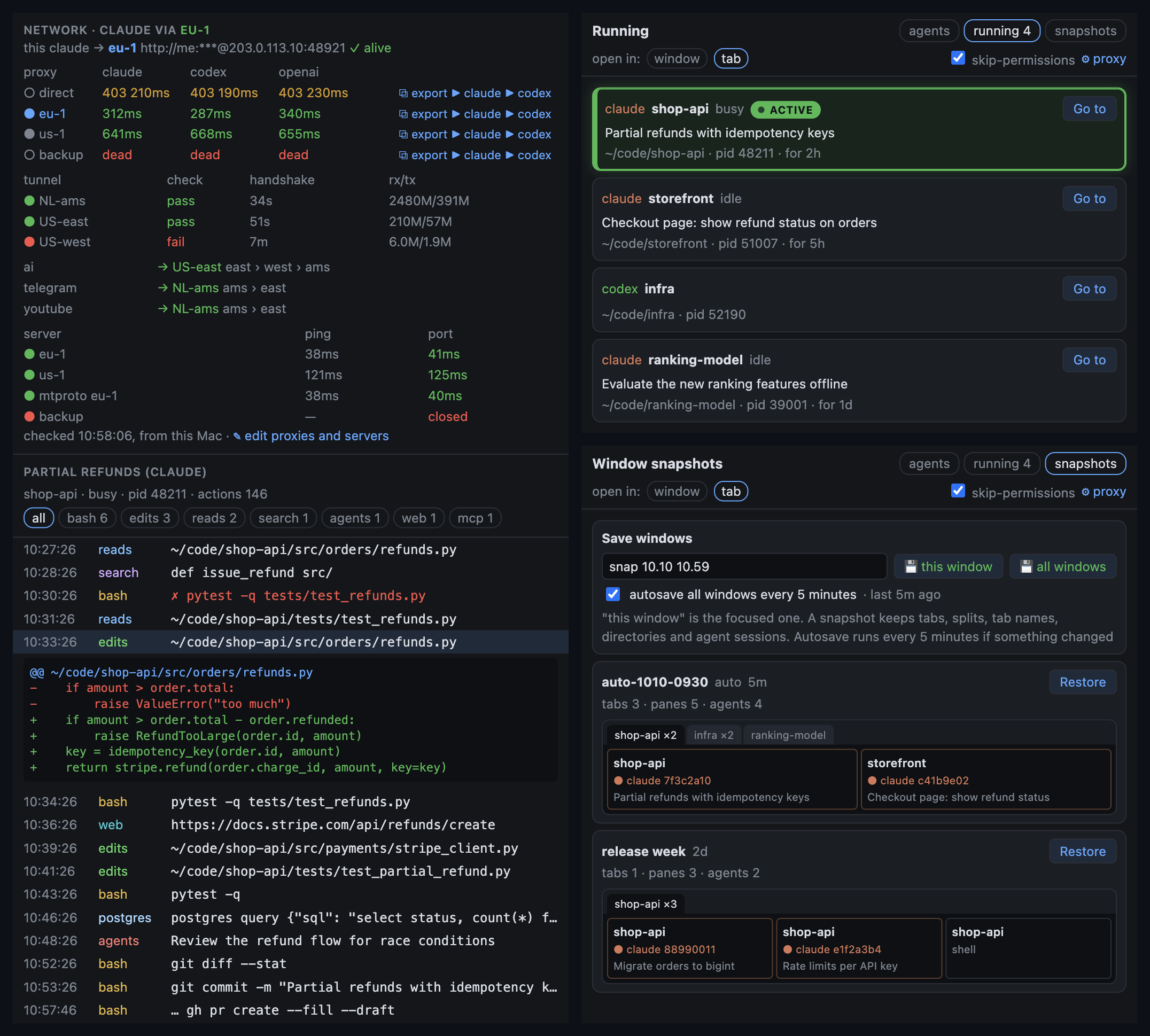
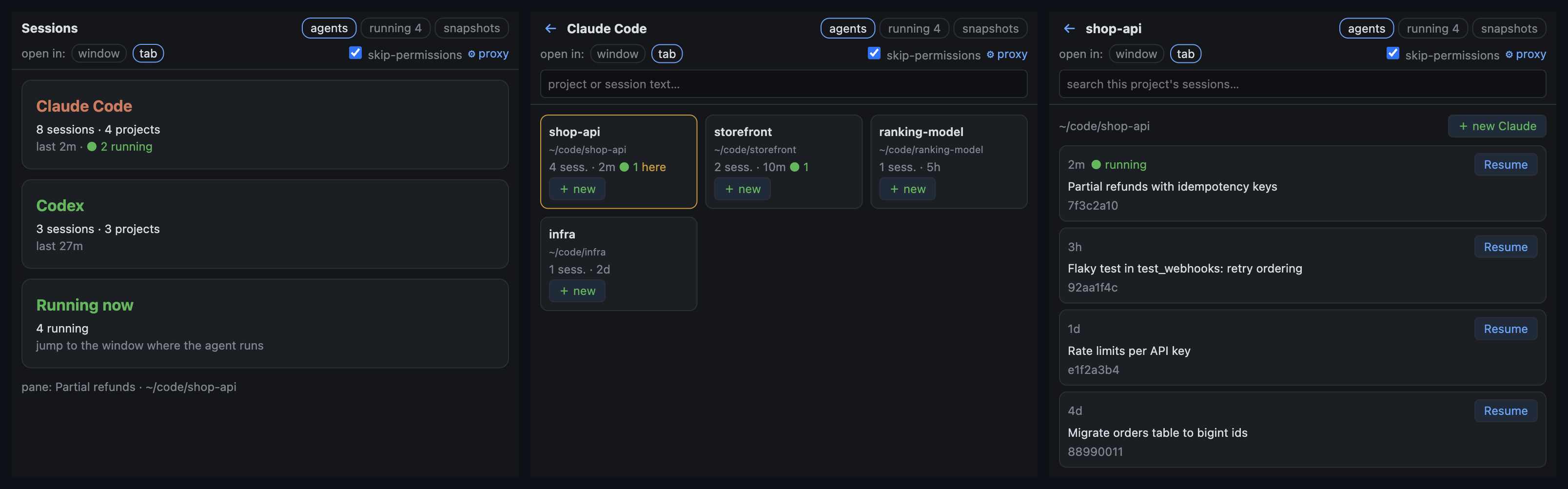
Screenshots use made-up demo data.
| tab | what it shows |
|---|---|
| ◆ Git & PR | branch, ahead/behind origin/main and upstream, changed files with a diff on click, the branch PR and its CI (gh), your open PRs, worktrees, custom repo checks |
| ◆ Agent actions | a live feed of what Claude Code does in this pane: bash commands, file edits with diffs, reads, searches, subagents, web, MCP. Failed calls are marked, passwords and tokens in commands are masked. A network block on top shows which proxy this claude runs through and, for every proxy in your list, whether each agent CLI reaches its API through it (claude → api.anthropic.com, codex → chatgpt.com or api.openai.com, openai → api.openai.com). Every proxy row has ⧉ export (an export HTTPS_PROXY=… line straight to the clipboard), ▶ claude and ▶ codex (a new agent in the current directory through that proxy); optional list of your servers with ping and SSH reachability, and Keenetic tunnels |
| ◆ Sessions | Claude Code, Codex, pi and omp: pick an agent → project tiles → project sessions with Resume (new iTerm window or tab), + new session in a project. The running-agent view detects Claude Code, Codex and pi and can jump to their panes when they have a terminal. The tab also saves window snapshots. |
| ⚙ settings | opened from the Sessions tab: intro, a default proxy (picked from your list) or a prefix and flags for launching agents, your own proxy and server lists and the Keenetic router, where to open sessions, which tabs are on, auto-show of the Toolbelt, custom repo checks |
Install
git clone https://github.com/vakovalskii/agentbelt ~/agentbelt
~/agentbelt/install.sh
Then in iTerm2:
- Settings → General → Magic → Enable Python API. On first run iTerm asks to allow the script.
- View → Toolbelt and tick the tabs starting with «◆». Show or hide the Toolbelt: ⌘⇧B. New windows open the Toolbelt by themselves.
- In ◆ Sessions press ⚙: a short intro and agent launch settings (e.g. a proxy).
Requires macOS, iTerm2 3.3+ (tested on 3.7) and python3. PR and CI info needs a logged-in gh.
install.sh creates a venv in ~/.config/agentbelt/venv, the config ~/.config/agentbelt/config.json and the LaunchAgent dev.agentbelt. An install under the old name is picked up: the config is copied from ~/.config/iterm-toolbelt, the old dev.iterm-toolbelt service is stopped. The service starts at login and restarts if it crashes. Update: git pull && ./install.sh. Uninstall: ./uninstall.sh.
If the iTerm2 API connection drops (for example, after restarting iTerm2 or waking the Mac),
the service exits and launchd restarts it with a fresh connection and Toolbelt registrations.
The local pages are briefly unavailable during recovery; launchd may delay restarting by up to
10 seconds, and iTerm2 must be available again. A script started manually exits on disconnect;
use install.sh for automatic recovery.
Proxies for Claude Code and Codex
If AI APIs are blocked or region-restricted where you work, see docs/proxies.md: a small
password-protected HTTP proxy on a VPS (gost in Docker, five minutes), pointing Claude Code and Codex at it,
and how to keep it from becoming an open proxy (secrets file, firewall allowlist, or publishing it only inside
a WireGuard/AmneziaWG tunnel). The toolbelt then manages the list, probes every proxy against each CLI's API
and launches agents through the one that works.
How it works
- One Python process: a small HTTP server on
127.0.0.1serves the pages frompages/, and iTerm2 shows them as Toolbelt tabs (iterm2.tool.async_register_web_view_tool). The same iTerm2 Python API tells us the active pane (FocusMonitor), its directory and tty, and opens windows to resume sessions. - Agent actions. The
claudeprocess on the pane's tty →~/.claude/sessions/<pid>.json(holds the session id) → the transcript~/.claude/projects/<dir>/<id>.jsonl, read incrementally from where it stopped. - Network.
HTTPS_PROXYis read from the environment of the runningclaude(ps eww). Every 60 s each proxy fromproxiesin the config is probed with curl against the endpoint each agent CLI really calls (the proxy URL goes through stdin, never argv); without a key every API answers 401, which counts as reachable, 403 is a region block, servers fromserversget a ping and a TCP connect with an SSH banner read. Everything runs from your Mac, so it shows what works from where you are now. Both lists stay in the local config only. Withkeeneticset (router address, login, password), the block also reads the router over its RCI API: every WireGuard tunnel with its ping-check state, last handshake and traffic, and for eachdns-proxy route object-groupgroup the tunnel it is going through right now and its fallback order. - Sessions. Scans
~/.claude/projects/*/*.jsonl,~/.codex/sessions/*/*/*/*.jsonl,~/.pi/agent/sessions/*/*.jsonland~/.omp/agent/sessions/*/*.jsonl. The header and first message are read from the first 512 KB; pi's latest saved name is found by reading backward once, then reading only appended bytes. Pi and omp use the session ID and project directory from the session header; omp's optional leading title record is supported. Results are cached on disk: the first pass over a couple thousand sessions takes tens of seconds in the background, after that only changed files are read. - Codex sessions use their own first metadata record, preserving the ID and project of user-created forks. Subagent sessions are hidden; titles skip service context and empty text. Old scan caches are rebuilt automatically when their format version changes.
- New omp sessions. + new passes a one-run
autoResume: falsesettings overlay, so it creates a saved session even when auto-resume is enabled in omp's global or project settings. Resume still usesomp -r <id>. - Idle, the process uses about 90 MB of memory and 0–3% CPU.
- PR links open in the default browser through macOS
open, keeping the Toolbelt on the Git & PR page. - Anything that launches something (
/sessions/open,/sessions/focus,/snaps/*,/settings/save,/net/copy,/open-url) accepts only POST with theX-Toolbelt: 1header, which a foreign web page cannot send./open-urlaccepts only HTTP(S) URLs. - Proxy passwords never reach the pages: the settings page gets masked URLs (an untouched masked URL is saved back as the stored one), and ⧉ export puts the line on the clipboard from the service side.
- Running agents skip processes suspended with Ctrl+Z, and a session resumed in a second process shows once. A running pi process does not expose its current session ID, so Resume is blocked while any pi process is open in the same project directory (including a suspended process). A brief reservation also prevents two simultaneous Resume requests before the process appears; + new still works.
Window snapshots (TermDeck compatible)
The "snapshots" screen in Sessions: Save captures the current window or all iTerm windows (tabs, splits, tab names, directories, agent sessions), Restore brings a snapshot back in a new window: tabs, splits, cd and claude --resume in every pane.
- Snapshots live in
~/.config/itermsnap/snaps/in the TermDeck format, so the TermDeck app and the toolbelt see the same snapshots. - The session id is taken from the
claudeprocess in the pane (~/.claude/sessions/<pid>.json), not guessed from the newest file in the directory. - Autosave every 5 minutes (
"autosave": true): only when something changed and at least one agent runs; the last 20auto-*are kept. If all windows close at once, the last good snapshot is not overwritten by an empty one. - If an iTerm dynamic profile named
TermDeckexists (title changes disabled), windows are restored with it and tab names stick.
Tests
tests/ covers the logic that does not need a running iTerm (the iterm2 module is stubbed): secret masking,
the Agent actions transcript reader, the Claude Code, Codex, pi and omp session scanner, running-agent detection,
launch commands with proxies, settings save and validation (passwords never leave the config), network probes,
Keenetic parsing, snapshots, the HTTP guard on state-changing endpoints, and a syntax check of every page script.
They run in GitHub Actions on every push (.github/workflows/tests.yml); locally: python3 -m pytest -q tests.
Config
~/.config/agentbelt/config.json (mode 600, it may hold a proxy with a password). Everything is editable on the ⚙ page in Sessions (proxies, servers and the router in the Network section), or by hand, see config.example.json. The config is yours alone and never goes into the repo.
{
  "agents": {
    "claude": {"prefix": "HTTPS_PROXY='http://user:pass@host:port'", "flags": "", "skip_permissions": true},
    "codex":  {"prefix": "", "flags": ""},
    "pi":     {"prefix": "", "flags": ""},
    "omp":    {"prefix": "", "flags": ""}
  },
  "open_in": "window",
  "repo_checks": [
    {"name": "Containers", "file": "docker-compose.yml", "cmd": "docker compose ps --format '{{.Name}} {{.State}}'", "max_lines": 6}
  ]
}
repo_checks are your own lines in Git & PR: if file exists in the repo root, cmd runs; exit code 0 is shown green, anything else red.
What iTerm2 already has
iTerm2 3.7 ships its own Claude Code integration: the Session Status tool, the Cockpit window, Workgroups with diff and review, and Codex support in 3.7.4 beta. agentbelt complements it with a Claude Code action feed, a browser for resuming Claude Code, Codex, pi and omp sessions, window snapshots with agent resume, and git/PR for the active pane.
License
MIT
Reviews (0)
Sign in to leave a review.
Leave a reviewNo results found