pr-map
Health Uyari
- License — License: MIT
- Description — Repository has a description
- Active repo — Last push 0 days ago
- Low visibility — Only 6 GitHub stars
Code Basarisiz
- network request — Outbound network request in dashboard/src/App.tsx
- exec() — Shell command execution in dashboard/src/diff-view.tsx
Permissions Gecti
- Permissions — No dangerous permissions requested
Bu listing icin henuz AI raporu yok.
Turn a GitHub pull request into an interactive map and review it from your browser. A Claude Code plugin.
pr-map
Turn a GitHub pull request into an interactive map, and review it from your browser.
The problem
Reviewing a pull request on GitHub gets hard the moment it touches more than a few
files. You get a long, flat list of diffs and lose the structure: which files depend
on which, where the risky parts are, what a change might break two files over. You
scroll, and you hold the whole shape of the change in your head.
What pr-map does
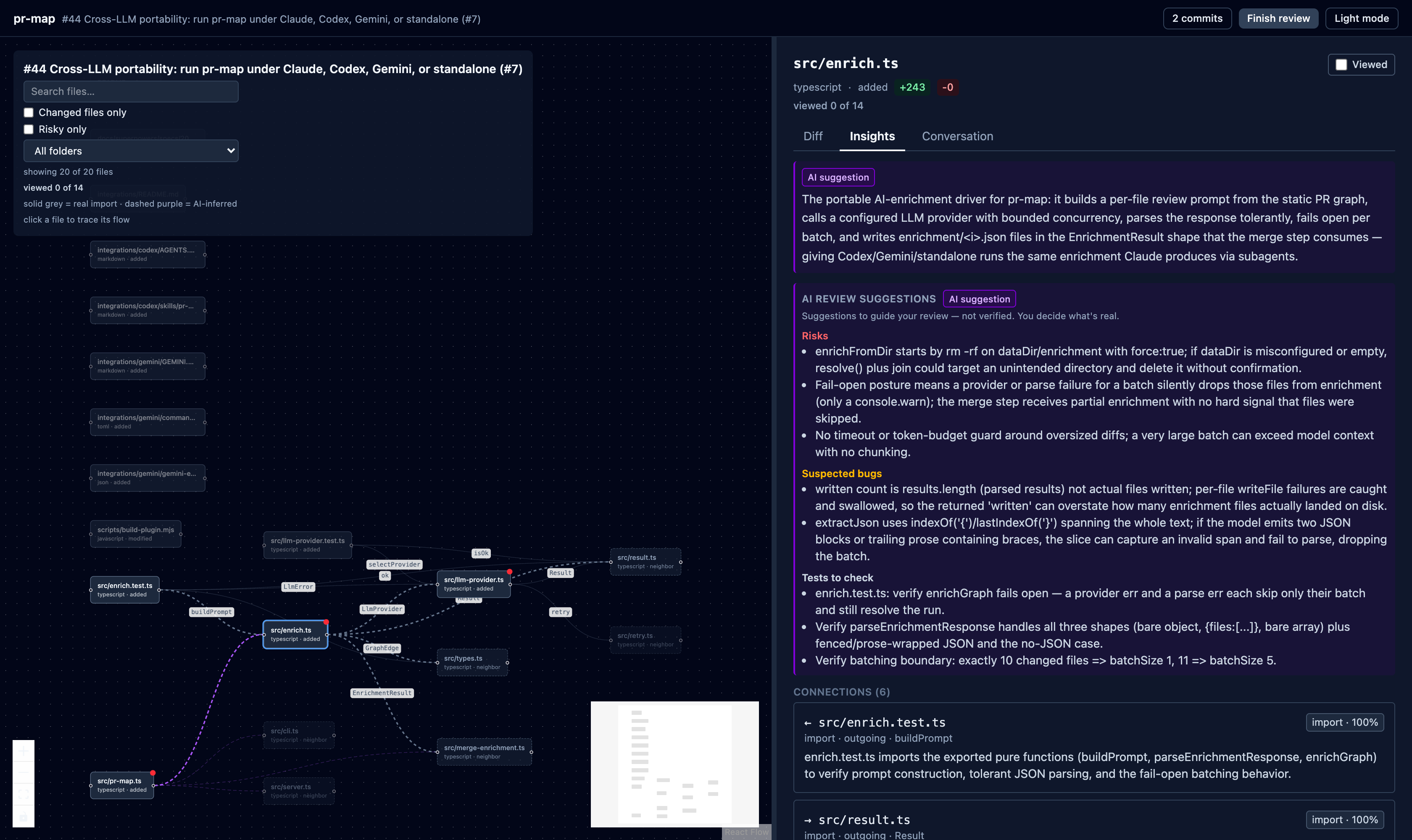
pr-map turns a PR into a map plus a review workspace:
- A graph of the files the PR changes and how they connect — real import edges plus
the one-hop neighbors a change touches, so you can see its blast radius. - AI review notes on each file: a plain-language summary, the reason two files are
connected, and review hints (risks, suspected bugs, tests to check, impact). Edges the
static scan missed are inferred and drawn separately. - A local dashboard where you read each diff, leave line / range / file / PR
comments and GitHub suggestions, and submit a verdict.
Every read and every review action goes through your already-authenticated gh CLI —
no API keys, no token management. And the AI only ever suggests: it never approves,
never posts, and never decides. The review is yours.
It runs as a Claude Code plugin (Claude does the AI step, so there is nothing to
configure), and the same engine runs under Codex, Gemini CLI, or standalone with a
swappable model.
Quickstart (Claude Code)
You need an authenticated gh CLI (gh auth status), Claude Code, and to be inside a
local checkout of the PR's repository.
Install the plugin from a clone of this repo:
claude plugin marketplace add .
claude plugin install pr-map@pr-map --scope user
Then, from inside a checkout of the PR's repository:
/pr-map <url|number>
With no argument it defaults to the PR for the current branch. That is the whole flow —
pr-map checks the PR out, builds the graph, enriches it, and opens the dashboard.
The installed plugin is self-contained: its bundled scripts run with plain node from${CLAUDE_PLUGIN_ROOT}/dist. There is no npm install step to use it.
How it works
Four stages run in order:
build the graph -> add AI insights -> merge them in -> open the dashboard
- Build the graph. Each changed file becomes a node; an import scanner draws the
edges; one-hop neighbors (unchanged files that talk to the changed ones) are pulled in. - Add AI insights. Each file gets a summary, the "why" of each connection, review
insights, and any semantic edges the static scan missed. AI-added edges are taggedorigin: "llm"; static edges keeporigin: "static". - Merge the insights into the graph.
- Open the dashboard in your browser.
Three of the four stages are plain, deterministic node scripts (no model). Only "add
AI insights" uses a language model — which is the one piece that swaps per runtime.
Use outside Claude Code (Codex, Gemini, or standalone)
Only the AI enrichment step is Claude-specific; the rest is plain node. The bundled
engine runs under any coding agent — or standalone with no agent — using a swappable LLM
provider (local Ollama by default, any OpenAI-compatible endpoint optional). Run the
whole pipeline with one command:
node "$PRMAP_HOME/pr-map-plugin/dist/pr-map.js" <url|number>
See integrations/README.md for setup, the PRMAP_LLM_*
provider table, and the Codex skill and Gemini extension wrappers.
Dashboard features
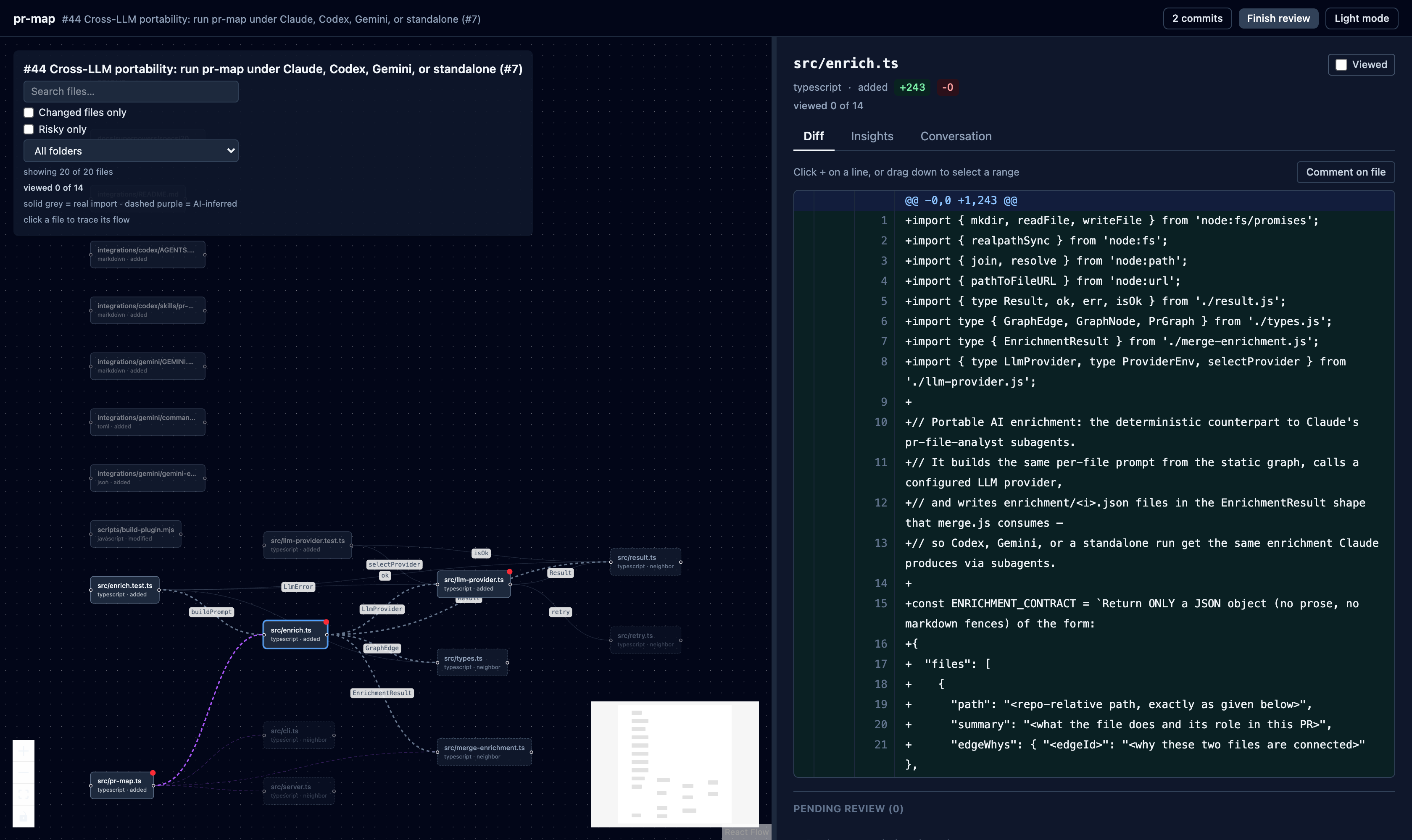
- Import graph of the changed files and their one-hop neighbors, with folder and risk
filters, search, and click-to-focus on a node. - GitHub-style diff with single-line, multi-line range, file, and PR-level comments,
shown as inline threads. - GitHub suggested changes: propose exact replacement text on a line or range.
- The PR's existing conversation (inline review comments and PR-level comments), read-only.
- Resolve and unresolve review threads.
- CI/checks status badge for the PR's head commit, and the PR's commit list.
- Mark-file-as-viewed progress, persisted per PR across reloads.
- AI enrichment (summaries, insights, inferred edges) clearly framed as suggestions, not
verdicts. - Dark and light theme.
- Submit a verdict: Approve, Request changes, or Comment.
Reviewing
Comments have three scopes:
- Line / range — click the
+on a diff line, or drag down the line numbers to
select a range, then write the comment. Use Suggest change to propose exact
replacement text as a GitHub suggestion. - File — a whole-file comment, added from the file's panel.
- PR — a general comment on the pull request as a whole.
Comments collect into a pending review. You can delete a pending comment before
submitting, and reply to an existing thread by its GitHub comment id. When you submit a
verdict (Approve / Request changes / Comment), line and file comments post together with
the verdict; PR-level conversation comments and replies post immediately. Submitting is
always an explicit action you take in the UI — pr-map never submits on your behalf.
You cannot Approve or Request changes on your own PR — GitHub rejects self-reviews of
that kind. Use Comment instead when reviewing a PR you authored.
Data and .gitignore
pr-map writes its working data under the target repository at.pr-map/<owner>-<repo>-<number>/ (graph.json, raw.json, the enrichment/
directory, and pending-review.json). Add .pr-map/ to the target repo's .gitignore
so this per-PR data is never committed:
echo ".pr-map/" >> .gitignore
Troubleshooting
Dashboard server stopped or closed. The server is stopped automatically when the
Claude Code session ends (the plugin's SessionEnd cleanup hook). To relaunch it against
existing data without rebuilding the graph:
node "$CLAUDE_PLUGIN_ROOT/dist/server.js" <dataDir>
<dataDir> is the .pr-map/<owner>-<repo>-<number>/ directory printed when the graph
was built. The server listens on http://localhost:5598 (or the next free port).
gh errors when fetching the PR or posting a review. Run gh auth status and confirm
you are authenticated for the right host. Both PR data and review actions go through gh.
Graph shows isolated nodes. Static edges are detected by import rules that cover
JavaScript/TypeScript, Python, Go, Java/Kotlin, Ruby, and Rust. Files in other languages
have no static edges and may appear isolated; they rely on AI-suggested edges (taggedorigin: "llm") to connect them.
Development
For working on pr-map itself (not required to use it):
npm run typecheck      # tsc --noEmit
npm run lint           # eslint
npm test               # vitest
npm run build:plugin   # build the dashboard and bundle the plugin into pr-map-plugin/
build:plugin builds dashboard/ and bundles the runtime into self-contained node
scripts under pr-map-plugin/dist plus the dashboard under pr-map-plugin/dashboard-dist,
which is what the installed plugin runs.
License
MIT — see LICENSE.
Yorumlar (0)
Yorum birakmak icin giris yap.
Yorum birakSonuc bulunamadi