vallennextproject
Health Uyari
- No license — Repository has no license file
- No description — Repository has no description
- Active repo — Last push 0 days ago
- Low visibility — Only 9 GitHub stars
Code Basarisiz
- rm -rf — Recursive force deletion command in tests/test_cli_fixes.py
Permissions Gecti
- Permissions — No dangerous permissions requested
Bu listing icin henuz AI raporu yok.

⚡ VALLEN NEXT
vallennextproject — Autonomous AI Software Engineering Studio & Terminal Agent





Open-source autonomous AI coding studio and terminal agent designed as a lightweight, private, and fully customizable alternative to Cursor and Claude Code.
📌 Keywords & Topics
ai-code-editor • autonomous-agent • coding-agent • cursor-alternative • claude-code-alternative • monaco-editor • terminal-agent • tui • developer-tools • vallennext • vallen-ide • vallencli • vallennextproject
💡 Apa itu VALLEN NEXT?
VALLEN NEXT (vallennextproject) menggabungkan dua lingkungan pengembangan dalam satu ekosistem:
- VALLEN IDE (AI Studio GUI) — Antarmuka web & desktop modern berbasis Monaco Editor, dilengkapi visual unified diff viewer, live Linux PTY multi-terminal, dan AI Copilot real-time.
- VALLEN CLI (Terminal TUI) — Agent coding otonom berkecepatan tinggi di dalam terminal untuk mengeksplorasi codebase, menjalankan pengujian, dan mengedit file secara mandiri.
- Unified Launcher (
vallennext) — Satu perintah CLI utama dengan ASCII Banner, pengecekan sistem, dan pemilih environment yang fleksibel.
📸 Tampilan Antarmuka (UI Showcase)
🎨 VALLEN IDE — Modern AI Code Studio & Monaco Editor
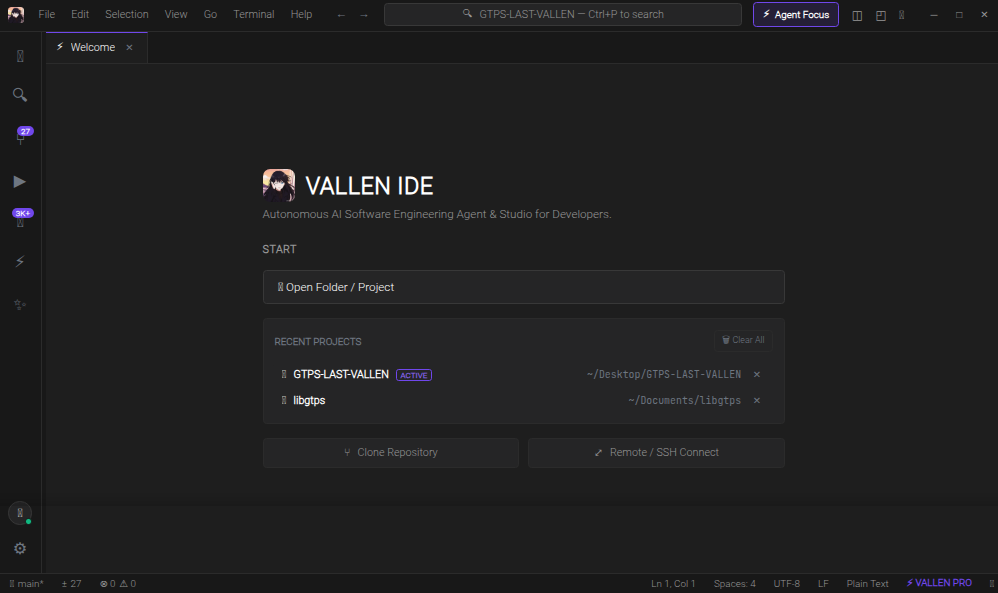
Antarmuka VALLEN IDE dengan Monaco Editor, AI Copilot real-time, Live Linux PTY multi-terminal, side-by-side diff review, dan sinkronisasi file instan.
⚡ Unified Launcher (vallennext)
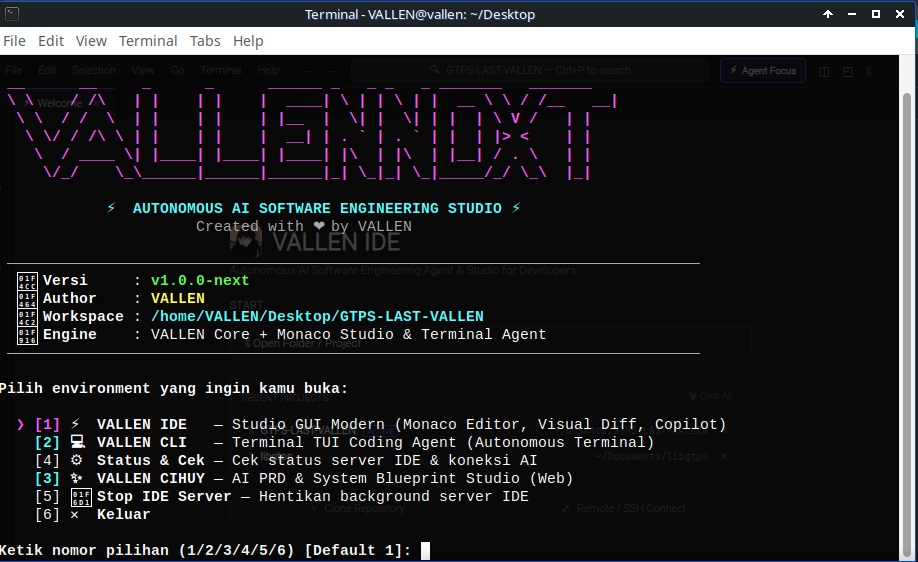
Unified CLI launcher dengan ASCII banner, diagnosa status sistem, dan pemilih environment yang cepat.
🖥️ VALLEN CLI — Autonomous Terminal Agent (TUI)
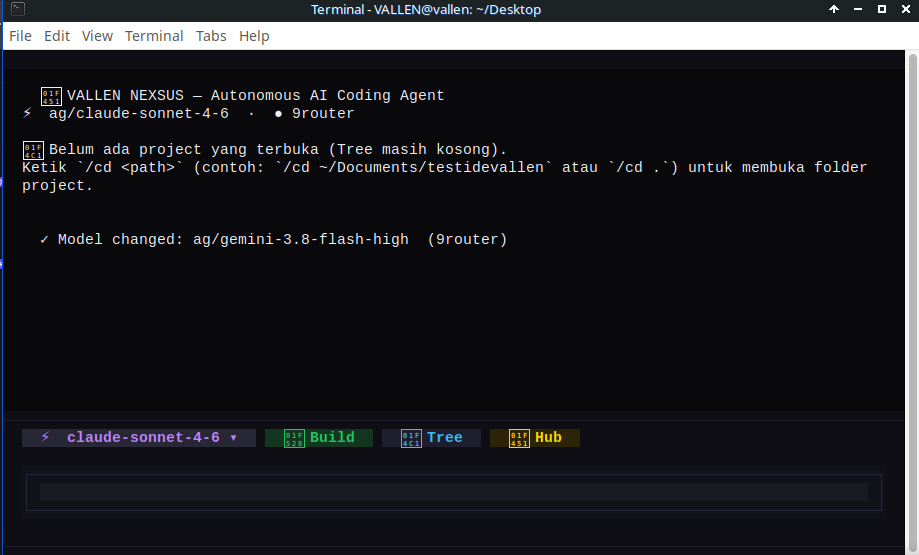
Agent coding otonom berkecepatan tinggi di dalam terminal dengan subagent tasking, memory compaction, dan auto-formatter.
🚀 Fitur Unggulan
🎨 1. VALLEN IDE (Studio Antarmuka)
- Monaco Code Editor: Editor kode standar industri dengan syntax highlighting, minimap, multi-tab, code navigation, dan keyboard shortcuts VS Code.
- AI Agent Copilot & Live Reasoning:
- Autonomous Multi-Round Execution: Mampu menjalankan 50 hingga 100 ronde eksekusi tool berkelanjutan tanpa terhenti di tengah jalan.
- Quick Continuation Chips: Tombol 1-klik
⚡ Lanjut (Continue),🔨 Build & Test, dan📊 Git Statusuntuk interaksi instan tanpa repot mengetik manual. - Real-Time Monaco Live Sync: Tab editor yang sedang terbuka otomatis memuat kode terbaru saat agent selesai melakukan edit secara instan.
- Streaming respon real-time dengan blok penalaran terpisah (
💭 Thinking...). - Checklist aktivitas visual (
0/5 tasks) yang melacak tool agent langkah demi langkah. - Tombol 📋 Salin dan 🔄 Kirim Ulang di setiap pesan obrolan.
- Seleksi teks bebas di seluruh elemen chat tanpa batasan CSS.
- Syntax highlighting otomatis pada blok kode balasan AI menggunakan engine Highlight.js.
- Side-by-Side Unified Diff Review: Review perubahan kode sebelum diterapkan dengan diff banner interaktif (
✓ Accept/✕ Revert). - Live Linux PTY Multi-Terminal:
- Mendukung banyak sesi terminal sekaligus (
1: bash,2: bash,3: node, dst.) dengan tombol tambah+dan tutup✕. - Proses terminal berjalan independen di latar belakang tanpa saling mengganggu.
- Mendukung banyak sesi terminal sekaligus (
- Deteksi OS & Penanganan Sudo Otomatis:
- AI secara cerdas mendeteksi lingkungan OS (Linux distro, Windows, macOS, user, shell).
- Ketika sebuah perintah membutuhkan hak akses root (
sudo), terminal interaktif otomatis terbuka ke layar sehingga pengguna dapat memasukkan password root dengan aman.
- Visual Git Source Control: Pantau file modified/untracked, lakukan commit langsung, dan buka perbandingan diff file git hanya dengan 1 klik tombol Diff.
- Command Palette (
Ctrl+Shift+P&Ctrl+P):Ctrl+Puntuk mencari dan membuka file secara cepat.Ctrl+Shift+P(atau ketik prefix>) untuk mengeksekusi perintah IDE langsung.
- Recent Projects Management: Layar Welcome dengan daftar folder project aktif, tombol hapus satuan (
✕), dan tombol 🗑️ Clear All. - Preferences & Settings Modal (
⚙️): Ganti model AI aktif, ukuran font, jenis font, serta toggle Autopilot langsung lewat antarmuka grafis.
⚡ 2. VALLEN CLI & Autonomous Engine
- 20+ Tooling System Terintegrasi:
read,write,edit: Modifikasi baris kode spesifik dengan collision guard & enginesmart_replaceyang toleran spasi, tab (\t), dan CRLF line-endings.apply_patch: Patch multi-file envelope format.shell: Eksekusi terminal background dengan buffer protection.websearch&webfetch: Riset dokumentasi langsung dari internet.lsp: Navigasi symbol dan code intelligence.task: Subagent delegation untuk eksplorasi codebase besar.
- Auto-Compaction Memory: Pangkas log tool lama secara otomatis saat context window mendekati batas model agar sesi tetap hemat token.
- Self-Healing & Auto-Formatter: Otomatis menjalankan linter/formatter (
ruff,black,prettier,gofmt) setelah agent mengedit file. - Multi-Provider Support: Mendukung provider lokal (Ollama) serta provider cloud OpenAI-compatible, 9Router, Anthropic, dan Gemini.
📦 Kebutuhan Sistem (Prerequisites)
- Sistem Operasi: Linux (Ubuntu, Debian, Arch Linux, Fedora, Linux Mint), macOS, atau Windows (via WSL2 / Native Python)
- Python: Versi 3.11 atau lebih baru
- Git
- Browser: Google Chrome, Chromium, atau Firefox (untuk tampilan desktop IDE)
🛠️ Panduan Instalasi Cepat
1. Clone Repository
git clone https://github.com/vallenmulia99/vallennextproject.git
cd vallennextproject
2. Jalankan Installer
bash install.sh
Installer otomatis:
- Menyiapkan virtual environment
.venv. - Menginstall seluruh dependensi (
fastapi,uvicorn,textual,rich,websockets,httpx, dll). - Mendaftarkan symlink global
vallennext,vallencli, danvallen-ide. - Memasang shortcut desktop icon di application menu Linux.
Instalasi Manual (Alternatif via Pip):
python3 -m venv .venv
source .venv/bin/activate
pip install -r requirements.txt
pip install -e .
🎮 Cara Menjalankan
🌟 1. Unified Launcher (vallennext) — Rekomendasi Utama
Cukup ketik satu perintah di terminal:
vallennext
Perintah ini akan membuka menu interaktif dengan ASCII Art dan info sistem untuk memilih mode kerja Anda:
[1] ⚡ VALLEN IDE(Studio GUI)[2] 💻 VALLEN CLI(Terminal Agent)[3] ⚙️ Status & Cek(Kesehatan sistem)
Perintah langsung:
vallennext ide             # Langsung buka VALLEN IDE Studio
vallennext cli             # Langsung buka VALLEN CLI Terminal Agent
vallennext status          # Cek status server IDE & koneksi AI
vallennext stop            # Hentikan background server IDE
vallennext -v              # Cek versi VALLEN NEXT
2. Perintah Langsung per Aplikasi
vallen-ide                 # Buka VALLEN IDE Studio
vallencli                  # Buka VALLEN CLI TUI Agent
vallencli run "buatkan api" # Mode headless CLI
⌨️ Shortcut Keyboard Penting
| Shortcut | Fungsi |
|---|---|
Ctrl + P |
Quick Open: Cari dan buka file secara instan |
Ctrl + Shift + P |
Command Palette: Jalankan perintah IDE |
Ctrl + B |
Buka / tutup Sidebar Explorer |
| `Ctrl + `` | Buka / tutup Panel Terminal bawah |
Ctrl + Shift + L |
Fokus kursor langsung ke AI Copilot Chat |
Ctrl + Shift + F |
Buka panel Search in Files |
Ctrl + Shift + G |
Buka panel Source Control Git |
Ctrl + Shift + D |
Quick Run & Debug file aktif di terminal |
Shift + Alt + F |
Format dokumen kode aktif |
Ctrl + S |
Simpan file aktif |
Ctrl + W |
Tutup tab aktif |
⚙️ Konfigurasi Provider & Model AI
Konfigurasi tersimpan pada file ~/.config/vallen/config.toml atau dapat diubah melalui menu Settings (⚙️) di IDE.
[general]
theme = "dark"
temperature = 0.7
max_tokens = 8192

[providers]
active = "9router"

[providers.9router]
base_url = "http://127.0.0.1:20128/v1"
api_key = "your-api-key-here"
model = "ag/claude-sonnet-4-6"
enabled = true

[providers.ollama]
base_url = "http://localhost:11434/v1"
api_key = "ollama"
model = "deepseek-r1:14b"
enabled = false
👤 Author & Full Credits
Project ini dirancang, dibangun, dan dikembangkan secara penuh oleh:
- Creator & Lead Developer: VALLEN (@vallenmulia99)
- Official Repository: https://github.com/vallenmulia99/vallennextproject
- License: MIT License
Built with passion by VALLEN — Autonomous AI Software Engineering for Everyone.
Yorumlar (0)
Yorum birakmak icin giris yap.
Yorum birakSonuc bulunamadi