varyai
Health Uyari
- License — License: MIT
- Description — Repository has a description
- Active repo — Last push 0 days ago
- Low visibility — Only 9 GitHub stars
Code Gecti
- Code scan — Scanned 12 files during light audit, no dangerous patterns found
Permissions Gecti
- Permissions — No dangerous permissions requested
Bu listing icin henuz AI raporu yok.
A local AI gateway for provider routing, sensitive-data redaction, and tool-risk visibility.
中文官网 · 下载安装 · 快速接入 · 最新版本 · 问题反馈
A local AI gateway for your coding workflow.
Connect providers. Inspect outbound text. Understand model usage.
Tauri + Rust React + TypeScript MIT licensed
Official Website · Get started · Screenshots · Documentation · Contribute · Upstream · License
Vary AI brings provider management, local routing, and request inspection into one desktop application. It is an independent derivative of CC Switch, with its original license and contributor attribution preserved.
Screenshots
Your workflow, in view
Review model usage, cache reuse, estimated costs, and security event groups in one dashboard.
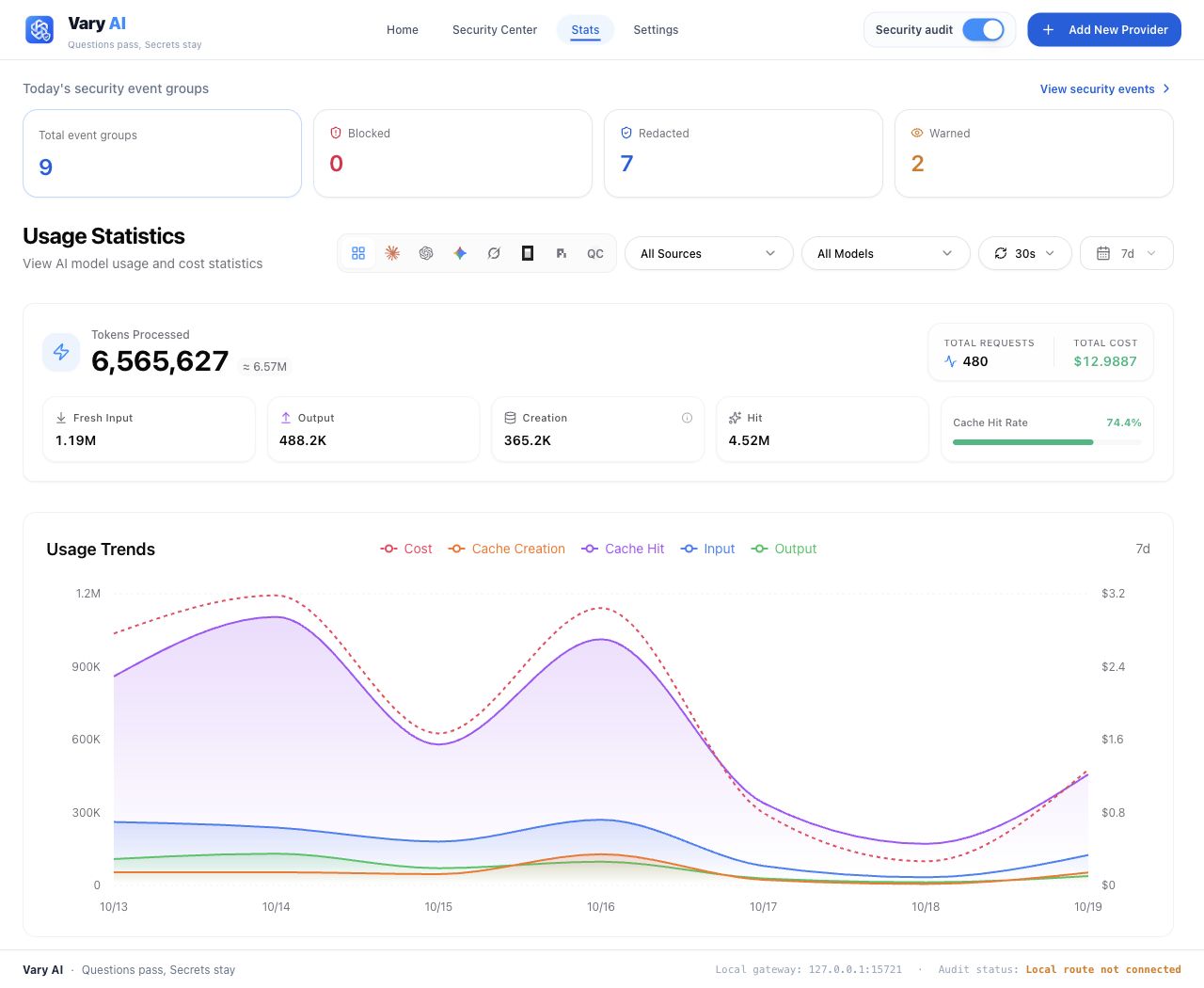
Sample data and example policy settings are shown throughout.
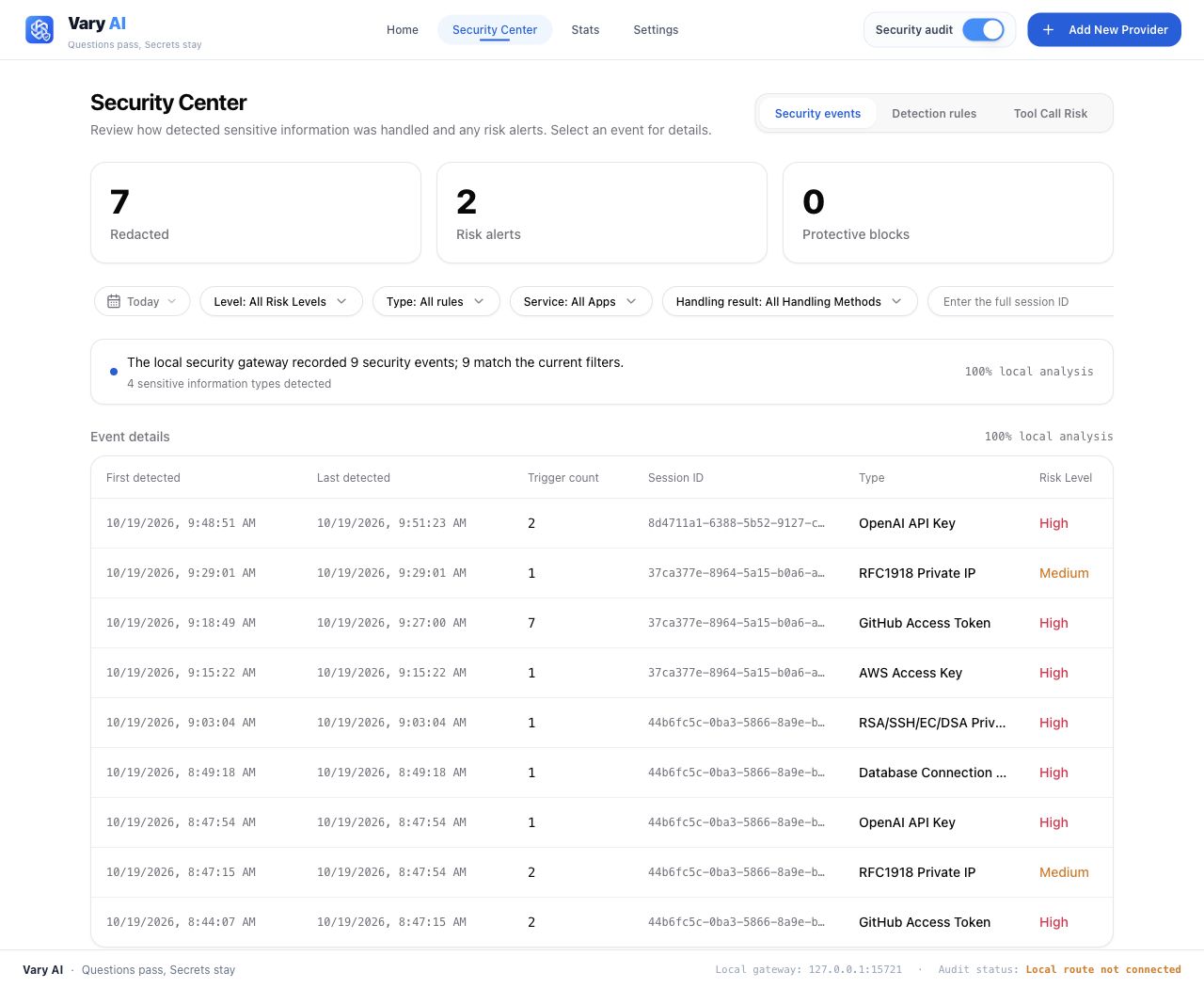
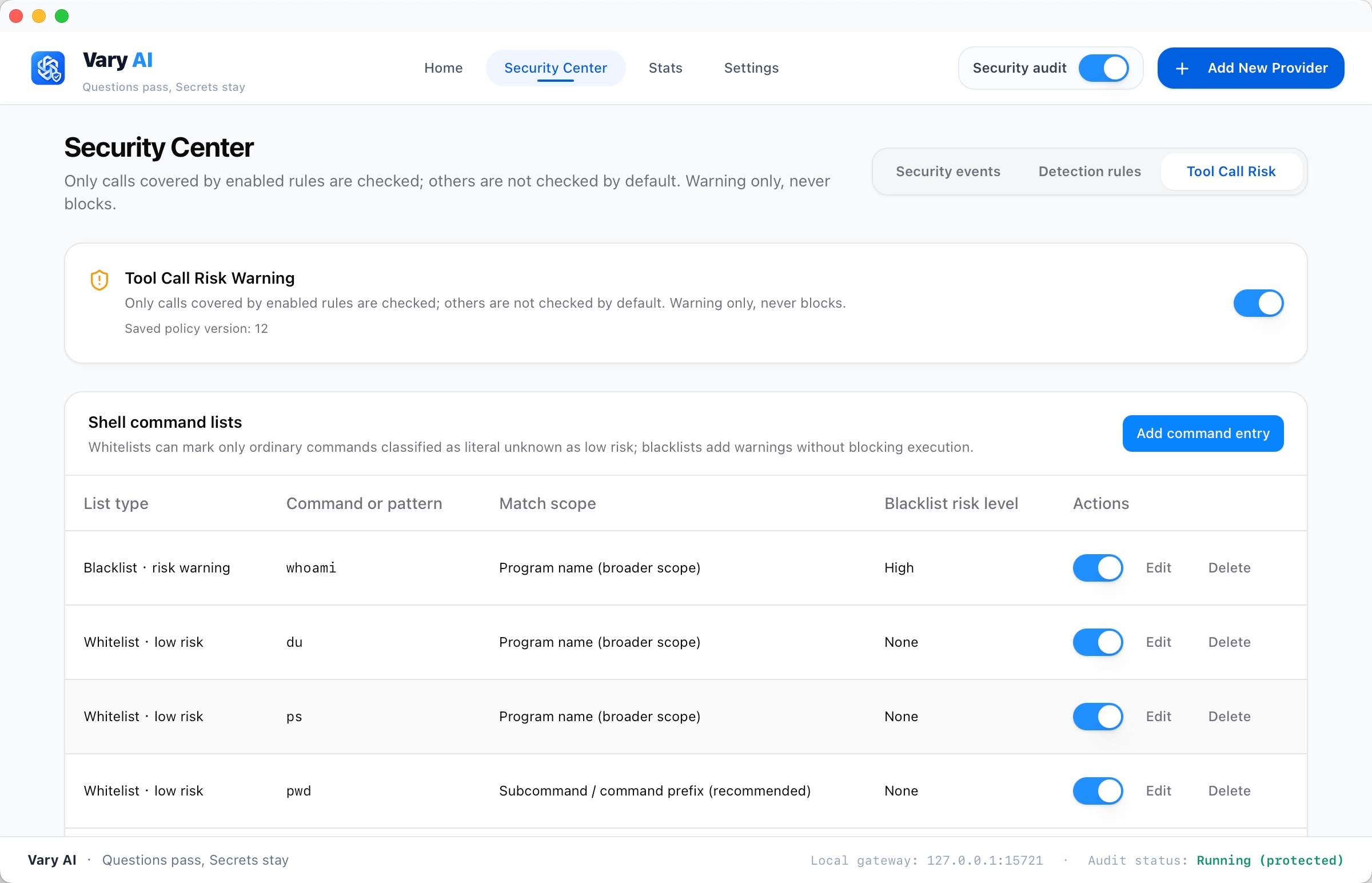
Explore the Security Center — events, detection rules, and tool-risk settingsReview security events
Inspect grouped detections, repeat occurrences, session identifiers, and handling results.
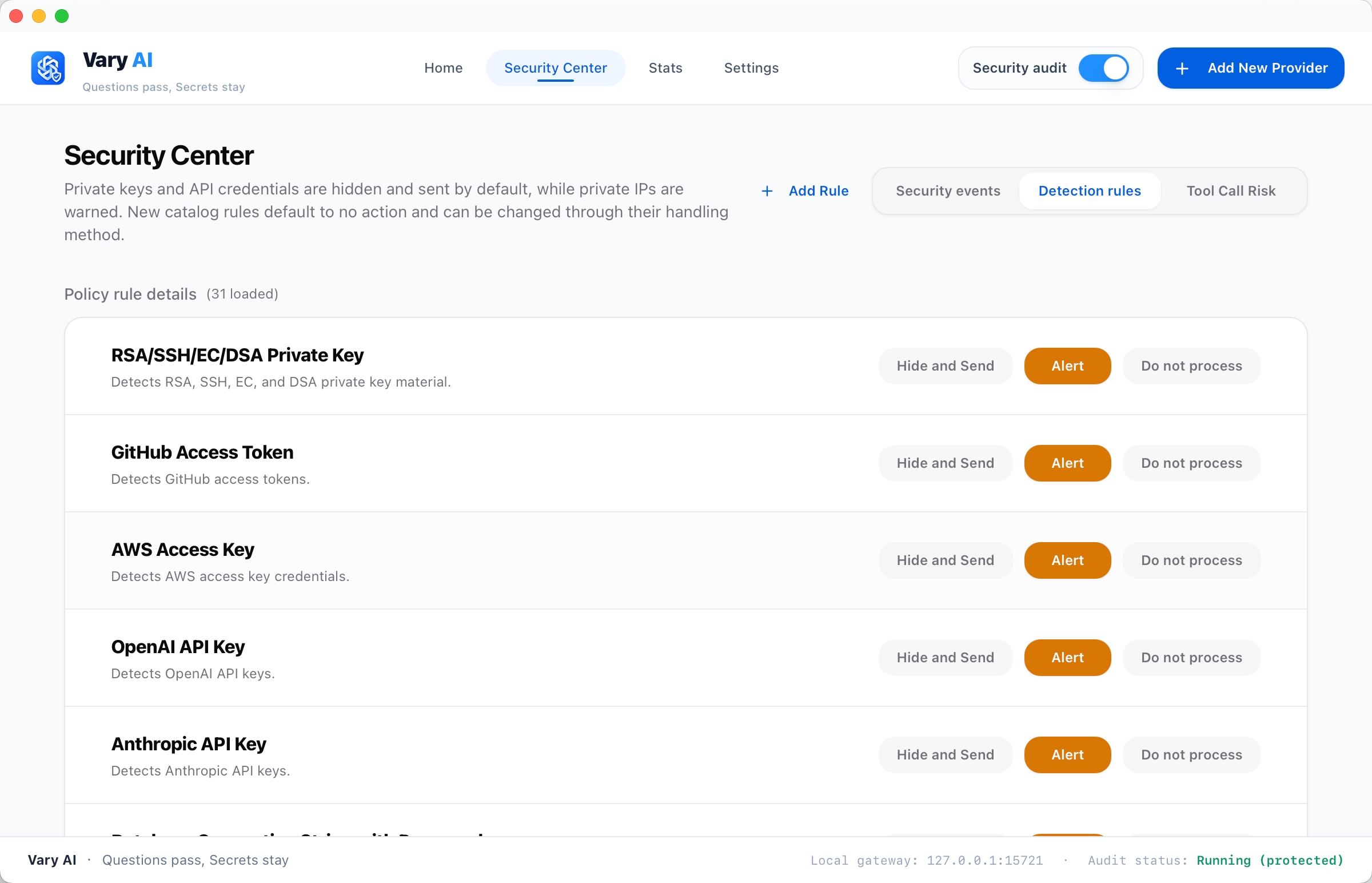
Configure detection rules
Choose how supported sensitive-information rules handle matches.
Observe tool-call risk
Configure tool-risk warnings and command lists for supported tool calls.
Built around your coding workflow
|
Connect your tools
Manage provider endpoints, model routes, MCP resources, Skills, and prompts from one desktop app. |
Inspect before forwarding
Apply configured redaction and audit rules to supported outbound text. Review detections in the Security Center. |
Understand your usage
See token categories, cache reuse, estimated costs, and provider and model breakdowns. |
Local proxy routing supports Claude Code, Codex, Gemini CLI, Grok Build, and Pi. Client bridges provide additional integration-specific capabilities. See the routing guide, configuration profiles, and Doubao Work guide for scope and setup.
Inspection covers traffic and fields handled by the enabled integration. Tool-risk observations provide warnings and records; they do not authorize, pause, or sandbox tool execution.
Explore all capabilities| Feature | Description |
|---|---|
| Provider management | Manage endpoints, credentials, and model settings for supported coding tools. |
| Local gateway | Route supported clients through a local HTTP proxy with streaming, protocol adaptation, retries, and configured failover. The default listener is 127.0.0.1:15722. |
| Protocol adaptation | Adapters for Anthropic Messages, OpenAI Chat Completions, OpenAI Responses, and Gemini. Available routes and conversion behavior depend on the client and provider. |
| Protocol matrix | Four-protocol routing and verification |
| Sensitive-data inspection | Inspect supported outbound text fields with built-in and custom rules. Configure redaction, audit logging, or forwarding without inspection for each rule. |
| Security center | Review detected events by time, session, information type, risk level, and handling result. |
| Tool-risk observations | Record and flag supported tool calls covered by enabled risk rules. |
| Usage statistics | Review requests, token categories, cache reuse, estimated costs, and provider and model breakdowns. |
| Client resources | Manage MCP configuration, Skills, and prompts for clients that support those integrations. |
Quick start
Prerequisites
- Node.js: the version in
.node-version. - pnpm: the version in
package.json, managed through itspackageManagerfield. - Rust: the stable toolchain in
rust-toolchain.toml, includingrustfmtandclippy. The crate declares Rust1.85.0as its minimum version. - Native dependencies: Xcode Command Line Tools on macOS; MSVC C++ build tools and WebView2 on Windows; GTK and WebKitGTK development packages on Linux. See the platform build guides.
Run from source
Clone the repository and install its dependencies:
git clone https://github.com/varium-ai/varyai.git
cd varyai
pnpm install --frozen-lockfile
pnpm dev
pnpm dev starts the Vite renderer and the native Tauri application. It automatically selects an available renderer port starting at 3001 and passes the actual URL to Tauri. Closing the command or a failed Tauri startup also shuts down its renderer. Exit an existing Vary AI instance before starting a separate development instance; the single-instance handler can bring an existing window to the foreground.
For frontend work, use pnpm dev:renderer. It serves the renderer at http://localhost:3001; native commands and the Rust gateway require the desktop runtime.
Configure a client
- Install the coding client separately, then select it in Vary AI.
- Add a provider with your endpoint, credentials, and model settings.
- Select the provider. Enable local routing for a supported client when you need protocol adaptation or request inspection.
- Restart or reload the client so it reads its updated configuration, then make a small test request.
- Review usage and security events, and configure the rules appropriate to your workflow.
Client routing changes the client's active endpoint configuration. Back up existing settings before first use. Requests are forwarded to the provider you configure; see Local routing for client-specific behavior.
Development
See CONTRIBUTING.md for the development workflow and validation requirements.
Checks and local buildsRun the contributor checks from the repository root:
pnpm typecheck
pnpm build:renderer
pnpm test:unit
cargo check --manifest-path src-tauri/Cargo.toml
cargo test --lib --manifest-path src-tauri/Cargo.toml
The contributing guide describes formatting, Clippy, and integration-test requirements.
To compile the desktop application without generating installer bundles or updater artifacts:
pnpm tauri build --no-bundle --config src-tauri/tauri.no-updater.conf.json
See the macOS, Windows, and Linux guides for local packaging. The no-updater build configuration controls artifact generation; it does not disable runtime update checks.
Data and network behavior
Vary AI stores independent configuration under ~/.varyai/, using varyai.db and varyai-ext.db. Native backup/restore and cloud synchronization use VaryAI storage; old VaryAI installation upgrades are outside this flow. Client-native configuration can still be shared with other managers. See the storage documentation for ownership and backup boundaries.
Installation statistics are enabled by default and use Google Analytics directly, with public Measurement ID G-2R2MZ76G1E. A separate hidden WebView sends installation-observation, daily-activity and version-change events; the main app view does not load the remote tag. The random installation ID is saved outside configuration export and synchronization. Google also receives connection and WebView device metadata; prompts, conversations, provider credentials and tool content are excluded. Settings → General → Privacy lets users disable reporting, delete the local statistics ID and preserve that choice across restarts. No Vary AI statistics backend or API secret is required. See Data and network behavior for scope and reporting limits.
Documentation
| Topic | Guide |
|---|---|
| Usage | User guide |
| Providers and routing | Provider setup and protocol conversion |
| Sensitive-data inspection | DLP architecture |
| Tool-risk observations | Coverage and behavior |
| Local storage | Shared and extension databases |
| Troubleshooting | Troubleshooting guide |
| Contributions | Contributing · Code of Conduct |
| Vulnerability reporting | Security policy |
See the documentation index for additional integration, architecture, and build references.
Contributing
Bug reports, focused pull requests, documentation improvements, and translations are welcome. Include reproduction steps and relevant validation, and update documentation when behavior changes. Follow CONTRIBUTING.md and the Code of Conduct.
Use this project's issue tracker for Vary AI-specific reports. Follow SECURITY.md for sensitive reports; do not include credentials, private configuration, or customer data in public examples.
Upstream origin and attribution
Vary AI is an independent derivative of CC Switch, created by Jason Young and its contributors. CC Switch provides the foundation for provider configuration, client integrations, and other inherited functionality. Vary AI adapts and extends this foundation for local routing, sensitive-data inspection, security event review, and tool-risk observations.
The retained CC Switch baseline is bd247a4adb92adfee0f065f0bdaac9580cfc276a — fix(proxy): omit missing tool descriptions instead of serializing null (#7319).
This commit and its 2,438 ancestors remain unchanged, preserving 2,439 original CC Switch commits. Vary AI development was consolidated into a source snapshot after this baseline, with upstream notices and contributor credit retained.
Later CC Switch changes were also adapted; this baseline is the retained history boundary, not a claim that all reused code comes from that revision. See Upstream provenance for seven verified examples with original commit links and file-level evidence, and Contributors for contributor credit. The examples are not an exhaustive inventory of upstream reuse.
Vary AI-specific changes and support are maintained in this repository. Please direct Vary AI reports here rather than to CC Switch maintainers. Vary AI is not an official CC Switch release.
License
Vary AI is distributed under the MIT License. It permits use, modification, distribution, sublicensing, and commercial use, subject to retaining the copyright and permission notices in copies or substantial portions of the software. The software is provided without warranty; see LICENSE for the complete terms.
The original CC Switch copyright notice is preserved:
Copyright (c) 2025 Jason Young
CC Switch's license at the recorded baseline is MIT. Retaining that notice credits the upstream work; it does not attribute all Vary AI changes to the upstream author. Dependencies and other third-party materials retain their respective licenses and notices.
Yorumlar (0)
Yorum birakmak icin giris yap.
Yorum birakSonuc bulunamadi