actp
Health Warn
- License — License: Apache-2.0
- Description — Repository has a description
- Active repo — Last push 0 days ago
- Low visibility — Only 7 GitHub stars
Code Fail
- rm -rf — Recursive force deletion command in packaging/macos/build-app.sh
Permissions Pass
- Permissions — No dangerous permissions requested
No AI report is available for this listing yet.
Agent Communication Transport Protocol (ACP over HTTP)
ACTP – Agent Client Transport Protocol
ACP over HTTP. Run coding agents on one machine, use them from anywhere.
ACTP lets any ACP client – an app, a bot, an editor – use a coding agent such as Claude Code, Codex, Droid or Pi that runs on another machine, as if it were local. The agent keeps its own login, files and tools on its machine. The client keeps speaking plain ACP. Neither side needs to change.
 ACP client (app, bot, editor)                       machine with the agents
 ─────────────────────────────                       ──────────────────────────────────
 spawns: actp droid@workstation                      actp server
        │  plain ACP over stdio                         │  plain ACP over stdio
        ▼                                               ▼
   actp bridge  ════ HTTPS / WebSocket, token ════►  Droid · Claude Code · Codex · Pi …
v0.1.0 – the first release. It works end to end, including through a Cloudflare tunnel, and has been tried with real agents. Builds are not signed yet. See what is done and what is not.
Why
- Distributed agents – keep agents on a strong workstation while your app runs on a small VPS.
- Personal agents – connect an assistant running on your Mac to a family or business space.
- Your own machines – use the computers you already have, with the logins you already have.
- Any ACP client – nothing to add to the client: it starts
actpinstead of a local agent.
What you get
- Plain ACP on both ends. Clients and agents do not know actp is there.
- Connections that survive drops. A closed lid or a Wi-Fi change does not stop the agent. The bridge reconnects and catches up without losing or repeating a message.
- Tokens per client, limited to the agents and folders you choose, and revocable at any time.
- Safe defaults. Agents only start in folders you allow. Files, terminals and local MCP servers stay on the agent's machine.
- A menu bar app for macOS (and tray builds for Linux and Windows) with a dashboard, so you do not need to edit config files.
- Built-in Cloudflare tunnel for machines without a public address.
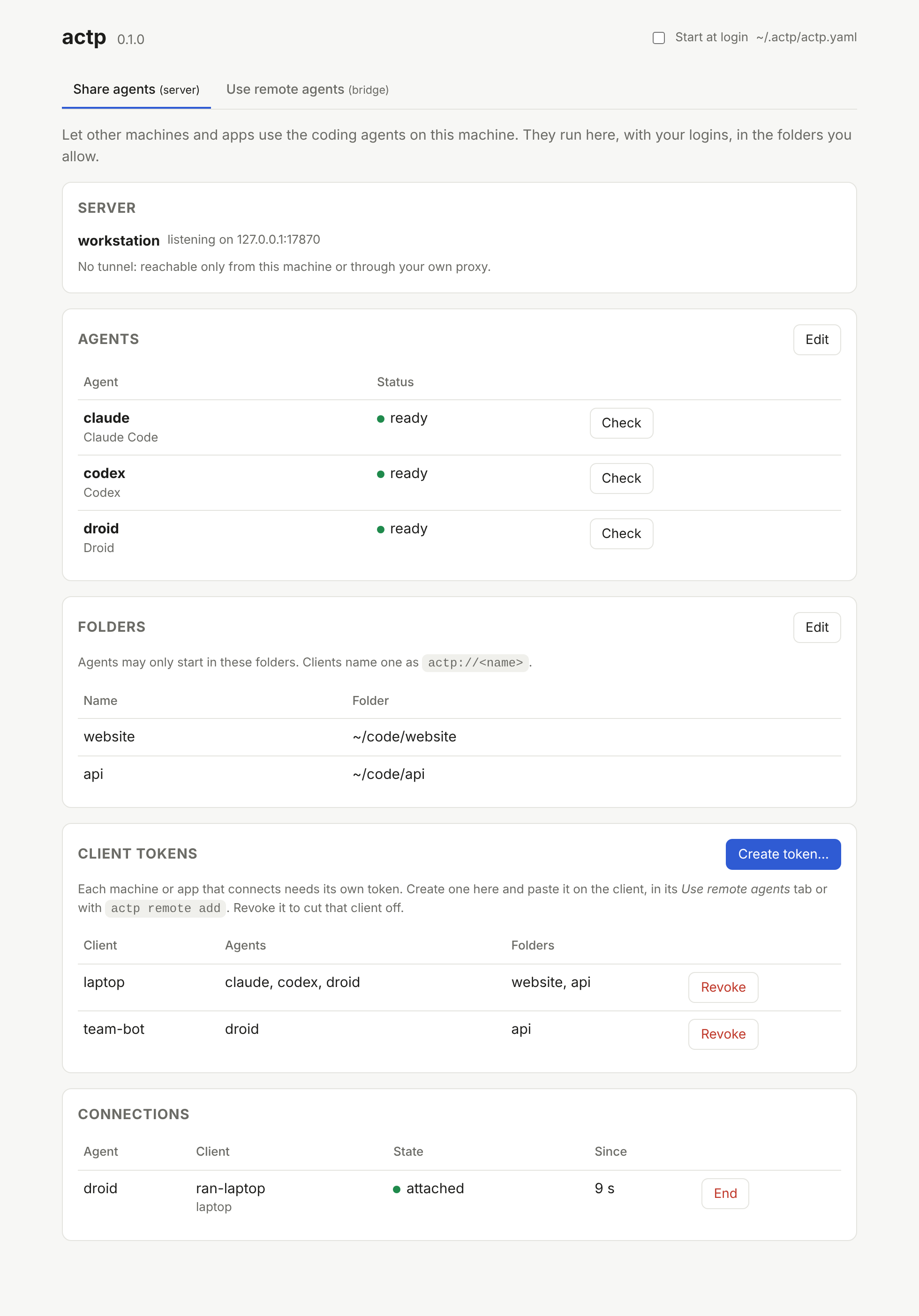
v0.1.0 is built for chat-style clients: apps, bots and assistants that talk to an agent and show what it does. The files live on the agent's machine, so clients that edit files themselves (IDE-style) are not a target yet.
Install
Download a build from the releases page:
| File | For |
|---|---|
actp_<version>_macos.zip |
macOS menu bar app (actp.app), Apple Silicon and Intel. |
actp-desktop_<version>_<os>_<arch> |
Linux and Windows builds with the tray icon. |
actp_<version>_<os>_<arch> |
The command line only, for servers and scripts. |
macOS builds are not signed yet. The first time, right-click actp.app and choose Open.
Or build from source with Go 1.25+:
go install github.com/varops/actp/cmd/actp@latest
On a Mac, packaging/macos/build-app.sh builds dist/actp.app.
Quick start with the app
On the machine with the agents:
- Open
actp.app. It lives in the menu bar and opens its dashboard. - In Share agents, pick the agents you want to share (actp lists the ones installed), the folders they may work in, and whether to use a Cloudflare tunnel. Click Start sharing.
- Under Client tokens, click Create token… for each machine or app that will connect. Copy the token; it is shown once.
- Copy the server URL. With a tunnel, wait until it says reachable (a new tunnel can take a minute).
On the client machine:
- Open
actp.appand go to Use remote agents. - Click Install the actp command, then Add remote… with a name (for example
workstation), the URL and the token. - Under that remote, copy the command for the agent you want (for example
actp droid@workstation) and use it as the agent command in your ACP client (see below).
Try it from a terminal:
actp droid@workstation -p "Say hello and list the files here"
Quick start on the command line
On the machine with the agents, create ~/.actp/actp.yaml:
server:
  listen: 127.0.0.1:7860
  tunnel:
    mode: quick                # or off, behind your own TLS proxy
  workspaces:
    - name: website
      path: ~/code/website
  agents:
    - id: claude
      preset: claude-code      # needs claude-agent-acp on PATH and `claude /login`
    - id: droid
      preset: droid
actp token create --name laptop --default-workspace website
actp doctor
actp serve
actp serve prints the tunnel URL once it is up. On the client machine:
echo 'actp_…' | actp remote add workstation https://….trycloudflare.com --token-stdin
actp agents workstation
actp claude@workstation -p "What is in this folder?"
Use it from an ACP client
Use actp <agent>@<remote> as the agent command. For example, in Zed's settings:
"agent_servers": {
  "Droid (workstation)": {
    "command": "/opt/homebrew/bin/actp",
    "args": ["droid@workstation"]
  }
}
Other clients take the same command and arguments; Copy as JSON in the dashboard gives you both. Use the full path to actp: apps started from Finder often do not see your shell's PATH.
Useful bridge options:
| Option | What it does |
|---|---|
--cwd actp://website |
Start every session in the website folder on the server, whatever folder the client sends. |
--map /local/path=actp://website |
Translate one client folder to a server folder. |
--token-env NAME |
Read the token from an environment variable instead of a saved remote. |
-p "text" |
Send one prompt and print the answer – for people at a terminal, not for clients. |
The server also accepts a URL directly: actp droid@https://agents.example.com --token-env ACTP_TOKEN.
How it behaves
- The network drops: the agent keeps working. The bridge reconnects in the background and receives everything it missed. A permission prompt waits for you.
- The client quits: the agent finishes its turn, then the session closes. The client can load the session again later and see what happened. To stop work, the client cancels the turn as usual.
- The agent asks a question nobody can answer (the client is gone): it is cancelled at once, so the session does not hang.
- Folders: a client folder means nothing on the server. Clients name a server folder as
actp://<name>, or you map folders in the token or with--cwd.
The details are in docs/design.md, section 3.
Tunnels
mode: quickneeds no account. The URL is random and changes every time the server restarts. Update your remotes with Edit in the dashboard. A new quick tunnel can take a minute to resolve.mode: namedwithtoken_envgives a stable hostname from your Cloudflare account (a dashboard-managed tunnel token).- No tunnel: put
actp servebehind your own TLS reverse proxy, or settls_certandtls_key.
If cloudflared is missing, the dashboard offers to install it, or run actp tunnel install. actp downloads a fixed version and checks a SHA-256 built into actp.
Troubleshooting
| Symptom | What to check |
|---|---|
| "no actp server answers at …" | The URL is wrong or the quick tunnel restarted. Copy the current URL from the server's dashboard. |
| Tunnel "not reachable yet" | Wait a minute. If it lasts, see ~/.actp/logs/cloudflared.log. |
| "no such host" after a while | Your computer cached "not found": sudo dscacheutil -flushcache; sudo killall -HUP mDNSResponder on macOS. |
An agent shows auth_required |
Log that agent in on the server machine (for example claude /login). |
| Something else | ~/.actp/logs/actp.log (the app) and actp doctor. |
A quick check that a server answers:
curl https://your-server/health
It should print {"ok":true}.
Security
- A client token is close to a shell. Whoever holds it can make the agents do anything your user can do on that machine. Folders limit where agents start, not what they can do. Only give tokens to clients you trust, and revoke them when you are done.
- Every request needs a token, including from the same machine: a tunnel makes outside traffic look local.
- Tokens are stored as hashes on the server and in the OS keychain on clients. They never go on a command line.
- The dashboard only listens on
127.0.0.1and only opens through a one-time link.
Commands
actp serve [--dashboard]                     run the server
actp tray                                    server, dashboard and menu bar icon
actp <agent>@<server> [options]              the bridge an ACP client spawns
actp <agent>@<server> -p "text"              one prompt from a terminal
actp token create|list|revoke                client tokens on a server
actp remote add|list|remove                  saved servers on a client
actp agents <server>                         what a server offers
actp tunnel install                          download cloudflared
actp doctor                                  check the config and the agents
actp version
Documents
docs/design.md– public API, configuration, behaviour, and what is done.docs/agents.md– supported agents, how to start them, and their quirks.api/openapi.yaml– the HTTP API.docs/native-clients.md– how to make an ACP client talk to actp directly, without the bridge.docs/wire.md– theactp.v1wire format between bridges (or native clients) and servers.docs/brainstorm.md– early notes and decisions.
Development
go test -race ./...
go generate ./api/
The second command regenerates the HTTP code after a change to api/openapi.yaml. CI runs the tests on Linux, macOS and Windows and builds actp.app on a Mac. Pushing a v* tag builds every platform into a draft GitHub release.
Contributing
Bug reports, fixes and new agent presets are welcome: see CONTRIBUTING.md. Please report security problems privately, as described in SECURITY.md.
License
Reviews (0)
Sign in to leave a review.
Leave a reviewNo results found