bb-plugin-handoff
Health Uyari
- License — License: MIT
- Description — Repository has a description
- Active repo — Last push 0 days ago
- Low visibility — Only 5 GitHub stars
Code Basarisiz
- os.homedir — User home directory access in adopt/adopt-core.ts
- os.homedir — User home directory access in adopt/agents/claude.ts
- process.env — Environment variable access in adopt/agents/claude.ts
- os.homedir — User home directory access in adopt/agents/codex.ts
- os.homedir — User home directory access in adopt/agents/gemini.ts
- os.homedir — User home directory access in adopt/agents/opencode.ts
Permissions Gecti
- Permissions — No dangerous permissions requested
Bu listing icin henuz AI raporu yok.
Move a whole session between agents and machines in both directions — hand a bb thread off to Codex, Claude Code, Kimi or opencode, or adopt an outside terminal session as a bb thread.

Handoff
Move a whole session between agents and machines, in both directions.
Hand a bb thread off to Codex, Claude Code, Kimi, opencode, Cursor and more,
or adopt a terminal session that never ran in bb at all.



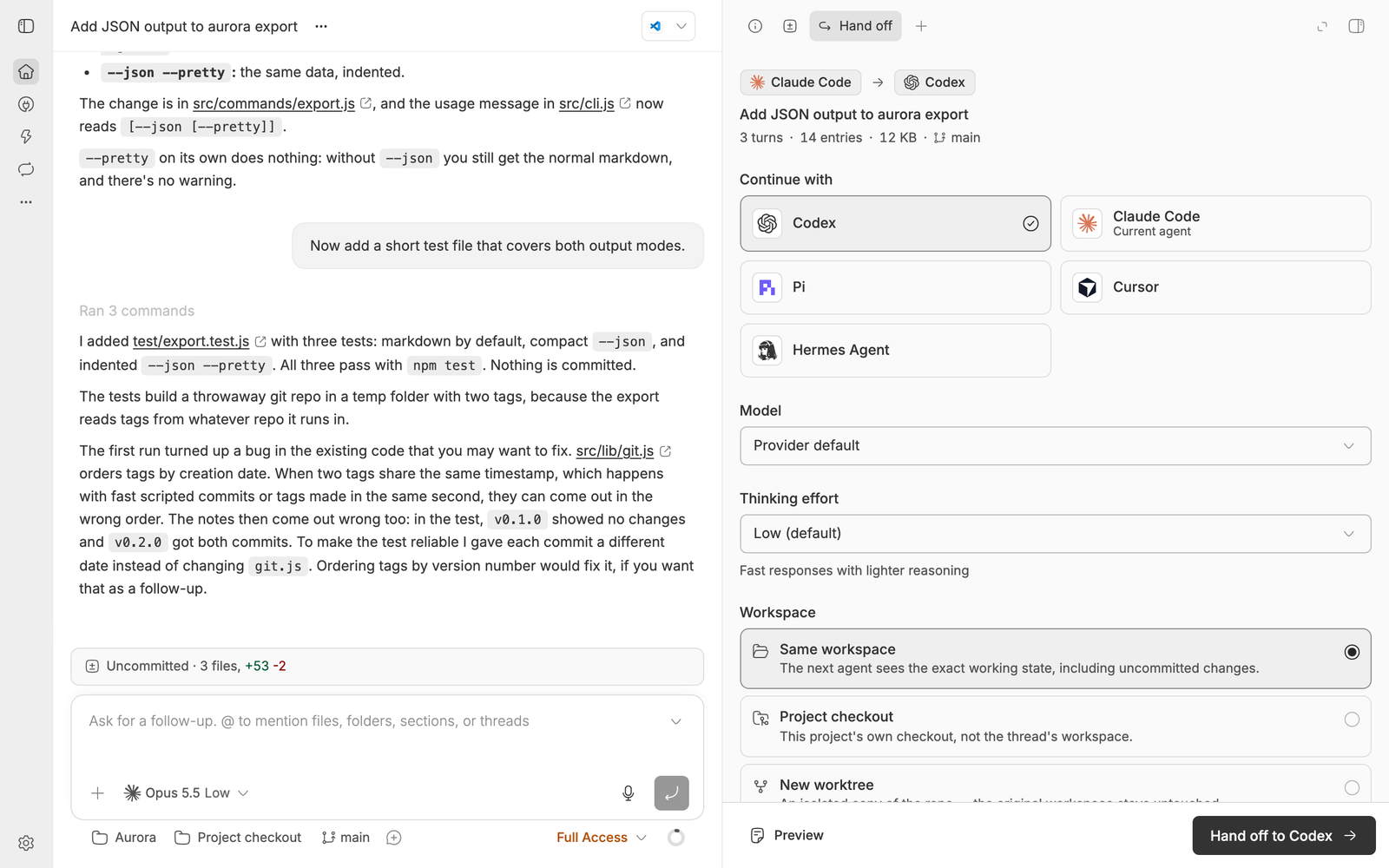
Every screenshot on this page is a real bb window, shot against a throwaway demo project.
Install
bb plugin install handoff
Or straight from this repository:
bb plugin install git:https://github.com/vburojevic/bb-plugin-handoff.git
[!NOTE]
Requires bb 0.49 or newer. No keys, no configuration, no external services: it only talks to your own bb and the session files already on your disks. Older bb keeps the last release it supports, because bb only updates a plugin to a release whose engine range it meets.
Why
No agent can load another agent's session file. Claude Code's JSONL means nothing to Codex, Codex's rollouts mean nothing to opencode, and a session is pinned to the machine whose disk it sits on. So the portable thing isn't the session format. It's a rendered transcript plus the working state it talks about.
That's the whole idea, applied in both directions:
| From | To | |
|---|---|---|
| Hand off | a bb thread on any provider | a new thread on any other provider, any enrolled machine |
| Adopt | a Claude Code, Codex, Gemini, OpenCode or Pi session in your terminal | a bb thread in the same directory, with its history |
flowchart LR
  T["bb thread<br>any provider"] -->|hand off| D["handoff document<br>transcript + working state"]
  D --> N["new bb thread<br>any provider, any machine"]
  S["terminal session<br>Claude Code, Codex,<br>Gemini CLI, OpenCode, Pi"] -->|adopt| A["bb thread<br>same directory, full history"]
Hand off: bb thread to any agent
Open any thread's right panel (⌘ J) and add the Hand off tab. Pick a target; everything else has a sane default.
Any installed provider is a targetThe panel reads bb's live catalog, so Codex, Claude Code, Kimi Code, opencode, Cursor, Pi, Hermes and anything else you've installed show up, with the unavailable ones sunk to the bottom rather than hidden. |
Model and thinking effortThey are the target's own, not the source's: pick |
The workspace is a choice, not a guessContinue in the same working directory (uncommitted changes and all), the project checkout, a fresh worktree, or a blank personal workspace. |
Optional briefingBefore the transfer, the outgoing agent writes a short status note (current state, decisions made, gotchas) that travels as its own section of the document. Skipped automatically when it's mid-turn or stops to ask you something. |
See exactly what the next agent gets
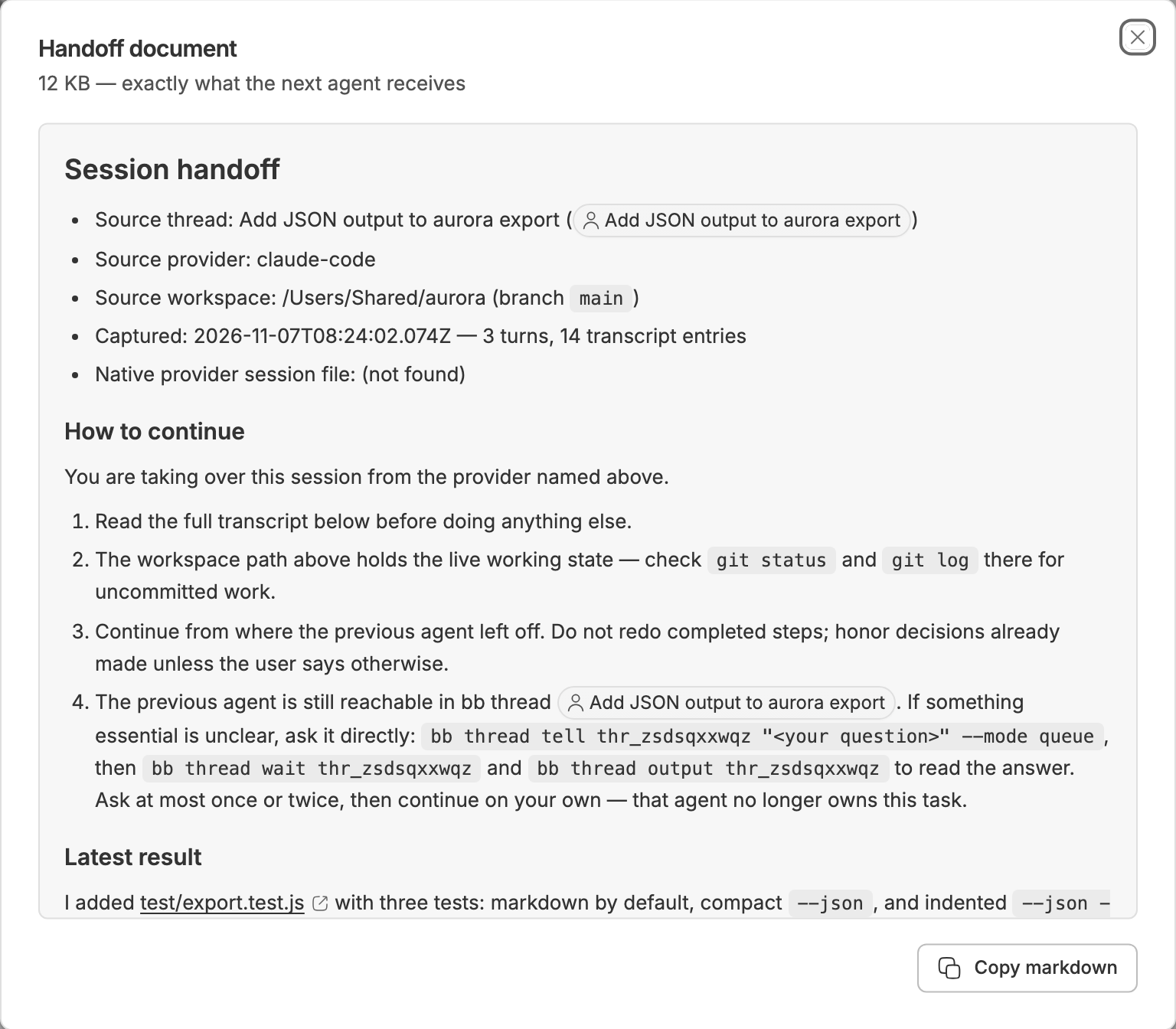
Preview renders the document byte for byte before anything is spawned: source thread and provider, workspace and branch, a link to the source provider's own raw session file, explicit "how to continue" instructions, and the full transcript. That means every user and assistant message, tool call with its arguments and result, command output, reasoning summary, plan and file change, pulled from bb's provider-independent event log rather than from any one agent's format.
Oversized transcripts are budgeted, not truncated blindly: the opening request and the recent tail are kept, and the oldest middle is dropped first.
Hand off from here, not from the top
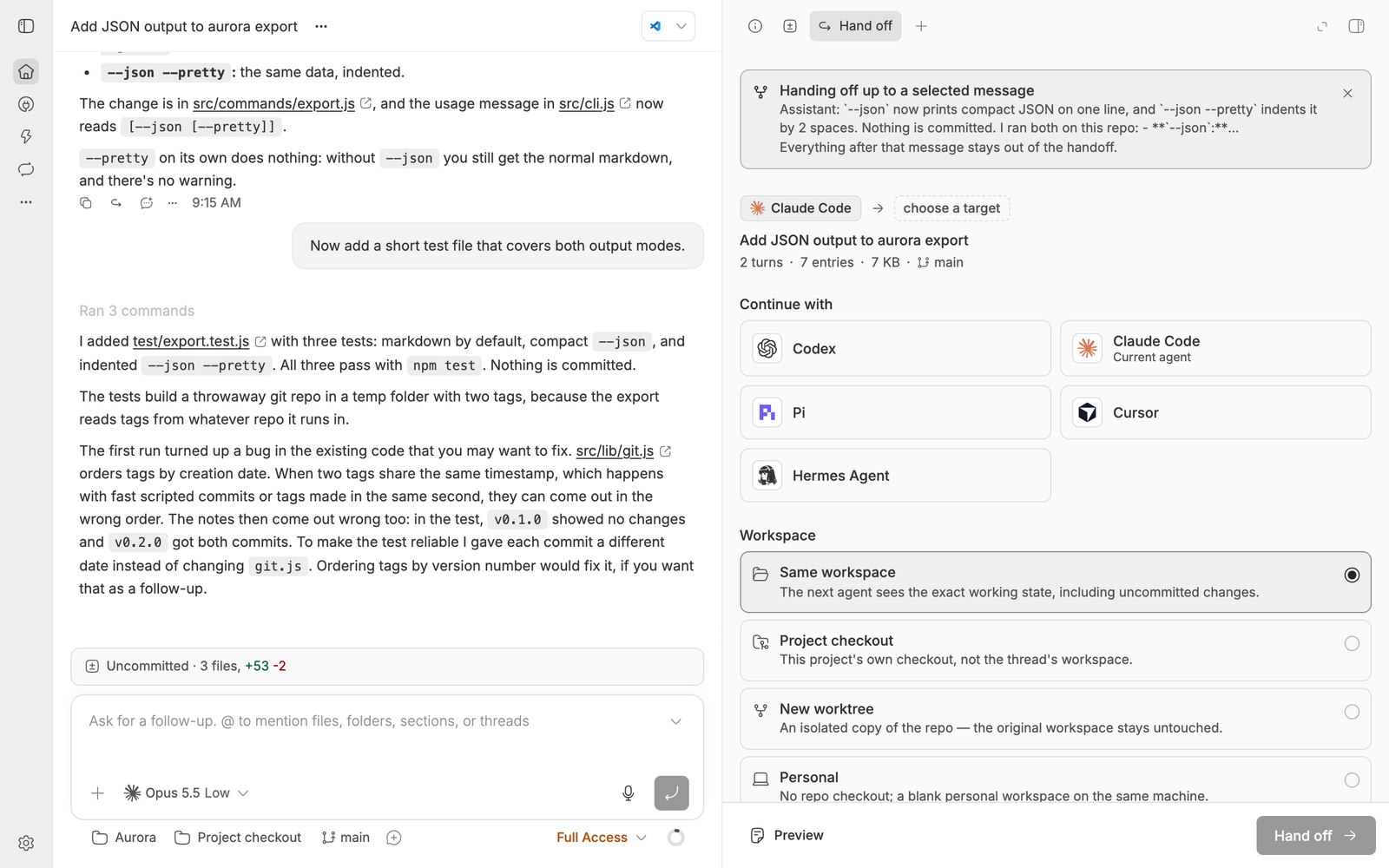
Hover any message, then Hand off from here. The panel re-scopes to the conversation up to that message: the false start, the abandoned approach and everything after it stay out of the document. The banner shows exactly where the cut lands, and clearing it restores the full thread.
Send it to another machine
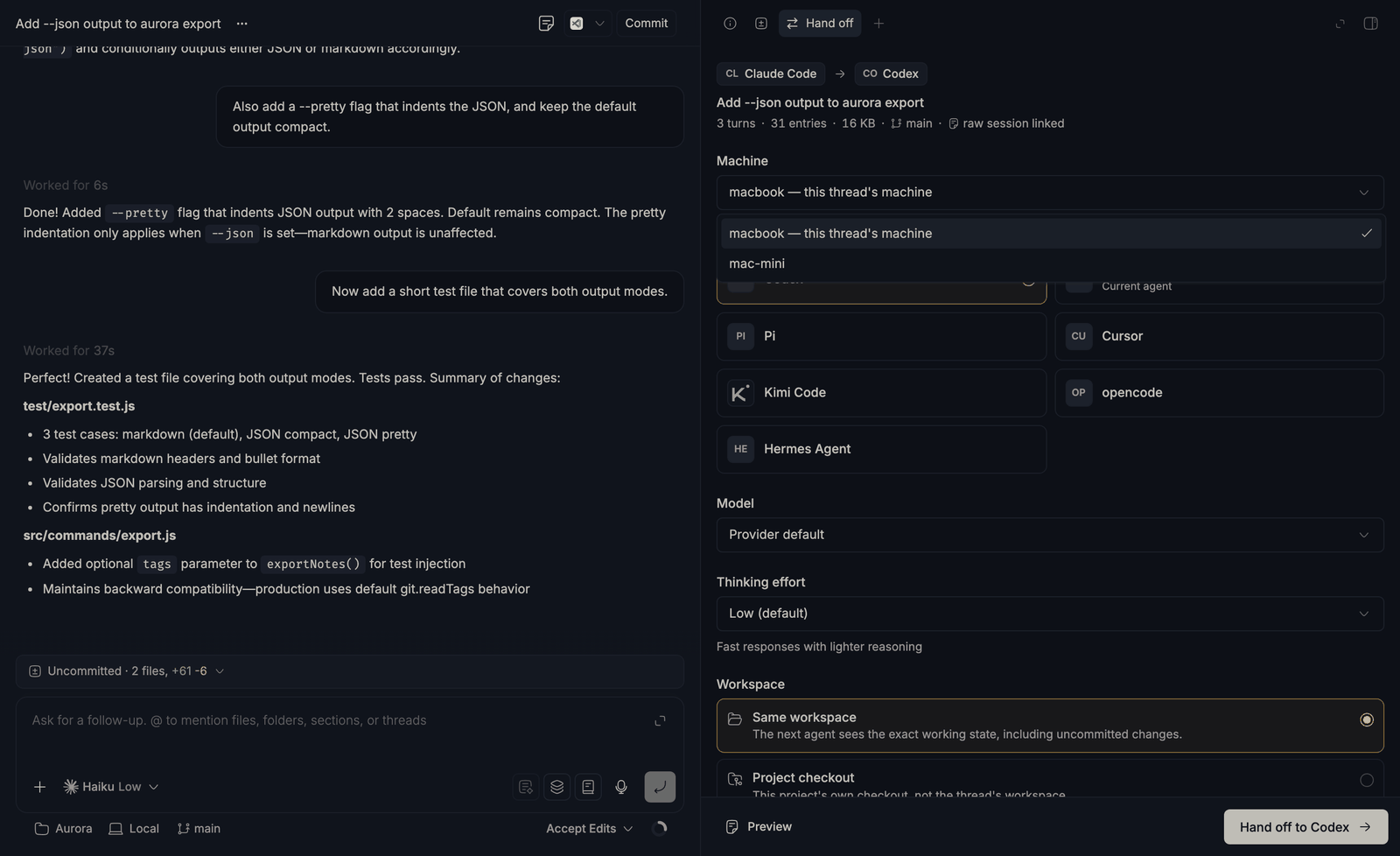
Pick a different enrolled machine and the whole panel re-scopes to it: its provider catalog, its models, its checkouts. A workspace can't span machines, so the modes adapt:
| Workspace | Same machine | Another machine |
|---|---|---|
reuse |
the thread's own environment | not possible: an environment lives on one host |
checkout |
the project's checkout | that machine's checkout of the same project |
worktree |
isolated worktree, default branch | isolated worktree, based on the thread's branch when it exists there |
personal |
blank workspace | blank workspace over there |
A personal-workspace handoff lands in bb's own Personal project, since bb only creates personal workspaces there.
A machine hop is the one case where a transcript alone would mislead: the files it discusses are on a disk the next agent can't see. So the handoff also:
- captures the source working tree's git state (branch, HEAD, dirty files),
- writes everything uncommitted as a patch on the target machine, with
git apply --3wayinstructions in the document, while the originals never move, - rewrites the document so the source path and raw session file are named as living on the other machine, not offered as readable,
- warns when the thread's branch doesn't exist over there and falls back to the default branch instead of failing.
Adopt: terminal session to bb thread
The other direction. You've been working in a plain terminal, it's turning into real work, and you want it in bb, with its history, in its own directory.
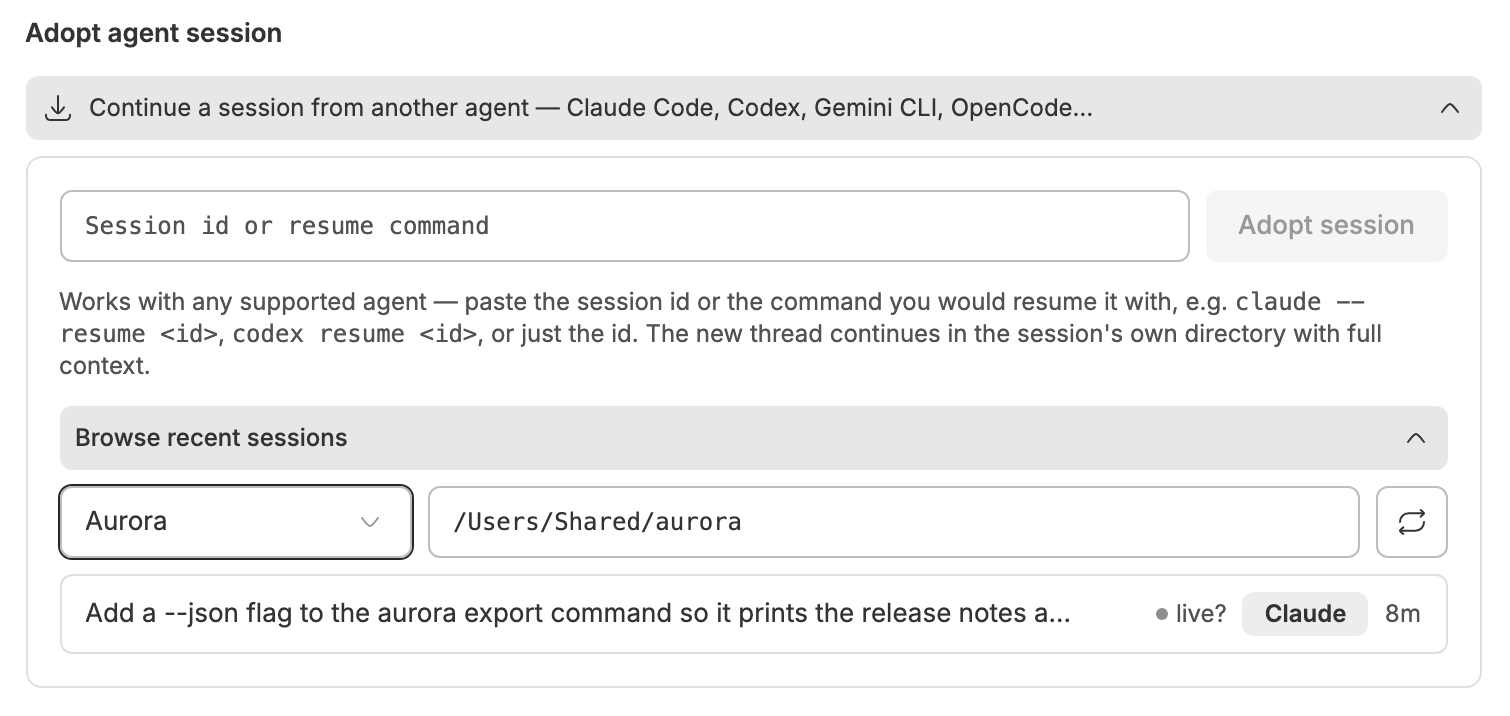
On the new-thread screen, expand Continue a session from another agent. Paste a session id, or the whole resume command you'd have typed:
claude --resume 9ace2fd5-d8ae-4946-a0a0-9ff58a6795df
codex resume 019fd95c-907f-7eb1-8dfc-2aad427ffc09
pi --session 11111111-2222-4333-8444-555555555555
Or just browse recent sessions per project and tap one.
| Agent | Session store | Continues on |
|---|---|---|
| Claude Code | ~/.claude/projects/<cwd-slug>/*.jsonl |
claude-code |
| Codex CLI | ~/.codex/sessions/YYYY/MM/DD/rollout-*.jsonl |
codex |
| Gemini CLI | ~/.gemini/tmp/<sha256(cwd)>/chats/*.json |
claude-code (no bb Gemini provider) |
| OpenCode | ~/.local/share/opencode/opencode.db (SQLite) |
acp-opencode |
| Pi | ~/.pi/agent/sessions/--<cwd>--/*.jsonl |
pi |
- Claude Code profiles. Claude Code's store moves with
CLAUDE_CONFIG_DIR. Adoption reads the configured directory, the default~/.claude, and any sibling profile directory (~/.claude-work,~/.claude-personal), so sessions started under a non-default profile are adoptable too, on this machine and on another one. - Pi sessions. Adoption imports the last persisted branch, not abandoned alternatives. User and assistant text, tool-call summaries, compactions and branch summaries carry over; system prompts, thinking, tool output, image bytes and extension state do not. Context edits on that branch are honored, and the source files stay untouched. Local discovery respects
PI_CODING_AGENT_DIRandPI_CODING_AGENT_SESSION_DIRin the bb server process. Remote discovery reads the default~/.pi/agent/sessionsstore; per-invocation--session-dirpaths and Pi settings-file overrides are not discovered. - OpenCode sessions. Adoption reads both of OpenCode's layouts: current builds (
session_v2andsession_message) and older ones (session,messageandpart), including a store upgraded from one to the other. User and assistant text and tool calls carry over; reasoning and OpenCode's own bookkeeping rows (system notices, automatic continue prompts, compactions, model and agent switches) do not. The store is read with thesqlite3command, or with the SQLite built into bb's runtime where that command is missing, as on a stock Windows install. - Same directory. The new thread starts in the session's own directory, so the files are exactly where you left them.
- Clean timeline. The transcript rides along as agent-only context: your bb timeline stays clean, the agent gets the full history.
- Project matching. The project is matched from the directory (longest project-source prefix). If nothing covers it, one is created.
- Live sessions. A session with activity in the last ~10 minutes is flagged as "may still be running", both in the session list and to the new agent, which watches for concurrent edits.
- Other machines.
--machine <host>adopts from another enrolled machine and runs the thread over there. Claude, Codex and Pi resolve from a session id alone; Gemini and OpenCode need--cwd, since their ids live inside a file and a SQLite row. The panel has the same axis: a From machine picker appears once a second machine is enrolled. Andbb handoff adoptrun from a bb thread that lives on another machine follows that machine automatically: its directory is over there, so that is where the sessions are read.
[!TIP]
Agents get both directions through the bundledhandoffskill. Asking an agent to "continue this in Codex" or "adopt my terminal session" is enough to trigger it.
Reference
CLI# Hand off
bb handoff --self --to codex # the current thread
bb handoff <thread-id> --to acp-opencode \
--model <model> --effort high --workspace worktree \
--instructions "Finish the tests first"
bb handoff <thread-id> --to codex --briefing # ask the source agent for a note first
bb handoff <thread-id> --to codex --up-to-seq <n> # only up to one message
bb handoff <thread-id> --to codex --machine mini # continue on another machine
bb handoff <thread-id> --dry-run # capture stats only
bb handoff export --self --out handoff.md # for use outside bb entirely:
codex exec - < handoff.md # pipe the document anywhere
bb handoff targets [--machine <host>] [--json] # providers per machine, + machines
bb handoff list [--json] # past handoffs (last 100)
# Adopt: run inside a live terminal session, or paste an id
bb handoff adopt # newest session for this directory
bb handoff adopt 9ace2fd5 # by id or prefix, any directory
bb handoff adopt "claude --resume 9ace2fd5-…" # or the whole resume command
bb handoff adopt "pi --session 11111111-…" # Pi ids and resume commands too
bb handoff adopt list --agent pi --cwd <path> # only Pi sessions
bb handoff adopt list --cwd <path> # what's adoptable here
bb handoff adopt list --machine mini --cwd <path> # …and over there
--effort takes none, low, medium, high, xhigh, ultracode, max or ultra; the levels a model accepts vary by model, so omit it to use the target model's own default.
capture.ts  handoff.ts   handing off: event-log capture → document → spawn
machines.ts              the machine axis: target host + workspace planning,
                         working-tree capture, patch delivery
adopt/                   adopting: external session stores → bb thread
  agents/                one adapter per agent (list / find / parse)
  transcript.ts          shared block model + budgeted markdown rendering
  adopt-core.ts          query parsing, global lookup, adoption engine
  remote.ts              the same stores read over bb's host file API and a
                         short-lived host terminal
Adding an agent means implementing AgentAdapter from adopt/transcript.ts in adopt/agents/<name>.ts (list(cwd) for discovery, find(id) for global lookup, parse(file) for transcript blocks) and registering it in adopt/agents/index.ts.
npm install
npm test            # 205 unit tests: capture/render, transfer planning,
                    # adopt engine + adapters, remote store readers, CLI guards
npm run typecheck
bb plugin install . # register this checkout with your bb
bb plugin dev       # watch loop: rebuild + reload on save
The plugin builds against the @get-bb/plugin-sdk package; bb plugin types . keeps its pin and the shimmed packages in step with your bb.
components/ui/ is vendored shadcn-model source from the BB component registry (pinned in components.json). Edit freely, and update with npx shadcn add @bb/<name>.
Limitations
- Continuation is transcript-based, not a native resume: the new thread is a fresh provider session seeded with the prior conversation. Work done in the old session after the handoff isn't carried over.
- Cross-machine carries a patch, not a workspace (capped at 2 MB). When the changes don't fit, the patch keeps the files that fit whole and the document names the rest. Untracked build output, ignored files and anything outside the repo stay behind.
- Remote reads need the machine connected. Discovery there runs one short-lived terminal (POSIX
sh,stat,find, plussqlite3for OpenCode). Without it, adoption by explicit session id still works for Claude, Codex and Pi through the file API alone. - Remote listings are directory-scoped (
--cwdis required, since the invoking directory is a path on this machine) and show no titles, since reading one would cost a round trip per session. - Transcripts are size-capped (adopt: 150k chars by default).
- Not adoptable: agents that don't persist full transcripts locally. Amp keeps threads server-side, and Cursor keeps them in app-internal databases.
License
MIT © Vedran Burojevic
More plugins for bb: vburojevic/bb-plugins
Yorumlar (0)
Yorum birakmak icin giris yap.
Yorum birakSonuc bulunamadi