claude-vsphere-skill
Health Warn
- License — License: Apache-2.0
- Description — Repository has a description
- Active repo — Last push 0 days ago
- Low visibility — Only 5 GitHub stars
Code Fail
- rm -rf — Recursive force deletion command in test-unix.sh
- rm -rf — Recursive force deletion command in wrapper/setup.sh
- rm -rf — Recursive force deletion command in wrapper/test-redaction.sh
- rm -rf — Recursive force deletion command in wrapper/uninstall.sh
Permissions Pass
- Permissions — No dangerous permissions requested
No AI report is available for this listing yet.
A Claude Code skill that turns Claude into a vSphere administrator using govc. Inventory, reports, snapshot audits, root-cause analysis, and safe VM/host/cluster management for VMware vCenter and ESXi — read-only first, with confirmation guardrails for destructive operations.
claude-vsphere-skill
A Claude Code skill that turns Claude into a vSphere administrator using govc — inventory, reporting, snapshot audits, root-cause analysis, and safe VM/host/cluster management for VMware vCenter and ESXi.
Ask in plain language:
"Which VMs have snapshots, and how old are they?"
"VM web-01 was down last night. Find out what happened and when."
"Datastore capacity report — flag anything over 85% full."
"Prepare esx02 for patching."
"Health check as an HTML file I can send to the customer." (what that looks like)
And Claude picks the right govc commands, batches queries efficiently, parses the JSON, and answers like a colleague — including pushing back when your premise is wrong:
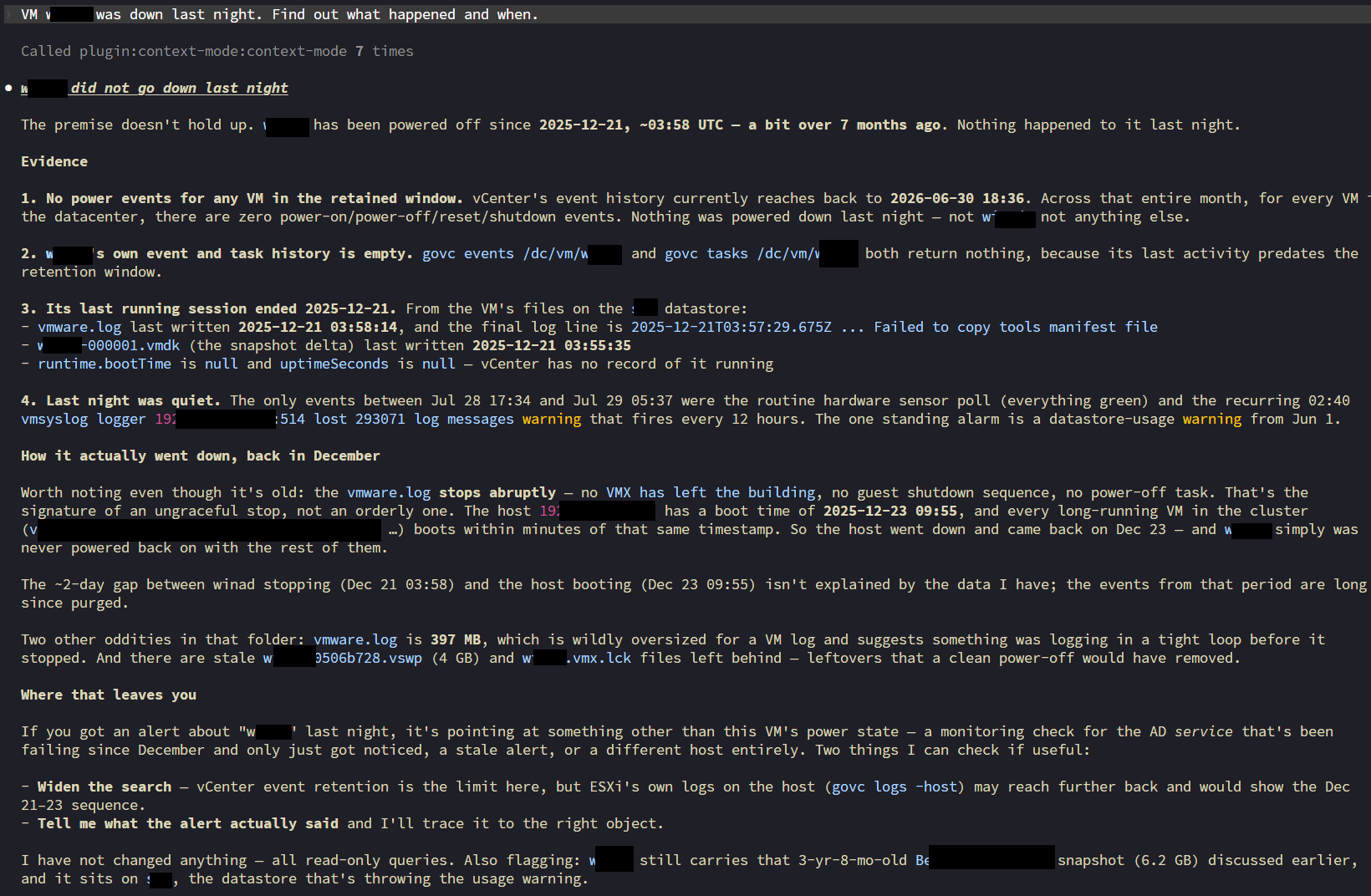
(Real session against a real vCenter: asked about an outage "last night", Claude proved from rotated vmware.log files — beyond vCenter's event retention — that the VM had been down since December, and reconstructed the host outage that caused it. All read-only.)
Safety first
Instructions the skill enforces on every session:
- Read-only first — reporting questions are answered with
*.info,find,collect,events,metric.sample; never by changing state. - Confirmation for destructive operations —
vm.destroy,snapshot.remove '*',datastore.rm,host.shutdownand friends require Claude to show the exact objects affected and get an explicit yes. - Dry-run mentality — before bulk operations, Claude prints the object list so you approve a list, not a pattern.
- Graceful before hard — guest shutdown before power-off, guest reboot before reset.
These are instructions, not a permission system. For defense in depth, run govc with a least-privilege vCenter role — with a read-only account the skill physically cannot change anything.
Requirements
- Claude Code
govcon PATH (step 1 below) — or lettest-unix.sh/test-windows.ps1install it for you- A vCenter or ESXi endpoint — or none at all: the test scripts can run against the bundled simulator
jqis recommended for the report patterns on bash-like shells; native PowerShell usesConvertFrom-Jsonand doesn't need it
Installation
Step 1 — install govc
| Platform | Command |
|---|---|
| macOS | brew install govc |
| Windows | scoop install govc |
| Linux | download below, or .deb/.rpm from releases |
| Any | go install github.com/vmware/govmomi/govc@latest |
Linux/macOS direct download. Note the aarch64 → arm64 mapping — uname -m reportsaarch64 on ARM, but the published asset is named arm64, so the naive one-liner 404s:
OS=$(uname -s); ARCH=$(uname -m)
[ "$ARCH" = "aarch64" ] && ARCH=arm64
curl -fL "https://github.com/vmware/govmomi/releases/latest/download/govc_${OS}_${ARCH}.tar.gz" \
  | sudo tar -C /usr/local/bin -xzf - govc
Verify with govc version. For jq: brew install jq / apt install jq / scoop install jq.
Step 2 — install the skill
Copy the govc/ folder — that's the whole skill — into your skills directory:
git clone https://github.com/vchaindz/claude-vsphere-skill.git
cd claude-vsphere-skill

# personal (all projects)
mkdir -p ~/.claude/skills && cp -r govc ~/.claude/skills/

# or per-project
mkdir -p /path/to/project/.claude/skills && cp -r govc /path/to/project/.claude/skills/
git clone https://github.com/vchaindz/claude-vsphere-skill.git
cd claude-vsphere-skill

$dst = "$env:USERPROFILE\.claude\skills\govc"
New-Item -ItemType Directory -Force -Path (Split-Path $dst) | Out-Null
if (Test-Path $dst) { Remove-Item $dst -Recurse -Force }   # avoid nesting on re-install
Copy-Item .\govc $dst -Recurse -Force
Step 3 — set the connection variables before starting Claude Code
Claude Code inherits the environment of the terminal that launches it, and each command it
runs is a separate process — so a variable exported mid-session does not stick. Set these
in your shell first, then run claude. If you change them, restart Claude Code.
# bash / zsh — Linux, macOS, WSL, Git Bash
export GOVC_URL='vcenter.example.com'
export GOVC_USERNAME='[email protected]'
export GOVC_PASSWORD='...'
export GOVC_INSECURE=true     # lab only, for self-signed certs; prefer GOVC_TLS_CA_CERTS
# PowerShell — this session
$env:GOVC_URL      = 'vcenter.example.com'
$env:GOVC_USERNAME = '[email protected]'
$env:GOVC_PASSWORD = '...'
$env:GOVC_INSECURE = 'true'

# or persistently (applies to NEW terminals — the current one keeps the old values)
setx GOVC_URL      "vcenter.example.com"
setx GOVC_USERNAME "[email protected]"
setx GOVC_PASSWORD "..."
REM cmd.exe
set GOVC_URL=vcenter.example.com
set [email protected]
set GOVC_PASSWORD=...
Confirm with govc about. To inspect a single variable use govc env GOVC_URL — a baregovc env prints GOVC_PASSWORD in cleartext.
To persist on Linux/macOS, add the export lines to ~/.zshrc (macOS default shell) or~/.bashrc.
Platform support
| Platform | Shell | Status |
|---|---|---|
| Linux (x86_64, arm64) | bash / zsh | Tested against a real vCenter and against the simulator |
| macOS (Intel, Apple Silicon) | zsh / bash | Same commands as Linux; no GNU-only flags in any pipeline |
| Windows | PowerShell 5.1 / 7+ | Tested against the simulator; every reference file carries PowerShell examples |
| Windows | Git Bash / WSL | Use the bash examples unchanged |
Try it without touching production
vcsim, the vCenter simulator from the govmomi project, answers nearly all govc calls with a simulated inventory. The included test scripts set everything up and validate the skill's command patterns:
# Windows: installs govc + vcsim, installs the skill, runs 15 smoke tests against the simulator
powershell -ExecutionPolicy Bypass -File .\test-windows.ps1
# Linux/macOS: installs govc + vcsim + the skill, runs 21 smoke tests against the simulator.
# No vCenter and no credentials needed — nothing real is touched.
./test-unix.sh --vcsim

# Or against your real vCenter: ~18 READ-ONLY tests
./test-unix.sh
# optional snapshot create/remove cycle on an explicitly named non-production VM:
./test-unix.sh --write-test my-test-vm
Recommended first interactive test: start claude, ask for an inventory report, then ask it to destroy a test VM — it should list the VM and ask for confirmation before doing anything.
Reports you can hand to someone
Quick questions get answered as a Markdown table in the chat. Ask for a report as a
file and you get a single self-contained HTML document instead — one file, no CDN links,
no external fonts or images, so it survives being emailed, archived, or opened on an
air-gapped management workstation.
Any of these triggers it:
"Health check as an HTML file."
"Snapshot audit — save it as a report I can send to the customer."
"Write me a capacity report for the ACME assessment."
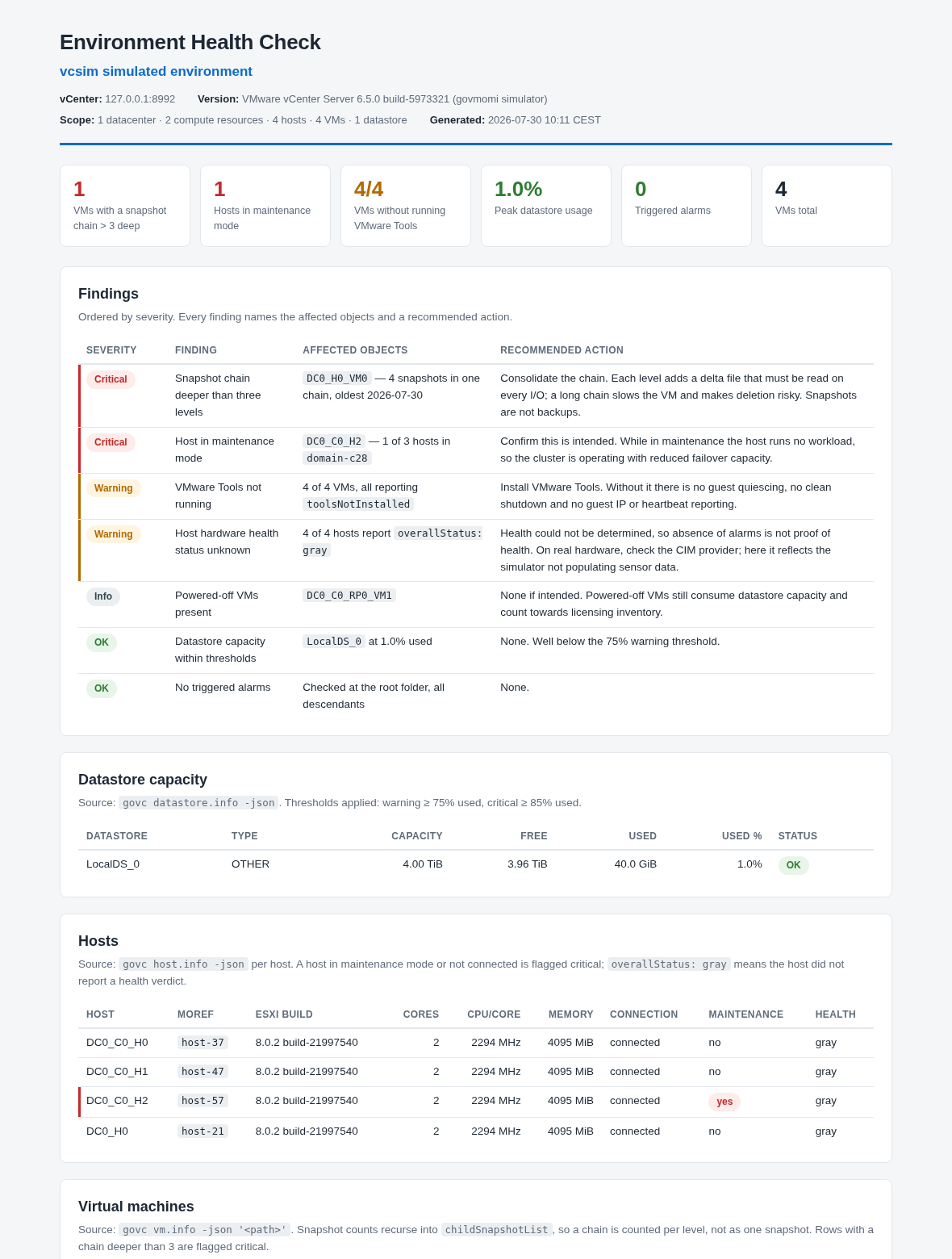
(The real file, generated against the vcsim simulator — examples/health-check-vcsim-2026-07-30.html. Cropped; the full report continues with VM, snapshot and alarm sections.)
Findings come first. Every report opens with a severity-ordered findings table — worst
first, each row naming the exact affected objects and a concrete recommended action.
A healthy category is stated as a finding too ("checked and found healthy"), because
silence is not a result. Then KPI cards for the headline numbers, then the supporting data
tables with click-to-sort columns.
Every number is auditable. Each section states the govc command it came from and the
thresholds applied, and the footer records how the data was gathered. If a query failed,
the report says "not collected" and why — it never guesses. Default thresholds (overridable
by just saying so):
| Check | Warning | Critical |
|---|---|---|
| Datastore used | ≥ 75% | ≥ 85% |
| Snapshot age | > 3 days | > 7 days, or > 3 in a chain |
| Host disconnected / unexpectedly in maintenance | — | always |
| VMware Tools | not running | — |
| Triggered alarms | yellow | red |
Files are named <report-type>-<environment>-<YYYY-MM-DD>.html. Say it's for a client (or
name one) and you additionally get the client name in the header and an executive summary
in prose above the tables, with recommendations phrased as recommendations.
Seeing it before you install anything
examples/ holds the same health check generated twice against the simulator:
| File | What it shows |
|---|---|
health-check-vcsim-2026-07-30.html |
normal output, real object names |
health-check-vcsim-tokens-2026-07-30.html |
the identical report with the privacy wrapper active — every name, MoRef, UUID and address replaced by a stable pseudonym, and the vCenter endpoint withheld |
Open them side by side: same findings, same numbers, same layout. The only difference is
whether a real identifier ever left the host. With the wrapper active a report is written
in tokens, and govc-safe rehydrate <file> gives you a cleartext copy locally.
The template itself is govc/assets/report-template.html; the rules for filling it —
structure, severity vocabulary, thresholds, consultant mode — are ingovc/references/report-template.md.
What's in the skill
govc/
├── SKILL.md                      # workflow, safety rules, command map, Windows notes
├── assets/
│   └── report-template.html      # self-contained styled HTML report skeleton
└── references/                   # loaded on demand (progressive disclosure)
    ├── setup.md                  # install, auth, TLS, sessions, troubleshooting, vcsim
    ├── inventory-reporting.md    # find/collect/jq patterns, metrics, events, health checks
    ├── report-template.md        # how report files are structured, severities, thresholds
    ├── vm-lifecycle.md           # create, clone, power, migrate, guest ops, destroy
    ├── snapshots.md              # create, audit, revert, cleanup workflow
    ├── host-cluster.md           # maintenance mode, DRS/HA rules, pools, esxcli
    └── storage-network.md        # datastores, disks, vSwitch/DVS/portgroups
Battle-tested details baked in from real-world runs: PowerShell splits unquoted dotted flags like -runtime.powerState (quote them), host.info needs an explicit host when there's more than one, multi-datacenter vCenters need -dc/GOVC_DATACENTER context, an empty datacenter answers datastore.info with a misleading "not found", snapshot.remove rejects the id integer that vm.info -json shows and wants the snapshot-NNNNN managed object ID instead, and a snapshot audit must recurse into childSnapshotList or it reports a deep chain as a single snapshot.
Every reference file is cross-platform: bash examples work on Linux, macOS, WSL, and Git Bash, and each command that behaves differently under native PowerShell carries a powershell twin. Batch pipelines use tr '\n' '\0' | xargs -0 rather than the GNU-only xargs -d '\n', so they run unmodified on macOS and survive VM names containing spaces.
Optional: keeping real identifiers away from the model
Entirely optional. Everything above works on its own. Skip this section
unless your vSphere data must not reach a model provider — nothing in thegovc/skill depends on it.
By default this skill runs govc through the agent's shell, so raw output —
VM names, IPs, MACs, usernames in events, guest OS versions — becomes part of the
conversation and is sent to whichever model provider you use.
If that is not acceptable, wrapper/ contains a pseudonymising proxy.govc-safe holds the credentials, runs the real command, and rewrites every
identifier to a stable token before anything is printed:
$ govc-safe find / -type m
/DC-01/vm/VM-0001
/DC-01/vm/VM-0002
Tokens are stable across commands and sessions, so the model can still correlate
objects and act on them (govc-safe vm.power -off VM-0017 resolves the token
before calling vCenter).
On the JSON path the wrapper walks the parsed document rather than its text, so
keys and structure come through exactly as govc emitted them and only values are
rewritten. Managed object references are preserved as tokens —"self": {"type": "VirtualMachine", "value": "VM-0001"} — which is what lets the
model join two outputs together without ever seeing a name. Plain-text output has
no such structure to lean on, so a VM named after a field label can have the
label tokenised alongside it; that is over-redaction rather than a leak, and-json avoids it.
You still read everything in cleartext. A MessageDisplay hook rehydrates
Claude's replies as they render, so the model writes
VM-0001is powered on with a 91-day snapshotSNAP-01onDS-01
and your terminal shows
ACME-PROD-SQL01is powered on with a 91-day snapshotpre-upgrade INC-88213onLocalDS_0
This is display-only, which is the whole trick: "the transcript and what Claude
sees keep the original", so the real names are never transmitted — they are
substituted locally, on your screen, after the response comes back. /verbose
shows the untouched text if you want to confirm exactly what left the machine.
For a cleartext copy on disk, govc-safe rehydrate report.tsv.
Enabling it
Two steps. First, install — per-user, no root:
./wrapper/setup.sh # installs govc-safe + the hook to ~/.local/bin
It stores your vCenter credentials in ~/.config/govc-safe/creds (0600) instead
of your shell profile. That matters: Claude Code inherits the environment it is
launched from, so export GOVC_PASSWORD=... in .zshrc hands the agent working
credentials and bypasses the wrapper entirely. Remove those exports — the
wrapper reads the file instead.
Second — nothing else. setup.sh wires the three hooks into~/.claude/settings.json for you, then tells you to restart Claude Code.
It merges rather than overwrites: your existing hooks, matcher groups and
deny rules are preserved, an existing matcher: "Bash" group is reused rather
than duplicated, and re-running converges instead of accumulating. The original
is backed up to settings.json.bak.<timestamp> first, and a malformed settings
file aborts the install rather than being truncated.
⚠️ Back up
settings.jsonyourself firstAny program that edits your settings file is a risk, this one included.
settings.jsonis hand-edited, shared with every other tool you have wired in,
and has no schema anyone can validate against — so a merge is always an
informed guess about a structure someone else owns.cp ~/.claude/settings.json ~/settings.json.mine # do this firstThe installer does take its own timestamped backup next to the original, and
the merge is tested against a real settings file with pre-existing hooks. But
the automatic backup lives in the same directory as the file it protects and is
written by the same code you are trusting. Keep your own copy somewhere else.If anything looks wrong afterwards, restore and tell us what your file looked
like:cp ~/settings.json.mine ~/.claude/settings.json # or the .bak.<timestamp>Prefer to stay in control?
--no-settingsinstalls everything and touches
nothing; the block it would have written is shown below, and./wrapper/uninstall.shremoves only its own entries.
./wrapper/setup.sh --project      # wire ./.claude/settings.json instead
./wrapper/setup.sh --yes          # non-interactive; credentials from the environment
./wrapper/setup.sh --no-settings  # install only, wire nothing
./wrapper/uninstall.sh            # reverse it; prompts before the sensitive files
{
  "permissions": { "deny": ["Bash(*GOVC_PASSWORD*)"] },
  "hooks": {
    "PreToolUse":  [{ "matcher": "Bash",
      "hooks": [{ "type": "command", "command": "~/.local/bin/govc-guard.py" }] }],
    "PostToolUse": [{ "matcher": "Bash",
      "hooks": [{ "type": "command", "command": "~/.local/bin/govc-guard.py" }] }],
    "MessageDisplay": [
      { "hooks": [{ "type": "command", "command": "~/.local/bin/govc-guard.py" }] }]
  }
}
MessageDisplay carries no matcher — that event does not support one. And
there is deliberately no "Bash(govc:*)" deny rule: deny rules are evaluated
regardless of what a hook returns, so it would block the very commandPreToolUse is rewriting. The installer refuses to proceed if it finds one.
One script, three events:
| Event | What it does |
|---|---|
PreToolUse |
Rewrites govc … → govc-safe … before the command runs, so the stock skill needs no changes. Also refuses rehydrate and reads of the creds file. |
PostToolUse |
Backstop: scrubs IPs, MACs, UUIDs and emails from any command's output, not just govc. |
MessageDisplay |
Rehydrates replies on your screen only, so you read real names while the model keeps tokens. |
Then confirm it took:
./wrapper/test-deployment.sh
It fails if the hooks are not wired, if a wired hook points at a file that no
longer exists, if your environment still exports GOVC_*, or if the creds file
has the wrong mode.
Platforms: Linux and macOS. The Python is portable, but the installer and
tests are POSIX shell and no PowerShell version has been tested — on Windows,
run the wrapper from WSL or Git Bash.
The skill needs no changes. A PreToolUse hook rewrites govc … intogovc-safe … before the command runs — including every invocation in a
pipeline — so the stock govc/ skill above keeps working exactly as written and
there is no second command name to learn:
Claude writes:   govc find / -type m | xargs -0 govc vm.info -json
actually runs:   govc-safe find / -type m | xargs -0 govc-safe vm.info -json
The wrapper is an allowlist, not a passthrough: it refuses guest.*,host.esxcli, logs, permissions.ls, sso.*, and flags like -trace and-e whose output cannot be redacted. Those refusals come back as ordinary tool
errors explaining what to use instead, so Claude adapts rather than stalling.
wrapper/govc-private/ is an optional companion skill. You do not need it —
it adds data-minimisation habits (count before list, aggregate before row-level)
and explains the token vocabulary up front. Install it if you want those; skip it
and the stock skill still works anonymised.
What this is, and what it isn't
It is an anonymisation tool, not a security boundary. It runs as you, so an
agent that deliberately set out to bypass it could — the hook matches command
text, and text matching loses to enough creativity.
What it does do is make sure the normal path never puts a real identifier in
front of the model, and that is where leaks actually happen: a routinevm.info -json dumping every VM name, IP and annotation into the transcript
because nobody thought about it. That failure mode is eliminated.
If you need a hard boundary against a hostile agent, this is the wrong layer —
run Claude Code as a separate unix user that genuinely cannot read the
credentials, or don't give the agent vCenter access at all.
Verifying it
Two scripts, testing two different things:
./wrapper/test-redaction.sh    # does anything leak?      (no install needed)
./wrapper/test-deployment.sh   # is my setup correct?     (after setup.sh)
test-redaction.sh runs the whole permitted command surface against vcsim —
including snapshots seeded with deliberately identifying names, and a VM named
after a JSON key — and fails if any real identifier, IP, MAC or UUID survives, or
if the allowlist stops behaving as specified. It also grades the opposite
direction, which a leak scan cannot see: a wrapper that deleted everything would
score a perfect pass, so the suite asserts that keys, structure and MoRefs
survive redaction intact.
test-deployment.sh checks the things the engine test cannot: that govc-safe
is on your PATH, that your shell is not exporting GOVC_*, that the creds file
is 0600, that plain govc cannot authenticate from a clean environment, and that
the hook actually denies direct govc and rehydrate.
Limits, stated plainly: free text (annotations, snapshot descriptions, event
messages) is dropped, not pseudonymised, because arbitrary prose cannot be
safely rewritten — a value with no type sibling counts as prose, while a{"type", "value"} pair is a managed object reference and is tokenised instead.
Structure still leaks by design — counts, cluster shape,
guest-OS versions and ESXi build numbers survive, since removing them removes the
point of the reports. And this protects data in transit to the model; it is not a
substitute for a least-privilege vCenter role, which is what prevents unwanted
changes.
Repository layout
| Path | Purpose |
|---|---|
govc/ |
The skill — the only thing you need to copy |
wrapper/ |
Optional pseudonymising proxy, hooks, installer, and both test suites |
wrapper/govc-private/ |
Companion skill for token-space operation |
examples/ |
Generated HTML reports (vcsim), with and without the wrapper |
test-windows.ps1 |
Windows setup + smoke test against vcsim |
test-unix.sh |
Linux/macOS setup + smoke test against vcsim (--vcsim) or a real vCenter |
images/ |
Screenshots |
Contributing
Issues and PRs welcome — especially additional gotchas from real environments, missing command patterns, and improvements to the safety rules. If Claude ever executes a destructive operation without confirmation, please file an issue with the transcript.
License
Apache License 2.0 — see LICENSE. govc and vcsim are part of the govmomi project (also Apache 2.0), © Broadcom. Not affiliated with Broadcom/VMware or Anthropic.
Reviews (0)
Sign in to leave a review.
Leave a reviewNo results found