clickweave
Health Warn
- License — License: MIT
- Description — Repository has a description
- Active repo — Last push 0 days ago
- Low visibility — Only 5 GitHub stars
Code Pass
- Code scan — Scanned 12 files during light audit, no dangerous patterns found
Permissions Pass
- Permissions — No dangerous permissions requested
This tool is an open-source desktop automation agent that allows users to build workflows visually or by recording screen actions. It uses an AI planning assistant to execute steps, acting as a "computer use agent" that can view your screen, click, and type.
Security Assessment
Overall Risk: High. By design, the application acts as a computer use agent that sees your screen and controls your mouse and keyboard. This inherently requires highly sensitive system permissions that could be disastrous if misused or compromised. Although the automated code scan found no dangerous patterns, hardcoded secrets, or unexpected network requests in the 12 files checked, the fundamental nature of the software demands extreme caution. The AI features also imply that data from your screen and workflows may be sent to external Large Language Model (LLM) APIs.
Quality Assessment
The project is MIT licensed, actively updated (last push was today), and has a clear description. However, community trust and visibility are very low, with only 5 stars on GitHub. The developers explicitly note that the project is in "early development," meaning users should expect incomplete features and breaking changes.
Verdict
Use with caution — while the initial code scan is clean and it is safe to inspect, the tool's core design requires absolute control over your desktop, meaning it should only be run in isolated or non-sensitive environments given its early stage of development.
Visual desktop automation agent — low-code workflow builder with AI-powered steps
Clickweave — Open-Source Desktop Automation with AI Planning & Record-and-Replay


Clickweave is an open-source desktop automation platform that combines a visual workflow builder with AI-powered planning and execution. Build automations by adding nodes from a palette, describe what you want in natural language, record a walkthrough of the task you want to automate, or mix all three approaches. Clickweave acts as a computer use agent (CUA) — it can see your screen, click, type, and make decisions — while giving you full control over every step.
Keywords: desktop automation, UI automation, RPA, computer use agent, CUA, agentic workflow, visual workflow builder, AI automation, no-code automation, record and replay, macro recorder, workflow recording, desktop recording, programming by demonstration, Model Context Protocol, MCP
Status: Clickweave is in early development. Expect rapid changes, incomplete features, and breaking updates as core functionality is being built.
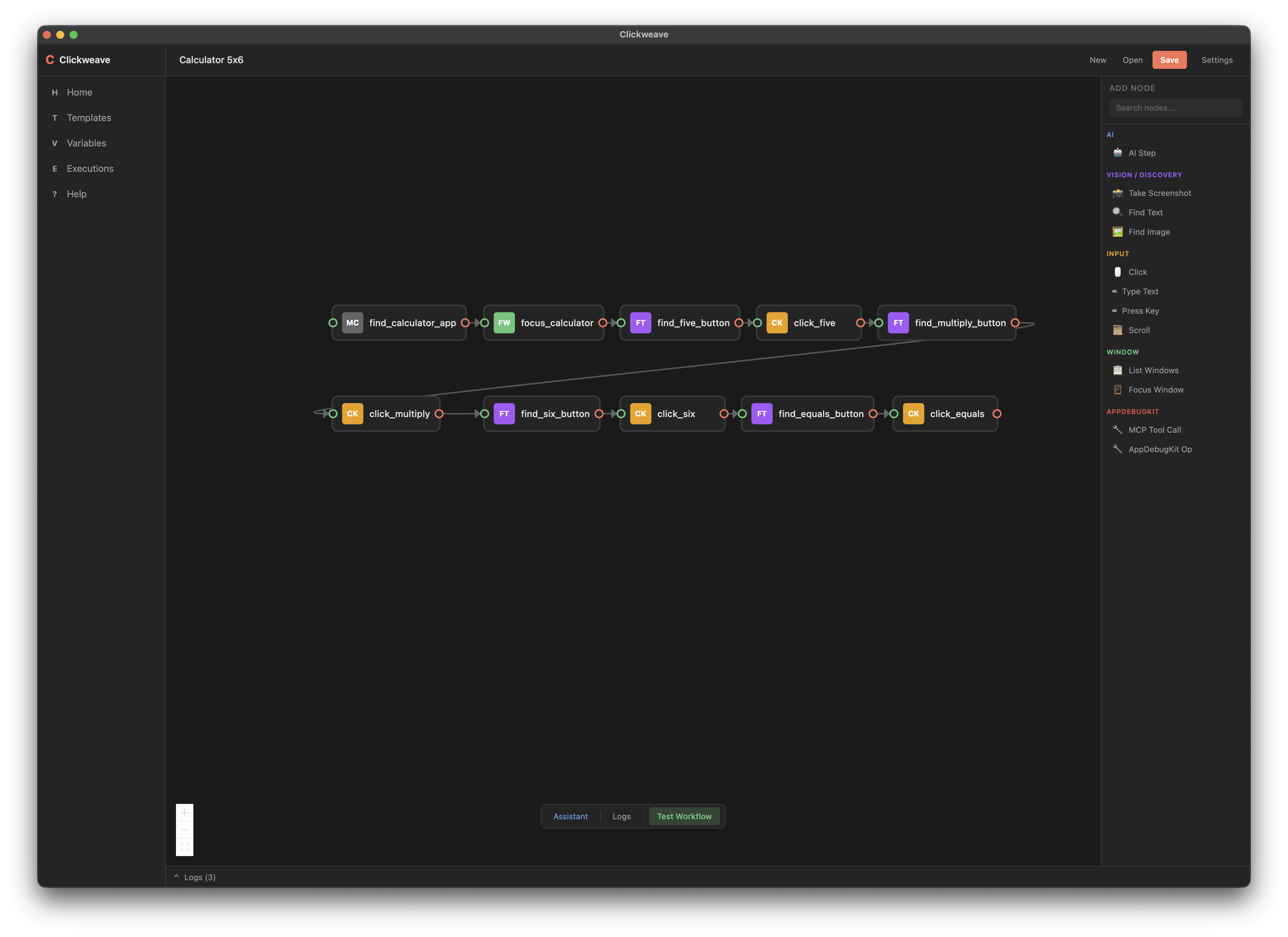
Table of Contents
- Features
- How It Works
- Architecture
- Node Types
- Use Cases
- Getting Started
- Configuration
- Logs
- FAQ
- For AI Agents
- License
Features
Visual Workflow Builder
A node-based graph editor for designing automation workflows. Add nodes from a categorized palette, connect them with edges, and configure each step through a detail modal with setup, checks, trace, and run history tabs. Supports multi-select, rubber-band selection, undo/redo, and visual loop grouping.
AI Workflow Planning
Describe your automation goal in natural language and Clickweave generates a complete workflow graph. The planner:
- Converts intent into a sequence of typed nodes using available MCP tool schemas
- Generates deterministic Tool steps by default, with optional AiStep and AiTransform nodes
- Auto-repairs malformed LLM output with one-shot retry and error feedback
- Validates generated workflows against structural graph rules
- Supports lenient parsing — partial corruption doesn't discard the entire response
AI Workflow Patching & Conversational Assistant
Modify existing workflows through conversation. The assistant panel lets you describe changes in natural language, and Clickweave generates patches that add, remove, or update nodes. Patches are staged for review before applying. The assistant validates patches against the workflow graph and retries with feedback when the result would be invalid.
Record & Replay — Workflow Recording
Record a demonstration of the task you want to automate and Clickweave synthesizes it into a replayable workflow graph — like a macro recorder that produces an editable, AI-enhanced automation:
- OS-level event capture records mouse clicks, key presses, and app focus changes
- Action normalization deduplicates, merges, and classifies raw events into meaningful steps
- Draft synthesis converts the normalized action sequence into a typed workflow graph with nodes and edges
- Review panel lets you rename, delete, and annotate steps before applying the draft to the canvas
- CDP support — Electron and Chrome-family apps are detected automatically and can be recorded with element-level precision via Chrome DevTools Protocol
Control Flow
Workflows support branching and looping without scripting:
- If nodes evaluate conditions and take true/false paths
- Switch nodes match against multiple cases with a default fallback
- Loop nodes use do-while semantics — the body runs at least once before checking exit criteria
- EndLoop nodes jump back to their paired Loop node
- Node outputs are extracted into runtime variables that downstream nodes can reference in conditions
Computer Use Agent (CUA)
Clickweave sees and interacts with the desktop via native-devtools-mcp, communicating over the Model Context Protocol (MCP):
- Visual perception: screenshots, OCR text detection, image template matching
- Interaction: mouse clicks, keyboard input, scrolling, window management
- Smart resolution: LLM-assisted app-name and element-name resolution with caching and retry
Test Mode & Per-Step Supervision
Clickweave has two execution modes: Test and Run. In Test mode, the engine verifies each step after execution — it captures a screenshot, sends it to a VLM for description, then asks an LLM judge whether the step succeeded. Steps that pass continue automatically; on failure the UI presents Retry, Skip, or Abort options. Read-only nodes (FindText, FindImage, ListWindows, TakeScreenshot) are exempt from verification since they have no observable side-effect. Nodes inside loops are verified in aggregate when the loop exits. LLM decisions made during Test (element resolution, click disambiguation, app-name resolution) are saved to a decision cache. In Run mode, the cache replays those decisions deterministically — skipping redundant LLM calls and running without supervision for faster, unattended execution.
Inline Verification
Any read-only Tool step (FindText, FindImage, ListWindows, TakeScreenshot) can be marked with a Verification role, turning it into an inline test assertion that runs during execution:
- Fail-fast: a failed verification verdict stops the workflow immediately
- Expected outcome:
TakeScreenshotverification nodes require a free-text expected outcome for VLM evaluation - Verdicts: pass, fail, or warn — displayed in a verdict bar with expandable per-node breakdowns and VLM reasoning
- Failure policy: each check can be set to
FailNode(hard stop) orWarnOnly(soft warning)
Run History & Tracing
Every workflow execution is persisted with full traceability:
.clickweave/runs/<workflow_name>/<execution_dir>/<node_name>/
  run.json           # Execution metadata and status
  events.jsonl       # Newline-delimited trace events
  artifacts/         # Screenshots, OCR results, template matches
  verdict.json       # Check evaluation results
Browse past runs in the UI, inspect trace events, and preview captured artifacts.
Pluggable AI Backends
Three independently configurable LLM endpoints (set in Settings):
- Planner — generates and patches workflows; also used as the supervision judge in Test mode
- Agent — powers AI step execution during runs
- VLM (optional) — dedicated vision model for image analysis and check evaluation
All endpoints use the OpenAI-compatible /v1/chat/completions format. Works with local servers (LM Studio, vLLM, Ollama) or hosted providers (OpenRouter, OpenAI). No API key required for local endpoints.
CDP / Electron / Chrome DevTools Protocol
For Electron and Chrome-family apps, Clickweave uses the built-in CDP tools in native-devtools-mcp to get element-level precision:
- Automatic detection: Electron apps are detected by framework directory checks; Chrome-family browsers are matched by bundle ID
- Single server: CDP tools (
cdp_connect,cdp_click,cdp_take_snapshot, etc.) run on the samenative-devtools-mcpserver — no separate process needed - Walkthrough integration: during recording, detected CDP apps trigger a selection modal for the user to choose the target page
Local-First & Cross-Platform
Desktop actions run locally. LLM/VLM requests go only to the endpoints you configure (defaults to localhost). Built with Tauri v2, producing lightweight native apps for macOS, Windows, and Linux.
How It Works
- Describe, build, or record — Type your automation goal in the planner, add nodes from the palette, or record a walkthrough of the task
- Review the graph — Inspect the generated workflow, tweak node parameters, add verification nodes
- Test — Run in Test mode with per-step supervision: after each step, a VLM + LLM judge verifies the screen and pauses on failures so you can Retry, Skip, or Abort. LLM decisions (element resolution, click disambiguation) are recorded to a decision cache.
- Run — Switch to Run mode for unattended execution. The decision cache replays recorded choices deterministically — no LLM calls for previously resolved decisions, no supervision pauses.
- Iterate — Use the assistant to patch workflows conversationally, or edit nodes directly
Architecture
Clickweave is a Tauri v2 hybrid app with a Rust backend and a React frontend.
Project Structure
/
├── crates/                 # Rust backend workspace
│   ├── clickweave-core/    # Workflow model, validation, runtime context, storage, tool mapping
│   ├── clickweave-engine/  # Workflow execution engine (graph walk, retries, AI steps, checks)
│   ├── clickweave-llm/     # LLM client, planning, patching, assistant, repair logic
│   └── clickweave-mcp/     # MCP JSON-RPC client (subprocess lifecycle, tool calls)
├── src-tauri/              # Tauri app shell & IPC commands
├── ui/                     # React frontend (Vite + Tailwind CSS v4)
│   ├── src/
│   │   ├── components/     # Graph canvas, nodes, modals, assistant, verdict bar
│   │   ├── store/          # Zustand state (9 slices: project, execution, assistant, history, settings, log, verdict, walkthrough, UI)
│   │   └── hooks/          # React hooks (undo/redo, loop grouping, node/edge sync, workflow actions, executor events)
├── docs/                   # Reference & conceptual documentation
└── assets/                 # Static assets
Frontend Stack
| Layer | Technology |
|---|---|
| Framework | React 19 |
| Build | Vite 6 |
| Styling | Tailwind CSS v4 |
| Graph Editor | React Flow (@xyflow/react) |
| State | Zustand (slice composition) |
| Desktop Bridge | Tauri v2 (@tauri-apps/api) |
| Type Safety | Auto-generated TypeScript bindings via Specta |
| Tests | Vitest + Testing Library |
Data Flow
Planning: UI → Tauri command → spawn MCP for tool discovery → LLM call → parse + validate → Workflow back to UI
Execution: UI → Tauri command → WorkflowExecutor::run() → spawn MCP server → walk graph (deterministic tools, AI loops, control flow) → per-step supervision in Test mode (screenshot → VLM → LLM judge → Retry/Skip/Abort) → record/replay LLM decisions via decision cache → stream executor:// events to UI
Node Types
| Category | Node | Description |
|---|---|---|
| AI | AiStep | Agentic LLM + tool loop with configurable tool access and max calls |
| Vision | TakeScreenshot | Capture screen, window, or region with optional OCR |
| Vision | FindText | OCR-based text search (contains or exact match) |
| Vision | FindImage | Template matching with threshold and max results |
| Input | Click | Mouse click at coordinates or by target text (LLM-resolved) |
| Input | Hover | Move mouse to position with optional dwell time |
| Input | TypeText | Keyboard text input |
| Input | PressKey | Key press with modifiers (shift, control, option, command) |
| Input | Scroll | Scroll at position with delta |
| Window | ListWindows | Enumerate visible windows |
| Window | FocusWindow | Bring window to front by app name, window ID, or PID |
| Control Flow | If | Conditional branch (evaluates runtime variables) |
| Control Flow | Switch | Multi-way branch with named cases and default |
| Control Flow | Loop | Do-while loop with max iteration bound |
| Control Flow | EndLoop | Jump back to paired Loop node |
| AppDebugKit | McpToolCall | Generic invocation of any MCP tool by name |
| AppDebugKit | AppDebugKitOp | Invoke an AppDebugKit operation on a connected app |
Node Configuration
Each node supports:
- Retries (0–10) with automatic re-execution and cache eviction on failure
- Timeout (ms) for bounded execution
- Settle delay (ms) for waiting after execution
- Trace level (Off / Minimal / Full) for controlling artifact capture
- Expected outcome — human-readable description for VLM verification
- Enabled toggle — skip nodes without removing them
Use Cases
- Record & Replay — Demonstrate a task once by recording your clicks and keystrokes, then replay it reliably as an editable workflow
- Desktop RPA — Automate repetitive back-office workflows across multiple desktop applications
- QA & Regression Testing — Build smoke and regression test flows with screenshots, OCR verification, and run traces for debugging
- AI-Assisted Automation — Let AI plan workflows from natural language, then keep deterministic execution where precision matters
- Visual Verification — Attach checks to nodes and let a VLM verify expected outcomes from screenshots
- Local-First Automation — Run against local LLM/VLM endpoints for privacy-sensitive workflows
- Cross-App Workflows — Chain actions across multiple desktop applications with window management and conditional branching
Getting Started
Prerequisites
- Rust >= 1.85 — Install Rust
- Node.js (LTS) — Install Node.js
- Tauri CLI:
cargo install tauri-cli --locked - OS dependencies:
- macOS: Xcode Command Line Tools (
xcode-select --install) - Windows: Visual Studio C++ Build Tools + WebView2 Runtime
- Linux (Ubuntu/Debian):
sudo apt-get update
sudo apt-get install libwebkit2gtk-4.1-dev build-essential curl wget file libxdo-dev libssl-dev libayatana-appindicator3-dev librsvg2-dev
- macOS: Xcode Command Line Tools (
Install & Run
# Clone the repository
git clone https://github.com/sh3ll3x3c/clickweave.git
cd clickweave

# Install frontend dependencies
npm install --prefix ui

# Run in development mode
cargo tauri dev

# Build for production
cargo tauri build
Output bundles will be in target/release/bundle/.
Running Tests
# Rust tests
cargo test

# Frontend tests
npm test --prefix ui
Configuration
AI Endpoints
Configure in Settings within the app. Each endpoint takes:
- Base URL (default:
http://localhost:1234/v1) - Model name (default:
local) - API key (optional, empty for local endpoints)
MCP Server
The MCP command can be set to:
"npx"(default) — runsnpx -y native-devtools-mcp- A custom binary path for self-hosted MCP servers
Model Info Detection
At workflow startup, Clickweave queries the inference provider for model metadata (context length, architecture, quantization).
| Provider | Context Length Field | Endpoint |
|---|---|---|
| LM Studio | max_context_length, loaded_context_length |
/api/v0/models |
| vLLM | max_model_len |
/v1/models |
| OpenRouter | context_length |
/v1/models |
| Ollama | Not supported yet | — |
| OpenAI | Not available via API | — |
Feature Flags
Toggle in Settings:
- Allow AI Transforms (default: on) — enables AiTransform in planner output
- Allow Agent Steps (default: off) — enables full agentic loops with tool access
Logs
JSON-formatted structured logs.
| Platform | Location |
|---|---|
| macOS | ~/Library/Logs/Clickweave/ |
| Windows / Linux | ./logs/ (relative to working directory) |
Log files: clickweave.YYYY-MM-DD.txt. Console level defaults to info (override with RUST_LOG). File layer captures at info with debug for clickweave_* crates. Full LLM request/response bodies are logged at trace level — set RUST_LOG=clickweave_llm=trace to include them.
FAQ
What is Clickweave?
Clickweave is an open-source desktop automation platform that acts as a computer use agent. It combines a visual node-based workflow builder, AI-powered planning, and record-and-replay workflow recording for automating UI tasks on macOS, Windows, and Linux.
How does Clickweave automate the desktop?
Clickweave drives desktop interactions through the Model Context Protocol (MCP) by spawning native-devtools-mcp as a subprocess. This provides screenshots, OCR, mouse/keyboard control, and window management — all without injecting code into target applications.
Does Clickweave require coding?
No. You can build workflows visually by adding nodes from a categorized palette, use natural-language prompts for AI-assisted planning and patching, record a walkthrough of the task to generate a workflow automatically, or combine all three approaches.
What is a computer use agent (CUA)?
A computer use agent is software that can see and interact with a computer's graphical interface — taking screenshots, reading text via OCR, clicking buttons, and typing — to accomplish tasks autonomously or semi-autonomously. Clickweave is a CUA that gives you a visual editor to control what the agent does.
Which AI model providers does Clickweave support?
Any provider with an OpenAI-compatible /v1/chat/completions endpoint: LM Studio, vLLM, Ollama (OpenAI-compatible mode), OpenRouter, OpenAI, and others. You can use different models for planning, execution, and vision tasks.
Is Clickweave local-first? Does it send my data to the cloud?
Yes, Clickweave is local-first. Desktop automation actions run entirely on your machine. LLM/VLM requests are sent only to the endpoints you configure — which default to localhost. No telemetry, no cloud dependency.
How does Clickweave compare to traditional RPA tools?
Traditional RPA tools rely on selectors, DOM scraping, or accessibility APIs tied to specific applications. Clickweave uses visual perception (screenshots + OCR + template matching) and can automate any application with a visible UI. The AI planner means you can describe what you want rather than manually scripting every click.
Can Clickweave handle conditional logic and loops?
Yes. Clickweave supports If, Switch, and Loop control-flow nodes. Node outputs are extracted into runtime variables that conditions and loops can reference, so workflows can branch and repeat without scripting.
How does workflow verification work?
Clickweave has two layers of verification. Per-step supervision (Test mode only) checks each step as it runs: a VLM describes the screen and an LLM judge decides pass/fail, pausing for user action on failure. Inline verification uses Verification-role nodes (any read-only tool step: FindText, FindImage, ListWindows, TakeScreenshot) as test assertions that produce pass/fail/warn verdicts during execution and fail-fast on failure.
How does record-and-replay work?
Record a walkthrough by performing the task while Clickweave captures OS-level events (clicks, key presses, app focus). The recording is normalized — deduplicating and merging raw events — then synthesized into a typed workflow graph. A review panel lets you rename, delete, and annotate steps before applying the draft. The resulting workflow is fully editable and replayable, just like one built by hand or generated by AI.
What is MCP and why does Clickweave use it?
The Model Context Protocol (MCP) is a standard for connecting AI models to external tools. Clickweave uses MCP to decouple its orchestration engine from specific automation backends — the same workflow graph can drive different MCP servers without changing the workflow definition.
For AI Agents
This section helps AI agents navigate and understand the codebase.
Key Entry Points:
- Planner:
crates/clickweave-llm/src/planner/plan.rs—plan_workflow/plan_workflow_with_backend - Patcher:
crates/clickweave-llm/src/planner/patch.rs— workflow patch generation - Assistant:
crates/clickweave-llm/src/planner/assistant.rs— conversational assistant with patch validation retry - Execution Loop:
crates/clickweave-engine/src/executor/run_loop.rs— core graph walk - Supervision:
crates/clickweave-engine/src/executor/supervision.rs— per-step VLM + LLM verification pipeline - MCP Protocol:
crates/clickweave-mcp/src/protocol.rs— JSON-RPC implementation - Frontend State:
ui/src/store/useAppStore.ts— main Zustand store - Tauri Commands:
src-tauri/src/commands/— IPC bridge (run_workflow,stop_workflow,supervision_respond)
Conventions:
- Error handling: internal crates use
anyhow::Result; Tauri boundaries returnResult<_, String> - Async:
tokioruntime - Tracing:
tracingcrate for structured logging - Types: Specta + tauri-specta for auto-generated TypeScript bindings
Documentation: See docs/ for reference docs (code-coupled, agent-oriented) and conceptual docs (architecture mental models).
License
Distributed under the MIT License. See LICENSE for more information.
Reviews (0)
Sign in to leave a review.
Leave a reviewNo results found