preview-skills
Health Uyari
- License — License: MIT
- Description — Repository has a description
- Active repo — Last push 0 days ago
- Low visibility — Only 6 GitHub stars
Code Gecti
- Code scan — Scanned 12 files during light audit, no dangerous patterns found
Permissions Gecti
- Permissions — No dangerous permissions requested
Bu listing icin henuz AI raporu yok.
Reduce cognitive load when reviewing AI agent work
Preview Skills
Reduce cognitive load when reviewing AI agent work. Transform plans, diffs, and data into navigable previews.
| Name | Description | File Types |
|---|---|---|
| preview-plan | Navigable plans with sidebar TOC and progress tracking | .plan.md, .plan |
| preview-csv | Sortable tables with search, filtering, and column statistics | .csv |
| preview-json | Syntax highlighting with collapsible tree structure | .json, .jsonl |
| preview-markdown | GitHub-flavored rendering with syntax highlighting | .md, .markdown |
| preview-mermaid | Interactive diagrams (flowcharts, sequences, ER, etc.) | .mmd, .mermaid |
| preview-diff | GitHub-style diffs with side-by-side comparison | .diff, .patch |
| preview-d3 | Interactive 2D data visualizations with zoom and pan | .d3 |
| preview-threejs | Interactive 3D visualizations with orbit controls | .threejs, .3d |
| preview-leaflet | Interactive maps with markers and routes | .leaflet, .map |
| preview-svg | Animated SVGs with play/pause, scrub, zoom — concept explainers | .svg |
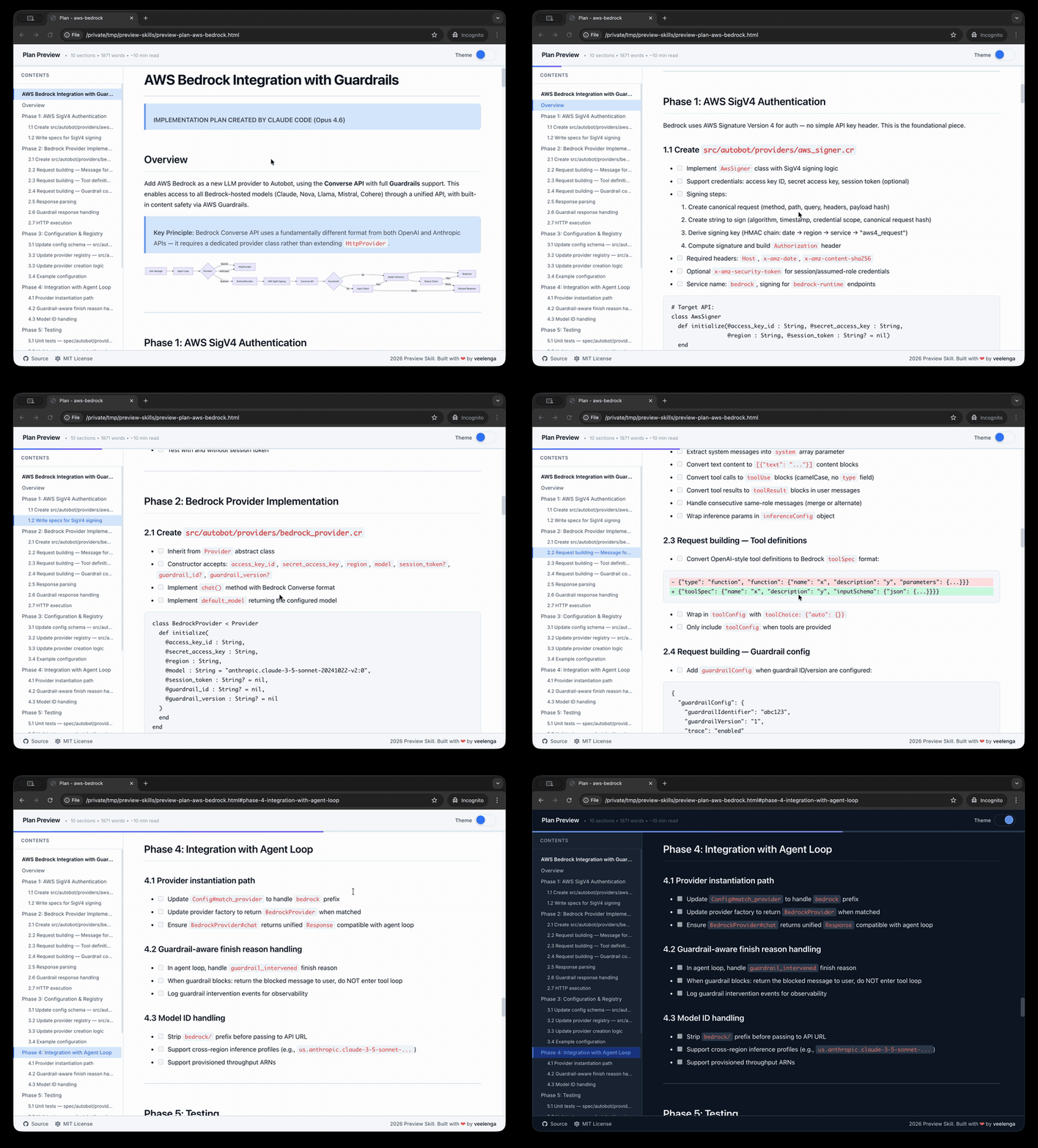
🌐 Visit website • 📚 Live examples
Quick start
Installation script (recommended)
The easiest way to install skills using symlinks:
# Clone repository
git clone https://github.com/veelenga/preview-skills.git && cd preview-skills

# Interactive installation - select which skills to install
scripts/install.sh

# Or install all skills
scripts/install.sh --all

# Or install specific skills
scripts/install.sh preview-csv preview-json preview-markdown
Symlinks keep the skills up-to-date with your repository. Use git pull to update, and the changes are immediately reflected.
Alternatively the specified skills can be manually copied to your agent skills directory.
Uninstall
# Interactive - select skills to remove
scripts/uninstall.sh

# Remove all preview skills
scripts/uninstall.sh --all

# Remove specific skills
scripts/uninstall.sh preview-csv preview-json
Usage
Each skill can be invoked directly:
# Preview CSV file
/preview-csv data.csv

# Preview JSON file
/preview-json config.json

# Preview Markdown file
/preview-markdown README.md
Or use natural language:
- "generate pie diagram and preview"
- "preview this CSV file"
- "show me the JSON data"
- "render this Markdown document"
Examples
# Plans
/preview-plan examples/plan/sample.plan.md

# Data files
/preview-csv examples/csv/employees.csv
/preview-json examples/json/sample.json
/preview-json examples/json/logs.jsonl

# Documentation
/preview-markdown README.md

# Diffs
/preview-diff examples/diff/feature.diff

# Diagrams
/preview-mermaid examples/mermaid/sample.mmd
/preview-d3 examples/d3/network-graph.d3

# 3D and maps
/preview-threejs examples/threejs/sample.threejs
/preview-leaflet examples/leaflet/longest-trails.leaflet

# Animated SVG (concept explainers)
/preview-svg examples/svg/bubble-sort.svg
/preview-svg examples/svg/load-balancer.svg
/preview-svg examples/svg/https-handshake.svg
Running tests
npm test              # Run all tests
npm run test:watch    # Watch mode
npm run lint          # ESLint
How it works
No servers, no dependencies, no installation complexity. Each skill is a bash script that:
- Reads input file or stdin
- Validates and processes content
- Generates standalone HTML file with embedded JavaScript/CSS
- Opens in default browser
The generated HTML files are completely self-contained and portable.
Configuration
Each skill has a config.sh file with well-documented configuration options:
- Metadata (tool name, title, defaults)
- Layout settings (type, background color)
- Dependencies (CDN scripts, CSS files)
- Processing options (content encoding)
- Renderer configuration
See skills/preview-csv/config.sh for a working example.
See also
If you like this project, you might also be interested in
- claude-mermaid — MCP Server to previewing mermaid diagrams
Yorumlar (0)
Yorum birakmak icin giris yap.
Yorum birakSonuc bulunamadi