velloo
Health Warn
- License — License: Apache-2.0
- Description — Repository has a description
- Active repo — Last push 0 days ago
- Low visibility — Only 7 GitHub stars
Code Pass
- Code scan — Scanned 12 files during light audit, no dangerous patterns found
Permissions Pass
- Permissions — No dangerous permissions requested
No AI report is available for this listing yet.
Local-first design canvas for AI coding agents. Recreate a real React screen, explore directions visually, then ship the winner back into your app.

Design like a developer. Build like a designer.
Velloo is an open-source, local-first canvas for agent-driven design. It gives
your coding agent a structured understanding of your app — its routes,
components, theme, and conventions — so it can compose real screens, inspect the
rendered result, and write the chosen design back into your app while you keep
the taste and direction.




Quickstart · Documentation · Contributing · Discussions · velloo.design
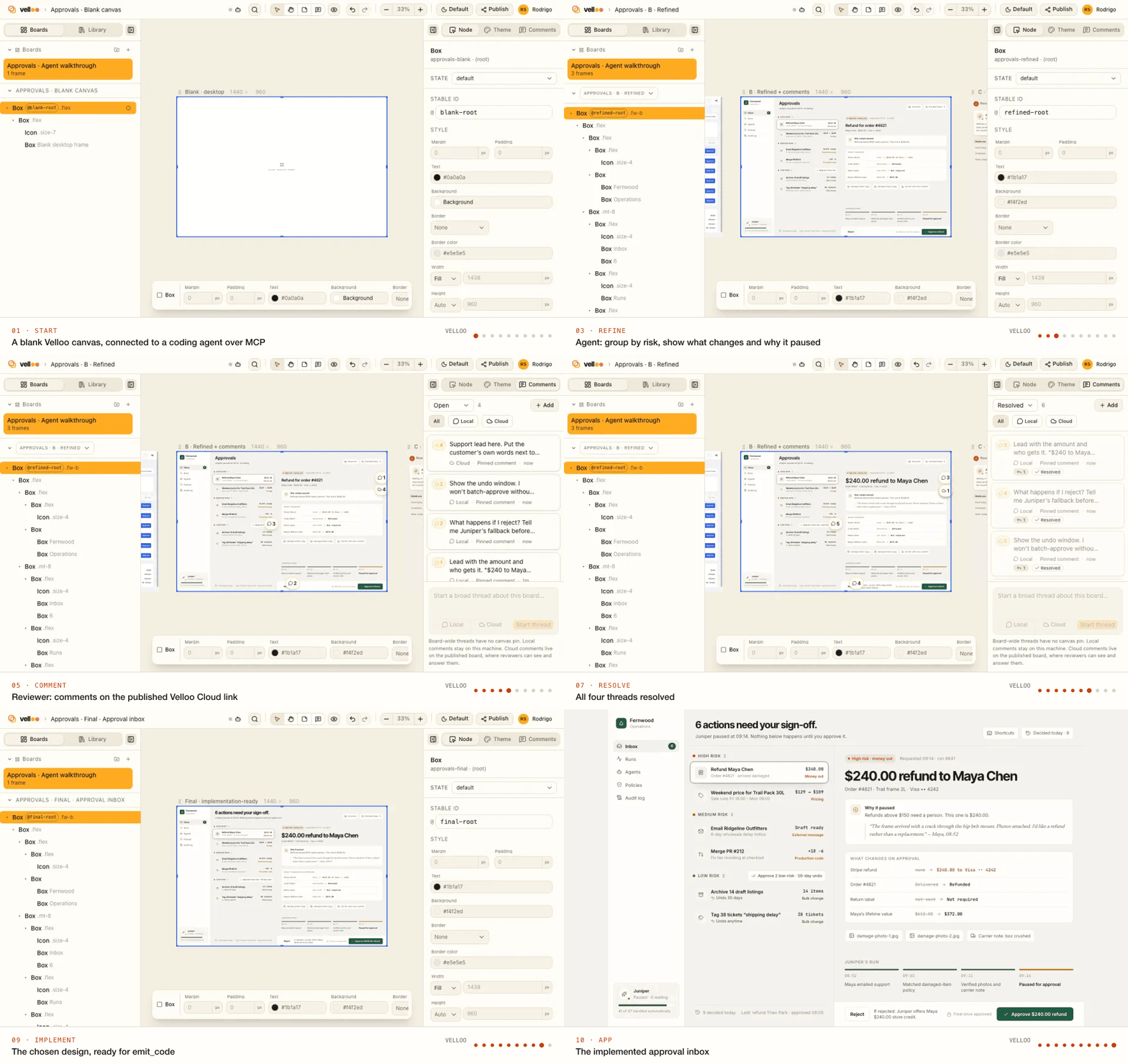
What is Velloo?
Velloo adds a visual design loop to your coding agent. The agent works with your
actual component system, explores and verifies directions on the canvas, and
implements the direction you choose using your application's conventions.
Designs are readable JSON that can live in your repo or outside it. The complete
solo workflow is local and account-free; Velloo Cloud is optional when you want
published boards, review links, and comments that return to the canvas.
No Figma seats. No paste-ready JSX you babysit. No translation tax.
Status: early and moving fast. The design-folder format is versioned and
migrated byvelloo upgrade, but expect rough edges and breaking changes
before 1.0. Bug reports and design feedback are very welcome.
Quickstart
Install the CLI. The npm package pulls an exact official Bun platform binary
with no install scripts — you don't install or manage Bun yourself:
npm install -g velloo # or: pnpm add -g velloo
Prefer a standalone install (macOS and Linux)?
curl -fsSL https://get.velloo.design/install.sh | bash
Then, from inside your app:
cd ~/code/my-shadcn-app
velloo init                    # interactive wizard
velloo run velloo              # the design folder it just created
- Canvas → http://localhost:7300 (the next free port if that one is busy)
- MCP server → your agent starts
velloo mcpover stdio;initalready
wrote that into its config. HTTP-only clients can runvelloo mcp --http,
which prints the URL to use.
Restart your agent so it picks up the new MCP config, then point it at a real
screen:
"Use
vellooto recreate the design for the billing page,
then show me three takes on the plan-comparison section."
That's the loop. The agent builds on the canvas, screenshots its own work, and
you react to pixels instead of to a diff.
What init does
The wizard creates a design folder (default velloo/), detects your routes,
component library, and theme, and connects supported coding agents through their
native MCP configuration and guidance format. It never changes your app source;
it only creates the design folder and agent configuration.
Ways to use Velloo
- Redesign an existing screen. Recreate a route as a faithful baseline,
explore alternatives beside it, and compare the result with the running app. - Start from scratch. Choose your component library, then begin with the
sample board or a blank canvas for a new screen or product idea. - Work from a live page. Capture a public or authenticated page when the
useful starting point is a browser rather than a route in the current app.
For better results, give the agent a concrete outcome and review bar: name the
screen, ask for genuinely different directions, say which components or tokens
must be preserved, and ask to see the canvas before application code changes.
Velloo Cloud and velloo publish
Velloo Cloud is the optional collaboration layer; the local design remains the
source of truth. When you want feedback from someone else, sign in and publish a
board from the canvas or the CLI:
velloo login
velloo publish velloo
Choose the boards, destination, and access level when prompted. Velloo uploads
the material needed to render the review and prints a share link; comments on
that link sync back to the local canvas for you or your agent to resolve. A later
publish can update the same link and preserve its review context.
Use velloo publish list to see existing publications andvelloo publish remove <share-url> to take one down. Velloo Cloud is not
required to design, export, or implement a screen.
Features
- Existing-screen redesign. Start from a React route or a captured
authenticated page, recreate a faithful baseline, explore alternatives, and
compare against the running product at the same viewport. - Real components, not approximations. Components come from a
ComponentProvider, so the design folder stays pure data. For shadcn,
client-safe files from your app mount directly in the canvas; portal- and
state-heavy families are explicitly adapted; compile failures fall back per
component with diagnostics. - Five React adapters. shadcn + Tailwind, Material UI, Ant Design, Chakra
UI, and no-library React each render and emit through their own adapter. - Visual verification. The agent inspects rendered nodes, takes screenshots,
diffs against a live URL, and fixes what it sees instead of guessing from code. - Board → Screen → Frame. One design folder holds many boards; frames that
share a screen stay in sync, so a mobile and a desktop frame are one edit. - A real MCP surface. Discovery, focused tree mutations, themes, screenshots,
comparison, comments, and agent-consumed implementation IR — plus bundled
skills for brand, design systems, logos, and design-to-code. - Optional collaboration. Create a team, publish a board, share externally,
and pull review comments back into the local canvas.
Requirements
| OS | macOS (arm64, x64), Linux (arm64, x64; glibc and musl), and Windows (x64, arm64) through npm. The standalone installer is macOS and Linux only. |
| Your app | React. shadcn + Tailwind, MUI, Ant Design, Chakra, and no-library folders are supported. |
| Screenshots | Optional headless Chromium, one command away (below). |
Screenshots — the one optional extra
A headless Chromium is used for exactly two things: your agent's screenshot
tool (so it can see a design) and velloo render <screen> --to=out.png. The
canvas, editing, publish, emit, and everything else work without it. Install
it anytime (one-time, ~150 MB):
velloo browser install
If a screenshot ever fails, run exactly that command and retry.
CLI essentials
A design is a folder with a .design/config.json, which holds its name. A
repo-root velloo.json lists where the repo's designs are (several can
coexist in a monorepo). Every design-taking command accepts a design name or a
path, and resolves through velloo.json when you pass nothing. With several
designs, a connected agent is told which one it is on and can switch between them.
Commands that take something else as their argument, like emit <screen>, take
the design as --design.
| Command | What it does |
|---|---|
velloo init |
Create a design folder and wire up your agent |
velloo run [design] |
Start the canvas + MCP daemon (--port to pick the canvas port) |
velloo design list|add|remove|move|rename|upgrade |
Manage the repo's designs |
velloo emit / velloo render |
Implementation IR for your agent / a PNG of a screen |
velloo publish [design] |
Publish a board for review (publish list|remove manage what you've published) |
velloo upgrade |
Update the install and migrate the design format (--check to preview) |
Ctrl-C stops the server.
Keeping designs out of the app repo is a first-class option — pick "Default
out of repo" in the wizard, give a path outside the repo, or runvelloo init --external --name web. The design is recorded
only on your machine: nothing is written into the repo, the files live under~/.velloo/designs/ (or where you chose) outside version control, and agents are
wired through global configs. See
Local designs outside the repository.
Choosing an MCP surface. Velloo defaults to a compact progressive-disclosure
surface: the agent sees call_velloo, run_velloo_plan, and operation_schema
and pays for a native schema only when it needs one. Clients that do better with
conventional function schemas can use velloo mcp --surface full. Both surfaces
carry the whole operation catalogue. See docs/mcp.md.
Local-first by default
The local tool is free, complete, account-free, and telemetry-free.
The CLI makes exactly one anonymous request outside the solo loop: at most daily,
a detached check reads the public npm release version and caches it locally. It
sends no project or account data, and VELLOO_DISABLE_UPDATE_CHECK=1 turns it
off. Everything else that touches the network is opt-in and gated behind an
explicit velloo login:
velloo login/velloo publish— publish boards to a personal or team
workspace and create external review links- comment tools — read and resolve team and external-review feedback
generate_asset— hosted image/SVG generation, metered against your creditssend_feedback— agent-side product feedback, only when enabled in the folder
config
You choose when — and whether — to use any of them.
Documentation
| docs/architecture.md | Design-folder format, providers, renderer, codegen, canvas daemon |
| docs/mcp.md | The MCP tool surface agents talk to |
| docs/providers.md | Adding a framework adapter |
| docs/css-class-channel.md | How styling is routed per framework |
| docs/external-local-design-folders.md | Local designs outside the repo: storage, agents, relocation, binding |
Contributing
Contributions are welcome — bug reports, adapters, docs, and design feedback
alike. CONTRIBUTING.md covers setup and the checks we
expect to be green; CLAUDE.md explains the repo's architecture
invariants before you change anything load-bearing.
The short version:
bun install                                 # also builds the snapshot manifest
bun run --cwd packages/canvas build         # build the canvas SPA
bun run velloo init /tmp/velloo-smoke
bun run velloo run /tmp/velloo-smoke        # canvas on :7300
bun run verify                              # typecheck + lint + knip + tests
Good first issues are labelledgood first issue.
Repo layout
Velloo is a Bun-workspaces monorepo with one-way dependencies:
| Package | Responsibility |
|---|---|
packages/schema |
Zod schemas + TS types for the on-disk design-folder format |
packages/protocol |
The wire contract: mutation arguments, typed errors, watch events |
packages/provider |
The ComponentProvider / FrameworkAdapter interface |
packages/provider-* |
shadcn, MUI, Ant Design, Chakra, and no-library adapters |
packages/shadcn-snapshot |
Pinned canvas-safe shadcn fallback, embedded in the binary |
packages/renderer |
Design JSON → HTML (and PNG via Playwright) |
packages/codegen |
Agent-consumed IR + theme emitters |
packages/server |
HTTP + MCP + mutations + theme + watcher |
packages/canvas |
Vite/React canvas UI |
packages/cli |
The velloo binary |
Community and support
- Questions, ideas, show-and-tell →
Discussions - Bugs and feature requests →
open an issue - Security issues →
SECURITY.md— please don't file a
public issue - Ground rules →
CODE_OF_CONDUCT.md
License
Velloo is open source under the Apache License 2.0.
The Velloo name and the interlinked-frames mark are trademarks and are not
covered by the code license — fork the code freely, but don't ship a derivative
under the Velloo name or logo. See TRADEMARK.md.
Reviews (0)
Sign in to leave a review.
Leave a reviewNo results found