Helm
Health Uyari
- License — License: MIT
- Description — Repository has a description
- Active repo — Last push 0 days ago
- Low visibility — Only 7 GitHub stars
Code Basarisiz
- process.env — Environment variable access in server/hook-post.mjs
- network request — Outbound network request in server/hook-post.mjs
- fs.rmSync — Destructive file system operation in server/index.mjs
- os.homedir — User home directory access in server/index.mjs
- process.env — Environment variable access in server/index.mjs
- process.env — Environment variable access in server/src/claude.mjs
- process.env — Environment variable access in server/src/log.mjs
Permissions Gecti
- Permissions — No dangerous permissions requested
Bu listing icin henuz AI raporu yok.
Local operations hub for Claude Code — a grid of real claude CLI sessions with live working/waiting status, usage & cost tracking, multi-account profiles, and revivable sessions. No API keys, no cloud, $0.
Helm ⎈
A local operations hub for Claude Code — run a fleet of real claude
terminal sessions in one browser grid, see who's working / waiting / idle at
a glance, and never lose a session to a closed tab.


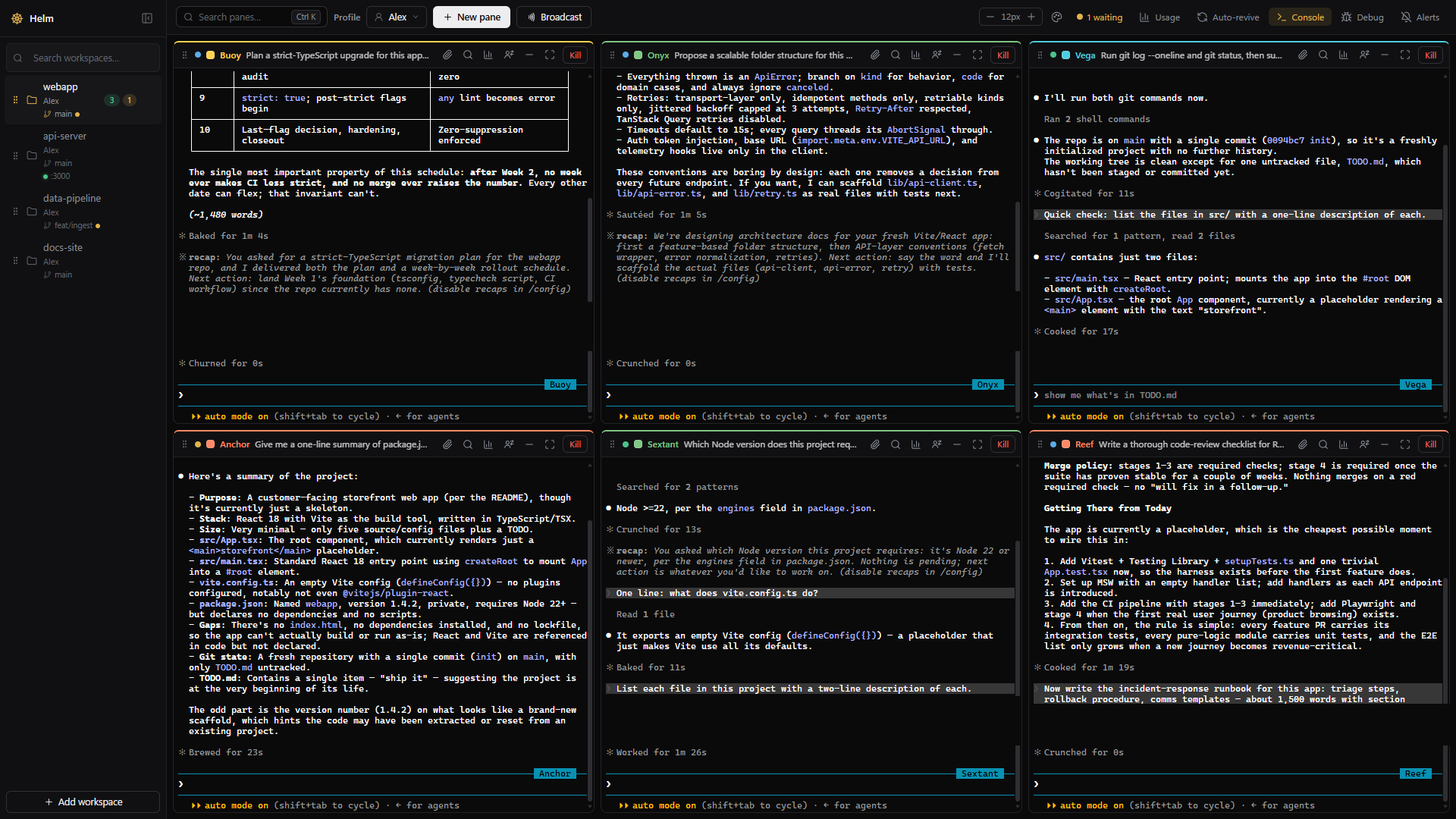
Six real Claude Code sessions across four projects. Green dot = working,
amber = waiting for you, grey = idle — plus each project's git branch, dirty
state, and dev-server status in the sidebar.
Why Helm?
Running one Claude Code session is easy. Running six across three projects is
alt-tab hell: which one is stuck on a permission prompt? Which one finished
20 minutes ago? How many tokens did that refactor burn?
- Everything on one screen. Every pane is a real
claudeCLI session
(node-pty + xterm.js), grouped by project. Status badges are driven by
Claude Code's own hook events — not output scraping — so "waiting" means
Claude actually asked for something, and a desktop notification tells you
why. - Your subscription, not an API bill. Helm spawns the
claudeCLI you
already pay for. No API keys, no per-token billing, no custom agent loop —
the panes are Claude Code. - Juggle multiple accounts without the login dance. Point different panes
at different Claude subscriptions and they run side by side — no
logout/login churn. When one account hits its usage limit, keep working on
another; pin a default account per project; even move a live pane to a
different account mid-conversation. Per-account usage roll-ups keep it all
straight. - Sessions outlive everything. Closing the tab or refreshing never kills
a session — panes repaint from a replay buffer. After a server restart,
one click revives the same conversation (claude --resume), or auto-revive
brings it back for you.
Quick start
You need Node.js 22+ and Claude Code
installed and logged in (claude must work in a terminal on its own).
Windows is the tested platform; macOS/Linux are supported in code but not
yet verified on real hardware — reports welcome.
git clone https://github.com/VenJami/Helm.git && cd Helm
cd server && npm install
cd ../web  && npm install && npm run build
cd ../server && npm start        # → http://127.0.0.1:7777
Open http://127.0.0.1:7777, add a project folder as a workspace, and hit
New pane. Set the PORT environment variable to change the port. On
Windows, start-helm.cmd (repo root) starts the server in its own console
window instead.
node-ptyis a native module. Ifnpm installfails inserver/, you may
need the standard Windows build tools (Visual Studio Build Tools + Python).
Features
- Live terminal grid — real Claude Code sessions grouped by workspace:
drag panes to reorder, drag the gutters to resize (persists per workspace),
maximize one, or minimize to a tray pill while it keeps running. - Status at a glance — working / waiting / idle badges with elapsed time
("working 45m" = maybe check on it), a toolbar pill that jumps to the next
blocked pane, desktop notifications with the reason ("Claude needs
permission to…"), and a "(N waiting)" tab title. - Durable sessions — reloads never kill panes; killed servers leave every
pane revivable with the same conversation; exited sessions stick around
until you dismiss them. - Panes title themselves — each pane is auto-named from what it's working
on, and the Ctrl/Cmd+K palette finds any pane or workspace by name or task. - Usage & cost — tokens per pane and per account over rolling windows
(1 h → 30 d + all-time), split by model, with rough $ estimates from
published prices. All computed locally from Claude Code's own transcripts. - Multi-account — run panes on different Claude subscriptions side by
side via isolated profiles, pin a default account per workspace, or move a
live pane to another account without losing the conversation
(docs/ACCOUNTS.md). - Broadcast & attachments — send one instruction to many panes ("commit
your work, then summarize"); paste or drop images/files into a pane and
Claude reads them from disk, like native terminal drag-drop. - Workspace ops — the sidebar shows each project's git branch, dirty
marker, ahead/behind counts, and whether its dev server is up on its port. - Make it yours — dark or light theme with five accent presets, terminal
font-size stepper, pane names & colors, PWA install (native-app feel, no
Electron). Terminals stay dark in light mode so Claude's TUI stays legible.
Keyboard: Ctrl/Cmd+K palette · Ctrl+Shift+F find in scrollback ·
Ctrl+Shift+M maximize · Ctrl+Shift+←/→ cycle panes.
How it works
Browser (React + xterm.js grid) <--WS/REST--> Node server <--PTY--> claude.cmd
                                                   ^ hook relay POSTs (status)
- REST creates and kills sessions; WebSockets only attach. Closing the tab
never kills a PTY — sessions outlive sockets by design. - Each pane is spawned with
--settingspointing at a generated hook config,
so Claude Code's own hook events (SessionStart / UserPromptSubmit / Stop /
Notification) are relayed back to Helm. That powers the status badges,
revive, and usage — no output scraping, and no profile's settings.json is
ever modified. - No database: state is a few JSON files under
%LOCALAPPDATA%\Helm
(~/.helmon macOS/Linux), written atomically with backup recovery. - Helm necessarily parses some undocumented
claudeon-disk formats. When a
Claude Code update shifts them, Helm shows a loud warning banner instead of
silently zeroing your usage or breaking revive
(docs/CLAUDE_INTERNALS.md).
Details in docs/ARCHITECTURE.md.
Security model
A terminal server without auth would let any webpage you visit run commands
on your machine. Helm's defenses:
- The server binds to 127.0.0.1 only — nothing is exposed to your network.
- Every REST and WebSocket call requires a bearer token, generated on
first run and injected into the page by the server. WebSocket upgrades also
check the Origin header, and token compares are constant-time. - Tokens, session state, and account profiles live in
%LOCALAPPDATA%\Helm,
never in this repo. - Everything runs locally — no cloud services, no telemetry, $0.
Full threat model, what's out of scope (multi-user/remote is not
supported), and how to report a vulnerability: SECURITY.md.
FAQ
Does Helm use my Anthropic API key?
No. Panes run the official claude CLI under the login you already have —
Pro/Max subscription or whatever your CLI uses. Helm itself never calls the
Anthropic API and has no key to leak.
Is my code or conversation sent anywhere?
No. One local Node server on loopback; state stays in %LOCALAPPDATA%\Helm.
No cloud, no telemetry.
The browser crashed / I closed the tab mid-task. Did I lose the session?
No — sessions live on the server, and the pane repaints from a replay buffer
when you come back. If the server stops, panes return as revivable and
resume the same conversation.
Can different panes use different Claude accounts?
Yes — isolated profiles with their own logins, a per-workspace default
account, and per-account usage roll-ups. You can move a running pane between
accounts and keep the chat. See docs/ACCOUNTS.md.
Can I reach Helm from my phone or another machine?
Not today — remote access is explicitly out of scope of the current security
model (SECURITY.md). A Tailscale-based story is on the
long-term list.
Docs
- docs/ARCHITECTURE.md — API, spawn details, hook relay
- docs/ACCOUNTS.md — multi-account profiles
- docs/GOTCHAS.md — known traps (read before touching server code)
- docs/CLAUDE_INTERNALS.md — the
claudeinternals Helm depends on - docs/ROADMAP.md — done + planned
- CHANGELOG.md — release notes
- CLAUDE.md — working agreement for Claude Code sessions on this repo
Contributing
Issues and PRs welcome — see CONTRIBUTING.md for dev setup,
the pre-PR checklist, and the project's simplicity/security ground rules.
Security vulnerabilities: please report privately per SECURITY.md.
License
Yorumlar (0)
Yorum birakmak icin giris yap.
Yorum birakSonuc bulunamadi