Vortex-Engine
Health Uyari
- License — License: Apache-2.0
- Description — Repository has a description
- Active repo — Last push 0 days ago
- Low visibility — Only 5 GitHub stars
Code Gecti
- Code scan — Scanned 12 files during light audit, no dangerous patterns found
Permissions Gecti
- Permissions — No dangerous permissions requested
Bu listing icin henuz AI raporu yok.
A fork of Psych Engine 1.0.4 with many additions and features implemented with the help of Claude code.
A Psych Engine 1.0.4 fork that also runs V-Slice mods, adds online multiplayer, and brings the new Funkin' menus to every mod.


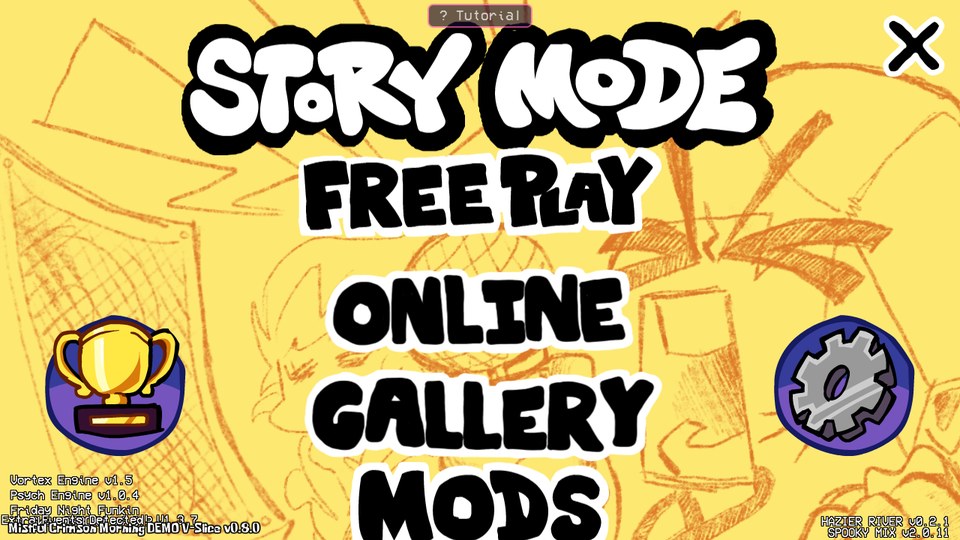
Highlights
| 🧩 V-Slice mod support | Play mods made for the official game (Polymod, .hxc scripts) next to your Psych mods, with no porting. |
| 📱 Android | The whole engine on phones (Android 7 and newer, 32 and 64-bit), with mods, Lua, HScript, V-Slice scripts and videos, and touch controls for songs and menus. |
| 📄 Codename Engine charts | Codename charts play like Psych ones (strumlines, events, BPM changes), and the chart editor converts them. |
| 🌐 Online multiplayer | Host or join a match by IP and play a song against a friend: each player sings one side. The port opens by itself (UPnP), there's a chat, and a missing mod can be sent to the other player. |
| 🎓 Tutorials | A "Tutorial" button on the menus and editors: Boyfriend zooms into each part of the screen and explains it. Mods can add their own. |
| 📸 Screenshots & Gallery | F3 takes a screenshot anywhere, with a flash and a preview; the Gallery shows them and saves copies. |
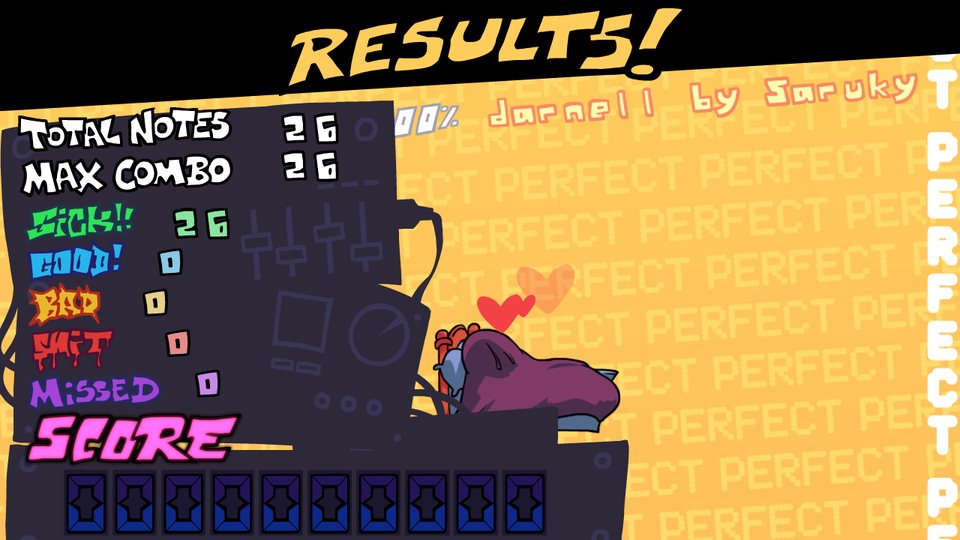
| 🎤 V-Slice menus for everyone | Freeplay with the DJ, Character Select, the Results screen and the sticker transition, for Psych songs too. |
| 🎮 New gameplay options | Play as Opponent, Health Drain, Break Timer, Lane Underlay, Ghost Notes, Hold Note Covers and more. |
| 👥 Extra characters | Add more singers to a song in the chart editor (a duet, a third character...) and pick who sings each note, with no script. |
| 🛠️ Better editors | Box selection in the chart editor, mouse tools and undo in the other editors, plus a new Character Select / Results editor. |
| 🧊 3D scenes | glTF / GLB models with their skeletal animations, lights and shadows, a sky and fog, drawn by the graphics card, with the characters (texture atlases too) standing in 3D. |
| 📜 More scripting | New Lua and HScript functions, callbacks and properties, listed in scripts.txt. |
🧩 V-Slice (Polymod) mod support
Put a V-Slice mod in the mods folder and it shows up in the game like any other mod.
- Scripts:
.hxcscripts run through Vortex's own interpreter: song, stage, character, module, dialogue, Freeplay and results scripts. - Content: V-Slice charts (
-chart.json/-metadata.json, every difficulty and variation), stages, characters (Sparrow, Packer, multi-sparrow and Adobe Animate atlases), song events (FocusCamera,ZoomCamera,SetCameraBop,PlayAnimation, ...), note kinds and dialogue conversations. - Utility mods: a V-Slice mod with scripts and no songs of its own (a custom pause menu, HUD or camera module) runs on the V-Slice songs of every mod, like on V-Slice.
- Playable characters: a mod's playable characters appear in Character Select and bring their own Freeplay DJ and results animations.
- Built-in base game content: the V-Slice versions of the base weeks, stages and characters come with the engine, so mods that depend on them work without the official game installed.
- Mods made for phones: their
.astcimages (the compressed format V-Slice uses on phones) open on computers and phones alike. On phones, the ones that look the same that way go to the graphics card as they are, taking a fraction of its memory. - Made for mods targeting the V-Slice 0.8.x API (0.8.0 up to the latest 0.8.7). Mods made for older versions work too: their note styles are sized the way they were, and their scripts' hxCodec videos play.
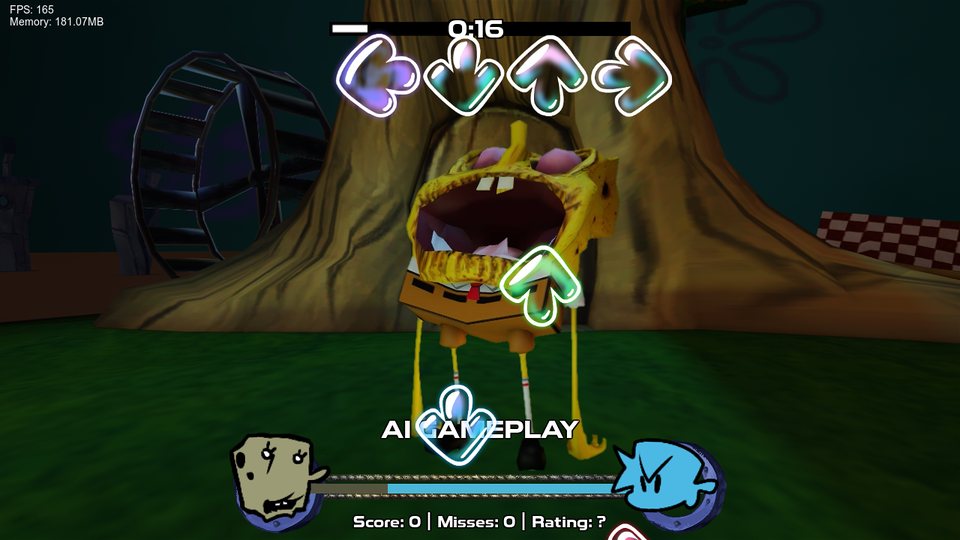
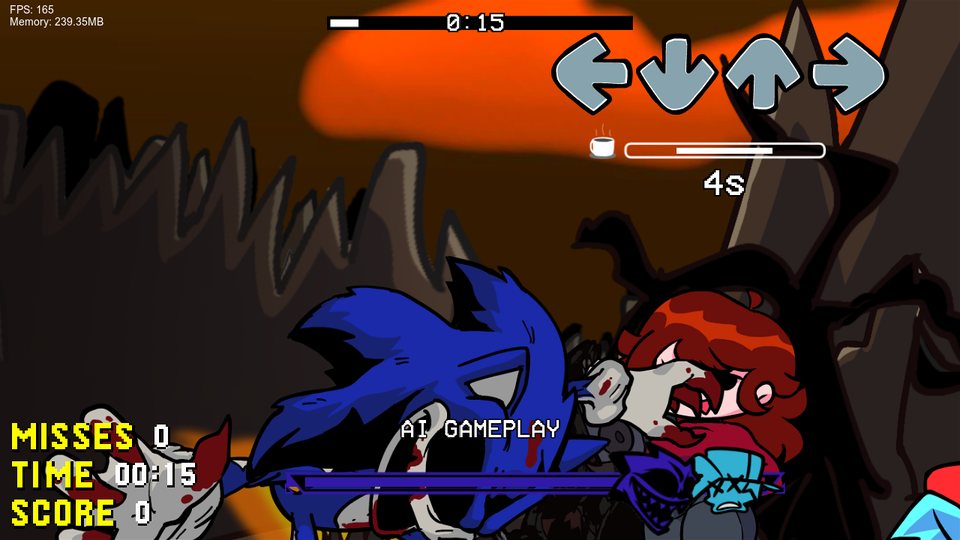
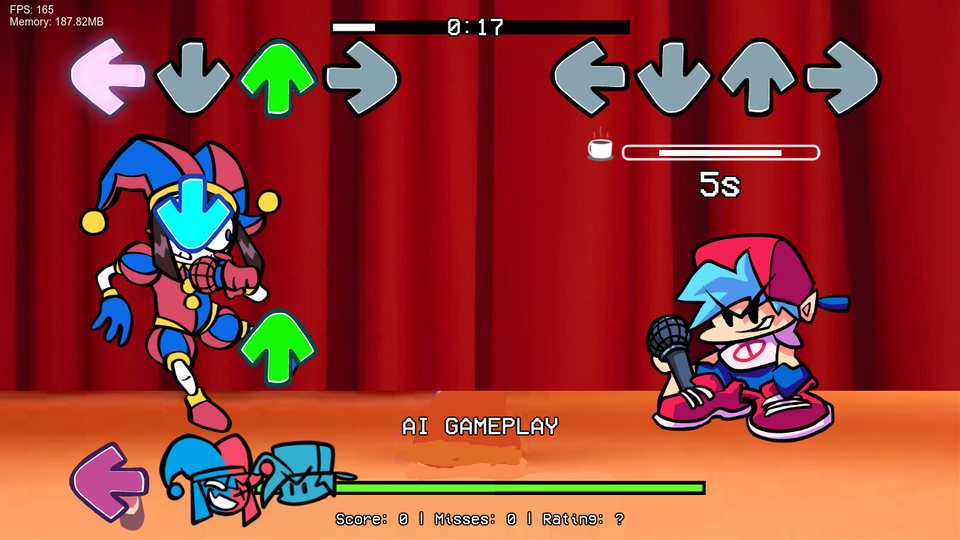
Community V-Slice mods running as they are. The mods belong to their creators.
🎤 V-Slice menus, for every mod
Each of these is an option, and Psych mods get them too.
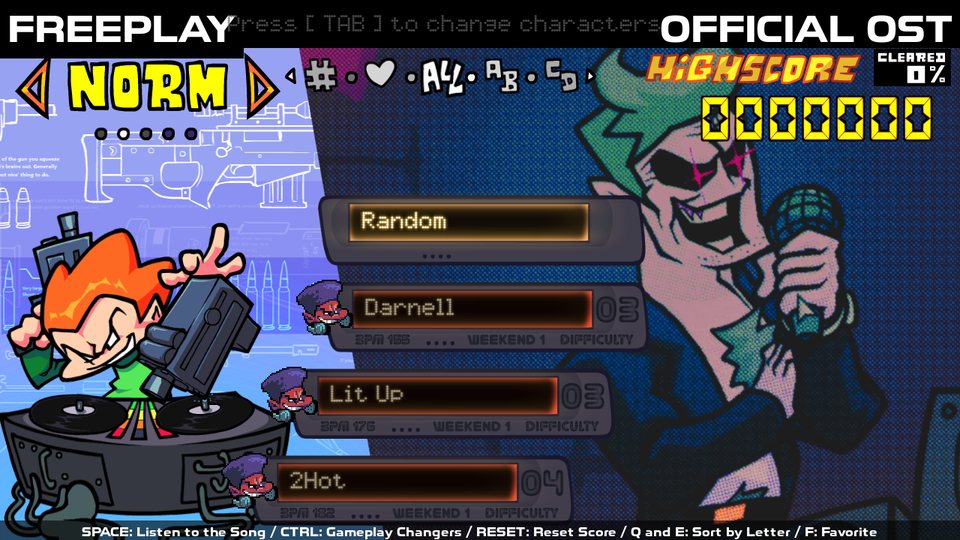
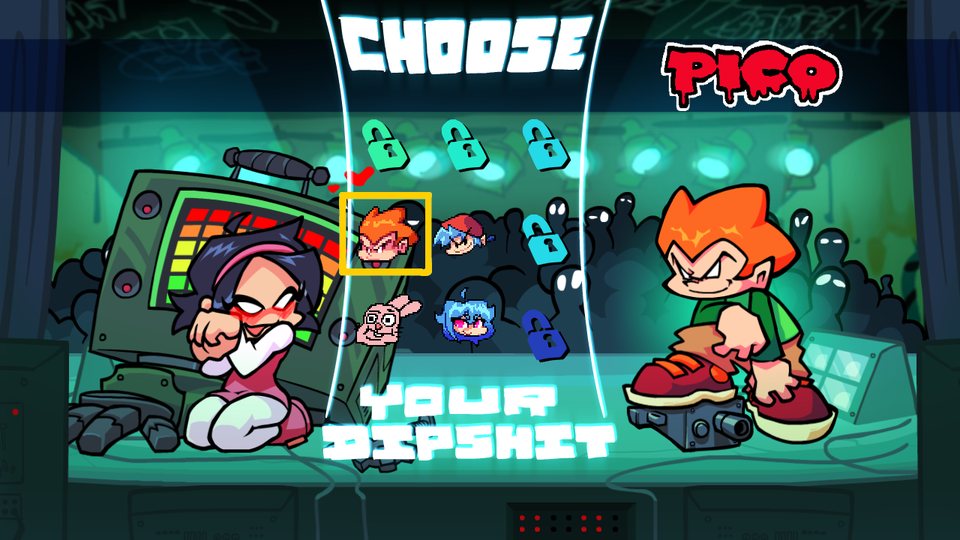
- Freeplay style: pick the classic Psych Freeplay or the V-Slice one, with the DJ, capsules, the "NEW" badge on songs you haven't played yet, favorites and sorting.
- Character Select: switch characters (press
TABin Freeplay) like in the official game. - Results screen: ratings tally and rank animations (Perfect, Excellent, Great, Good, Loss) after each song.
- Sticker transition between Freeplay and the songs.
🌐 Online multiplayer
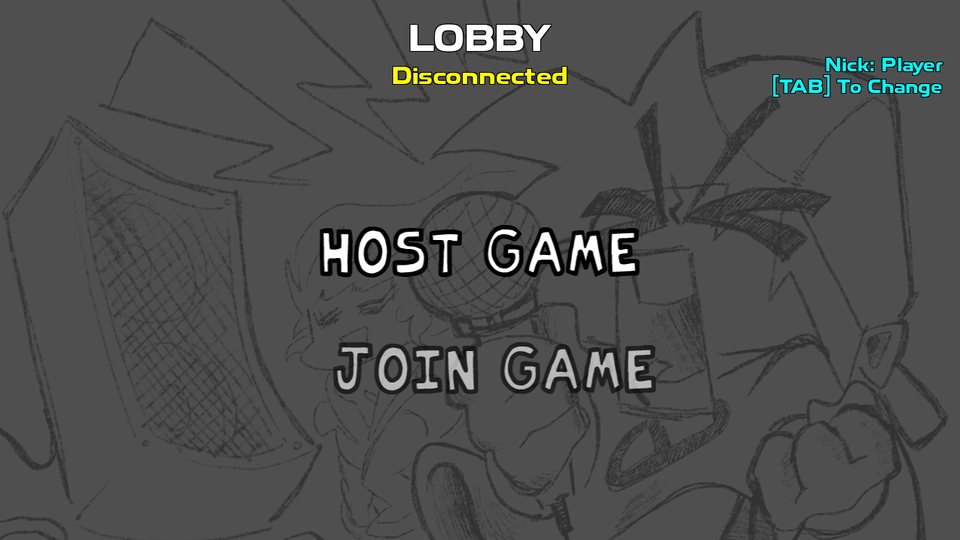
- Host Game waits for a friend; Join Game connects with the host's IP (port
8888).CTRL+Vpastes the IP. - No Radmin or Hamachi needed (when the router allows it): hosting asks the router to open the port by itself (UPnP) and shows the IP to send to your friend (
Ccopies it). If the router can't (UPnP off, or an internet provider that shares one IP between many homes, called CGNAT), the screen says so, and a VPN like Radmin still works. - Tunnels (no VPN on either PC): only the host needs one: a TCP tunnel to port
8888(see the table below). The other player types or pastes its address (name:port) on Join. - Choose your nickname in the lobby (
TAB). - Chat:
Topens it on any screen of the match (the lobby, the song, the results). Its key can be changed in Controls. - The other player's preferences:
Pin the lobby shows them (downscroll, middlescroll, lane underlay, ghost tapping, note skin, offset, FPS). With the option Online: Opponent's View, you see their notes the way they do: going down if they use downscroll, with dark lanes if they use Lane Underlay. - Sending a mod: if the host picks a song from a mod the other player doesn't have, the other player is asked if they want it (with its size, and a warning that mods can have scripts). If they accept, the host sends the mod's files, it's installed and turned on, and the match starts. A mod they have but turned off is only turned on.
- Each player plays one side of the chart, and both see each other's notes, misses and animations as they happen.
- Match setup: after picking the song, the host chooses how the match is won (Score, Misses or Accuracy) and the sides; the other player watches it live.
- During the song, the other player's score, misses and accuracy are in a corner, with who's ahead. Getting knocked out loses; if nobody is, a results screen shows both players side by side and who won.
- Health drain added by a mod for the opponent's notes is blocked online, because the match already handles health.
- Scripts can check
onlinePlay/onlineHostto change mechanics that would be unfair online.
Playing without a VPN: TCP tunnels
When the router can't open the port, the host can use a tunnel: an address like name:12345 that leads to the host's port 8888. The host creates the room in the game, starts the tunnel and sends its address; the other player types or pastes it on Join and installs nothing. Every message goes through the tunnel's server, so pick one close to both players.
| Where the players are | Tunnel | What the host runs | Free plan |
|---|---|---|---|
| Brazil / South America | Pinggy (has a server in Brazil, picked by itself) | ssh -p 443 -R0:localhost:8888 [email protected] (ssh comes with Windows 10 and 11) |
No account, nothing to download. Each tunnel lasts 60 minutes; a new one has a new address. |
| United States | bore | bore local 8888 --to bore.pub |
No account, no time limit. A small program from its GitHub releases; a free server kept by its author, with no promise it stays up. |
| Europe, UK, Asia (Singapore), Australia | Pinggy (picks the closest server) | ssh -p 443 -R0:localhost:8888 [email protected] |
60 minutes per tunnel. |
| Any region (choose the server) | Localtonet | Its program, with a TCP tunnel to port 8888 | Needs an account. TCP tunnels stop after 30 minutes (they can be started again), 1 GB a month. |
| Any region | ngrok (US, Europe, São Paulo, India, Japan, Singapore, Australia) | ngrok tcp 8888 |
TCP tunnels need an account with a credit or debit card added (not charged). |
| Any region (both PCs) | Radmin VPN, Hamachi, ZeroTier | Both players install it and join the same network | Free; the game talks straight between the two PCs. |
- With Pinggy, the first time
sshasks if the server can be trusted: typeyes(and if it asks for a password, just press Enter). - playit.gg's free plan only has UDP tunnels for other programs, and the game's online uses TCP.
- Free plans change: check the tunnel's own page.
🎮 Gameplay
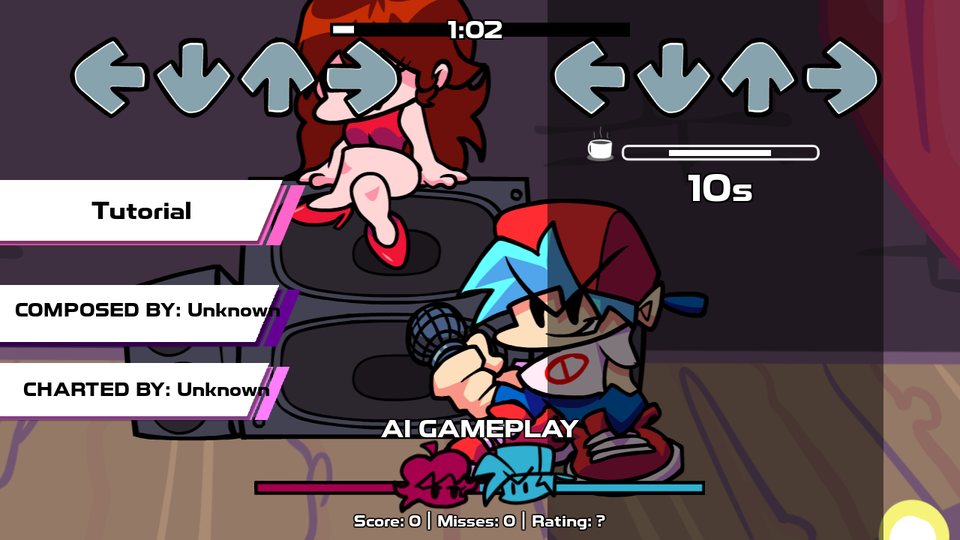
Lane Underlay, the Break Timer ("10s") and the Song Credits Card.
Gameplay changers
- Play as Opponent: play the opponent's notes while the computer plays Boyfriend's.
- Health Drain: every note the opponent hits takes a little health (it never kills you).
- Speed Up on Miss: every miss makes the song 5% faster, up to 2x.
- Ghost Notes: two notes of the same character close together leave an afterimage of the first pose, in the animation the character was in.
- Only Sick: anything worse than a Sick (and any miss) ends the song.
- Random Chart: every note goes to a random column (notes at the same time never land on the same one).
- Random Scroll Invert: every 16 beats, the receptors may glide to the other side of the screen, and the notes turn around with them.
- Fade In / Fade Out: the notes appear only near the receptors, or disappear before reaching them.
- Random Note Speed: each note comes at its own speed.
New options
- Break Timer: a countdown when there are 3 seconds or more without notes.
- Click Between Frames (Windows): like the Geometry Dash mod, each key press counts from the moment it was made, not from the start of the next frame, for more precise hits (mostly at low framerates).
- Lane Underlay: dark lanes under your notes, with adjustable opacity.
- Hold Note Covers: the sparks on the receptors while you hold a long note.
- Sustain Wiggle, Icon Bop, Smooth Health Bar and Sustains as One Note.
- Score Camera: ratings and combo pop up on the HUD or in the stage.
- Song Credits Card: the song's name, composer and charter slide in when the song starts.
- Animated health icons (an
.xmlnext to the icon) and winning icons (3 frames). - Window Mode (windowed or fullscreen) and Sharpness.
- Keystrokes: the keys you press, shown during songs and lit while held, with keys per second. Custom opens an editor (
ENTER) to place each key over a gray screen with the arrows and bars, for each number of arrows (1K to 9K), with multiple selection (CTRL+ click or dragging an area), snapping and undo. WASD lays them out like W A S D,DFJK in a row (songs that don't have 4 arrows always use the row). They and the Break Timer are on a camera of their own over every other one, so songs that hide or move the HUD don't take them away. - Supersampling: the game is drawn bigger than the window and shrunk to it, for smoother edges (like DSR on NVIDIA cards).
- Widescreen: songs and menus fill screens wider than 16:9 (ultrawide monitors, phones) instead of leaving black bars.
- Subtitles: V-Slice songs' and cutscenes' subtitles, shown at the bottom of the screen.
- Texture Quality: Half draws big images (characters, stages) from textures of half their size, for weak graphics cards and phones.
- Crash screen: an error no longer closes the game: it shows what happened and where, with a way back to the menus, and saves a report in
crash/. - The options menu is one panel with tabs (Gameplay, Graphics, Visuals, V-Slice, Vortex Engine, Mods and More), usable with the keyboard or the mouse. The note and splash settings show the arrows, with the splashes playing.
- Mods tab: "Open Mod Configs" opens V-Slice's own options menu, where V-Slice mods put their settings (
createPrefItemCheckbox,createPrefItemEnum,createPrefItemNumberandcreatePrefItemPercentageon its pages, pages and lines of their own, keys of their own on its controls page), with their modules running on it like on V-Slice. Psych mods' settings (data/settings.json) are on the mods menu. - MS Offset Display (Vortex Engine tab): how early or late each note was hit, under its rating ("+12ms Late", "-5ms Early"), like Kade Engine had.
- Check for Updates (Vortex Engine tab): the main menu tells you when a new version of the engine is out.
- Show Locked Songs (Vortex Engine tab): Freeplay also lists the songs of weeks that are still locked, without beating the weeks before them.
- FPS Counter (Visuals tab): Off, Simple or Detailed. Detailed shows the lowest, average and highest FPS, and the CPU, GPU and VRAM used by the game itself, to see what makes a song or stage heavy.
- Controls: two actions on the same key that work during a song (a note key that's also the chat's, for example) get a warning.
🎹 Extra keys (1 to 9 arrows)
Songs can have more or fewer than 4 arrows per side, for mods like Shaggy's 6 and 9 key songs.
- In the chart:
"keyCount": 6. A chart's"mania"works too: Psych Engine Extra Keys' (its number plus one) and the older one of Shaggy's mod and Kade forks (0 is 4 arrows, 1 is 6, 2 is 7, 3 is 9), told apart by the columns the notes use. The notes are0tokeyCount - 1on one side andkeyCounttokeyCount * 2 - 1on the other, like Psych's 0-3 and 4-7. - In the chart editor: "Arrows per side" in the Song tab. Changing it keeps each note on its side and in its column (as far as there are columns).
- The arrows: each column uses one of the 4 arrows, or the middle one (the "space" key, a diamond of its own with the game's note skin, the up arrow with the others), with the color of its direction from Note Colors; a second arrow of the same direction gets another color. They get smaller the more there are.
| Arrows | Columns | Default keys |
|---|---|---|
| 1 | middle | Space |
| 2 | ← → | F J |
| 3 | ← middle → | F Space J |
| 5 | ← ↓ middle ↑ → | D F Space J K |
| 6 | ← ↑ → ← ↓ → | S D F J K L |
| 7 | ← ↑ → middle ← ↓ → | S D F Space J K L |
| 8 | ← ↓ ↑ → ← ↓ ↑ → | A S D F H J K L |
| 9 | ← ↓ ↑ → middle ← ↓ ↑ → | A S D F Space H J K L |
- Keys: Options → More → Extra Keys (UP/DOWN pick how many arrows, LEFT/RIGHT the arrow, ENTER changes its key, R puts the default ones back).
- Characters sing the animation of the arrow's direction (the middle one sings up). Scripts see the column as always, in
noteData.
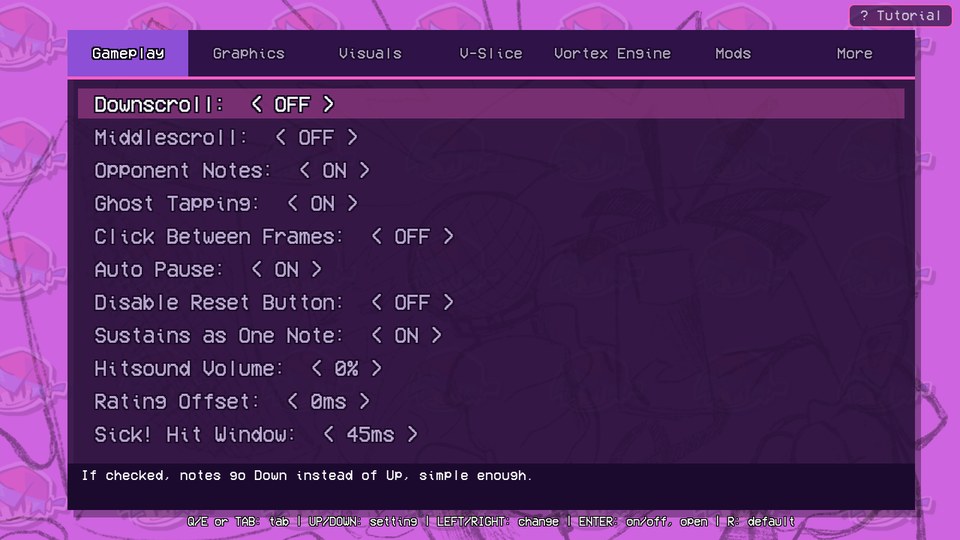
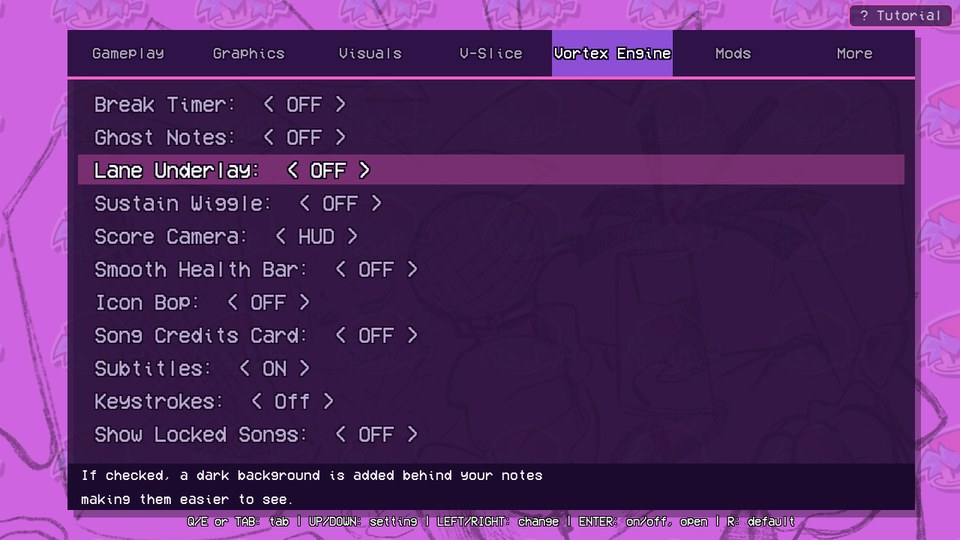
The options menu: one panel with tabs, opened right over the main menu. The Vortex Engine tab has all of Vortex's own options.
🛠️ Editors
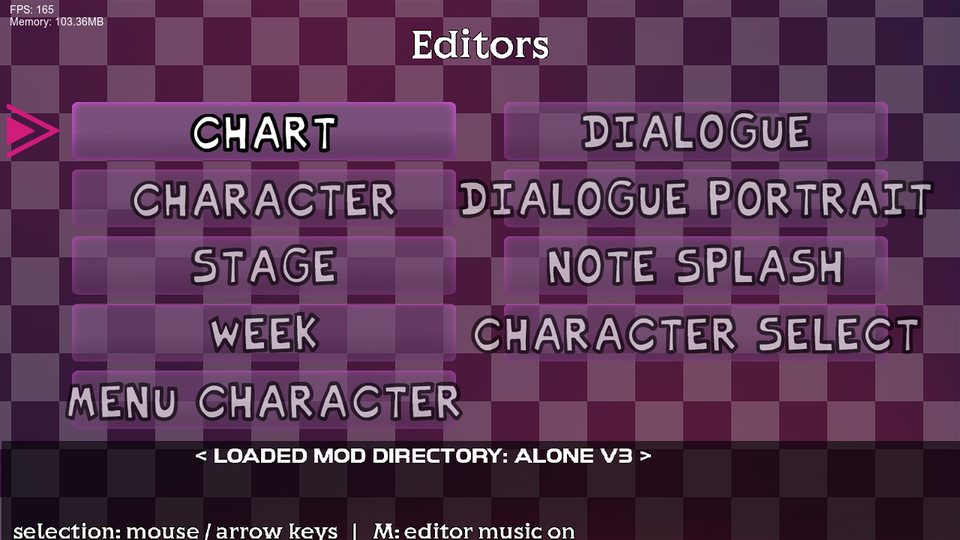
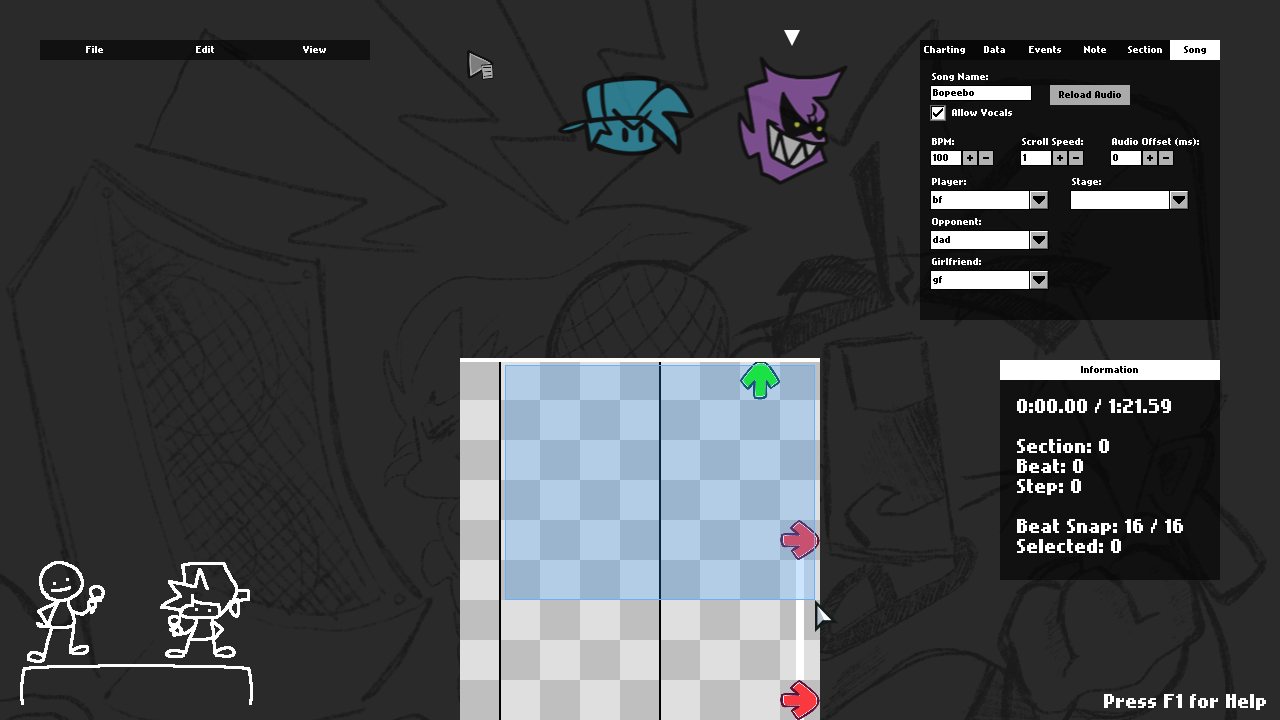
- Chart Editor: a music player bar at the bottom (like V-Slice's): drag it to go anywhere in the song, play/pause and skip with its buttons, and see the time left, beat, step, BPM and snap. Drag a box with the mouse to select notes, drag the selection to move it, cut / copy / paste and undo. Music plays when you leave it idle, like in V-Slice (
Mturns it off). - Extra characters: the chart editor's "Extras" tab adds characters besides the opponent, the player and the girlfriend (a character, a side, where it stands, and if its notes come down its side's receptors or receptors of its own). Each one gets a field of its own on the grid, like Codename Engine's strumlines, to chart its notes; the Note tab's "Sung by" also picks who sings each note: the main character, an extra one, or everyone on that side. They dance, sing, hold long notes and miss like the main ones; scripts get them by their tag. See section 8 of
scripts.txt. - Codename Engine charts: a Codename chart (strumlines,
meta.json,events.json) is read like a Psych one, in a song's folder or in the chart editor (File > Open Codename Engine Chart..., with a grid field for each strumline). Its extra strumlines become extra characters (with receptors of their own when Codename shows them), invisible ones sing in the background, and its events become the engine's (camera with its ease and offset, HUD zoom, gradual BPM changes). Seescripts.txt, section 8. - New chart events: Flash Camera, Fade Screen, Set Camera Zoom, Fade HUD, Cinematic Bars, Lyrics, Camera Target, Camera Bop, Character Trail, Notes Fade, Camera Angle and Change Stage (another stage in the middle of the song), with no script needed (see section 10 of
scripts.txt). A mod with its own event of the same name keeps its own. - Stage, Character, Dialogue Portrait and Menu Character editors: move things with the mouse, with undo.
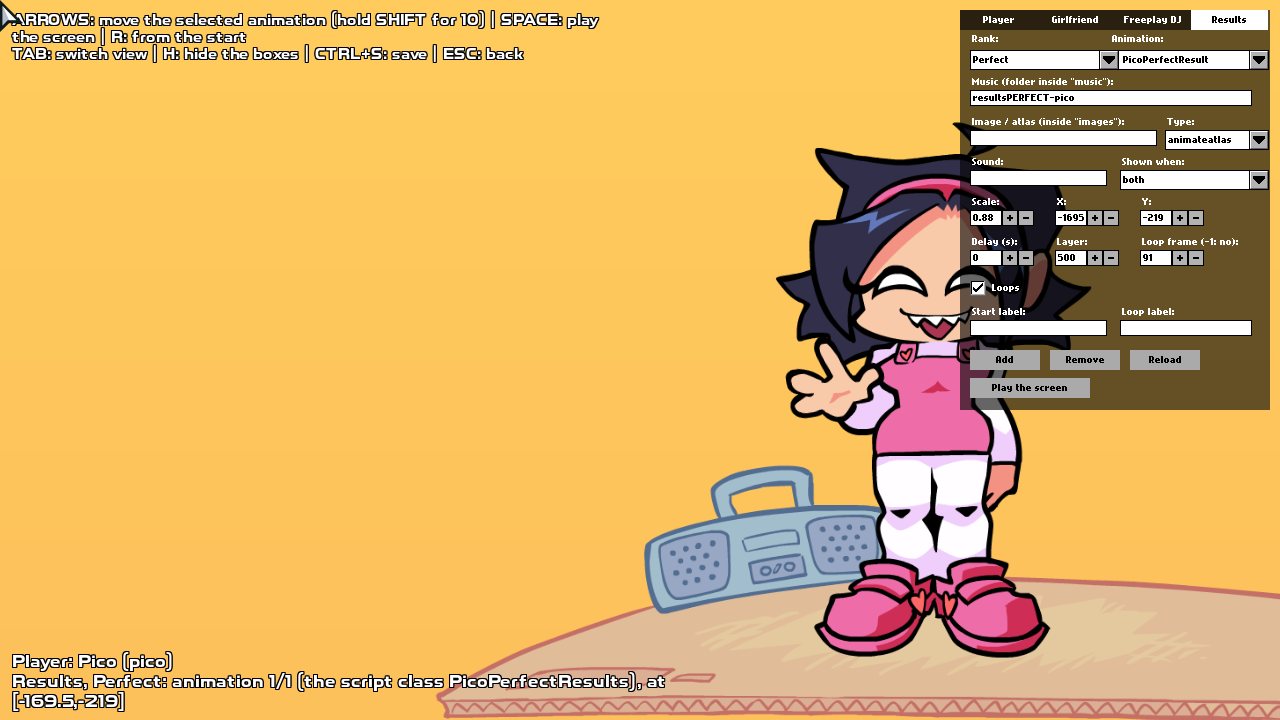
- Character Select & Results editor (new): place the characters, portraits and results animations of a playable character, with a live preview. What you save works in the official V-Slice too.The character can also be a spritesheet (
.png+.xml) instead of a texture atlas, in the "Player Sheet" tab (Vortex only: V-Slice needs the atlas). The "Icon" tab changes the player's icon on the grid and in Freeplay (a.png, an animated one with its.xml, or one made from the health icon), saved where V-Slice looks for it. - Every editor has a Tutorial button (see below).
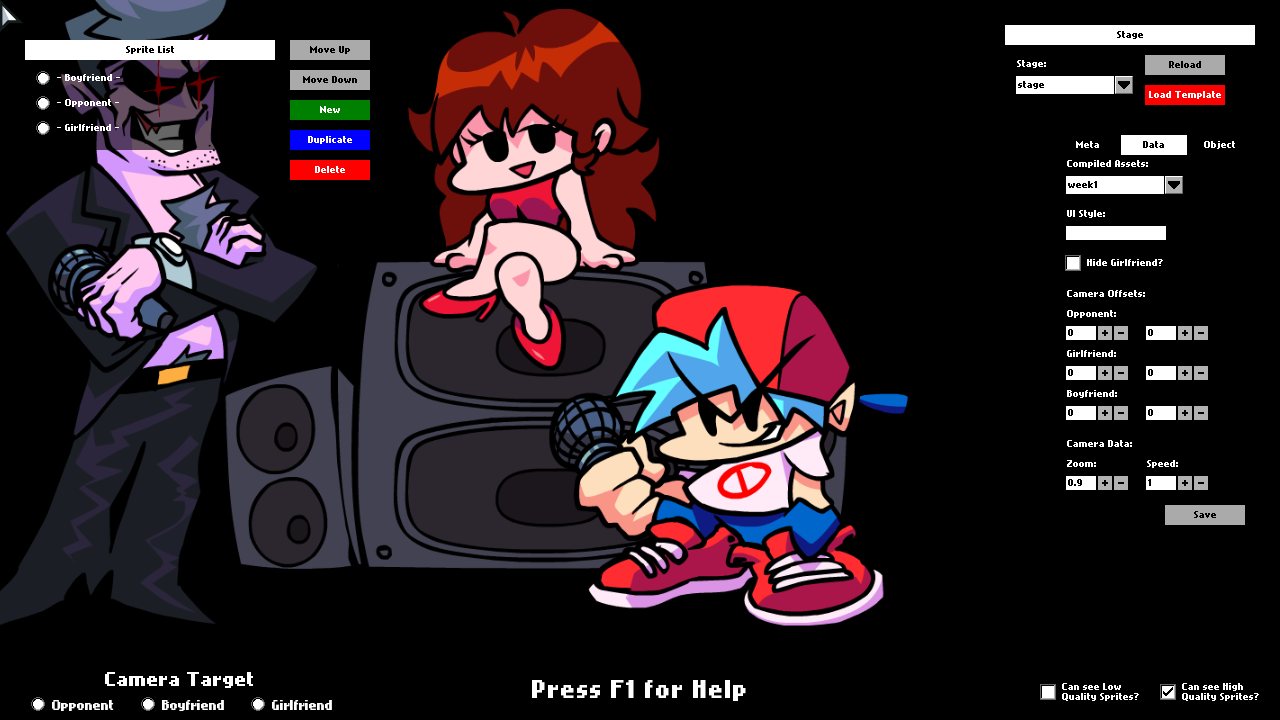
🎓 Tutorials
The menus and the editors that have a tutorial show a Tutorial button (F6 also opens it). Boyfriend comes in, the screen zooms into each part he talks about, and a speech bubble explains it. ENTER or a click goes on, BACKSPACE goes back, ESC leaves.
There are tutorials for the main menu, Freeplay (both styles), the options, Online, the mods menu, the Gallery, the editors menu, and the Chart, Character, Stage and Character Select editors.
The button can be hidden in Options → Vortex Engine → Tutorial Button.
Making one for your mod: add data/tutorials/<ScreenName>.json to the mod, named after the screen's class (MainMenuState, ChartingState, a custom state's class...). A mod's tutorial replaces the game's one for that screen.
{
	"button": "top-right",
	"steps": [
		{"text": "Hi! This step has no target: the whole screen is shown."},
		{"text": "This is the song list.", "target": "grpSongs", "zoom": 1.5},
		{"text": "The Note tab.", "target": "mainBox", "set": {"mainBox.selectedName": "Note"}},
		{"text": "A spot of the screen.", "rect": [100, 100, 300, 200], "pose": "up"}
	]
}
target: the name of something on the screen (a variable of the state), or several in a list. Dots go inside it:"mainBox.tabs.Note","menuItems.members.2".rect: a place on the screen instead,[x, y, width, height](the screen is 1280x720).areapicks a part of the target the same way, from its corner.zoom: how close it goes (2 by default; it never goes closer than what fits).set: values changed while the step is shown (a tab, a menu opened...). Everything goes back to how it was when the tutorial ends.pose: what Boyfriend does:hey,left,down,up,rightoridle. By default he looks at what he's showing.button: where the button goes:top-left,top-center,top-right,bottom-left,bottom-center,bottom-right, or[x, y].- Translations: add
"key": "mymod_menu"to the file, and the language files'mymod_menu_1,mymod_menu_2... replace the steps' texts (counting from 1). The game's own tutorials usetutorial_<screenname>.
🧊 3D scenes
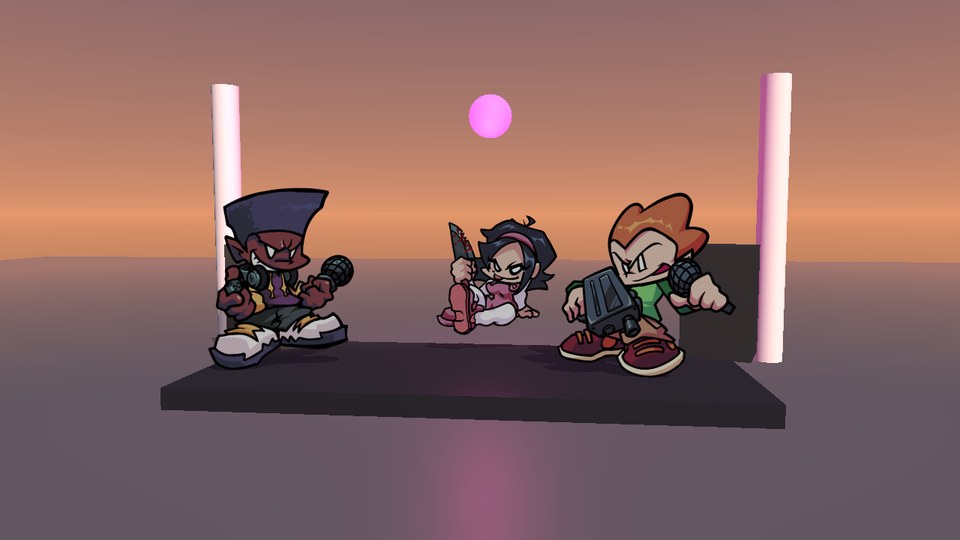
A 3D stage made with Lua: the floor, the stage and the lights are made by the engine, and the song's characters stand in it, casting shadows.
A 3D scene is drawn by the graphics card with real depth, on a sprite of its own: it goes on the stage or the HUD, behind or in front of the characters, and its background is see-through unless it has a sky.
- Models: glTF / GLB (what Blender exports) with all of their materials' textures, morph targets and lights, OBJ, and shapes made by the engine (box, floor, sphere, cylinder, cone).
- Animations from the file, fading from one to another, with layers on some bones only (the head looking around while the body walks), and things attached to bones.
- Lights (sun, point, spot, ambient) with shadows, a sky (colors or a 360 picture), fog, and a camera that can follow a model.
- 2D characters in 3D:
makeSprite3D('dad3d', 'world', 'dad')puts the opponent in the scene, singing as usual and facing the camera. Texture atlas characters too. - Lighter on phones and with Low Quality (simpler lighting, hard shadows).
- Everything by tag, like Lua sprites (
setProperty,startTween), and from HScript (render3d.Scene3D,render3d.Model3D). See section 13 ofscripts.txt.
📱 Android
The engine runs on phones: Android 7 and newer, 32 and 64-bit, with mods, Lua, HScript, V-Slice scripts and videos.
- Mods go in
Android/media/com.team.vortexengine/modson the phone's storage (no permissions needed). That folder has the game's files too, copied on the first launch. - Touch controls (Options → More → Mobile Options): Arrows (touch your own arrows, laid out like V-Slice on phones), Hitbox (the screen split in one lane per arrow, each with a frame of its color) or Buttons (a button per arrow at the sides, which you can move and resize), with a pause button, their opacity, the arrows' size and upscroll. Extra keys songs work with all of them.
- Menus: drag to scroll, tap to pick, a back button and an on-screen pad. Dialogues and cutscenes go on with a tap and have a Skip button, and keys a mod's script asks for (a dodge on SPACE) get a button of their own while it uses them.
- Render Resolution draws the game at fewer lines than the screen has (720p by default) for weaker phones, and Texture Quality can halve big images.
- Mods made for computers mostly work as they are: images too big for the phone's graphics card are made smaller instead of black, and file names don't care about capital letters.
To build it yourself, see Building.
📸 Screenshots and the Gallery
F3 (it can be changed in Controls) takes a screenshot of the game anywhere, with a flash (if Flashing Lights is on), a camera sound and a small preview in the corner. Clicking the preview opens the folder.
The pictures go to mods/images/gallery, and the Gallery shows them along with the images of the game and of the mods. S (or its button) saves a copy anywhere on the computer.
📜 Scripting
Everything Psych Engine's Lua and HScript can do still works, and so do V-Slice's .hxc scripts. On top of that, Vortex adds:
- State scripts: a
statesfolder with one.hxper screen (MainMenuState.hx,LoadingState.hx, ... andGlobal.hxfor all of them) to change the menus and make your own loading screen. See the full guide below. VortexEngine,playAsOpponent,onlinePlayandonlineHostvariables.- Functions such as
setLaneUnderlay,setScoreCamera,setHiddenNotes,getTalliesandstartConversation(V-Slice dialogue in Psych songs). - Lua cameras of your own (
makeLuaCamera), shaders on whole cameras (addCameraShader,tweenShaderFloat), the game's window (setWindowTitle,setWindowPosition,setWindowSize,windowAlert...), notes added during the song (spawnNote), extra characters added or taken out during the song (addExtraCharacter,removeExtraCharacter) and the clipboard. - 3D: Lua sprites, receptors and notes turned with
angleX,angleYandz; whole cameras turned withsetCamera3D/tweenCamera3D(tilt the HUD like a 3D modchart);.objmodels on the stage (makeLuaModel); and full 3D scenes with glTF models, animations, lights and shadows (makeScene3D, see 3D scenes). See section 13 ofscripts.txt. - Mods for older Psych Engine (0.4 to 0.7.3): their old class names, options and video players (hxCodec's
FlxVideo,MP4Handler) work as they did. - Callbacks such as
onBreakStartandonBreakEnd. - Overlay, hardlight, difference and invert blend modes that really work on Lua sprites.
- Camera rotation without empty corners: no
zCameraFixscripts needed.
The full list, with examples, is in scripts.txt and on the website's Lua API page. Everything on Psych Engine's Lua Script API page works in Vortex too.
🖼️ State scripts: change the menus and the loading screen
Put HScript files in a states folder of your mod, named after the screen they're for, and they run on it:
mods/My Mod/states/
├─ Global.hx           ← every screen
├─ MainMenuState.hx    ← the main menu
├─ FreeplayState.hx    ← Freeplay
└─ LoadingState.hx     ← the loading screen before a song
// mods/My Mod/states/MainMenuState.hx
function onCreatePost() {
	var hello = new FlxText(20, FlxG.height - 70, 0, 'Hello from my mod!', 28);
	add(hello);
}
- Callbacks:
onCreate,onCreatePost,onUpdate,onUpdatePost,onStepHit,onBeatHit,onOpenSubState,onCloseSubState,onDestroy. - The screen's own things are reached by their names (
optionsGear.visible = false;), andadd()/insert()/remove()work on it. - Custom loading screens:
onLoadingProgress(loaded, total, percent), andonFinishedLoading()returningFunction_Stopkeeps the screen on untilfinishLoading()(a minimum time, "Press ENTER to continue", a fade...). switchState('CreditsState'),debugPrint(),parseJson()andsharedData(data kept from one screen to the next, or for the song's scripts).
📖 Full guide, with every screen name, callback and function, and complete examples: docs/STATE_SCRIPTS.md · Template: docs/scripts/StateTemplate.hx
[!WARNING]
Mods made with Vortex Engine are not recommended for other engines.
Many features only exist in Vortex: the functions, variables and callbacks above, the extra blend modes, the gameplay changers, V-Slice dialogue in Psych songs, online checks and the files made by its editors. A mod that uses any of them will break or behave differently on Psych Engine, V-Slice or other forks.
A mod made in Vortex can only be expected to work elsewhere if it doesn't use any of Vortex's exclusive mechanics (plain Psych Engine 1.0.4 Lua/HScript, or plain V-Slice content).
If you want your mod to run on other engines too, check for Vortex with theVortexEnginevariable before using these features.
The CHECK MOD button in the mods menu lists everything a mod uses that only Vortex has, with the file and line of each one.
Installation
Refer to the Build Instructions.
Customization
If you wish to disable things like Lua Scripts or Video Cutscenes, you can refer to the Project.xml file.
Inside Project.xml, you will find several variables to customize the engine to your liking.
To start you off, disabling Video Cutscenes should be simple: delete the line "VIDEOS_ALLOWED" or comment it out by wrapping the line in XML-like comments, like this: <!-- YOUR_LINE_HERE -->
Same goes for Lua Scripts: comment out or delete the line with LUA_ALLOWED. This and other customization options are all available within the Project.xml file.
A build for mod makers (no base songs)
A copy of the engine without the songs and weeks of the base game (Psych's and V-Slice's), so that only a mod's own songs show up in Freeplay and Story Mode. It's meant for people making a mod with Vortex Engine, or shipping their own modified version of it, who would otherwise have to delete the base songs by hand.
Nothing besides Haxe has to be installed: the export runs with Haxe itself, the same one that builds the game (on Windows, Linux and Mac). There's no Python or anything else to set up.
Step by step
- Build the game as usual, with your own changes to the source if you made any:
lime build windows - Export the clean version. On Windows, double click
art/buildScripts/export_clean_build.bat. On any system, open a terminal in the engine's folder (the one withProject.xml) and run:haxe art/buildScripts/export_clean_build.hxml - The result is in
export/clean. OpenVortexEngine.exethere to check it: the menus work, Freeplay and Story Mode are empty, and every song added undermods/shows up alone. - To share it, add
--zip(haxe art/buildScripts/export_clean_build.hxml --zip, orart\buildScripts\export_clean_build.bat --zipin a terminal) and sendexport/clean.zip.
It prints what was copied and what was left out, like this:
Copied: 2299 files, 477.0 MB
Left out (base songs): 6, 448.2 MB
Left out (base cutscene): 3, 26.5 MB
Left out (base song chart): 29, 2.0 MB
Left out (base weeks): 10, 0.0 MB
What's in it: the engine, the characters, the stages and their images, the note skins, the menus, Freeplay's DJs, Character Select, the results screen, the sounds and music of the menus, and the V-Slice base content that mods use (characters, stages, note styles...).
What's left out:
- Psych's songs: their audio (
assets/songs), their charts (assets/shared/data/<song>), the weeks (assets/shared/weeks) and the cutscene videos (assets/videos). - V-Slice's base songs: their audio, charts and levels (
assets/vslice/songs,data/songs,data/levels), their scripts (scripts/songs) and their videos (assets/vslice/videos). - What's only on your computer: your
modsfolder (a clean one with itsreadme.txtand the mod template takes its place), the chart editor's backups, the mods list, the logs and the script error files.
Options (after the command, or after the .bat in a terminal):
| Option | What it does |
|---|---|
--zip |
Also makes export/clean.zip, ready to share. |
--dry |
Only shows what would be copied and left out. Nothing is written. |
<game folder> <output folder> |
Uses other folders. For example, for a Linux build: haxe art/buildScripts/export_clean_build.hxml export/release/linux/bin export/clean-linux |
--force |
The output folder is made again from nothing on every export. If it has something an export didn't put there (a file you saved in it, a mod inside its mods folder), the export stops and lists it instead of deleting it. --force deletes it anyway. |
The scripts are in art/tools/: ExportCleanBuild.hx is the export, and the folder lists at its top (SKIP_ROOT, SKIP_DIRS, DATA_KEEP) say what's left out, if your version of the engine needs other folders kept or removed.
Custom mouse cursor
Put an image at images/cursor.png (the game's assets/shared/images/, or a mod's images/ folder - the mod being played comes first) and it becomes the cursor on every screen. An optional images/cursor.txt next to it sets its size and the pixel that clicks: scale, x, y (for example 2, 0, 0, or 1, 16, 16 for a 32x32 crosshair clicking with its middle).
💬 Community
Questions, bug reports, mods made with Vortex Engine, or someone to play online with: join the Vortex Engine Discord server.
Credits
Vortex Engine
- VeritonR - Creator of Vortex Engine.
Psych Engine
- Shadow Mario - Main Programmer and Head of Psych Engine.
- Riveren - Main Artist/Animator of Psych Engine.
Special Thanks
- bbpanzu - Ex-Team Member (Programmer).
- crowplexus - HScript Iris, Input System v3, and Other PRs.
- Kamizeta - Creator of Pessy, Psych Engine's mascot.
- MaxNeton - Loading Screen Easter Egg Artist/Animator.
- Keoiki - Note Splash Animations and Latin Alphabet.
- SqirraRNG - Crash Handler and Base code for Chart Editor's Waveform.
- EliteMasterEric - Runtime Shaders support and Other PRs.
- MAJigsaw77 - .MP4 Video Loader Library (hxvlc).
- iFlicky - Composer of Psync, Tea Time and some sound effects.
- KadeDev - Fixed some issues on Chart Editor and Other PRs.
- superpowers04 - LUA JIT Fork.
- CheemsAndFriends - Creator of FlxAnimate.
- Ezhalt - Pessy's Easter Egg Jingle.
- MaliciousBunny - Video for the Final Update.
- The Funkin' Crew - Friday Night Funkin' and V-Slice.
- The Android Open Source Project and Binomial (Basis Universal) - ASTC image decoder (Apache License 2.0).
Vortex Engine by VeritonR · Psych Engine by ShadowMario · Friday Night Funkin' by ninjamuffin99 and The Funkin' Crew
Yorumlar (0)
Yorum birakmak icin giris yap.
Yorum birakSonuc bulunamadi