versus-incident
Health Gecti
- License — License: GPL-3.0
- Description — Repository has a description
- Active repo — Last push 0 days ago
- Community trust — 410 GitHub stars
Code Gecti
- Code scan — Scanned 12 files during light audit, no dangerous patterns found
Permissions Gecti
- Permissions — No dangerous permissions requested
This tool is an incident management agent that receives webhook alerts from monitoring systems like Grafana or Sentry, and forwards them as customized notifications to multiple channels including Slack, Teams, and Telegram. It also supports on-call integrations and features a beta AI SRE agent to analyze unexpected system behavior.
Security Assessment
Overall Risk: Low. The tool acts primarily as a webhook relay and alert forwarder, meaning it will naturally handle system metrics and potentially sensitive operational logs. It requires network requests to function properly, both to receive incoming alerts and to send outgoing notifications to external services. However, the code scan of 12 files found no dangerous patterns, hardcoded secrets, or dangerous permission requests. It does not appear to execute arbitrary shell commands. Developers must remain cautious about securely passing API tokens (such as Slack tokens) via environment variables rather than hardcoding them, and should ensure the tool's HTTP endpoint is not exposed to the public internet without authentication.
Quality Assessment
The project is in excellent health. It is actively maintained, with the most recent push occurring today. It possesses a solid foundation of community trust, evidenced by over 400 GitHub stars. The repository is properly licensed under GPL-3.0, making it safe for legal use and modification in most environments. The documentation is extensive, offering quick-start guides and clear architectural diagrams.
Verdict
Safe to use, provided you follow standard security practices like securing the webhook endpoint and managing API tokens securely via environment variables.
An incident management tool supporting multi-channel alerting, customizable messages, and on-call integrations. Compatible with any tool supporting webhook alerts.


An incident management tool that supports alerting across multiple channels with easy custom messaging and on-call integrations. Compatible with any tool supporting webhook alerts, it's designed for modern DevOps teams to quickly respond to production incidents.
🚀 Mastering your Site Reliability Engineering Skills: On-Call in Action.
Table of Contents
- Features
- Getting Started
- Development Custom Templates
- SNS Usage
- AI Agent
- On-Call
- Configuration
- Environment Variables
- Dynamic Configuration with Query Parameters
- Template Syntax
- Roadmap
- Contributing
- License
Features
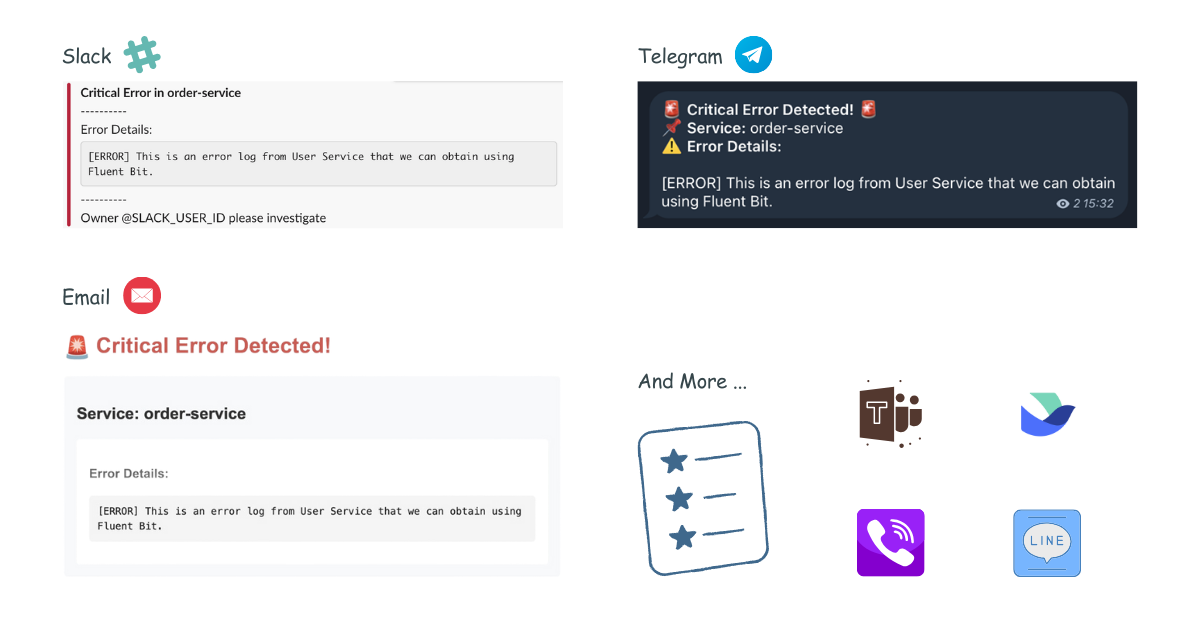
- 🚨 Multi-channel Alerts: Send incident notifications to Slack, Microsoft Teams, Telegram, Viber, Email, and Lark (more channels coming!)
- 📝 Custom Templates: Define your own alert messages using Go templates
- 🔧 Easy Configuration: YAML-based configuration with environment variables support
- 📡 REST API: Simple HTTP interface to receive alerts
- 📡 On-Call: On-Call integrations with AWS Incident Manager and PagerDuty
- 🤖 AI Agent (Beta): An AI SRE agent that reads your logs, metrics and tracing, learns what normal looks like, and only alerts you when something new and unexpected appears.

Get Started in 60 Seconds
Easy Installation with Docker
docker run -p 3000:3000 \
  -e SLACK_ENABLE=true \
  -e SLACK_TOKEN=your_token \
  -e SLACK_CHANNEL_ID=your_channel \
  ghcr.io/versuscontrol/versus-incident
Versus listens on port 3000 by default and exposes the /api/incidents endpoint, which you can configure as a webhook URL in your monitoring tools. This endpoint accepts JSON payloads from various monitoring systems and forwards the alerts to your configured notification channels.
Universal Alert Template Support
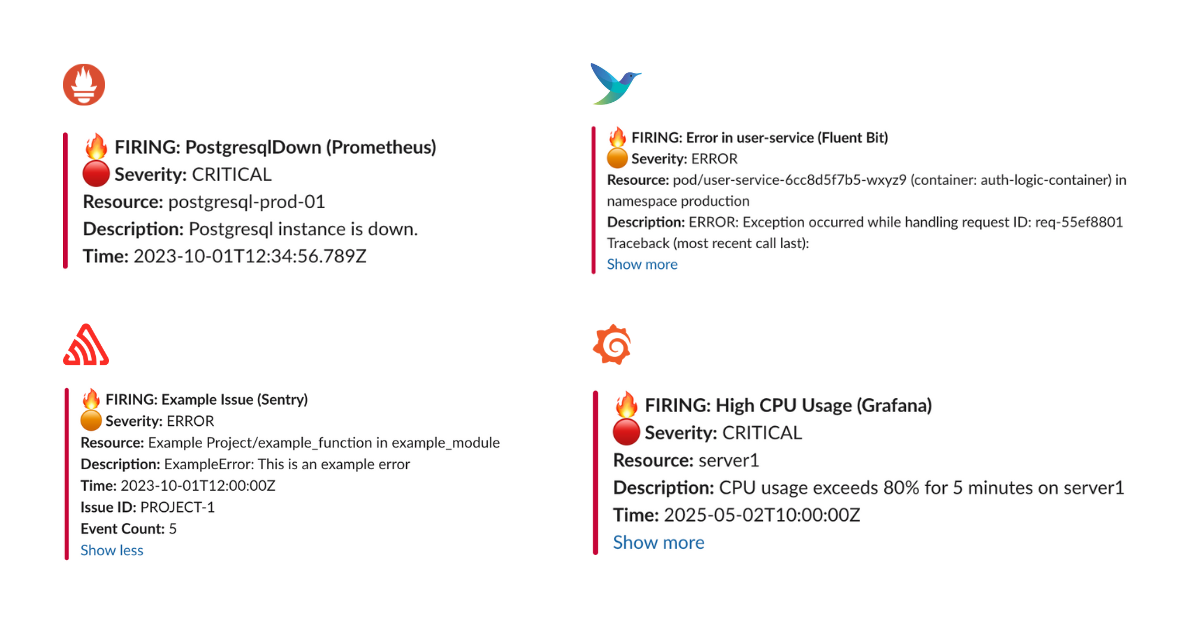
Our default template (Slack, Telegram) automatically handles alerts from multiple sources, including:
- Alertmanager (Prometheus)
- Grafana Alerts
- Sentry
- CloudWatch SNS
- FluentBit
Example JSON Payload Sent by Alertmanager
curl -X POST "http://localhost:3000/api/incidents" \
  -H "Content-Type: application/json" \
  -d '{
    "receiver": "webhook-incident",
    "status": "firing",
    "alerts": [
      {
        "status": "firing",
        "labels": {
          "alertname": "PostgresqlDown",
          "instance": "postgresql-prod-01",
          "severity": "critical"
        },
        "annotations": {
          "summary": "Postgresql down (instance postgresql-prod-01)",
          "description": "Postgresql instance is down."
        },
        "startsAt": "2023-10-01T12:34:56.789Z",
        "endsAt": "2023-10-01T12:44:56.789Z",
        "generatorURL": ""
      }
    ],
    "groupLabels": {
      "alertname": "PostgresqlDown"
    },
    "commonLabels": {
      "alertname": "PostgresqlDown",
      "severity": "critical",
      "instance": "postgresql-prod-01"
    },
    "commonAnnotations": {
      "summary": "Postgresql down (instance postgresql-prod-01)",
      "description": "Postgresql instance is down."
    },
    "externalURL": ""
  }'
Example JSON Payload Sent by Sentry
curl -X POST "http://localhost:3000/api/incidents" \
  -H "Content-Type: application/json" \
  -d '{
    "action": "created",
    "data": {
      "issue": {
        "id": "123456",
        "title": "Example Issue",
        "culprit": "example_function in example_module",
        "shortId": "PROJECT-1",
        "project": {
          "id": "1",
          "name": "Example Project",
          "slug": "example-project"
        },
        "metadata": {
          "type": "ExampleError",
          "value": "This is an example error"
        },
        "status": "unresolved",
        "level": "error",
        "firstSeen": "2023-10-01T12:00:00Z",
        "lastSeen": "2023-10-01T12:05:00Z",
        "count": 5,
        "userCount": 3
      }
    },
    "installation": {
      "uuid": "installation-uuid"
    },
    "actor": {
      "type": "user",
      "id": "789",
      "name": "John Doe"
    }
  }'
Result:
Development Custom Templates
Docker
Create a configuration file:
mkdir -p ./config && touch config.yaml
config.yaml:
name: versus
host: 0.0.0.0
port: 3000

alert:
  slack:
    enable: true
    token: ${SLACK_TOKEN}
    channel_id: ${SLACK_CHANNEL_ID}
    template_path: "/app/config/slack_message.tmpl" # For containerized env

  telegram:
    enable: false

  msteams:
    enable: false
Slack Template
Create your Slack message template, for example config/slack_message.tmpl:
🔥 *Critical Error in {{.ServiceName}}*

❌ Error Details:
```{{.Logs}}```

Owner <@{{.UserID}}> please investigate
Run with volume mount:
docker run -d \
  -p 3000:3000 \
  -v $(pwd)/config:/app/config \
  -e SLACK_ENABLE=true \
  -e SLACK_TOKEN=your_slack_token \
  -e SLACK_CHANNEL_ID=your_channel_id \
  --name versus \
  ghcr.io/versuscontrol/versus-incident
To test, simply send an incident to Versus:
curl -X POST http://localhost:3000/api/incidents \
  -H "Content-Type: application/json" \
  -d '{
    "Logs": "[ERROR] This is an error log from User Service that we can obtain using Fluent Bit.",
    "ServiceName": "order-service",
    "UserID": "SLACK_USER_ID"
  }'
Response:
{
    "status":"Incident created"
}
Result:
Understanding Custom Templates with Monitoring Webhooks
When integrating Versus with any monitoring tool that supports webhooks, you need to understand the JSON payload structure that the tool sends to create an effective template. Here's a step-by-step guide:
- Enable Debug Mode: First, enable debug_body in your config to see the exact payload structure:
alert:
  debug_body: true  # This will print the incoming payload to the console
Capture Sample Payload: Send a test alert to Versus, then review the JSON structure within the logs of your Versus instance.
Create Custom Template: Use the JSON structure to build a template that extracts the relevant information.
FluentBit Integration Example
Here's a sample FluentBit configuration to send logs to Versus:
[OUTPUT]
    Name            http
    Match           kube.production.user-service.*
    Host            versus-host
    Port            3000
    URI             /api/incidents
    Format          json
    Header          Content-Type application/json
    Retry_Limit     3
Sample FluentBit JSON Payload:
{
  "date": 1746354647.987654321,
  "log": "ERROR: Exception occurred while handling request ID: req-55ef8801\nTraceback (most recent call last):\n  File \"/app/server.py\", line 215, in handle_request\n    user_id = session['user_id']\nKeyError: 'user_id'\n",
  "stream": "stderr",
  "time": "2025-05-04T17:30:47.987654321Z",
  "kubernetes": {
    "pod_name": "user-service-6cc8d5f7b5-wxyz9",
    "namespace_name": "production",
    "pod_id": "f0e9d8c7-b6a5-f4e3-d2c1-b0a9f8e7d6c5",
    "labels": {
      "app": "user-service",
      "tier": "backend",
      "environment": "production"
    },
    "annotations": {
      "kubernetes.io/psp": "eks.restricted",
      "monitoring.alpha.example.com/scrape": "true"
    },
    "host": "ip-10-1-2-4.ap-southeast-1.compute.internal",
    "container_name": "auth-logic-container",
    "docker_id": "f5e4d3c2b1a0f5e4d3c2b1a0f5e4d3c2b1a0f5e4d3c2b1a0f5e4d3c2b1a0f5e4",
    "container_hash": "my-docker-hub/user-service@sha256:abcdef1234567890abcdef1234567890abcdef1234567890abcdef1234567890",
    "container_image": "my-docker-hub/user-service:v2.1.0"
  }
}
FluentBit Slack Template (config/slack_message.tmpl):
🚨 *Error in {{.kubernetes.labels.app}}* 🚨
*Environment:* {{.kubernetes.labels.environment}}
*Pod:* {{.kubernetes.pod_name}}
*Container:* {{.kubernetes.container_name}}

*Error Details:*
```{{.log}}```

*Time:* {{.time}}
*Host:* {{.kubernetes.host}}

<@SLACK_ONCALL_USER_ID> Please investigate!
Other Templates:
Please refer to the document here: Other Templates.
More examples
- How to Customize Alert Messages from Alertmanager to Slack and Telegram
- Configuring Fluent Bit to Send Error Logs to Versus Incident
- Configuring AWS CloudWatch to Send Alerts to Slack and Telegram
- How to Configure Sentry to Send Alerts to MS Teams
- How to Configure Kibana to Send Alerts to Slack and Telegram
- How to Configure Grafana to Send Alerts to Slack and Telegram
- How to Configure OpenSearch to Send Alerts to Slack and Telegram
Kubernetes
For detailed information, please refer to the document here.
Helm Chart
For detailed information, please refer to the document here.
SNS Usage
docker run -d \
  -p 3000:3000 \
  -e SLACK_ENABLE=true \
  -e SLACK_TOKEN=your_slack_token \
  -e SLACK_CHANNEL_ID=your_channel_id \
  -e SNS_ENABLE=true \
  -e SNS_TOPIC_ARN=$SNS_TOPIC_ARN \
  -e SNS_HTTPS_ENDPOINT_SUBSCRIPTION=https://your-domain.com \
  -e AWS_ACCESS_KEY_ID=$AWS_ACCESS_KEY \
  -e AWS_SECRET_ACCESS_KEY=$AWS_SECRET_KEY \
  --name versus \
  ghcr.io/versuscontrol/versus-incident
Send test message using AWS CLI:
aws sns publish \
  --topic-arn $SNS_TOPIC_ARN \
  --message '{"ServiceName":"test-service","Logs":"[ERROR] Test error","UserID":"U12345"}' \
  --region $AWS_REGION
A key real-world application of Amazon SNS involves integrating it with CloudWatch Alarms. This allows CloudWatch to publish messages to an SNS topic when an alarm state changes (e.g., from OK to ALARM), which can then trigger notifications to Slack, Telegram, or Email via Versus Incident with a custom template.
AI Agent
Versus supports an opt-in AI SRE agent that reads your logs, metrics and tracing, learns what normal looks like, and only alerts you when something new and unexpected appears.
Configuration example with agent features:
name: versus
host: 0.0.0.0
port: 3000

# ... existing alert configurations ...

agent:
  enable: false # Use this to enable or disable the agent for all sources
  mode: training # Valid values: "training", "shadow", or "detect"
  poll_interval: 30s
  gateway_secret: ${AGENT_GATEWAY_SECRET} # Shared secret required for /api/agent/* endpoints (sent in X-Gateway-Secret header)

  # Sources are kept in a separate file so they can be managed independently
  # (e.g. swap fixtures, per-environment lists). Path is resolved relative to
  # this config file. Override via env: AGENT_SOURCES_PATH.
  sources_path: ./agent_sources.yaml

  catalog:
    mode: file # Storage backend for the pattern catalog. Currently only "file" is supported (the catalog is saved as <data_dir>/patterns.json).
    persist_interval: 30s
    auto_promote_after: 100 # In detect mode, this many sightings = "known"

  redaction:
    enable: true
    redact_ips: false
    extra_patterns: # Optional: extra regex rules to scrub before clustering
      - "(?i)password=\\S+"
      - "Authorization:\\s*Bearer\\s+\\S+"

  miner:
    similarity_threshold: 0.4
    tree_depth: 4
    max_children: 100

  regex:
    # Optional: tag any signal whose message matches this pattern
    # if none of the named rules below hit. Leave empty to disable.
    default_pattern: "(?i)error|exception|fatal|panic"
    # Named rules are tried first, in order. The first match wins.
    rules:
      - name: oom
        severity: critical
        pattern: "(?i)out of memory|OOMKilled|java\\.lang\\.OutOfMemoryError"
      - name: db-timeout
        severity: high
        pattern: "(?i)(connection|query) timeout|deadlock detected"
      - name: auth-failure
        severity: medium
        pattern: "(?i)401 unauthorized|invalid credentials|permission denied"

redis: # Required for the agent to persist source cursors across restarts
  host: ${REDIS_HOST}
  port: ${REDIS_PORT}
  password: ${REDIS_PASSWORD}
  db: 0
Explanation:
The agent section includes:
enable: Turn the agent on or off (default:false). When disabled, nothing extra runs — no background processes, no extra files written.mode: How the agent behaves after it has learned your log patterns:training: observation only — the agent learns patterns and saves them, but sends no alerts.shadow: same as training, but also logs a note every time it would have sent an alert. Good for reviewing before going live.detect: the agent actively sends alerts for any pattern it has never seen before.
poll_interval: How often the agent checks your log sources for new entries.gateway_secret: A shared secret that protects the/api/agent/*management endpoints. Set this to any value you choose; clients must send the same value in theX-Gateway-Secretheader. When no secret is configured, the agent can't start.catalog: Where the agent stores the list of known patterns and how often to write updates.modeselects the storage backend — onlyfileis supported today, which writes to<data_dir>/patterns.json(the filename is fixed).redaction: Rules for automatically removing sensitive information (passwords, tokens, emails, etc.) from logs before the agent processes them.miner: Controls how aggressively the agent groups similar log lines together. The defaults work well for most setups.regex: Acts as a pre-filter for the agent. Only signals whose message matches at least one rule (a named entry underrulesordefault_pattern) are forwarded to the pattern miner and stored in the catalog. Anything that doesn't match is dropped before clustering, so boring noise (200-OK requests, debug lines, etc.) never bloatspatterns.json.- Named
rulesare tried in order; the first match wins and tags the signal with thatnameandseverity. - If no named rule hits,
default_patternis tried. Matches there are tagged withname=default. - To learn from every line, set
default_pattern: ".*". This is useful in early training when you don't yet know what's interesting. - To filter aggressively, set
default_pattern: ""(empty) and rely on your named rules — anything that doesn't match an explicit rule is dropped.
- Named
sources_path: Path to a separate YAML file that lists the log sources the agent should read from. Keeping sources in their own file makes it easier to manage per-environment source lists or swap fixtures without touching the rest of the config. The path is resolved relative to the main config file. Override via theAGENT_SOURCES_PATHenv var.
The sources file (default ./agent_sources.yaml) has a single top-level sources: list. Each entry needs name, type (file or elasticsearch), enable, plus a matching file: or elasticsearch: block. Example:
sources:
  - name: prod-app
    type: elasticsearch
    enable: true
    elasticsearch:
      addresses:
        - https://es.example.internal:9200
      username: ${ES_USERNAME}
      password: ${ES_PASSWORD}
      index: "logs-app-*"
      time_field: "@timestamp"
      query: 'log.level:(error OR warn)'
      message_field: message
      page_size: 500

  - name: sample-app
    type: file
    enable: true
    file:
      path: ./local/resource/sample-app.log
      format: text
      from_beginning: true
The redis section is required when agent.enable is true. Redis is used to remember where the agent left off in each log source, so it picks up from the right place after a restart.
For detailed information on integration, please refer to the document here: Enable AI Agent.
On-Call
Versus supports On-Call integrations with AWS Incident Manager and PagerDuty. Updated configuration example with on-call features:
name: versus
host: 0.0.0.0
port: 3000
public_host: https://your-ack-host.example # Required for on-call ack

# ... existing alert configurations ...

oncall:
  ### Enable overriding using query parameters
  # /api/incidents?oncall_enable=false => Set to `true` or `false` to enable or disable on-call for a specific alert
  # /api/incidents?oncall_wait_minutes=0 => Set the number of minutes to wait for acknowledgment before triggering on-call. Set to `0` to trigger immediately
  initialized_only: true  # Initialize on-call feature but don't enable by default; use query param oncall_enable=true to enable for specific requests
  enable: false # Use this to enable or disable on-call for all alerts
  wait_minutes: 3 # If you set it to 0, it means there's no need to check for an acknowledgment, and the on-call will trigger immediately
  provider: aws_incident_manager # Valid values: "aws_incident_manager" or "pagerduty"

  aws_incident_manager: # Used when provider is "aws_incident_manager"
    response_plan_arn: ${AWS_INCIDENT_MANAGER_RESPONSE_PLAN_ARN}
    other_response_plan_arns: # Optional: Enable overriding the default response plan ARN using query parameters, eg /api/incidents?awsim_other_response_plan=prod
      prod: ${AWS_INCIDENT_MANAGER_OTHER_RESPONSE_PLAN_ARN_PROD}
      dev: ${AWS_INCIDENT_MANAGER_OTHER_RESPONSE_PLAN_ARN_DEV}
      staging: ${AWS_INCIDENT_MANAGER_OTHER_RESPONSE_PLAN_ARN_STAGING}

  pagerduty: # Used when provider is "pagerduty"
    routing_key: ${PAGERDUTY_ROUTING_KEY} # Integration/Routing key for Events API v2 (REQUIRED)
    other_routing_keys: # Optional: Enable overriding the default routing key using query parameters, eg /api/incidents?pagerduty_other_routing_key=infra
      infra: ${PAGERDUTY_OTHER_ROUTING_KEY_INFRA}
      app: ${PAGERDUTY_OTHER_ROUTING_KEY_APP}
      db: ${PAGERDUTY_OTHER_ROUTING_KEY_DB}

redis: # Required for on-call functionality
  insecure_skip_verify: true # dev only
  host: ${REDIS_HOST}
  port: ${REDIS_PORT}
  password: ${REDIS_PASSWORD}
  db: 0
Explanation:
The oncall section includes:
enable: A boolean to toggle on-call functionality for all incidents (default:false).initialized_only: Initialize on-call feature but keep it disabled by default. When set totrue, on-call is triggered only for requests that explicitly include?oncall_enable=truein the URL. This is useful for having on-call ready but not enabled for all alerts.wait_minutes: Time in minutes to wait for an acknowledgment before escalating (default:3). Setting it to0triggers the on-call immediately.provider: Specifies which on-call provider to use ("aws_incident_manager" or "pagerduty").aws_incident_manager: Configuration for AWS Incident Manager when it's the selected provider, includingresponse_plan_arnandother_response_plan_arns.pagerduty: Configuration for PagerDuty when it's the selected provider, including routing keys.
The redis section is required when oncall.enable or oncall.initialized_only is true. It configures the Redis instance used for state management or queuing, with settings like host, port, password, and db.
For detailed information on integration, please refer to the document here: On-Call setup with Versus.
Complete Configuration
A sample configuration file is located at config/config.yaml:
name: versus
host: 0.0.0.0
port: 3000
public_host: https://your-ack-host.example # Required for on-call ack

# Proxy configuration (global settings)
# Use this when your network blocks access to messaging services like Telegram, Viber, or Lark
proxy:
  url: ${PROXY_URL}           # HTTP/HTTPS/SOCKS5 proxy URL (e.g., http://proxy.example.com:8080)
  username: ${PROXY_USERNAME} # Optional proxy username for authenticated proxies
  password: ${PROXY_PASSWORD} # Optional proxy password for authenticated proxies

alert:
  debug_body: true  # Default value, will be overridden by DEBUG_BODY env var

  slack:
    enable: false  # Default value, will be overridden by SLACK_ENABLE env var
    token: ${SLACK_TOKEN}            # From environment
    channel_id: ${SLACK_CHANNEL_ID}  # From environment
    template_path: "config/slack_message.tmpl"
    message_properties:
      button_text: "Acknowledge Alert" # Custom text for the acknowledgment button
      button_style: "primary" # Button style: "primary" (default blue), "danger" (red), or empty for default gray
      disable_button: false # Set to true to disable the button, if you want to handle acknowledgment differently

  telegram:
    enable: false  # Default value, will be overridden by TELEGRAM_ENABLE env var
    bot_token: ${TELEGRAM_BOT_TOKEN} # From environment
    chat_id: ${TELEGRAM_CHAT_ID} # From environment
    template_path: "config/telegram_message.tmpl"
    use_proxy: false # Set to true to use global proxy settings for Telegram API calls

  viber:
    enable: false  # Default value, will be overridden by VIBER_ENABLE env var
    bot_token: ${VIBER_BOT_TOKEN} # From environment (token for bot or channel)
    api_type: ${VIBER_API_TYPE} # From environment - "channel" (default) or "bot"
    # Channel API (recommended for incident management)
    channel_id: ${VIBER_CHANNEL_ID} # From environment (required for channel API)
    # Bot API (for individual user notifications)
    user_id: ${VIBER_USER_ID} # From environment (required for bot API)
    template_path: "config/viber_message.tmpl"
    use_proxy: false # Set to true to use global proxy settings for Viber API calls

  email:
    enable: false # Default value, will be overridden by EMAIL_ENABLE env var
    smtp_host: ${SMTP_HOST} # From environment
    smtp_port: ${SMTP_PORT} # From environment
    username: ${SMTP_USERNAME} # From environment
    password: ${SMTP_PASSWORD} # From environment
    to: ${EMAIL_TO} # From environment, can contain multiple comma-separated email addresses
    subject: ${EMAIL_SUBJECT} # From environment
    template_path: "config/email_message.tmpl"

  msteams:
    enable: false # Default value, will be overridden by MSTEAMS_ENABLE env var
    power_automate_url: ${MSTEAMS_POWER_AUTOMATE_URL} # Automatically works with both Power Automate workflow URLs and legacy Office 365 webhooks
    template_path: "config/msteams_message.tmpl"
    other_power_urls: # Optional: Define additional Power Automate URLs for multiple MS Teams channels
      qc: ${MSTEAMS_OTHER_POWER_URL_QC} # Power Automate URL for QC team
      ops: ${MSTEAMS_OTHER_POWER_URL_OPS} # Power Automate URL for Ops team
      dev: ${MSTEAMS_OTHER_POWER_URL_DEV} # Power Automate URL for Dev team

  lark:
    enable: false # Default value, will be overridden by LARK_ENABLE env var
    webhook_url: ${LARK_WEBHOOK_URL} # Lark webhook URL (required)
    template_path: "config/lark_message.tmpl"
    use_proxy: false # Set to true to use global proxy settings for Lark API calls
    other_webhook_urls: # Optional: Enable overriding the default webhook URL using query parameters, eg /api/incidents?lark_other_webhook_url=dev
      dev: ${LARK_OTHER_WEBHOOK_URL_DEV}
      prod: ${LARK_OTHER_WEBHOOK_URL_PROD}

  queue:
  enable: true
  debug_body: true

  # AWS SNS
  sns:
    enable: false
    https_endpoint_subscription_path: /sns # URI to receive SNS messages, e.g. ${host}:${port}/sns or ${https_endpoint_subscription}/sns
    # Options If you want to automatically create an sns subscription
    https_endpoint_subscription: ${SNS_HTTPS_ENDPOINT_SUBSCRIPTION} # If the user configures an HTTPS endpoint, then an SNS subscription will be automatically created, e.g. https://your-domain.com
    topic_arn: ${SNS_TOPIC_ARN}

  # AWS SQS
  sqs:
    enable: false
    queue_url: ${SQS_QUEUE_URL}

  # GCP Pub Sub
  pubsub:
    enable: false

  # Azure Event Bus
  azbus:
    enable: false

oncall:
  ### Enable overriding using query parameters
  # /api/incidents?oncall_enable=false => Set to `true` or `false` to enable or disable on-call for a specific alert
  # /api/incidents?oncall_wait_minutes=0 => Set the number of minutes to wait for acknowledgment before triggering on-call. Set to `0` to trigger immediately
  initialized_only: false  # Initialize on-call feature but don't enable by default; use query param oncall_enable=true to enable for specific requests
  enable: false # Use this to enable or disable on-call for all alerts
  wait_minutes: 3 # If you set it to 0, it means there's no need to check for an acknowledgment, and the on-call will trigger immediately
  provider: aws_incident_manager # Valid values: "aws_incident_manager" or "pagerduty"

  aws_incident_manager: # Used when provider is "aws_incident_manager"
    response_plan_arn: ${AWS_INCIDENT_MANAGER_RESPONSE_PLAN_ARN}
    other_response_plan_arns: # Optional: Enable overriding the default response plan ARN using query parameters, eg /api/incidents?awsim_other_response_plan=prod
      prod: ${AWS_INCIDENT_MANAGER_OTHER_RESPONSE_PLAN_ARN_PROD}
      dev: ${AWS_INCIDENT_MANAGER_OTHER_RESPONSE_PLAN_ARN_DEV}
      staging: ${AWS_INCIDENT_MANAGER_OTHER_RESPONSE_PLAN_ARN_STAGING}

  pagerduty: # Used when provider is "pagerduty"
    routing_key: ${PAGERDUTY_ROUTING_KEY} # Integration/Routing key for Events API v2 (REQUIRED)
    other_routing_keys: # Optional: Enable overriding the default routing key using query parameters, eg /api/incidents?pagerduty_other_routing_key=infra
      infra: ${PAGERDUTY_OTHER_ROUTING_KEY_INFRA}
      app: ${PAGERDUTY_OTHER_ROUTING_KEY_APP}
      db: ${PAGERDUTY_OTHER_ROUTING_KEY_DB}

redis: # Required for on-call functionality
  insecure_skip_verify: true # dev only
  host: ${REDIS_HOST}
  port: ${REDIS_PORT}
  password: ${REDIS_PASSWORD}
  db: 0

# -----------------------------------------------------------------------------
# AI agent mode (training | shadow | detect) — opt-in.
#
# When agent.enable=false (the default), nothing changes: no goroutines start,
# no new dependencies are loaded, no Redis keys are created.
#
# Recommended rollout:
#   1: mode=training, review the catalog via /api/agent/patterns
#   2: mode=shadow,   review log lines `agent[shadow]: would alert ...`
#   3: mode=detect    (AI emission ships in a follow-up milestone)
#
# See local/plans/ai-incident-detection/ for the full design.
# -----------------------------------------------------------------------------
agent:
  enable: false                   # master switch (env: AGENT_ENABLE)
  mode: training                  # training | shadow | detect (env: AGENT_MODE)
  poll_interval: 30s              # how often each source is pulled
  lookback: 5m                    # initial backfill window on startup
  batch_max: 1000                 # safety cap per tick
  signal_max_bytes: 8192          # cap on Signal.Raw
  gateway_secret: ${AGENT_GATEWAY_SECRET}  # shared secret for /api/agent/* endpoints (sent in X-Gateway-Secret header)
  data_dir: ./data

  # Signal sources are kept in a separate file so users can manage them
  # independently of the main config. Path is resolved relative to this
  # config file. Override via env: AGENT_SOURCES_PATH.
  sources_path: ./agent_sources.yaml

  redaction:
    enable: true
    redact_ips: false             # IPs are usually useful context; opt-in
    extra_patterns:
      - "(?i)password=\\S+"
      - "Authorization:\\s*Bearer\\s+\\S+"

  catalog:
    mode: file                    # storage backend; only "file" is supported today (planned: redis, database)
    persist_interval: 30s
    auto_promote_after: 100       # in detect mode, this many sightings = "known"

  miner:
    similarity_threshold: 0.4
    tree_depth: 4
    max_children: 100

  regex:
    # Set to ".*" to train on every line; leave empty to require
    # an explicit named rule match.
    default_pattern: "(?i).*error.*"
    rules:
      - name: oom-killer
        pattern: "Out of memory: Killed process"
        severity: critical
      - name: panic
        pattern: "(?i)panic:"
        severity: critical
      - name: 5xx-burst
        pattern: "HTTP/[0-9.]+\\s+5\\d\\d"
        severity: high
Environment Variables
The application relies on several environment variables to configure alerting services. Below is an explanation of each variable:
Common
| Variable | Description |
|---|---|
DEBUG_BODY |
Set to true to enable print body send to Versus Incident. |
Proxy Configuration
| Variable | Description |
|---|---|
PROXY_URL |
HTTP/HTTPS/SOCKS5 proxy URL (e.g., http://proxy.example.com:8080). Used by channels that have use_proxy: true enabled. |
PROXY_USERNAME |
Optional username for authenticated proxy servers. |
PROXY_PASSWORD |
Optional password for authenticated proxy servers. |
Note: The proxy configuration is global and can be used by any channel (Telegram, Viber, Lark) by setting their respective use_proxy field to true in the configuration.
Slack Configuration
| Variable | Description |
|---|---|
SLACK_ENABLE |
Set to true to enable Slack notifications. |
SLACK_TOKEN |
The authentication token for your Slack bot. |
SLACK_CHANNEL_ID |
The ID of the Slack channel where alerts will be sent. Can be overridden per request using the slack_channel_id query parameter. |
Slack also supports interactive acknowledgment buttons that can be configured using the following properties in the config.yaml file:
alert:
  slack:
    # ...other slack configuration...
    message_properties:
      button_text: "Acknowledge Alert" # Custom text for the acknowledgment button
      button_style: "primary" # Button style: "primary" (default blue), "danger" (red), or empty for default gray
      disable_button: false # Set to true to disable the button, if you want to handle acknowledgment differently
These properties allow you to:
- Customize the text of the acknowledgment button (
button_text) - Change the style of the button (
button_style) - options are "primary" (blue), "danger" (red), or leave empty for default gray - Disable the interactive button entirely (
disable_button) if you want to handle acknowledgment through other means
Telegram Configuration
| Variable | Description |
|---|---|
TELEGRAM_ENABLE |
Set to true to enable Telegram notifications. |
TELEGRAM_BOT_TOKEN |
The authentication token for your Telegram bot. |
TELEGRAM_CHAT_ID |
The chat ID where alerts will be sent. Can be overridden per request using the telegram_chat_id query parameter. |
TELEGRAM_USE_PROXY |
Set to true to use the global proxy configuration for Telegram API calls. Useful when Telegram is blocked. |
Viber Configuration
Viber supports two types of API integrations:
- Channel API (default): Send messages to Viber channels for team notifications
- Bot API: Send messages to individual users for personal notifications
When to use Channel API:
- ✅ Broadcasting to team channels
- ✅ Public incident notifications
- ✅ Automated system alerts
- ✅ Better for most incident management scenarios
- ✅ No individual user setup required
When to use Bot API:
- ✅ Personal notifications to specific users
- ✅ Direct messaging for individual alerts
- ⚠️ Limited to individual users only
- ⚠️ Requires users to interact with bot first
- ⚠️ User IDs can be hard to obtain
| Variable | Description |
|---|---|
VIBER_ENABLE |
Set to true to enable Viber notifications. |
VIBER_BOT_TOKEN |
The authentication token for your Viber bot or channel. |
VIBER_API_TYPE |
API type: "channel" (default) for team notifications or "bot" for individual messaging. |
VIBER_CHANNEL_ID |
The channel ID where alerts will be posted (required for channel API). Can be overridden per request using the viber_channel_id query parameter. |
VIBER_USER_ID |
The user ID where alerts will be sent (required for bot API). Can be overridden per request using the viber_user_id query parameter. |
VIBER_USE_PROXY |
Set to true to use the global proxy configuration for Viber API calls. Useful when Viber is blocked. |
Email Configuration
| Variable | Description |
|---|---|
EMAIL_ENABLE |
Set to true to enable email notifications. |
SMTP_HOST |
The SMTP server hostname (e.g., smtp.gmail.com). |
SMTP_PORT |
The SMTP server port (e.g., 587 for TLS). |
SMTP_USERNAME |
The username/email for SMTP authentication. |
SMTP_PASSWORD |
The password or app-specific password for SMTP authentication. |
EMAIL_TO |
The recipient email address(es) for incident notifications. Can be multiple addresses separated by commas. Can be overridden per request using the email_to query parameter. |
EMAIL_SUBJECT |
The subject line for email notifications. Can be overridden per request using the email_subject query parameter. |
Microsoft Teams Configuration
| Variable | Description |
|---|---|
MSTEAMS_ENABLE |
Set to true to enable Microsoft Teams notifications. |
MSTEAMS_POWER_AUTOMATE_URL |
Automatically works with both Power Automate workflow URLs and legacy Office 365 webhooks. |
MSTEAMS_OTHER_POWER_URL_QC |
(Optional) Power Automate URL for the QC team channel. Can be selected per request using the msteams_other_power_url=qc query parameter. |
MSTEAMS_OTHER_POWER_URL_OPS |
(Optional) Power Automate URL for the Ops team channel. Can be selected per request using the msteams_other_power_url=ops query parameter. |
MSTEAMS_OTHER_POWER_URL_DEV |
(Optional) Power Automate URL for the Dev team channel. Can be selected per request using the msteams_other_power_url=dev query parameter. |
Lark Configuration
| Variable | Description |
|---|---|
LARK_ENABLE |
Set to true to enable Lark notifications. |
LARK_WEBHOOK_URL |
The webhook URL for Lark notifications. |
LARK_USE_PROXY |
Set to true to use the global proxy configuration for Lark API calls. Useful when Lark is blocked. |
LARK_OTHER_WEBHOOK_URL_DEV |
(Optional) Webhook URL for the development environment. Can be selected per request using the lark_other_webhook_url=dev query parameter. |
LARK_OTHER_WEBHOOK_URL_PROD |
(Optional) Webhook URL for the production environment. Can be selected per request using the lark_other_webhook_url=prod query parameter. |
Queue Services Configuration
| Variable | Description |
|---|---|
SNS_ENABLE |
Set to true to enable receive Alert Messages from SNS. |
SNS_HTTPS_ENDPOINT_SUBSCRIPTION |
This specifies the HTTPS endpoint to which SNS sends messages. When an HTTPS endpoint is configured, an SNS subscription is automatically created. If no endpoint is configured, you must create the SNS subscription manually using the CLI or AWS Console. E.g. https://your-domain.com. |
SNS_TOPIC_ARN |
AWS ARN of the SNS topic to subscribe to. |
SQS_ENABLE |
Set to true to enable receive Alert Messages from AWS SQS. |
SQS_QUEUE_URL |
URL of the AWS SQS queue to receive messages from. |
On-Call Configuration
| Variable | Description |
|---|---|
ONCALL_ENABLE |
Set to true to enable on-call functionality. Can be overridden per request using the oncall_enable query parameter. |
ONCALL_INITIALIZED_ONLY |
Set to true to initialize on-call feature but keep it disabled by default. When enabled, on-call is triggered only for requests that explicitly include ?oncall_enable=true in the URL. |
ONCALL_WAIT_MINUTES |
Time in minutes to wait for acknowledgment before escalating (default: 3). Can be overridden per request using the oncall_wait_minutes query parameter. |
ONCALL_PROVIDER |
Specify the on-call provider to use ("aws_incident_manager" or "pagerduty"). |
AWS_INCIDENT_MANAGER_RESPONSE_PLAN_ARN |
The ARN of the AWS Incident Manager response plan to use for on-call escalations. Required if on-call provider is "aws_incident_manager". |
AWS_INCIDENT_MANAGER_OTHER_RESPONSE_PLAN_ARN_PROD |
(Optional) AWS Incident Manager response plan ARN for production environment. Can be selected per request using the awsim_other_response_plan=prod query parameter. |
AWS_INCIDENT_MANAGER_OTHER_RESPONSE_PLAN_ARN_DEV |
(Optional) AWS Incident Manager response plan ARN for development environment. Can be selected per request using the awsim_other_response_plan=dev query parameter. |
AWS_INCIDENT_MANAGER_OTHER_RESPONSE_PLAN_ARN_STAGING |
(Optional) AWS Incident Manager response plan ARN for staging environment. Can be selected per request using the awsim_other_response_plan=staging query parameter. |
PAGERDUTY_ROUTING_KEY |
Integration/Routing key for PagerDuty Events API v2. Required if on-call provider is "pagerduty". |
PAGERDUTY_OTHER_ROUTING_KEY_INFRA |
(Optional) PagerDuty routing key for infrastructure team. Can be selected per request using the pagerduty_other_routing_key=infra query parameter. |
PAGERDUTY_OTHER_ROUTING_KEY_APP |
(Optional) PagerDuty routing key for application team. Can be selected per request using the pagerduty_other_routing_key=app query parameter. |
PAGERDUTY_OTHER_ROUTING_KEY_DB |
(Optional) PagerDuty routing key for database team. Can be selected per request using the pagerduty_other_routing_key=db query parameter. |
When you have initialized_only: true in your configuration (rather than enable: true), on-call is only triggered for incidents that explicitly request it. This is useful when:
- You want the on-call feature ready but not active for all alerts
- You need to selectively enable on-call only for high-priority services or incidents
- You want to let your monitoring system decide which alerts should trigger on-call
Redis Configuration
| Variable | Description |
|---|---|
REDIS_HOST |
The hostname or IP address of the Redis server. Required if on-call is enabled. |
REDIS_PORT |
The port number of the Redis server. Required if on-call is enabled. |
REDIS_PASSWORD |
The password for authenticating with the Redis server. Required if on-call is enabled and Redis requires authentication. |
AI Agent Configuration
| Variable | Description |
|---|---|
AGENT_ENABLE |
Set to true to enable the AI agent. Disabled by default. |
AGENT_MODE |
Operating mode: training, shadow, or detect. |
AGENT_GATEWAY_SECRET |
Shared secret required to call /api/agent/* admin endpoints. Clients send the same value in the X-Gateway-Secret header. |
AGENT_SOURCES_PATH |
Path to the YAML file listing the agent's log sources. Overrides agent.sources_path in the main config. |
Ensure these environment variables are properly set before running the application.
Dynamic Configuration with Query Parameters
We provide a way to overwrite configuration values using query parameters, allowing you to send alerts to different channels and customize notification behavior on a per-request basis.
| Query Parameter | Description |
|---|---|
slack_channel_id |
The ID of the Slack channel where alerts will be sent. Use: /api/incidents?slack_channel_id=<your_value>. |
telegram_chat_id |
The chat ID where Telegram alerts will be sent. Use: /api/incidents?telegram_chat_id=<your_chat_id>. |
viber_user_id |
The user ID where Viber alerts will be sent (for bot API). Use: /api/incidents?viber_user_id=<your_user_id>. |
viber_channel_id |
The channel ID where Viber alerts will be posted (for channel API). Use: /api/incidents?viber_channel_id=<your_channel_id>. |
email_to |
Overrides the default recipient email address for email notifications. Use: /api/incidents?email_to=<recipient_email>. |
email_subject |
Overrides the default subject line for email notifications. Use: /api/incidents?email_subject=<custom_subject>. |
msteams_other_power_url |
Overrides the default Microsoft Teams Power Automate flow by specifying an alternative key (e.g., qc, ops, dev). Use: /api/incidents?msteams_other_power_url=qc. |
lark_other_webhook_url |
Overrides the default Lark webhook URL by specifying an alternative key (e.g., dev, prod). Use: /api/incidents?lark_other_webhook_url=dev. |
oncall_enable |
Set to true or false to enable or disable on-call for a specific alert. Use: /api/incidents?oncall_enable=false. |
oncall_wait_minutes |
Set the number of minutes to wait for acknowledgment before triggering on-call. Set to 0 to trigger immediately. Use: /api/incidents?oncall_wait_minutes=0. |
awsim_other_response_plan |
Overrides the default AWS Incident Manager response plan by specifying an alternative key (e.g., prod, dev, staging). Use: /api/incidents?awsim_other_response_plan=prod. |
pagerduty_other_routing_key |
Overrides the default PagerDuty routing key by specifying an alternative key (e.g., infra, app, db). Use: /api/incidents?pagerduty_other_routing_key=infra. |
Examples for Each Query Parameter
Slack Channel Override
To send an alert to a specific Slack channel (e.g., a dedicated channel for database issues):
curl -X POST "http://localhost:3000/api/incidents?slack_channel_id=C01DB2ISSUES" \
  -H "Content-Type: application/json" \
  -d '{
    "Logs": "[ERROR] Database connection pool exhausted.",
    "ServiceName": "database-service",
    "UserID": "U12345"
  }'
Telegram Chat Override
To send an alert to a different Telegram chat (e.g., for network monitoring):
curl -X POST "http://localhost:3000/api/incidents?telegram_chat_id=-1001234567890" \
  -H "Content-Type: application/json" \
  -d '{
    "Logs": "[ERROR] Network latency exceeding thresholds.",
    "ServiceName": "network-monitor",
    "UserID": "U12345"
  }'
Viber Channel Override (Default API)
To send an alert to a different Viber channel (e.g., for team notifications):
curl -X POST "http://localhost:3000/api/incidents?viber_channel_id=your_channel_id" \
  -H "Content-Type: application/json" \
  -d '{
    "Logs": "[ERROR] Production database connection failure.",
    "ServiceName": "database",
    "UserID": "U12345"
  }'
Viber User Override (Bot API)
To send an alert to a different Viber user (e.g., for personal notifications):
curl -X POST "http://localhost:3000/api/incidents?viber_user_id=4UHcAFe/T6w4SJjQ3M8VKA==" \
  -H "Content-Type: application/json" \
  -d '{
    "Logs": "[ERROR] Mobile app service degradation detected.",
    "ServiceName": "mobile-api",
    "UserID": "U12345"
  }'
Email Recipient Override
To send an email alert to a specific recipient with a custom subject:
curl -X POST "http://localhost:3000/api/[email protected]&email_subject=Urgent%20Network%20Issue" \
  -H "Content-Type: application/json" \
  -d '{
    "Logs": "[ERROR] Load balancer failing health checks.",
    "ServiceName": "load-balancer",
    "UserID": "U12345"
  }'
Microsoft Teams Channel Override
You can configure multiple Microsoft Teams channels using the other_power_urls setting:
alert:
  msteams:
    enable: true
    power_automate_url: ${MSTEAMS_POWER_AUTOMATE_URL}
    template_path: "config/msteams_message.tmpl"
    other_power_urls:
      qc: ${MSTEAMS_OTHER_POWER_URL_QC}
      ops: ${MSTEAMS_OTHER_POWER_URL_OPS}
      dev: ${MSTEAMS_OTHER_POWER_URL_DEV}
Then, to send an alert to the QC team's Microsoft Teams channel:
curl -X POST "http://localhost:3000/api/incidents?msteams_other_power_url=qc" \
  -H "Content-Type: application/json" \
  -d '{
    "Logs": "[ERROR] Quality check failed for latest deployment.",
    "ServiceName": "quality-service",
    "UserID": "U12345"
  }'
Lark Webhook Override
You can configure multiple Lark webhook URLs using the other_webhook_urls setting:
alert:
  lark:
    enable: true
    webhook_url: ${LARK_WEBHOOK_URL}
    template_path: "config/lark_message.tmpl"
    other_webhook_urls:
      dev: ${LARK_OTHER_WEBHOOK_URL_DEV}
      prod: ${LARK_OTHER_WEBHOOK_URL_PROD}
Then, to send an alert to the development environment's Lark webhook:
curl -X POST "http://localhost:3000/api/incidents?lark_other_webhook_url=dev" \
  -H "Content-Type: application/json" \
  -d '{
    "Logs": "[ERROR] Development server failure.",
    "ServiceName": "dev-server",
    "UserID": "U12345"
  }'
On-Call Controls
To disable on-call escalation for a non-critical alert:
curl -X POST "http://localhost:3000/api/incidents?oncall_enable=false" \
  -H "Content-Type: application/json" \
  -d '{
    "Logs": "[WARNING] This is a minor issue that doesn't require on-call response.",
    "ServiceName": "monitoring-service",
    "UserID": "U12345"
  }'
To trigger on-call immediately without the normal wait period for a critical issue:
curl -X POST "http://localhost:3000/api/incidents?oncall_wait_minutes=0" \
  -H "Content-Type: application/json" \
  -d '{
    "Logs": "[CRITICAL] Payment processing system down.",
    "ServiceName": "payment-service",
    "UserID": "U12345"
  }'
AWS Incident Manager Response Plan Override
You can configure multiple AWS Incident Manager response plans using the other_response_plan_arns setting:
oncall:
  enable: true
  wait_minutes: 3
  provider: aws_incident_manager

  aws_incident_manager:
    response_plan_arn: ${AWS_INCIDENT_MANAGER_RESPONSE_PLAN_ARN}  # Default response plan
    other_response_plan_arns:
      prod: ${AWS_INCIDENT_MANAGER_OTHER_RESPONSE_PLAN_ARN_PROD}  # Production environment
      dev: ${AWS_INCIDENT_MANAGER_OTHER_RESPONSE_PLAN_ARN_DEV}    # Development environment
      staging: ${AWS_INCIDENT_MANAGER_OTHER_RESPONSE_PLAN_ARN_STAGING}  # Staging environment
Then, to use a specific AWS Incident Manager response plan for a production environment issue:
curl -X POST "http://localhost:3000/api/incidents?awsim_other_response_plan=prod" \
  -H "Content-Type: application/json" \
  -d '{
    "Logs": "[CRITICAL] Production database cluster failure.",
    "ServiceName": "prod-database",
    "UserID": "U12345"
  }'
PagerDuty Routing Key Override
You can configure multiple PagerDuty routing keys using the other_routing_keys setting:
oncall:
  enable: true
  wait_minutes: 3
  provider: pagerduty

  pagerduty:
    routing_key: ${PAGERDUTY_ROUTING_KEY}  # Default routing key
    other_routing_keys:
      infra: ${PAGERDUTY_OTHER_ROUTING_KEY_INFRA}  # Infrastructure team
      app: ${PAGERDUTY_OTHER_ROUTING_KEY_APP}      # Application team
      db: ${PAGERDUTY_OTHER_ROUTING_KEY_DB}        # Database team
Then, to use a specific PagerDuty routing key for the infrastructure team:
curl -X POST "http://localhost:3000/api/incidents?pagerduty_other_routing_key=infra" \
  -H "Content-Type: application/json" \
  -d '{
    "Logs": "[ERROR] Server load balancer failure in us-west-2.",
    "ServiceName": "infrastructure",
    "UserID": "U12345"
  }'
Combining Multiple Parameters
You can combine multiple query parameters to customize exactly how an incident is handled:
curl -X POST "http://localhost:3000/api/incidents?slack_channel_id=C01PROD&telegram_chat_id=-987654321&oncall_enable=true&oncall_wait_minutes=1" \
  -H "Content-Type: application/json" \
  -d '{
    "Logs": "[CRITICAL] Multiple service failures detected in production environment.",
    "ServiceName": "core-infrastructure",
    "UserID": "U12345",
    "Severity": "CRITICAL"
  }'
This will:
- Send the alert to a specific Slack channel (
C01PROD) - Send the alert to a specific Telegram chat (
-987654321) - Enable on-call escalation with a shortened 1-minute wait time
Roadmap
- Add Telegram support
- Add Email support
- Add SNS subscription
- Add MS Team support
- Add Viber support
- Add Lark support
- Add support for queue listeners (AWS SQS, GCP Cloud Pub/Sub, Azure Service Bus)
- Support multiple templates
- API Server for Incident Management
- Web UI
- On-call integrations (AWS Incident Manager, PagerDuty)
- Prometheus metrics
Complete Project Diagram

Contributing
We welcome contributions! Please follow these steps:
- Fork the repository
- Create your feature branch (
git checkout -b feature/amazing-feature) - Commit your changes (
git commit -m 'Add some amazing feature') - Push to the branch (
git push origin feature/amazing-feature) - Open a Pull Request
License
Distributed under the MIT License. See LICENSE for more information.
Yorumlar (0)
Yorum birakmak icin giris yap.
Yorum birakSonuc bulunamadi