OpenSpec-UI
Health Uyari
- License — License: MIT
- Description — Repository has a description
- Active repo — Last push 0 days ago
- Low visibility — Only 6 GitHub stars
Code Uyari
- process.env — Environment variable access in .github/workflows/quality.yml
- fs module — File system access in .github/workflows/quality.yml
Permissions Gecti
- Permissions — No dangerous permissions requested
Bu listing icin henuz AI raporu yok.
A dashboard + VS Code extension for OpenSpec, with Claude, Copilot, Codex, and Gemini agents built in
OpenSpec UI
Dashboard for OpenSpec — a view
over Changes/Archive/Specs/Tasks and a launcher for CLI agents (Claude CLI,
GitHub Copilot CLI, Codex CLI, Gemini CLI, and a local LLM via an
OpenAI-compatible API) for working with change proposals. The product ships
in two forms with shared code: a standalone web tool and a VS Code extension.
Project site: https://openspec-ui.dev — downloads, release notes and
what each delivery target does.
A Tool That Watched Itself Get Built
Product Tour
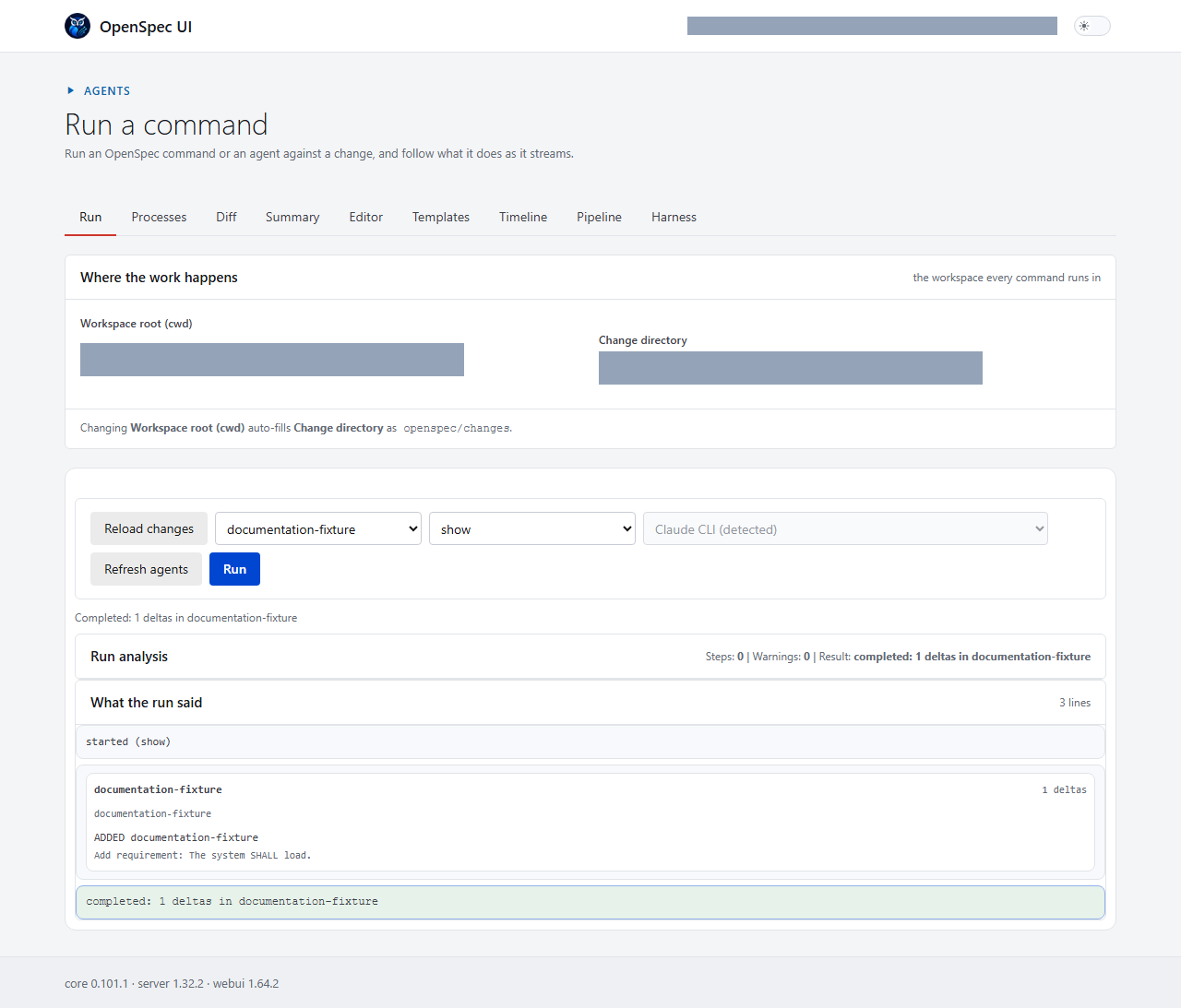
The standalone application and VS Code extension expose the same OpenSpec
workflows through interfaces suited to their respective hosts.
Standalone application
VS Code extension
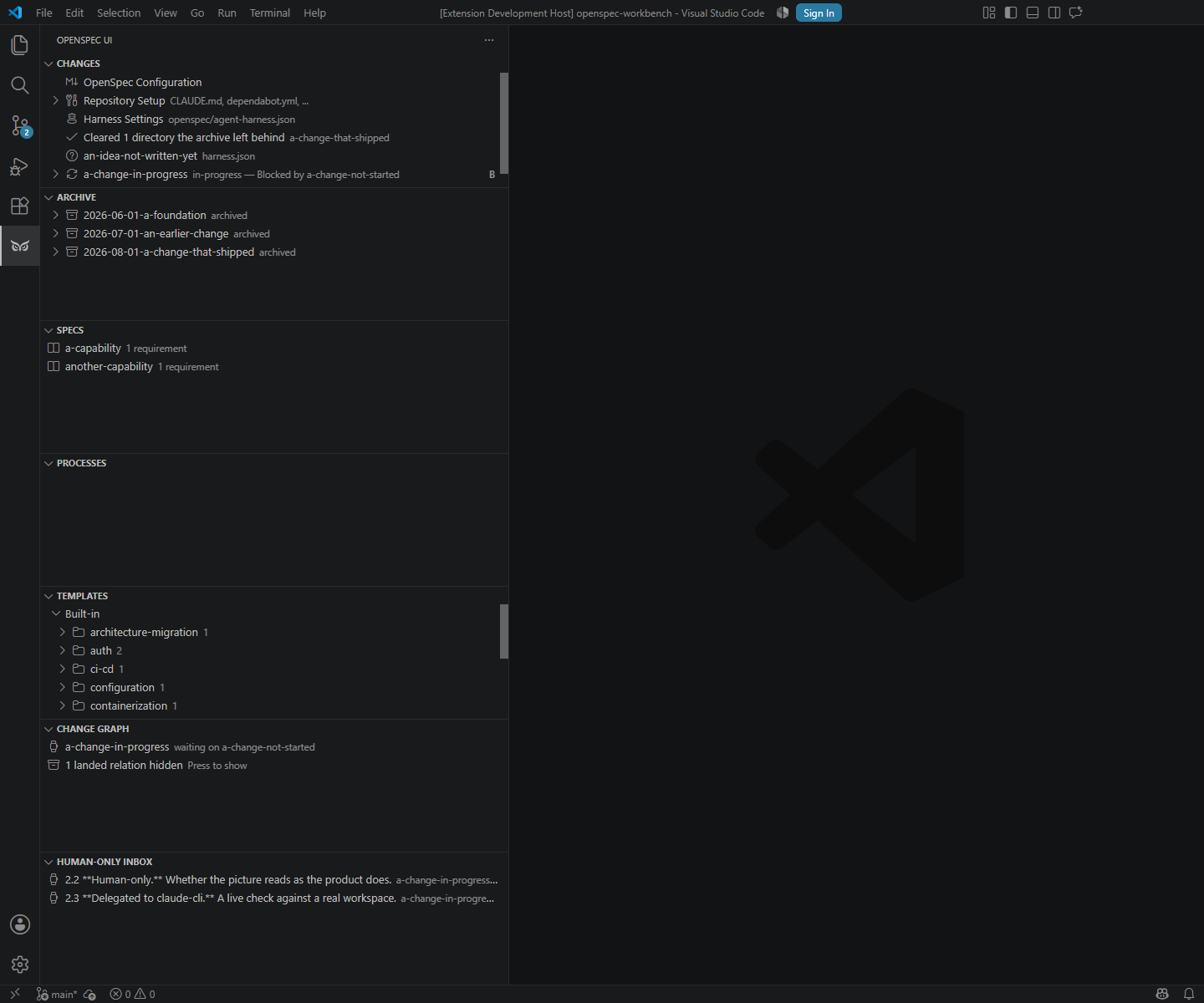
The Change Graph view nests each change under the ones it
follows, marks anything waiting on a change that has not landed, folds
away the branches where every change has landed, and lets a relation be
added or removed from the row that shows it. The Archive, Specs and
Change Graph views each take a filter from their title bar.
Both hosts also carry, beyond the views above:
- The Pipeline - every change as a card in the order the changes
declare, with what a live run last said and what can start alongside
what. A card starts a run, answers a checkpoint, and asks a run to stop
with a reason. - The Timeline - one change as a line of moments read from git, and a
comparison of every change on a grid of days. - What waits on somebody - every task marked human-only or delegated
to a named agent, with the run offered where this build carries that
agent. A panel of the Summary in the standalone app; a view of its own
in the editor. - Harness Settings - the per-stage agent, model, effort and budget,
globally and per change. - What the archive left behind - a directory holding nothing but a
file this product wrote is cleared, and anything else with no documents
in it is shown rather than removed.
See the complete screenshot galleries for the
standalone application and the
VS Code extension.
Local Delivery Modes
This repository effectively ships two independent products that share one
common core:
- VS Code extension for users who already work inside VS Code
- Standalone web application for users who do not use VS Code
Both products solve the same problem set: viewing and editing OpenSpec
changes, validating artifacts, and running local AI-assisted workflows from
the same shared execution engine. They are designed to operate only on the
local machine and do not require Internet access for normal use. The split is
purely about UI host preference: if VS Code is available, the extension is the
most natural path; otherwise, the standalone web app is the equivalent local
product.
UI reception and launch
Standalone web app: build the server bundle and start the local standalone
app from source, then open the tokenized localhost URL printed by the server.
Example commands from the repository root:npm install npm run build --workspace @openspec-ui/server npm run start --workspace @openspec-ui/server -- <workspaceRoot> 4317Here,
<workspaceRoot>is the absolute path to the local project or repo
that the app should inspect and manage. In practice, this is usually the
folder you want to open, such as the current repository root or another Git
working directory on your machine. After startup, the server prints a URL in
the console similar to:OpenSpec UI server listening on http://127.0.0.1:4317/#token=PU32_AOBt0lG6sHhYQtCMwSU6ZmcXtIJX0-4RUe1FQM (workspaceRoot: ., allowExternalCwd: false)You must open that exact URL in the browser to connect to the server. The
URL contains a temporary one-time access token; without it, you cannot access
the running server. The default port is4317.VS Code extension: install the extension into VS Code and open the native
workbench from the editor. The extension uses the same shared core logic and
local-only data access path as the web app.
VSIX package reception and installation in VS Code
- Receive the packaged artifact from the official GitHub Release for the
extension. The built package is published as a.vsixfile; it is not
committed into the repository. - In VS Code, open the Extensions view and choose "Install from VSIX...".
- Select the downloaded
.vsixfile, confirm the installation prompt, and
reload the window if VS Code asks for it. - After reload, the extension is available as a local VS Code product and can
be used without any remote service dependency.
Status
Active development. The repository contains a working standalone application,
shared core and web UI packages, and a native VS Code OpenSpec Workbench. Seeopenspec/README.md for the governed change workflow.
What the current releases added, written for somebody using the tool rather
than building it:
What you can see and stop: 0.44 → 0.56.
Why not just openspec view
OpenSpec CLI already has openspec view — an interactive dashboard for
specs/changes. This project does not reinvent it: the reasons for existing are
(1) diffs between versions of archived changes (not covered by openspec view), (2) launching CLI agents directly from the UI with a unified
command/event protocol, and (3) VS Code integration as a native extension
rather than a separate window.
Before implementing any capability, check whether it has already appeared in
upstream openspec view so we do not duplicate it.
How this differs from BMAD
BMAD, the BMad Method, sets
out to "turn an idea or change request into working software without giving
up the thinking". Its own pages, read on 2026-09-13, describe it as "a set
of named commands, called skills", added "to AI coding tools such as Claude
Code and Cursor". It works in a loop of clarify → plan → build and verify →
learn and adjust, drawing on "product, architecture, UX, development, and
testing expertise".
What the two share.
- Written before it is built. Work is written down before it is built:
BMAD's briefs, specifications and architecture; here, an OpenSpec change'sproposal.md,design.md,tasks.mdand spec deltas. - Steps taken in turn. The work passes through steps that different
expertise, or different agents, take in turn. - Checked before accepted. Building is followed by checking, before
anything is accepted.
Where this repository differs.
It runs the agents itself. BMAD's skills run inside whichever AI tool
you work in. Here, the Agentic Harness starts and supervises a CLI agent
(Claude, Copilot, Codex, Gemini or a local model) for each stage of a
change:propose → review → apply → verify → archive → git. It runs the
same way from the standalone app, the VS Code extension, oropenspec-ui-cli run. SeeHARNESS.md.A specification outlives its change. Archiving a change merges its
spec deltas intoopenspec/specs/. The next change is proposed against
what the system does now, not against a document written for an earlier
task. Seeopenspec/README.md.Where a person decides is configuration, and the runner enforces it.
- an autonomy level;
- checkpoints between stages;
- a review gate that only a change's own settings can relax;
- tasks marked Human-only or Delegated to a named agent;
- a delegated item whose tick records nothing new has the tick reverted.
See
HARNESS.md.Spending is capped, and every run is recorded. Each stage has its own
spending cap, in the unit its agent honours, and each chain has a ceiling.
Every run lands in an audit log, and the product states plainly which
limits do not exist. SeeLIMITS.md.Several changes run at once, and you can see them.
- Each change can have its own git worktree, guarded by a lease.
- A readiness report says which ready changes can start alongside which,
and why the others cannot. - The Pipeline shows every working directory, and what each run says it
is doing.
See
docs/adr/, 0025 to 0029.
BMAD's pages were not found to describe spending limits, an audit log or
parallel runs. That is not a claim that BMAD lacks them, only that this
comparison could not find them.
The two are not exclusive: planning done with BMAD can be written down as an
OpenSpec change here and run through the harness.
Architecture at a Glance
Shared code (packages/core, packages/webui) is reused in two delivery
forms: a standalone tool (browser + local REST/WS server) and a VS Code
extension (Webview + direct core import in the extension host, without HTTP
where possible). See docs/adr/0001-shared-core-two-delivery-targets.md for
the full rationale and openspec/specs/ for the detailed behavioral
contract of each part.
flowchart TD
    EXT["openspec/, git, CLI agents<br/>Claude · Copilot · Codex · Gemini"] --> CORE

    subgraph MONO["Shared code (TS monorepo)"]
        CORE["core<br/>execution engine · OpenSpec parser · git · security"]
        SRV["server<br/>thin REST/WS layer over core"]
        WEBUI["webui<br/>shared React components, transport-agnostic"]
        CORE --> SRV
    end

    SRV -- "REST / WS" --> STANDALONE["Standalone tool<br/>browser"]
    SRV -. "REST / WS (localhost)<br/>optional mode" .-> WEBVIEW["Webview<br/>inside VS Code"]
    CORE -->|"direct import + message bridge<br/>primary mode"| EXTHOST["Extension host<br/>commands, TreeView, git API, Chat Participant"]
    WEBUI --> STANDALONE
    WEBUI --> WEBVIEW
    WEBVIEW --- EXTHOST
Packages
| Package | Purpose | Capability |
|---|---|---|
packages/core |
Execution engine, OpenSpec parser, git wrapper, CLI-agent orchestration, security model, derived change-state machine | execution-core |
packages/server |
Thin REST/WS layer over core, used only for standalone |
standalone-app |
packages/webui |
Shared React components (Changes/Archive/Specs/Tasks/AI panel), transport-agnostic | shared-ui |
packages/extension |
VS Code extension — TreeView/Commands/Settings/Chat Participant on top of native VS Code API + Webview for what is not covered natively | vscode-extension |
packages/cli |
Non-interactive CLI over core for CI merge gates (no HTTP, no webview) |
ci-cli |
Technology Stack
TypeScript, npm workspaces (monorepo) — rationale indocs/adr/0001-shared-core-two-delivery-targets.md. Testing uses Vitest;
contract tests between webui and server are required before archivingstandalone-app (see openspec/config.yaml, operations.archive.guidance).
Runtime Environment (Node.js)
This repository uses npm workspaces and pins the local runtime with Volta in
the root package.json (volta + engines fields).
For Windows setup:
- Install Volta:
winget install Volta.Volta - Open a new terminal in the repository root.
- Install dependencies:
npm install - Verify pinned runtime:
volta list
After that, regular project commands (npm run typecheck, npm run lint,npm run test) use the pinned Node.js/npm versions automatically.
Versioning
The project uses semver per package, not only at the standalone/extension
delivery level.
patch— bug fixes, documentation, and refactoring without external
contract changes.minor— new capabilities that remain compatible with the current contract.major— breaking changes in public behavior, protocol, data format, or
promised UX.
If a change is visibly user-facing, the affected package's version bump andCHANGELOG.md entry are proposed via a changeset
(npx changeset) in the same change, instead of hand-editing package.json'sversion field directly — see .changeset/README.md for the full workflow
and why this repository adopted it. For delivery forms, an aggregated release
version is allowed, but package versions — especially core — remain the
source of truth and should be shown separately when the UI displays build
information.
The private root package remains 0.0.0; it is a workspace container, not a
release artifact, and is excluded from changesets accordingly
(.changeset/config.json's ignore). Current release versions (as of
2026-09-19; each package's own package.json is the live source of truth,
this table is a snapshot, not authoritative, and the standalone app's
footer prints the live figures):
| Package | Version | Release role |
|---|---|---|
@openspec-ui/core |
0.98.0 | Shared behavior and persistence contract |
openspec-ui-vscode |
0.63.0 | VS Code delivery |
@openspec-ui/server |
1.30.0 | Standalone server delivery |
@openspec-ui/webui |
1.62.0 | Shared browser UI |
@openspec-ui/cli |
0.14.0 | CI merge-gate delivery |
@vscode/vsce (the extension's packager) already names the built
artifact with its version (openspec-ui-vscode-<version>.vsix) — no
extra step needed there. On every push to main where that version has
no matching git tag yet, CI (release-extension job in.github/workflows/quality.yml) tags the commit
(openspec-ui-vscode@<version>) and publishes a GitHub Release with the.vsix attached — that Release page is the permanent, versioned place to
download a specific build; the artifact itself is never committed intopackages/ or anywhere else in git.
Reaching the Visual Studio Marketplace is a separate step, and a manual
one: not every release is meant for it. Somebody dispatches thePublish to the Marketplace workflow
(.github/workflows/publish-marketplace.yml), names the version and types
the confirmation, and that run publishes the .vsix from that version's
GitHub Release — the artifact the extension integration suite exercised,
never a rebuild. No push, tag or merge publishes anything. The token is a
repository secret read by that one job;scripts/check-publish-workflow.mjs fails the lint gate if any of that
stops holding.
Delivery Capability Matrix
| Capability | Standalone | VS Code |
|---|---|---|
| Browse changes, archive, specs, and tasks | Yes | Yes |
| Create and edit change artifacts | Yes | Yes, through native editors |
| Deterministic OpenSpec status and validation | Yes | Yes |
| Shared command/event protocol | Yes | Yes |
| Native VS Code Chat and Agent handoff | Not applicable | Yes |
| Agent selection (plan/implement/review via this app's own protocol) | Yes | Yes |
| Processes view and checkpoint rollback | Yes | Yes |
| Persistent run journal engine | Yes | Yes |
| Built-in template catalog (17 templates, 10 categories) | Yes | Yes |
| Recorded agent spend, and a ceiling that stops a chain | Yes | Yes |
Change relation graph (follows/supersedes/blocked_by) |
No — @openspec-ui/cli change-graph |
View, filter, fold what has landed, and add or remove a relation from a row |
| Clear what the archive left behind | Yes | Yes |
Host-specific UX is allowed to differ, but business behavior must remain inpackages/core. Both delivery targets expose the same core recovery behavior
through host-specific interfaces. See ADR 0004.
Agent Selection
The AI panel (in both the standalone browser tab and the VS Code Webview,
either transport mode) has an agent picker next to the command picker.
Selecting plan, implement, or review sends the picked agent id asCommand.agentId; the host resolves it to a real AgentRunner frombuildDefaultAgentRunners() (packages/core/src/default-runners.ts) and
streams events over the same protocol already used forstatus/list/show/validate. Available agents (seepackages/core/src/agents/registry.ts):
| Agent | Underlying CLI | Run against the real binary here? |
|---|---|---|
| Claude CLI | claude |
Yes — used continuously in development |
| GitHub Copilot CLI | copilot |
Yes |
| Codex CLI | codex |
No — never |
| Gemini CLI | gemini |
No — never |
| Local LLM (OpenAI-compatible) | HTTP to http://localhost:30000 by default |
Not exercised live |
| Claude CLI (ACP) | claude --input-format stream-json --output-format stream-json |
Progress only — no permission gate, see below |
| GitHub Copilot CLI (ACP) | copilot --acp |
Yes |
| Codex CLI (ACP) | externally installed codex-acp |
No — never |
| Gemini CLI (ACP) | gemini --experimental-acp |
No — never |
On that last column, plainly: codex and gemini have never been run
by this project at all. Neither CLI is installed on the maintainer's
machine and neither is expected to be, so their adapters — raw and
ACP-flavored alike — are written to the vendors' documented interfaces
and unit-tested against a spec-compliant mocked peer, but have never met
the real thing. If you use either and it misbehaves, that is the most
likely reason, and a report would be genuinely useful. Seedocs/adr/0013-acp-agent-adapters.md's Consequences for the full record.
The ACP-flavored adapters speak the Agent Client Protocol,
which carries structured progress and, where the agent supports it, a
permission request the UI can answer — instead of the opaque text the
raw adapters pass through. Two caveats worth knowing before choosing one:claude has no native ACP mode, so its ACP adapter translatesclaude's own structured output and never emits a permission
request; and copilot --acp, live-verified here, completes file writes
and shell commands without ever asking for permission, so its
permission gate is likewise not something to rely on.
Each CLI tool must already be installed and authenticated on the machine
running the server/extension — this app never handles API keys or
credentials directly; it only shells out to (or, for the local LLM, sends
HTTP requests to) a tool that manages its own login. If the selected
tool is not installed, the run fails immediately with a clear failed
event instead of hanging.
Convenience worth calling out explicitly: none of these agents need to
be "installed in VS Code." This picker talks to each tool's plain CLI
binary on PATH, the same way a terminal would — not a VS Code extension,
not a VS Code-specific integration. A CLI authenticated for one editor or
none at all still works here. This holds for the standalone delivery too,
which has no VS Code dependency whatsoever. Practically: installclaude/copilot/codex/gemini however you'd normally install any CLI
tool, log in once, and it becomes available in this picker in both hosts —
no VS Code-specific setup step exists or is required.
Each option in the picker also carries a best-effort detected / not
detected annotation (standalone: on load and via a "Refresh agents"
button; VS Code message-bridge mode: refreshed automatically every time
the AI panel is opened). This is a presence check only (the CLI resolves
on PATH) — it never hides or disables an option, and a "detected" result
is not a guarantee the tool is actually authenticated or otherwise usable;
the run's own failed event remains the real source of truth for that.
This is a separate mechanism from VS Code's native Chat/Agent handoff
(the "Implement with VS Code Agent" command and the @openspec Chat
Participant's /plan//implement//review), which opens VS Code's own
Copilot Chat panel and uses whatever model the user has already selected
there. Neither replaces the other: the native path is VS Code-only and
uses VS Code's own model picker; the agent picker described here works
identically in both hosts through this app's own CLI-runner protocol.
Agentic Harness
The Agentic Harness sequences the agent picker above across a whole
change — propose → review → apply → verify → archive → git — with
per-stage agent/model/effort/budget choices, an autonomy level, review
gates, and checkpoints, all read from openspec/agent-harness.json and a
per-change openspec/changes/<id>/harness.json. SeeHARNESS.md for the full reference (every setting, what
accepts it, and where each is edited in both hosts) andLIMITS.md for what actually caps a run's spending — and
what does not.
For one specific thing rather than the whole reference,docs/how-to/ has a page per common goal: the goal, the
file it edits, and the two steps that reach it.
CI CLI (merge gate)
packages/cli (see docs/adr/0007-ci-cli-third-delivery-target.md) is a
third, non-interactive delivery target: a thin adapter over core, no
HTTP server and no webview. It started as a merge gate with one command,validate, and now runs, checks and watches changes from a terminal too.openspec-ui-cli --help prints the full usage; in short:
| Command | What it does |
|---|---|
validate |
Strict validation of every active change, as one report. |
run <change> |
Runs a change's chain, as its own harness settings permit. |
check <change> |
Runs the checks a change's tasks.md declares. |
ready |
What can start now, and alongside what. |
doctor |
What this machine and workspace are missing before a run. |
advise |
What the readiness report suggests, with the commands for it. |
lease, lease release |
Who holds the workspace; clear a lease whose holder is gone. |
status |
What every run of the repository last said it was doing. |
stop <instanceId> --reason <text> [--after <task>] |
Asks a live run to stop where its work is sound, or after it finishes a named task. |
enrol [<keyId>] |
Lists unenrolled keys signing live runs; confirms one was yours. |
worktree add, list, move, remove |
A working directory per change. |
change-graph |
What each change follows. |
release-manifest |
The manifest the project site reads; used by CI. |
Unless a command says otherwise below, the exit codes are shared: 0
the check passed or the chain completed, 1 the change did not pass or
did not complete, 2 the CLI itself could not complete the check or
declined to start.
validate — the merge gate
validate lists every active OpenSpec change and runs strict validation
on each, printing an aggregated report.
npm run start --workspace @openspec-ui/cli -- validate --cwd . --format text
- Default output is JSON (
{ ok, results: [...] });--format text
prints a human-readable table for local use. - Exit codes are part of the contract:
0every change is valid,1at
least one change failed strict validation,2the check itself could
not run (bad arguments,openspecCLI missing, etc.) —1and2are
deliberately distinct so CI can tell "your change is broken" apart from
"the tooling is broken." - One broken change never aborts the run — the report still covers every
other change in the same pass. - This repository's own CI (
.github/workflows/quality.yml,openspec-validatejob) runs it againstopenspec/changes/on every
pull request, as the real merge gate;main's ruleset requires it on a
branch that is up to date withmain.
doctor — what would stop a run here
openspec-ui-cli doctor answers, before a run is started, what this
machine and this workspace are missing: the runtime against the pinnedengines, the openspec CLI, which agents are installed, whether the
harness configuration reads, who holds the workspace, and whether a git
identity is configured. --change <id> adds the preflight's own answer
for one change, from the same resolution a run would use.
npm run start --workspace @openspec-ui/cli -- doctor --cwd .
Exit codes: 0 nothing found would stop a run, 1 something would, 2
it could not look. A workspace held by a live run is reported and exits0 — being busy is not being broken, which is the answer lease
already gives.
status — what every run says it is doing
openspec-ui-cli status prints every run of this repository, whichever
host started it and whichever working directory it runs in: whose it is,
where, what it last said it was doing, and how long ago. It never says
whether a run is stuck or healthy: a silent agent and a hung one look
identical, and telling them apart is a person's judgement.
A run says whose it is only as far as its signature shows: signed by an
enrolled person, not verified, or a signature that does not check out. It
exits 0 whether or not anything is running.
npm run start --workspace @openspec-ui/cli -- status --cwd .
stop — ask a run to stop
openspec-ui-cli stop <instanceId> --reason <text> asks a live run to
stop where its work is sound, through a request signed with this
machine's key. The run reads the request at its next renewal, and acts on
it only if the request is verified and fresh. It prints the request's
message id. It exits 1 when no live run reports itself under that
instance id; status lists the instance ids.
npm run start --workspace @openspec-ui/cli -- stop <instanceId> --reason "wrong branch" --cwd .
--after <task> asks the run to finish that task first: --after 4.6
lets 4.6 be ticked and stops at the next sound point after it. A task the
change's list does not have is refused before anything is written, and a
run asked for a task it has already passed stops at the next sound point
and says so.
See docs/how-to/stop-a-run.md for stopping a
run from its Pipeline card, in either host.
enrol — say a run was yours
openspec-ui-cli enrol lists the keys that sign a live run's record and
are not enrolled, with where the run is, its machine and its git author.openspec-ui-cli enrol <keyId> says a listed run was yours: its key is
enrolled, and its runs then read as signed by you. The same confirmation
is offered in the Human-Only Inbox of both hosts as "It was me". It exits1 when the confirmation is refused.
Getting Started
Read
docs/adr/0001-*.md— the architecture decisions and rejected
alternatives.Read
openspec/README.md— the runbook for this repository's governed
change workflow.The four foundational changes (
execution-core,shared-ui,
standalone-app,vscode-extension) are already implemented; find them
underopenspec/changes/archive/. Runopenspec listto see what is
currently active inopenspec/changes/.Every further repository modification — code, tests, docs, or tooling —
follows the same cycle:flowchart LR A["openspec/changes/<id>/<br/>proposal.md + tasks.md"] --> B["Implement tasks.md;<br/>tsc / eslint / vitest green"] B --> C["openspec change validate<br/>--strict <id>"] C --> D["openspec archive <id><br/>(after live verification)"] D --> E["openspec/changes/archive/<br/>+ openspec/specs/ updated"]See
operations.apply.guidanceandoperations.archive.guidancein
openspec/config.yamlfor exactly what must be verified at each step —
archiving before live verification is out of process.
Change Governance
Every repository modification must go through an OpenSpec change entry inopenspec/changes/<id>/. This includes code, tests, docs, and tooling.
Direct ad-hoc commits without a change entry are out of process.
All architecture-level changes must be documented through ADR files indocs/adr/, and the related OpenSpec change must reference that ADR.
Yorumlar (0)
Yorum birakmak icin giris yap.
Yorum birakSonuc bulunamadi